
在流程中消费和出售虚拟货币
按照本教程,将流程与虚拟货币结合运用到你的 iOS 应用中。本教程将介绍如何:
- 在流程中显示货币余额,并在流程打开期间保持实时更新。
- 当用户点击流程中的原生按钮时消耗货币,并在消耗过程中显示加载动画。
- 向用户显示还需要多少货币。
- 在流程中提供货币包和订阅。
- 从应用代码中关闭一个流程并打开另一个流程。
由于货币包和订阅都在流程中,你可以在不发布新版本的情况下随时修改,还可以对其进行 A/B 测试。A/B 测试报告会统计购买次数。消耗操作不会出现在报告中:你的后端会将消耗数据发送给 Adapty,但不会与测试关联。
完成本教程后,你将为游戏创建两个流程:在能量不足流程中,玩家使用钻石购买能量;在充值流程中,玩家购买钻石。同样的步骤适用于任何使用虚拟货币的应用,例如 AI 生成所需的积分或剧集所需的代币。在你的应用中,将能量选项和钻石替换为你自己的选项和货币。最终效果如下:
- 玩家能量耗尽,应用代码打开能量耗尽流程。玩家看到钻石余额和两个按钮,分别对应两个选项:用 10 颗钻石补充能量,或用 30 颗钻石享受一小时无限能量。
- 玩家点击按钮,应用代码调用后端扣除钻石。扣除过程中,按钮显示加载动画。
- 若扣除成功,玩家看到确认标记。应用代码关闭流程,游戏为玩家补充能量。
- 若余额不足,应用代码关闭能量耗尽流程,打开充值流程。玩家看到还需多少颗钻石,并可购买钻石包或订阅。
- 购买完成后,应用代码再次打开能量耗尽流程。玩家看到新余额,点击按钮扣除钻石。
开始之前
-
让用户登录,这样他们就能在每台设备上以及重新安装后保留余额。用户登录时,在应用代码中通过客户用户 ID 识别该用户。您的后端需要此 ID 来向 Adapty 标识用户。
-
要在流程中显示余额和按钮,请将您的应用更新至 Adapty iOS SDK 4.4 或更高版本。
-
搭建一个后端,使用您的密钥 API 密钥调用服务端 API。请将密钥保存在后端:任何持有该密钥的人都可以向任意余额添加钻石。
-
在 App Store Connect 中,为每个钻石包创建一个消耗型商品,并创建一个自动续期订阅。然后将每个产品添加到 Adapty。
-
创建一个虚拟货币,代码设为
DIAMONDS。将每个产品关联到DIAMONDS,并设置 Adapty 向余额添加的钻石数量:- Diamond pack:每次购买对应的 Credit amount。
- Subscription:每个计费周期对应的 Credit per cycle。当用户开始免费试用时,Adapty 仅添加 Credit on trial start。
将三个值都设置为至少 30 颗钻石(即一小时无限能量的价格)。设置这些值后,充值流程中的每笔购买都能补足缺少的钻石数量。
1. 构建玩家消耗钻石的流程
在 Flow & Paywall Builder 中,创建能量耗尽流程。将该流程添加到 ID 为 out_of_energy 的版位中。当玩家能量耗尽时,步骤 2 中的代码会从该版位打开流程。
为了让玩家可以不消费直接关闭流程,请添加一个关闭按钮。
显示钻石余额
要显示钻石余额,请使用自定义元素:用户可以在其中看到来自您应用代码的原生视图的元素。当您的应用代码在流程打开时更改余额(例如消费后),用户会看到最新余额。
-
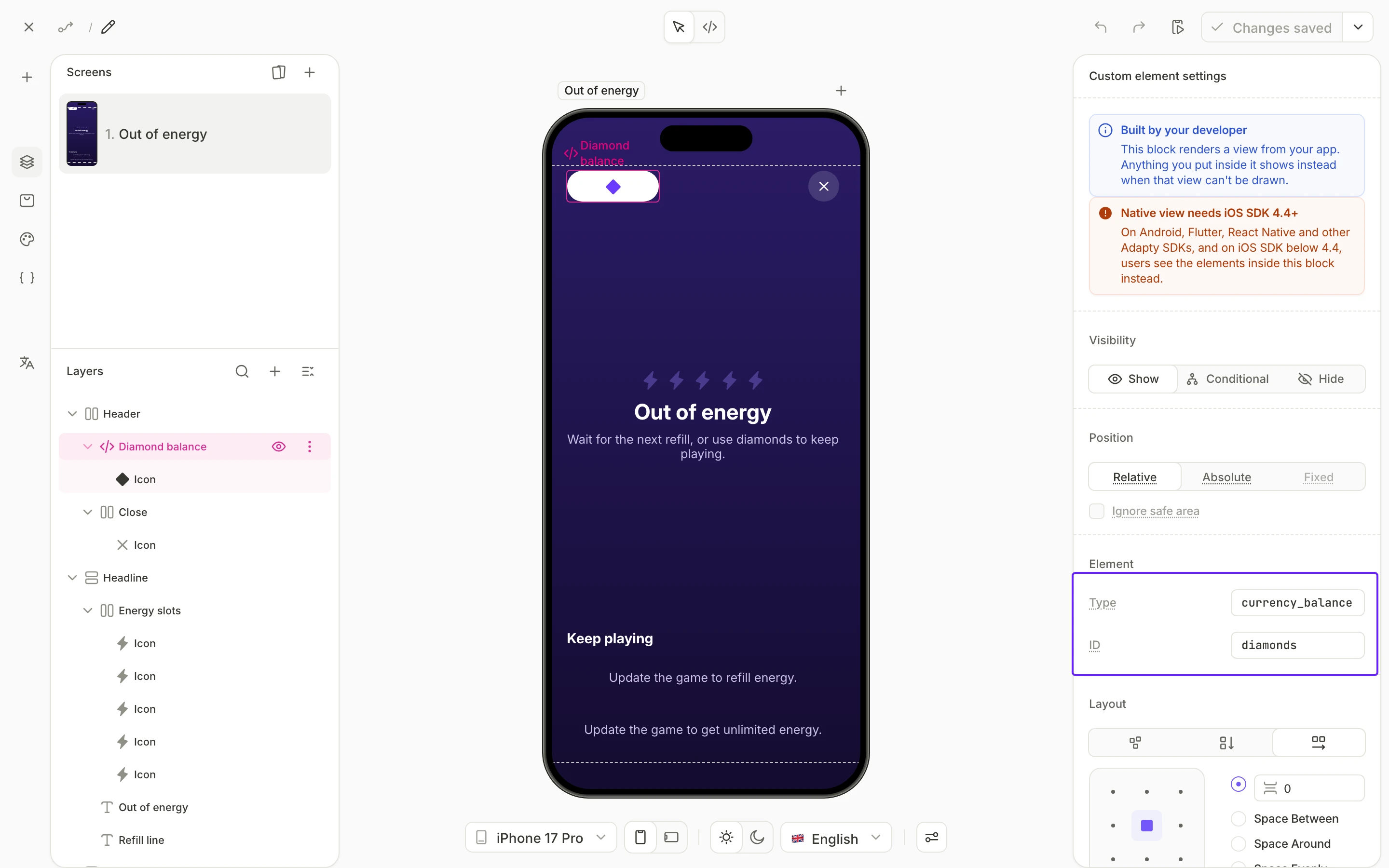
在屏幕上添加自定义元素,并输入其 Type 和 ID:
- Type:
currency_balance。 - ID:
diamonds。
第 2 步中的代码通过此 Type 和 ID 将余额视图与自定义元素匹配。
- Type:
添加能量补充和无限能量按钮
要在用户点击的按钮中显示加载动画,然后显示对勾标记,需要将两个按钮都作为自定义元素添加。在带有自定义动作的编辑工具按钮中,用户既看不到加载动画也看不到对勾标记。自定义动作是单向的:您的应用代码无法将消耗结果返回给流程。按钮的文本和样式来自您的应用代码。如需更改文本或样式,请发布应用更新。
-
为能量补充添加一个自定义元素,并填写其 Type 和 ID:
- Type:
spend_button。 - ID:
energy_refill。
- Type:
-
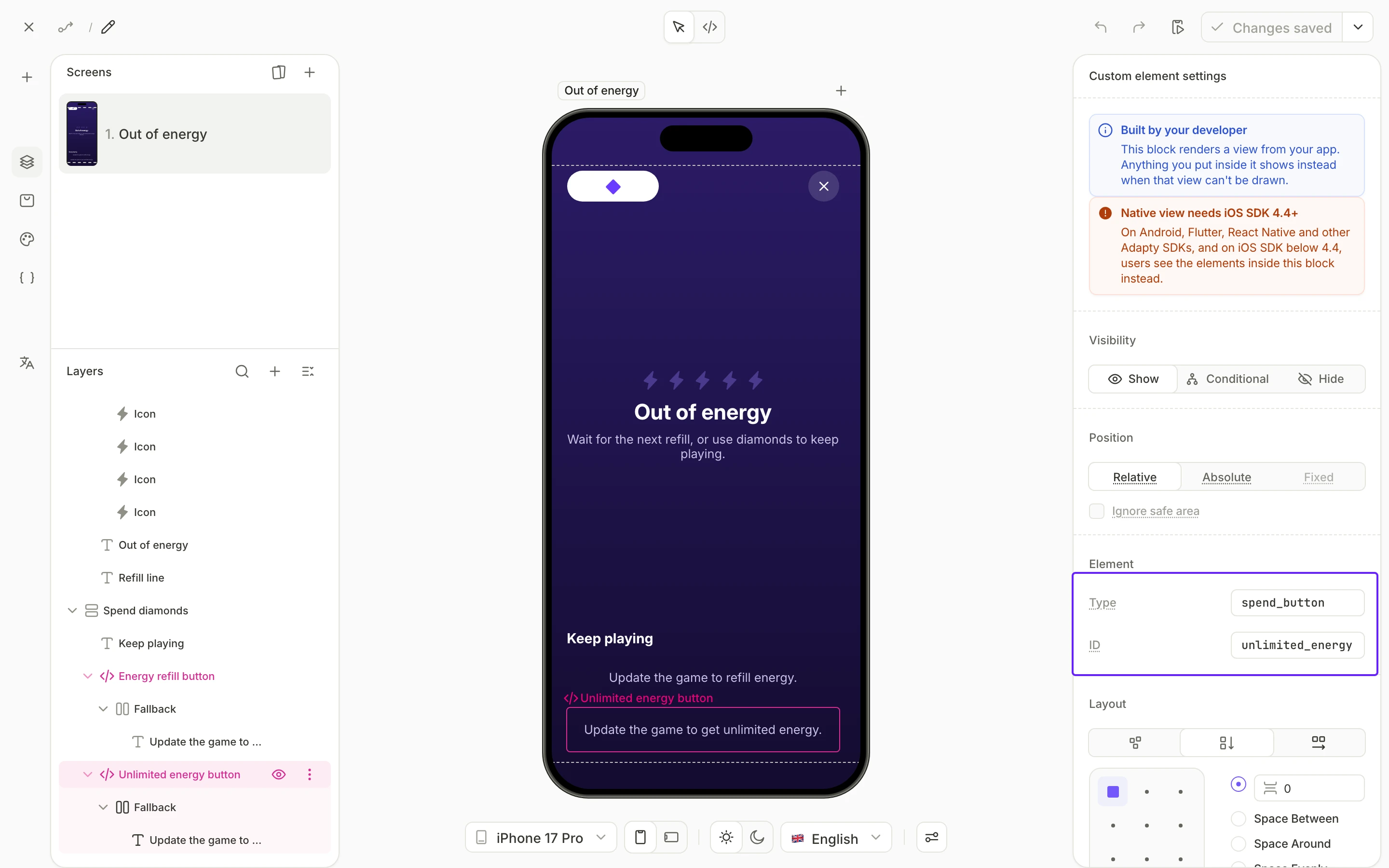
为无限能量添加第二个自定义元素,Type 相同,ID 填写
unlimited_energy。步骤 2 中的代码通过 Type 将同一个按钮视图匹配到两个自定义元素,并通过各自的 ID 读取每个按钮的选项。
-
将每个自定义元素的 Fixed 高度从 200 调整为按钮所需的实际高度。
-
在每个自定义元素内部添加一个文本元素,并为其选项输入说明文字:
- 能量补充:“Update the game to refill energy.”
- 无限能量:“Update the game to get unlimited energy.”
在不支持按钮视图的应用版本中,用户将看到此文本作为备用内容显示,没有可点击的按钮。
2. 玩家点击按钮时消耗钻石
在这一步,你将为能量耗尽流程编写后端代码和应用代码。完成后,钻石充足的玩家就可以在该流程中消耗钻石。
从后端扣除钻石
当玩家在能量耗尽流程中点击某个按钮时,你的应用代码会调用后端,使用钻石购买该按钮对应的选项。应用代码无法直接向 Adapty 发送消耗请求,因为该请求需要你的密钥。你的后端需要调用 Create virtual currency transaction,并传入负数 amount,具体方式参见 Virtual currency quickstart 教程。直接发送消耗请求,无需提前查询余额:Adapty 会在处理消耗时自动验证余额。
将每个选项的费用保存在后端:补充能量消耗 10 颗钻石,获得一小时无限能量消耗 30 颗钻石。应用代码只向后端发送所选选项,这样即使应用被篡改,也无法降低费用。
curl -X POST https://api.adapty.io/api/v2/server-side-api/vc/transactions/ \
  -H "Authorization: Api-Key {your secret key}" \
  -H "adapty-customer-user-id: player-42" \
  -H "Idempotency-Key: 5221577a-8b4c-419a-a0f5-028e4598b265" \
  -H "Content-Type: application/json" \
  -d '{
        "items": [{"currency_code": "DIAMONDS", "amount": -30}],
        "operation": "spend",
        "feature": "unlimited_energy",
        "customer_placement_id": "out_of_energy",
        "reference_id": "energy_order_7781"
      }'
请求中包含消耗信息、玩家信息以及所选选项:
Idempotency-Key:由应用代码为每笔新消耗生成的 UUID v4,用于防止同一笔交易被重复扣费。如果需要重试(例如因网络故障),请复用原始交易的密钥。该密钥有效期为 1 小时。一旦某笔使用该密钥的交易成功,后续使用相同密钥的请求将返回原始交易结果,不会再次变更余额。adapty-customer-user-id:已登录用户的 customer user ID。在后端从登录会话中读取该值。feature:选项的标签,例如unlimited_energy。通过该标签,你可以在玩家的事件历史记录中查看每笔消耗的用途。
以下两个可选字段有助于后续追溯消耗记录,均会显示在事件历史记录的交易详情中:
customer_placement_id:应用中发生消耗的页面 ID。通过该字段,你可以查看每笔消耗来自哪个页面。在本示例中,使用能量耗尽流程的版位 ID:out_of_energy。reference_id:后端相关记录的 ID,例如本次消耗对应的能量订单 ID。通过该字段,客服团队可以将消耗记录与用户实际获得的内容关联起来。
消耗成功后,请在后端为玩家补充能量:Adapty 只维护钻石余额,不管理能量。每个响应中的 transaction_id 只补充一次能量,因为使用相同 Idempotency-Key 重试时会返回原始交易。响应中 balances 数组包含 DIAMONDS 的 available 值,即玩家当前可用的钻石数。将该值返回给应用代码。
如果余额不足以支付费用,请求将以 HTTP 状态码 400 失败,余额不会发生变化。如需检测此错误,请将 error_code 与 insufficient_balance 进行比对。然后计算玩家还差多少钻石:通过 List virtual currency balances 查询余额,用费用减去 DIAMONDS 的 available 值,即为所需差额。将差额和 available 值一并返回给应用代码。
如果差额为 0 或负数,说明 Adapty 在消耗失败后(例如订阅续期)又向余额中添加了钻石。此时,请使用相同的 Idempotency-Key 重试请求,并返回重试结果。由于 Adapty 不保存失败消耗的密钥,因此第二次请求会被正常接受。
当使用相同 Idempotency-Key 的首次请求仍在处理中时,重试将以 HTTP 状态码 409 和 idempotency_in_flight 错误码失败。请等待响应头 Retry-After 中指定的秒数后,再使用相同密钥重试。
所有用户的消耗请求共享同一个限额:默认情况下,你的应用每分钟最多 600 次请求。超出限额的请求将以 HTTP 状态码 429 和 rate_limited 错误码失败。如果预计高峰期的消耗请求量会超出限额,请联系支持团队确认适用于你的应用的速率限制。
在后端添加一个余额查询接口:调用 List virtual currency balances,并返回 DIAMONDS 的 available 值。本示例中的应用代码会在能量耗尽流程打开前以及购买完成后调用该接口。
为订阅开启积分到期功能后,请提醒用户及时消耗积分。List virtual currency balances 返回的 expiry.expiring 数组列出了即将到期的积分数量及到期时间。可在流程中通过自定义标签展示最近一次到期信息,例如”30 颗钻石将在 2 天后到期”。
创建余额视图
为钻石余额创建一个模型,并为 currency_balance 自定义元素创建一个 SwiftUI 视图。本步骤后续代码以及第 4 步的代码会根据后端响应来设置模型中的余额。视图会监听模型变化,从而在余额更新时自动重绘:
// The diamond balance that your app keeps up to date
@MainActor
final class DiamondWallet: ObservableObject {
    @Published var balance: Int? // nil until your backend returns a balance
}

struct DiamondBalanceView: View {
    @ObservedObject var wallet: DiamondWallet

    var body: some View {
        Label(wallet.balance?.formatted() ?? "—", systemImage: "diamond.fill")
    }
}
DiamondBalanceView 使用系统文本颜色,当设备切换到深色模式时,该颜色会变为白色。除非你为流程添加深色主题,否则流程会保持浅色配色。如果你的流程没有深色主题,请在视图中设置固定的文本颜色,例如 .foregroundStyle(.black)。
要在两个流程中都显示该视图,请从全局解析器中返回它,该解析器通过 Type 和 ID 将每个自定义元素匹配到对应的视图。添加一个 DiamondWallet 类型的 wallet 属性,以及一个针对 currency_balance Type 和 diamonds ID 返回 DiamondBalanceView 的 case。高亮行显示了需要添加的内容。如果你的应用还没有全局解析器,可以直接复制完整代码:
struct CustomElementsResolver: AdaptyUICustomElementsResolver {
    let wallet: DiamondWallet

    func view(
        forType type: String,
        id: String,
        context: AdaptyUICustomElementContext
    ) -> AnyView? {
        switch type {
        case "currency_balance" where id == "diamonds":
            return AnyView(DiamondBalanceView(wallet: wallet))
        // the other cases of your resolver
        default:
            return nil
        }
    }
}
使用 DiamondWallet 创建解析器,并将其设置为全局解析器。在应用启动时调用一次 AdaptyUI.setCustomElementsResolver(_:),例如:
@MainActor let diamondWallet = DiamondWallet()

// keep this instance: a resolver for one flow can reuse it
@MainActor let customElementsResolver = CustomElementsResolver(wallet: diamondWallet)

// at app launch, such as in application(_:didFinishLaunchingWithOptions:)
AdaptyUI.setCustomElementsResolver(customElementsResolver)
创建按钮视图
为两个按钮创建一个 SwiftUI 视图。该视图接收按钮文本,以及一个用于消耗钻石并在消耗成功时返回 true 的闭包。消耗进行时,玩家会看到按钮中显示加载动画,此时按钮忽略多余的点击。消耗成功后,玩家会看到一个对勾图标:
struct SpendButton: View {
    let title: String
    let spend: @MainActor () async -> Bool // true when the spend goes through

    @State private var phase = Phase.ready
    private enum Phase { case ready, spending, done }

    var body: some View {
        Button {
            guard phase == .ready else { return } // ignore more taps while the spend runs
            phase = .spending
            // a Task keeps running when the flow closes and this view disappears
            Task {
                phase = await spend() ? .done : .ready
            }
        } label: {
            Group {
                switch phase {
                case .ready: Text(title)
                case .spending: ProgressView().tint(.white) // white on the filled button
                case .done: Image(systemName: "checkmark")
                }
            }
            .frame(maxWidth: .infinity) // the full width of the custom element
        }
        .buttonStyle(.borderedProminent)
    }
}
将按钮连接到您的后端
为两个选项创建一个枚举。将每个选项的自定义元素 ID 作为其原始值:
// the options to spend diamonds on, with the IDs of their custom elements
enum EnergyOption: String {
    case energyRefill = "energy_refill"
    case unlimitedEnergy = "unlimited_energy"

    // keep the numbers equal to the costs on your backend
    var title: String {
        switch self {
        case .energyRefill: return "Energy refill · 10 ◆"
        case .unlimitedEnergy: return "Unlimited energy for 1 hour · 30 ◆"
        }
    }
}
The following code is for UIKit. In the view controller that opens the out-of-energy flow, add a method that spends diamonds on an option. The method sends the option to your backend, and sets the balance in diamondWallet from the response. Then the method does one of the following:
- 消费成功:方法返回
true,玩家在按钮上看到勾选标记。一秒后,代码关闭流程。 - 余额不足:方法调用
openTopUpFlow,即在玩家钻石不足时打开充值流程的函数。
private var outOfEnergyFlow: AdaptyFlowController? // set when the out-of-energy flow opens

// true when the spend goes through
func spendDiamonds(on option: EnergyOption) async -> Bool {
    do {
        // the client of your backend: your backend sends the spend to Adapty
        let result = try await GameBackend.shared.spendDiamonds(
            on: option.rawValue,
            idempotencyKey: UUID() // a new key for each spend; UUID() creates a version 4 UUID
        )
        switch result {
        case let .spent(available):
            diamondWallet.balance = available
            // your backend gave the player the energy: show it in the game
            Task {
                try? await Task.sleep(for: .seconds(1)) // players see the checkmark first
                outOfEnergyFlow?.dismiss(animated: true)
            }
            return true
        case let .insufficientBalance(diamondsNeeded, available):
            diamondWallet.balance = available
            await openTopUpFlow(diamondsNeeded: diamondsNeeded)
            return false
        }
    } catch {
        // handle the error
        return false
    }
}
然后为能量耗尽流程编写一个解析器。对于每个 spend_button 类型的自定义元素,解析器从 ID 中读取选项,并返回一个调用 spend 方法的 SpendButton。附加到某个流程的解析器会在该流程中替代全局解析器。为了在能量耗尽流程中显示余额,此解析器会调用全局解析器:
struct OutOfEnergyResolver: AdaptyUICustomElementsResolver {
    let spend: @MainActor (EnergyOption) async -> Bool // the spend method of your view controller
    let appWideResolver: any AdaptyUICustomElementsResolver

    func view(
        forType type: String,
        id: String,
        context: AdaptyUICustomElementContext
    ) -> AnyView? {
        // the ID tells the buttons apart: energy_refill or unlimited_energy
        if type == "spend_button", let option = EnergyOption(rawValue: id) {
            return AnyView(SpendButton(title: option.title) { await spend(option) })
        }
        // other custom elements, such as the balance: the views of the app-wide resolver
        return appWideResolver.view(forType: type, id: id, context: context)
    }
}
从应用代码中打开能量耗尽流程
当玩家能量耗尽时,使用以下函数打开能量耗尽流程。该函数会先向后端请求余额,确保玩家在流程打开时能看到余额信息。随后,函数将 OutOfEnergyResolver 附加到流程上,并将流程控制器保存在 outOfEnergyFlow 中。通过这个引用,spendDiamonds 可以关闭该流程:
// call when a player runs out of energy
func openOutOfEnergyFlow() async {
    // the balance that players see when the flow opens; without it, players see a dash
    if let available = try? await GameBackend.shared.diamondBalance() {
        diamondWallet.balance = available
    }
    do {
        let flow = try await Adapty.getFlow(placementId: "out_of_energy")
        let flowConfiguration = try await AdaptyUI.getFlowConfiguration(
            forFlow: flow,
            customElementsResolver: OutOfEnergyResolver(
                spend: { [weak self] option in
                    await self?.spendDiamonds(on: option) ?? false
                },
                appWideResolver: customElementsResolver // the instance that you set app-wide
            )
        )
        let flowController = try AdaptyUI.flowController(
            with: flowConfiguration,
            delegate: self
        )
        outOfEnergyFlow = flowController
        present(flowController, animated: true)
    } catch {
        // handle the error
    }
}作为低电量流程的委托,视图控制器还必须实现用于购买和恢复的委托方法。对于 didFinishPurchase,请使用步骤 4 中的代码。
在 SwiftUI 中,获取流程配置时附加 OutOfEnergyResolver。在解析器的 spend 闭包中,调用你的消耗方法。使用 .flow 修饰符展示流程配置,并使用其闭包替代委托方法。闭包不接收视图控制器。若要关闭流程,将 isPresented 设置为 false。
3. 创建玩家购买钻石的流程
在 Flow & Paywall Builder 中创建充值流程。将该流程添加到 ID 为 out_of_diamonds 的版位。当余额不足以完成消耗时,第 4 步中的代码会从该版位打开流程。
要根据余额显示不同的充值流程,请在 out_of_diamonds 版位中添加一个包含虚拟货币余额细分的目标受众。例如,向钻石数量为 0 的用户展示单独的流程。每次应用代码获取流程时,Adapty 都会读取余额,因此一次消耗或购买可能会改变用户下次看到的流程。
如需在该流程中也显示钻石余额,请添加一个自定义元素,其 Type 和 ID 与能量不足流程中的完全相同:currency_balance 和 diamonds。在自定义元素内,添加钻石 Icon 作为备用内容。这样玩家在两个流程中看到的余额视图完全一致,无需为此添加任何代码。
显示玩家需要多少钻石
To tell players how many more diamonds they need, use a custom tag: a placeholder that you insert into a text element. The code in step 4 passes the number to the tag once, when it opens the flow. The words around the number stay in the builder, where you can edit and translate them.
-
Create a custom tag named
diamonds_needed, and enter a dash (—) in its Initial value field. If your app code passes no number for the tag, players see the dash. -
Add a text element with the words “You need more diamonds”. After “need”, insert the
diamonds_neededcustom tag.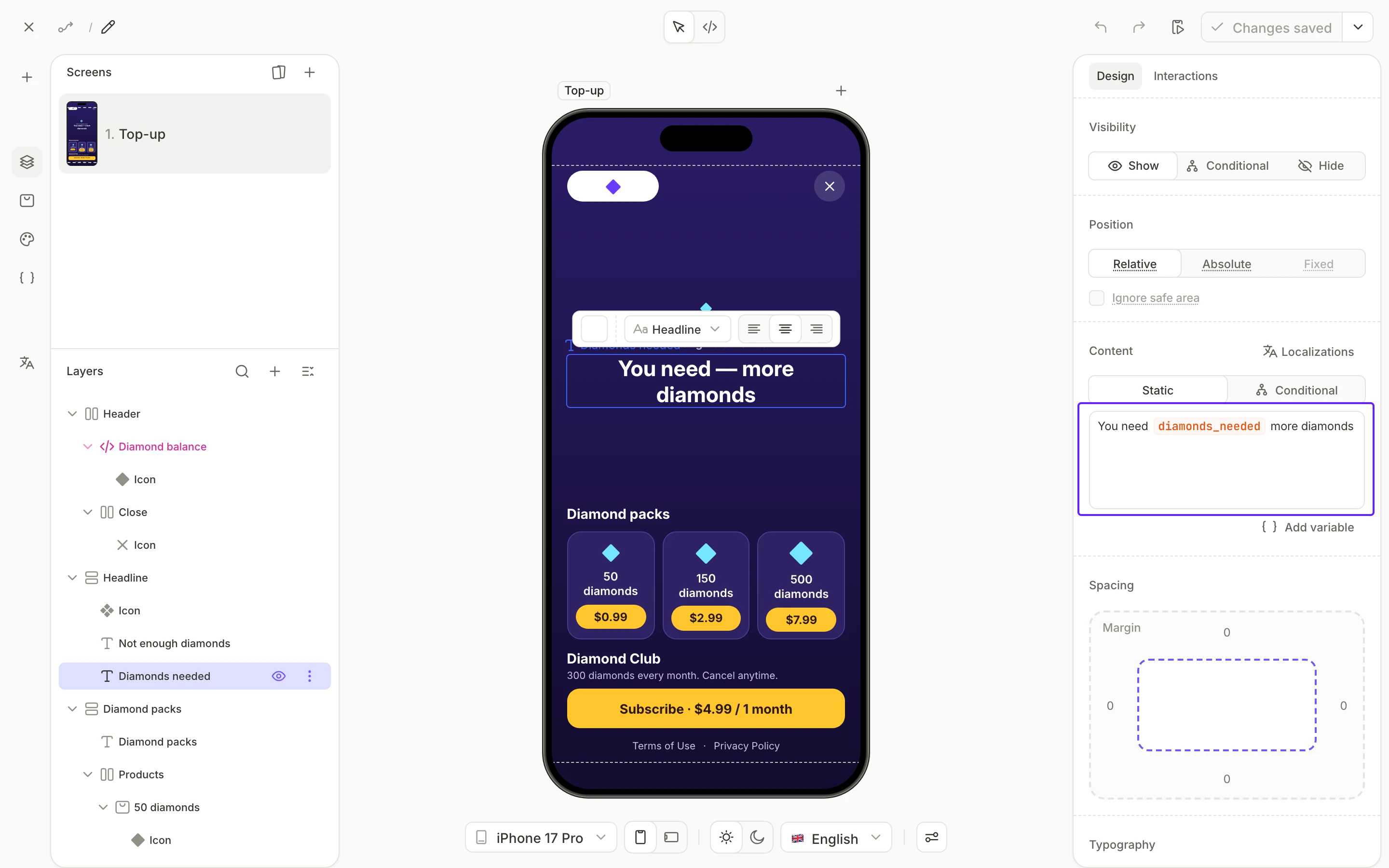
添加钻石礼包和订阅
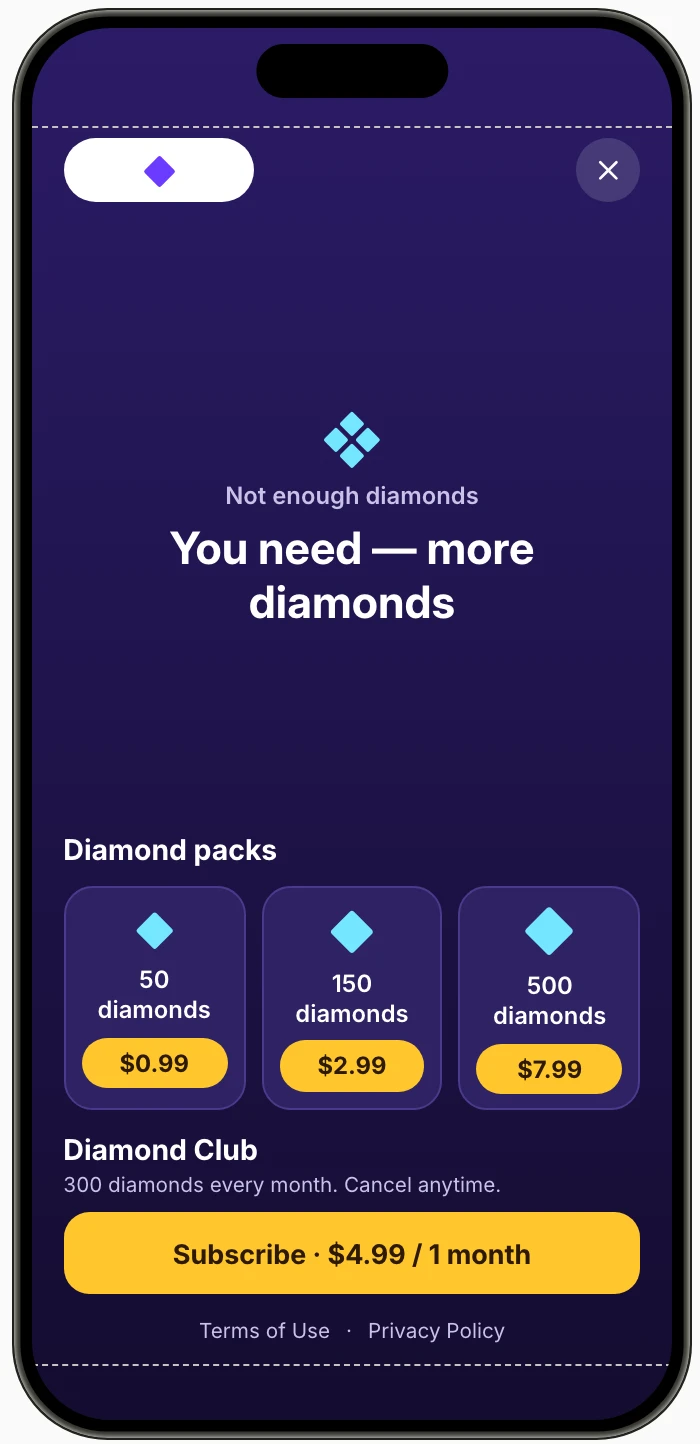
- Add a Products element with the diamond packs. To start the purchase of a pack when a player taps its card, attach the Purchase action to each card.
- To offer the subscription on the same screen as the packs, add a purchase button. In the Purchase action of the button, select the subscription from the Product dropdown. In the button text, insert the
prod_priceandprod_billing_periodvariables of the subscription. - In a text element of each card, type how many diamonds the player receives, such as “500 diamonds”. Add a text element for the subscription, and type how many diamonds the player receives for each billing period, such as “300 diamonds every month”. Keep each number equal to the Credit amount or Credit per cycle of the product: no product variable holds this number. If the name of each pack in the app store already includes the number, such as “500 Diamonds”, insert the
prod_titlevariable instead. - To give players a way to close the flow without a purchase, add a Close button. Add the footer links: app stores require the Terms of Use and Privacy Policy links wherever players can buy a subscription.
4. 关闭一个流程并打开另一个
完成此步骤后,钻石不足的玩家可以在充值流程中购买更多钻石,然后再进行消费。在本示例中,一个视图控制器同时作为两个流程的代理。为了在代理方法中区分这两个流程,可以将 controller.flowPlacementId 属性与每个流程的版位 ID 进行比较。在 SwiftUI 中,使用第二个 .flow 修饰符来呈现充值流程,并在另一个流程的 didDisappear 闭包中打开当前流程。
当玩家钻石不足时打开充值流程
以下函数将缺少的钻石数量传递给 diamonds_needed 标签,并打开充值流程。由于视图控制器每次只能呈现一个流程,该函数会先关闭能量不足流程,再打开充值流程:
func openTopUpFlow(diamondsNeeded: Int) async {
    // with no value, players see the Initial value of the tag
    let tags = diamondsNeeded > 0 ? ["diamonds_needed": diamondsNeeded.formatted()] : [:]
    do {
        let flow = try await Adapty.getFlow(placementId: "out_of_diamonds")
        let flowConfiguration = try await AdaptyUI.getFlowConfiguration(
            forFlow: flow,
            tagResolver: tags
        )
        let flowController = try AdaptyUI.flowController(
            with: flowConfiguration,
            delegate: self
        )
        // a view controller presents one flow at a time
        outOfEnergyFlow?.dismiss(animated: true) {
            self.present(flowController, animated: true)
        }
    } catch {
        // handle the error
    }
}
购买后重新打开能量不足流程
当玩家在充值流程中购买礼包或订阅后,Adapty 通常会先将钻石添加到余额中。随后 Adapty SDK 会调用 didFinishPurchase,但不会关闭流程。在该方法中,以下代码会向您的后端请求新余额,关闭充值流程,并重新打开能量不足流程。玩家在那里看到新余额后,可以点击按钮来消耗钻石。不要在购买后立即消耗钻石:玩家可能已经不想要能量了。
func flowController(
    _ controller: AdaptyFlowController,
    didFinishPurchase product: AdaptyPaywallProduct,
    purchaseResult: AdaptyPurchaseResult
) {
    // canceled or pending: the flow stays open
    guard purchaseResult.isPurchaseSuccess,
          controller.flowPlacementId == "out_of_diamonds" // the top-up flow
    else { return }
    Task {
        let balanceBefore = diamondWallet.balance ?? 0
        if let available = try? await GameBackend.shared.diamondBalance() {
            diamondWallet.balance = available
        }
        let diamondsArrived = (diamondWallet.balance ?? 0) > balanceBefore
        controller.dismiss(animated: true) {
            if diamondsArrived {
                Task { await self.openOutOfEnergyFlow() } // the player taps a button again
            } else {
                // Adapty adds the diamonds later: tell the player in your own UI
            }
        }
    }
}
当玩家取消购买,或购买处于待处理状态时,代码会保持充值流程处于打开状态。Adapty SDK 在这些情况下同样会调用 didFinishPurchase,但余额保持不变。
当购买成功但后端余额未变化时,代码会关闭充值流程,而不会打开能量不足流程。在任一流程中,玩家在购买后都会看到旧余额。余额未变化的原因是 Adapty SDK 无法立即与 Adapty 完成购买验证。Adapty 会在之后补充钻石,具体时机是 Adapty SDK 再次向 Adapty 发送购买记录时,例如在下次启动应用时。在此之前,请在您自己的 UI 中告知玩家钻石正在路上。
当用户购买与 DIAMONDS 关联的产品时,请勿从您的后端添加钻石:Adapty 会自动添加这些钻石,否则用户将收到双倍钻石。
5. 在设备上测试
付费墙编辑工具无法运行你的应用代码,因此在画布上,你只能看到自定义元素的备用内容。
要查看购买后获得的钻石,请使用沙盒账户进行测试。在沙盒环境中,订阅每隔几分钟就会续期一次,Adapty 会在每次续期时添加钻石。如果在 Xcode 中使用 StoreKit 配置文件,Adapty SDK 不会通过 Adapty 验证购买,也不会添加钻石。
测试方法如下:
- 发布两个流程。若要查看最新发布版本而非缓存版本,请将设备注册为测试设备。
- 使用示例代码运行应用,以一个没有钻石的玩家账号登录。在游戏中耗尽能量,验证能量耗尽流程是否以余额 0 的状态打开。
- 点击”无限能量”按钮,验证按钮上是否出现加载动画,然后充值流程以”You need 30 more diamonds”的文本打开。
- 购买一包钻石,验证能量耗尽流程是否再次打开并显示新余额。
- 点击”能量补充”按钮,验证按钮上是否出现对勾标记、流程是否关闭,以及游戏是否为玩家补充了能量。
- 在 Adapty 看板中,打开该玩家的用户画像,使用 Adjustment 操作扣减余额至低于 10。再次耗尽能量,点击”能量补充”按钮,并在充值流程中购买订阅。验证能量耗尽流程是否再次打开并显示新余额。
- 点击”无限能量”按钮,验证按钮上是否出现对勾标记、流程是否关闭,以及游戏是否为玩家开启了无限能量。
-
在玩家的事件历史中,验证以下条目:
- Virtual currency credited:每次购买或续订添加钻石时产生。
- Virtual currency debited:每次成功消耗时产生,带有
energy_refill或unlimited_energy标签。Adapty 以spend操作命名此条目。若未设置operation,Adapty 将其命名为 Virtual currency transaction。 - Virtual currency adjusted:每次手动扣减时产生,使用 Adjustment 操作,例如第 6 步中的操作。
- Virtual currency expired:订阅钻石未使用即过期时产生。
要了解为什么显示的是备用付费墙而非余额或按钮,请按照测试自定义元素的步骤操作。