
Singular
Singular is a Mobile Measurement Partner (MMP) platform that collects and presents data from marketing campaigns.
Adapty sends the subscription events you select to Singular. In the Singular dashboard, you can then see how much revenue each campaign generates and evaluate the effectiveness of your advertising.
Set up integration
Connect Adapty to Singular
To set up the integration with Singular, go to Integrations > Singular in your Adapty Dashboard, turn on a toggle, and fill out the fields.
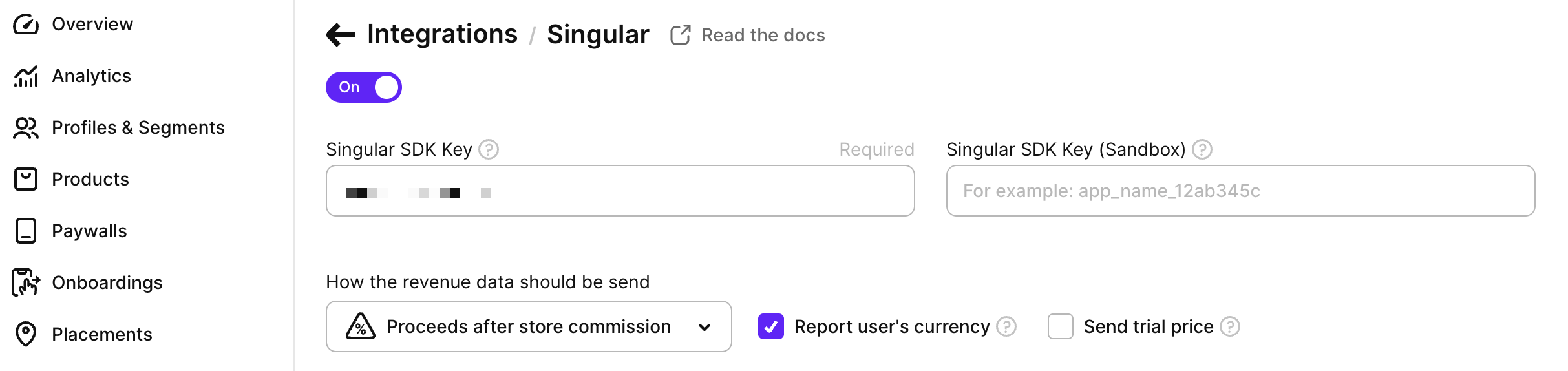
The following credentials are available:
- Singular SDK Key: Required. The production SDK key for your Singular app.
- Singular SDK Key (Sandbox): Optional. The SDK key for your sandbox Singular app. If not set, sandbox events will not be sent to Singular.
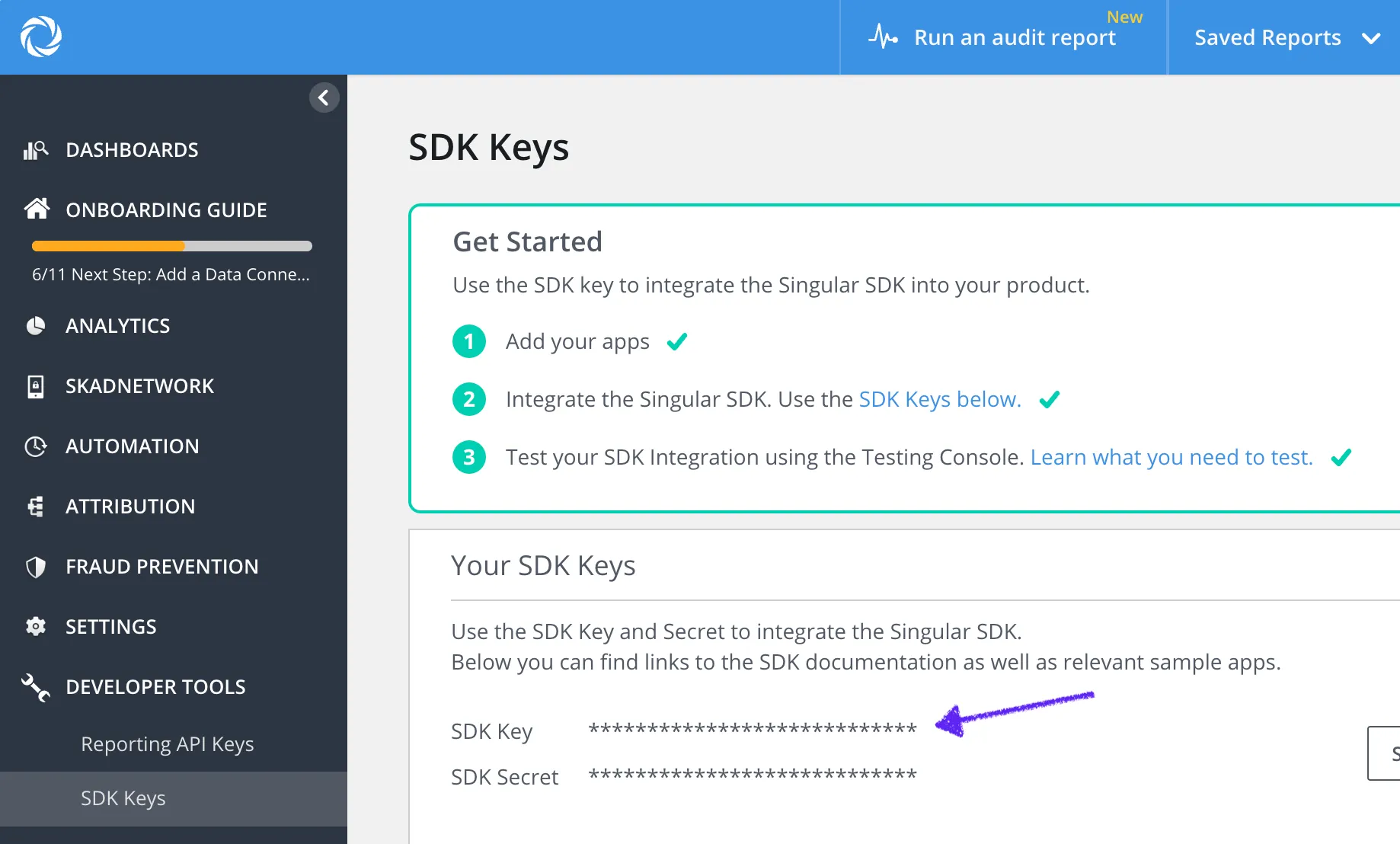
Both keys can be found in the Singular dashboard under Developer tools -> SDK Keys -> SDK Key (not SDK Secret):
Configure events and tags
Below the credentials, there are three groups of events you can send to Singular from Adapty. For the full list of Adapty events, see Events.
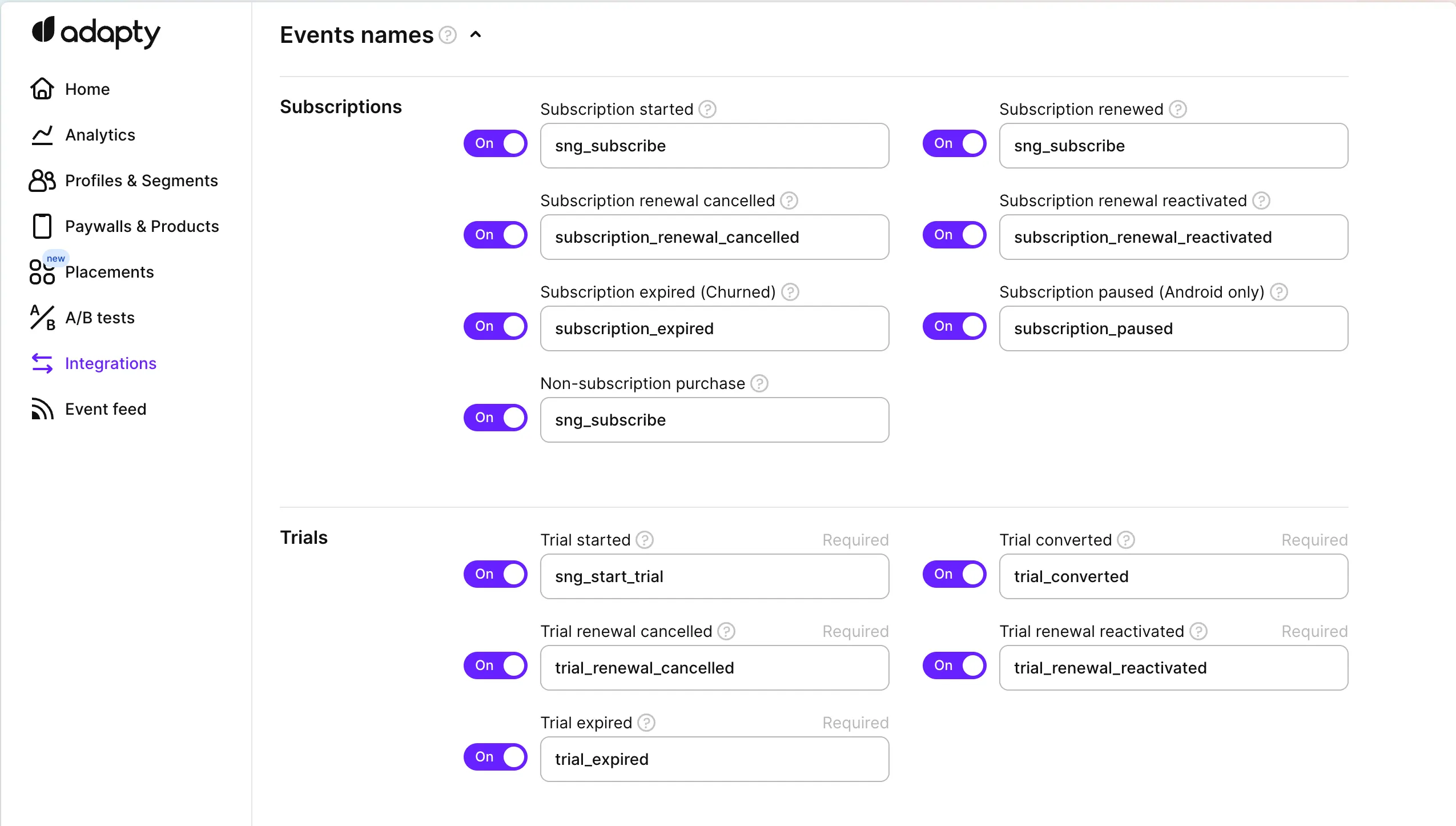
We recommend using the default event names provided by Adapty. But you can change the event names based on your needs.
Adapty sends subscription events to Singular server-to-server, so you can view all subscription events in your Singular dashboard and link them to your acquisition campaigns.
Profiles created before you set up the integration can’t deliver their events to Singular.
Connect your app to Singular
Singular enables the Singular Device ID (SDID) by default for accounts created on or after July 15, 2026. These accounts accept events only through the v2 Event API, and Adapty sends an event to v2 only when the user’s profile has an SDID. To deliver events to such an account, pass the SDID to Adapty from your app.
If your Singular account was created before July 15, 2026, and SDID isn’t enabled on it, skip this step. Adapty sends your events to the v1 Event API, and no app code is needed.
- Activate Adapty, then start the Singular SDK with an SDID callback:
sdidReceivedHandleron iOS,SDIDAccessorHandleron Android,sdidReceivedCallbackon React Native and Flutter, andSingularSdidAccessorHandleron Unity. - Wait for Singular to call the callback. The SDID reaches your app asynchronously, after the Singular SDK starts. Singular calls the callback on every launch, including when the SDID is already stored on the device.
- Inside the callback, pass the SDID to Adapty with
setIntegrationIdentifier()and thesingular_sdidkey. No Adapty SDK has a predefined constant for this key, so write the key as a string literal. - Call
Adapty.identify()only aftersetIntegrationIdentifier()completes. Adapty creates an anonymous profile at activation, then switches to the identified profile onceidentify()resolves. An SDID set during that switch can be lost.
Event structure
Adapty picks the Singular Event API version for each event by whether the user’s profile has an SDID:
- With an SDID: Adapty sends a
POSTrequest tohttps://s2s.singular.net/api/v2/evtwith a form-urlencoded body. Thesdidparameter replaces the device identifiersidfa,idfv,aifa,andi, andasid. Booleans are sent astrueorfalse. - Without an SDID: Adapty sends a
GETrequest tohttps://s2s.singular.net/api/v1/evtwith query parameters.
Both versions carry the same parameters otherwise. A v1 event is structured like this:
{
  "n": "subscription_renewed",
  "a": "singular_sdk_key_123",
  "p": "iOS",
  "i": "com.example.app",
  "ip": "192.168.100.1",
  "idfa": "00000000-0000-0000-0000-000000000000",
  "idfv": "00000000-0000-0000-0000-000000000000",
  "ve": "17.0.1",
  "att_authorization_status": 3,
  "custom_user_id": "user_12345",
  "utime": 1709294400,
  "partner": "adapty",
  "use_ip": false,
  "is_revenue_event": true,
  "amt": 9.99,
  "cur": "USD",
  "purchase_product_id": "yearly.premium.6999",
  "purchase_transaction_id": "GPA.3383...",
  "e": "{\"is_revenue_event\":true,\"amt\":9.99,\"cur\":\"USD\",\"purchase_product_id\":\"yearly.premium.6999\",\"purchase_transaction_id\":\"GPA.3383...\"}"
}
Where:
| Parameter | Type | Description |
|---|---|---|
n | String | The event name (mapped from Adapty event). |
a | String | Your Singular SDK Key. |
p | String | Platform (“iOS” or “Android”). |
i | String | Store App ID (Bundle ID). |
ip | String | User’s IP address. |
sdid | String | v2 only. Singular Device ID, from the singular_sdid integration identifier. |
idfa | String | iOS, v1 only. ID for Advertisers (uppercase). |
idfv | String | iOS, v1 only. ID for Vendors (uppercase). |
aifa | String | Android, v1 only. Google Advertising ID (lowercase). |
andi | String | Android, v1 only. Android ID (lowercase). |
asid | String | Android, v1 only. App Set ID (lowercase). |
ve | String | OS version. |
att_authorization_status | Integer | iOS only. ATT status (e.g., 3 for authorized). |
custom_user_id | String | The user’s Customer User ID. |
utime | Long | UNIX timestamp of the event in seconds. |
partner | String | Always adapty. Identifies the event as sent by Adapty. |
use_ip | Boolean | true when Adapty has no IP address for the user. |
is_revenue_event | Boolean | true if the event contains revenue. Sent only with revenue events. |
amt | Float | Revenue amount. |
cur | String | Currency code (e.g., “USD”). |
purchase_product_id | String | The Product ID from the store. |
purchase_transaction_id | String | Original transaction ID. |
e | String | JSON string containing event details (see below). |
The e parameter (custom event data) is a JSON-encoded string containing:
| Parameter | Type | Description |
|---|---|---|
is_revenue_event | Boolean | true if the event contains revenue. |
amt | Float | Revenue amount. |
cur | String | Currency code. |
purchase_product_id | String | The Product ID from the store. |
purchase_transaction_id | String | Original transaction ID. |
Troubleshooting
Events fail with invalid api version: v1
Your Singular account was created on or after July 15, 2026, and accepts events only through the v2 Event API. Adapty sent the event to v1 because the user’s profile has no SDID. To fix this, pass the SDID to Adapty from your app, as described in Connect your app to Singular. Events from users on an app version without the setIntegrationIdentifier() call keep failing until those users update the app.
access_level_updated shows as failed in the Event Feed
access_level_updated is a webhook-only event. Adapty never sends it to this integration. But Adapty records an outcome for every enabled integration, and an unsupported event is displayed as a failure.