
Predictions in cohorts
Adapty Predictions are designed to help you answer the following questions:
- What is the predicted lifetime value (LTV) of your user cohorts?
- Which cohorts are likely to generate the highest revenue in the future?
- How much can you invest given the predicted payoff?
With Adapty Predictions, you can make data-driven decisions about revenue and growth.
Adapty’s prediction model estimates the long-term revenue potential of your app’s user cohorts. For each cohort, it projects how revenue, the number of paying users, and average LTV will evolve over time. This helps you make informed decisions about user acquisition, marketing strategies, and product development.
Adapty offers predicted lifetime value (LTV) and predicted revenue for cohorts of paying users. Predictions are displayed on the cohort analysis page for 3, 6, 9, 12, 18, and 24 months after cohort creation.
For apps with very limited history, the model falls back to cross-app averages, so predictions for newer apps may not fully reflect their specific user behavior.
How the model works
Adapty’s prediction model uses growth patterns from historical cohort data to project future revenue and LTV.
For each combination of app and product type, the model measures how a cohort’s cumulative revenue and cumulative number of paying users grow between fixed points in the cohort’s life, counted in days from the day the cohort started. The intervals between those points are short while a cohort is young and get longer as it ages — days at first, then months, then quarters. Adapty measures a pair of growth coefficients for each interval: one for revenue, one for paying users. Both measures are net of refunds: a refund subtracts its amount from the cohort’s revenue and drops that user from its paying-user count.
To project a cohort, Adapty takes the last of those points the cohort has reached and chains the coefficients forward from there to the day that matches the horizon you selected — day 90 for the 3-month prediction, day 365 for the 12-month one, up to day 730 for 24 months. The data used is completely anonymized.
Coefficients are measured separately per product type: weekly, monthly, 2-month, 3-month, 6-month, and annual subscriptions, plus lifetime and one-time purchases. A cohort’s prediction is the sum of the projections for every product type its users bought.
The model produces two values for each cohort:
- Predicted revenue: The total revenue, minus refunds, a cohort is projected to generate within the selected horizon.
- Predicted LTV: The predicted revenue divided by the predicted number of paying users in the cohort.
App-specific and cross-app coefficients
By default, a cohort’s prediction uses coefficients learned from that app’s own past cohorts of the same product type, reflecting its specific user behavior. An app gets its own coefficients for a product type once it has at least two cohorts large enough to measure.
The two sources mix inside a single prediction: where the app’s own history doesn’t cover an interval, Adapty fills that step with coefficients averaged across all apps selling that product type. So a young app can project its first weeks from its own data and the rest of the year from cross-app averages.
Calibration and floors
Chained coefficients drift, and the drift is largest for cohorts with the least history to project from. Adapty measures that drift during training: each app’s curve re-predicts its own completed cohorts from earlier points in their lives, and the gap between the projection and what those cohorts earned becomes a correction factor for that product type, horizon, and amount of observed history. Every prediction is multiplied by the factor matching how far the cohort has been observed, so the correction is largest for the youngest cohorts, where the projection reaches furthest ahead.
The correction leans deliberately low for the product types the model tends to overshoot. Weekly, monthly, 2-month, 3-month, and 6-month subscriptions get a revenue factor that pulls the projection down rather than centering it, and for weekly subscriptions the lean is strongest in a cohort’s first two weeks. Annual, lifetime, and one-time purchases get no lean. The paying-user factor is never leaned, so the caution lands in predicted revenue and, through it, in predicted LTV.
Two floors apply after the correction:
- A prediction never falls below what the cohort has already earned by that horizon. A cohort that has already earned more than its 3-month projection shows its realized revenue as the 3-month prediction.
- A longer horizon never shows less than a shorter one. Predicted revenue and predicted paying users are both cumulative, so the 12-month prediction is at least the 9-month one.
Availability and updates
Predictions are built for weekly and monthly cohorts only. With the Cohort length control set to day, quarter, or year, the prediction columns stay empty.
For weekly and monthly cohorts, availability depends on how long the cohort has existed, not on which products its users bought. A cohort gets its first prediction once its install period has fully elapsed and the longest trial anyone could have started during that period has had time to convert.
The install period is a week after the cohort starts for a weekly cohort length, a month for a monthly one. Until it ends, the cohort is still collecting installs. A user who installs on its last day can still start your longest trial, and a cohort’s revenue only lands once trials convert — so the wait is the install period plus the length of your longest trial. The longer your trials, the later predictions appear.
After that, predictions are recalculated daily from the latest transaction data, so they stay current with the cohort’s behavior.
Limitations
- Data quality: Unusual cohort behavior or a small number of paying users reduces accuracy. Cohorts with fewer than 30 paying users get no prediction, and they’re excluded from the model’s training data.
- New apps: Apps without sufficient history use cross-app coefficients, which may not reflect the app’s specific user behavior.
- Cohort age: Predictions for a given horizon are hidden once the cohort exceeds that horizon. For example, 3-month predictions stop showing after three months, and no predictions are shown for cohorts older than 24 months.
In the Dashboard
To view predictions, navigate to the Cohort analysis page in your Adapty dashboard. For details on cohorts, see Cohort analysis.
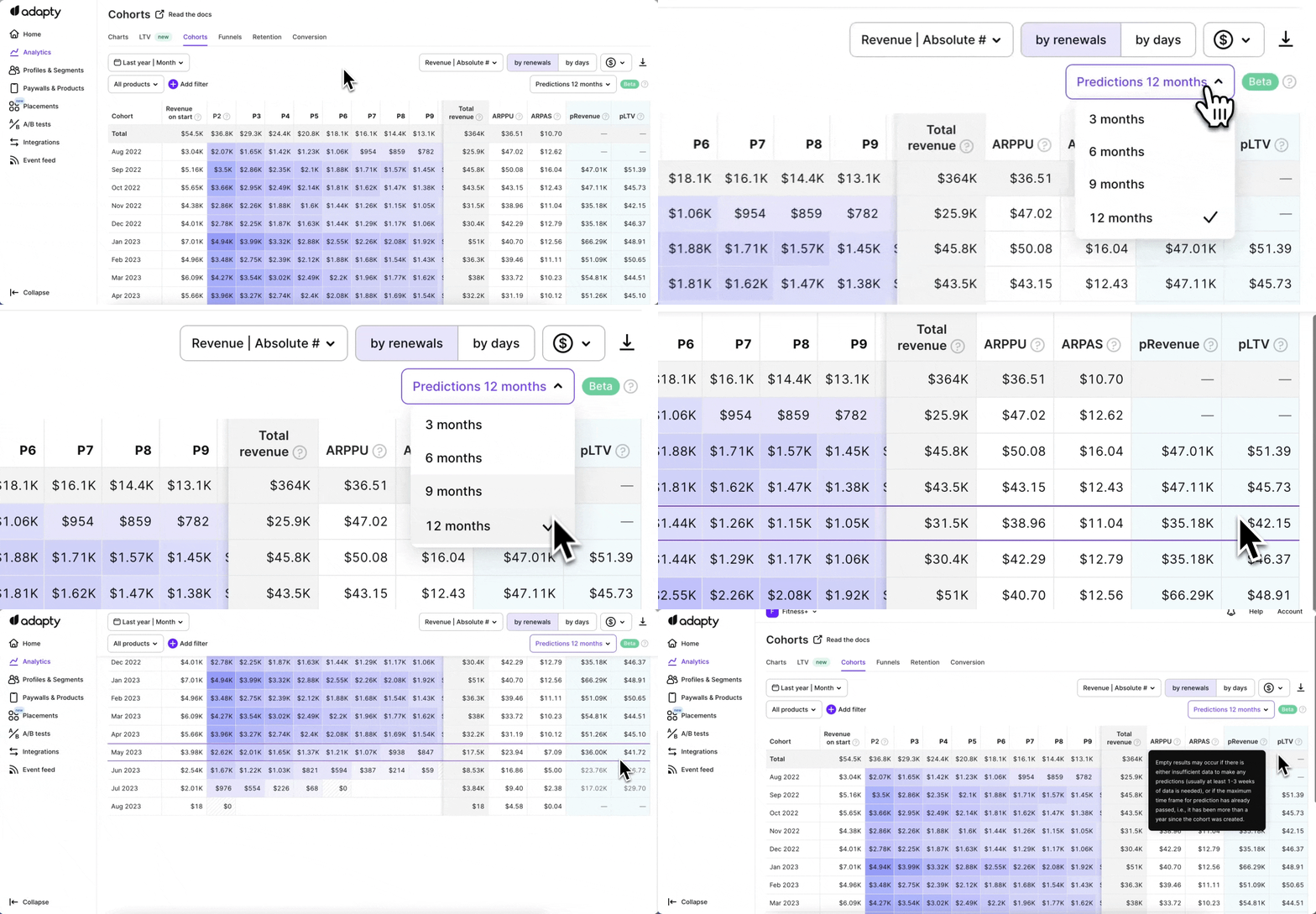
The Predicted revenue column shows the estimated total revenue, minus refunds, a cohort of paying users is expected to generate during the selected time frame after cohort creation. This value is calculated using Adapty’s prediction model, based on the app’s historical cohort growth patterns.
The Predicted LTV column shows the estimated lifetime value of each user in the selected cohort. This value is calculated by dividing the predicted revenue by the predicted number of paying users in the cohort.
Select the horizon
To change the prediction horizon, select a value from the Predictions dropdown. The available options are 3, 6, 9, 12, 18, and 24 months after cohort creation.
Filter by product
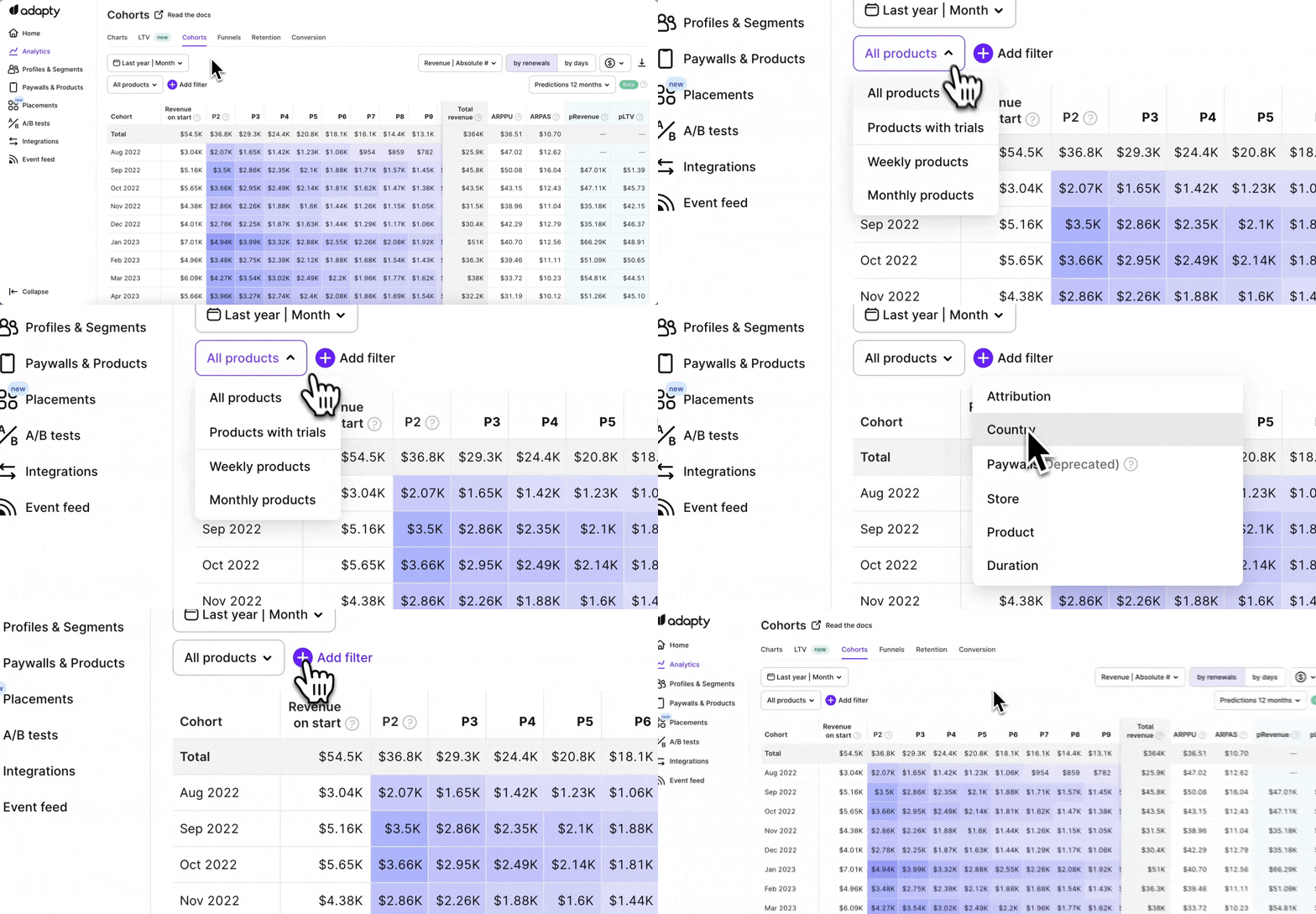
You can filter predicted revenue and LTV by product. By default, predictions are built from all purchase data — filtering by product shows how each product contributes.
When predictions are unavailable
When a prediction can’t be produced for a cohort, the Predicted Revenue and Predicted LTV columns show em-dashes (—) instead of values. This can happen for several reasons:
- Unsupported cohort length: The Cohort length control is set to day, quarter, or year. Predictions are built for weekly and monthly cohorts only.
- Unsupported filter or comparison: The table is filtered by placement, audience, paywall, or A/B test, or a comparison period is turned on. Filters by product, product duration, country, store, and attribution data keep predictions.
- Insufficient time since cohort creation: The cohort’s install period hasn’t fully elapsed yet, or the longest trial someone could have started during that period hasn’t had time to convert. See Availability and updates.
- Small cohort size: Fewer than 30 paying users — too few to produce a reliable projection.
- Unusual cohort behavior: The cohort deviates significantly from the patterns the model expects. Waiting a few weeks may resolve this as more data accumulates.
- Horizon exceeded: The cohort is older than the selected prediction horizon. For example, the 3-month prediction is hidden after three months, the 12-month prediction after twelve months, and no predictions are shown for cohorts older than 24 months.
When enabling predictions, it’s important to note that there may be a maximum delay of 24 hours before the prediction data for Revenue and LTV becomes available on your Adapty dashboard.