
Analytics in Adapty Mail
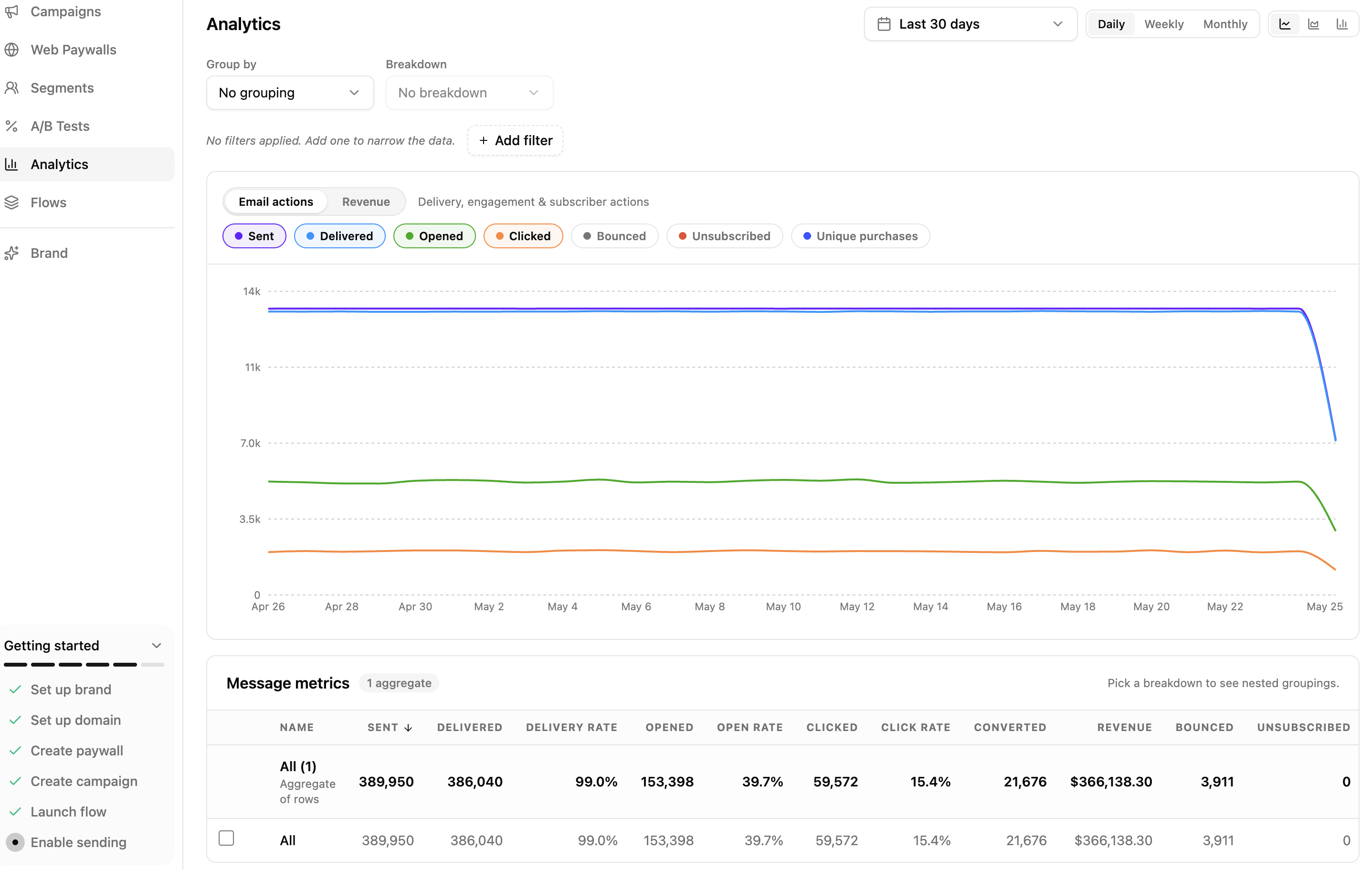
The Analytics page shows what your emails did: how many were delivered, opened, and clicked, and how much revenue they brought in. Every number can be broken down — by campaign, by segment, by A/B variant, and more.
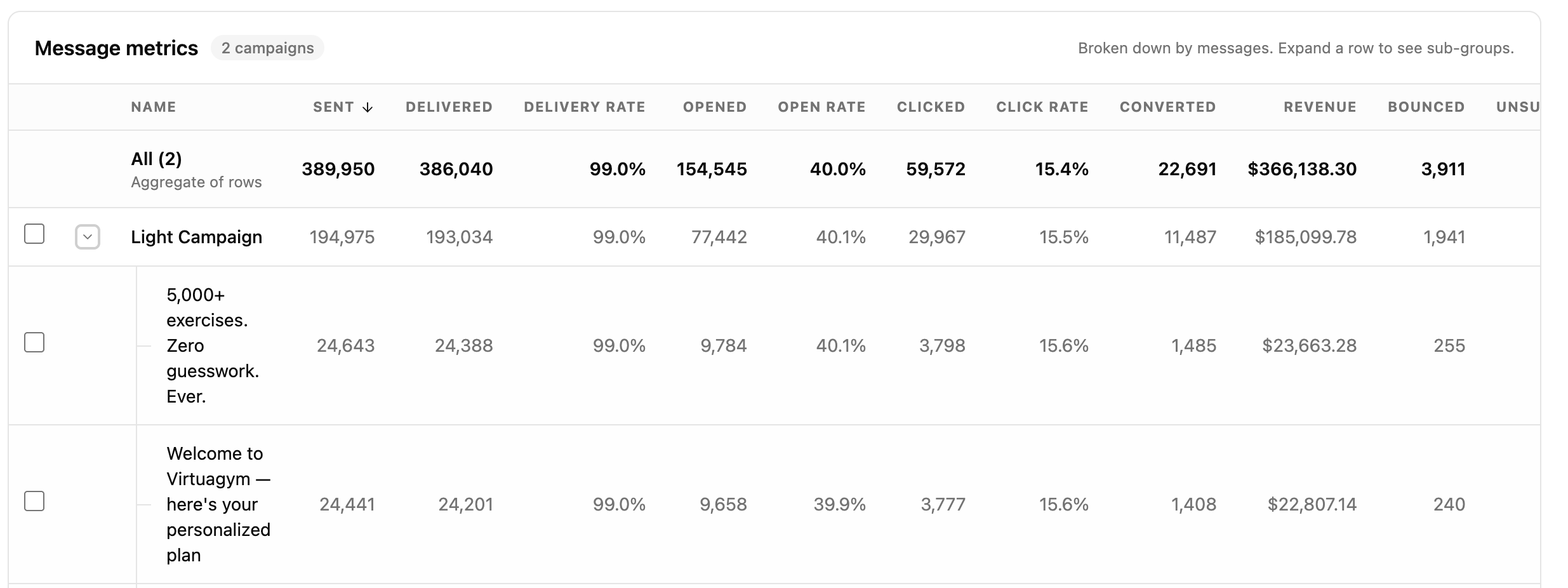
The page has a chart on top and a breakdown table below. Click any row to drill into a single entity.
To ask about your numbers in plain language — “which campaign converted best last month?” — connect an AI assistant to the Adapty Mail MCP server. It reads the same metrics and breakdowns as this page.
Pick a time range
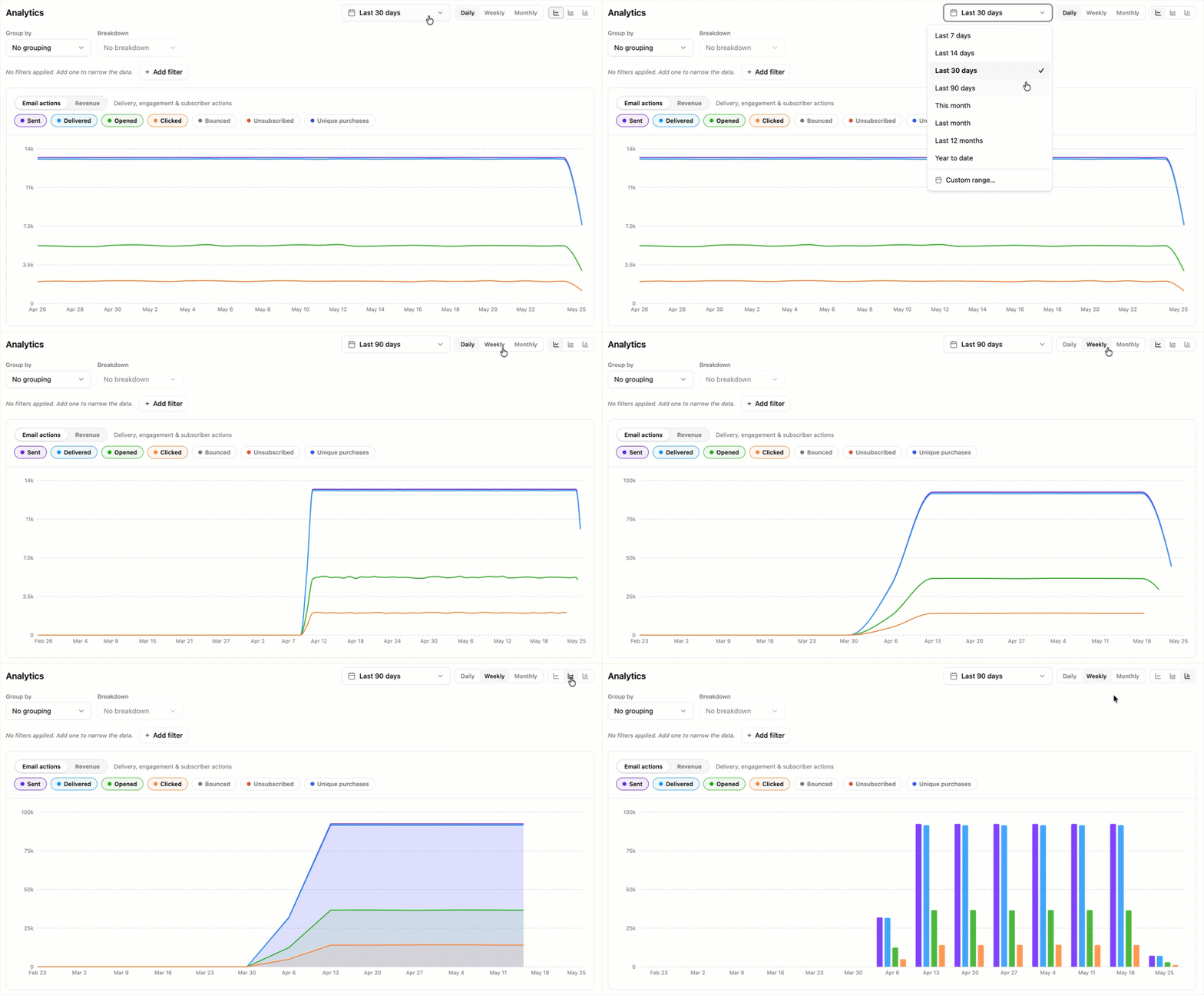
The toolbar at the top of the page controls the time window and how it’s bucketed:
- Date range: Presets (Last 7 / 14 / 30 / 90 days, This month, Last month, Last 12 months, Year to date) or a Custom range picker. The default is the last 30 days.
- Granularity: Daily, Weekly, or Monthly buckets. Granularity coarsens automatically when the range grows — Daily switches to Weekly past 92 days, and both switch to Monthly past 366 days.
- Chart style: Line, Area, or Bar.
If the page reports that the range is too wide, narrow the date range, coarsen the granularity, group by less, or apply filters.
Group, break down, filter
Three controls below the toolbar shape what the chart and table show:
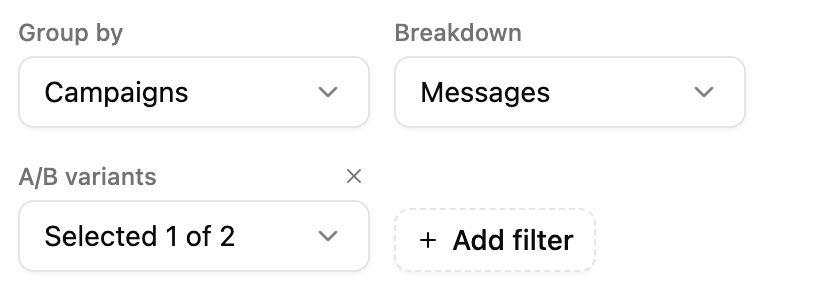
- Group by: Splits the table into one row per campaign, per segment, or whatever else you pick. With No grouping, everything collapses into a single All row.
- Breakdown: Splits each of those rows again, by a second choice. Expand a row to see them. It stays disabled until you set a Group by, and you can’t pick the same thing twice.
- Add filter: Narrows the chart and the table down to the campaigns, segments, or domains you care about.
All three offer the same twelve choices:
| Option | One row per |
|---|---|
| Campaigns | campaign |
| Campaign type | marketing or transactional |
| Campaign purpose | lifecycle moment the campaign is written for |
| Email language | language the email went out in |
| Segments | segment the recipient matched |
| A/B variants | variation the recipient was routed to |
| Messages | individual email in a campaign |
| Triggers | trigger that started the flow |
| Sender email domain | sending domain that carried the email |
| Mailbox email provider | recipient’s mailbox provider — Google, iCloud, and so on |
| Mailbox email domain | recipient’s email domain |
| Event outcome | bounce reason, complaint kind, or link clicked |
Two of those choices behave differently:
- Messages appears only in the Breakdown dropdown. A subject line means nothing outside its campaign, so group by Campaigns first, then split each campaign row into the individual emails it sent.
- Event outcome gives each row a single kind of event, so most of its columns are empty — a bounce reason has no opens. Rows with nothing to show for the metrics you’ve selected are hidden.
Read the chart
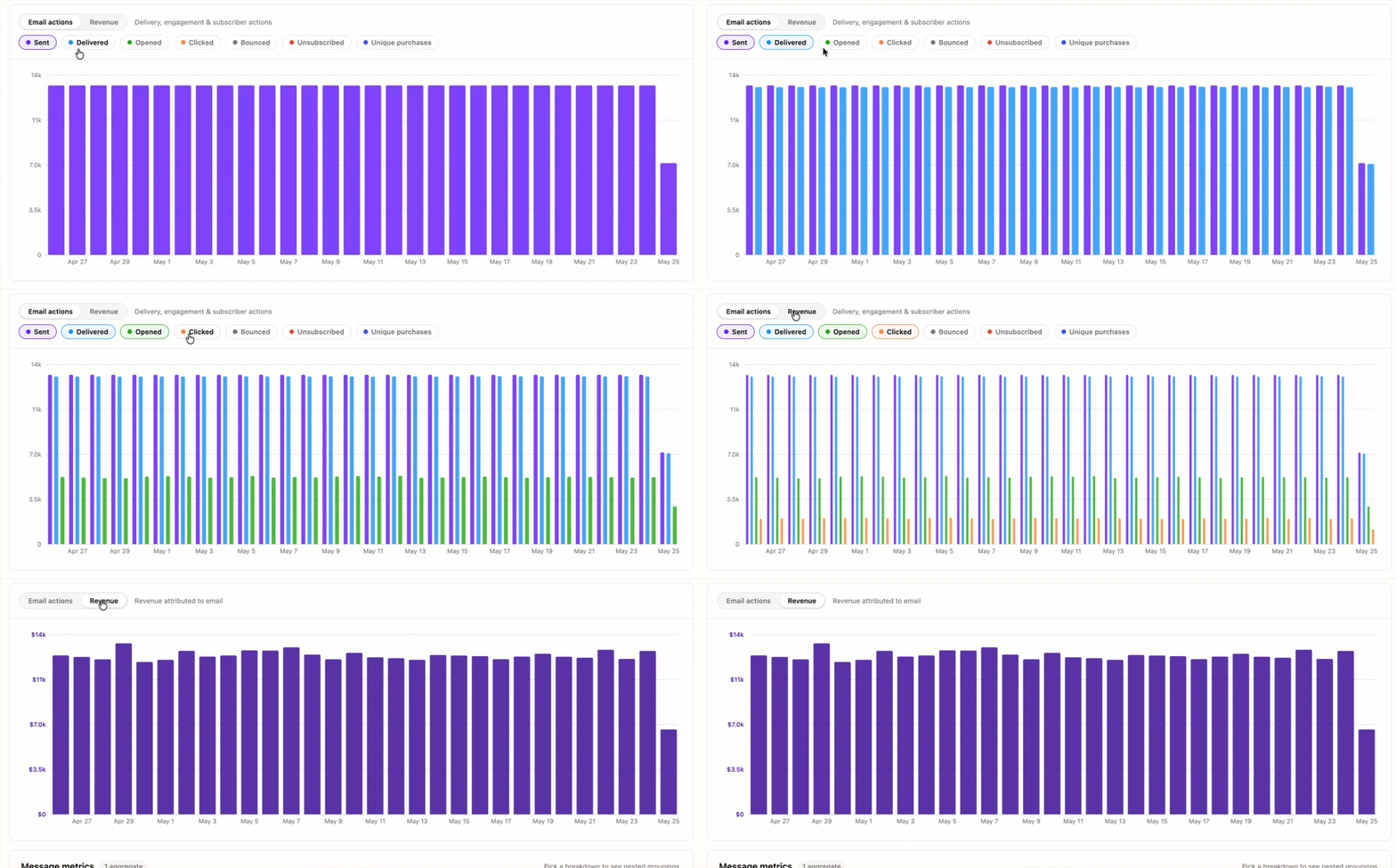
The chart renders the metrics you select over the chosen time range.
- Metric category: Toggle between Email actions (Sent, Delivered, Opened, Clicked, Bounced, Unsubscribed, Converted) and Revenue.
- Metric pills: Pick which metrics to plot. In aggregate mode (no grouping), you can plot multiple metrics on the same chart. With grouping on, the chart plots a single metric — one line per group — so groups stay visually distinct.
- Legend: When grouping is on, the legend on the right lists every group and lets you toggle a series on or off.
The visibility checkboxes in the metrics table below also control which rows appear on the chart.
Read the metrics table
Below the chart, the metrics table lists one row per group. A summary row at the top aggregates every other row in the table.
- Sortable columns: Click any column header to sort by Name, Sent, Delivered, Delivery rate, Opened, Open rate, Clicked, Click rate, Converted, Revenue, Bounced, or Unsubscribed.
- Visibility checkbox: Toggle whether a row appears on the chart.
- Expand row: When a Breakdown is set, the chevron on the left of each row expands it into its sub-groups.
- Open the drilldown: Click a row’s name to open the focused view for that entity.
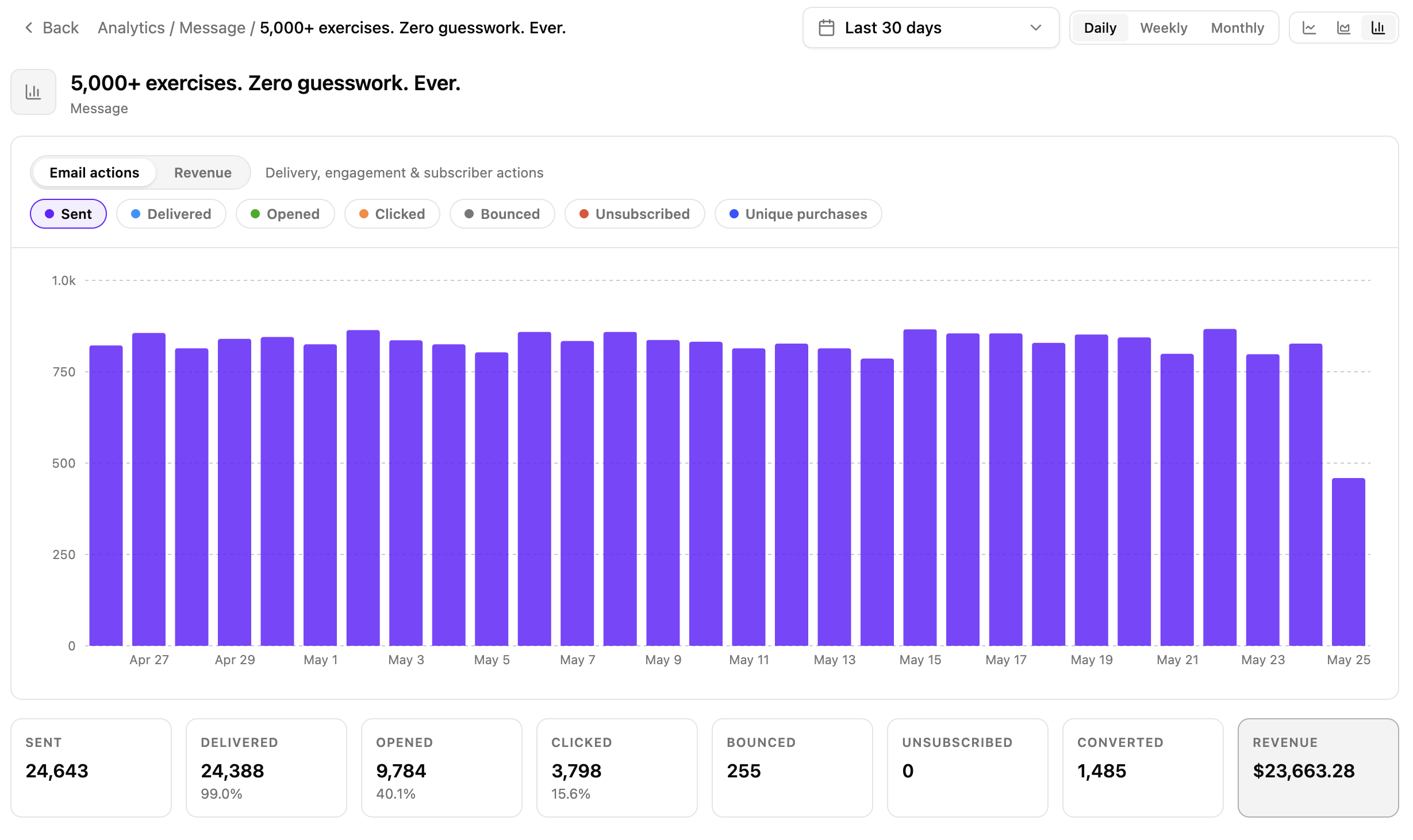
The drilldown shows:
- The same chart and metric selector as the main page, scoped to one entity.
- Eight summary cards at the bottom: Sent, Delivered (with delivery rate), Opened (with open rate), Clicked (with click rate), Bounced, Unsubscribed, Converted, and Revenue.
The date range and granularity carry over from the main page. Use Back in the breadcrumb to return.
What’s tracked
Adapty converts other currencies to USD at the currencylayer.com exchange rate (refreshed every 8 hours). The rate is fixed at the time of the transaction — future changes do not affect the conversion result.
Each row — on the Analytics page, in the drilldown, and in the inline views described below — exposes the same set of raw counts:
- Sent: Emails dispatched to SES.
- Delivered: SES-confirmed inbox deliveries.
- Bounced: SES-reported bounces. Hard and soft bounces both count as one Bounced. Each sending domain has a Bounces card that shows them separately for the last 30 days.
- Opened: Pixel loads. Apple Mail Privacy Protection pre-fetches images on iOS 15+ and inflates this count — rely on clicks and revenue for stronger signals.
- Clicked: Clicks on the CTA button, the hero image, or the logo. Footer links — unsubscribe, privacy, terms — aren’t counted, and don’t appear anywhere in analytics. A click is recorded at your own link subdomain, which every link passes through before redirecting onward.
- Unsubscribed: Unsubscribes from the footer link or the
List-Unsubscribeheader. - Converted: Unique profiles in the group with an attributed purchase in the time range. Conversions are bucketed by the purchase date — a click in March followed by a buy in April counts in April. A profile that purchases more than once still counts once.
- Revenue: Sum of attributed revenue (USD) across subscription starts, renewals, and one-time purchases.
Derived rates
| Rate | What it divides |
|---|---|
| Delivery rate | Delivered / Sent |
| Open rate | People who opened at least one email / everyone Adapty Mail tried to send to |
| Click rate | People who clicked a CTA, hero image, or logo / everyone Adapty Mail tried to send to |
Delivery rate counts emails; the other two count people. Someone who opens the same email five times adds five to Opened but one to the open rate. The denominator includes addresses that bounced, so a batch with many bounces drags the open rate down.
The drilldown shows the same three rates next to its summary cards.
Revenue attribution
Revenue is attributed on last click:
- When a recipient clicks the CTA, the hero image, or the logo, Adapty Mail remembers which email the click came from — for one hour.
- A purchase in that hour is credited to that email, provided it has no attribution already and happened after the click.
- A purchase more than an hour after the click, or with no click before it, stays unattributed.
- A renewal of a product the profile already bought is never credited, however recently they clicked.
Attribution needs nothing extra from your checkout page: the click is recorded at the redirect, and the purchase is matched by profile once it reaches Adapty Mail. The {email} and profile-ID placeholders a self-hosted page can carry personalize what the visitor sees; they play no part in attribution. Set up checkout covers both.
Inline analytics in Flows and A/B Tests
The same metrics also appear inline next to the rows being measured:
- Flows page: Under each trigger, every segment shows its own delivery, engagement, and revenue counts.
- A/B Tests page: Variations are listed side by side with the same metric set, which is convenient for comparing variants directly.
Use the Analytics page when comparing across campaigns or drilling into a single entity, and the inline views when you’re already working in a flow or an A/B test. The metric definitions, derived rates, and attribution rules above apply identically across all three views.
Limitations
- All bounces are counted together: The Bounced metric includes both hard and soft bounces. Each sending domain has a Bounces card that shows them separately for the last 30 days.
- Eventual consistency, not real-time: Counts are aggregated from event tables. Fresh events usually appear within minutes, but there’s no streaming guarantee.
- Range size is capped: A wide date range with fine granularity, or a grouping with many rows, can exceed what the chart will render. The page then shows “Selected range is too wide. Try a coarser granularity or shorter range.”
- No language data for older events: Email language shows every event before October 6, 2026 as English, including those from translated emails.