
Handle Adapty subscription events with webhooks
Webhooks let your server receive Adapty subscription events in real time — purchases, renewals, cancellations, billing issues, and refunds — so you can grant access, sync your backend, or trigger workflows. This guide takes you from endpoint to a verified, tested integration on one page, and shows how to have an AI coding agent write the handler for your stack.
Using an AI coding agent? Click Copy for LLM under the title and paste this whole page into your agent — it has the setup, payload, and handler logic it needs.
How Adapty webhooks work
- One-way and real-time: Adapty sends an HTTP
POSTto your server when an event occurs — no polling. - Two kinds of request: A one-time verification request (sent when you save the integration) and ongoing subscription events.
- One URL per environment: You configure a separate endpoint for production and for the sandbox.
- You acknowledge each request: Respond with a
2xxstatus quickly, and Adapty retries on failure.
Build your endpoint
Create a public HTTPS endpoint that handles two request types:
- Verification request: Sent once when you save the integration. It has an empty JSON body (
{}). Respond with a2xxstatus and a JSON body. - Subscription events: Ongoing
POSTrequests with the event in the body. Respond200within 10 seconds, then do any heavy work asynchronously.
Choose a secret string and store it as an environment variable (for example, ADAPTY_WEBHOOK_SECRET). On every request, verify the Authorization header matches it, and reject the request if it doesn’t — you’ll enter the same secret in the dashboard next.
import express from "express";

const app = express();
app.use(express.json());

const WEBHOOK_SECRET = process.env.ADAPTY_WEBHOOK_SECRET;

app.post("/adapty/webhook", (req, res) => {
  // 1. Verify the shared secret Adapty echoes back.
  if (req.get("Authorization") !== WEBHOOK_SECRET) {
    return res.sendStatus(401);
  }

  // 2. Acknowledge fast, then process asynchronously.
  res.status(200).json({});

  // 3. The verification request has an empty body — nothing to handle.
  const event = req.body;
  if (!event.event_type) return;

  switch (event.event_type) {
    case "subscription_started":
    case "subscription_renewed":
    case "trial_converted":
      // Grant or extend access.
      break;
    case "subscription_expired":
    case "subscription_refunded":
      // Revoke access.
      break;
    default:
      break;
  }
});

app.listen(3000);
Deploy the endpoint to a public HTTPS URL before you configure the integration — Adapty sends the verification request the moment you save.
Key events and the payload
Every event shares the same envelope. The fields vary by event type, store, and the options you enabled. Here is a trimmed subscription_started event:
{
  "profile_id": "00000000-0000-0000-0000-000000000000",
  "customer_user_id": "UserIdInYourSystem",
  "event_type": "subscription_started",
  "event_datetime": "2024-11-15T10:45:36.181000+0000",
  "event_properties": {
    "store": "play_store",
    "currency": "USD",
    "price_usd": 4.99,
    "vendor_product_id": "onemonth_no_trial",
    "transaction_id": "0000000000000000",
    "original_transaction_id": "0000000000000000",
    "subscription_expires_at": "2024-12-15T10:45:36.181000+0000",
    "profile_event_id": "00000000-0000-0000-0000-000000000000"
  },
  "event_api_version": 1
}
The events you’ll handle most often:
| Event type | Fires when |
|---|---|
subscription_started | A user starts a paid subscription |
subscription_renewed | A subscription renews and bills successfully |
subscription_renewal_cancelled | A user turns off auto-renew (access lasts until expiry) |
subscription_expired | Access ends after a non-renewed subscription lapses |
trial_started | A user starts a free trial |
trial_converted | A trial converts to a paid subscription |
billing_issue_detected | A renewal payment fails |
subscription_refunded | A subscription purchase is refunded |
For the full event list and every field, see Webhook event types and fields.
Don’t order events by event_datetime — it’s the business time of the event, so events can arrive out of order or share a timestamp. Order by your own receipt time, and deduplicate using profile_event_id or the transaction IDs.
Configure the webhook in Adapty
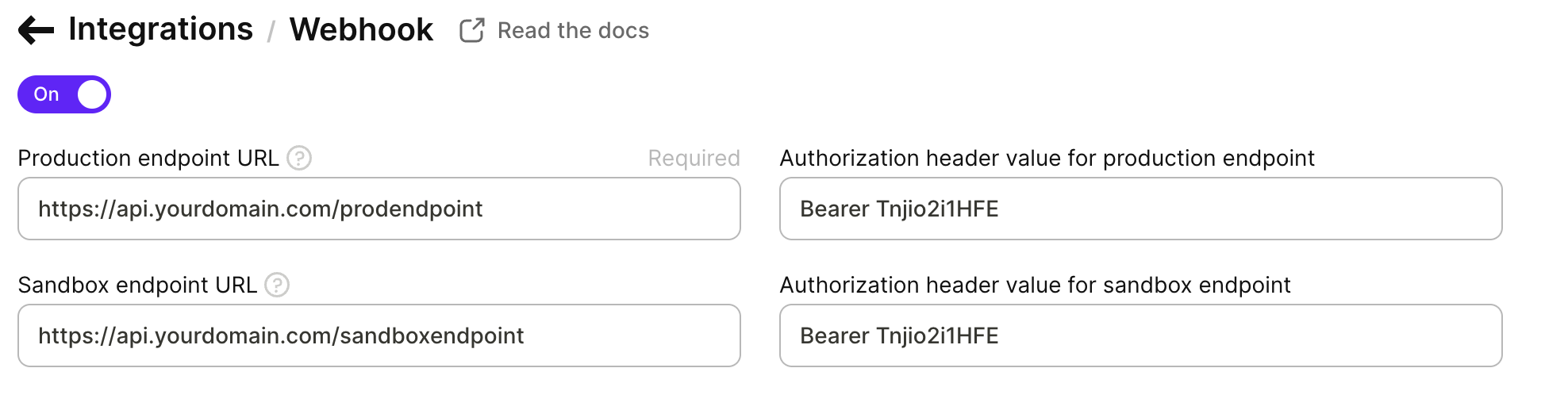
- Open Integrations → Webhook in the Adapty Dashboard.
- Turn on the integration.
- In Production endpoint URL, enter the HTTPS URL of the endpoint you deployed.
- In Authorization header value for production endpoint, enter the same secret your endpoint checks. Adapty sends this value back in the
Authorizationheader on every request. It’s optional but strongly recommended. - To test in the sandbox first, fill in Sandbox endpoint URL and its Authorization header value too.
- Click Save. Adapty immediately sends the verification request to your endpoint, which replies with a
2xxto complete setup.
To choose which events to send, map event names, or enable optional fields (trial price, historical events, attribution, user attributes, Play Store token), see Set up webhook integration.
Build it with your AI coding agent
Give your AI coding agent this guide and the reference docs as Markdown (add .md to any page URL), tell it your stack, and let it scaffold the handler:
Example prompt:
Read these Adapty webhook docs, then write a webhook handler for my Express app:
verify the Authorization header against ADAPTY_WEBHOOK_SECRET, answer the
verification request, acknowledge events with 200, and grant or revoke access
based on event_type.
The agent writes the handler code, but it can’t deploy your endpoint or configure the dashboard — host the endpoint yourself and set the URL and secret in Integrations → Webhook.
Test your webhook
Test in the sandbox before production:
- Set up the sandbox endpoint and secret as described above.
- In your sandbox app, make a purchase, start a trial, or issue a refund to trigger an event.
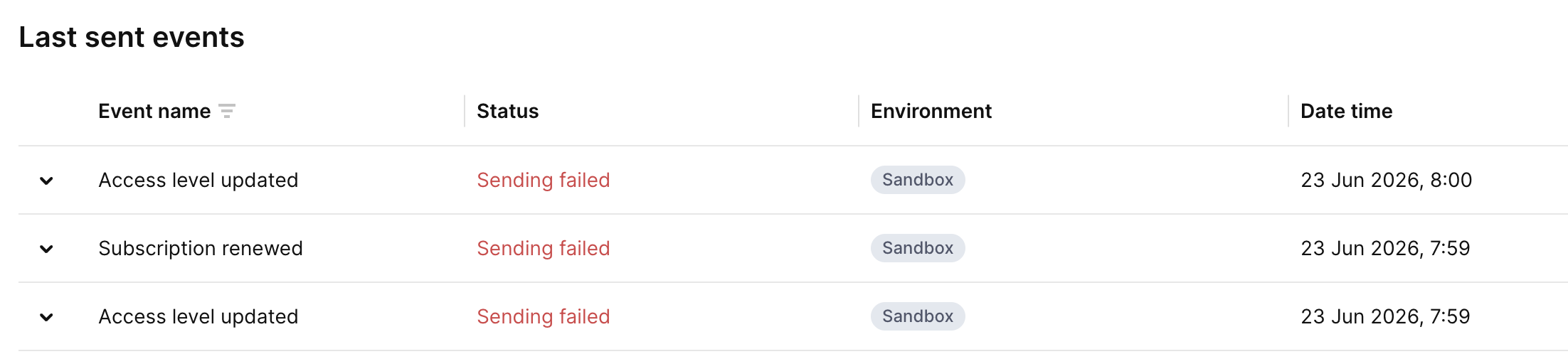
- Open the integration’s Last sent events section. A delivered event shows the Success status.
If an event shows Sending failed, your server returned a status outside the 200–399 range — hover over the status for details. For the full testing walkthrough, see Test webhook integration.
Limits
- Acknowledge within 10 seconds: If Adapty doesn’t get a response in time, it treats the attempt as failed and retries.
- Retries: If your status is outside the 200–404 range, Adapty retries with exponential backoff — up to 9 retries over 24 hours.
- Cancellation delay: Cancellation events can take up to 2 hours to arrive.
- One URL per environment: To deliver events to several services, point the webhook at your own backend and fan out from there.