
A/B test types
Adapty offers two A/B test types, each suited for different testing scenarios:
- Regular A/B test: An A/B test created for a single flow/paywall/onboarding placement.
- Crossplacement A/B test: An A/B test created for multiple flow or paywall placements in your app. Once the A/B test assigns a variant A/B test variants are alternative versions of the flow, paywall, or onboarding to test. , it shows that variant consistently across all selected sections of your app.
Each flow/paywall/onboarding gets a weight that splits traffic during the test.
For example, with weights of 70 % and 30 %, the first paywall is shown to roughly 700 of 1,000 users, the second to about 300. In Crossplacement tests, weights are set per variant, not per flow or paywall.
This setup lets you compare different flows, paywalls and make data-driven decisions for your app’s monetization strategy.
When to use each type
Each A/B test type is useful if:
- Regular A/B tests:
- You have only one placement in your app.
- You want to run your A/B test on only one placement and track economics changes for that placement only, even if your app has multiple placements.
- You want to run an A/B test on old users (those who have seen at least one Adapty paywall).
- Crossplacement A/B test:
- You want to synchronize variants across multiple placements. For example, you might change prices in the onboarding flow and in your app’s settings at the same time.
- You want to evaluate your app’s overall economy. Running the test across all placements makes A/B test statistics easier to analyze than testing isolated placements.
- You want to run an A/B test on new users only, i.e. the users who have never seen a single Adapty paywall.
- You want to use multiple flows or paywalls within a single variant:
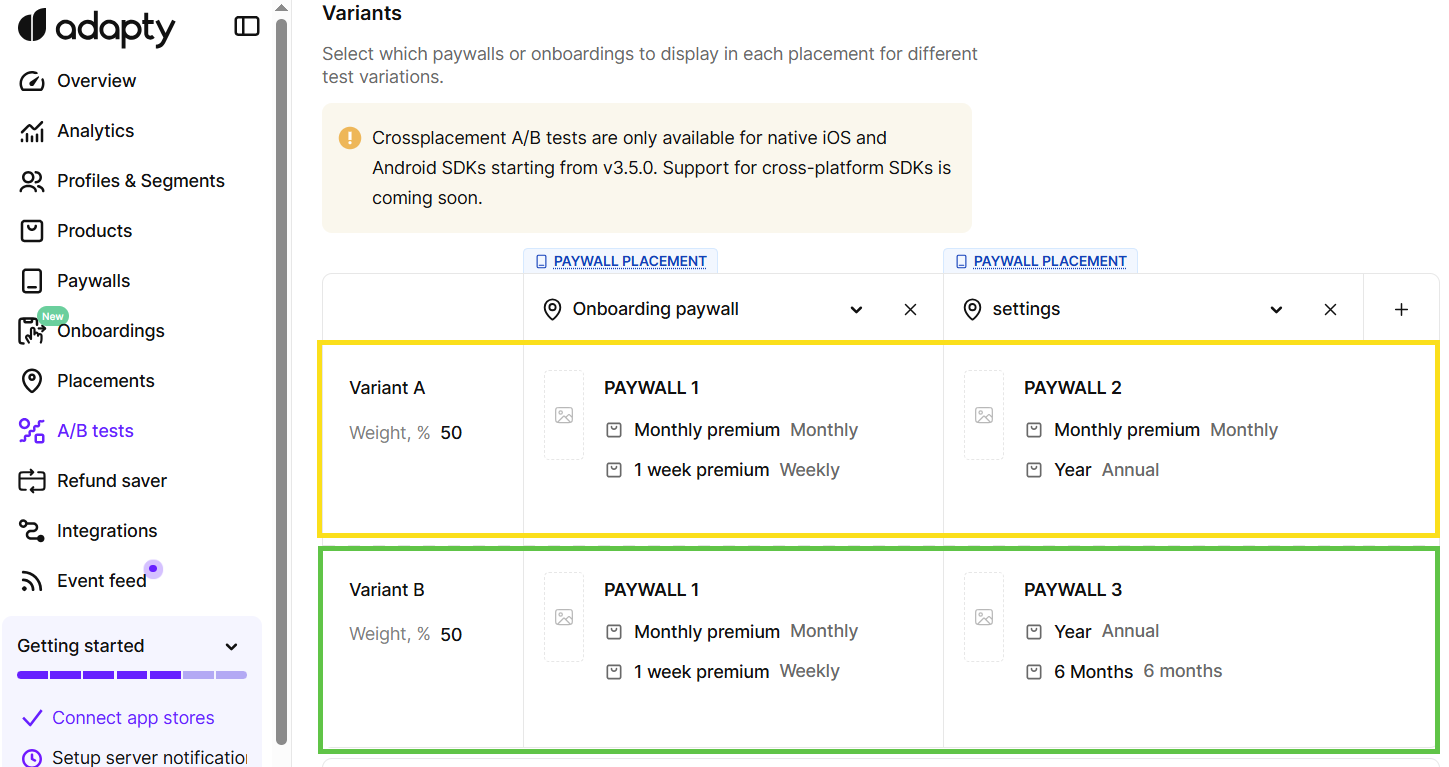
Key differences
| Feature | Regular A/B Test | Crossplacement A/B Test |
|---|---|---|
| What is being tested | One flow/paywall/onboarding | Set of flows or paywalls belonging to one variant |
| Variant consistency | Variant is determined separately for every placement | Same variant used across all placements in the test |
| Audience targeting | Defined per flow/paywall/onboarding placement | Shared across all placements in the test |
| Analytics | You analyze one flow/paywall/onboarding placement | You analyze the whole app on those placements that are a part of the test |
| Variant weight distribution | Per flow/paywall/onboarding | Per set of flows or paywalls |
| Users | For all users | Only new users (those who haven’t seen an Adapty paywall) |
| Adapty SDK version | For flows: v4.0.0+. Any for paywalls. For onboardings: v3.8.0+ (iOS, Android, React Native, Flutter), v3.14.0+ (Unity), v3.15.0+ (KMP, Capacitor) | 4.0.0+ for flows, 3.5.0+ for paywalls |
| Best for | Testing independent changes in a single flow/paywall/onboarding placement without considering the overall app economics | Evaluating overall monetization strategies app-wide |
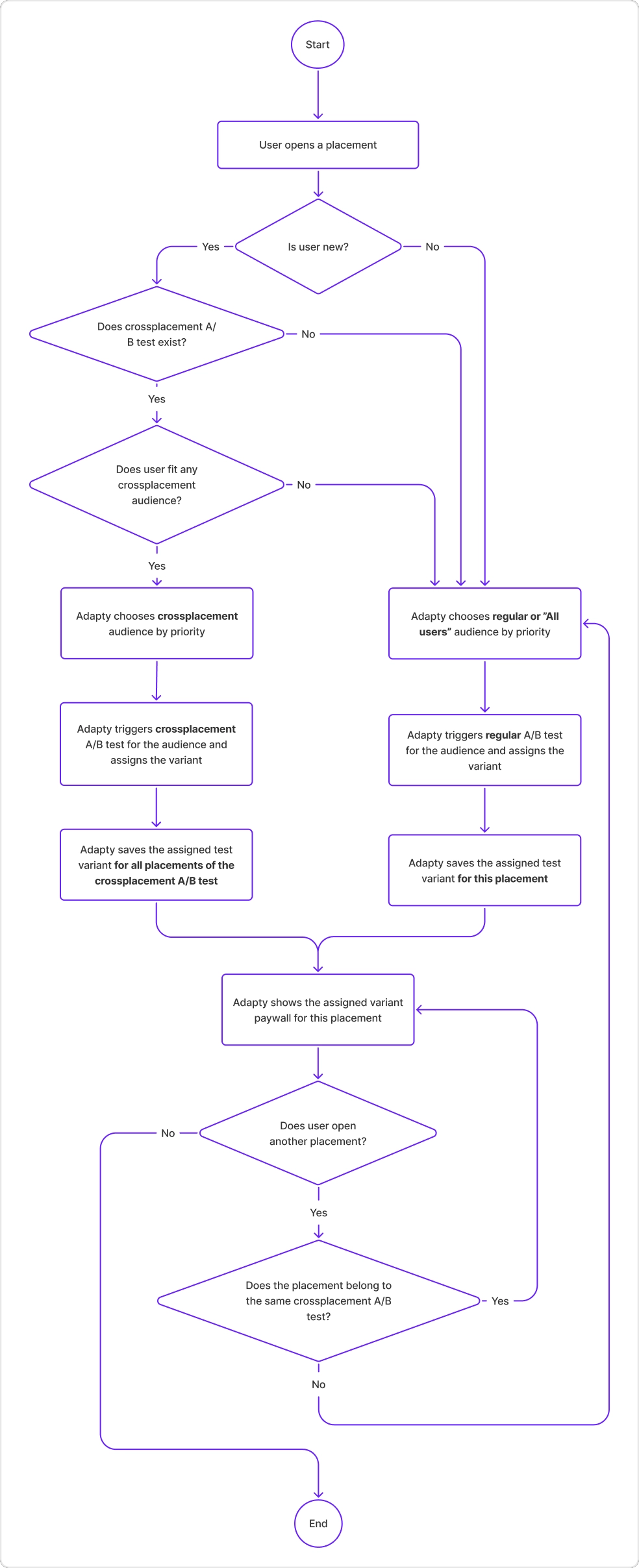
A/B test selection logic
Crossplacement A/B tests take priority over regular A/B tests. However, Crossplacement tests are only shown to new users — those who haven’t seen a single Adapty flow or paywall yet (the app never called getFlow or getPaywall for them). This ensures consistency in results across placements.
The following diagram shows the logic Adapty uses to select an A/B test for a placement:
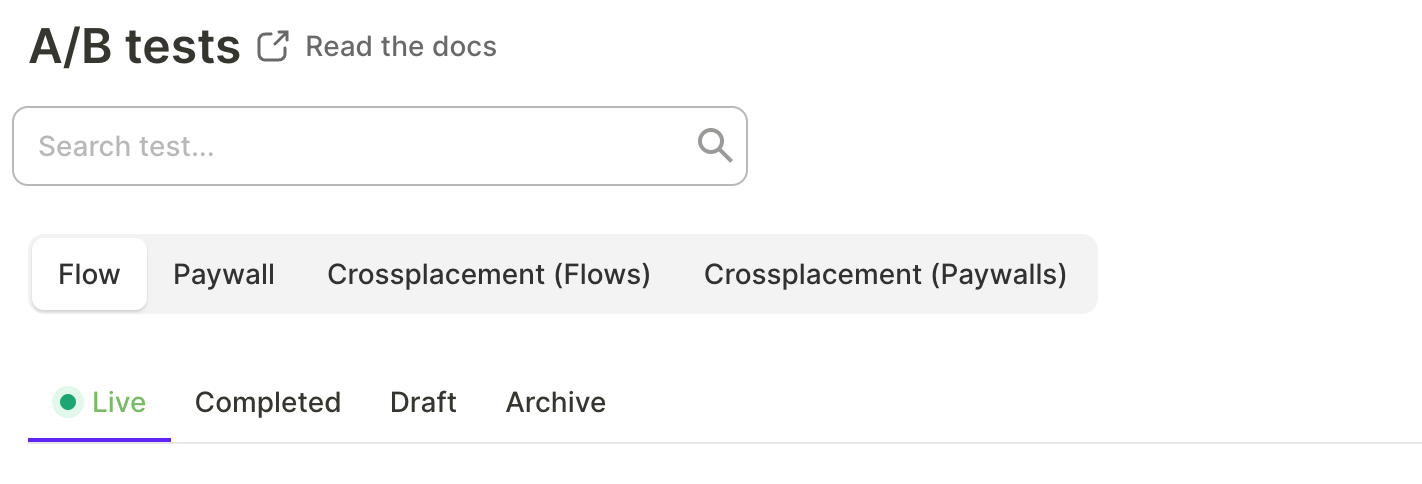
On the A/B Tests page, flow, paywall, and onboarding tests appear on separate tabs. Crossplacement tests have two tabs of their own: Crossplacement (Flows) and Crossplacement (Paywalls).
Crossplacement A/B test limitations
Crossplacement A/B tests cannot include onboarding placements. One test cannot mix flow and paywall placements.
Crossplacement A/B tests guarantee that each user sees the same variant across all placements in the test. This creates the following limitations:
-
Only new users can participate. A new user is one who has not seen an Adapty flow or paywall and whose app has never called
getFloworgetPaywall. Adapty cannot guarantee a consistent chain of flows or paywalls for other users. -
The first placement the user encounters determines which flow or paywall Adapty displays. You cannot change a user’s assignment or enroll the same user in more than one Crossplacement A/B test.
-
A device learns about cross-placement assignments made elsewhere — for example, on the user’s other device — only when the app becomes active, and at most once every 60 seconds. This sync can’t be forced, so an assignment can take up to a minute, or until the next foregrounding, to reach a long-running session.
Once a user receives a Crossplacement flow or paywall, they see it for 90 days, even after you stop the test. To change this duration, in the General settings, adjust Cross-placement variation stickiness.
Crossplacement A/B test priority
-
Crossplacement A/B tests always take priority over regular and onboarding A/B tests. If a new user qualifies for both a Crossplacement test and a regular test on the same placement, the Crossplacement test is shown.
-
When multiple Crossplacement A/B tests with the same audience share the same placement, Adapty automatically assigns test priority based on the order they were added. The first test gets the highest priority. You cannot manually change it.
-
Tests that target smaller segments of your audience automatically take priority over those targeting the All Users segment.
In Analytics, a Crossplacement A/B test appears as several child tests, one per placement. Child tests follow the naming pattern <test-name> child-0, <test-name> child-1, and so on. The numbering matches the placement order on the A/B test details page. To view results for a specific placement, filter by Placement.
Next steps
- Create, run, and stop an A/B test — Set up and launch your first test
- A/B test results and metrics — Analyze performance and pick a winner