
Set up a 12-month commitment plan
To offer a commitment plan, you need a yearly App Store subscription, a custom paywall, and Adapty SDK v4.3 or later. Flows can’t display the plan.
To have subscribers commit to a full year and pay monthly, add a 12-month commitment plan to your yearly product in App Store Connect and in Adapty.
Before you begin
Before you implement commitment plans, make sure that you:
- Target the right market: Commitment plans aren’t available in the United States. In Germany, Israel, South Africa, and Türkiye, subscribers can cancel with immediate effect through Apple Support.
- Target the right OS version: Subscribers need iOS 26.4 or later, or the same version of iPadOS, macOS, tvOS, or visionOS. Build your app with Xcode 26.5 or later.
- Target the right price range: The sum value of the 12 monthly payments must range between 1x and 1.5x the value of the upfront yearly subscription.
- Run Adapty SDK v4.3 or later: In app versions with an earlier SDK, users can only buy the upfront plan.
- Update code that reads product IDs: Webhooks, integrations, data exports, and the Server-side API report commitment-plan purchases as
<product_id>:monthly. If your code processes product IDs, update the logic before the first commitment-plan purchase.
1. App Store Connect configuration
- Open a yearly subscription in App Store Connect, or create a new subscription with a 1 Year duration.
- In the Availability section, add the same countries under 1 Year Upfront and under Monthly with 12-Month Commitment. Apple only offers commitment billing where upfront billing is available. The reverse isn’t required: you can offer the upfront plan in countries without the commitment plan.
- In the Subscription Prices section, set the upfront price for your base territory, if the subscription doesn’t have one yet. Apple requires the upfront price even if you only display the commitment plan to users.
- Set the monthly price for your base territory. The monthly price must be 1/12 to 1/8 of the upfront price. For example, with a €59.99 upfront price, the monthly price can be €5.00 to €7.49.
App Store Connect calculates the prices for the other countries from your base-territory prices.
For complete instructions, follow Apple’s guide to offering monthly subscriptions with a 12-month commitment.
2. Adapty configuration
To display the commitment plan in custom paywalls, turn it on for the yearly product in Adapty. If you don’t use custom paywalls, you can skip this step.
-
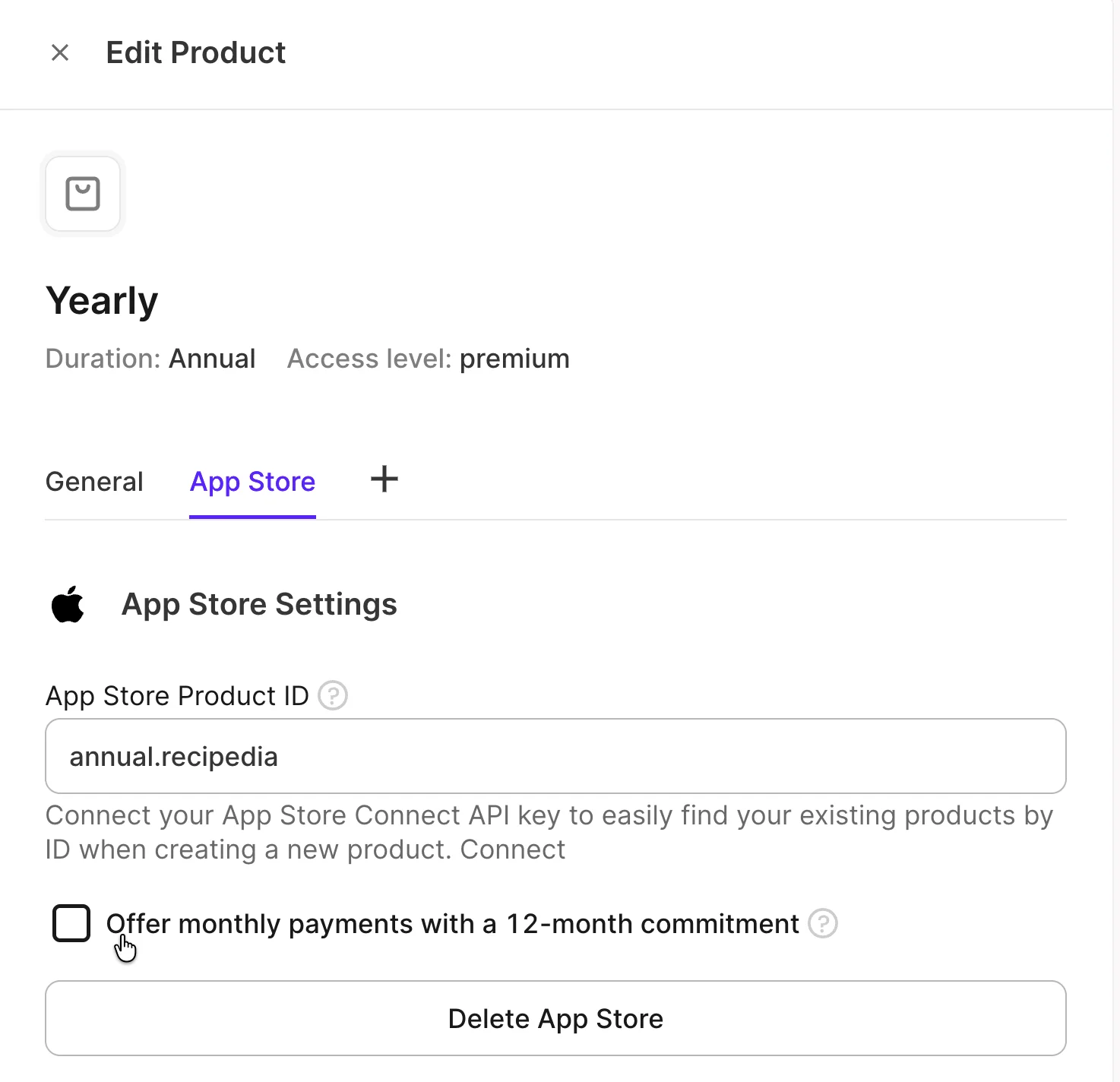
Open the yearly product. If it doesn’t exist yet, create it and connect the subscription you set up in App Store Connect. Don’t push a new product from Adapty: it would create a separate subscription without the commitment plan.
-
Open the App Store tab, and select Offer monthly payments with a 12-month commitment.
-
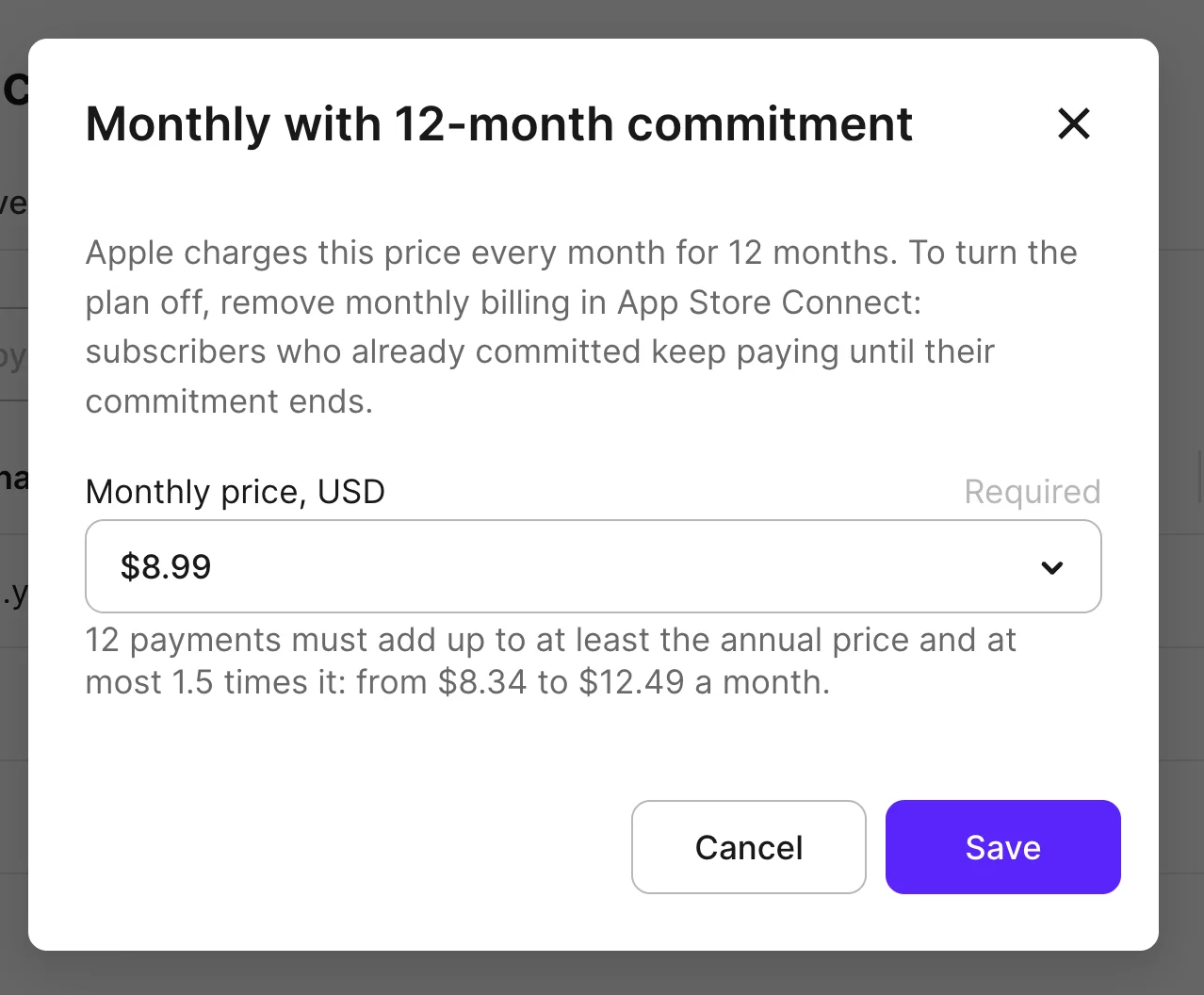
In the pop-up, from the Monthly price, USD list, select the installment price that matches App Store Connect. The list only contains App Store price points within the allowed range. This price is a reference value: Adapty doesn’t send it to App Store Connect.
3. Set up offers
In App Store Connect, each billing plan has its own introductory offers, promotional offers, win-back offers, and offer codes. An offer for the upfront plan doesn’t apply to the commitment plan.
- Free trials and other introductory offers: In App Store Connect, set up the offer for the commitment plan. Adapty applies introductory offers automatically. When an introductory offer ends, the subscriber’s 12-month commitment starts.
- Promotional and win-back offers: Set up promotional or win-back offers for the commitment plan in App Store Connect. Then add the offers to Adapty, and set their App Store plan to Monthly with 12-month commitment. A paywall row only lists the offers for its own billing plan. If you don’t use custom paywalls, you don’t need to add the offers to Adapty.
- Offer codes: Set up offer codes for the commitment plan in App Store Connect.
4. Add to a custom paywall
Apple requires you to show both the installment price and the yearly total before the purchase.
- In the custom paywall, add the yearly product, and set its Billing plan to Monthly. To also sell the upfront plan on the same paywall, add the yearly product again with the Upfront billing plan.
- To give an upfront offer to users who buy the upfront plan instead — on an earlier SDK version, or where the commitment plan doesn’t apply — select it under Fallback offer.
- In your app, display the price from
product.subscriptionPricingTerms. For users who can buy the commitment plan, the Adapty SDK returns its pricing. For everyone else, the SDK returns the upfront plan’s pricing:- To tell which plan the SDK returned, check
product.subscriptionPricingTerms?.billingPlan. The value is.monthlyfor the commitment plan and.upFrontfor the upfront plan. - To display the installment price, use
subscriptionPricingTerms.localizedBillingPriceandsubscriptionPricingTerms.billingPeriod. - To display the yearly total, use
subscriptionPricingTerms.commitmentInfo.localizedPriceandsubscriptionPricingTerms.commitmentInfo.period. For the commitment plan,product.localizedPriceandproduct.subscriptionPeriodreturn the same yearly values.
- To tell which plan the SDK returned, check
Users can’t buy the commitment plan in the following cases:
- Unsupported OS version or country: The user’s Apple device runs a system version earlier than 26.4, or the plan isn’t available in their App Store country. The Adapty SDK returns the upfront plan’s pricing instead.
- Existing upfront subscription: StoreKit reports that the user is already subscribed. To switch plans, subscribers use their Apple subscription settings.
- Promoted in-app purchase: The user selects the product in the App Store, then the Adapty SDK starts the purchase in your app. For these purchases, the SDK only supports the upfront plan.
To stop offering the commitment plan, in your custom paywalls, set the yearly product’s Billing plan to Upfront, or remove the Monthly row. You can’t clear the Offer monthly payments with a 12-month commitment checkbox in Adapty. Current subscribers still renew into a new commitment each year, unless you click Remove Monthly Billing for the yearly subscription in App Store Connect. Subscribers who already committed keep paying until their commitment ends.
5. Test the plan in a sandbox
Follow the sandbox testing guide with two sandbox accounts:
- An account from a country where you offer the commitment plan: The paywall should display the commitment plan with the monthly price alongside the total price. After the purchase, the sandbox user’s profile should have the access level of the yearly product.
- A US account: The paywall should only display the upfront plan.
If your code processes product IDs from webhooks or the Server-side API, verify that it receives commitment-plan purchases as <product_id>:monthly.
To test the purchase logic locally, use StoreKit Testing in Xcode 26.5 or later. Purchases in StoreKit Testing don’t reach Adapty.
Troubleshooting
- The checkbox for monthly payments is missing: The Offer monthly payments with a 12-month commitment checkbox only appears on an Annual product with an App Store product ID. It stays inactive until the product has a Price (USD).
- Users don’t see a free trial or another offer for the commitment plan: In App Store Connect, each offer belongs to one billing plan. Set up the offer for the commitment plan. For a promotional or win-back offer, also set the offer’s App Store plan in Adapty to Monthly with 12-month commitment.
- Every user sees the upfront price: Verify both of the following:
- The app is built with Xcode 26.5 or later. With an earlier Xcode version, the Adapty SDK always returns the upfront plan’s pricing.
- In the custom paywall, the yearly product’s Billing plan is Monthly.
- Some users see the upfront price: Those users can’t buy the commitment plan.
- The paywall shows the yearly total instead of the installment price: For the commitment plan,
product.localizedPricereturns the yearly total. To display the installment price, usesubscriptionPricingTerms.localizedBillingPrice.