
How profiles work
Every user in your app gets an Adapty profile that tracks their purchases, events, and subscription state. Understanding how profiles are created and linked helps you prevent integration bugs, avoid data fragmentation, and interpret the data in the Profiles section.
Profile creation
Adapty automatically creates a profile the first time a user opens your app.
Without a Customer User ID, the profile is anonymous. A new anonymous profile is created each time:
- A user reinstalls the app
- A user logs out of your app (when your app calls
Adapty.logout())
Purchases are tied to the app installation, not to a persistent user identity.
With a Customer User ID, the profile persists across reinstalls and devices. Using a customer user ID lets you:
- Track a user across app reinstalls and multiple devices.
- Find users by their customer user ID in the Profiles section.
- Use the customer user ID in the server-side API.
- Adapty sends the customer user ID to all integrations.
Profile behavior with a customer user ID depends on when you set it:
- At SDK activation: Adapty uses the existing profile with that customer user ID (for returning users) or creates a new profile (for first-time users).
- After SDK activation: Adapty creates an anonymous profile on activation. When you later identify the user, Adapty links the customer user ID to the anonymous profile (for first-time users) or switches to the existing profile with that ID (for returning users).
Which approach to use:
- Customer user ID available at app launch (for example, stored from a previous session) — pass it to
activate()when initializing the SDK. - Users sign in after the app launches — call
identify()after authentication. Adapty links the ID to the current profile (if the ID is new) or switches to the existing profile (if the ID already exists). - Users can purchase before logging in — call
identify()after login. If the customer user ID already exists in Adapty, retrieve the profile afterwards to sync the current access level.
For implementation details, see the identifying users SDK guide.
If a returning user previously used your app without a customer user ID, those anonymous profiles are not automatically merged when you start identifying at SDK activation. To maintain complete history for such users, use identify() after login instead.
Parent and inheritor profiles
When the same store-side subscription is associated with more than one Adapty profile, Adapty treats those profiles as a chain: one parent profile and one or more inheritor profiles that share access from the same purchase.
This happens when:
- Sharing paid access between user accounts is enabled and a user signs in on a device where a different profile previously made the purchase.
- A user reinstalls the app without a
customer_user_id, and the new profile picks up the previous installation’s purchase. - Different identified users restore purchases on the same device.
- An app transfers between Apple Team IDs and the new app picks up purchases made under the old Team ID.
How the parent is selected.
The parent is the first profile to record the purchase — determined by purchase-receipt order in Adapty, not by profile creation order. For example: you install the app and make no purchase, then reinstall and buy a subscription. The second profile becomes the parent because it made the purchase. The first profile becomes the inheritor and gains access through sharing.
How events are distributed:
- Transactional events (purchases, renewals, cancellations, billing issues, grace periods, refunds): Appear only on the parent profile that made the purchase. All subscription renewals and updates continue appearing on this profile.
access_level_updatedevents: Appear on both parent and inheritor profiles whenever the access level state changes. This keeps all connected profiles updated about their current access status.
The parent profile shows the complete transaction history. Inheritor profiles show only their access level updates and a link to the parent profile in the Access level section.
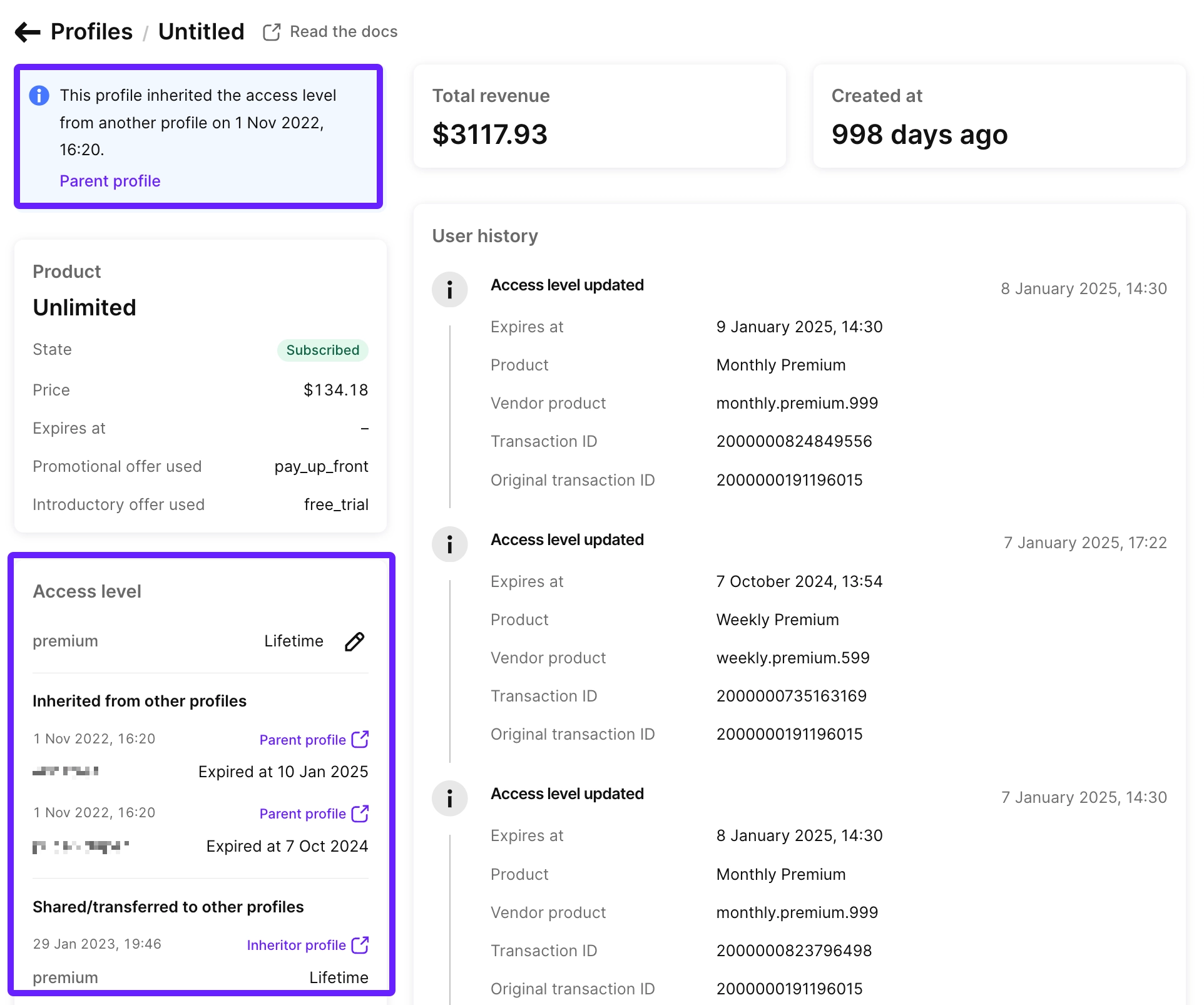
Tracking the same subscription across profiles.
Each inheritor profile has its own profile_id, so profile_id is not stable across a chain. To identify the same subscription across multiple profiles — for example, when reconciling webhook events or matching dashboard profiles to one underlying user — use the store-side identifier instead.
| Field | Use for |
|---|---|
store_original_transaction_id | Identifying a subscription chain across profiles. Unique per Apple subscription. |
profiles_sharing_access_level (webhook field) | All profiles currently entitled by the subscription, when sharing is enabled. |
profile_id | Not suitable for cross-profile tracking — each inheritor has its own. |
Transactions without profiles
Some transactions in Adapty aren’t attached to any profile — they appear in analytics and exports but not in the Profiles list. This happens for server-to-server (S2S) store notifications delivered for users whose accounts never connected to your app through the Adapty SDK. The known sources are:
- App Store S2S notifications (including refund events)
- Google Play S2S notifications
- Stripe and Paddle webhook events
These transactions:
- Appear in analytics charts (they count toward overall metrics)
- Appear in exports (S3, GCS, BigQuery) with
profile_idset tonull - Don’t appear in the Profiles list — there’s no profile to attach them to
If you see more events in analytics or exports than you can find in the Profiles UI, the difference is likely these profile-less transactions. To find them in an export, filter rows where profile_id IS NULL.
Sharing paid access between user accounts
Main article: Sharing paid access between user accounts
To set your access level sharing policy, on the General settings page, select a sharing option. You can set a separate policy for the sandbox environment.
Enabled (default)
Identified users (those with a Customer User ID) can share the same access level provided by Adapty if their device is signed in to the same Apple/Google ID. This is useful when a user reinstalls the app and logs in with a different email — they’ll still have access to their previous purchase. With this option, multiple identified users can share the same access level.
Even though the access level is shared, all past and future transactions are logged as events in the original Customer User ID to maintain consistent analytics and keep a complete transaction history — including trial periods, subscription purchases, renewals, and more, linked to the same profile.
Transfer access to new user
Identified users can keep accessing the access level provided by Adapty, even if they log in with a different Customer User ID or reinstall the app, as long as the device is signed in to the same Apple/Google ID.
Unlike the previous option, Adapty transfers the purchase between identified users. This ensures that the purchased content is available, but only one user can have access at a time. For example, if UserA buys a subscription and UserB logs in on the same device and restores transactions, UserB will gain access to the subscription, and it will be revoked from UserA.
If one of the users (either the new or the old one) is not identified, the access level will still be shared between those profiles in Adapty.
Although the access level is transferred, all past and future transactions are logged as events in the original Customer User ID to maintain consistent analytics and keep a complete transaction history — including trial periods, subscription purchases, renewals, and more, linked to the same profile.
After switching to Transfer access to new user, access levels won’t be transferred between profiles immediately. The transfer process for each specific access level is triggered only when Adapty receives an event from the store, such as subscription renewal, restore, or when validating a transaction.
Disabled
The first identified user profile to get an access level will retain it forever. This is the best option if your business logic requires that purchases be tied to a single Customer User ID.
Note that access levels are still shared between anonymous users.
You can “untie” a purchase by deleting the owner’s user profile. After deletion, the access level becomes available to the first user profile that claims it, whether anonymous or identified.
Disabling sharing only affects new users. Subscriptions already shared between users will continue to be shared even after this option is disabled.
Apple and Google require in-app purchases to be shared or transferred between users because they rely on the Apple/Google ID to associate the purchase with. Without sharing, restoring purchases might not work upon subsequent reinstalls.
Disabling sharing may prevent users from regaining access after logging in.
We recommend disabling sharing only if your users are required to log in before they make a purchase. Otherwise, an identified user could buy a subscription, log into another account, and lose access permanently.
Which setting should I choose?
| My app… | Option to choose |
|---|---|
| Does not have a login system and only uses Adapty’s anonymous profile IDs. | Use the default option, as access levels are always shared between anonymous profile IDs for all three options. |
| Has an optional login system and allows customers to make purchases before creating an account. | Choose Transfer access to new user to ensure that customers who purchase without an account can still restore their transactions later. |
| Requires customers to create an account before purchasing but allows purchases to be linked to multiple Customer User IDs. | Choose Transfer access to new user to ensure that only one Customer User ID has access at a time, while still allowing users to log in with a different Customer User ID without losing their paid access. |
| Requires customers to create an account before purchasing, with strict rules that tie purchases to a single Customer User ID. | Choose Disabled to ensure that transactions are never transferred between accounts. |
Event timestamps with future dates (Apple/iOS)
This behavior is specific to the Apple App Store. Google Play’s notification system does not send events in advance.
Event timestamps in profiles and integrations may show future dates because Apple sends renewal events in advance.
- Why it happens: Apple does this to ensure subscriptions renew automatically before expiring, preventing user service interruptions. For more details, check Apple’s Developer Forum: Server Notifications for Subscriptions.
- Event types affected: Typically, this applies to subscription renewals and trial-to-paid conversions. These events may have future timestamps because Apple notifies systems about them ahead of time.
- Other event types: Additional in-app purchases and subscription plan changes are recorded with their actual timestamps because these events cannot be predicted in advance.
- Impact on Analytics and Event Feed: These events will only appear in Analytics and the Event Feed once their timestamps have passed. Events with future timestamps are not shown in either section.
- Impact on Integrations: Adapty sends events to integrations as soon as they are received. If an event has a future timestamp, Adapty sends it to your integration with the future timestamp unchanged.
Next steps
- To use the Profiles dashboard to find and manage users, see Profiles.
- To set up user identification in your app, see the identifying users SDK guide.
- To configure access sharing policy, see Sharing paid access between user accounts.