
Prepare your app for store review
This article describes the process that the stores follow when reviewing app submissions, and offers tips for faster app approval. It sources information from the official submission guidelines:
Both stores follow a similar review process. When a policy only applies to one of the stores, the article mentions the store by name.
Adapty users should pay extra attention to compliance issues around paywalls and in-app purchases. These are among the most common reasons for rejections.
Before you begin
Confirm that your application is ready for submission.
Adapty offers a release checklist to prepare your app for publication.
Google Play Store requires first-time publishers to test the app before submitting it. The test should involve at least 12 people, and last a minimum of 14 consecutive days. This requirement was introduced in 2025 to lower the number of buggy apps that reach Google’s review staff.
Review process overview
Step 1: The automated screening
Both App Store and Google Play Store follow a similar two-step review process. Immediately after the submission, your app undergoes an automated scan that may take up to several hours.
Both stores scan your app for malware, with Google putting a particular emphasis on this process. It looks for behavioral indicators of malicious activity, like contact with suspicious servers, and unjustified access to user data. If your application is deemed potentially harmful, it is flagged and passed to a human security analyst. The Google Play Protect documentation contains an approximate list of checks performed during this step.
The stores also confirm the presence of necessary metadata, lack of harmful or severely outdated dependencies, and the integrity of your build.
Step 2: The human review
After your app passes the automated screening, it is examined by a human reviewer. This step may take up to several days, depending on the complexity of your app and the current review queue. Apps that process sensitive data take longer to review.
General requirements
Stability
Applications that crash during review are rejected. Reviewers may intentionally simulate unreliable network conditions, so the app must be able to handle them well.
Completeness
Both Apple and Google impose a completeness (“minimum functionality”) requirement on store content.
- Placeholders, “coming soon” screens, and broken capabilities lead to rejections for iOS apps.
- Google is more flexible, particularly if your application is in Early Access.
- Both stores reject apps that have little to no functionality. This includes apps that display a single image, PDF file, or web page.
Missing content falls into the same category.
- If the app does not accomplish what you advertise, it will be rejected.
- If you configure an in-app purchase in your dashboard, but do not include it in the build, the app will be rejected.
Metadata accuracy
Misleading, inaccurate, or inconsistent information in description, screenshots, and other metadata may lead to rejection.
Do not use your store listing to advertise future app capabilities.
If the app is not designed for the general public, the reviewer will look for additional documentation that explains its workflows. Include clear instructions in the app’s metadata.
Content rating
The content inside your app must match its declared rating.
Legal aspects
- Your app’s privacy policy should be accessible from inside the app. You can use the paywall builder’s link button.
- Require users to read and accept any legal agreements before they come into force.
- Disclose the presence of advertisements in your app. Failure to do so may result in a rejection.
- If your iOS app includes in-app purchases, you must accept the Paid Apps Agreement in your App Store Connect dashboard.
Authentication
If a part of your app’s content is only available after authentication, provide valid access credentials for the store reviewer. Inability to access content in full warrants a rejection.
If your app allows users to create an account, it should also allow them to delete it. Directing users to email-based support or a website does not satisfy this requirement.
Access and privacy
The app’s metadata must clearly state the reason for each requested permission. The most sensitive of permissions (for example, access to text messages and call logs) may require a video demonstration.
The same principle applies to sensitive user data: if you request it, explain why.
IAP-related requirements
Business policy violations are among the most common reasons for app rejections. If the primary monetization methods for your application are subscriptions and in-app purchases, it will face increased scrutiny.
Paywall requirements
App reviewers expect straightforward, easy-to-understand paywalls.
If you are suspected of user manipulation, the app is rejected. If several reviews find evidence of deceptive practices, your account can be deactivated, and your app suspended. Google Play uses a strike system that can lead to all your apps being deleted.
Adhere to the following practices in your paywall design:
-
Be transparent and upfront.
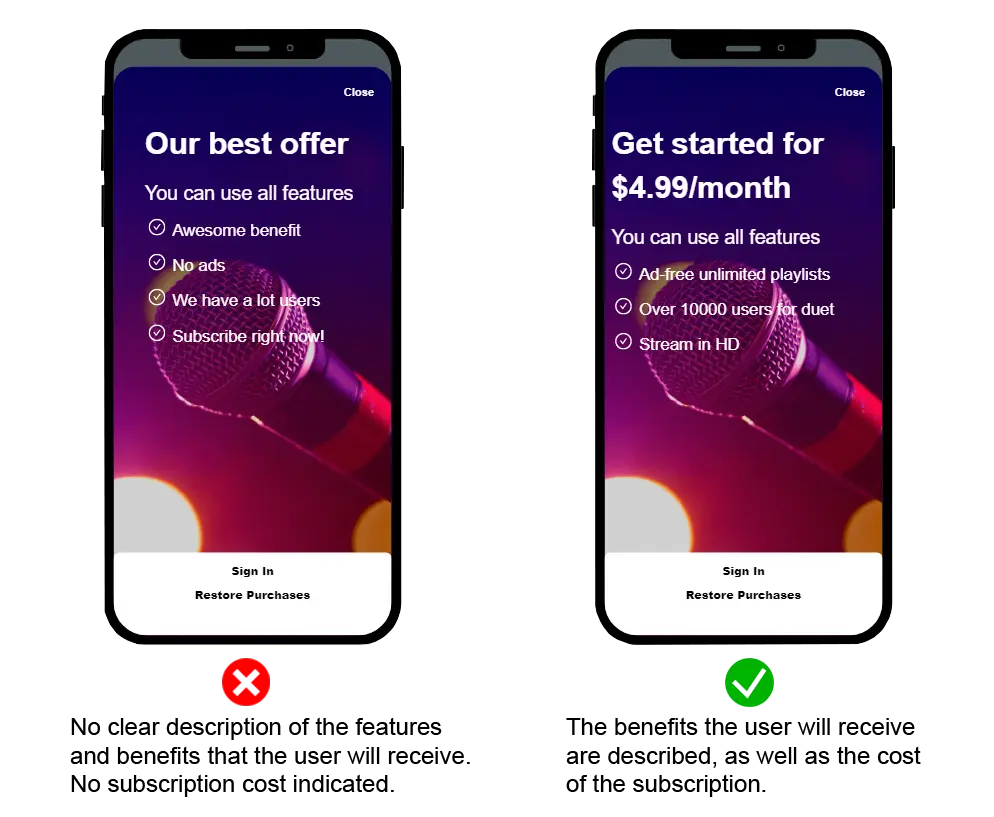
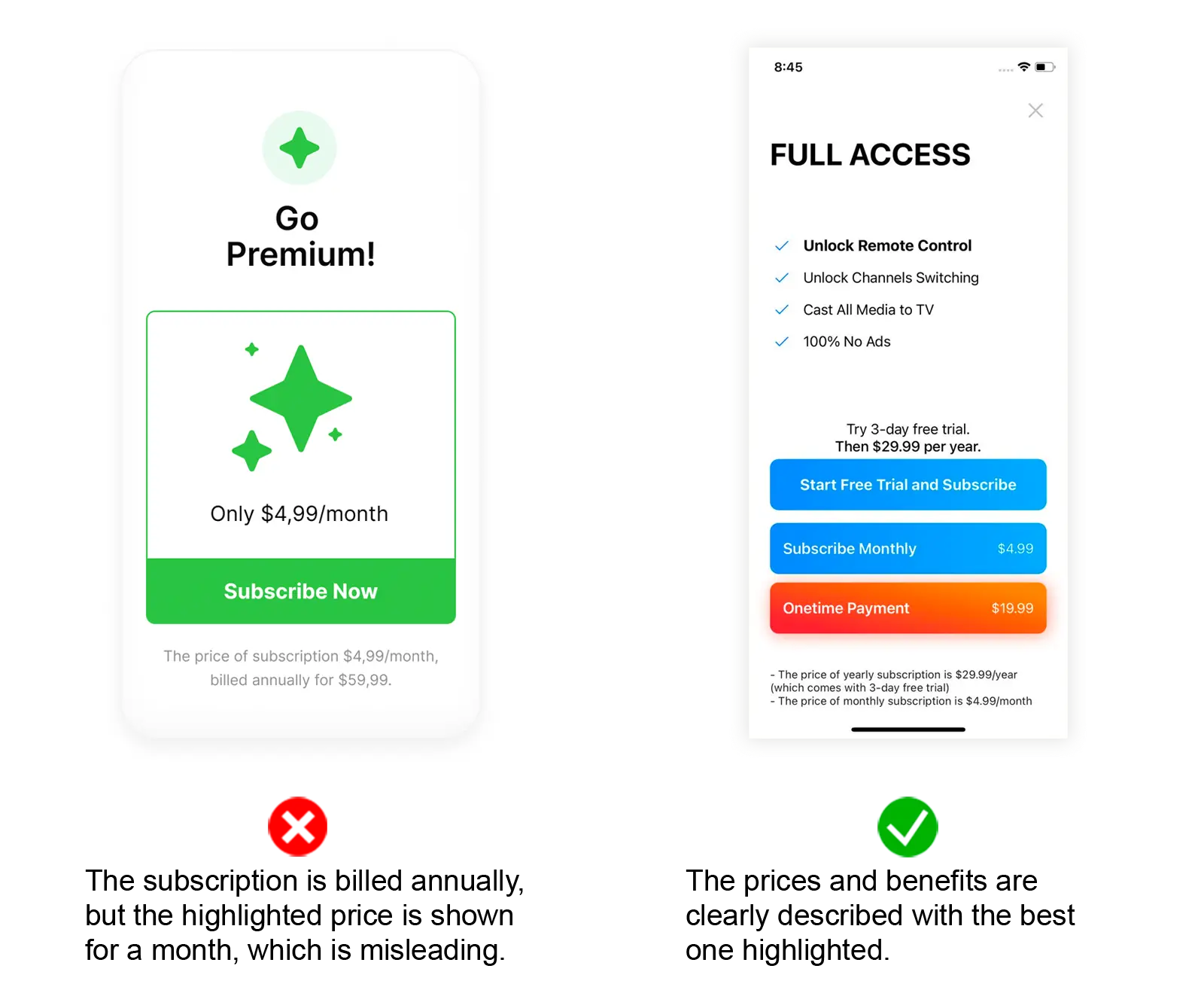
Display the products’ exact price, billing frequency, benefits, and cancellation conditions before prompting the user to purchase.
Clearly differentiate between one-time purchases and products that require recurring payments.
If a product comes with a free trial, clearly state its duration and conditions.
If you offer a 12-month commitment plan, show both the installment price and the yearly total.
Do not use intentionally confusing language to mislead the user.
-
Be consistent.
Product prices must match across App Store listing, in-app screens, subscription management screens, and marketing content. Any pricing mismatch, no matter how small, is grounds for rejection.
Adapty’s Paywall Builder automatically syncs prices between your paywall and your App Store Connect product. If your paywall is manually coded, you must retrieve each product’s price from its data array.
-
Display all tiers equally.
Do not pre-select the most expensive option, nor hide the cheaper ones.
-
Avoid “dark patterns”.
Do not create a false sense of urgency or scarcity.
Do not force users to make purchases by intentionally making free capabilities inconvenient or hard to locate.
Access guarantee
The application must guarantee the users’ right to access their purchases.
-
Immediate access
A successful purchase should immediately unlock access to the product, without visible delays.
Intermediate states of payment authorization should not raise errors or break the user experience.
A successful purchase should immediately hide the paywall. If you continue to display the paywall after a purchase, you prevent the user from accessing the content they paid for.
-
Access restoration
A user should be able to restore access to the product from a new device. Place the restore button in a visible place.
If you built your paywall with the Flow & Paywall Builder, the restore button automatically triggers the restoration process. If you implemented a custom paywall, add code that fires the restorePurchases method. Adapty will restore the user’s access level, unless you use the SDK in observer mode.
The app should be able to recognize in-app purchases made from the product’s store page, or elsewhere in the app store.
Appropriate payment methods
Both stores prohibit the sale of physical goods with in-app purchases, and require in-store billing for most digital goods.
The in-store billing requirement does not apply in some geographic jurisdictions, including the US and the EU. Depending on the country, you may be able to circumvent in-store billing altogether, or present the user with a choice between app store billing and alternative billing.
Some app categories (such as e-book readers or dating apps) may be eligible for alternative payment methods even outside these regions. Check the stores’ official guidelines for details.
Unlike Google, Apple doesn’t offer a definitive list of countries that allow for alternative billing methods. As new jurisdictions pass similar laws, the availability will expand. Read the docs pertaining to your particular country before proceeding.
Note that both stores enforce guidelines for payment provider integrations, and continue to charge commission for transactions that use these services.
Handling rejection
If your application is rejected, the reviewer will cite which guideline(s) it violated. Read the guideline in full and fix it:
If you feel that the rejection was unfair, you have the right to appeal it. Provide evidence of compliance and reach out to the store.
- Do not update the app while it’s being reviewed.
- Every time you submit your application for review, you may get a different reviewer. This can work in your favor, or against you.
- Do not fix issues one by one. Submit the app for re-review when all the fixes are in place.
- If Google Play rejected your application for policy violations, update the data in question across all the tracks, even if they’re paused or inactive.
- Subsequent reviews typically take less time than the first one.
- Expedited review may be available for critical bugs and deadlines — use sparingly.
After the review: continuous monitoring
Both app stores continue to monitor your application even after it passes the review process.
If your app’s function changes after approval (for example, due to dynamically loaded code), it will be flagged and unlisted. An influx of negative user feedback is also grounds for additional scrutiny.
Between 2024 and 2025, Google removed 47% of its Play Store apps to increase their average quality.
Abandoning your app also carries a risk. Both Google and Apple delist apps that don’t receive updates or downloads.