
AI Growth Advisor: How it works
AI Growth Advisor helps you figure out which experiments to run based on your actual performance data and how similar apps in your market are doing. Instead of guessing what might work, you get specific recommendations for tests that are more likely to improve your results.
This article offers a transparent look at how AI Growth Advisor thinks — what data it uses, how it evaluates opportunities, and why certain recommendations appear. The goal is to help you feel confident using it as part of your growth workflow.
What AI Growth Advisor actually does
AI Growth Advisor analyzes your app and paywall metrics to find the experiments that are most likely to increase your revenue. It looks at:
- Your current setup: pricing, trials, products, and how well they convert
- Market patterns: how similar apps structure their offers and what they charge
- Your testing history: which experiments you’ve already run and what they revealed
- Growth potential: which changes are most likely to make a difference
Growth Advisor uses AI to evaluate these factors together and turn them into A/B tests you can launch right away. You get a ready-made plan without having to research competitors or guess what to test next.
The data behind AI Growth Advisor
Each recommendation is built from three main data sources that work together.
Your app’s own data
AI Growth Advisor looks at how your app performs today:
- Conversion metrics across your paywalls
- Pricing and product structure
This gives AI Growth Advisor a baseline to work from before suggesting any changes.
We don’t use your app’s performance data to train recommendations for other apps. Your data stays private.
Paywall analysis
AI Growth Advisor analyzes your paywall screenshot and compares its design against the established patterns used by top-performing apps in your category. It evaluates layout choices, copy, subscription breakdowns, and conversion-oriented elements like savings badges or review sections.
This analysis produces two types of recommendations:
- Benchmarked recommendations based on what top-performing apps do differently — each backed by a specific stat (for example, “Used by 72% of top-performing Education apps”).
- Visual analysis recommendations generated by AI from your screenshot, covering copy improvements, layout changes, and other design adjustments.
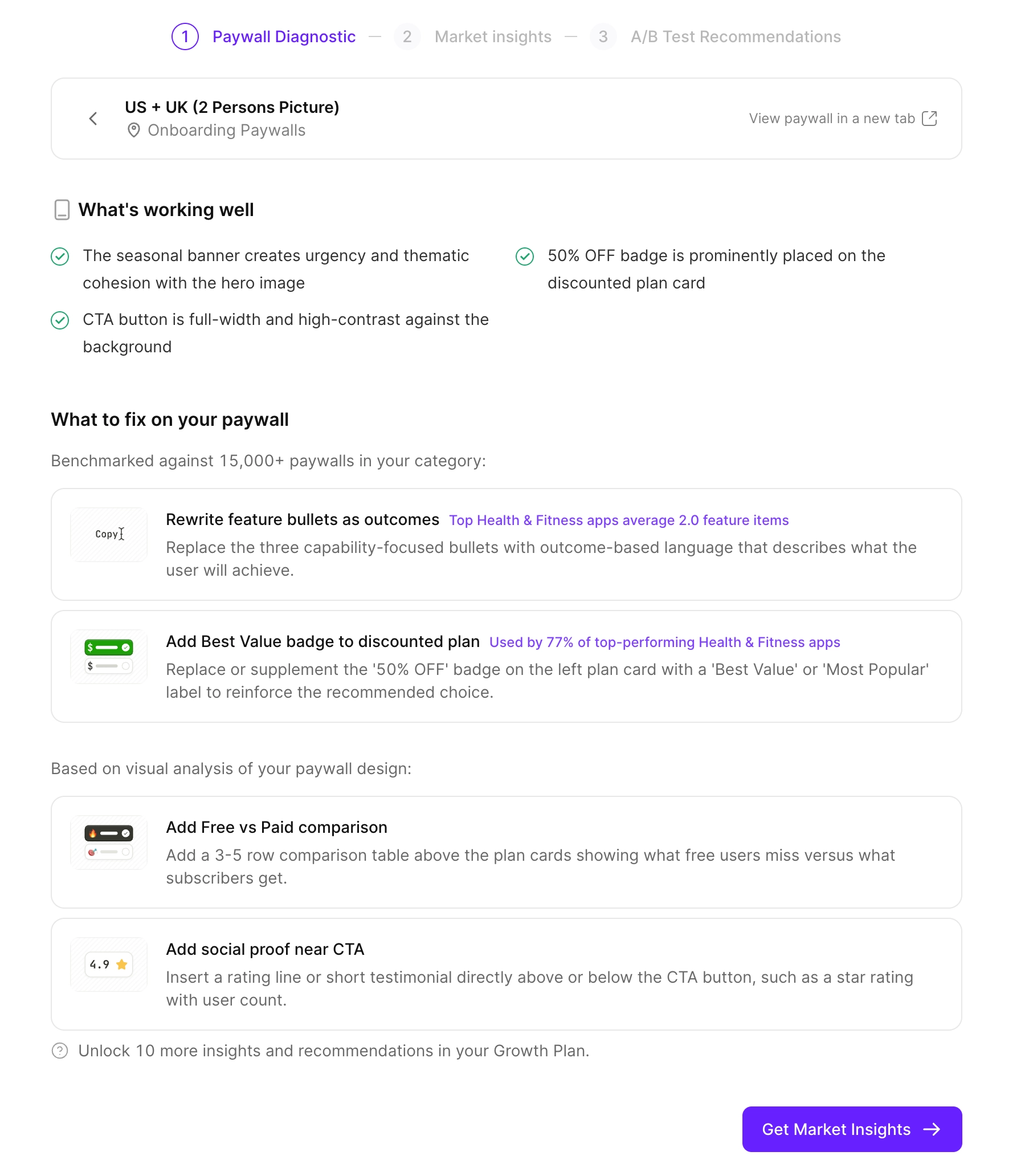
These recommendations feed directly into your growth plan as hypotheses you can launch as A/B tests.
Competitor data
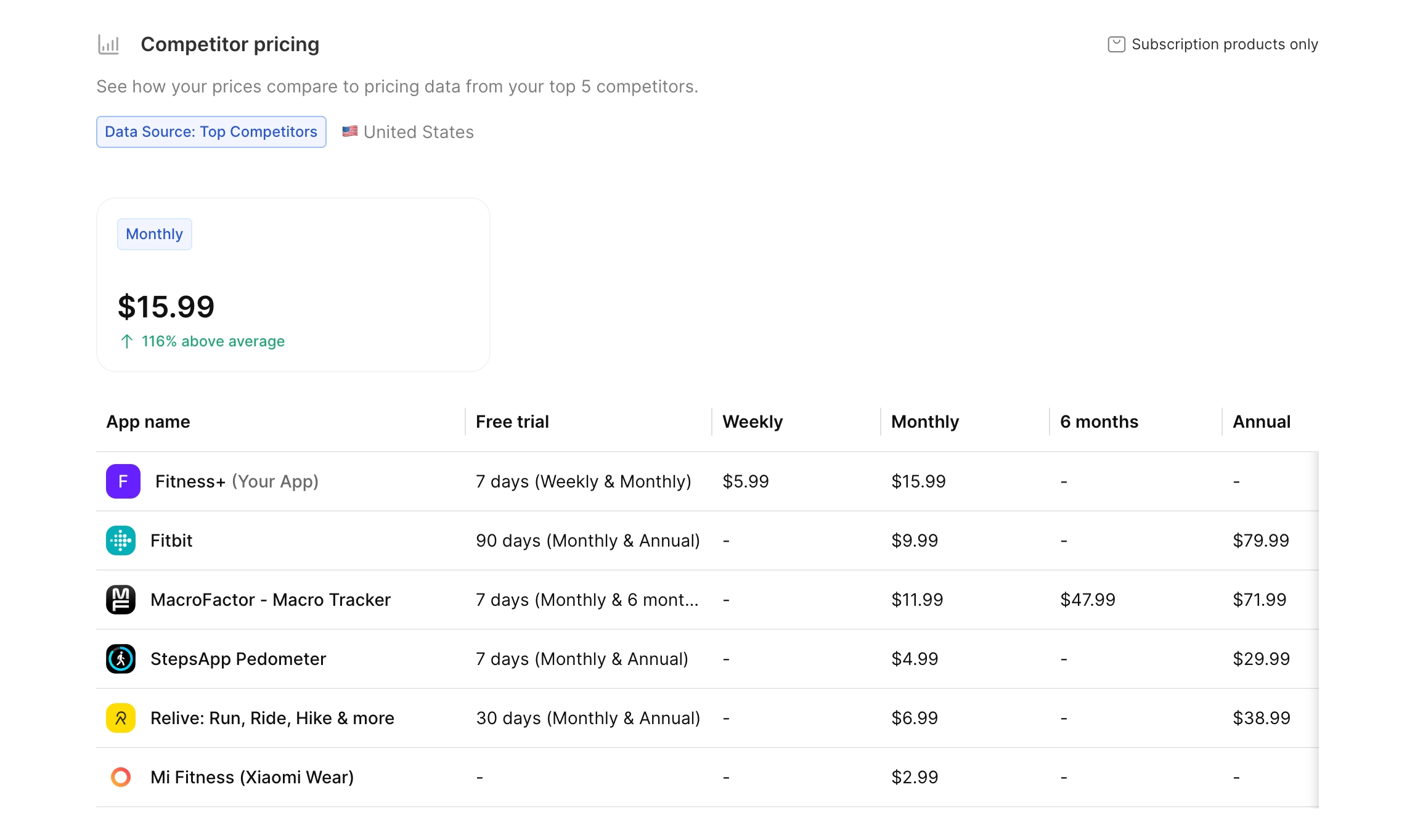
AI Growth Advisor compares your setup with similar apps in your market using public information like pricing, subscription structures, and common patterns in your category. These comparisons are country-specific, since competitor pricing and structures vary across markets. Competitor pricing comes from third-party and public sources like the App Store — distinct from the anonymized Adapty network data used by the metric analysis.
This way, you’re testing strategies that already work for apps like yours, not just random ideas. When you see the analysis, you can compare your benchmarks and competitor prices side by side. If similar apps are doing better with different pricing or structure, that’s a good signal that the same approach could work for you too.
AI Growth Advisor selects relevant competitors automatically based on what you can realistically compete with. We generally recommend sticking with these suggestions rather than adding apps that are too far ahead or too far behind. If your app falls into several categories, you might want to adjust the list to focus on the most relevant market segment.
Industry benchmarks
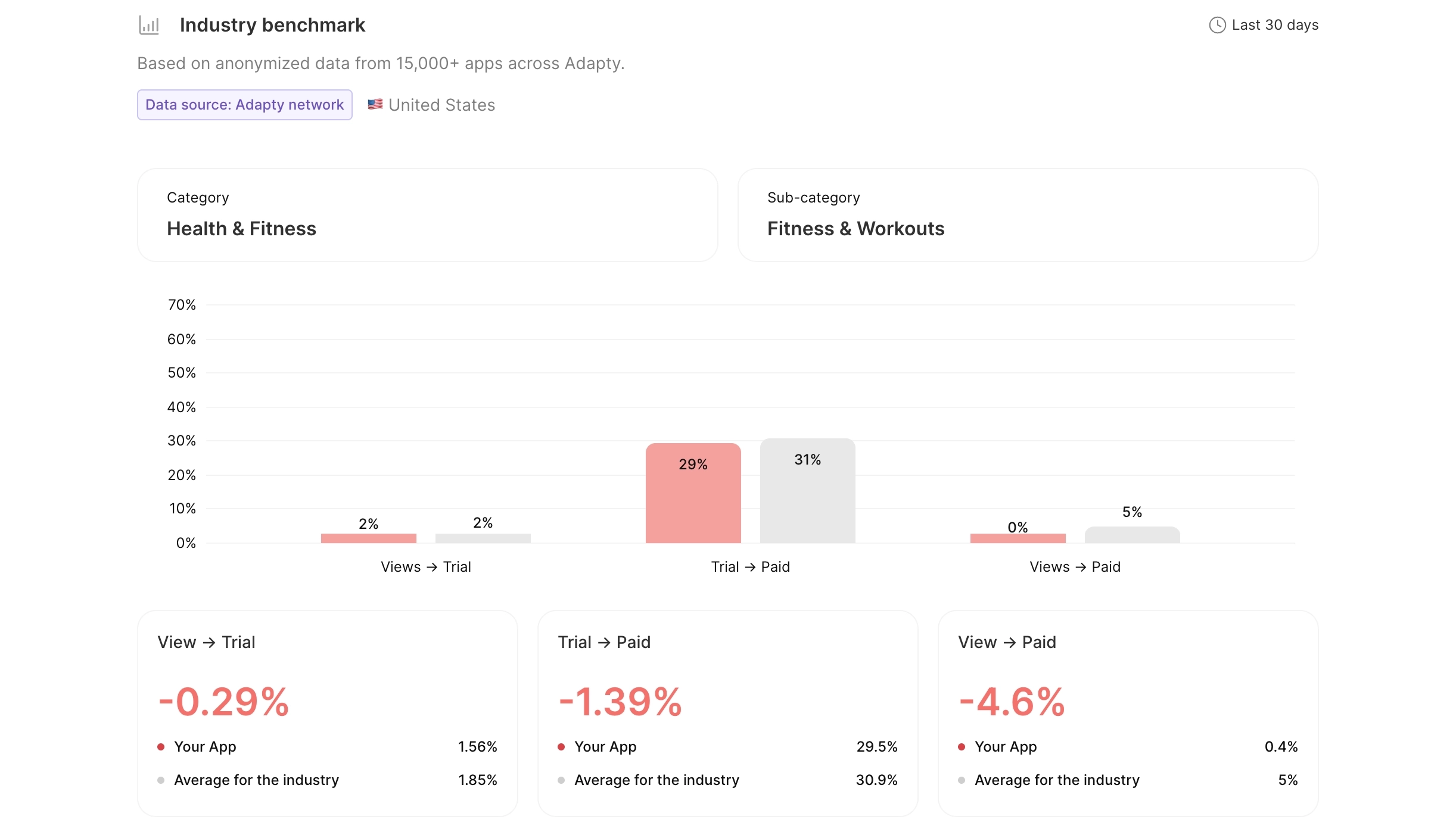
AI Growth Advisor draws on anonymized data from 20,000 subscription apps tracked by Adapty to show how you compare to the category average within a specific country. The data is aggregated across the network and never tied to a specific app.
For example, your conversion funnel and revenue per install are compared against the average for apps in your category and country. This helps you see if you’re underperforming, doing about average, or already ahead of the curve.
Geographic market data
AI Growth Advisor analyzes individual geographic markets — drawing on patterns across the 20,000-app Adapty network — to identify where regional pricing adjustments could unlock more revenue. For each country, it evaluates:
- Conversion rate: How the install-to-paid rate compares to the global average. A higher rate may indicate room to increase prices; a lower rate may signal price sensitivity.
- Price index: The country’s position in the Adapty Pricing Index, which indicates its residents’ purchasing power.
You can act on these recommendations by creating A/B tests from the geo-pricing suggestions in your growth plan.
How AI Growth Advisor decides what to recommend
AI Growth Advisor generates a pool of suggestions to improve your paywall conversion. These suggestions are designed to be tested one by one in order to reliably measure the impact of each change.
Here’s how AI Growth Advisor comes up with suggestions:
-
Find the biggest opportunities
AI Growth Advisor reviews your pricing, products, and funnel performance, then compares them with industry patterns and similar apps. The analysis runs in your primary market’s currency — not just USD — so price recommendations match what your subscribers actually pay. It looks for where you have the most room to improve, whether that’s adjusting your price, adding a trial, or changing your offer structure.
-
Select the next experiment
Each hypothesis is generated based on your existing test history. AI Growth Advisor knows which experiments you’ve already run, which ones won, and which directions are still worth exploring. The next suggestion builds on what the previous one revealed instead of following a fixed sequence.
-
Run winner vs. challenger tests
After each experiment, the winner becomes your new baseline. That result shapes the next recommendation in your growth plan — AI Growth Advisor keeps what worked, rules out what didn’t, and picks the next test from there.
-
Keep it practical
AI Growth Advisor only suggests tests you can launch with your existing products and setup, or with small changes like creating a new product or adjusting a price. The goal is to keep testing fast and manageable.
-
Show you the reasoning
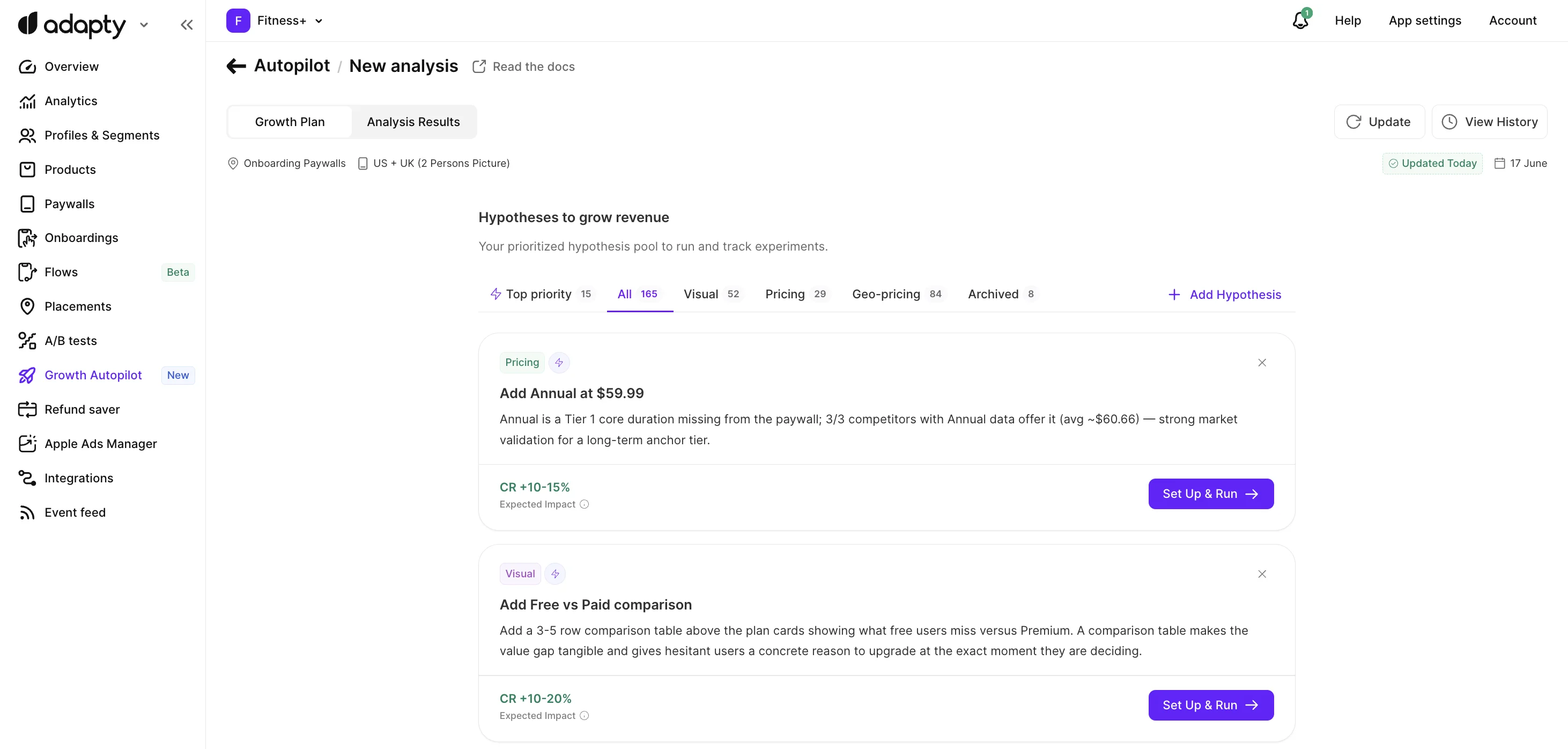
For each recommendation, AI Growth Advisor provides a clear hypothesis that explains exactly why this test is worth running. You’ll see how your current metrics compare to competitors and industry averages, what the opportunity is, and which key metrics we expect to improve.
This turns experimentation into a repeatable process where each test teaches you something and moves you toward a more effective paywall.
What happens after each experiment
Recommendations don’t run out. Each completed test becomes the basis for further experiments. As long as you keep testing, AI Growth Advisor keeps suggesting what to try next.
To refresh the underlying market data, rerun the analysis on the same placement. Each re-run pulls in updated competitor pricing, conversion benchmarks, and category trends, and contributes any newly identified hypotheses to your growth plan without disturbing what’s already there. Your existing AI-generated hypotheses, custom hypotheses, and in-progress A/B tests are preserved across re-runs.
Once you’ve optimized your baseline, you might also choose to compete with more advanced competitors. This iterative approach helps you keep maximizing your revenue as your app grows and the market evolves.
Ready to try? Launch AI Growth Advisor to analyze your paywalls and generate a growth plan with A/B tests. Use the built-in wizard to seamlessly launch complex tests: it will guide you through product creation, paywall duplication, and segment setup.