
Get Push notifications about new events
Push notifications in the Adapty mobile app for iOS and Android help you stay updated on what’s happening with your apps in real time. Whether you’re tracking new trials, subscription renewals, or installs, you’ll get instant updates without checking the dashboard.
You can set default notification settings that apply to all apps, and then adjust them for specific apps if you need more control. This is especially useful when you’re launching a new app and want to monitor early activity closely.
The total number of notifications for all your apps combined is limited to 1000/day.
Configure Push notifications
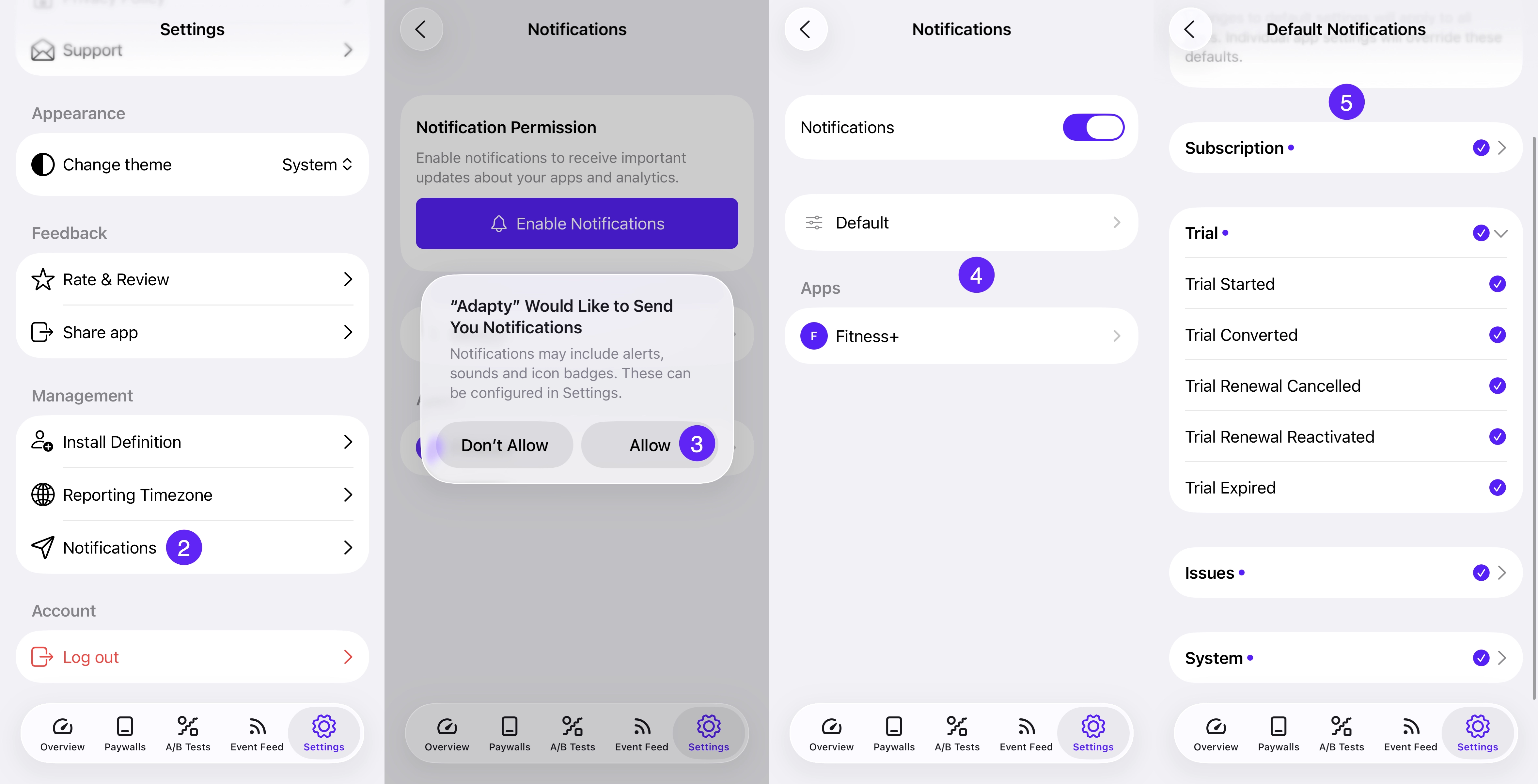
To configure push notifications in the Adapty mobile app:
- Open the Adapty app.
- Go to Settings → Notifications.
- Tap Enable notifications to let the app send you notifications.
- Choose whether to use Default settings or configure notifications per app. Note that individual app settings override default settings.
- Select which events you’d like to receive notifications for.
Supported events
You can receive push notifications for the following event types:
- Access level updated
- Auto-renew turned off
- Auto-renew turned on
- Billing issue detected
- Entered grace period
- Non-subscription purchase
- Non-subscription purchase refunded
- Subscription cancelled
- Subscription deferred
- Subscription initial purchase
- Subscription paused
- Subscription refunded
- Subscription renewed
- Trial canceled
- Trial converted
- Trial started