
Monitor domain health in Adapty Mail
Look at your domain metrics to detect early signs that email providers start classifying your campaigns as spam. Bounces, complaints, and inbox placement can signal future issues — monitor them to treat problems early on.
Find your domain in the Email domains section of the DNS page. Click Details to view its health metrics:
- Deliverability score: A rating from 0 to 100.
- Bounces: Bounces from the domain over the last 30 days, grouped by reason.
- Inbox placement: Which folder emails from the warm-up mailbox reached at each major mail provider.
- Send tiers: Progress through the send tiers, and the current cap.
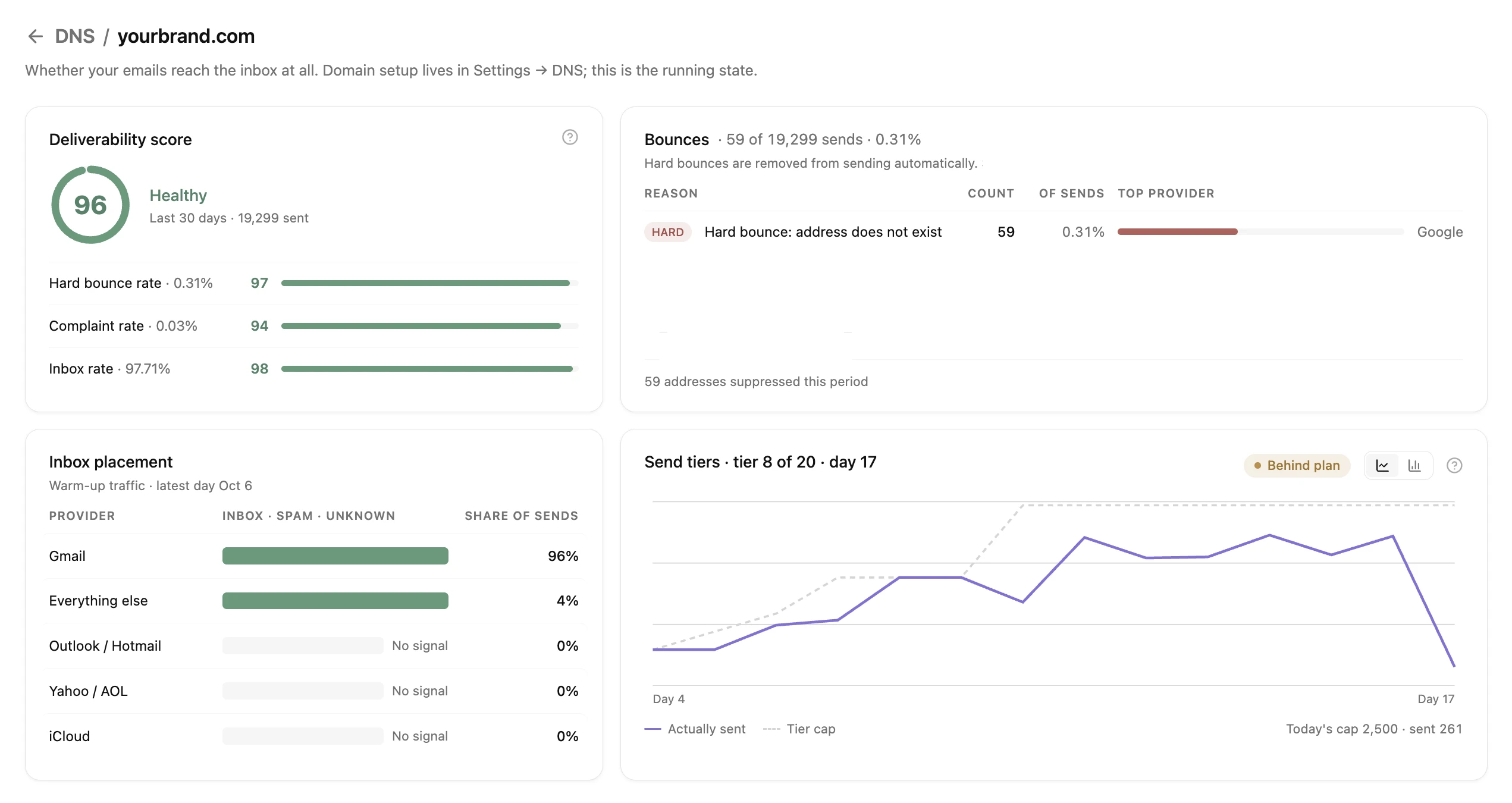
Deliverability score
The Deliverability score card shows one of the following statuses:
| Status | Score |
|---|---|
| Healthy | 90–100 |
| Needs attention | 50–89 |
| At risk | Below 50 |
| No data yet | None: the domain sent no campaign emails in the last 30 days |
The score doesn’t affect send tiers. To raise a low score, follow the troubleshooting steps.
How the score is calculated
The score combines the following signals, each scored from 0 to 100:
| Signal | Weight | What it measures | Scores 100 at | Scores 80 at | Scores 0 at |
|---|---|---|---|---|---|
| Complaint rate | 45% | Spam complaints on campaign emails, last 30 days | 0% | 0.1% | 0.5% or more |
| Hard bounce rate | 35% | Hard bounces on campaign emails, last 30 days | 0% | 2% | 5% or more |
| Inbox rate | 20% | Warm-up emails that reached the inbox, last 7 days | 100% | 80% | 0% |
The score is the weighted average of the signals, with two adjustments:
- The weakest signal restricts the score: Once the domain has sent enough emails, the score can’t rise more than 10 points above its weakest signal. One weak signal is then enough to put the domain At risk.
- Signals from few emails have less influence: On a new domain, one hard bounce in 50 emails is already a 2% rate. Until the domain has sent a few hundred campaign emails in the last 30 days, the score is marked Early data.
Without warm-up data, the score only combines the complaint and hard bounce rates. Test emails don’t count toward any signal.
Bounces
The Bounces card groups the bounces of the last 30 days by reason. For each reason, the Top provider column identifies the provider with the most bounces. A tag on a reason shows its bounce type:
- HARD: Delivery failed for a permanent reason, such as an address that doesn’t exist.
- SOFT: Delivery failed for a temporary reason, such as a full mailbox or rejected content.
The rate in the Bounces card title includes both hard and soft bounces. The deliverability score excludes soft bounces, as Amazon SES does.
Every bounce, hard or soft, suppresses the recipient: Adapty Mail stops sending to them.
To reduce bounces, look for what most of them have in common:
| What you see | What to do |
|---|---|
| Most bounces have the HARD tag | Review where the bounced addresses come from, such as a signup form. |
| Most bounces are Content rejected | Review the links and wording in your emails. |
| One provider is the Top provider for most bounces | Contact support. |
Inbox placement
The Inbox placement card shows which folder the warm-up emails reached for each major provider. The warm-up mailbox of the domain exchanges these emails with test mailboxes at those providers. The card excludes campaign emails, because no sender can see which folder they reach.
Besides Inbox and Spam, a provider row can show the following labels:
- Unknown: Warm-up emails that bounced or weren’t delivered.
- No signal: The warm-up mailbox sent no emails to the provider.
The card covers a single day: yesterday at the latest, because Adapty Mail collects the data daily. To see the history of a provider, click its row.
Until the warm-up mailbox sends its first emails, the card shows No warm-up data collected yet. If the message stays, make sure the Warmup mailbox records are verified. A domain set up before automatic warm-up has no warm-up mailbox, so the card keeps showing this message.
Send tiers (daily email caps)
A domain warms up separately for each group of mailbox providers. The Send tiers card has one row per group, with its current tier, its cap for today, and its day of warm-up. For a new domain, each cap starts at 100 emails a day and rises through 20 tiers. To see which mailbox domains a group covers, hover over its name. How tiers work lists every tier and its cap, and the open rates that move a group up or down.
A group moves up a tier the day after it reaches its daily cap, if enough of its recipients open the emails. Emails that Adapty Mail delays because of the cap still count toward it. To see a chart that compares sent emails with the cap for each of the last 14 days, click the row of a group.
Each group shows one of the following statuses:
- Not started: The domain hasn’t sent a campaign email to the group yet.
- Climbing: The group moved up a tier in the last three days.
- Lowered: The group moved down a tier in the last three days, because few of its recipients opened the emails.
- Holding: The tier of the group didn’t change in the last three days. With a small audience, this status is normal.
- Warmed up: The group passed the top tier and has no daily cap.
Limitations
- Inbox placement is an estimate based on the warm-up emails: no sender can definitively determine which folder their email lands in.
- Gmail complaints are underreported: Gmail doesn’t report individual spam complaints to senders. As a result, the complaint rate understates how many people mark your emails as spam. To see your Gmail spam rate, use Google Postmaster Tools.
- The score covers one sending subdomain: The score and every card on the deliverability page cover only the sending subdomain whose Details you clicked. Two sending subdomains of the same root domain each have their own score.
- The score doesn’t reset when you re-add a domain: If you delete a domain and add it again with the same sending subdomain, its campaign emails from the last 30 days still count toward the score and the Bounces card.
Troubleshooting
-
The Deliverability score card shows Needs attention or At risk: Find the signal with the lowest score.
- Hard bounce rate: Review where the bounced addresses come from, such as a signup form.
- Complaint rate: Only send to recipients who opted in. To ask new recipients to confirm their address before any marketing email, turn on double opt-in.
- Inbox rate: Follow the sending domain troubleshooting for emails that go to spam.
If the score doesn’t improve, contact support.
-
The Deliverability score card shows No data yet (No data in Settings > DNS): The domain sent no campaign emails in the last 30 days. Test emails don’t count toward the score.
-
The Deliverability score card shows Early data: The domain has sent fewer than a few hundred campaign emails in the last 30 days.
-
A group doesn’t move to the next tier: A group moves up only when it reaches its daily cap, at least 200 emails are delivered to it in its last three days on the tier, its open rate reaches the bar, and its opens didn’t fall on the last day, as How tiers work describes. Until then, the group stays on its tier, however many days pass.
-
A group shows Lowered: Few of its recipients opened your emails. Follow the sending domain troubleshooting for emails that go to spam, and only send to recipients who opted in.
-
Campaigns go out slowly: When all your domains reach their caps for a recipient’s mailbox provider, Adapty Mail delays the remaining emails: marketing emails by a week, transactional emails by a day. On the first day of a tier, Adapty Mail splits the daily cap into equal hourly caps. If a delayed email can’t go out on its new date either, Adapty Mail cancels the campaign for its recipient. To raise the daily capacity before a large launch from a new domain, add more domains.