
Connect AI assistants to Adapty (MCP)
The Adapty MCP server connects an AI assistant to your Adapty account. Ask about revenue and conversions, set up products and placements, publish flows, or start an A/B test from a chat, in plain language. The assistant signs in with your Adapty account in the browser and gets your permissions. No API key is needed.
| Server URL | https://mcp.adapty.io/mcp |
| Protocol | MCP over Streamable HTTP, OAuth 2.1 sign-in in the browser |
| Works with | The Claude app (web and desktop), Claude Code, Codex, and other MCP clients that support OAuth sign-in |
The MCP server works best together with the Adapty skills. The server gives the assistant access to your account; the skills give it tested workflows for the work. Building flows and paywalls and finding what to test next in your analytics depend on the skills.
Used 6 Adapty tools
analytics_conversion— trial to paid, by country, last two monthsanalytics_conversion— trial to paid in Germany, by placementplacements_get—settings_upgradepaywalls_listab_tests_list— paywall tests onsettings_upgradeab_tests_create— a draft test, 50/50
Trial-to-paid fell only in Germany, from 41% to 29%, and only on the settings_upgrade placement.
Every other country held steady. On 2 October, settings_upgrade switched from the paywall Annual first to Weekly focus, which leads with the weekly plan. Since then, fewer German users who start a trial there pay after it ends.
I created a draft A/B test on settings_upgrade for users in Germany: Annual first against Weekly focus, 50/50. Nothing has changed for your users yet.
If I start the test, half of the German users who open settings_upgrade see Annual first from today. Users in other countries keep seeing Weekly focus. You can stop the test at any time, but you can’t undo the start. Start it?
- Yes, start the test
- No, keep it as a draft
Add the Adapty skills
The MCP server gives your assistant access to your Adapty account. The Adapty skills give it the know-how: tested workflows that plan a change, verify it, and ask before each step that reaches your users. Install them together. The adapty-skills plugin includes the skills and this MCP server.
Two kinds of work depend on the skills:
- Flows and paywalls: The flow-generator skill includes the Flow Builder’s config rules. It builds screens from a description or a screenshot, and validates and previews every change before it saves the flow. Without the skill, an assistant can read and write a flow config, but it has no rules for a valid one.
- Analytics and what to test next: The growth-advisor skill knows which reports to read and how to read them, and turns your numbers into hypotheses to A/B test. Without the skill, an assistant can fetch your charts, but it has no method to explain them.
Add the plugin in the Claude app
You add the plugin from the Claude settings, with no command line.
- In Claude, open Settings → Plugins.
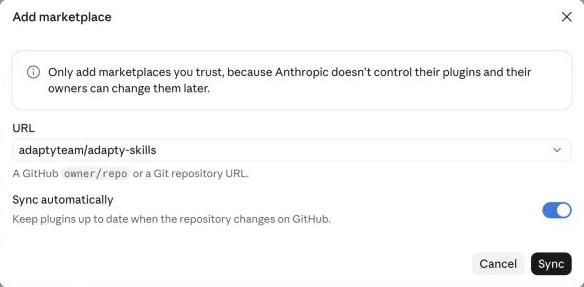
- Click Add → Add marketplace.
- Select Add from a repository.
- In the URL field, enter
adaptyteam/adapty-skillsand select the repository. To get new skills and fixes as they ship, keep Sync automatically on. - Click Sync.
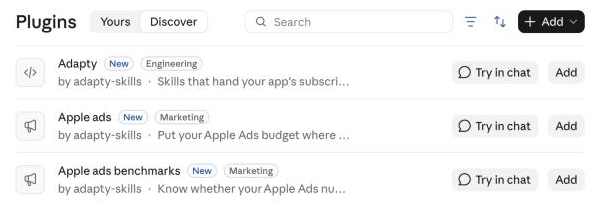
Claude opens the Discover tab with the plugins from the Adapty marketplace. To install the skills, in the Adapty row, click Add.
The skills run their scripts in Claude’s sandbox. To let them, in Settings → Capabilities, turn on Code execution and file creation.
Add the plugin in a coding agent
In Claude Code, Codex, Copilot CLI, Gemini CLI, Cursor, and other coding agents, run:
npx adapty skills installThe command installs the plugin through your agent’s own installer when it has one. Restart your agent afterwards. In Claude Code and Codex, the plugin also adds the Adapty MCP server, so you only sign in, as Connect your assistant describes.
Which skills use the MCP server and which use the CLI
Before its first step, each skill detects whether your agent has the MCP server, the Adapty Developer CLI, or both. With one, the skill uses it. With both, the skill uses the one that suits its work:
- MCP server: Running A/B tests, integrating the SDK, and testing purchases.
- Adapty CLI: Building and auditing flows, finding what to test next, moving placements to flows, and creating segments. These skills run their own scripts and files, and the CLI hands them files directly.
Build and edit flows
Install the flow-generator skill so your own AI coding tool can author, translate, and restructure Adapty flows through the Adapty CLI.
Find what to test next
Install the growth-advisor skill so your AI coding tool reads your Adapty analytics, finds where your app loses revenue, and suggests what to A/B test next.
Run A/B tests
Install the ab-tests skill so your AI coding tool creates, starts, stops, and replaces paywall and flow A/B tests in Adapty, and shows you who sees what before each step that can't be undone.
Skill-based integration
Use the adapty-integration skill to integrate the Adapty SDK into your iOS app end to end with your AI coding tool.
What the assistant can do
The server’s tools follow the Adapty Dashboard and the Adapty Developer CLI. The assistant picks the tools for your request; you don’t name them.
| Area | What the assistant can do | Try asking |
|---|---|---|
| Apps and access levels | List, create, and update apps and access levels | ”Create an access level premium in Fitness Pro.” |
| Products and offers | Create products with their store product IDs, and link store offers to them | ”Which of my products have no Google Play product ID?” |
| Paywalls | Create and update paywalls, and find the placements that show each one | ”Which placements show the paywall Annual sale?” |
| Flows | Create flows, read and write their builder configs, validate, preview, publish, and read flow metrics | ”Publish the flow Onboarding v2 and tell me which placements show it.” |
| Placements and audiences | Create placements and change who sees what, and read the metrics of flow placements | ”Who sees what on the onboarding placement?” |
| Segments | Read segments and their filters | ”List my segments and what each one filters on.” |
| A/B tests | Create, start, stop, replace, and archive paywall and flow A/B tests | ”Start the draft test Weekly vs annual for users in Germany.” |
| Analytics | Read revenue, MRR, conversions, the funnel, retention, LTV, and install cohorts | ”Compare trial-to-paid conversion by country for last month.” |
| Migration from RevenueCat | Create and run a migration of your RevenueCat catalog to a new Adapty app | ”Move my RevenueCat project to a new Adapty app.” |
Adapty Mail has its own MCP server. To connect an assistant to your Adapty Mail project, see Manage Adapty Mail with AI assistants.
Choose the MCP server or the CLI
The MCP server and the Adapty Developer CLI reach the same Adapty account. Choose by where your assistant runs:
| Adapty MCP server | Adapty CLI | |
|---|---|---|
| Runs in | Any MCP client, including chat apps such as the Claude app | Agents that run terminal commands, and your own scripts |
| Sign-in | Once per client, in the browser | adapty auth login, once per machine |
| Best for | Questions and changes from a chat | Editing flow configs, bulk changes, and scripts |
| Install | Nothing to install | npm install -g adapty |
An agent can use both. In the Claude app, the MCP server needs less setup than the CLI: the CLI has to be installed and authorized in every conversation, as Set up the Adapty CLI in the Claude app describes.
Before you start
- Adapty account: The assistant works in the companies and apps your Adapty account can open, with your permissions.
- MCP client with OAuth: Your client supports remote MCP servers that sign in with OAuth.
The assistant acts with your rights, and its changes are real. A started A/B test or a changed placement reaches your users. Before the assistant starts or stops an A/B test, or changes who sees what on a placement, the server asks it to describe the exact effect and wait for your yes. Read the plan before you approve it.
Connect your assistant
Sign in
Every client ends in the same place: the Adapty sign-in page in your browser.
- Log in with your Adapty account, if you aren’t logged in already.
- Allow the client to access your Adapty account.
The client then reads and changes data in the companies your account can open, and it stays signed in until you disconnect it. Approve only a sign-in that you started yourself.
To verify the connection, ask the assistant which Adapty account it’s signed in to. The answer should name you and the companies your account can open.
Start working
Ask the assistant which apps it can see, then name the app to work on. Some requests to try:
List my Adapty apps and their placements.
How did revenue and new subscriptions change last month compared with the month before?
Which products in Fitness Pro have no App Store product ID?
Show who sees what on the onboarding placement, including any A/B test.
Create a draft A/B test on main_paywall: the current paywall against Annual sale, 50/50.
The assistant asks for confirmation before the steps that change what users see. A request that only reads data runs without questions.
After a task of several steps, the assistant can send the Adapty team a short note about how the task went. The note contains no personal data of your app’s users.
Disconnect
To disconnect, remove the server in the client:
- Claude app: In Settings → Connectors, remove the Adapty connector.
- Claude Code: Run
claude mcp remove adapty. If the server came with theadapty-skillsplugin, disable it in/mcpinstead. - Codex: Remove the
adaptyserver from~/.codex/config.toml.
To connect again, add the server and sign in once more.
Troubleshooting
| Issue | Solution |
|---|---|
| Claude Code shows the server as Needs authentication | The client added the server but didn’t sign in. Run /mcp, select the Adapty server, and choose Authenticate. |
| The client lists no Adapty tools | Finish the sign-in, then start a new session. Some clients load tools only at the start of a session. |
| The assistant can’t find an app | The app belongs to a company your Adapty account can’t open. Ask a company owner for access. |
| The client can’t complete the sign-in | The client doesn’t support the sign-in method the server uses. Connect from the Claude app, Claude Code, or Codex, or use the Adapty Developer CLI. |