
Profiles in Adapty Mail
A profile is one customer in your project. The Profiles page lists everyone Adapty Mail knows about and shows each person’s purchase outcome, email engagement, and full activity journey.
Profiles arrive automatically, through whichever entry point you set up. An email address is the entry requirement: Adapty Mail creates no profile for a customer who hasn’t given you one.
To group profiles into reusable audiences for flows and A/B tests, see Segments.
How profiles get into Adapty Mail
Adapty Mail creates profiles automatically from three sources:
- Adapty: The Adapty SDK collects emails and purchases from your app. See Connect Adapty to Adapty Mail.
- Adapty Mail API: Your backend sends profiles and transactions server-to-server. See Send data via the API.
- FunnelFox: Your web funnels forward emails, purchases, and subscription events. See Connect FunnelFox to Adapty Mail.
Adapty Mail matches people by email address. Two sources reporting the same address land on one profile; two different addresses create separate profiles, even when customer_user_id is identical. Each source keeps its own identifier for the person, and the profile page lists them all under External Profile IDs.
If you also use Adapty, a profile here is not your Adapty profile. Adapty Mail keeps its own records and stores the Adapty profile ID as one of those external IDs. Expect fewer profiles here than in Adapty, because an Adapty profile with no email address never arrives.
You can’t create or edit profiles here — whichever source sent them owns that data — but you can unsubscribe and delete them.
The Profiles list
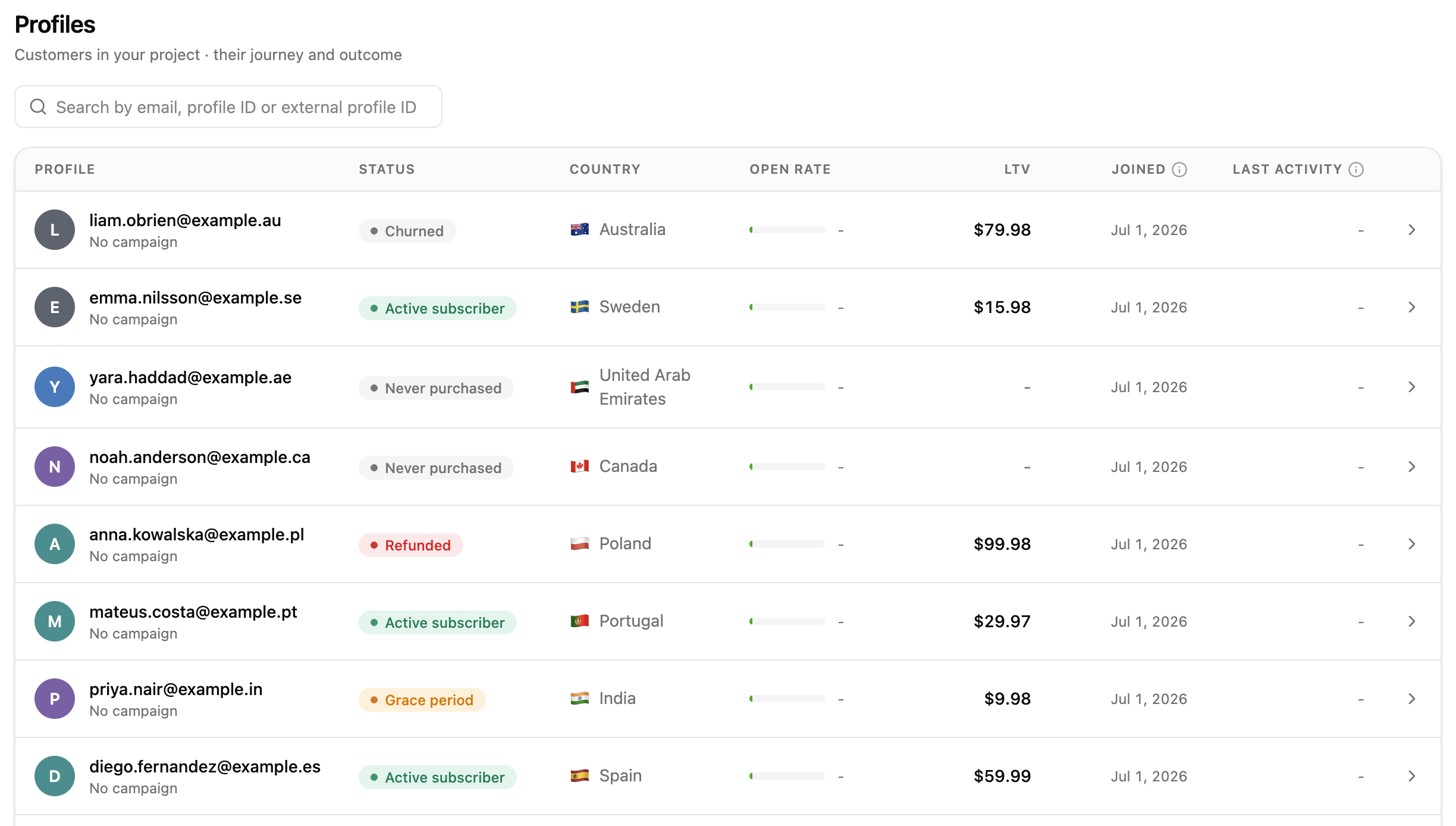
The list shows one profile per row, newest first. Use the search box to find a profile by email, profile ID, or external profile ID.
| Column | Shows |
|---|---|
| Profile | The customer’s email and the campaign behind their most recent email event. |
| Status | The profile’s purchase state. See Profile status. |
| Country | The customer’s country. |
| Open rate | Emails opened divided by emails sent. A dash means no emails were sent yet. |
| LTV | Lifetime value — total revenue from this profile across all sources. |
| Joined | When the profile first entered Adapty Mail. |
| Last activity | When the profile’s most recent email event happened. A send counts, not only an open or a click. |
Joined is the date the profile first entered Adapty Mail, used as the “customer since” date. It is the ingest time, not the original signup date from your app.
Profile status
The Status column shows the profile’s purchase state — what the customer bought and whether it’s still active. It says nothing about whether they receive your emails.
| Status | Meaning |
|---|---|
| Never purchased | The customer hasn’t bought anything. |
| Purchased | The customer made a one-time purchase. |
| Active subscriber | The customer has a paid subscription set to renew. |
| Renewal cancelled | Auto-renew is off; access lasts until the current period ends. |
| Billing issue | A renewal payment failed. |
| Grace period | Payment failed, but access continues during the store’s grace period. |
| Churned | The subscription expired and access ended. |
| Refunded | A purchase was refunded. |
A profile can be an Active subscriber yet Unsubscribed from your emails, or Churned yet still Subscribed. The email status appears on the profile page and controls whether Adapty Mail can send to the profile.
Profile details
Click a profile to open its detail page.
The profile header
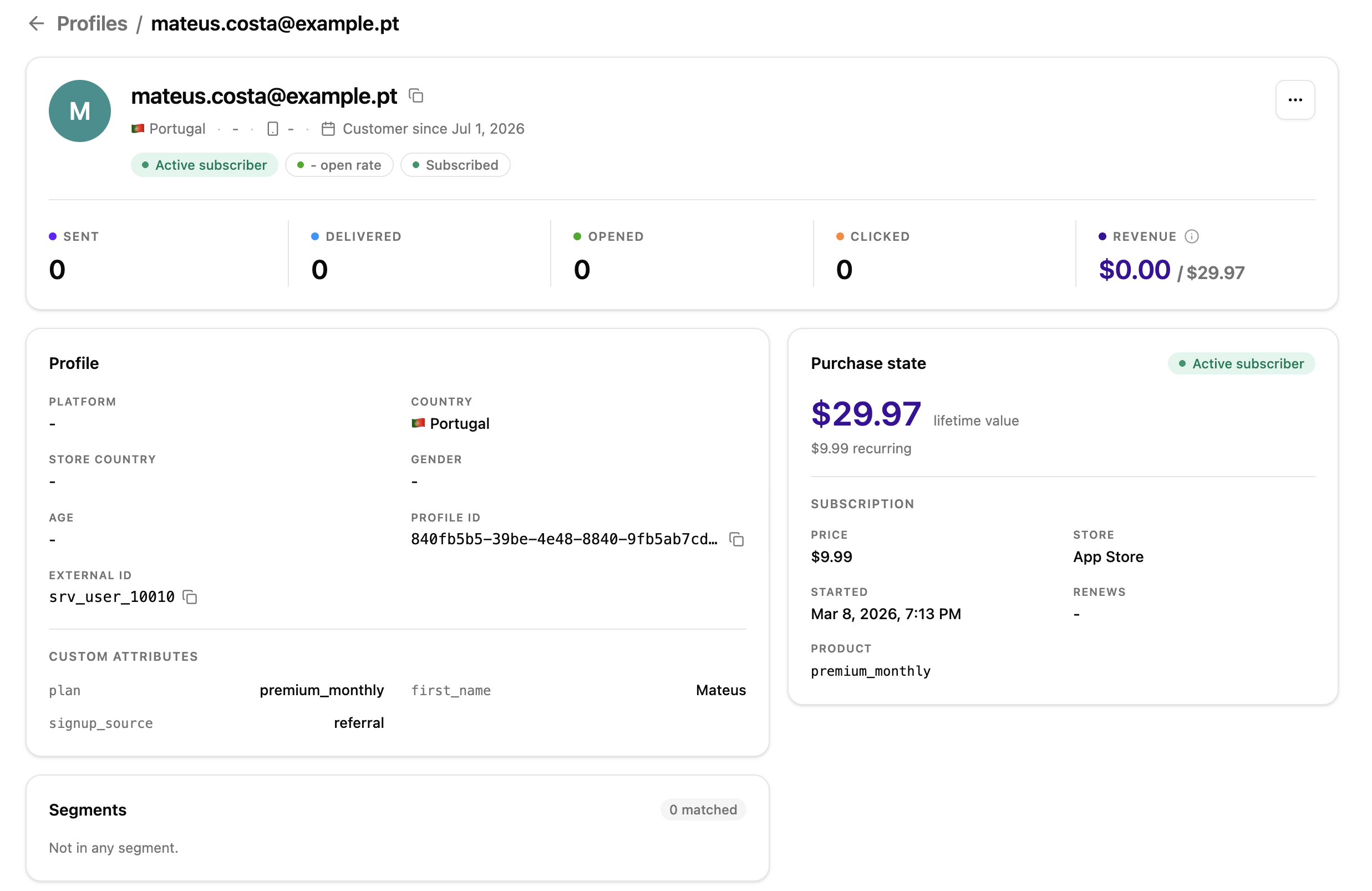
The header identifies the customer: email, country, gender, age, platform, and the “customer since” date. It also carries three badges:
- Purchase status: The profile’s purchase state, using the values listed under Profile status.
- Open rate: This profile’s opens against the emails sent to it. Analytics counts recipients who opened at least once, not emails, so the two figures differ.
- Email status: Subscribed, or the reason sending stopped — such as Unsubscribed, Bounced, or Reported spam. This badge is unrelated to the paid subscription in Status.
Subscribed means nothing blocks a send — not that anything is scheduled. The profile still has to match a segment in a flow, and double opt-in holds marketing back until they confirm their address. Reasons emails stop covers every reason that replaces Subscribed.
Engagement metrics
Five metrics run across the top of the page:
- Sent: Emails sent to the profile.
- Delivered: Emails the mailbox provider accepted.
- Opened: Times the recipient opened an email, counting repeat opens.
- Clicked: Times the recipient clicked a link.
- Revenue: Two figures — attributed revenue and lifetime value.
Attributed revenue is revenue driven by your emails: purchases the customer made after clicking a link in one. Lifetime value (LTV) is the profile’s total revenue across all sources, whether or not email played a part. The header shows attributed revenue first, then LTV.
The Profile card
The Profile card lists the customer’s attributes:
- Platform: The platform of the customer’s most recent device, such as iOS or Android.
- Email provider: Who runs the mailbox — Google, iCloud, Proton, and so on — identified from the domain’s MX records. Disposable marks a throwaway-address service, which fails verification and arrives already suppressed.
- Country: The customer’s country.
- Store country: The country of the customer’s App Store or Google Play account.
- Gender: The customer’s gender, if known.
- Age: The customer’s age, followed by the birthday the source sent.
- Profile ID: Adapty Mail’s internal identifier for the profile.
External Profile IDs lists one entry per source — Adapty, FunnelFox, or Custom — each with the identifier that source uses for this person and when it first arrived. Custom attributes lists the key-value pairs the source sent.
Purchase state
The Purchase state card shows the profile’s revenue and purchase history. Lifetime value appears at the top, with the recurring revenue beneath it, followed by up to two sections:
- Subscription: Price, store, start date, product ID, and a date labelled Renews while access lasts or Expired once it ends.
- One-time purchase: Price, store, purchase date, and product ID for the most recent one-time purchase.
When the customer has both, each section carries its own status badge. If they haven’t bought anything, the card shows No purchase yet.
Segments
The Segments card counts how many segments the profile currently matches and lists them; click one to open it. If none match, the card shows Not in any segment. Adapty Mail re-runs the filters on every request, so the list always reflects the latest profile data. Segments covers how to build them.
The activity journey
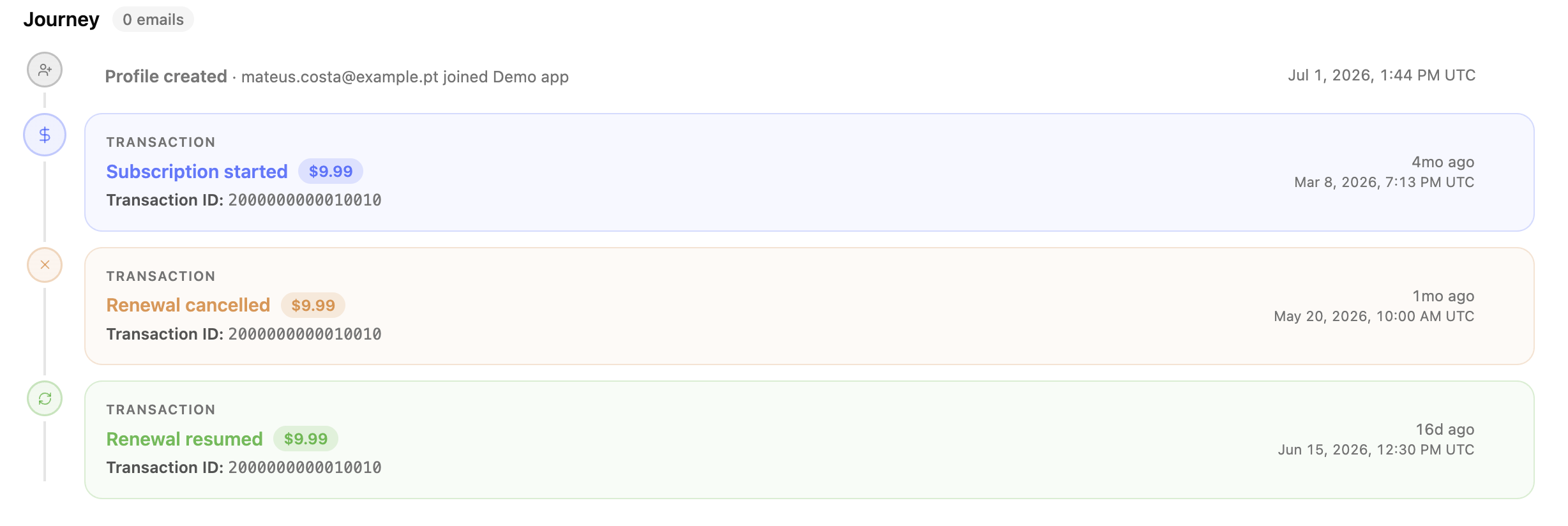
The Journey section is a timeline of everything that happened to the profile, starting with Profile created. Email events and transaction events interleave in one list.
Email events
Each entry is one email Adapty Mail sent. Expand it to see the links the recipient clicked and any purchase the email drove. A chip shows how far the email got:
| Chip | What it means |
|---|---|
| Scheduled | The email has a send time and Adapty Mail hasn’t sent it yet. |
| Sent | Adapty Mail sent the email and has no delivery confirmation for it yet. |
| Delivered | The receiving mail server accepted the email. This chip replaces Sent. |
| Opened | The tracking pixel loaded. |
| Clicked | The recipient clicked a link. Expand the email to see which links, and the purchase it drove. |
| Confirmed | The recipient confirmed their address from a double opt-in email. |
| Bounced | The receiving mail server refused the email and returned it. |
| Spam report | The recipient marked the email as spam. |
| Unsubscribed | The recipient unsubscribed. |
| Delayed | The receiving mail server asked Adapty Mail to try again later. |
| Throttled | Every sending domain was over its daily limit, so the email waits. |
| Cancelled | The email won’t send. A purchase, an unsubscribe, a bounce, a spam report, a deletion, or a second throttle all cancel what’s left of a sequence — see Reasons emails stop. |
Transaction events
Each entry is a subscription or one-time purchase milestone. The journey shows a plain-language label in place of the raw event_type:
event_type | Journey label |
|---|---|
subscription_started | Subscription started |
subscription_renewed | Subscription renewed |
subscription_renewal_cancelled | Renewal cancelled |
subscription_renewal_reactivated | Renewal resumed |
billing_issue_detected | Billing issue |
entered_grace_period | Entered grace period |
subscription_expired | Subscription expired |
subscription_refunded | Subscription refunded |
non_subscription_purchase | One-time purchase |
non_subscription_purchase_refunded | Purchase refunded |
These events reach Adapty Mail automatically through the Adapty SDK, or you can send them yourself through the API.
Unsubscribe a profile
To stop sending emails to a profile, open its page, click …, and select Unsubscribe. Adapty Mail marks the profile as unsubscribed and adds it to your suppression list, so campaigns and flows skip it.
Once a profile is suppressed — for any reason — Unsubscribe stays disabled. Reasons emails stop covers the two ways recipients unsubscribe themselves.

Delete a profile
Delete a profile to erase what Adapty Mail stores about a person — to answer a data-deletion request, for example.
To delete a profile, open its page, click …, select Delete, and confirm. Adapty Mail then:
- Erases the email address and every personal attribute: name, gender, birthday, country, store country, device details, and custom attributes.
- Cancels the emails still scheduled for the profile.
- Removes the profile from the Profiles page.
You can’t undo this. Purchase records survive with nothing left to identify the person, so your revenue totals don’t change.
Deletion doesn’t block the address. If a source sends it again, Adapty Mail creates a new profile, unconnected to the deleted one. To keep someone out for good, stop the source from sending their data.
Your backend can delete profiles too, through the Delete profile endpoint.