
Respond to purchase outcomes
When a purchase finishes, the Adapty SDK calls your app with the result. Nothing changes on screen until your app reacts. Your app can close the paywall, leave it open for another attempt, or open a second flow that confirms the purchase.
The builder can’t branch on a purchase result: no trigger fires when a purchase finishes, and no variable carries its outcome. So the transition belongs in your code, where the result arrives.
The work splits into three parts:
- Build the post-purchase flow and assign it to its own placement.
- In your app code, branch on the purchase result.
- On success, close the paywall and present the post-purchase flow.
Before you start
- Flows require Adapty SDK v4.0 or later.
- Build a paywall screen — for example, follow the Create a basic paywall screen recipe.
1. Build the post-purchase flow
Create the flow. It runs after the purchase, so it needs no products. To send the user back to your app’s own UI, add a button with the Close Flow action to the final screen.
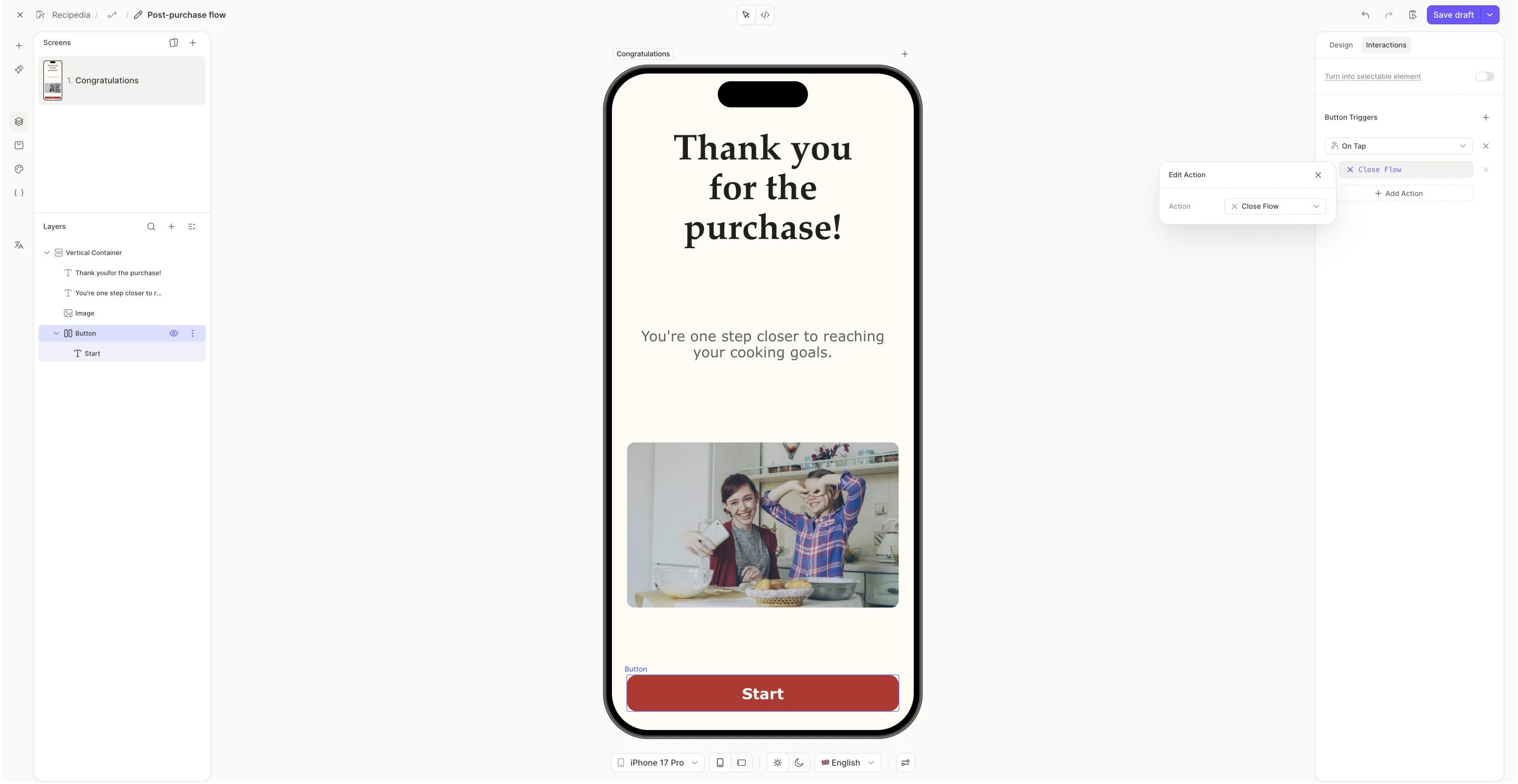
Use a Custom Action when the flow has more than one way out. Create multiple buttons, each with its own action ID, so your app can tell Set up now from Set up later.
2. Add the post-purchase flow to its own placement
To fetch the post-purchase flow from your app, assign it to its own placement. Your flow’s placement can’t serve it too — a placement serves one flow per audience.
- Publish the flow.
- Create a flow placement. Note the Placement ID — your app uses it to fetch the flow.
- Assign the post-purchase flow to the new placement.
3. Branch on the purchase result
Your app receives the purchase result through two callbacks:
- Completion: The purchase reached a conclusion — it succeeded, the user cancelled it, or the payment is pending approval (a parent’s confirmation, for example). Read the result’s type to tell the three apart. On success, the result carries the updated
AdaptyProfile. - Failure: An error stopped the purchase, and the callback carries an
AdaptyError— payment restrictions, invalid products, network failures, or transaction verification failures.
Callback names and signatures: iOS | Android | React Native | Flutter | Unity | Kotlin Multiplatform | Capacitor
Branch on the outcome:
- On success, close the paywall, then present the post-purchase flow.
- On a cancellation, a pending payment, or a failure, leave the paywall open.
Restores report through their own callback, which covers users who reinstall or switch devices. Confirm the returned profile has your access level active, then close and present a flow the same way. Point that callback at a separate flow — a screen that thanks the user for a purchase doesn’t fit a restore.
4. Load and present the post-purchase flow
To open the post-purchase flow without a wait, fetch it alongside the paywall, rather than inside the handler. Request its UI configuration too — that call is what starts caching the flow’s images in the background.
On iOS and Android, preloadFlows (SDK 4.1+) warms several placements in one call. It caches the placement JSON only, so pair it with a ReturnCacheDataElseLoad fetch policy and still request the UI configuration ahead of time.
Get flows and paywalls: iOS | Android | React Native | Flutter | Unity | Kotlin Multiplatform | Capacitor
Display flows and paywalls: iOS | Android | React Native | Flutter | Unity | Kotlin Multiplatform | Capacitor