React Native SDKでオンボーディングイベントを処理する
Warning
オンボーディングは Adapty SDK v4 以降で非推奨となりました。 代わりにフローを構築してください。オンボーディングは WebView 内で動作しますが、フローはデバイス上でネイティブにレンダリングされるため、アニメーションがスムーズで、一貫したネイティブの外観と操作感、高速な読み込み、そして WebView ランタイムへの依存がありません。
オンボーディングをビルダーで設定すると、アプリが応答できるイベントが生成されます。これらのイベントの処理方法は、使用しているプレゼンテーション方式によって異なります。
- モーダルプレゼンテーション: すべてのオンボーディングビューのイベントを処理するイベントハンドラーの設定が必要です
- Reactコンポーネント: ウィジェット内のインラインコールバックパラメーターで直接イベントを処理します
始める前に、以下を確認してください:
- Adapty React Native SDK バージョン 3.8.0 以降をインストール済みであること。
- オンボーディングを作成済みであること。
- オンボーディングをプレースメントに追加済みであること。
モバイルアプリのオンボーディング画面で発生するプロセスを制御・監視するには、イベントハンドラーを実装してください:
React コンポーネントの場合、AdaptyOnboardingView コンポーネントの個別のイベントハンドラープロップを通じてイベントを処理します。
function MyOnboarding({ onboarding }) {
  const onAnalytics = useCallback<OnboardingEventHandlers['onAnalytics']>((event, meta) => {}, []);
  const onClose = useCallback<OnboardingEventHandlers['onClose']>((actionId, meta) => {}, []);
  const onCustom = useCallback<OnboardingEventHandlers['onCustom']>((actionId, meta) => {}, []);
  const onPaywall = useCallback<OnboardingEventHandlers['onPaywall']>((actionId, meta) => {}, []);
  const onStateUpdated = useCallback<OnboardingEventHandlers['onStateUpdated']>((action, meta) => {}, []);
  const onFinishedLoading = useCallback<OnboardingEventHandlers['onFinishedLoading']>((meta) => {}, []);
  const onError = useCallback<OnboardingEventHandlers['onError']>((error) => {}, []);

  return (
    <AdaptyOnboardingView
      onboarding={onboarding}
      style={styles.container}
      onAnalytics={onAnalytics}
      onClose={onClose}
      onCustom={onCustom}
      onPaywall={onPaywall}
      onStateUpdated={onStateUpdated}
      onFinishedLoading={onFinishedLoading}
      onError={onError}
    />
  );
}
モーダル表示の場合は、イベントハンドラーメソッドを実装してください。
Important
setEventHandlers を複数回呼び出すと、指定したハンドラーが上書きされ、そのイベントに対するデフォルトおよび以前に設定したハンドラーが両方とも置き換えられます。
const view = await createOnboardingView(onboarding);

const unsubscribe = view.setEventHandlers({
  onAnalytics(event, meta) {
    // Track analytics events
  },
  onClose(actionId, meta) {
    // Handle close action
    view.dismiss();
    return true;
  },
  onCustom(actionId, meta) {
    // Handle custom actions
  },
  onPaywall(actionId, meta) {
    // Handle paywall actions
  },
  onStateUpdated(action, meta) {
    // Handle user input updates
  },
  onFinishedLoading(meta) {
    // Onboarding finished loading
  },
  onError(error) {
    // Handle loading errors
  },
});

try {
  await view.present();
} catch (error) {
  // handle the error
}
SDK バージョン 3.14 未満では、モーダル表示のみサポートされています:
const view = await createOnboardingView(onboarding);

const unsubscribe = view.registerEventHandlers({
  onAnalytics(event, meta) {
    // Track analytics events
  },
  onClose(actionId, meta) {
    // Handle close action
    view.dismiss();
    return true;
  },
  onCustom(actionId, meta) {
    // Handle custom actions
  },
  onPaywall(actionId, meta) {
    // Handle paywall actions
  },
  onStateUpdated(action, meta) {
    // Handle user input updates
  },
  onFinishedLoading(meta) {
    // Onboarding finished loading
  },
  onError(error) {
    // Handle loading errors
  },
});

try {
  await view.present();
} catch (error) {
  // handle the error
}
イベントの種類
以下のセクションでは、使用するプレゼンテーション方式に関わらず処理できる各種イベントについて説明します。
カスタムアクションの処理
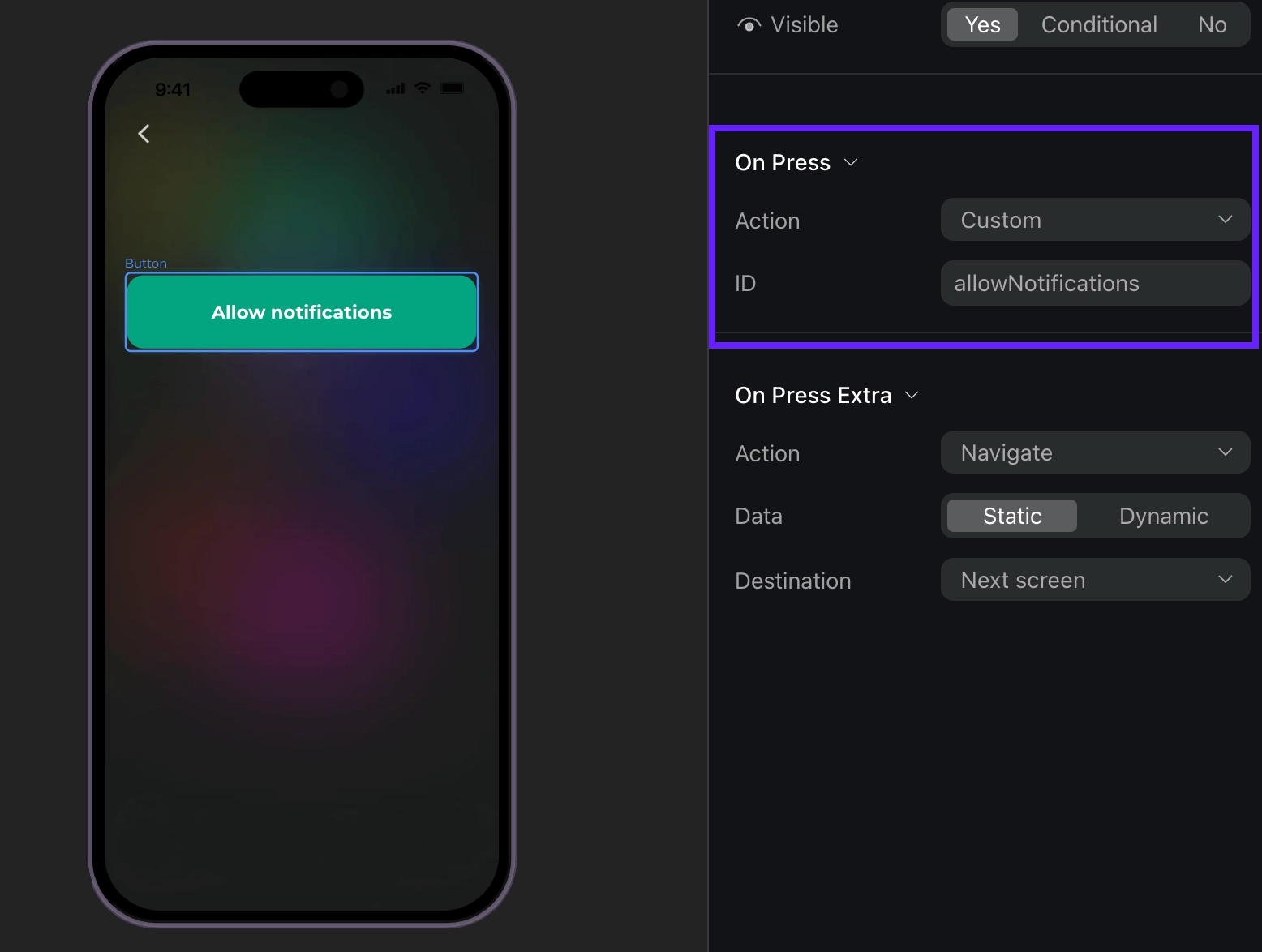
ビルダーでは、ボタンにカスタムアクションを追加してIDを割り当てることができます。
このIDをコード内で使用し、カスタムアクションとして処理できます。たとえば、ユーザーが Login や Allow notifications のようなカスタムボタンをタップすると、ビルダーの Action ID と一致する actionId パラメーターでイベントハンドラーが呼び出されます。“allowNotifications” のような独自のIDを作成することも可能です。
function MyOnboarding({ onboarding }) {
  const onCustom = useCallback<OnboardingEventHandlers['onCustom']>((actionId, meta) => {
    switch (actionId) {
      case 'login':
        login();
        break;
      case 'allow_notifications':
        allowNotifications();
        break;
    }
  }, []);

  return (
    <AdaptyOnboardingView
      onboarding={onboarding}
      style={styles.container}
      onCustom={onCustom}
    />
  );
}
const view = await createOnboardingView(onboarding);

const unsubscribe = view.setEventHandlers({
  onCustom(actionId, meta) {
    switch (actionId) {
      case 'login':
        login();
        break;
      case 'allow_notifications':
        allowNotifications();
        break;
    }
  },
});
const view = await createOnboardingView(onboarding);

const unsubscribe = view.registerEventHandlers({
  onCustom(actionId, meta) {
    switch (actionId) {
      case 'login':
        login();
        break;
      case 'allow_notifications':
        allowNotifications();
        break;
    }
  },
});
イベントの例(クリックして展開)
{
  "actionId": "allow_notifications",
  "meta": {
    "onboardingId": "onboarding_123",
    "screenClientId": "profile_screen",
    "screenIndex": 0,
    "screensTotal": 3
  }
}
オンボーディングの読み込み完了
オンボーディングの読み込みが完了すると、次のイベントが発生します。
function MyOnboarding({ onboarding }) {
  const onFinishedLoading = useCallback<OnboardingEventHandlers['onFinishedLoading']>((meta) => {
    console.log('Onboarding loaded:', meta.onboardingId);
  }, []);

  return (
    <AdaptyOnboardingView
      onboarding={onboarding}
      style={styles.container}
      onFinishedLoading={onFinishedLoading}
    />
  );
}
const view = await createOnboardingView(onboarding);

const unsubscribe = view.setEventHandlers({
  onFinishedLoading(meta) {
    console.log('Onboarding loaded:', meta.onboardingId);
  },
});
const view = await createOnboardingView(onboarding);

const unsubscribe = view.registerEventHandlers({
  onFinishedLoading(meta) {
    console.log('Onboarding loaded:', meta.onboardingId);
  },
});
イベントの例(クリックして展開)
{
    "meta": {
        "onboarding_id": "onboarding_123",
        "screen_cid": "welcome_screen",
        "screen_index": 0,
        "total_screens": 4
    }
}
オンボーディングを閉じる
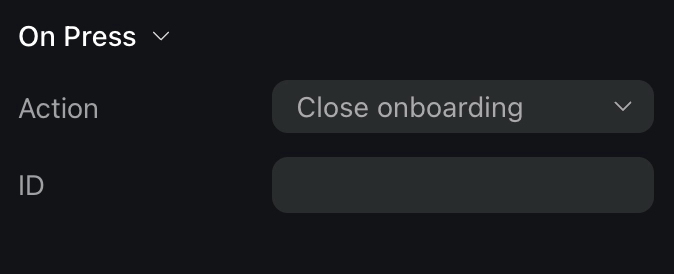
ユーザーがCloseアクションが割り当てられたボタンをタップすると、オンボーディングは閉じられたとみなされます。
Important
ユーザーがオンボーディングを閉じたときの処理は、ご自身で実装する必要があります。たとえば、オンボーディング自体の表示を停止する処理が必要です。
function MyOnboarding({ onboarding, navigation }) {
  const onClose = useCallback<OnboardingEventHandlers['onClose']>((actionId, meta) => {
    navigation.goBack();
  }, [navigation]);

  return (
    <AdaptyOnboardingView
      onboarding={onboarding}
      style={styles.container}
      onClose={onClose}
    />
  );
}
const view = await createOnboardingView(onboarding);

const unsubscribe = view.setEventHandlers({
  onClose(actionId, meta) {
    await view.dismiss();
    return true;
  },
});
const view = await createOnboardingView(onboarding);

const unsubscribe = view.registerEventHandlers({
  onClose(actionId, meta) {
    await view.dismiss();
    return true;
  },
});
イベントの例(クリックして展開)
{
  "action_id": "close_button",
  "meta": {
    "onboarding_id": "onboarding_123",
    "screen_cid": "final_screen",
    "screen_index": 3,
    "total_screens": 4
  }
}
ペイウォールを開く
Tip
オンボーディング内でペイウォールを開きたい場合は、このイベントを処理してください。ペイウォールを閉じた後に開きたい場合は、より簡単な方法があります。クローズアクションを処理し、イベントデータに依存せずにペイウォールを開いてください。
オンボーディングでペイウォールをシームレスに扱う最善の方法は、アクション ID をペイウォールのプレースメント ID と同じにすることです。
function MyOnboarding({ onboarding }) {
  const onPaywall = useCallback<OnboardingEventHandlers['onPaywall']>((actionId, meta) => {
    openPaywall(actionId);
  }, []);

  return (
    <AdaptyOnboardingView
      onboarding={onboarding}
      style={styles.container}
      onPaywall={onPaywall}
    />
  );
}

const openPaywall = async (placementId) => {
  // Implement your paywall opening logic here
};
iOSでは、ペイウォールまたはオンボーディングのうち、画面に表示できるビューは一度に1つだけです。オンボーディングの上にペイウォールを表示した場合、バックグラウンドにあるオンボーディングをプログラムから操作することはできません。オンボーディングを閉じようとすると、代わりにペイウォールが閉じられ、オンボーディングがそのまま表示され続けます。これを避けるため、ペイウォールを表示する前に必ずオンボーディングのビューを閉じてください。
const view = await createOnboardingView(onboarding);

const unsubscribe = view.setEventHandlers({
  onPaywall(actionId, meta) {
    view.dismiss().then(() => {
      openPaywall(actionId);
    });
  },
});

const openPaywall = async (placementId) => {
  // Implement your paywall opening logic here
};
Note
iOSでは、ペイウォールまたはオンボーディングのビューは同時に1つしか画面に表示できません。オンボーディングの上にペイウォールを表示した場合、バックグラウンドのオンボーディングをプログラムで制御することはできません。オンボーディングを閉じようとすると、代わりにペイウォールが閉じられ、オンボーディングが表示されたままになります。これを避けるために、ペイウォールを表示する前に必ずオンボーディングのビューを閉じてください。
const view = await createOnboardingView(onboarding);

const unsubscribe = view.registerEventHandlers({
  onPaywall(actionId, meta) {
    view.dismiss().then(() => {
      openPaywall(actionId);
    });
  },
});

const openPaywall = async (placementId) => {
  // ここにペイウォールを開くロジックを実装してください
};
イベントの例(クリックして展開)
{
    "action_id": "premium_offer_1",
    "meta": {
        "onboarding_id": "onboarding_123",
        "screen_cid": "pricing_screen",
        "screen_index": 2,
        "total_screens": 4
    }
}
ナビゲーションのトラッキング
オンボーディングフロー中にさまざまなナビゲーション関連イベントが発生すると、アナリティクスイベントを受け取ります。
function MyOnboarding({ onboarding }) {
  const onAnalytics = useCallback<OnboardingEventHandlers['onAnalytics']>((event, meta) => {
    trackEvent(event.name, meta.onboardingId);
  }, []);

  return (
    <AdaptyOnboardingView
      onboarding={onboarding}
      style={styles.container}
      onAnalytics={onAnalytics}
    />
  );
}
const view = await createOnboardingView(onboarding);

const unsubscribe = view.setEventHandlers({
  onAnalytics(event, meta) {
    trackEvent(event.name, meta.onboardingId);
  },
});
const view = await createOnboardingView(onboarding);

const unsubscribe = view.registerEventHandlers({
  onAnalytics(event, meta) {
    trackEvent(event.name, meta.onboardingId);
  },
});
event オブジェクトは以下のいずれかの型になります:
| タイプ | 説明 |
|---|
onboardingStarted | オンボーディングが読み込まれたとき |
screenPresented | いずれかの画面が表示されたとき |
screenCompleted | 画面が完了したとき。オプションの elementId(完了した要素の識別子)とオプションの reply(ユーザーからの回答)を含む。ユーザーが画面を離れる操作を行ったときにトリガーされる。 |
secondScreenPresented | 2番目の画面が表示されたとき |
userEmailCollected | 入力フィールドからユーザーのメールアドレスが収集されたときにトリガーされる |
onboardingCompleted | ユーザーが final IDを持つ画面に到達したときにトリガーされる。このイベントが必要な場合は、最後の画面に final IDを割り当ててください。 |
unknown | 認識できないイベントタイプの場合。name(不明なイベントの名前)と meta(追加のメタデータ)を含む |
各イベントには以下のフィールドを含む meta 情報が含まれています:
| フィールド | 説明 |
|---|
onboardingId | オンボーディングフローの一意の識別子 |
screenClientId | 現在の画面の識別子 |
screenIndex | フロー内における現在の画面の位置 |
screensTotal | フロー内の画面の総数 |
イベントの例(クリックして展開)
// onboardingStarted
{
  "name": "onboarding_started",
  "meta": {
    "onboarding_id": "onboarding_123",
    "screen_cid": "welcome_screen",
    "screen_index": 0,
    "total_screens": 4
  }
}

// screenPresented
{
    "name": "screen_presented",
    "meta": {
        "onboarding_id": "onboarding_123",
        "screen_cid": "interests_screen",
        "screen_index": 2,
        "total_screens": 4
    }
}

// screenCompleted
{
    "name": "screen_completed",
    "meta": {
        "onboarding_id": "onboarding_123",
        "screen_cid": "profile_screen",
        "screen_index": 1,
        "total_screens": 4
    },
    "params": {
        "element_id": "profile_form",
        "reply": "success"
    }
}

// secondScreenPresented
{
    "name": "second_screen_presented",
    "meta": {
        "onboarding_id": "onboarding_123",
        "screen_cid": "profile_screen",
        "screen_index": 1,
        "total_screens": 4
    }
}

// userEmailCollected
{
    "name": "user_email_collected",
    "meta": {
        "onboarding_id": "onboarding_123",
        "screen_cid": "profile_screen",
        "screen_index": 1,
        "total_screens": 4
    }
}

// onboardingCompleted
{
    "name": "onboarding_completed",
    "meta": {
        "onboarding_id": "onboarding_123",
        "screen_cid": "final_screen",
        "screen_index": 3,
        "total_screens": 4
    }
}