Handle onboarding events in React Native SDK

Onboardings configured with the builder generate events your app can respond to. The way you handle these events depends on which presentation approach you're using:

  • Modal presentation: Requires setting up event handlers that handle events for all onboarding views
  • React component: Handles events through inline callback parameters directly in the widget

Before you start, ensure that:

  1. You have installed Adapty React Native SDK 3.8.0 or later.
  2. You have created an onboarding.
  3. You have added the onboarding to a placement.

To control or monitor processes occurring on the onboarding screen within your mobile app, implement event handlers:

For React component, you handle events through individual event handler props in the AdaptyOnboardingView component:

React Native (TSX)
import React, { useCallback } from 'react';
import { AdaptyOnboardingView } from 'react-native-adapty';
import type { OnboardingEventHandlers } from 'react-native-adapty';

function MyOnboarding({ onboarding }) {
const onAnalytics = useCallback<OnboardingEventHandlers['onAnalytics']>((event, meta) => {}, []);
const onClose = useCallback<OnboardingEventHandlers['onClose']>((actionId, meta) => {}, []);
const onCustom = useCallback<OnboardingEventHandlers['onCustom']>((actionId, meta) => {}, []);
const onPaywall = useCallback<OnboardingEventHandlers['onPaywall']>((actionId, meta) => {}, []);
const onStateUpdated = useCallback<OnboardingEventHandlers['onStateUpdated']>((action, meta) => {}, []);
const onFinishedLoading = useCallback<OnboardingEventHandlers['onFinishedLoading']>((meta) => {}, []);
const onError = useCallback<OnboardingEventHandlers['onError']>((error) => {}, []);

return (
<AdaptyOnboardingView
onboarding={onboarding}
style={styles.container}
onAnalytics={onAnalytics}
onClose={onClose}
onCustom={onCustom}
onPaywall={onPaywall}
onStateUpdated={onStateUpdated}
onFinishedLoading={onFinishedLoading}
onError={onError}
/>
);
}

Event types

The following sections describe the different types of events you can handle, regardless of which presentation approach you're using.

Handle custom actions

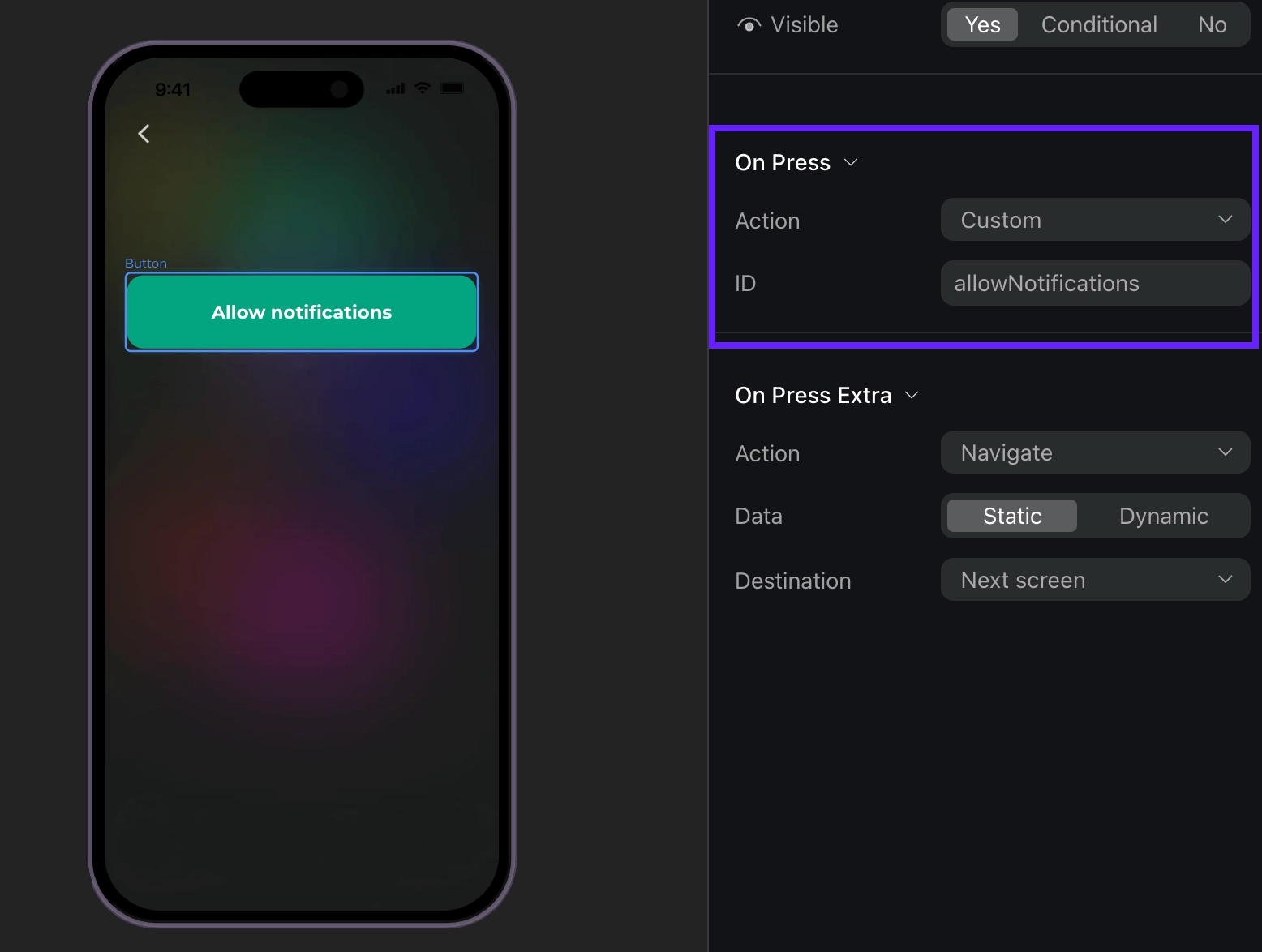
In the builder, you can add a custom action to a button and assign it an ID.

Then, you can use this ID in your code and handle it as a custom action. For example, if a user taps a custom button, like Login or Allow notifications, the event handler will be triggered with the actionId parameter that matches the Action ID from the builder. You can create your own IDs, like "allowNotifications".

React Native (TSX)
import React, { useCallback } from 'react';
import { AdaptyOnboardingView } from 'react-native-adapty';
import type { OnboardingEventHandlers } from 'react-native-adapty';

function MyOnboarding({ onboarding }) {
const onCustom = useCallback<OnboardingEventHandlers['onCustom']>((actionId, meta) => {
switch (actionId) {
case 'login':
login();
break;
case 'allow_notifications':
allowNotifications();
break;
}
}, []);

return (
<AdaptyOnboardingView
onboarding={onboarding}
style={styles.container}
onCustom={onCustom}
/>
);
}
Event example (Click to expand)
{
"actionId": "allow_notifications",
"meta": {
"onboardingId": "onboarding_123",
"screenClientId": "profile_screen",
"screenIndex": 0,
"screensTotal": 3
}
}

Finishing loading onboarding

When an onboarding finishes loading, this event will be triggered:

React Native (TSX)
import React, { useCallback } from 'react';
import { AdaptyOnboardingView } from 'react-native-adapty';
import type { OnboardingEventHandlers } from 'react-native-adapty';

function MyOnboarding({ onboarding }) {
const onFinishedLoading = useCallback<OnboardingEventHandlers['onFinishedLoading']>((meta) => {
console.log('Onboarding loaded:', meta.onboardingId);
}, []);

return (
<AdaptyOnboardingView
onboarding={onboarding}
style={styles.container}
onFinishedLoading={onFinishedLoading}
/>
);
}
Event example (Click to expand)
{
"meta": {
"onboarding_id": "onboarding_123",
"screen_cid": "welcome_screen",
"screen_index": 0,
"total_screens": 4
}
}

Closing onboarding

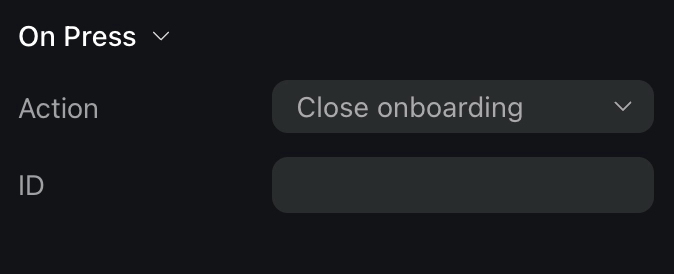
Onboarding is considered closed when a user taps a button with the Close action assigned.

important

Note that you need to manage what happens when a user closes the onboarding. For instance, you need to stop displaying the onboarding itself.

React Native (TSX)
import React, { useCallback } from 'react';
import { AdaptyOnboardingView } from 'react-native-adapty';
import type { OnboardingEventHandlers } from 'react-native-adapty';

function MyOnboarding({ onboarding, navigation }) {
const onClose = useCallback<OnboardingEventHandlers['onClose']>((actionId, meta) => {
navigation.goBack();
}, [navigation]);

return (
<AdaptyOnboardingView
onboarding={onboarding}
style={styles.container}
onClose={onClose}
/>
);
}
Event example (Click to expand)
{
"action_id": "close_button",
"meta": {
"onboarding_id": "onboarding_123",
"screen_cid": "final_screen",
"screen_index": 3,
"total_screens": 4
}
}

Opening a paywall

tip

Handle this event to open a paywall if you want to open it inside the onboarding. If you want to open a paywall after it is closed, there is a more straightforward way to do it – handle the close action and open a paywall without relying on the event data.

If a user clicks a button that opens a paywall, you will get a button action ID that you set up manually. The most seamless way to work with paywalls in onboardings is to make the action ID equal to a paywall placement ID.

React Native (TSX)
import React, { useCallback } from 'react';
import { AdaptyOnboardingView } from 'react-native-adapty';
import type { OnboardingEventHandlers } from 'react-native-adapty';

function MyOnboarding({ onboarding }) {
const onPaywall = useCallback<OnboardingEventHandlers['onPaywall']>((actionId, meta) => {
openPaywall(actionId);
}, []);

return (
<AdaptyOnboardingView
onboarding={onboarding}
style={styles.container}
onPaywall={onPaywall}
/>
);
}

const openPaywall = async (placementId) => {
// Implement your paywall opening logic here
};
Event example (Click to expand)
{
"action_id": "premium_offer_1",
"meta": {
"onboarding_id": "onboarding_123",
"screen_cid": "pricing_screen",
"screen_index": 2,
"total_screens": 4
}
}

Tracking navigation

You receive an analytics event when various navigation-related events occur during the onboarding flow:

React Native (TSX)
import React, { useCallback } from 'react';
import { AdaptyOnboardingView } from 'react-native-adapty';
import type { OnboardingEventHandlers } from 'react-native-adapty';

function MyOnboarding({ onboarding }) {
const onAnalytics = useCallback<OnboardingEventHandlers['onAnalytics']>((event, meta) => {
trackEvent(event.name, meta.onboardingId);
}, []);

return (
<AdaptyOnboardingView
onboarding={onboarding}
style={styles.container}
onAnalytics={onAnalytics}
/>
);
}

The event object can be one of the following types:

TypeDescription
onboardingStartedWhen the onboarding has been loaded
screenPresentedWhen any screen is shown
screenCompletedWhen a screen is completed. Includes optional elementId (identifier of the completed element) and optional reply (response from the user). Triggered when users perform any action to exit the screen.
secondScreenPresentedWhen the second screen is shown
userEmailCollectedTriggered when the user's email is collected via the input field

onboardingCompletedTriggered when a user reaches a screen with the final ID. If you need this event, assign the final ID to the last screen.
unknownFor any unrecognized event type. Includes name (the name of the unknown event) and meta (additional metadata)

Each event includes meta information containing:

FieldDescription
onboardingIdUnique identifier of the onboarding flow
screenClientIdIdentifier of the current screen
screenIndexCurrent screen's position in the flow
screensTotalTotal number of screens in the flow
Event examples (Click to expand)
// onboardingStarted
{
"name": "onboarding_started",
"meta": {
"onboarding_id": "onboarding_123",
"screen_cid": "welcome_screen",
"screen_index": 0,
"total_screens": 4
}
}

// screenPresented
{
"name": "screen_presented",
"meta": {
"onboarding_id": "onboarding_123",
"screen_cid": "interests_screen",
"screen_index": 2,
"total_screens": 4
}
}

// screenCompleted
{
"name": "screen_completed",
"meta": {
"onboarding_id": "onboarding_123",
"screen_cid": "profile_screen",
"screen_index": 1,
"total_screens": 4
},
"params": {
"element_id": "profile_form",
"reply": "success"
}
}

// secondScreenPresented
{
"name": "second_screen_presented",
"meta": {
"onboarding_id": "onboarding_123",
"screen_cid": "profile_screen",
"screen_index": 1,
"total_screens": 4
}
}

// userEmailCollected
{
"name": "user_email_collected",
"meta": {
"onboarding_id": "onboarding_123",
"screen_cid": "profile_screen",
"screen_index": 1,
"total_screens": 4
}
}

// onboardingCompleted
{
"name": "onboarding_completed",
"meta": {
"onboarding_id": "onboarding_123",
"screen_cid": "final_screen",
"screen_index": 3,
"total_screens": 4
}
}