
在 Google Play Console 中启用实时开发者通知(RTDN)
Google Play 通过实时开发者通知将续订、取消、退款和账单问题上报给 Adapty。由于这些事件发生在应用关闭期间,Adapty SDK 无法自行上报它们。
开始之前
配置 Google Play Store 集成。Adapty 会根据你的密钥文件自动生成主题名称,因此在上传密钥文件之前无需复制任何内容。
启用通知
-
在 Adapty 看板中打开 App settings > Android SDK,复制 Google Play RTDN topic name 下方的主题名称。该名称以
projects/开头。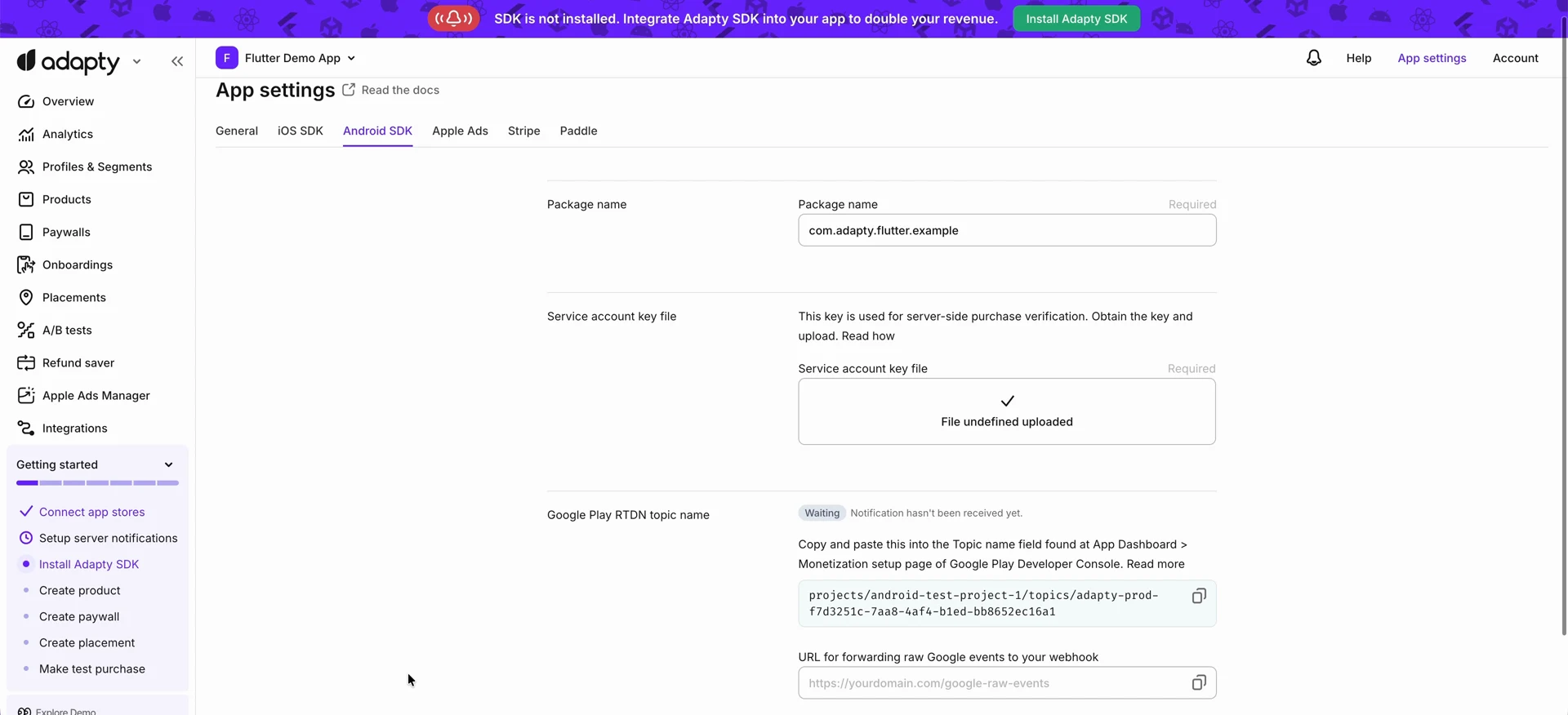
-
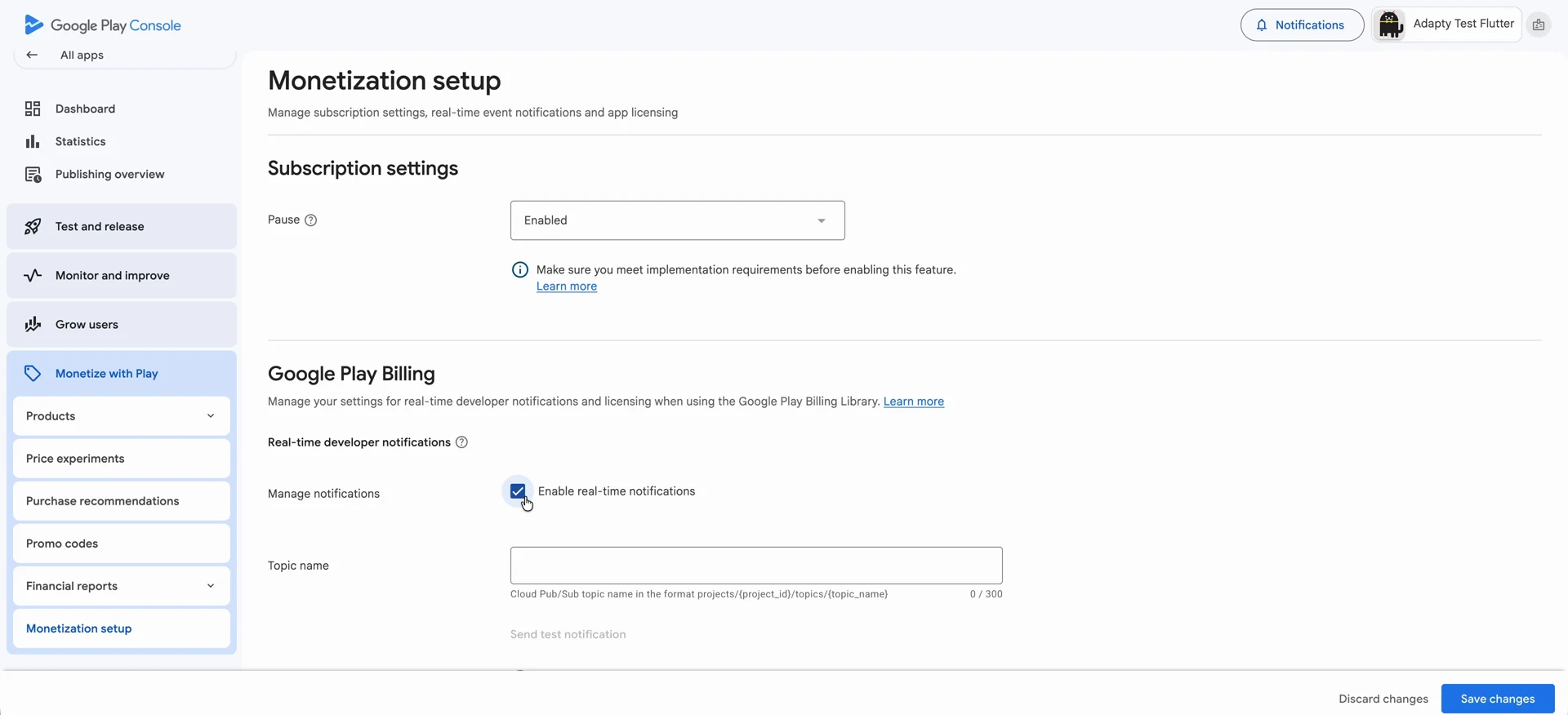
打开 Google Play Console,选择你的应用,然后前往 Monetize with Play > Monetization setup。
-
在 Google Play Billing 部分,勾选 Enable real-time notifications 复选框。
-
将主题名称粘贴到 Topic name 中。
-
点击 Save changes。
验证连接
-
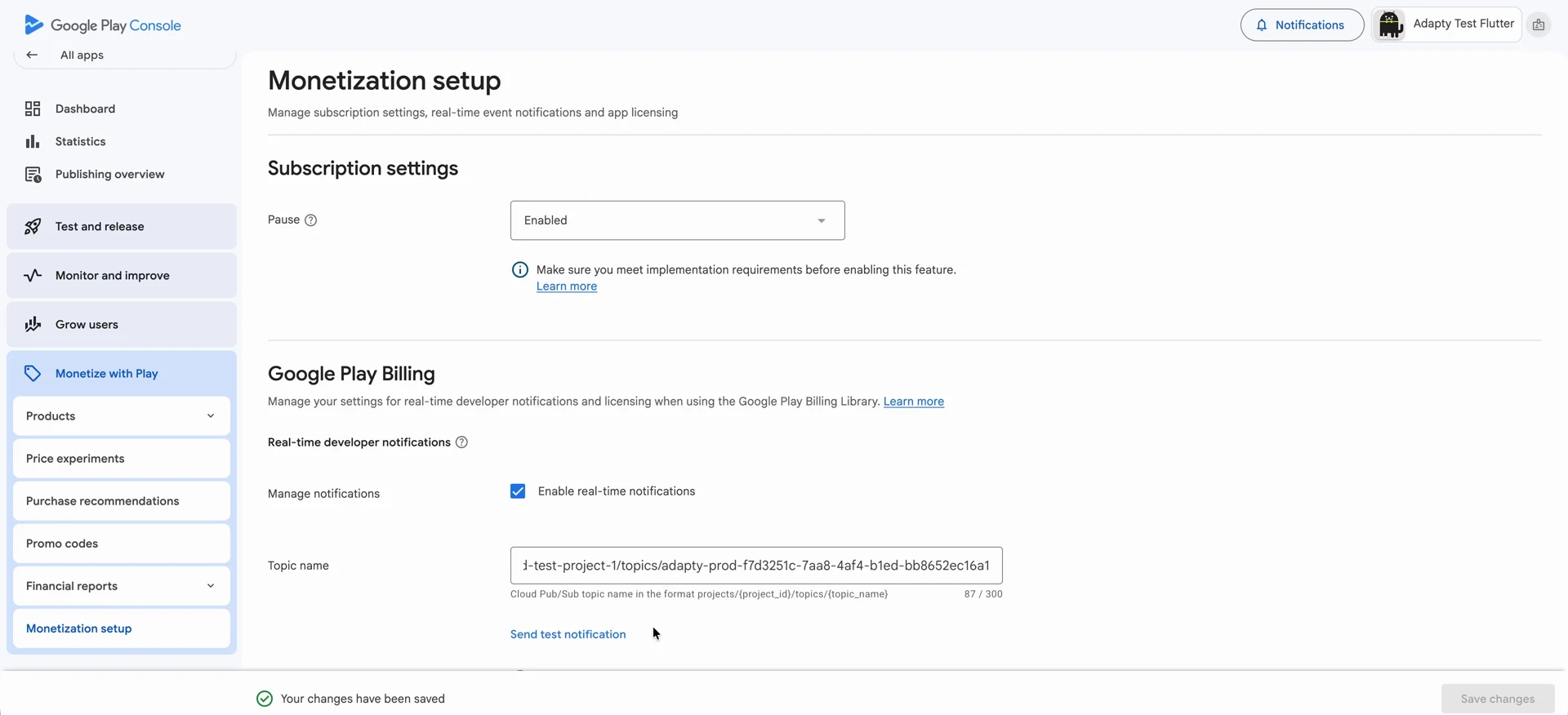
在 Monetization setup 页面,点击 Topic name 字段下方的 Send test notification 按钮。
-
返回 Adapty 的 App settings > Android SDK。Adapty 收到通知后,Google Play RTDN topic name 部分的状态标签将显示为 Active。
Note测试通知仅用于验证连接,不会产生购买事件,因此测试后 Event Feed 不会有任何记录——只有真实交易发生时才会产生事件。
如果 RTDN 停止向 Adapty 发送通知,新交易、续订和退款将停止出现。Adapty 不会主动提示——请参阅更新停止到达时的处理方法。
向两个 Adapty 应用发送通知
Google Play 将某个应用的通知发送到同一个主题。如果一个 Google Play 应用同时对应两个 Adapty 应用(例如一个生产环境应用和一个开发环境应用),请为该主题添加第二个订阅,以便两个应用都能收到通知。
- 在第二个 Adapty 应用中,为同一个 Google Play 应用配置 Google Play Store 集成。Adapty 会为第二个应用创建一个主题和一个推送订阅,并为两者赋予相同的名称:即第二个应用的 Google Play RTDN topic name 中
topics/之后的部分,显示在 App settings > Android SDK 中。 - 在 Google Cloud Console 中,选择第二个应用密钥文件所属的项目,然后前往 Pub/Sub > Subscriptions。打开同名的订阅并复制其端点 URL。
- 选择 Google Play Console 所使用的主题所属项目,然后前往 Pub/Sub > Topics。打开该主题,创建一个投递类型为 Push 的订阅,并填入你刚才复制的端点 URL。
第二个 Adapty 应用随后会收到 Google Play 应用中每笔购买的通知,包括通过第一个 Adapty 应用完成的购买。
转发原始 Google 事件
Adapty 会解码来自 Google 的每条通知,将其转换为自有事件,并与用户画像和产品进行匹配,同时附加收入数据。如果您还希望接收 Google 的原始消息,请在 App settings > Android SDK 中将您的 Endpoint 添加到 URL for forwarding raw Google events to your webhook。
Adapty 将 Pub/Sub 消息完全按照 Google 发送的原始格式转发,不做任何解析处理:采用 base64 编码,使用 Google 的字段名称和数字通知类型,并通过 token 而非 Adapty 用户画像来标识购买记录。Google 在其 RTDN 参考文档 中对该格式有详细说明。
RTDN 故障排查
主题名称缺失
设置 RTDN 的第一步是从 Adapty 复制主题名称。如果这里没有内容,就无法继续操作:Play Console 中的 Topic name 是 Google Play 了解事件发送目标的依据,而该名称只能从 Adapty 获取。
当您保存密钥文件时,Adapty 会在您的 Cloud 项目中创建该主题。有效名称以 projects/ 开头,例如 projects/your-project-id/topics/adapty-prod-3f7a1c2e-9b4d-4e8f-a1b2-c3d4e5f60718。如果 Adapty 无法创建主题,该部分会显示一条简短说明及 Recreate Pub/Sub topic 按钮,说明中会告知您具体的失败原因:
| 您看到的内容 | 含义 | 处理方式 |
|---|---|---|
| To set the Google Play RTDN topic name first upload a valid service account key file above. | Adapty 没有该应用的密钥文件 | 上传密钥文件 |
| Enable Pub/Sub API | 该 Cloud 项目中的 Cloud Pub/Sub API 未开启 | 点击 Adapty 显示的链接,然后点击 Recreate Pub/Sub topic |
| Grant permissions | 该服务账号在项目中没有 Pub/Sub Admin 角色 | 在 IAM & Admin > IAM 中编辑服务账号,添加 Pub/Sub > Pub/Sub Admin 权限,然后点击 Recreate Pub/Sub topic |
在该主题存在之前,无法向 Play Console 粘贴任何内容,因此 Google Play 不会开始发送事件,Adapty 也会错过续订、取消和退款等通知。
Recreate Pub/Sub topic 会使用您已上传的密钥文件重新执行设置,无需再次上传。
重新创建话题失败
Google Play 需要向您的话题发布消息的权限,因此 Adapty 会将该权限授予 google-play-developer-notifications@system.gserviceaccount.com。该账户属于 Google,而非您的公司。
许多公司会将 Google Cloud 配置为仅允许本公司域名下的账户访问。这类公司级规则称为组织政策,其中有两条会拒绝向外部账户授权,导致话题无法创建。
-
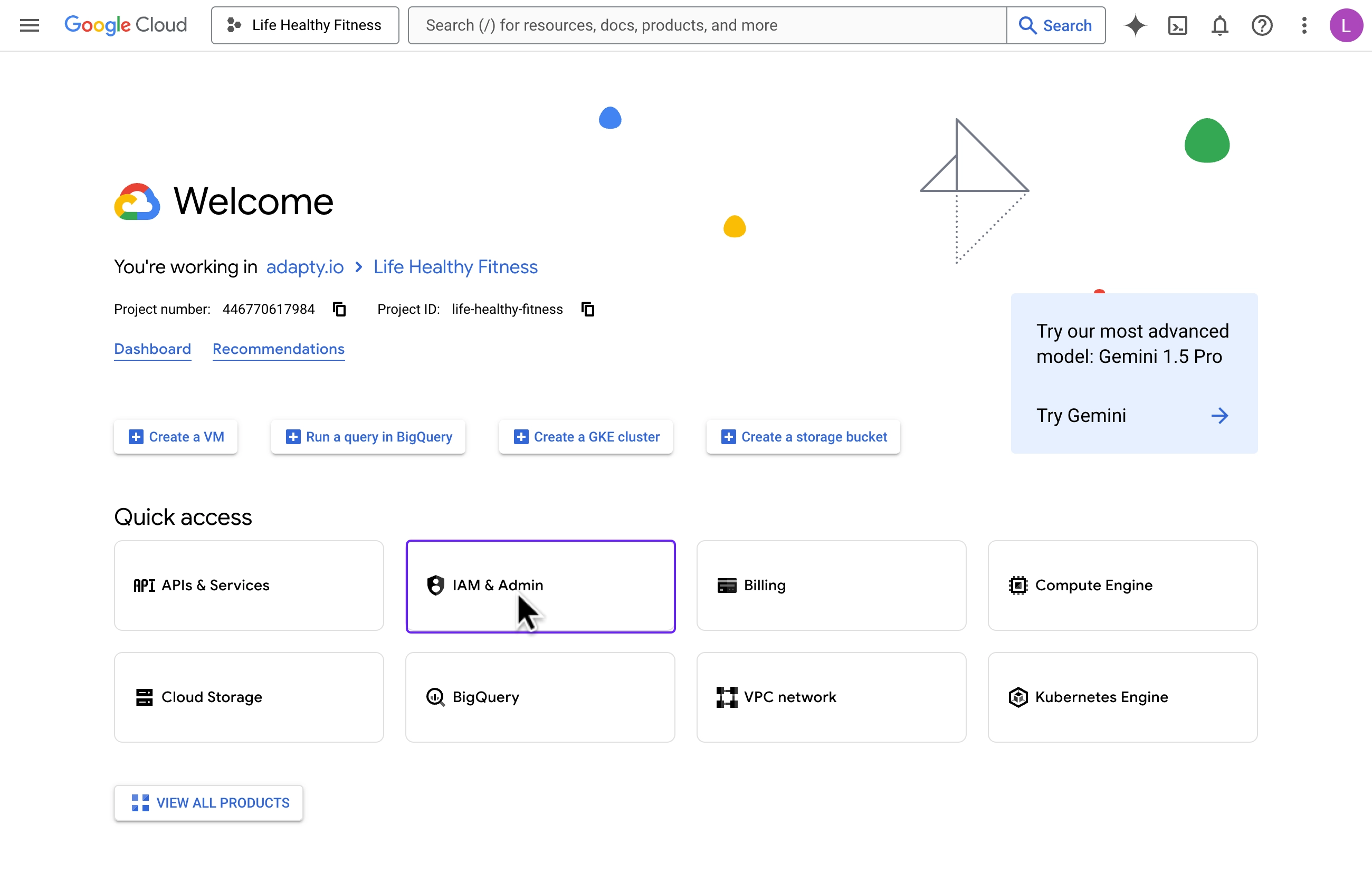
打开 Google Cloud Console 并选择密钥文件所属的项目。
-
前往 IAM & Admin > Organization Policies。
-
找到 Domain restricted contacts 策略,打开其 Actions 菜单,然后点击 Edit policy。
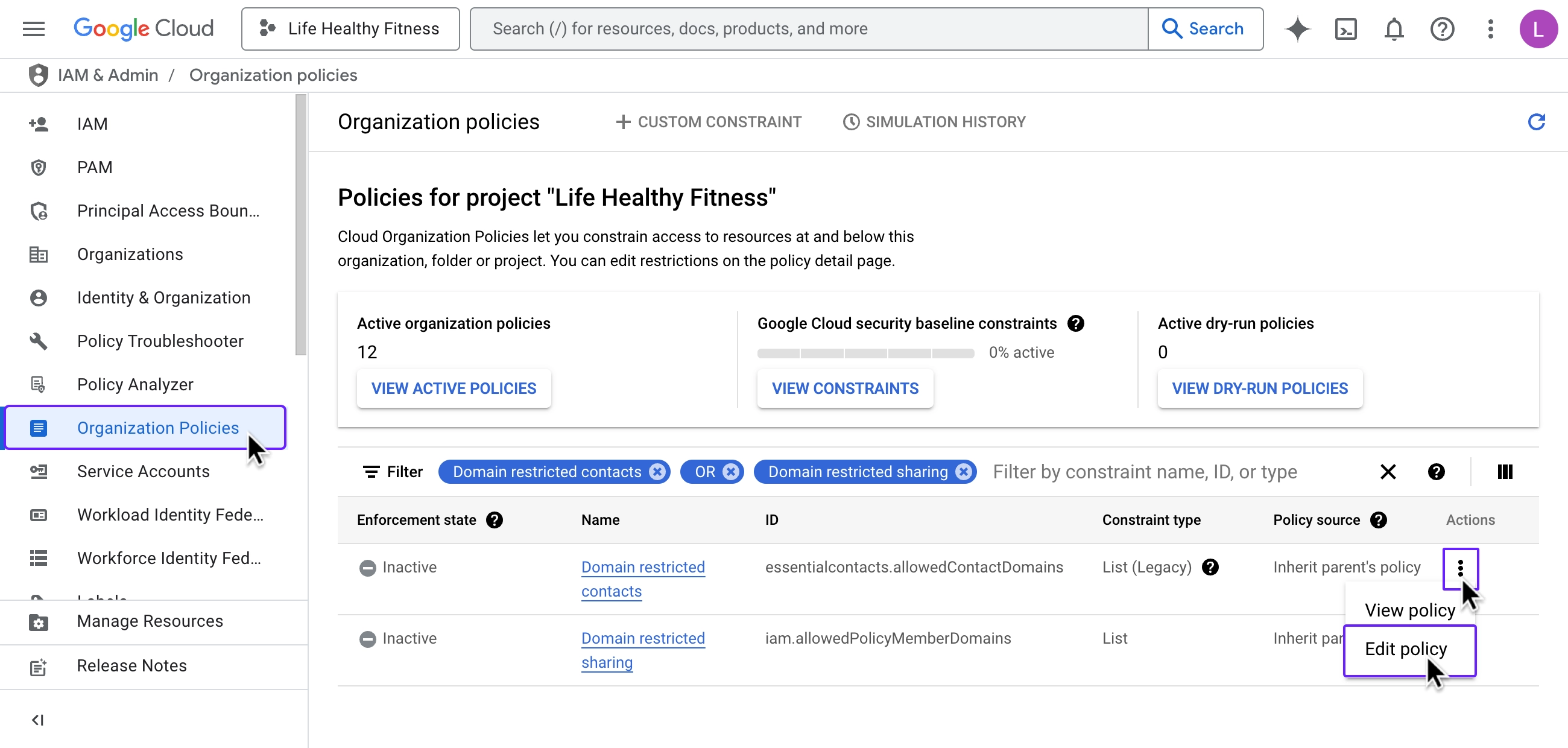
-
选择 Override parent’s policy,将 Policy enforcement 设置为 Replace,然后点击 Add a rule。
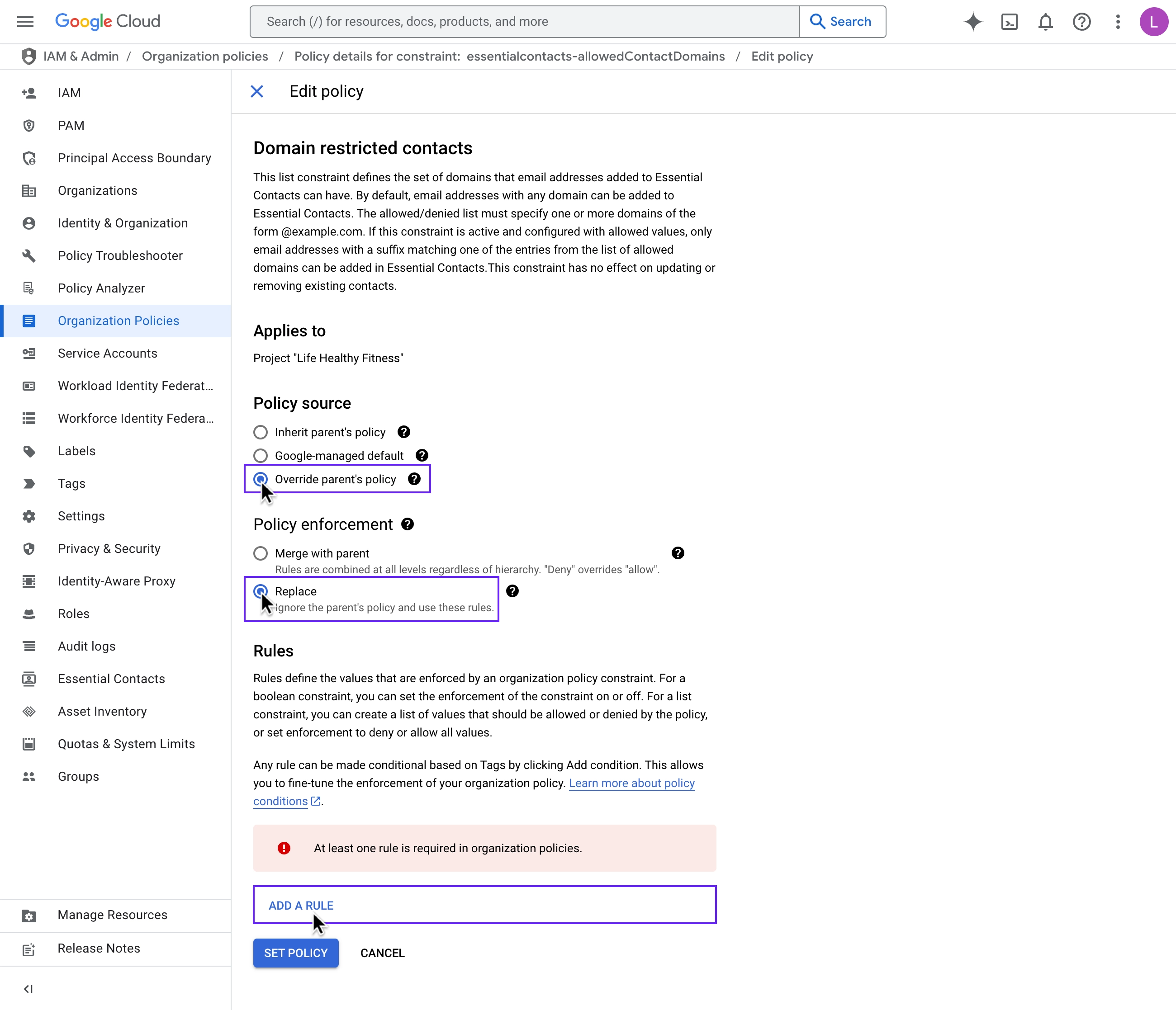
-
在 Policy values 下,选择 Allow All,然后点击 Set policy。
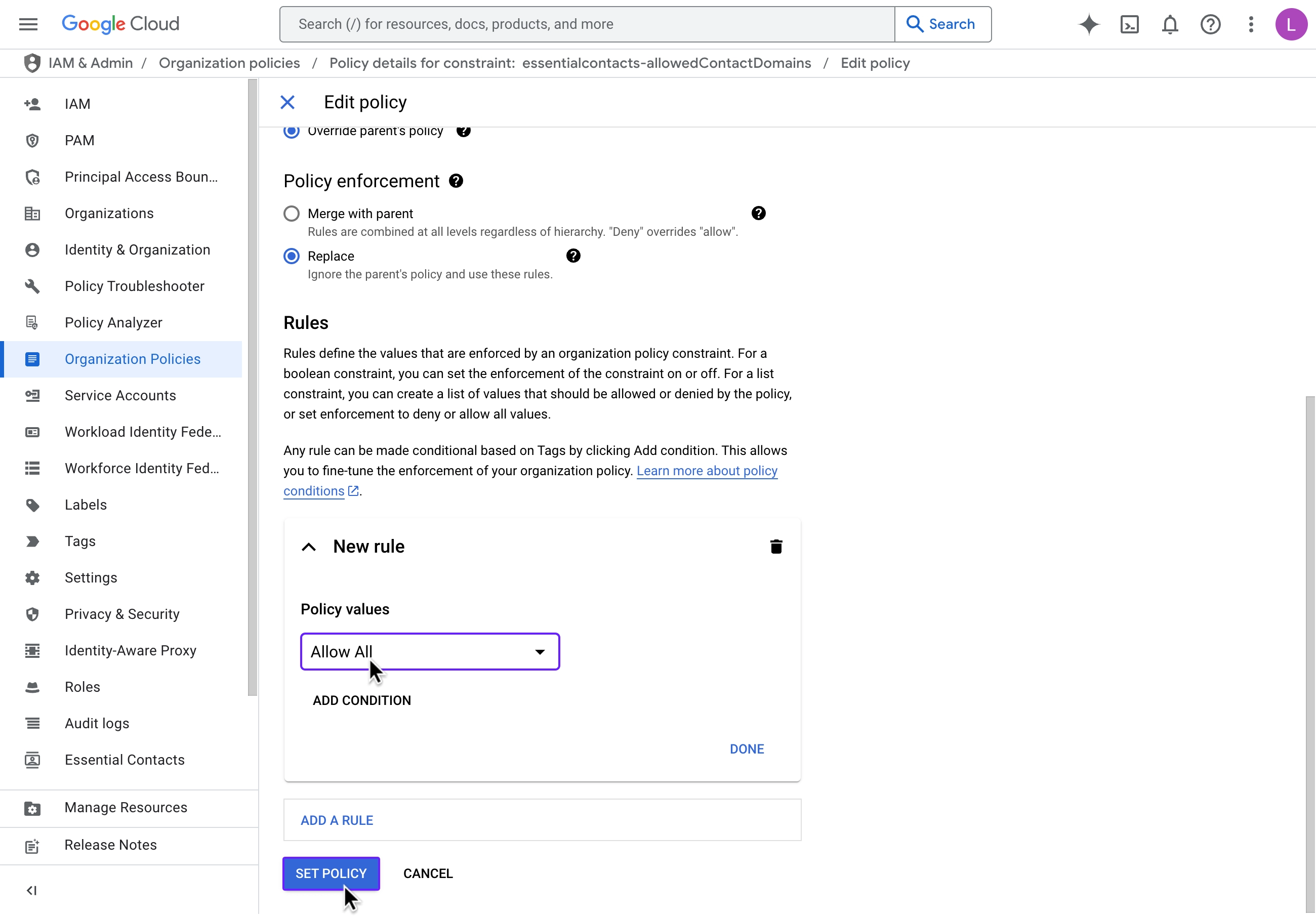
-
对 Domain restricted sharing 策略重复上述操作。
-
在 Adapty 中重新创建该主题。
主题创建完成后,请立即将两项策略都恢复为 Inherit parent’s policy。在设置为 Allow All 期间,该项目将接受任何 Google 账号(而不仅仅是 Google 通知服务)的访问授权和共享请求。
后续步骤
为你的应用所使用的每个框架安装 Adapty SDK。在此之前,你的应用无法展示付费墙或向 Adapty 上报购买记录。