
在 React Native SDK 中处理来自用户引导的数据
Warning
从 Adapty SDK v4 开始,用户引导功能已弃用。 请改用流程:与运行在 WebView 中的用户引导不同,流程直接在设备上原生渲染——动画更流畅、外观更统一、加载更快,且无需依赖 WebView 运行时。
当用户回答测验问题或在输入框中填写数据时,系统会调用 onStateUpdatedAction 方法。你可以在代码中保存或处理对应的字段类型。
例如:
// Full-screen presentation
const unsubscribe = view.setEventHandlers({
  onStateUpdated(action, meta) {
    // Process data
  },
});

// Embedded widget
<AdaptyOnboardingView
  onboarding={onboarding}
  eventHandlers={{
    onStateUpdated(action, meta) {
      // Process data
    },
  }}
/>查看操作格式说明,请点击这里。
已保存数据示例(实际格式可能因实现方式而异)
// Example of a saved select action
{
    "elementId": "preference_selector",
    "elementType": "select",
    "value": {
        "id": "option_1",
        "value": "premium",
        "label": "Premium Plan"
    },
    "meta": {
        "onboardingId": "onboarding_123",
        "screenClientId": "preferences_screen",
        "screenIndex": 1,
        "totalScreens": 3
    }
}

// Example of a saved multi-select action
{
    "elementId": "interests_selector",
    "elementType": "multi_select",
    "value": [
        {
            "id": "interest_1",
            "value": "sports",
            "label": "Sports"
        },
        {
            "id": "interest_2",
            "value": "music",
            "label": "Music"
        }
    ],
    "meta": {
        "onboardingId": "onboarding_123",
        "screenClientId": "interests_screen",
        "screenIndex": 2,
        "totalScreens": 3
    }
}

// Example of a saved input action
{
    "elementId": "name_input",
    "elementType": "input",
    "value": {
        "type": "text",
        "value": "John Doe"
    },
    "meta": {
        "onboardingId": "onboarding_123",
        "screenClientId": "profile_screen",
        "screenIndex": 0,
        "totalScreens": 3
    }
}

// Example of a saved date picker action
{
    "elementId": "birthday_picker",
    "elementType": "date_picker",
    "value": {
        "day": 15,
        "month": 6,
        "year": 1990
    },
    "meta": {
        "onboardingId": "onboarding_123",
        "screenClientId": "profile_screen",
        "screenIndex": 0,
        "totalScreens": 3
    }
}
使用场景
用用户数据丰富用户画像
如果你想立即将输入数据与用户画像关联,避免重复询问相同信息,可以在处理操作时通过更新用户画像来保存这些输入数据。
例如,你让用户在 ID 为 name 的文本字段中输入姓名,并希望将该字段的值设置为用户的名字;同时,你还让用户在 email 字段中输入电子邮件。在你的应用代码中,实现方式如下:
// Full-screen presentation
const unsubscribe = view.setEventHandlers({
  onStateUpdated(action, meta) {
    // Store user preferences or responses
    if (action.elementType === 'input') {
      const profileParams = {};

      // Map elementId to appropriate profile field
      switch (action.elementId) {
        case 'name':
          if (action.value.type === 'text') {
            profileParams.firstName = action.value.value;
          }
          break;
        case 'email':
          if (action.value.type === 'email') {
            profileParams.email = action.value.value;
          }
          break;
      }

      // Update profile if we have data to update
      if (Object.keys(profileParams).length > 0) {
        adapty.updateProfile(profileParams).catch(error => {
          // handle the error
        });
      }
    }
  },
});

// Embedded widget
<AdaptyOnboardingView
  onboarding={onboarding}
  eventHandlers={{
    onStateUpdated(action, meta) {
      // Store user preferences or responses
      if (action.elementType === 'input') {
        const profileParams = {};

        // Map elementId to appropriate profile field
        switch (action.elementId) {
          case 'name':
            if (action.value.type === 'text') {
              profileParams.firstName = action.value.value;
            }
            break;
          case 'email':
            if (action.value.type === 'email') {
              profileParams.email = action.value.value;
            }
            break;
        }

        // Update profile if we have data to update
        if (Object.keys(profileParams).length > 0) {
          adapty.updateProfile(profileParams).catch(error => {
            // handle the error
          });
        }
      }
    },
  }}
/>
根据用户回答定制付费墙
在用户引导中加入问卷测验,还可以根据用户完成用户引导后的回答,为其展示定制化的付费墙。
例如,你可以询问用户的运动经验,然后向不同的用户群体展示不同的 CTA 和产品。
- 在用户引导编辑器中添加问卷测验,并为每个选项分配有意义的 ID。
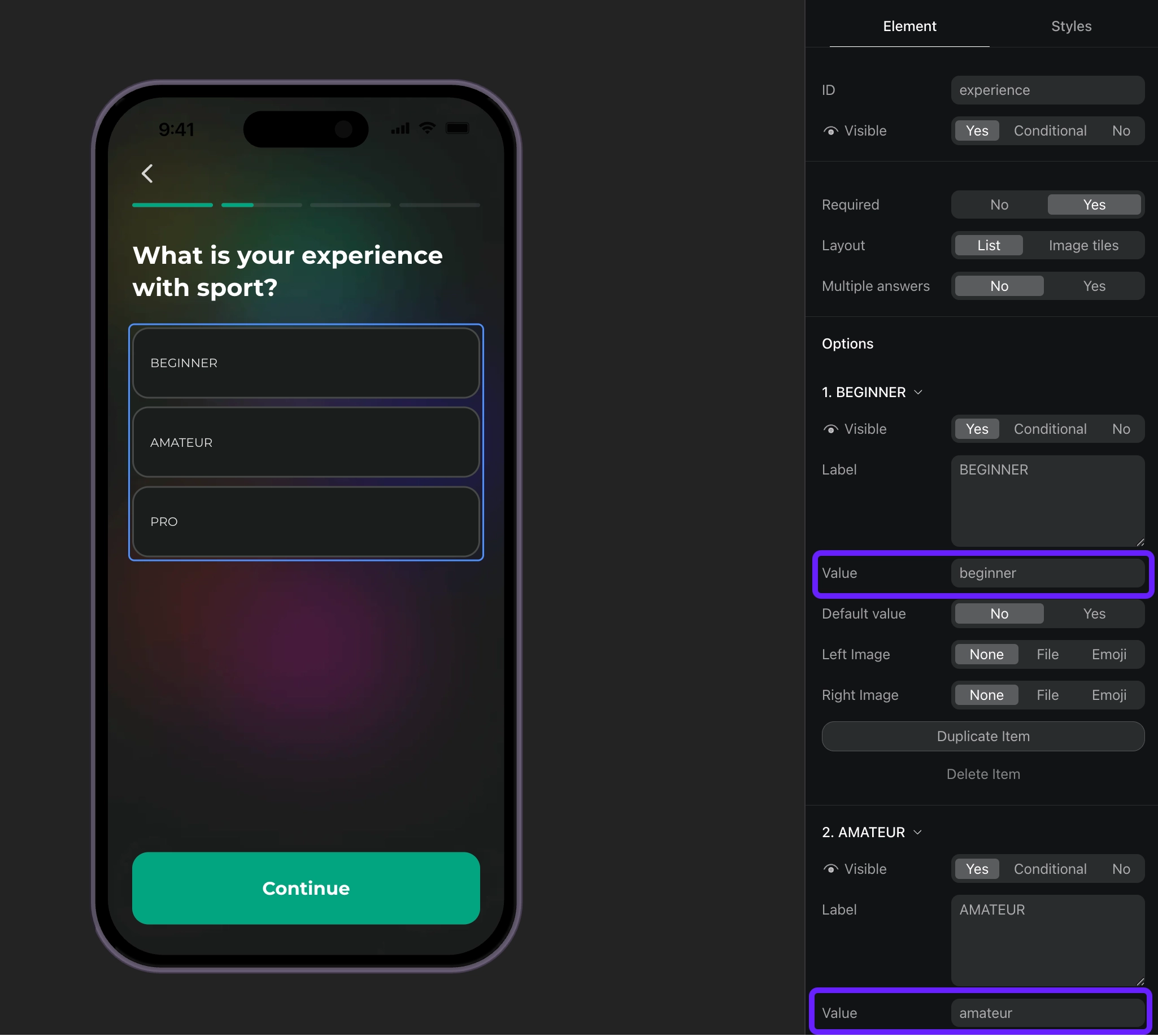
- 根据选项 ID 处理问卷回答,并为用户设置自定义属性。
// Full-screen presentation
const unsubscribe = view.setEventHandlers({
  onStateUpdated(action, meta) {
    // Handle quiz responses and set custom attributes
    if (action.elementType === 'select') {
      const profileParams = {};

      // Map quiz responses to custom attributes
      switch (action.elementId) {
        case 'experience':
          // Set custom attribute 'experience' with the selected value (beginner, amateur, pro)
          profileParams.codableCustomAttributes = {
            experience: action.value.value
          };
          break;
      }

      // Update profile if we have data to update
      if (Object.keys(profileParams).length > 0) {
        adapty.updateProfile(profileParams).catch(error => {
          // handle the error
        });
      }
    }
  },
});

// Embedded widget
<AdaptyOnboardingView
  onboarding={onboarding}
  eventHandlers={{
    onStateUpdated(action, meta) {
      // Handle quiz responses and set custom attributes
      if (action.elementType === 'select') {
        const profileParams = {};

        // Map quiz responses to custom attributes
        switch (action.elementId) {
          case 'experience':
            // Set custom attribute 'experience' with the selected value (beginner, amateur, pro)
            profileParams.codableCustomAttributes = {
              experience: action.value.value
            };
            break;
        }

        // Update profile if we have data to update
        if (Object.keys(profileParams).length > 0) {
          adapty.updateProfile(profileParams).catch(error => {
            // handle the error
          });
        }
      }
    },
  }}
/>