
Số dư tiền tệ ảo
Bài viết chính: Tiền tệ ảo
Mỗi hồ sơ người dùng trong Profiles/CRM đều hiển thị số dư tiền tệ ảo của người dùng đó, cùng với lịch sử mọi thay đổi.
Xem số dư trong hồ sơ người dùng
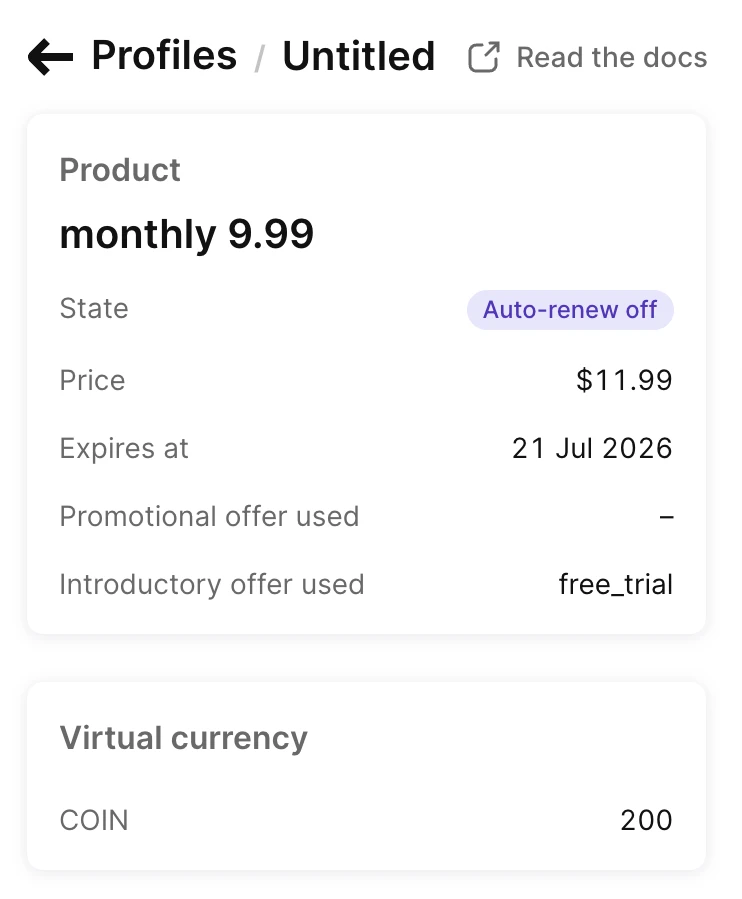
Mở hồ sơ người dùng. Thẻ Virtual currency liệt kê tất cả các loại tiền tệ mà người dùng đang sở hữu.
Mỗi hàng hiển thị:
- Mã tiền tệ, ví dụ như
COINS. - Số dư hiện tại, dưới dạng số nguyên.
Số dư được cập nhật khi người dùng kiếm, tiêu hoặc nhận credits. Số dư không thể xuống dưới 0: một giao dịch cố tiêu nhiều hơn số dư hiện có sẽ thất bại với lỗi insufficient_balance và không thay đổi gì. Hồ sơ người dùng không có số dư nào sẽ hiển thị thẻ trống.
Để đọc số dư từ code của bạn, hãy gọi List virtual currency balances trong server-side API.
Xem lại lịch sử thay đổi số dư
Mọi thay đổi số dư đều xuất hiện trong lịch sử sự kiện của hồ sơ người dùng, theo thứ tự mới nhất trước. Mỗi mục ghi rõ tên thay đổi và các loại tiền tệ bị ảnh hưởng.
Lịch sử hiển thị ba loại sự kiện tiền tệ ảo:
- Virtual currency credited: Một giao dịch mua, gia hạn hoặc bắt đầu dùng thử đã cộng thêm số dư.
- Virtual currency transaction: Một lệnh gọi API phía server đã cộng hoặc trừ số dư.
- Virtual currency expired: Số dư có hạn bị đặt lại vào cuối chu kỳ thanh toán hoặc khi gói đăng ký kết thúc.
Mỗi mục liệt kê, cho từng loại tiền tệ bị thay đổi:
- Virtual currency: Tên và mã tiền tệ, ví dụ như
Gold Coins (COINS). - Amount: Thay đổi có dấu — dương cho khoản cộng, âm cho khoản trừ.
- Balance after: Số dư của tiền tệ sau khi thay đổi được áp dụng.
Một sự kiện có thể thay đổi nhiều loại tiền tệ cùng lúc — ví dụ, một giao dịch duy nhất trừ một loại tiền tệ và cộng một loại khác để chuyển đổi giữa chúng.
Số dư, hồ sơ người dùng và thiết bị
Một số dư luôn thuộc về đúng một hồ sơ người dùng và không bao giờ chuyển sang hồ sơ khác. Adapty không chia sẻ hay chuyển số dư giữa các hồ sơ người dùng theo cách có thể chia sẻ mức độ truy cập giữa các tài khoản người dùng.
Trên thực tế, điều này có nghĩa là:
- Người dùng đã xác định danh tính: ID người dùng khách hàng luôn trỏ đến cùng một hồ sơ người dùng, vì vậy người dùng sẽ thấy cùng một số dư trên mọi thiết bị khi họ đăng nhập, và vẫn giữ được số dư đó sau khi cài đặt lại ứng dụng.
- Người dùng ẩn danh: Hồ sơ người dùng ẩn danh có thể kiếm và tiêu credits, nhưng nó chỉ gắn với một lần cài đặt ứng dụng trên một thiết bị. Khi cùng một người dùng cài đặt lại ứng dụng, hoặc mở ứng dụng trên thiết bị khác mà không đăng nhập, Adapty sẽ tạo một hồ sơ người dùng ẩn danh mới với số dư bằng 0. Các credits vẫn còn trên hồ sơ người dùng cũ, nơi người dùng không còn có thể truy cập được nữa.
Vì vậy, để duy trì nền kinh tế tiền tệ ảo xuyên suốt các thiết bị và lần cài đặt lại, bạn cần xác định người dùng. Bạn có thể xác định họ trong code ứng dụng thông qua SDK (xem Xác định người dùng trong phần quickstart) hoặc từ backend của bạn thông qua server-side API.
Việc xác định người dùng muộn cũng có một lưu ý riêng: nếu người dùng tích lũy tín dụng dưới dạng ẩn danh rồi đăng nhập bằng customer user ID đã thuộc về một hồ sơ người dùng khác, thiết bị sẽ chuyển sang hồ sơ người dùng đó cùng với số dư của nó. Các tín dụng đã tích lũy ẩn danh vẫn nằm trên hồ sơ người dùng cũ và không thể truy cập được. Nếu customer user ID là mới, nó sẽ gắn với hồ sơ người dùng hiện tại và người dùng giữ được số dư. Để an toàn, hãy xác định người dùng trước khi họ có thể tích lũy hoặc mua tín dụng.
Trong các lệnh gọi API phía máy chủ, hãy xác định hồ sơ người dùng bằng header adapty-profile-id hoặc adapty-customer-user-id — cả hai đều trỏ đến cùng một hồ sơ người dùng. Đối với hồ sơ người dùng ẩn danh, hãy dùng adapty-profile-id.