
Hồ sơ người dùng/CRM
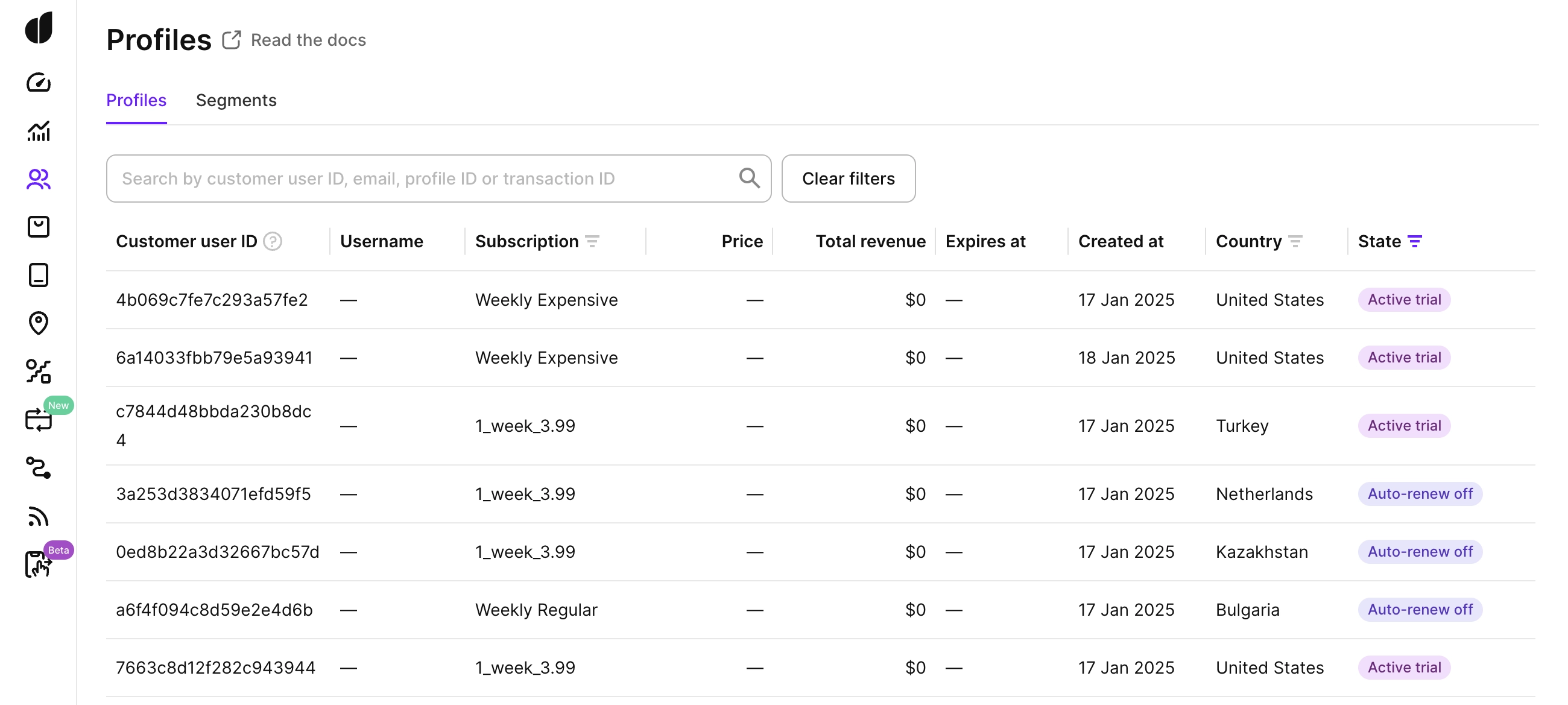
Profiles là CRM dành cho người dùng của bạn. Với Profiles, bạn có thể:
- Tìm kiếm người dùng cụ thể theo profile ID, customer user ID, email hoặc transaction ID.
- Xem lịch sử sự kiện của người dùng, bao gồm các vấn đề thanh toán, thời gian ân hạn và các sự kiện khác.
- Phân tích thuộc tính của người dùng như trạng thái gói đăng ký, tổng doanh thu/lợi nhuận và nhiều thông tin khác.
- Cấp gói đăng ký cho người dùng.
Các sự kiện từ luồng sự kiện sẽ đến dashboard với một khoảng trễ. Hồ sơ người dùng mới và các thay đổi thuộc tính có thể không hiển thị ngay lập tức.
Để hiểu cách Adapty tạo và liên kết hồ sơ người dùng, xem Cách hồ sơ người dùng hoạt động.
Tìm kiếm người dùng
Trong danh sách Profiles, bạn có thể tìm kiếm một người dùng cụ thể theo:
- Profile ID: Mã định danh nội bộ của Adapty cho người dùng (còn gọi là Adapty ID).
- Customer user ID: Mã định danh của ứng dụng bạn cho người dùng, nếu bạn đã thiết lập.
- Email: Email của người dùng, nếu được gửi dưới dạng thuộc tính tùy chỉnh.
- Transaction ID: Mã giao dịch từ cửa hàng của một lần mua.
Kết quả tìm kiếm khớp chính xác hoàn toàn với giá trị nhập vào: tìm kiếm từng phần sẽ không có kết quả, và khoảng trắng thừa cũng khiến tìm kiếm không trả về gì — hãy dán đúng định danh đầy đủ, không có khoảng trắng thừa. Customer user ID, email và transaction ID cũng phân biệt chữ hoa/thường.
Nhấp vào bất kỳ hàng nào để mở hồ sơ người dùng đầy đủ.
Trạng thái gói đăng ký
Trong danh sách Profiles, bạn có thể lọc và sắp xếp người dùng theo trạng thái gói đăng ký. Các giá trị trạng thái bao gồm:
| Trạng thái người dùng | Mô tả |
|---|---|
| Subscribed | Người dùng có gói đăng ký đang hoạt động với tính năng tự động gia hạn được bật. |
| Auto-renew off | Người dùng đã tắt tự động gia hạn nhưng vẫn có quyền truy cập các tính năng cao cấp cho đến khi kết thúc kỳ đăng ký. |
| Subscription cancelled | Người dùng đã hủy gói đăng ký và gói đó đã hoàn toàn kết thúc. |
| Billing issue | Người dùng không thể bị tính phí do sự cố thanh toán, xảy ra sau khi gói đăng ký hoặc dùng thử của họ hết hạn. |
| Grace period | Người dùng hiện đang trong thời gian ân hạn do sự cố thanh toán xảy ra khi cố gắng tính phí sau khi gói đăng ký hoặc dùng thử của họ hết hạn. |
| Active trial | Người dùng có gói đăng ký đang hoạt động và hiện đang trong giai đoạn dùng thử. |
| Trial cancelled | Người dùng đã hủy dùng thử và không có gói đăng ký đang hoạt động. |
| Never subscribed | Người dùng chưa bao giờ đăng ký hoặc bắt đầu dùng thử và vẫn là người dùng freemium. |
Thuộc tính người dùng
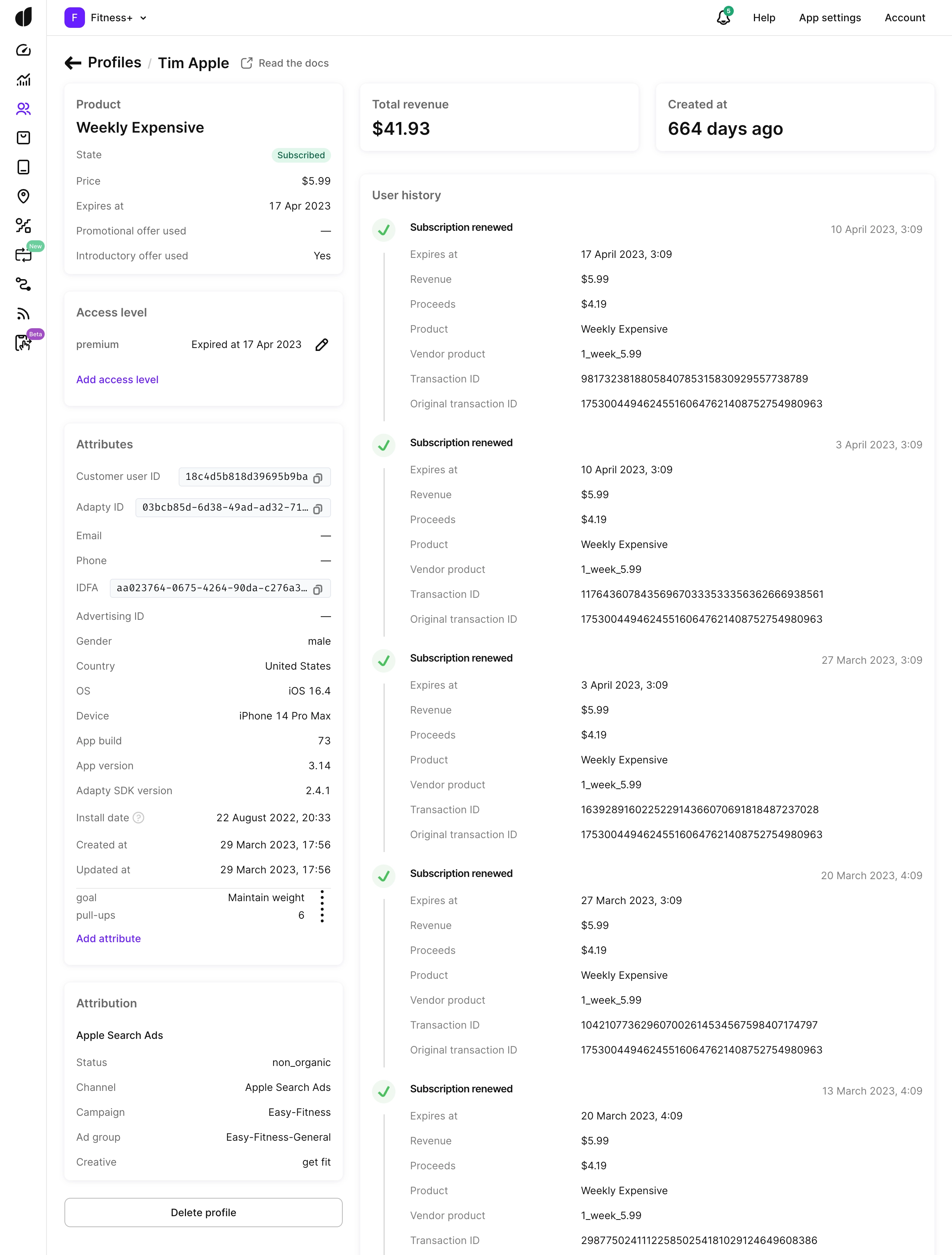
Bạn có thể gửi thêm thuộc tính người dùng đến Adapty thông qua SDK.
Theo mặc định, Adapty thiết lập:
| Property | Description |
|---|---|
| Customer user ID | Mã định danh người dùng cuối trong hệ thống của bạn. |
| Adapty ID | Mã định danh nội bộ của Adapty cho người dùng cuối, được gọi là Profile ID. |
| IDFA | Mã định danh dành cho nhà quảng cáo, do Apple gán cho thiết bị của người dùng. Yêu cầu quyền App Tracking Transparency (ATT) trên iOS 14+. Không khả dụng trên Android. |
| IP country | Quốc gia theo địa chỉ IP từ yêu cầu đầu tiên của người dùng cuối. Adapty không cập nhật giá trị này từ các yêu cầu sau. Thuộc tính phân khúc Country sử dụng giá trị này. Để biết thêm chi tiết, xem Các thuộc tính khả dụng. |
| Store country | Quốc gia trong tài khoản App Store hoặc Google Play của người dùng cuối, theo thông tin từ cửa hàng. Adapty nhận thông tin này qua các giao dịch từ cửa hàng, vì vậy trường này sẽ trống đối với người dùng chưa có giao dịch mua. |
| OS | Hệ điều hành mà người dùng cuối đang sử dụng. |
| Device | Tên model thiết bị hiển thị cho người dùng cuối. |
| Install date | Ngày người dùng được ghi nhận lần đầu trong Adapty:
|
| Created at | Ngày người dùng được tạo. |
Hãy gửi ít nhất ID người dùng nội bộ hoặc email của người dùng. Điều này giúp bạn tìm kiếm người dùng theo các định danh này trong danh sách Profiles.
Sau khi cài đặt SDK, Adapty sẽ tự động thu thập các sự kiện của người dùng từ hàng đợi thanh toán và hiển thị chúng trong hồ sơ người dùng. Các thuộc tính trong bảng trên được thu thập tự động — bạn không cần gửi chúng.
Thuộc tính tùy chỉnh
Trong phần Attributes của hồ sơ người dùng, bạn có thể xem các thuộc tính tùy chỉnh được thiết lập qua SDK hoặc API. Bạn cũng có thể gán thuộc tính thủ công bằng nút Add attribute.
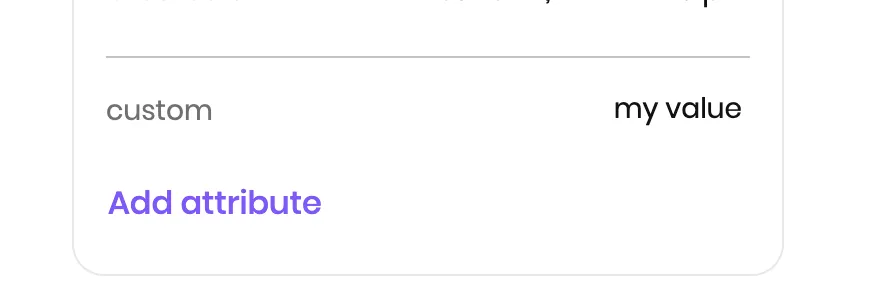
Để thay đổi hoặc xóa một thuộc tính, nhấp vào biểu tượng ba chấm bên cạnh thuộc tính đó và chọn Edit hoặc Delete. Việc xóa thuộc tính chỉ ảnh hưởng đến hồ sơ người dùng này — các hồ sơ người dùng khác có cùng thuộc tính vẫn giữ nguyên.
Cấp gói đăng ký
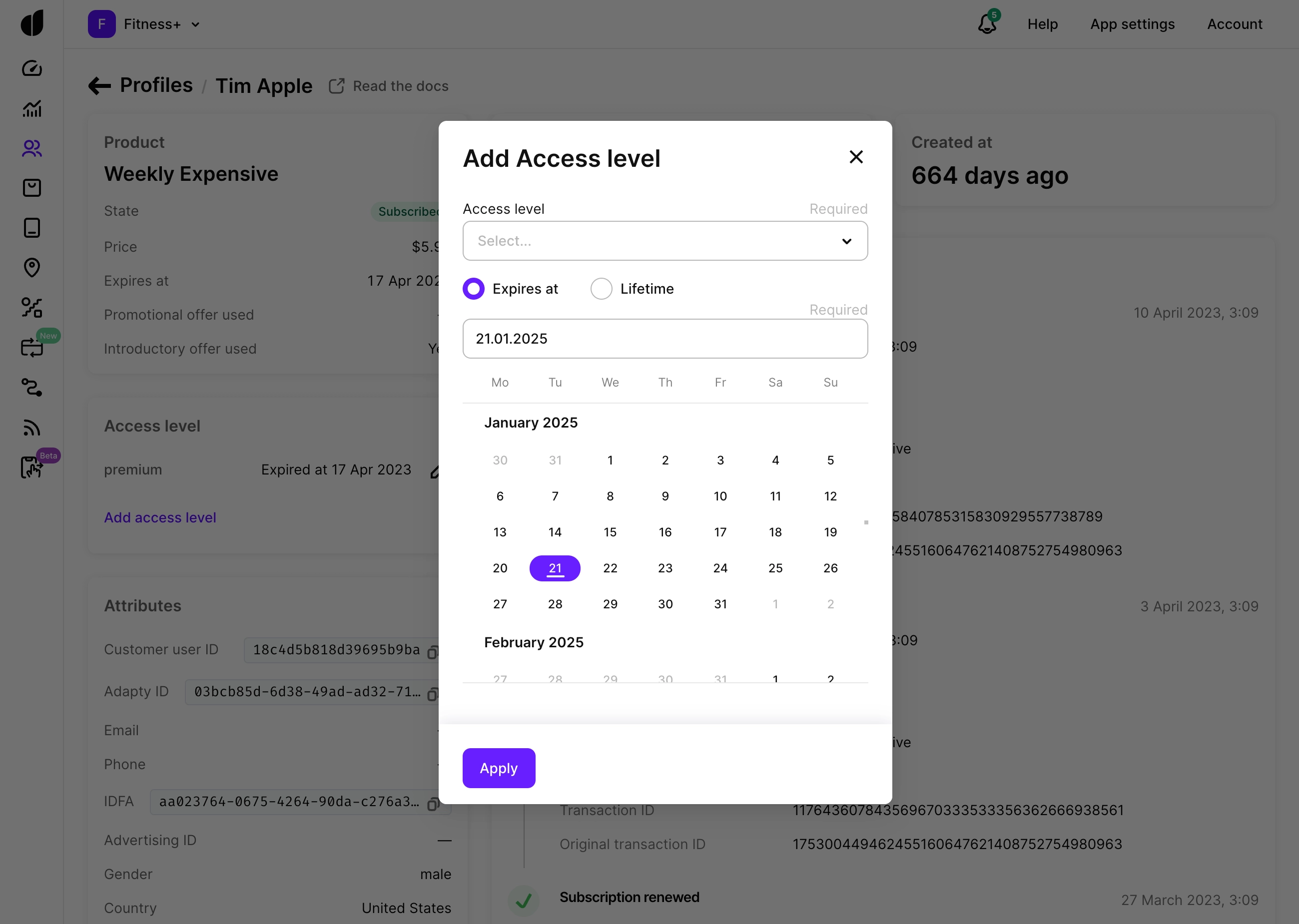
Trong hồ sơ người dùng, bạn có thể gia hạn gói đăng ký đang hoạt động hoặc cấp cho người dùng quyền truy cập trọn đời vào một mức độ truy cập — mà không yêu cầu họ thực hiện thanh toán.
Tính năng này hữu ích nhất trong các trường hợp:
- Bồi thường cho người dùng sau sự cố thanh toán hoặc hỗ trợ.
- Chạy chương trình khuyến mãi thủ công hoặc chương trình beta.
- Kiểm tra flow gói đăng ký mà không cần thực hiện mua hàng thật.
Để cấp quyền truy cập, mở hồ sơ người dùng, vào phần Access levels và nhấn Edit. Đặt ngày hết hạn và lưu lại. Ngày hết hạn phải là ngày trong tương lai và không thể giảm xuống sau khi đã đặt. Việc điều chỉnh ngày này cho các gói đăng ký đang hoạt động sẽ không ảnh hưởng đến các khoản thanh toán đang diễn ra.
Việc cấp quyền truy cập không tạo ra sự kiện mua hàng trên App Store hay Google Play. Lịch sử sự kiện và phân tích của người dùng sẽ khác với một flow mua hàng thực tế.
Bạn cũng có thể cấp quyền truy cập theo cách lập trình bằng phương thức API Grant access level.
Chia sẻ quyền truy cập trả phí giữa các tài khoản người dùng
Bài viết chính: Chia sẻ quyền truy cập trả phí giữa các tài khoản người dùng
Lịch sử chia sẻ quyền truy cập
Khi mức độ truy cập được chia sẻ hoặc chuyển giao, hồ sơ người dùng sẽ hiển thị liên kết đến hồ sơ liên kết — hồ sơ đã chia sẻ quyền truy cập, hoặc hồ sơ đã nhận quyền truy cập. Để xem hồ sơ liên kết, trong Profile của người dùng, nhấp vào liên kết bên cạnh mức độ truy cập.
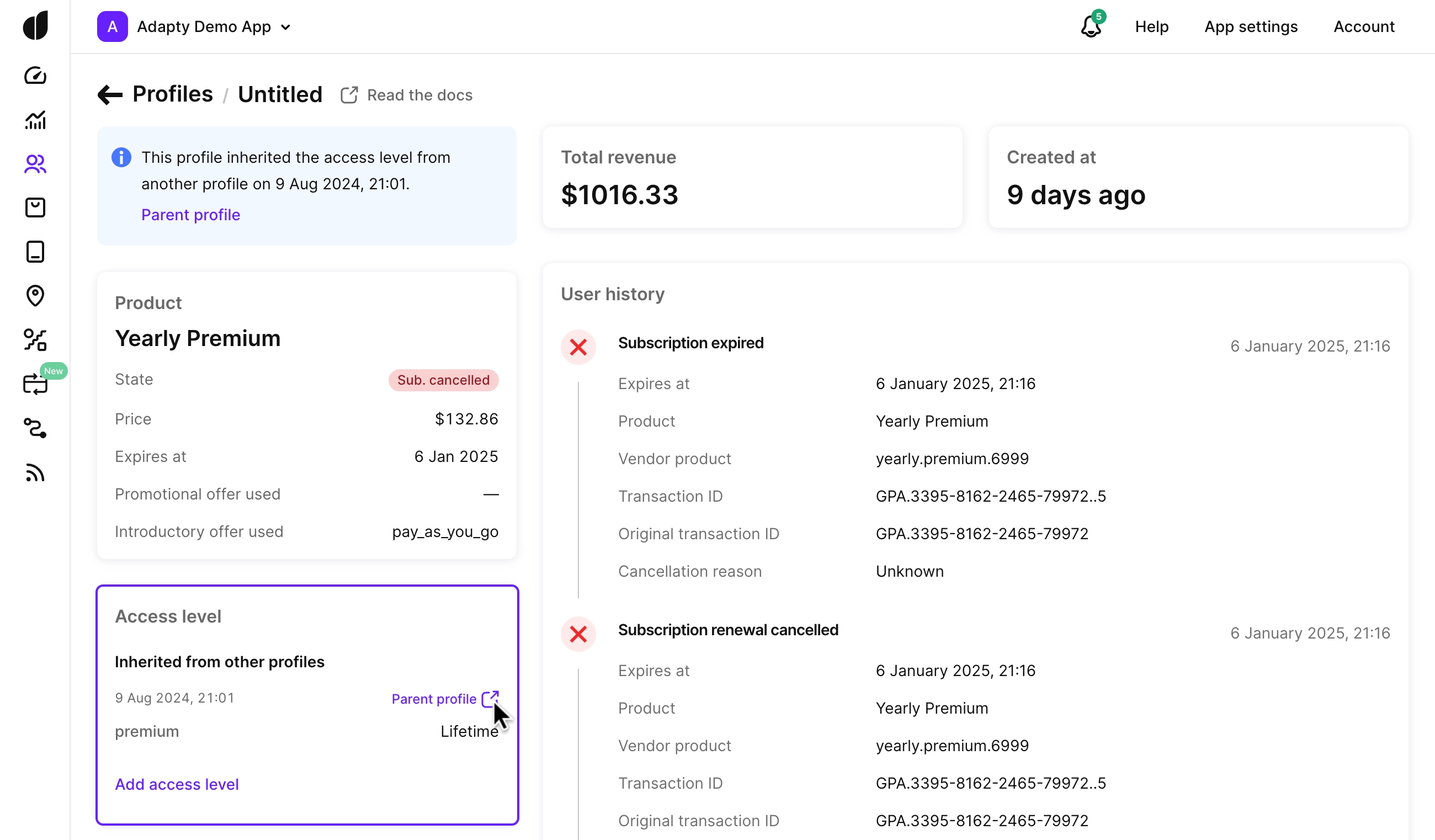
Số dư tiền tệ ảo không được chia sẻ hay chuyển giao giữa các hồ sơ người dùng như mức độ truy cập. Mỗi số dư chỉ gắn với một hồ sơ người dùng duy nhất — xem Số dư, hồ sơ người dùng và thiết bị.
Bước tiếp theo
- Để hiểu cách Adapty tạo và liên kết hồ sơ người dùng, xem Cách hồ sơ người dùng hoạt động.
- Để cấu hình chính sách chia sẻ quyền truy cập, xem Chia sẻ quyền truy cập có trả phí giữa các tài khoản người dùng.
- Để cấp quyền truy cập theo cách lập trình, xem phương thức API Cấp mức độ truy cập.