
在 Flutter SDK 中处理用户引导数据
Warning
从 Adapty SDK v4 开始,用户引导功能已弃用。 请改用流程:与运行在 WebView 中的用户引导不同,流程直接在设备上原生渲染——动画更流畅、外观更统一、加载更快,且无需依赖 WebView 运行时。
当用户回答测验问题或在输入框中填写数据时,系统会调用 onStateUpdatedAction 方法。你可以在代码中保存或处理对应的字段类型。
例如:
// Full-screen presentation
void onboardingViewOnStateUpdatedAction(
  AdaptyUIOnboardingView view,
  AdaptyUIOnboardingMeta meta,
  String elementId,
  AdaptyOnboardingsStateUpdatedParams params,
) {
  // Process data
}

// Embedded widget
onStateUpdatedAction: (meta, elementId, params) {
  // Process data
}
有关 action 格式,请参阅此处。
每种 params 类型的属性结构(点击展开)
void onboardingViewOnStateUpdatedAction(
  AdaptyUIOnboardingView view,
  AdaptyUIOnboardingMeta meta,
  String elementId,
  AdaptyOnboardingsStateUpdatedParams params,
) {
  // elementId is a String:
  elementId; // 'preference_selector'

  // meta — AdaptyUIOnboardingMeta:
  meta.onboardingId;   // 'onboarding_123'
  meta.screenClientId; // 'preferences_screen'
  meta.screenIndex;    // 1
  meta.screensTotal;   // 3

  // params is one of the AdaptyOnboardingsStateUpdatedParams subclasses:
  switch (params) {
    case AdaptyOnboardingsSelectParams(:final id, :final value, :final label):
      // a single selected option
      id;    // 'option_1'
      value; // 'premium'
      label; // 'Premium Plan'
      break;
    case AdaptyOnboardingsMultiSelectParams(:final params):
      // a list of selected options, each an AdaptyOnboardingsSelectParams
      params; // [(id: 'interest_1', value: 'sports', label: 'Sports'), (id: 'interest_2', value: 'music', label: 'Music')]
      break;
    case AdaptyOnboardingsInputParams(:final input):
      switch (input) {
        case AdaptyOnboardingsTextInput(:final value):
          value; // 'John Doe'
          break;
        case AdaptyOnboardingsEmailInput(:final value):
          value; // 'user@example.com'
          break;
        case AdaptyOnboardingsNumberInput(:final value):
          value; // 25.0 (a double)
          break;
      }
      break;
    case AdaptyOnboardingsDatePickerParams(:final day, :final month, :final year):
      day;   // 15
      month; // 6
      year;  // 1990
      break;
  }
}
使用场景
用户画像数据填充
如果你希望立即将用户输入的数据与用户画像关联起来,避免重复询问相同信息,可以在处理操作时通过更新用户画像的方式写入这些数据。
例如,你让用户在 ID 为 name 的文本框中输入姓名,并希望将该值设置为用户的名字;同时,你还让用户在 email 字段中输入邮箱地址。在你的应用代码中,实现方式如下:
// Full-screen presentation
void onboardingViewOnStateUpdatedAction(
  AdaptyUIOnboardingView view,
  AdaptyUIOnboardingMeta meta,
  String elementId,
  AdaptyOnboardingsStateUpdatedParams params,
) {
  // Store user preferences or responses
  if (params is AdaptyOnboardingsInputParams) {
    final builder = AdaptyProfileParametersBuilder();

    // Map elementId to appropriate profile field
    switch (elementId) {
      case 'name':
        if (params.input is AdaptyOnboardingsTextInput) {
          builder.setFirstName((params.input as AdaptyOnboardingsTextInput).value);
        }
        break;
      case 'email':
        if (params.input is AdaptyOnboardingsEmailInput) {
          builder.setEmail((params.input as AdaptyOnboardingsEmailInput).value);
        }
        break;
    }

    // Update profile
    Adapty().updateProfile(builder.build()).catchError((error) {
      // handle the error
    });
  }
}

// Embedded widget
onStateUpdatedAction: (meta, elementId, params) {
  // Store user preferences or responses
  if (params is AdaptyOnboardingsInputParams) {
    final builder = AdaptyProfileParametersBuilder();

    // Map elementId to appropriate profile field
    switch (elementId) {
      case 'name':
        if (params.input is AdaptyOnboardingsTextInput) {
          builder.setFirstName((params.input as AdaptyOnboardingsTextInput).value);
        }
        break;
      case 'email':
        if (params.input is AdaptyOnboardingsEmailInput) {
          builder.setEmail((params.input as AdaptyOnboardingsEmailInput).value);
        }
        break;
    }

    // Update profile
    Adapty().updateProfile(builder.build()).catchError((error) {
      // handle the error
    });
  }
}
根据答案自定义付费墙
在用户引导中使用问卷,你可以根据用户完成用户引导后的答案来自定义展示给他们的付费墙。
例如,你可以询问用户的运动经验,并向不同的用户群体展示不同的 CTA 和产品。
- 在用户引导编辑器中添加问卷,并为各选项分配有意义的 ID。
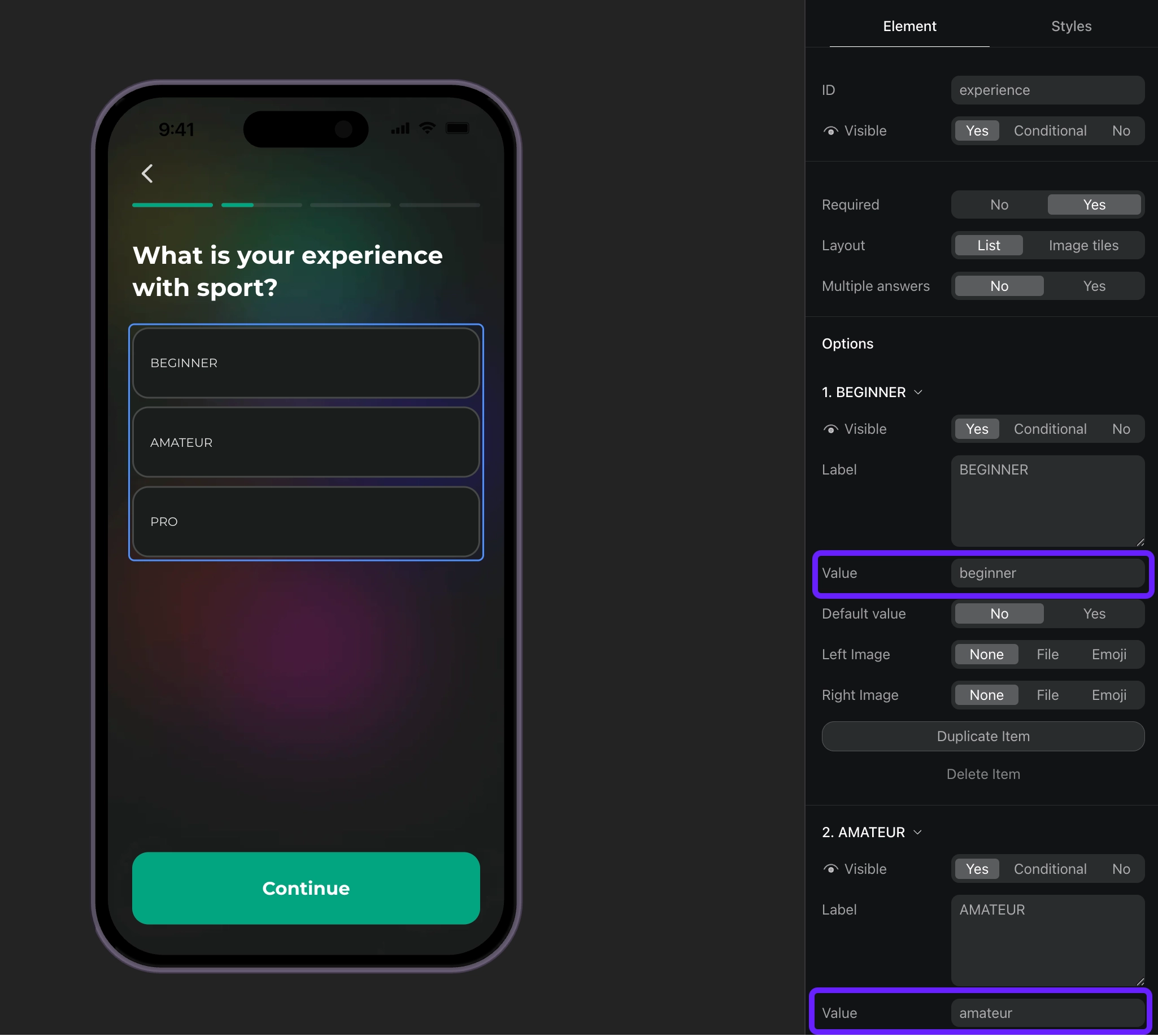
- 根据 ID 处理问卷响应,并为用户设置自定义属性。
// Full-screen presentation
void onboardingViewOnStateUpdatedAction(
  AdaptyUIOnboardingView view,
  AdaptyUIOnboardingMeta meta,
  String elementId,
  AdaptyOnboardingsStateUpdatedParams params,
) {
  // Handle quiz responses and set custom attributes
  if (params is AdaptyOnboardingsSelectParams) {
    final builder = AdaptyProfileParametersBuilder();

    // Map quiz responses to custom attributes
    switch (elementId) {
      case 'experience':
        // Set custom attribute 'experience' with the selected value (beginner, amateur, pro)
        builder.setCustomStringAttribute(params.value, 'experience');
        break;
    }

    // Update profile
    Adapty().updateProfile(builder.build()).catchError((error) {
      // handle the error
    });
  }
}

// Embedded widget
onStateUpdatedAction: (meta, elementId, params) {
  // Handle quiz responses and set custom attributes
  if (params is AdaptyOnboardingsSelectParams) {
    final builder = AdaptyProfileParametersBuilder();

    // Map quiz responses to custom attributes
    switch (elementId) {
      case 'experience':
        // Set custom attribute 'experience' with the selected value (beginner, amateur, pro)
        builder.setCustomStringAttribute(params.value, 'experience');
        break;
    }

    // Update profile
    Adapty().updateProfile(builder.build()).catchError((error) {
      // handle the error
    });
  }
}