
Xử lý dữ liệu từ onboarding trong Flutter SDK
Onboardings đã bị deprecated kể từ Adapty SDK v4. Hãy xây dựng flows thay thế: không giống onboardings chạy trong WebView, flows render trực tiếp trên thiết bị — hiệu ứng mượt mà hơn, giao diện native nhất quán, tải nhanh hơn, và không phụ thuộc vào WebView runtime.
Khi người dùng trả lời câu hỏi trong bài quiz hoặc nhập dữ liệu vào trường nhập liệu, phương thức onStateUpdatedAction sẽ được gọi. Bạn có thể lưu hoặc xử lý loại trường đó trong code của mình.
Ví dụ:
// Full-screen presentation
void onboardingViewOnStateUpdatedAction(
  AdaptyUIOnboardingView view,
  AdaptyUIOnboardingMeta meta,
  String elementId,
  AdaptyOnboardingsStateUpdatedParams params,
) {
  // Process data
}

// Embedded widget
onStateUpdatedAction: (meta, elementId, params) {
  // Process data
}
Xem định dạng action tại đây.
Cấu trúc thuộc tính cho từng loại params (nhấn để mở rộng)
void onboardingViewOnStateUpdatedAction(
  AdaptyUIOnboardingView view,
  AdaptyUIOnboardingMeta meta,
  String elementId,
  AdaptyOnboardingsStateUpdatedParams params,
) {
  // elementId là một String:
  elementId; // 'preference_selector'

  // meta — AdaptyUIOnboardingMeta:
  meta.onboardingId;   // 'onboarding_123'
  meta.screenClientId; // 'preferences_screen'
  meta.screenIndex;    // 1
  meta.screensTotal;   // 3

  // params là một trong các lớp con của AdaptyOnboardingsStateUpdatedParams:
  switch (params) {
    case AdaptyOnboardingsSelectParams(:final id, :final value, :final label):
      // một tùy chọn được chọn
      id;    // 'option_1'
      value; // 'premium'
      label; // 'Premium Plan'
      break;
    case AdaptyOnboardingsMultiSelectParams(:final params):
      // danh sách các tùy chọn được chọn, mỗi tùy chọn là AdaptyOnboardingsSelectParams
      params; // [(id: 'interest_1', value: 'sports', label: 'Sports'), (id: 'interest_2', value: 'music', label: 'Music')]
      break;
    case AdaptyOnboardingsInputParams(:final input):
      switch (input) {
        case AdaptyOnboardingsTextInput(:final value):
          value; // 'John Doe'
          break;
        case AdaptyOnboardingsEmailInput(:final value):
          value; // 'user@example.com'
          break;
        case AdaptyOnboardingsNumberInput(:final value):
          value; // 25.0 (a double)
          break;
      }
      break;
    case AdaptyOnboardingsDatePickerParams(:final day, :final month, :final year):
      day;   // 15
      month; // 6
      year;  // 1990
      break;
  }
}
Các trường hợp sử dụng
Làm phong phú hồ sơ người dùng với dữ liệu
Nếu bạn muốn liên kết ngay dữ liệu đầu vào với hồ sơ người dùng và tránh hỏi họ hai lần về cùng một thông tin, bạn cần cập nhật hồ sơ người dùng với dữ liệu đầu vào khi xử lý action.
Ví dụ: bạn yêu cầu người dùng nhập tên của họ vào trường văn bản có ID name, và bạn muốn đặt giá trị của trường này làm tên của người dùng. Ngoài ra, bạn cũng yêu cầu họ nhập email vào trường email. Trong code của ứng dụng, nó có thể trông như thế này:
// Full-screen presentation
void onboardingViewOnStateUpdatedAction(
  AdaptyUIOnboardingView view,
  AdaptyUIOnboardingMeta meta,
  String elementId,
  AdaptyOnboardingsStateUpdatedParams params,
) {
  // Store user preferences or responses
  if (params is AdaptyOnboardingsInputParams) {
    final builder = AdaptyProfileParametersBuilder();

    // Map elementId to appropriate profile field
    switch (elementId) {
      case 'name':
        if (params.input is AdaptyOnboardingsTextInput) {
          builder.setFirstName((params.input as AdaptyOnboardingsTextInput).value);
        }
        break;
      case 'email':
        if (params.input is AdaptyOnboardingsEmailInput) {
          builder.setEmail((params.input as AdaptyOnboardingsEmailInput).value);
        }
        break;
    }

    // Update profile
    Adapty().updateProfile(builder.build()).catchError((error) {
      // handle the error
    });
  }
}

// Embedded widget
onStateUpdatedAction: (meta, elementId, params) {
  // Store user preferences or responses
  if (params is AdaptyOnboardingsInputParams) {
    final builder = AdaptyProfileParametersBuilder();

    // Map elementId to appropriate profile field
    switch (elementId) {
      case 'name':
        if (params.input is AdaptyOnboardingsTextInput) {
          builder.setFirstName((params.input as AdaptyOnboardingsTextInput).value);
        }
        break;
      case 'email':
        if (params.input is AdaptyOnboardingsEmailInput) {
          builder.setEmail((params.input as AdaptyOnboardingsEmailInput).value);
        }
        break;
    }

    // Update profile
    Adapty().updateProfile(builder.build()).catchError((error) {
      // handle the error
    });
  }
}
Tùy chỉnh paywall dựa trên câu trả lời
Sử dụng quiz trong onboarding, bạn có thể tùy chỉnh paywall hiển thị cho người dùng sau khi họ hoàn thành onboarding.
Ví dụ, bạn có thể hỏi người dùng về kinh nghiệm tập thể thao của họ và hiển thị các CTA và sản phẩm khác nhau cho từng nhóm người dùng.
- Thêm quiz trong trình tạo onboarding và gán ID có ý nghĩa cho các lựa chọn của nó.
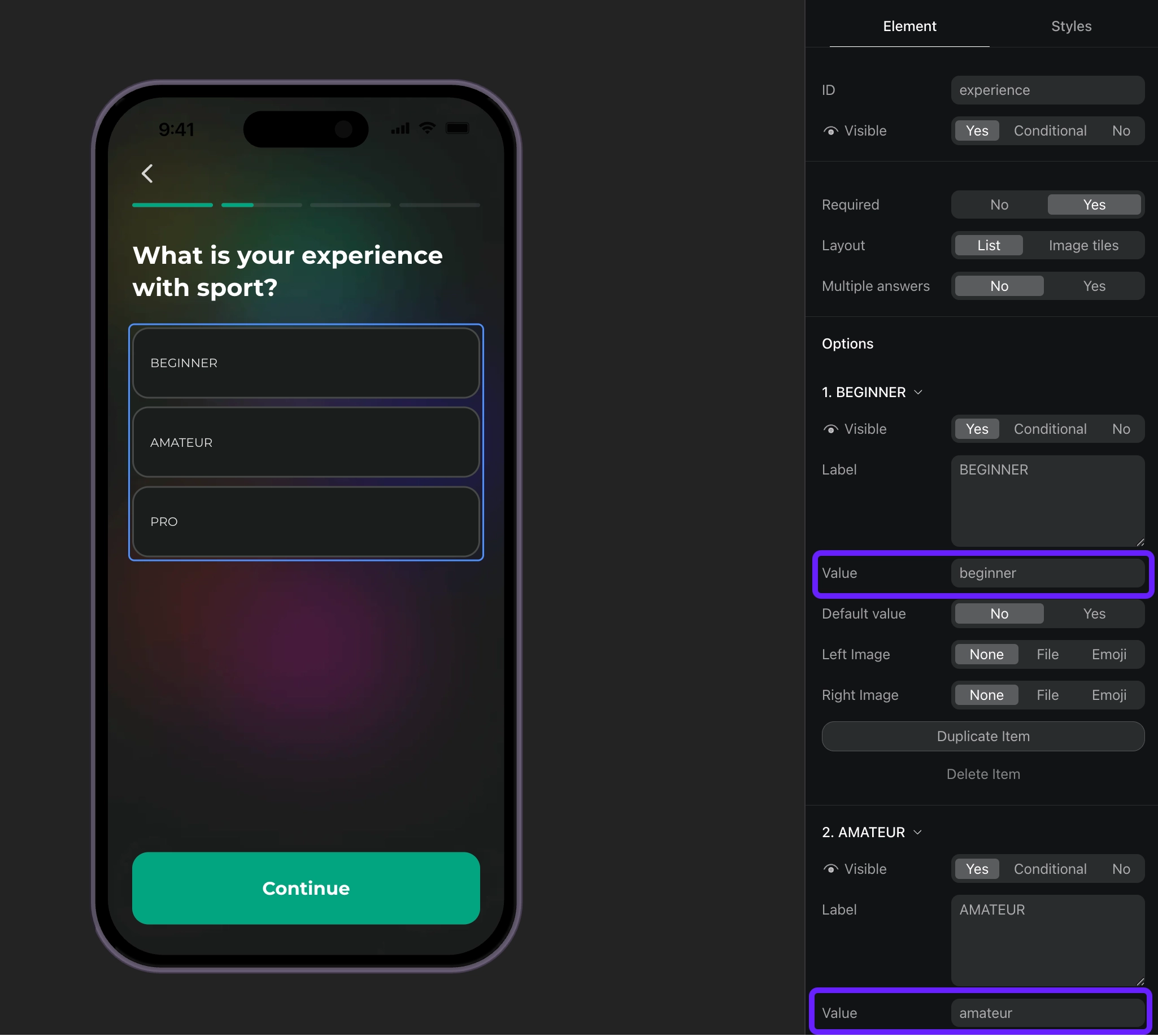
- Xử lý các phản hồi quiz dựa trên ID của chúng và thiết lập thuộc tính tùy chỉnh cho người dùng.
// Full-screen presentation
void onboardingViewOnStateUpdatedAction(
  AdaptyUIOnboardingView view,
  AdaptyUIOnboardingMeta meta,
  String elementId,
  AdaptyOnboardingsStateUpdatedParams params,
) {
  // Handle quiz responses and set custom attributes
  if (params is AdaptyOnboardingsSelectParams) {
    final builder = AdaptyProfileParametersBuilder();

    // Map quiz responses to custom attributes
    switch (elementId) {
      case 'experience':
        // Set custom attribute 'experience' with the selected value (beginner, amateur, pro)
        builder.setCustomStringAttribute(params.value, 'experience');
        break;
    }

    // Update profile
    Adapty().updateProfile(builder.build()).catchError((error) {
      // handle the error
    });
  }
}

// Embedded widget
onStateUpdatedAction: (meta, elementId, params) {
  // Handle quiz responses and set custom attributes
  if (params is AdaptyOnboardingsSelectParams) {
    final builder = AdaptyProfileParametersBuilder();

    // Map quiz responses to custom attributes
    switch (elementId) {
      case 'experience':
        // Set custom attribute 'experience' with the selected value (beginner, amateur, pro)
        builder.setCustomStringAttribute(params.value, 'experience');
        break;
    }

    // Update profile
    Adapty().updateProfile(builder.build()).catchError((error) {
      // handle the error
    });
  }
}- Tạo phân khúc cho từng giá trị thuộc tính tùy chỉnh.
- Tạo một placement và thêm đối tượng cho từng phân khúc bạn đã tạo.
- Hiển thị paywall cho placement trong code của ứng dụng. Nếu onboarding của bạn có nút mở paywall, hãy triển khai code paywall như một phản hồi cho hành động của nút này.