
AppsFlyer
Adapty 与 AppsFlyer 双向交换数据。AppsFlyer 告知 Adapty 每位用户来自哪个推广活动;Adapty 则将用户的付费行为——购买、续订、试用和退款,以及相关的收入和产品详情——回传给 AppsFlyer。
- 查看完整的订阅生命周期,而不仅仅是首次购买。 续订和试用转化属于应用商店事件,AppsFlyer 客户端 SDK 无法通过应用会话上报这些数据。Adapty 在服务端接收订阅事件并将其转发给 AppsFlyer,因此即使在初始安装很久之后,广告系列的数据仍会持续更新。退款也以同样的方式传递,AppsFlyer 会从广告系列收入中扣除退款金额。
- 利用订阅事件数据优化广告系列。 AppsFlyer 将 Adapty 的应用内事件以 postback 的形式转发给您的广告网络。管理广告预算的服务可以根据用户的实际付费行为进行优化。
- 按广告系列筛选 Adapty 分析数据。 Adapty 将 AppsFlyer 的归因数据保存在每个用户画像中,精确到广告组和素材,订阅数据图表可以按此进行筛选。
- 为不同广告系列展示不同的付费墙。 Adapty 市场细分支持按相同的归因字段进行筛选——包括广告系列、广告组和素材。将市场细分用作目标受众,即可将付费墙与引导用户的广告相匹配。
您的 Adapty 账户已内置两款付费推广工具。Adapty Ads Manager 用于管理您的 Apple Ads 广告系列;Adapty Attribution 覆盖 Meta Ads 和 TikTok。两者均直接从 Adapty 购买数据中报告 ROAS 和 LTV,且均可免费开始使用 — 详见定价页面。
集成工作原理
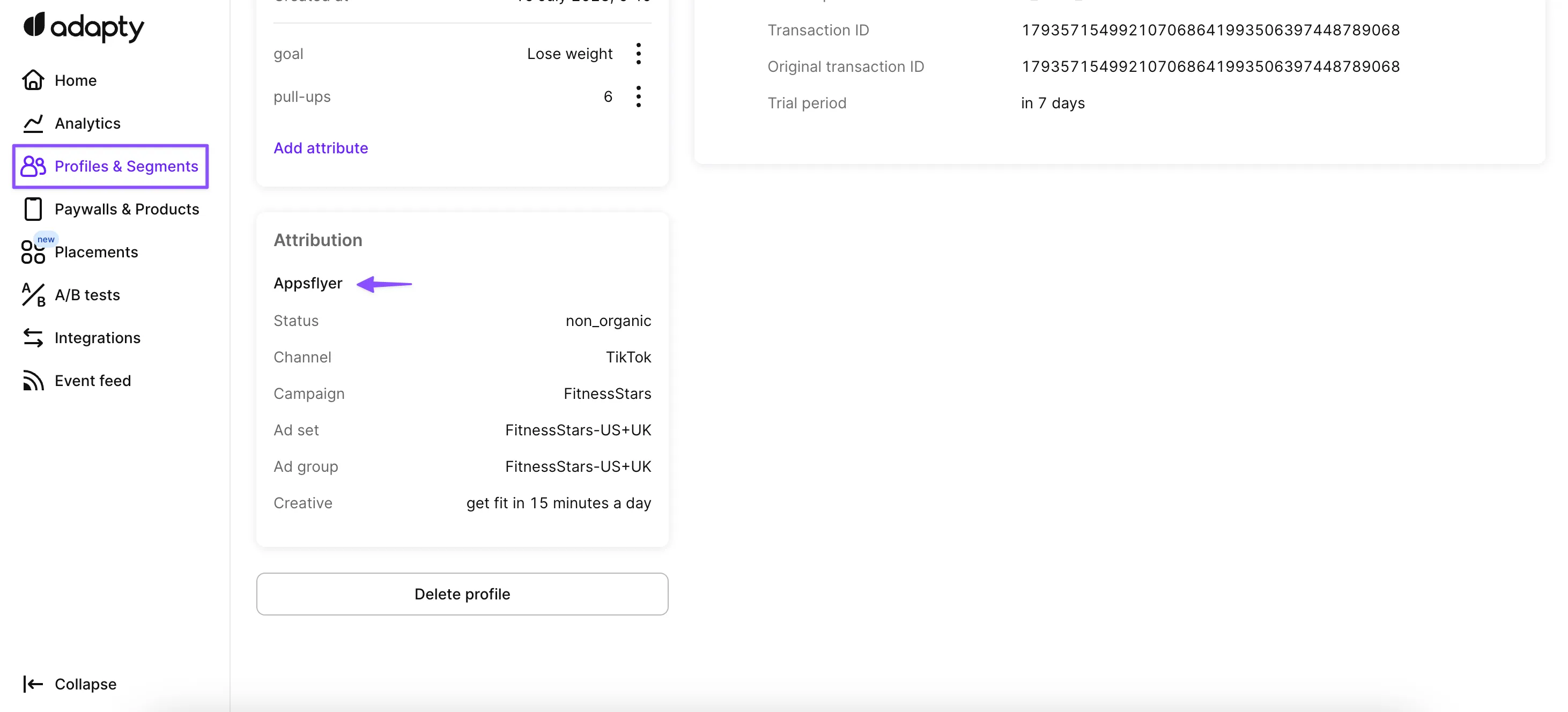
Adapty 从 AppsFlyer 接收归因数据,并将订阅事件回传给 AppsFlyer。两者都依赖同一个值:AppsFlyer ID,这是 AppsFlyer 在你的应用首次启动时生成的字符串。
- 当用户安装您的应用时,AppsFlyer SDK 会为其分配一个唯一 ID。
- 您的应用将该 ID 传递给 Adapty,Adapty 会将其作为
appsflyer_id存储在用户画像中。 - 您的应用还会将 AppsFlyer 的归因数据传递给 Adapty,Adapty 将其保存在同一用户画像中。
- 之后,当用户触发订阅事件(例如开始试用或购买产品)时,Adapty 的服务器会使用相同的
appsflyer_id通过 AppsFlyer 的 S2S API 推送该事件。 - AppsFlyer 将该 ID 与已归因的安装进行匹配,使该购买继承对应安装的广告系列和媒体来源信息。
设置说明
在开始之前:
- 确认您的 AppsFlyer 套餐支持 S2S 应用内事件。 AppsFlyer 入门级 Zero 套餐不支持此功能:其 API 会对 Adapty 发送的每个事件返回
403 Forbidden。 - 在应用中集成 AppsFlyer SDK。 该集成所依赖的 AppsFlyer ID 只有在 SDK 初始化后才会生成。仅靠服务端集成无法产生此 ID。
- 关闭所有其他归因集成。 Adapty 每个用户画像只接受一个归因来源,且无法覆盖已有的值。在 iOS 上,非自然流量的 Apple Ads 归因 始终优先——详见选择单一归因来源。
在 AppsFlyer 中创建 S2S 令牌
Adapty 使用你创建的令牌对 AppsFlyer 的 S2S API 进行身份验证。只有 AppsFlyer 管理员才能访问 Tokens 页面,如果你的账户不是管理员,请联系管理员创建令牌。如果你已经有令牌,可直接跳至配置 Adapty。
-
登录 AppsFlyer。
-
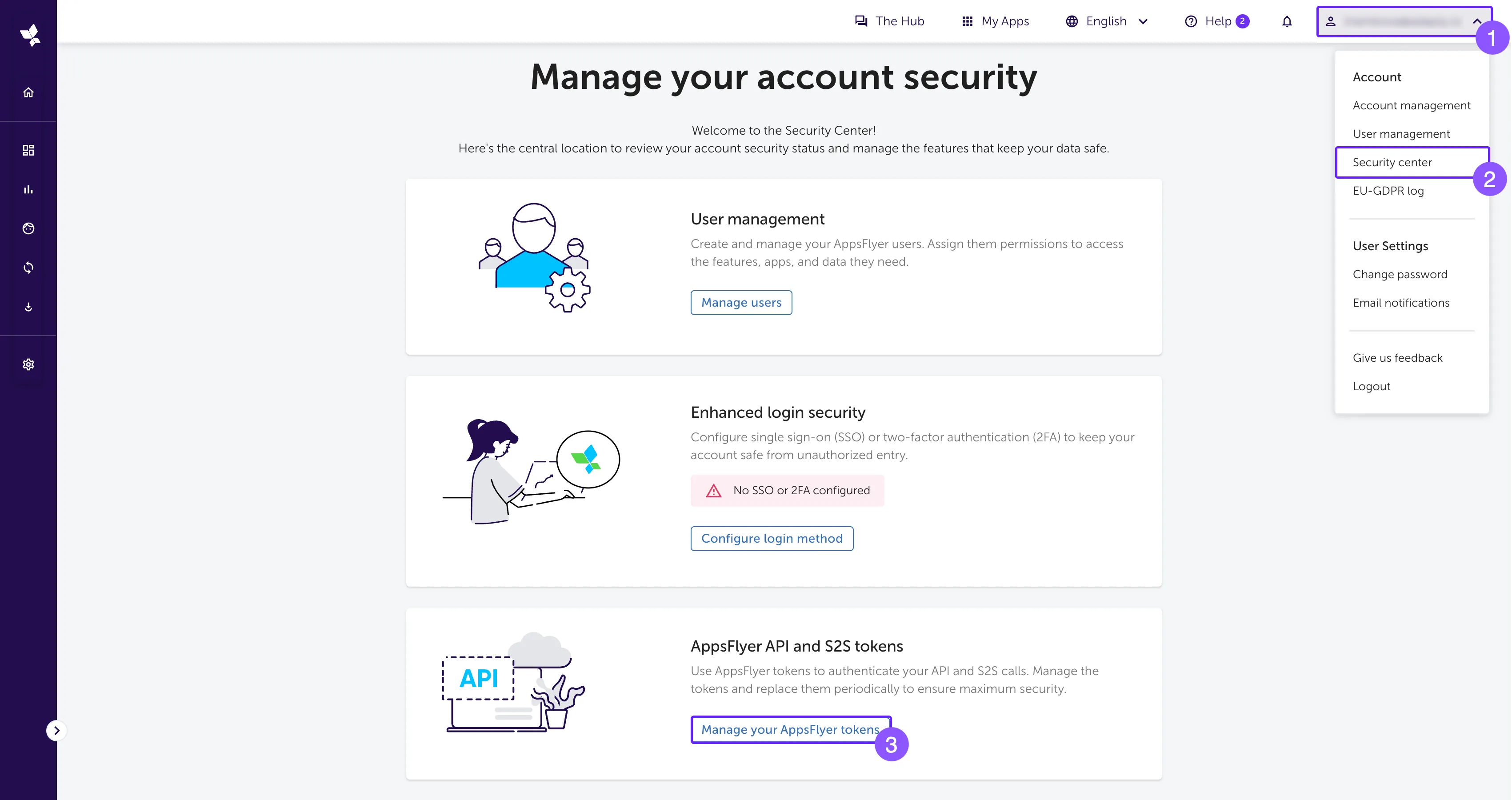
点击右上角的账户名称,打开 Security center。
-
在 Manage your account security 页面,找到 AppsFlyer API and S2S tokens 卡片,然后点击 Manage your AppsFlyer tokens。此时会打开 Tokens 页面。
-
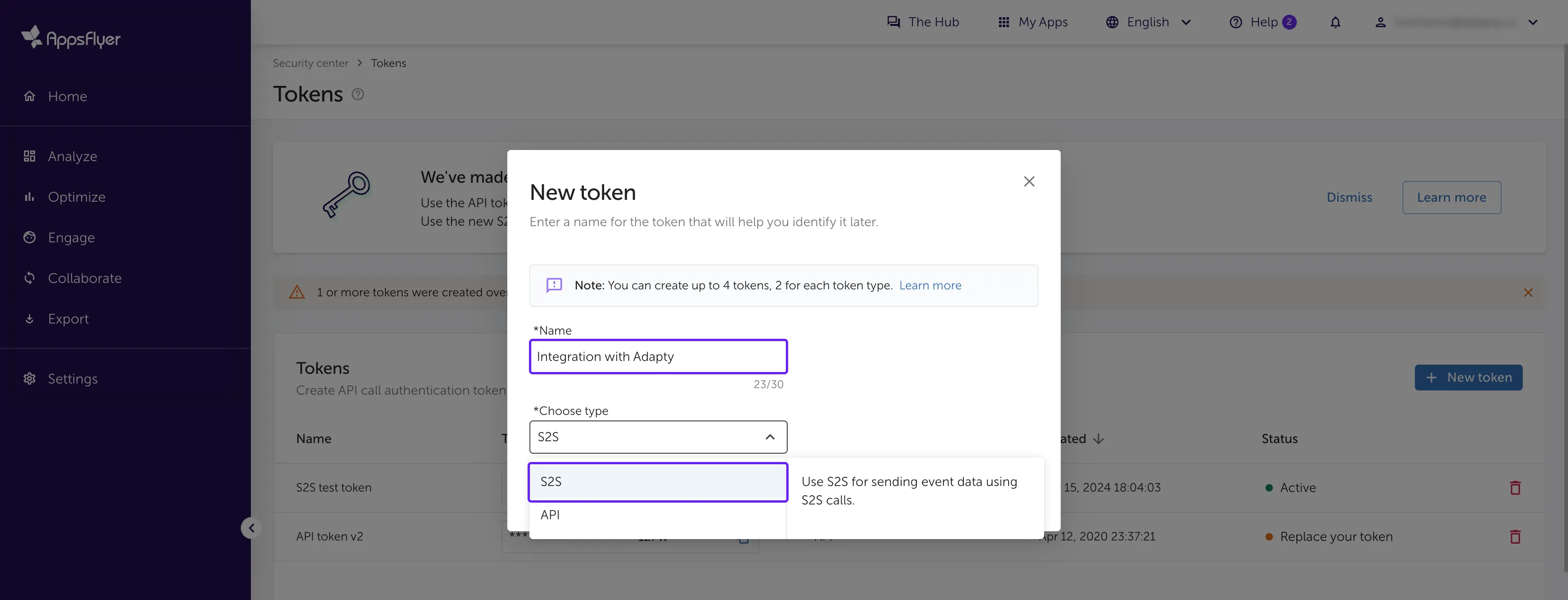
点击 New token。
-
在 Name 字段中输入令牌名称。该名称仅供参考,后续可随时修改。
-
选择 S2S 令牌类型。使用其他类型会导致集成无法正常工作。
-
点击 Create new token。
AppsFlyer 每种类型最多允许两个 Token。如果您的账户已有两个 S2S Token,请复用其中一个。
-
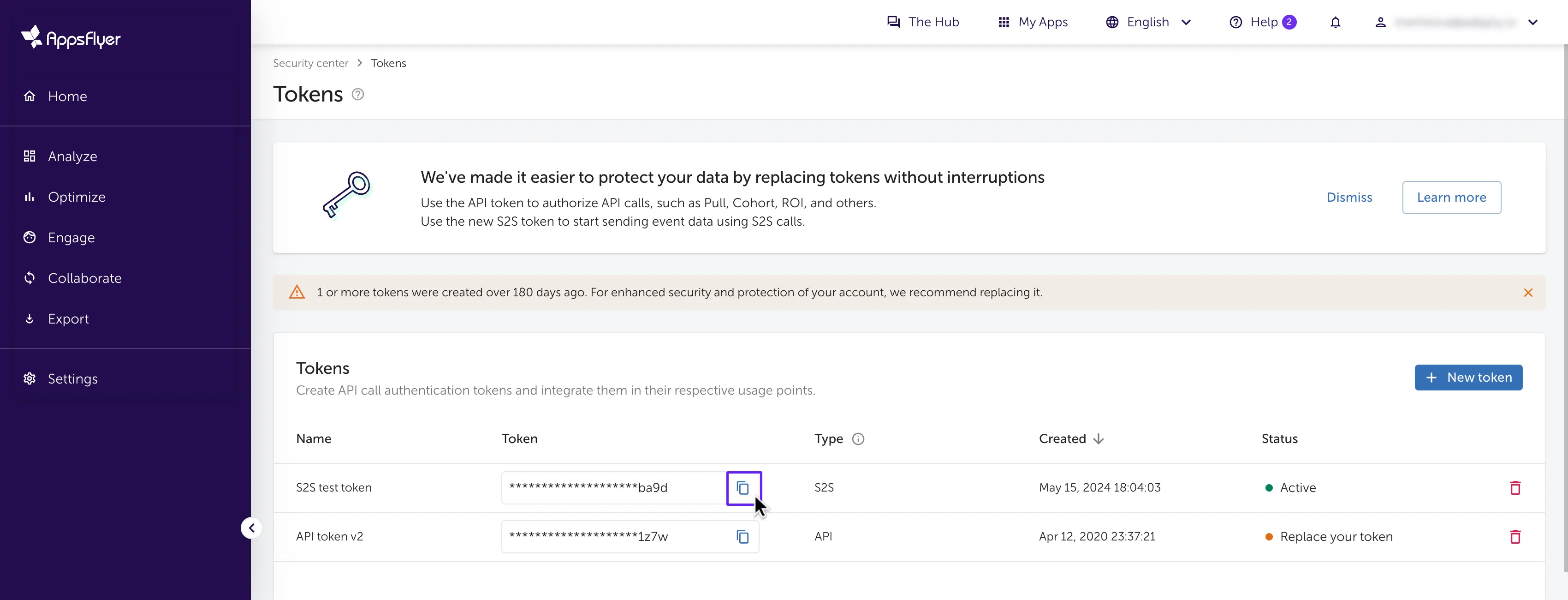
在列表中找到您新建的 Token。AppsFlyer 会对值进行遮蔽,请点击 Token 列中的复制图标来获取它。
配置 Adapty
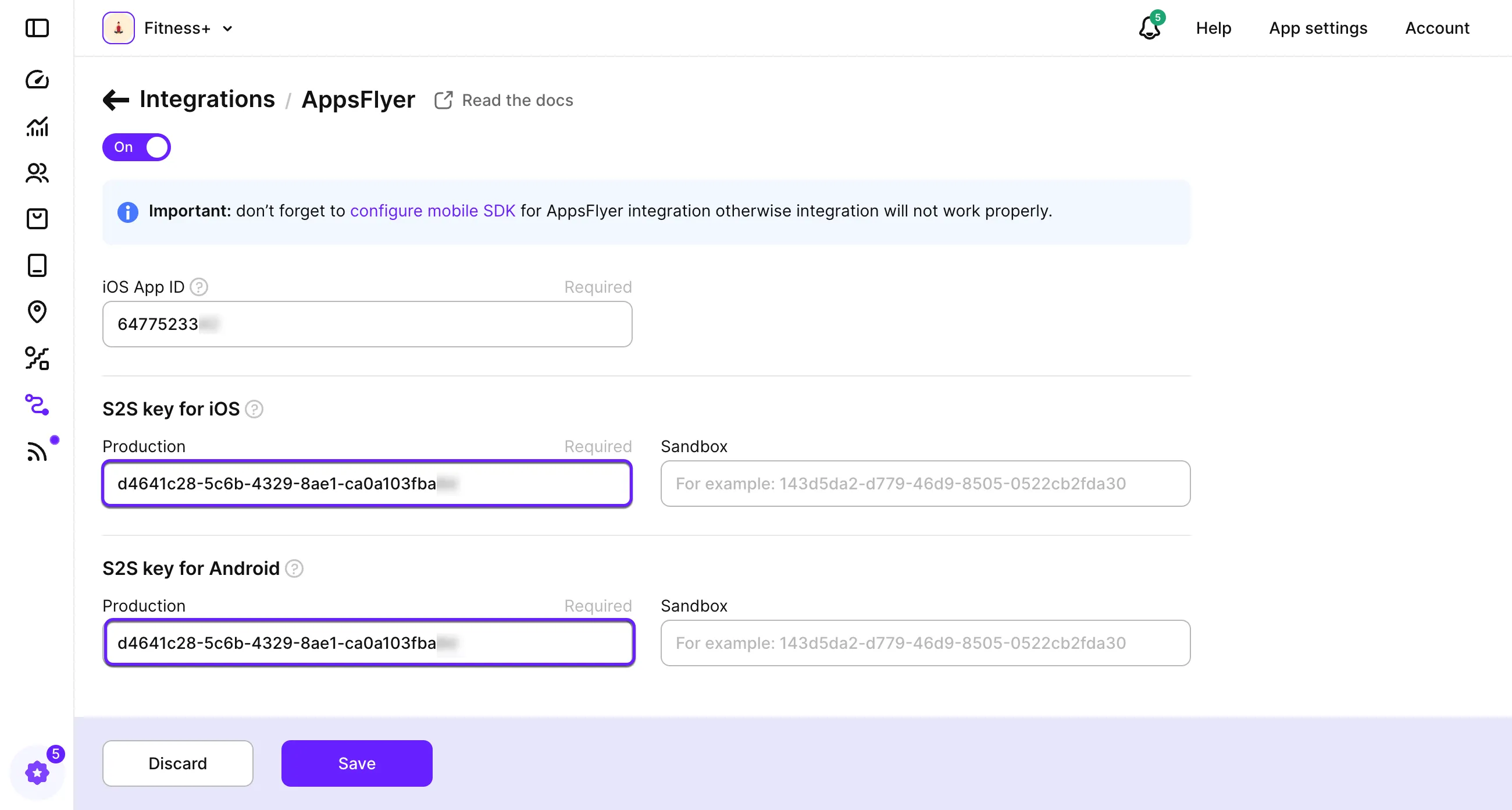
- 在 Adapty 看板中打开 Integrations > AppsFlyer。
- 启用 AppsFlyer 开关。
- 如果你已将应用连接到 App Store,iOS App ID 字段会自动填入应用的 Apple 数字 ID。若该字段为空,请先连接你的 App Store 账户。Android 无需填写对应字段。
- 将 S2S token 粘贴到 S2S key for iOS、S2S key for Android 或两者的 Production 字段中。
- 填写 Sandbox 字段,以防测试购买数据混入生产数据——详见将沙盒数据与生产数据隔离。
- 在 How the revenue data should be send 下,选择 Adapty 发送为
af_revenue的收入数值。这三个选项与 Adapty 数据图表收入视图对应,因此你的选择也决定了 AppsFlyer 数据应与哪个视图保持一致。
| 选项 | Adapty 发送的内容 |
|---|---|
| Gross revenue | 买家支付的全额金额,扣除佣金和税费之前。默认选项。 |
| Proceeds after store commission | 扣除应用商店佣金后的金额,仍含税费。 |
| Proceeds after store commission and taxes | 同时扣除佣金和税费后的金额。 |
- 设置其余选项:
| 开关 | 开启后 | 默认值 |
|---|---|---|
| Report user’s currency | Adapty 以买家实际支付的货币报告每笔销售,而非美元。 | 关闭 |
| Send trial price | 试用开始事件默认不携带收入。开启后,每次试用将附带一个占位价格,同时会出现 Trial price percentage 字段——设置试用应上报的订阅价格占比。设为 60% 时,$10 的订阅将上报 $6。 | 关闭 |
| Exclude historical events | Adapty 跳过用户安装包含 Adapty SDK 的版本之前发生的事件。 | 开启 |
| Delay events with a future datetime | Apple 会提前上报续订和试用转化事件,因此这些事件会携带未来日期。AppsFlyer 通常会将该日期替换为事件到达当天。开启此选项可将每个事件延迟至其日期再发送——参见续订落在错误日期。 | 关闭 |
-
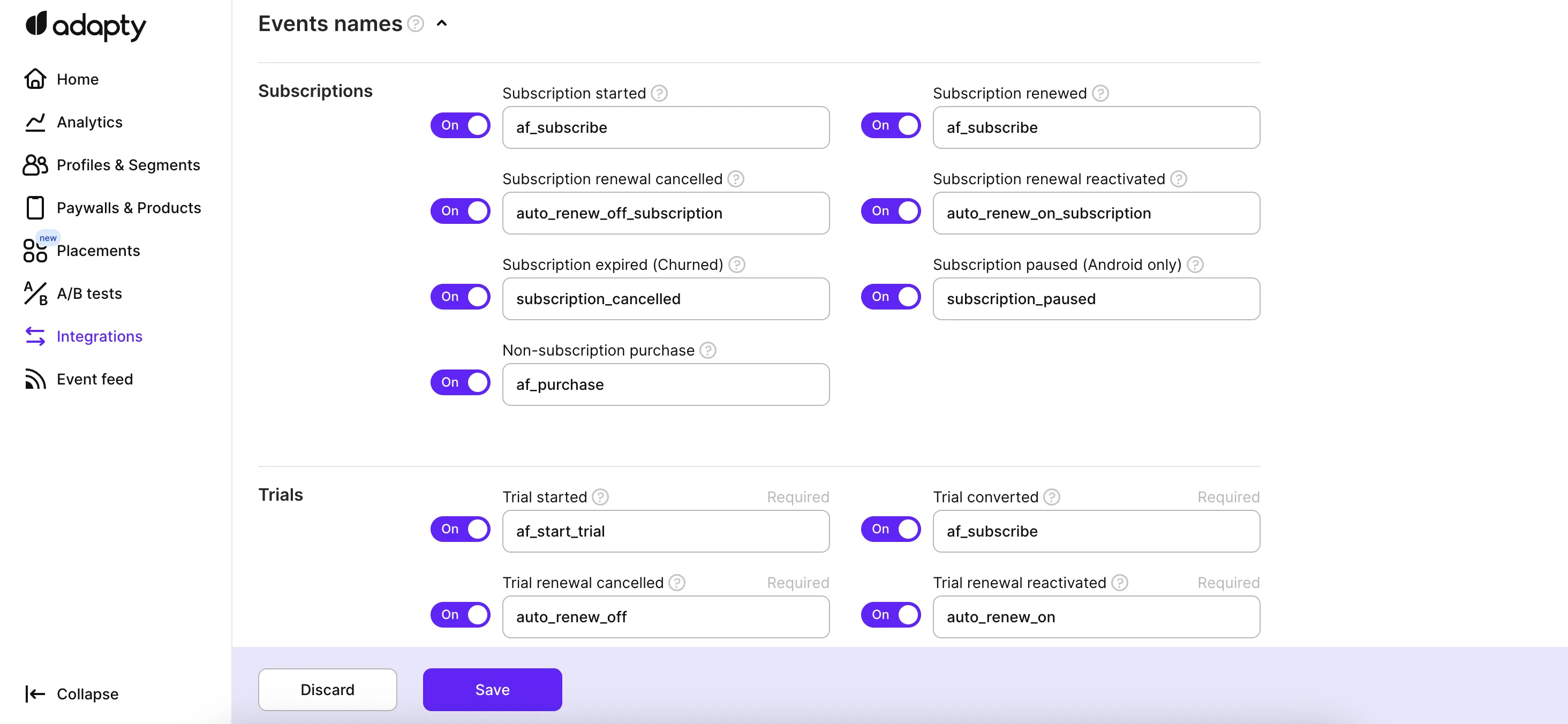
在 Events names 部分重命名或禁用单个事件——详见事件名称。
-
点击 Save。
将沙盒数据与生产数据隔离
要避免测试购买污染真实数据,请将其发送到独立的 AppsFlyer 应用。为开发构建注册一个单独的应用,然后将其 Token 粘贴到各平台区块的 Sandbox 字段中。
Adapty 会根据环境路由每笔交易——真实购买发送到 Production 字段对应的应用,测试购买发送到 Sandbox 字段对应的应用。如果希望在同一个应用中统一上报所有数据,只需在两个字段中填入相同的 Token 即可。
App Store 审核和 TestFlight 购买属于沙盒交易,即使它们运行在生产版本上也是如此。Adapty 会将这些购买以 Sandbox 键发送。
沙盒交易不会显示在任何分析数据图表中。 它们仍会出现在各个用户画像页面和事件流中。
配置应用代码
- 在 AppsFlyer SDK 中注册转化回调。iOS 上实现
AppsFlyerLibDelegate协议,Android 上实现AppsFlyerConversionListener接口,Unity 上实现IAppsFlyerConversionData接口。React Native 和 Flutter 上则向onInstallConversionData方法传入处理器。 - 等待 AppsFlyer 调用该回调。AppsFlyer 在自己的服务器上进行归因,因此结果会异步返回到应用,而不是在启动时立即可用。SDK 在每次后续会话中也会再次调用该回调。
- 在回调内部,通过
getAppsFlyerUID读取用户的 AppsFlyer ID,并通过setIntegrationIdentifier()将其传给 Adapty。只有提供了该值,Adapty 的事件才能正确关联到对应的 AppsFlyer 用户。 - 在同一回调内,通过
updateExternalAttribution()将 AppsFlyer 的归因数据传给 Adapty。这样 Adapty 就能知道是哪个广告活动带来了该安装。该方法在 SDK 4.1 版本之前名为updateAttribution()。 - 使用
await Adapty.identify(),而不是与第 3、4 步并行执行。Adapty 在激活时会创建匿名用户画像,待identify()完成后再切换到已识别的用户画像。在切换过程中设置的appsflyer_id不一定能在切换后保留。
完整的调用顺序,请参阅 iOS、Android、React Native、Flutter、Unity、Capacitor 和 Kotlin Multiplatform SDK 的相关文档。
第三方 SDK 会异步生成用户 ID,在 Adapty.activate() 执行时该 ID 可能尚未就绪。如果你的 Customer User ID 来自此类 SDK,请先不带该 ID 调用 Adapty.activate()。待 ID 到位后,依次调用 setIntegrationIdentifier(),再用 CUID 调用 identify()。
验证集成
- 触发一次沙盒购买,然后打开应用的 Event Feed。每次投递尝试都会显示在那里。若要查看 AppsFlyer 对失败尝试的响应,将鼠标悬停在对应行上即可。
- 在 AppsFlyer 中,打开 Settings > SDK Integration Tests > Live Events,然后选择你的测试设备。Live Events 会在 S2S 事件到达后立即列出,远早于它们出现在 AppsFlyer 的 Activity 看板上。
- 打开应用的 Activity 看板,确认事件、其收入及媒体来源。请等待约一小时——S2S 事件不会立即显示在该看板上。
Adapty 的事件不会出现在你应用的 AppsFlyer SDK 调试日志中。Adapty 从自有服务器发送这些事件,不经过你的应用。本地日志为空并不代表集成有问题。
AppsFlyer 事件结构
Adapty 针对每个事件向 https://api3.appsflyer.com/inappevent/{app_id} 发送一次 POST 请求,并在 authentication 请求头中携带 S2S token。API 2 使用 https://api2.appsflyer.com/inappevent/{app_id}。
{
  "appsflyer_id": "1699887556000-6192770",
  "eventName": "af_subscribe",
  "eventTime": "2026-03-01 12:00:00",
  "eventValue": "{\"af_content_id\":\"yearly.premium.6999\",\"af_order_id\":\"GPA.3383-4699-1373-07113\",\"store_country\":\"US\",\"profile_country\":\"US\",\"af_content_type\":\"in_app\",\"af_revenue\":\"9.9900\",\"af_currency\":\"USD\",\"af_quantity\":\"1\"}",
  "os": "17.0.1",
  "bundleIdentifier": "com.example.app",
  "customer_user_id": "user_12345",
  "eventCurrency": "USD",
  "ip": "192.168.100.1",
  "advertising_id": "00000000-0000-0000-0000-000000000000",
  "idfa": "00000000-0000-0000-0000-000000000000",
  "idfv": "00000000-0000-0000-0000-000000000000",
  "att": "3"
}| 参数 | 类型 | 描述 |
|---|---|---|
appsflyer_id | String | 你的应用传递给 setIntegrationIdentifier 的 AppsFlyer ID。AppsFlyer 通过该值将事件与安装记录进行匹配。 |
eventName | String | 来自 Events names 部分的名称——参见事件名称。 |
eventTime | String | 事件发生的时间(UTC,YYYY-MM-DD HH:MM:SS)。对于超过 26 小时的旧事件,Adapty 会将其替换为当前时间——参见旧事件显示为今天的日期。 |
eventValue | String | 下表中各字段的 JSON 编码字符串。 |
os | String | 用户设备的操作系统版本。 |
bundleIdentifier | String | iOS 上的应用 Bundle ID,或 Android 上的包名。 |
customer_user_id | String | 用户的 Customer User ID。 |
eventCurrency | String | ISO 4217 货币代码,例如 USD。 |
ip | String | 用户的 IP 地址。 |
advertising_id | String | 仅限 Android。 Google Advertising ID。 |
idfa | String | 仅限 iOS。 ID for Advertisers。 |
idfv | String | 仅限 iOS。 ID for Vendors。 |
att | String | 仅限 iOS。 App Tracking Transparency 状态,取值范围 0 到 3。若 Adapty 没有对应值,则发送 0。 |
eventValue 携带购买本身。最后四个参数仅出现在携带收入的事件中:
| 参数 | 类型 | 描述 |
|---|---|---|
af_content_id | String | 商店中的产品 ID。 |
af_order_id | String | 原始交易 ID。 |
store_country | String | 用户商店账户所在国家/地区。 |
profile_country | String | Adapty 根据用户 IP 地址推断的国家/地区。 |
af_content_type | String | 固定为 in_app。 |
af_revenue | String | 收入金额,保留 4 位小数。退款时为负值。 |
af_currency | String | af_revenue 的货币单位。 |
af_quantity | String | 固定为 1。 |
事件名称
默认情况下,Adapty 会将其收入相关事件映射到 AppsFlyer 的标准事件名称,而不是以自定义事件的形式发送 Adapty 自己的名称。如果你需要将事件转发给广告网络,这一点非常重要:广告网络会直接识别并处理这些标准名称,无需你为每个事件单独配置映射关系。
| Adapty 事件 | 默认 AppsFlyer 名称 |
|---|---|
| Subscription started | af_subscribe |
| Subscription renewed | af_subscribe |
| Trial converted | af_subscribe |
| Trial started | af_start_trial |
| Non-subscription purchase | af_purchase |
其他所有 Adapty 事件均保留其原始名称,例如 subscription_refunded。在 AppsFlyer 集成页面的 Events names 部分,你可以重命名任意事件,或关闭不需要的事件。有关 Adapty 可发送的完整事件列表,请参阅事件。
局限性
- 没有
appsflyer_id的用户画像不会产生任何事件。 AppsFlyer 将事件与生成该 ID 的安装相关联,并从该安装中读取广告系列信息。没有此 ID,Adapty 不会发送任何内容,且 Event Feed 会标记这些用户画像——详见事件未到达 AppsFlyer。 - 不支持历史数据回填。 Adapty 仅从您启用集成的那一刻起转发事件,过去的购买记录不会同步到 AppsFlyer。
- AppsFlyer 原始数据中的设备详情为空。 S2S 事件只包含请求中携带的信息。Device Model、Device Category、Language、Operator、WIFI、App Version 和 App Name 均无对应的 S2S 参数,因此通过这种方式发送的数据无法填充这些字段。
故障排除
- 事件未到达 AppsFlyer
- 购买显示为自然流量
- 旧事件以今天的日期到达
- 续订落在错误的日期
- AppsFlyer 中的收入与 Adapty Analytics 不匹配
- 事件动态中出现
Failed to authenticate access_level_updated在事件动态中显示为失败
事件未到达 AppsFlyer
先打开 Event Feed。投递失败时会显示 AppsFlyer 返回的错误信息。以下是最常见的原因:
- 用户画像中没有
appsflyer_id。 请确认你的应用在所有目标平台上都调用了getAppsFlyerUID,并将结果传给了setIntegrationIdentifier——详见配置应用代码。 - 该平台的 App ID 缺失。 AppsFlyer 通过 ID 识别每个应用,没有 ID Adapty 将不发送任何事件。iOS 事件需要在集成页面填写 iOS App ID;Android 事件需要在 App settings > Android SDK 中填写包名——详见配置 Adapty。
- 该购买是沙盒交易,但 Sandbox 密钥为空。 详见将沙盒数据与生产环境隔离。
- 该事件在 Events names 部分已被关闭。
成功投递并不代表 AppsFlyer 会保留该事件。只要请求格式正确,AppsFlyer 就会返回 200 OK,但如果 appsflyer_id 与任何真实安装均不匹配,该事件将被直接丢弃。
购买记录显示为自然量
每个 appsflyer_id 对应一次安装,携带该 ID 的所有事件都会继承该安装的归因信息——即产生该安装的广告系列,若为自然安装则无归因。AppsFlyer 需要 20–30 秒乃至更长时间才能完成新安装的归因。在此之前到达的事件无法继承任何归因,因此 AppsFlyer 会将其标记为未归因的自然量。
预计首次启动时的购买行为会被归因为自然流量——即在应用启动后数秒内开始的试用。为避免这种情况,请适当延迟显示付费墙,以便 AppsFlyer 有足够时间完成安装归因处理。
如果每个事件看起来都是自然流量,而不仅仅是偶尔的首次启动购买,那么原因在于归因本身,而非时机问题:另一个来源已提前声明了该用户画像。请参阅选择单一归因来源。
旧事件以今天的日期到达
事件可能延迟到达 Adapty,原因有以下两种:
- 当 App Store Connect 中 App Store 服务器通知显示 Delayed 时,Apple 会将通知加入队列。续订事件可能在实际发生很久之后才到达 Adapty —— 详见 App Store 服务器通知显示”Delayed”。
- 当 Exclude historical events 关闭时,追溯历史事件会随时传入。
AppsFlyer 不接受过旧的时间戳。为确保事件处理的一致性,Adapty 会将超过 26 小时的事件的 eventTime 替换为当前时间。此行为无法禁用。
续订日期落在错误的日期
Apple 会在续订和试用转换发生之前通知 Adapty,Adapty 会立即将其转发,并保留原始的未来 eventTime。AppsFlyer 仅在时间戳属于到达当天时才会保留未来时间戳——如果续订时间是明天,AppsFlyer 会将其改为今天的到达时间。
在集成设置中开启 Delay events with a future datetime。Adapty 会将每个事件保留到其对应时间到来后再发送,这样 AppsFlyer 记录的日期就是 Apple 公告的日期。请参阅带有未来日期的事件时间戳。
AppsFlyer 中的收入与 Adapty Analytics 不匹配
Adapty 和 AppsFlyer 对相同购买的统计方式不同,这些差异几乎涵盖了所有不匹配的原因。
- AppsFlyer 的概览看板按安装日期对收入分组;Adapty 的数据图表按事件日期分组。 在 AppsFlyer 中,一月份安装用户在七月产生的续订收入会计入一月份。若要对比,请参阅 Adapty 的同期群分析——该分析同样按安装月份对收入分组。AppsFlyer 的原始数据报告按事件日期分组,因此应将其与 Adapty 的数据图表进行比较。
- 没有
appsflyer_id的用户画像产生的购买记录永远不会到达 AppsFlyer。 这些数据将保留在 Adapty Analytics 中。请参阅事件未到达 AppsFlyer。 - AppsFlyer 只显示您在 Adapty 中选择的收入数据。 How the revenue data should be send 设置决定 Adapty 发送的是毛收入、净收益还是净利润。如果将其与 Adapty Analytics 的其他视图进行比较,差额将等于佣金、税费或两者之和。
- Adapty 使用您应用的报告时区;AppsFlyer 接收的是 UTC 时间。 无论您在 App Settings 中如何设置,集成始终使用 UTC 时间戳。如果您的报告时区为 +02:00,则 7 月 1 日 23:30 UTC 产生的购买将在 Adapty 中显示为 7 月 2 日。
- AppsFlyer 缺少历史事件。 原因通常有两个:启用 Exclude historical events 后,用户的 AppsFlyer 历史记录从其首次启动 Adapty 版本时开始计算;此外,Adapty 不会补录在您启用集成之前已处理的事件。
- 沙盒购买会到达由沙盒密钥指定的 AppsFlyer 应用。 如果该应用是生产环境应用,测试购买将虚增其收入。请参阅将沙盒数据隔离在生产环境之外。
- 集成中关闭的事件永远不会到达 AppsFlyer。 Adapty Analytics 仍会统计这些事件。请检查 Events names 部分——关闭
subscription_renewed会导致任何成熟应用的大部分收入数据缺失。
事件日志中出现 Failed to authenticate
当凭据与 API 版本不匹配时,AppsFlyer 会拒绝认证。API 2 需要 Dev key,API 3 需要 S2S token。切换版本时若未同步替换密钥,则每条事件都会产生此报错。
请在 AppsFlyer Security Center 中创建新 token,并将其粘贴到 S2S key 字段中,或参考 从 AppsFlyer S2S API 2 切换到 API 3。
事件日志中 access_level_updated 显示为失败
access_level_updated 是一个仅限 Webhook 的事件。Adapty 不会将其发送到此集成。但 Adapty 会为每个已启用的集成记录结果,不支持的事件将显示为失败。