如果您通过 自定义商店(例如 Amazon Appstore、Microsoft Store 或您自己的支付平台)销售订阅或应用内购买,您可以将这些交易与 Adapty 同步,以自动管理访问等级并在分析中跟踪收入。
在本指南中,您将了解如何使用 SDK 和 API 将自定义商店的购买与 Adapty 连接起来。
示例用例
假设您在 Amazon Appstore 上分发应用,或者您已经建立了自己的网络商店用于直接购买。当用户通过这些平台完成购买时,您希望:
- 自动授予他们在移动应用中访问高级功能的权限
- 在 Adapty 分析中与 App Store 和 Google Play 收入一起跟踪该交易
- 像其他任何订阅一样触发集成和 Webhook
这正是本集成所要实现的目标。
步骤 1. 识别用户
Adapty 使用 customer_user_id 跨平台识别用户。
您需要创建此 ID 一次,并将其传递给移动 SDK 和 Web 后端。当用户首次从应用注册时,您可以在 SDK 激活期间传递其 customer user ID;如果您在注册阶段之前已激活 Adapty SDK,则使用 identify 方法创建新的用户画像并为其分配 customer user ID。
Important
如果您在 SDK 激活后识别新用户,SDK 将首先创建一个匿名用户画像(它无法在没有用户画像的情况下工作)。当您使用 customer user ID 调用 identify 时,将创建一个新的用户画像。
此行为是正常的,不会影响分析准确性。了解更多信息,请点击此处。
do {
    try await Adapty.identify("YOUR_USER_ID") // Unique for each user
} catch {
    // handle the error
}
// User IDs must be unique for each user
Adapty.identify("YOUR_USER_ID") { error in
    if let error {
        // handle the error
    }
}
Adapty.identify("YOUR_USER_ID") { error -> // Unique for each user
    if (error == null) {
        // successful identify
    }
}
// User IDs must be unique for each user
Adapty.identify("YOUR_USER_ID", error -> {
    if (error == null) {
        // successful identify
    }
});
try {
    await adapty.identify("YOUR_USER_ID"); // Unique for each user
    // successfully identified
} catch (error) {
    // handle the error
}
try {
  await Adapty().identify(customerUserId); // Unique for each user
} on AdaptyError catch (adaptyError) {
  // handle the error
} catch (e) {
}
Adapty.Identify("YOUR_USER_ID", (error) => { // Unique for each user
  if(error == null) {
    // successful identify
  }
});
Adapty.identify("YOUR_USER_ID") // Unique for each user
    .onSuccess {
        // successful identify
    }
    .onError { error ->
        // handle the error
    }
try {
  await adapty.identify({ customerUserId: "YOUR_USER_ID" });
  // successfully identified
} catch (error) {
  // handle the error
}
步骤 2. 在 Adapty 看板中创建自定义商店的产品
为了让 Adapty 将自定义商店的交易与您的产品匹配,您需要添加产品并为其设置自定义商店详情。
- 在 Adapty 看板左侧菜单中进入 Products,然后点击 Create product。或者,点击现有产品进行编辑。
- 确保您已选择希望授予购买该产品的用户的访问等级。
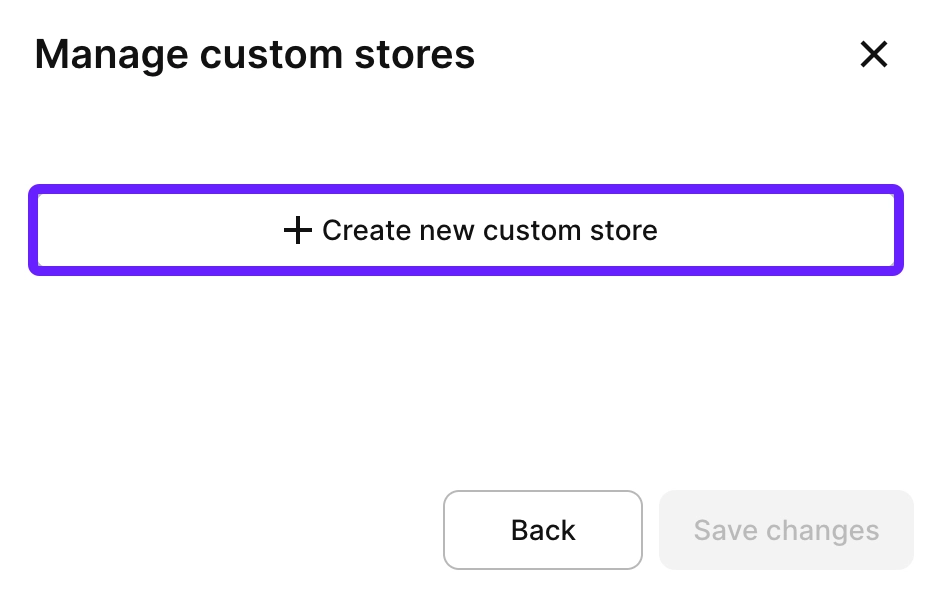
- 点击 + 并选择 Add a custom store。
- 点击 Create new custom store。
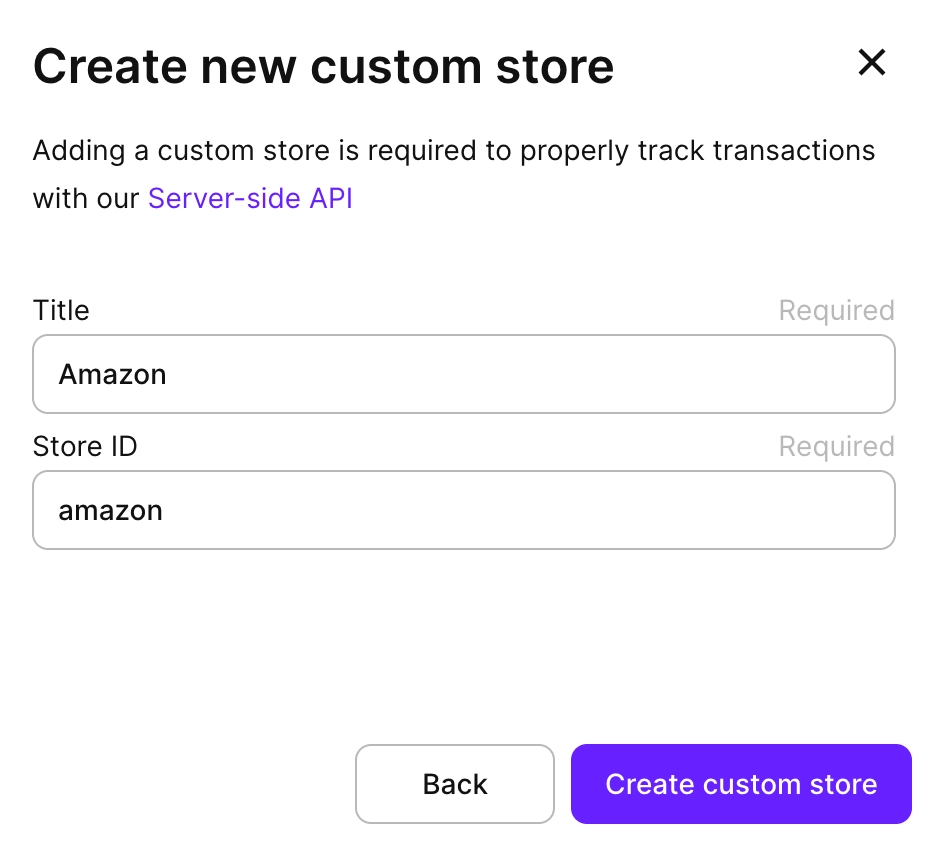
- 为您的商店命名(例如:“Amazon Appstore”、“Microsoft Store” 或 “Web Store”)并设置 ID。点击 Create custom store。
- 然后,点击 Save changes 将产品链接到自定义商店。
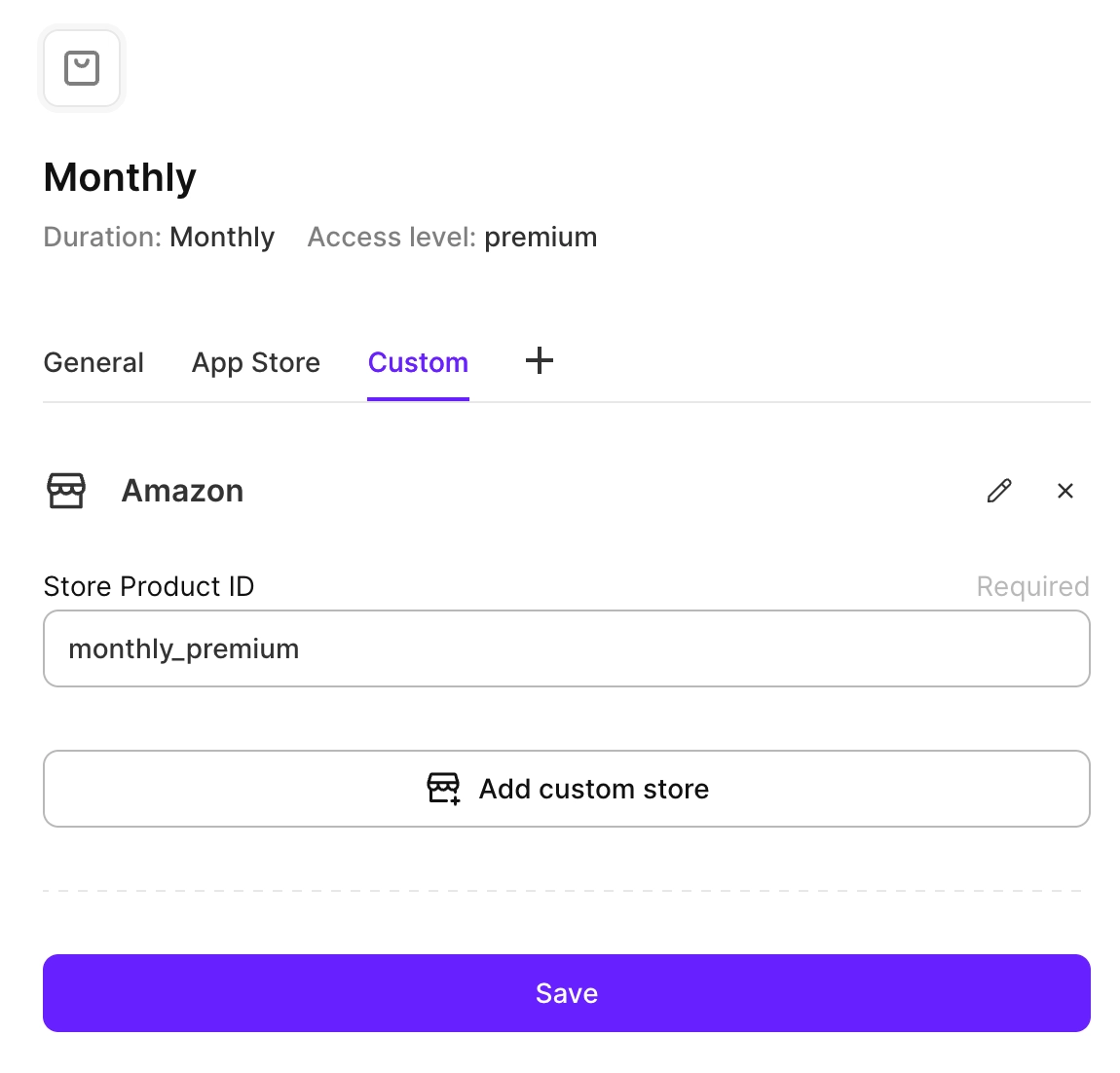
- 输入产品的 Store product ID,以便将其映射到该商店中的某个产品。然后,点击 Save。
步骤 3. 通过 API 同步交易
当自定义商店中完成购买时,您需要使用服务端 API 将其同步到 Adapty。
此 API 调用将:
- 在 Adapty 中记录交易
- 向用户授予相应的访问等级
- 触发您已配置的任何集成和 Webhook
- 使交易出现在您的分析中
完整方法参考请参见此处。
curl --request POST \
  --url https://api.adapty.io/api/v2/server-side-api/purchase/set/transaction/ \
  --header 'Accept: application/json' \
  --header 'Authorization: Api-Key YOUR_SECRET_API_KEY' \
  --header 'Content-Type: application/json' \
  --header 'adapty-customer-user-id: YOUR_CUSTOMER_USER_ID' \
  --data '{
  "purchase_type": "PRODUCT_PERIOD",
  "store": "YOUR_CUSTOM_STORE",
  "environment": "production",
  "store_product_id": "YOUR_STORE_PRODUCT_ID",
  "store_transaction_id": "STORE_TRANSACTION_ID",
  "store_original_transaction_id": "ORIGINAL_TRANSACTION_ID",
  "price": {
    "country": "COUNTRY_CODE",
    "currency": "CURRENCY_CODE",
    "value": "YOUR_PRICE"
  },
  "purchased_at": "2024-01-15T10:30:00Z"
}'
Important
重要参数:
- store:步骤 2 中自定义商店的 ID
- store_product_id:步骤 2 中的商店产品 ID
- store_transaction_id:此交易的唯一标识符
- purchased_at:购买发生时的 ISO 8601 时间戳
- price:用户实际支付的金额
步骤 4. 在应用中验证访问权限
交易同步后,用户的用户画像将自动更新为新的访问等级。
当用户打开您的移动应用时,获取其用户画像以检查其订阅状态并解锁高级功能。
do {
    let profile = try await Adapty.getProfile()

    if profile.accessLevels["YOUR_ACCESS_LEVEL"]?.isActive ?? false {
        // grant access to premium features
    }
} catch {
// handle the error
}
Adapty.getProfile { result in
    if let profile = try? result.get() {
        // check the access
        if profile.accessLevels["YOUR_ACCESS_LEVEL"]?.isActive ?? false {
            // grant access to premium features
        }
    }
}
Adapty.getProfile { result ->
    when (result) {
        is AdaptyResult.Success -> {
            val profile = result.value
            // check the access
            if (profile.accessLevels["YOUR_ACCESS_LEVEL"]?.isActive == true) {
                // grant access to premium features
            }
        }
        is AdaptyResult.Error -> {
            val error = result.error
            // handle the error
        }
    }
}
Adapty.getProfile(result -> {
    if (result instanceof AdaptyResult.Success) {
        AdaptyProfile profile = ((AdaptyResult.Success<AdaptyProfile>) result).getValue();
        // check the access
        if (profile.getAccessLevels().get("YOUR_ACCESS_LEVEL") != null && profile.getAccessLevels().get("YOUR_ACCESS_LEVEL").getIsActive()) {
            // grant access to premium features
        }

    } else if (result instanceof AdaptyResult.Error) {
        AdaptyError error = ((AdaptyResult.Error) result).getError();
        // handle the error
    }
});
try {
    const profile = await adapty.getProfile();
    // check the access
    if (profile.accessLevels["YOUR_ACCESS_LEVEL"]?.isActive) {
        // grant access to premium features
    }
} catch (error) {
  // handle the error
}
try {
  final profile = await Adapty().getProfile();
  // check the access
  if (profile.accessLevels["YOUR_ACCESS_LEVEL"]?.isActive ?? false) {
      // grant access to premium features
  }
} on AdaptyError catch (adaptyError) {
  // handle the error
} catch (e) {
}
Adapty.GetProfile((profile, error) => {
  if (error != null) {
    // handle the error
    return;
  }

  // check the access
  if (profile.AccessLevels["YOUR_ACCESS_LEVEL"]?.IsActive ?? false) {
      // grant access to premium features
  }
});
Adapty.getProfile()
    .onSuccess { profile ->
        // check the access
        if (profile.accessLevels["YOUR_ACCESS_LEVEL"]?.isActive == true) {
            // grant access to premium features
        }
    }
    .onError { error ->
        // handle the error
    }
try {
  const profile = await adapty.getProfile();
  // check the access
  if (profile.accessLevels["YOUR_ACCESS_LEVEL"]?.isActive) {
      // grant access to premium features
  }
} catch (error) {
  // handle the error
}