
在 Capacitor SDK 中处理用户引导事件
从 Adapty SDK v4 开始,用户引导功能已弃用。 请改用流程:与运行在 WebView 中的用户引导不同,流程直接在设备上原生渲染——动画更流畅、外观更统一、加载更快,且无需依赖 WebView 运行时。
通过编辑工具配置的用户引导会生成各类事件,你的应用可以对这些事件作出响应。使用 setEventHandlers 方法来处理独立屏幕展示时的相关事件。
开始之前,请确保:
设置事件处理器
要处理用户引导的事件,请使用 view.setEventHandlers 方法:
try {
  const view = await createOnboardingView(onboarding);

  view.setEventHandlers({
    onAnalytics(event, meta) {
      console.log('Analytics event:', event);
    },
    onClose(actionId, meta) {
      console.log('Onboarding closed:', actionId);
      return true; // Allow the onboarding to close
    },
    onCustom(actionId, meta) {
      console.log('Custom action:', actionId);
      return false; // Don't close the onboarding
    },
    onPaywall(actionId, meta) {
      console.log('Paywall action:', actionId);
      view.dismiss().then(() => {
        openPaywall(actionId);
      });
    },
    onStateUpdated(action, meta) {
      console.log('State updated:', action);
    },
    onFinishedLoading(meta) {
      console.log('Onboarding finished loading');
    },
    onError(error) {
      console.error('Onboarding error:', error);
    },
  });

  await view.present();
} catch (error) {
  console.error('Failed to present onboarding:', error);
}
事件类型
以下部分描述了您可以处理的不同类型的事件。
处理自定义操作
在编辑工具中,你可以为按钮添加自定义操作并为其指定一个 ID。
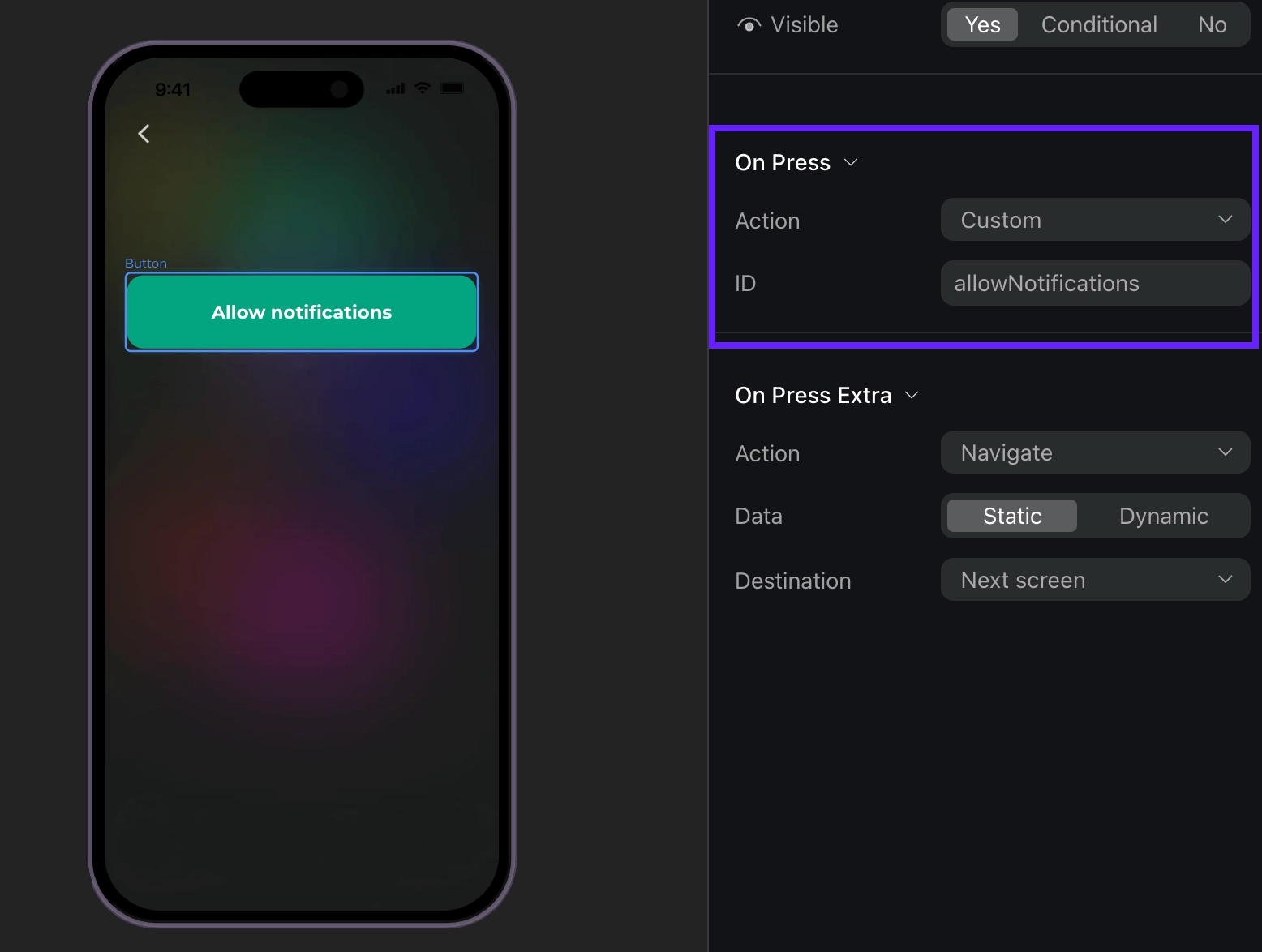
之后,您可以在代码中使用这个 ID,并将其作为自定义动作来处理。例如,当用户点击自定义按钮(如 Login 或 Allow notifications)时,事件处理程序将被触发,并附带与编辑工具中 Action ID 对应的 actionId 参数。您可以自定义 ID,例如 “allowNotifications”。
view.setEventHandlers({
  onCustom(actionId, meta) {
    switch (actionId) {
      case 'login':
        console.log('Login action triggered');
        break;
      case 'allow_notifications':
        console.log('Allow notifications action triggered');
        break;
    }
    return false; // Don't close the onboarding
  },
});
事件示例(点击展开)
{
  "actionId": "allow_notifications",
  "meta": {
    "onboardingId": "onboarding_123",
    "screenClientId": "profile_screen",
    "screenIndex": 0,
    "screensTotal": 3
  }
}
完成用户引导加载
当用户引导完成加载时,将触发以下事件:
view.setEventHandlers({
  onFinishedLoading(meta) {
    console.log('Onboarding loaded:', meta.onboardingId);
  },
});
事件示例(点击展开)
{
    "meta": {
        "onboarding_id": "onboarding_123",
        "screen_cid": "welcome_screen",
        "screen_index": 0,
        "total_screens": 4
    }
}
关闭用户引导
当用户点击分配了 Close 操作的按钮时,用户引导即被视为已关闭。
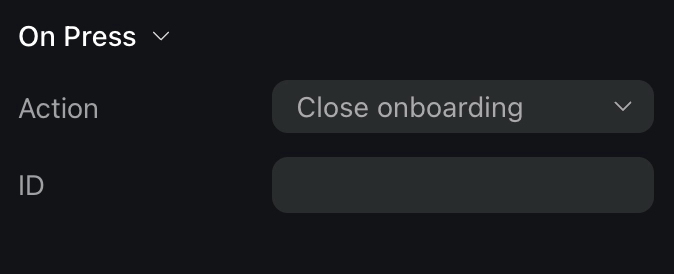
请注意,当用户关闭用户引导时,你需要自行处理后续逻辑。例如,你需要停止显示用户引导界面本身。
view.setEventHandlers({
  onClose(actionId, meta) {
    console.log('Onboarding closed:', actionId);
    return true; // Allow the onboarding to close
  },
});
事件示例(点击展开)
{
  "action_id": "close_button",
  "meta": {
    "onboarding_id": "onboarding_123",
    "screen_cid": "final_screen",
    "screen_index": 3,
    "total_screens": 4
  }
}
打开付费墙
如果你希望在用户引导内部打开付费墙,可以处理此事件。如果你希望在付费墙关闭后再打开一个付费墙,有一种更直接的方式——处理关闭动作,然后直接打开付费墙,无需依赖事件数据。
在用户引导中使用付费墙最流畅的方式,是将动作 ID 设置为与付费墙版位 ID 相同。
请注意,在 iOS 上,同一时间只能显示一个视图(付费墙或用户引导)。如果你在用户引导上方展示付费墙,将无法以编程方式控制后台的用户引导。尝试关闭用户引导时,实际上会关闭付费墙,导致用户引导依然可见。为避免此问题,请在展示付费墙之前,始终先关闭用户引导视图。
view.setEventHandlers({
  onPaywall(actionId, meta) {
    // 在显示付费墙之前关闭用户引导
    view.dismiss().then(() => {
      openPaywall(actionId);
    });
  },
});

async function openPaywall(placementId: string) {
  // 在此实现您的付费墙打开逻辑
}
事件示例(点击展开)
{
    "action_id": "premium_offer_1",
    "meta": {
        "onboarding_id": "onboarding_123",
        "screen_cid": "pricing_screen",
        "screen_index": 2,
        "total_screens": 4
    }
}
跟踪导航
在用户引导流程中,当各类与导航相关的事件发生时,你会收到相应的分析事件:
view.setEventHandlers({
  onAnalytics(event, meta) {
    console.log('Analytics event:', event.type, meta.onboardingId);
  },
});
event 对象可以是以下类型之一:
| 类型 | 描述 |
|---|---|
onboardingStarted | 用户引导加载完成时触发 |
screenPresented | 任意屏幕显示时触发 |
screenCompleted | 屏幕完成时触发。包含可选的 elementId(已完成元素的标识符)和可选的 reply(用户的响应)。当用户执行任何退出屏幕的操作时触发。 |
secondScreenPresented | 第二个屏幕显示时触发 |
userEmailCollected | 通过输入框收集到用户邮箱时触发 |
onboardingCompleted | 当用户到达 ID 为 final 的屏幕时触发。如需使用此事件,请为最后一个屏幕分配 final ID。 |
unknown | 用于任何无法识别的事件类型。包含 name(未知事件的名称)和 meta(附加元数据) |
每个事件都包含 meta 信息,其中含有以下字段:
| 字段 | 描述 |
|---|---|
onboardingId | 用户引导流程的唯一标识符 |
screenClientId | 当前屏幕的标识符 |
screenIndex | 当前屏幕在流程中的位置 |
screensTotal | 流程中的屏幕总数 |
事件示例(点击展开)
// onboardingStarted
{
  "name": "onboarding_started",
  "meta": {
    "onboarding_id": "onboarding_123",
    "screen_cid": "welcome_screen",
    "screen_index": 0,
    "total_screens": 4
  }
}

// screenPresented
{
    "name": "screen_presented",
    "meta": {
        "onboarding_id": "onboarding_123",
        "screen_cid": "interests_screen",
        "screen_index": 2,
        "total_screens": 4
    }
}

// screenCompleted
{
    "name": "screen_completed",
    "meta": {
        "onboarding_id": "onboarding_123",
        "screen_cid": "profile_screen",
        "screen_index": 1,
        "total_screens": 4
    },
    "params": {
        "element_id": "profile_form",
        "reply": "success"
    }
}

// secondScreenPresented
{
    "name": "second_screen_presented",
    "meta": {
        "onboarding_id": "onboarding_123",
        "screen_cid": "profile_screen",
        "screen_index": 1,
        "total_screens": 4
    }
}

// userEmailCollected
{
    "name": "user_email_collected",
    "meta": {
        "onboarding_id": "onboarding_123",
        "screen_cid": "profile_screen",
        "screen_index": 1,
        "total_screens": 4
    }
}

// onboardingCompleted
{
    "name": "onboarding_completed",
    "meta": {
        "onboarding_id": "onboarding_123",
        "screen_cid": "final_screen",
        "screen_index": 3,
        "total_screens": 4
    }
}