
AppMetrica
AppMetrica is a free analytics tool that helps you track user behavior and analyze your mobile app’s performance in real time. By integrating AppMetrica with Adapty, you can gain deeper insights into your subscription metrics and user engagement.
How to set up AppMetrica integration
Setting up the AppMetrica integration involves two main steps:
- Configure the integration in the Adapty Dashboard
- Set up the integration in your app’s code
Dashboard configuration
To set up the AppMetrica integration:
- Open the AppMetrica apps list
- Select the app you want to track
- Go to Settings > Main and copy the Application ID and Post API key
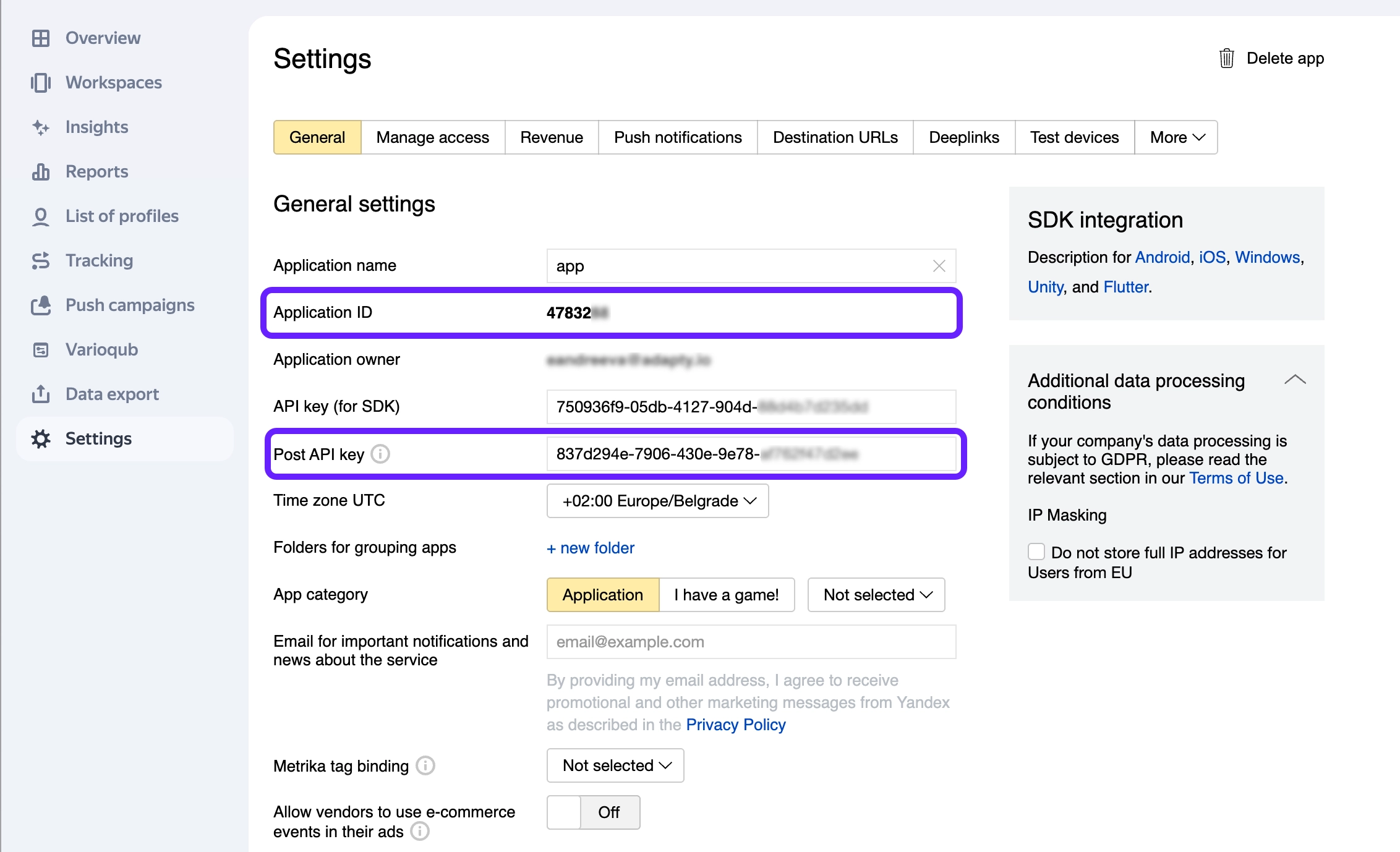
- Go to Integrations > AppMetrica in the Adapty Dashboard
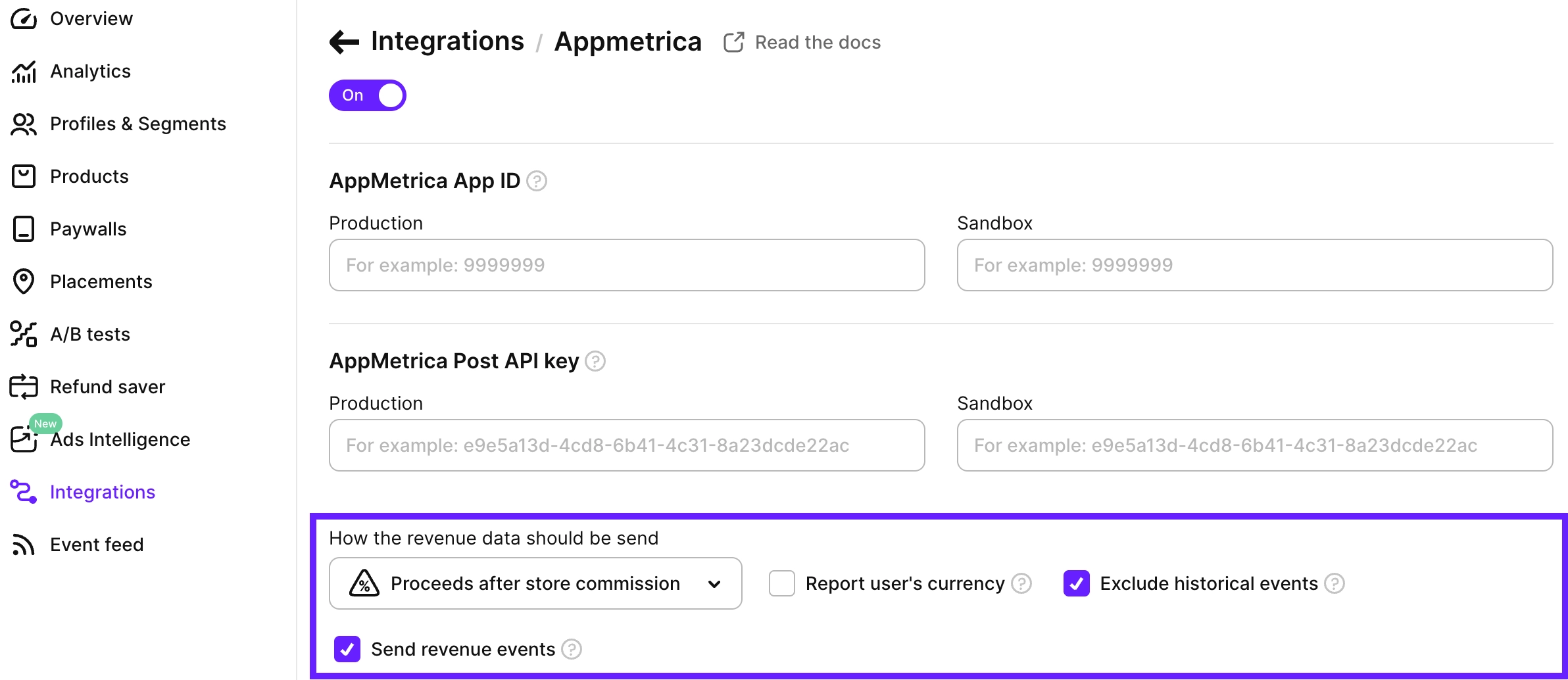
- Paste your AppMetrica credentials.
Events and tags
Adapty allows you to send three groups of events to AppMetrica. You can enable the events you need to track your app’s performance. For a complete list of available events, see our events documentation.
AppMetrica syncs events every 4 hours, so there may be a delay before events appear in your dashboard.
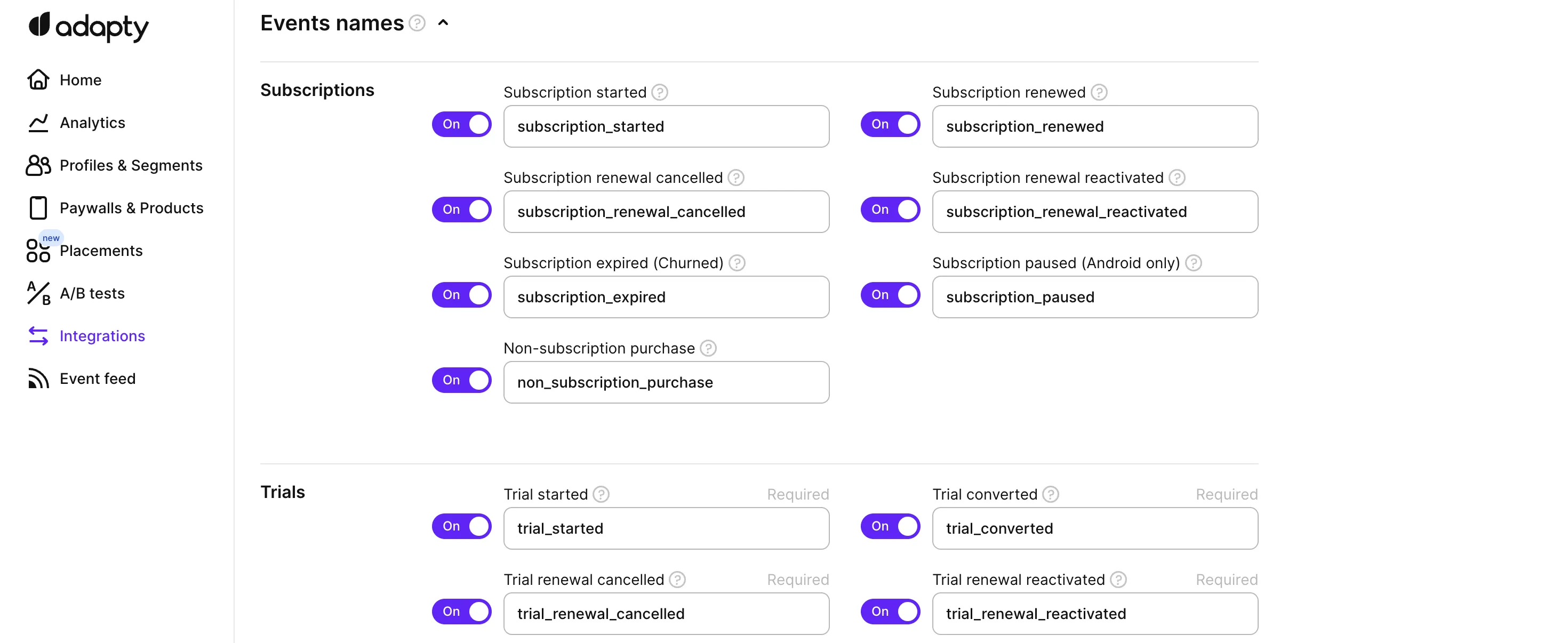
We recommend using Adapty’s default event names for consistency, but you can customize them to match your existing analytics setup.
Revenue settings
By default, Adapty sends revenue data as properties in events, which appear in AppMetrica’s Events report. You can configure how this revenue data is calculated and displayed:
-
Revenue calculation: Choose how revenue values are calculated to match your financial reporting needs:
- Gross revenue: Shows the total revenue before any deductions, useful for tracking the full amount customers pay
- Proceeds after store commission: Displays revenue after App Store/Play Store fees are deducted, helping you track actual earnings
- Proceeds after store commission and taxes: Shows net revenue after both store fees and applicable taxes, providing the most accurate picture of your earnings
-
Report user’s currency: When enabled, sales are reported in the user’s local currency, making it easier to analyze revenue by region. When disabled, all sales are converted to USD for consistent reporting across different markets.
-
Send revenue events: Enable this option to make revenue data appear not only in the Events report but also in AppMetrica’s In-app and ad revenue report. Make sure you’re not sending revenue from anywhere else, as this may result in duplication.
-
Exclude historical events: When enabled, Adapty won’t send events that occurred before the user installed the app with Adapty SDK. This helps avoid data duplication if you were already sending events to analytics before integrating Adapty.
SDK configuration
To enable the AppMetrica integration in your app, you need to set up two identifiers:
appmetrica_device_id: Required for basic integrationappmetrica_profile_id: Optional, but recommended if your app has user registration
Use the setIntegrationIdentifier() method to set these values. Here’s how to implement it for each platform:
Third-party SDKs generate user IDs asynchronously. The ID may not be ready when Adapty.activate() runs. If your Customer User ID comes from one of these SDKs, call Adapty.activate() without it. Once the ID arrives, call setIntegrationIdentifier(), then identify() with the CUID.
AppMetrica event structure
Adapty sends events to AppMetrica via POST requests with parameters passed as query parameters. For each Adapty event, AppMetrica receives up to two separate requests:
- Profile event (always sent): Contains event metadata
- Revenue event (optional): Contains revenue data if the “Send revenue events” option is enabled in Adapty Dashboard
Profile Event Request
Sent to: https://api.appmetrica.yandex.ru/logs/v1/import/events
Example URL with query parameters:
POST https://api.appmetrica.yandex.ru/logs/v1/import/events?post_api_key=your_key&application_id=your_app_id&event_name=subscription_renewed&event_timestamp=1709294400&event_json=%7B%22vendor_product_id%22%3A%22yearly.premium%22...%7D&os_name=ios&ios_ifa=00000000-0000-0000-0000-000000000000&ios_ifv=12345678-1234-1234-1234-123456789012&profile_id=user_12345&session_type=foregroundQuery parameters:
| Parameter | Type | Description |
|---|---|---|
post_api_key | String | Your AppMetrica Post API Key. |
application_id | String | Your AppMetrica Application ID. |
event_name | String | The event name (mapped from Adapty event). |
event_timestamp | Long | UNIX timestamp of the event in seconds. Capped to the last 7 days if older. |
event_json | String | URL-encoded JSON string containing all available event fields. Only non-null fields included. |
os_name | String | ”ios” or “android”. |
profile_id | String | AppMetrica Profile ID (if set), otherwise Customer User ID (if available). |
appmetrica_device_id | String | AppMetrica Device ID Hash. Only sent if profile_id is not available. |
session_type | String | Always “foreground”. |
ios_ifa | String | iOS only. ID for Advertisers. |
ios_ifv | String | iOS only. ID for Vendors. |
google_aid | String | Android only. Google Advertising ID. |
Revenue Event Request (Optional)
Sent to: https://api.appmetrica.yandex.ru/logs/v1/import/revenue
This request is only sent when the “Send revenue events” option is enabled in your Adapty Dashboard integration settings.
Example URL with query parameters:
POST https://api.appmetrica.yandex.ru/logs/v1/import/revenue?post_api_key=your_key&application_id=your_app_id&revenue_event_type=subscription_renewed&price=9.99¤cy=USD&product_id=yearly.premium&quantity=1&transaction_id=GPA.3383...&payload=%7B%22vendor_product_id%22%3A%22yearly.premium%22...%7D&os_name=ios&ios_ifa=00000000-0000-0000-0000-000000000000&profile_id=user_12345&session_type=foregroundQuery parameters:
| Parameter | Type | Description |
|---|---|---|
post_api_key | String | Your AppMetrica Post API Key. |
application_id | String | Your AppMetrica Application ID. |
revenue_event_type | String | The type of revenue event (e.g., “subscription_renewed”, “refund”, “intro_started”). See AppMetrica event mapping. |
price | Float | Revenue amount (based on your revenue calculation settings). |
currency | String | Currency code (e.g., “USD”). |
product_id | String | The Product ID from the store. |
quantity | Integer | Always 1. |
transaction_id | String | Store Transaction ID. |
payload | String | URL-encoded JSON string containing event details. Automatically trimmed if exceeds 30KB by removing optional fields in order of importance to preserve the most critical data. |
os_name | String | ”ios” or “android”. |
profile_id | String | AppMetrica Profile ID (if set), otherwise Customer User ID (if available). |
appmetrica_device_id | String | AppMetrica Device ID Hash. Only sent if profile_id is not available. |
session_type | String | Always “foreground”. |
ios_ifa | String | iOS only. ID for Advertisers. |
ios_ifv | String | iOS only. ID for Vendors. |
google_aid | String | Android only. Google Advertising ID. |
Troubleshooting
access_level_updated shows as failed in the Event Feed
access_level_updated is a webhook-only event. Adapty never sends it to this integration. But Adapty records an outcome for every enabled integration, and an unsupported event is displayed as a failure.