How to personalize app onboarding by ad source?


TL;DR:
You know where every user came from before they see a single screen. Apple Ads passes the exact search keyword; Meta and TikTok pass campaign, ad set, and creative.
Matching the flow to that signal lifted install-to-trial 41% and trial-to-paid 24% across 1M+ ad groups, and took one app's Apple Ads from never breaking even to profitable on day 61\\.
Flow & Paywall Builder does all of it: build one onboarding & paywall flow per source, attach it to a segment, publish without an app release.
Your ads, your onboarding, and your paywall all need to be on the same page.
Just imagine a scenario where a designer looks up an “ai headshot” on the App Store. Your ad is optimized for that keyword so they tap and install your photo app.
That’s work half done.
Why should you match your flow to the ad source?
A generic onboarding will open with generic welcome.
The following screen asks whether they’d want to edit photos or videos. As they go further, they drown with unnecessary questions.
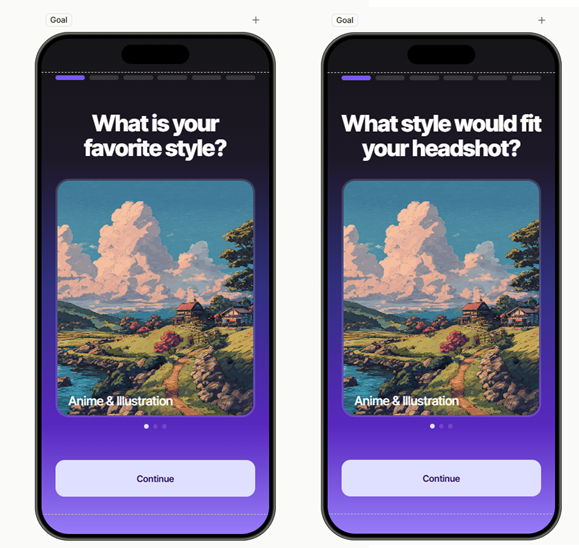
In this case, you already know why they’ve tapped. Apple handed you that data before they saw a single pixel of your app. But in this example, the flow ignored it. They never saw the word “headshot.”
What’s worse, you might’ve told them that they’re in the wrong place. A paid tap was wasted.
That’s why you tailor your onboarding and paywall by ad source. That way, the run-up to the paywall read like a continuation of the ad. A real flow.
You can do this with Adapty’s Flow & paywall builder: it lets you point each acquisition source at its own onboarding and paywall without code and publish it without an app release.
What does an ad-matched flow look like?
It depends on the ad source.
An Apple ad sends a clear intent signal, while Meta and TikTok ads provide a signal that’s based on the type of audience you target, or the promise of the ad.
With Flow Builder, you can also match your paywall to the country, a device, or any other source you provide, allowing you countless flow variations within the ad itself.
But first, you’ll need to think about intent.
Apple Ads flow personalization: one flow per keyword cluster
Let’s say that this app’s Apple Ads account has dozens of keywords which you can sort by three intents.
Intent 1: ai headshot", "linkedin photo", "professional profile picture": someone wants to look employable by Thursday.
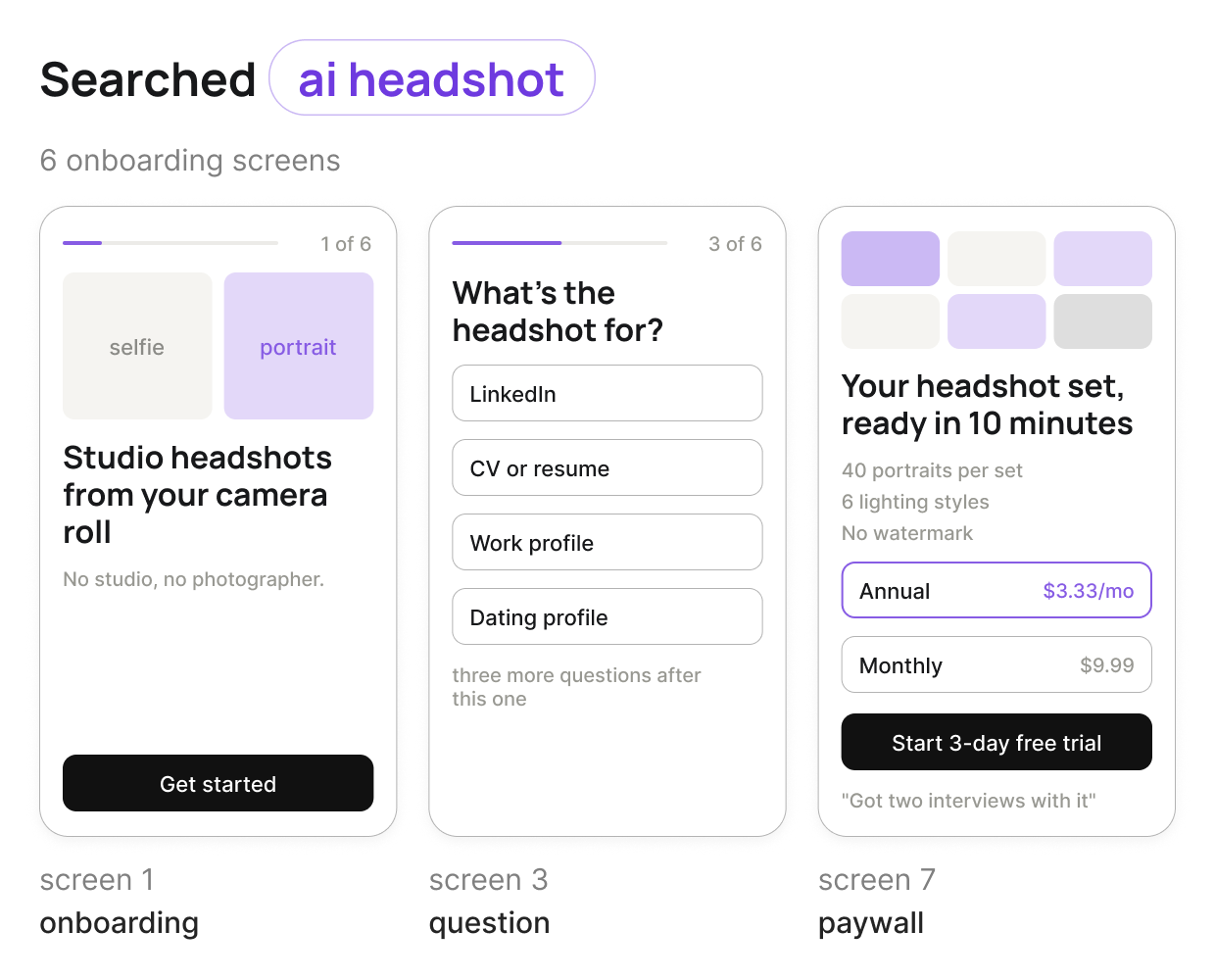
Starts with a before-and-after of a phone selfie next to a studio-lit portrait.
The first question asks what the headshot is for: LinkedIn, a CV, a work profile, a dating app.
A short "building your set" screen names the style they picked and the paywall leads with a finished set of 40 headshots. Annual plan first, and proof from people who used it for hiring.
Intent 2: "remove background", "erase object", "cut out photo": someone has one file to fix right now.
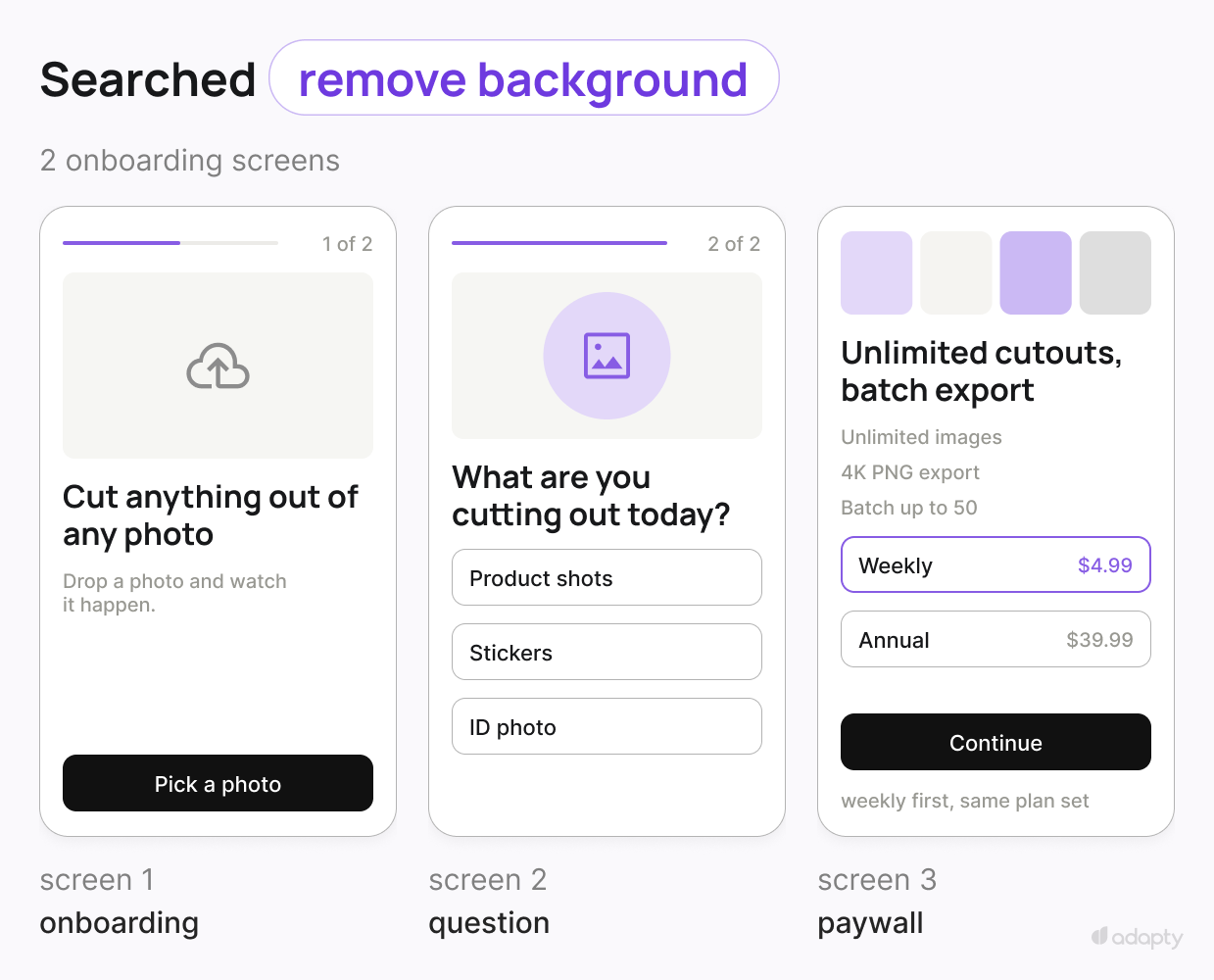
It opens by asking for a photo, then cuts the background out on screen before asking for anything.
One question about what the user needs it for: product shots, stickers, ID photos. The paywall leads with unlimited cutouts and batch export, and it surfaces the weekly plan first.
The reason is that someone with one urgent file is not buying a year of anything yet.
Intent 3: "ai video generator", "photo to video", "ai animation": someone wants to make something new.
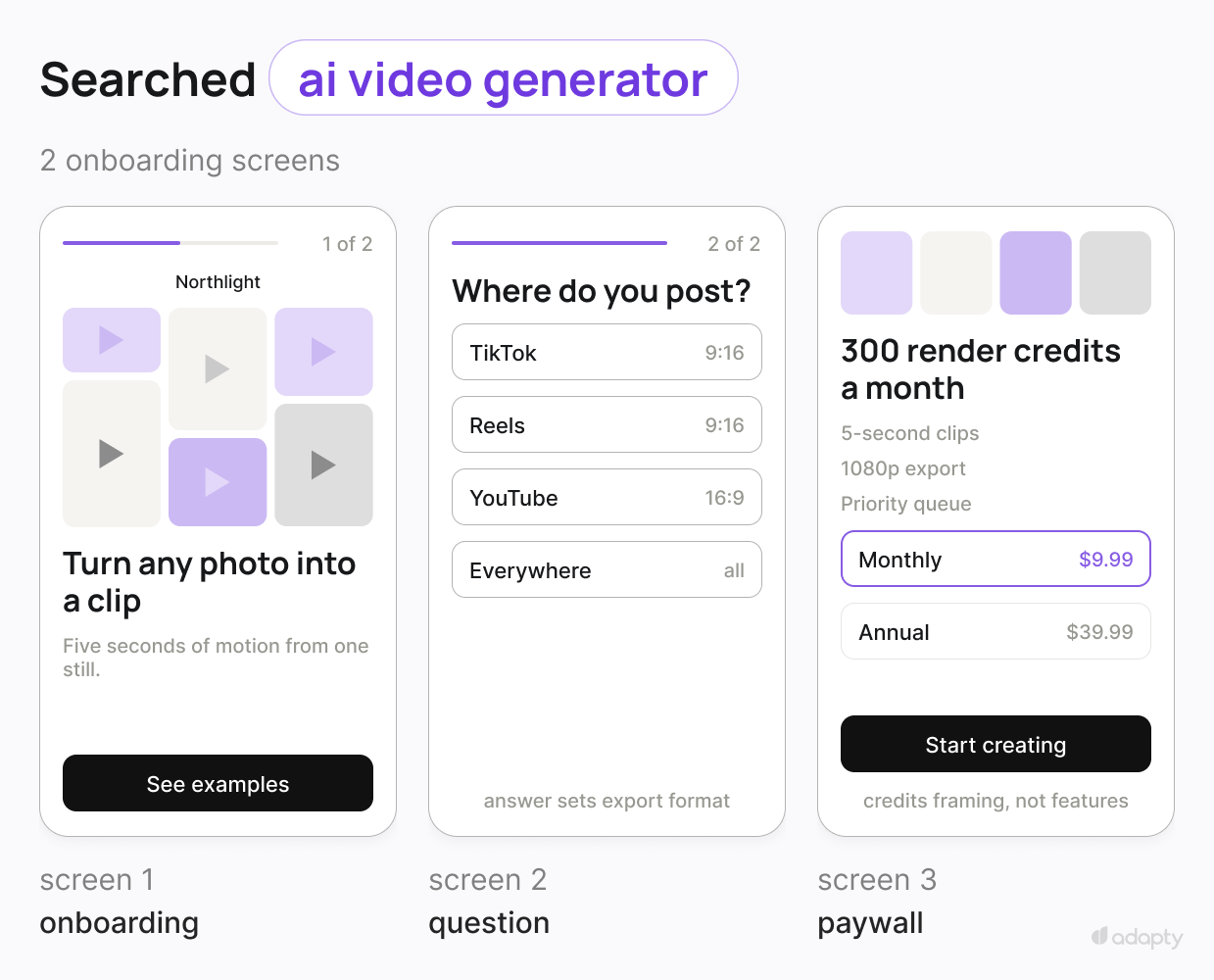
First thing user sees is a gallery of clips generated from stills. App asks which format they post in, then how long their clips usually run. The paywall leads with render speed and credits.
Notice what stayed the same: the brand, the plan set, the trial length, the purchase button.
What changed. The promise on screen one, the question asked, the order of value props, and which plan sits on top. The brand, the plan set, the trial length, and the purchase button all stayed put.
💡Length follows the keyword, not your category. The cutout user gets two screens, because she has a file waiting in another app. The headshot user sits through six, because every answer visibly sharpens what the app hands back. Category benchmarks still set your baseline, but inside one app the keyword sets the count. Copying screen count across variants is the fastest way to make a matched flow feel generic again.
Meta Ads: a longer flow with more proof
With Flow & paywall builder, you can also match a Meta ad with your flow. But the lower intent often makes it a not-so-smooth sailing. This is where you get creative with your flows.
The user arrives after seeing a static ad, scrolling, considering, and tapping with deliberation.
You targeted them with interest, but they didn’t look for you or your problem specifically. You’ve most likely interrupted their scroll.
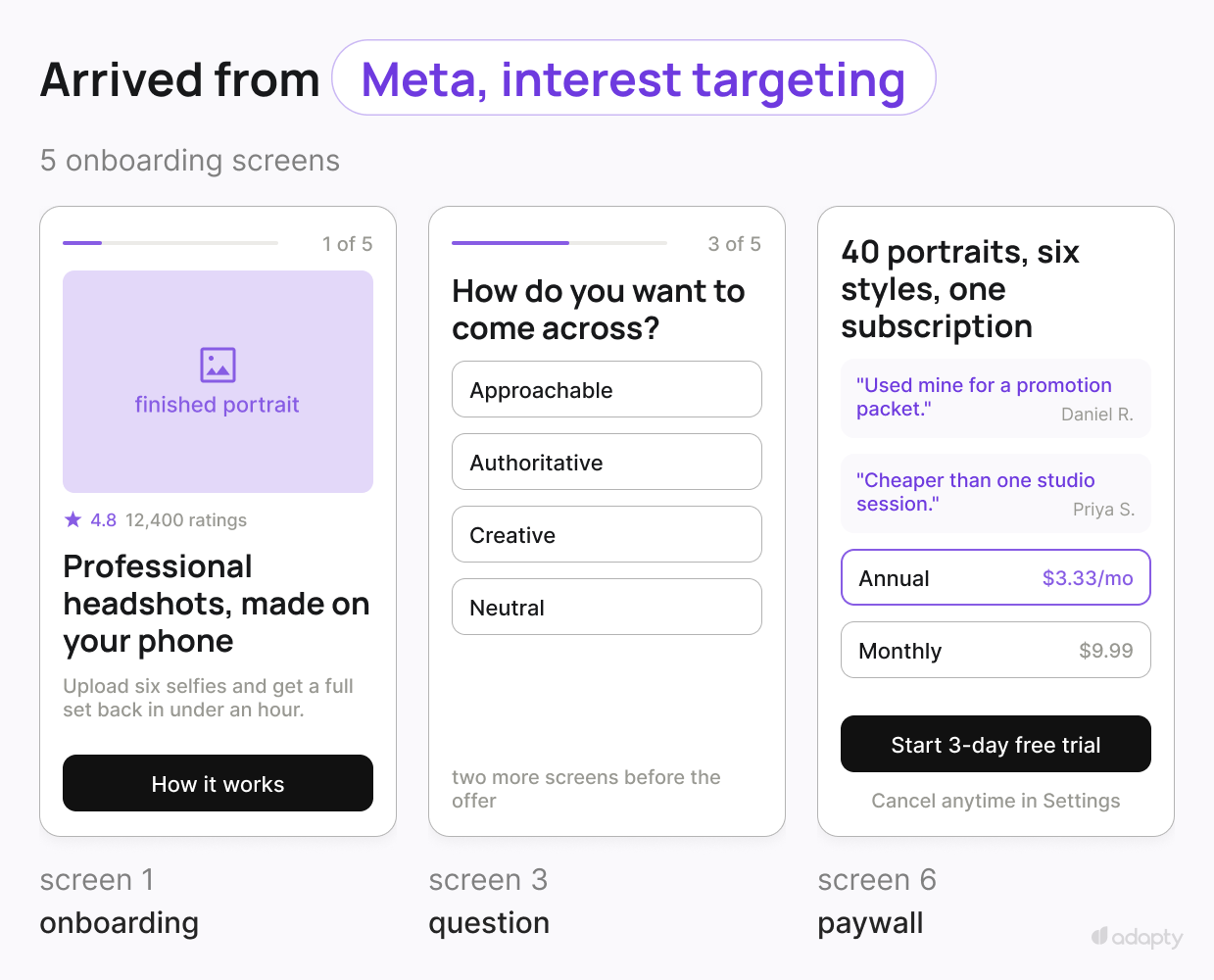
What they saw is a static ad about professional headshots. hey scrolled, considered, and tapped with more deliberation.
You keep the five-question quiz, because they will answer it. Add a screen explaining how the model works, add reviews, put the annual plan first, and say cancel anytime out loud.
What changed. Length and proof. The user’s hesitation is about trust, not speed, so the flow spends screens buying credibility.
TikTok: continue the video, forget your brand
TikTok abides by different rules and this is where your flows need more pace than proof.
For this particular app, a user that arrives from a TikTok ad watched nine seconds of a before-and-after and tapped without reading. They don’t know your app's name.
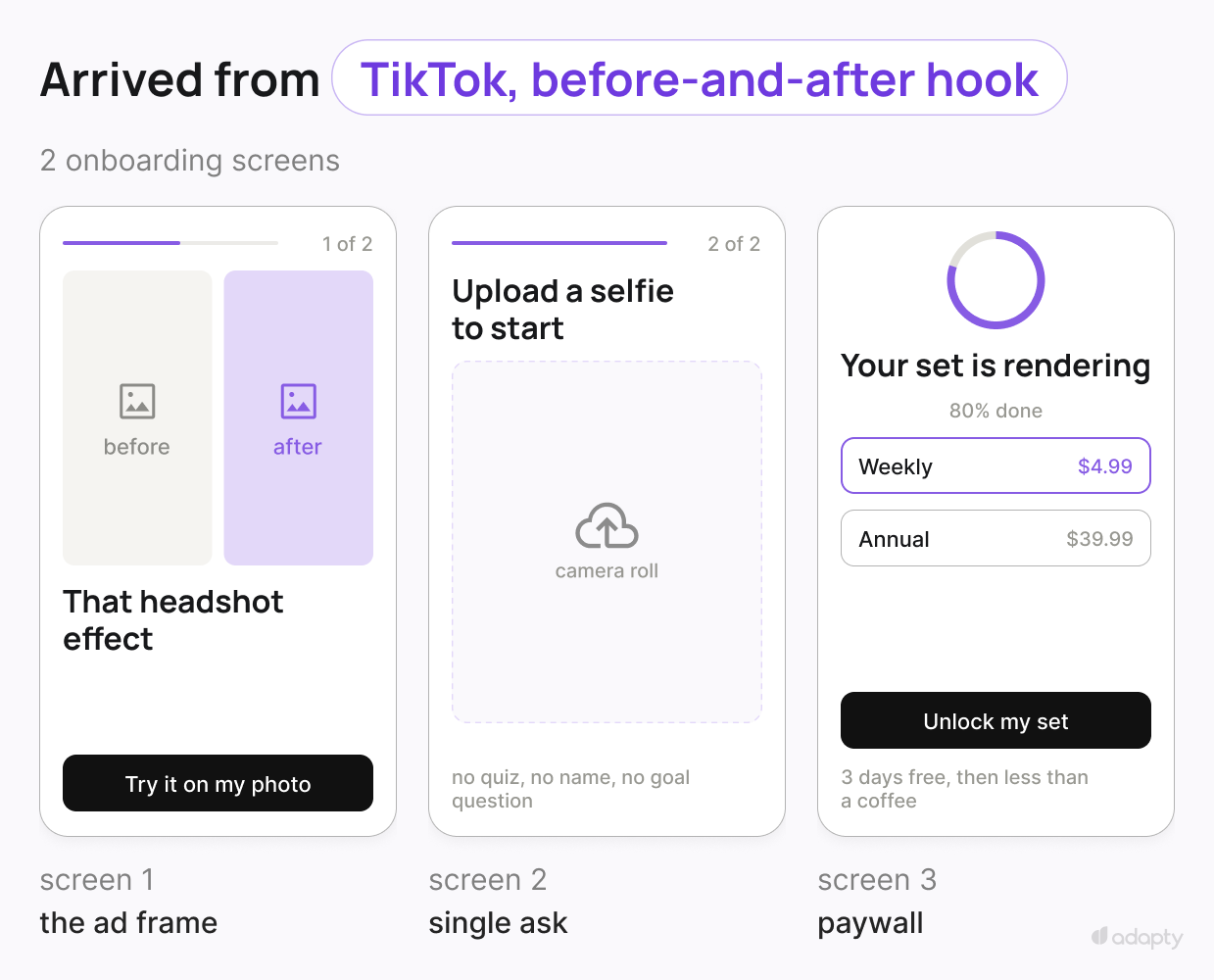
One ask: upload a selfie. Then a paywall in under thirty seconds, leading with the transformation they just watched, trial-forward, weekly price anchored against a coffee.
What changed. Everything about the pace. Two onboarding screens instead of five, no quiz, no brand introduction, and the paywall arrives while the hook is still fresh.
Here’s what each of these sources can tell you and the effort it takes to set up an ad-matched flow:
| Source | Signal you get | What you can match | Effort |
| Meta | Campaign, ad set, creative | The angle and the audience you targeted | A day per channel |
| TikTok | Campaign, ad group, creative | The hook that stopped the scroll | A day per channel |
| Apple Ads | The literal search keyword, plus campaign and ad group | What user said they wanted, in their words | Two to three days, one engineering ticket |
You can build any personalized flow and publish it from Flow & Paywall Builder, with no app release between versions. The build steps are at the end of this article.
Can you grow revenue with ad-matched onboarding flows and paywalls?
Absolutely. And we have receipts that prove it.
Uplift of paywalls tailored to ad source
We looked at 1M+ ad groups across 8,000+ apps running Apple Ads through Adapty, comparing intent-matched paywalls against generic ones.
- Install to trial, up 41%. The first screen confirms what the search promised, so she keeps going.
- Trial to paid, up 24%. She spent the trial using the feature she came for, which makes the renewal easy.
- Together, 75% more paying users on the same installs, the same keywords, and the same bids.
- Day 92 ROAS gap, 81% uplift. The ROAS curve keeps increasing as more users stick around.

**A thing to keep in mind: **The Apple Ads lift is measured. The social ads split is more of a design hypothesis with a sound mechanism behind it. Ship it as an A/B test against your default flow, cluster by cluster, and let your own numbers decide. Do not quote our Apple Ads figures at a TikTok flow.
How an AI app went from never breaking even to doing so at day 61 with ad-matched paywalls
AI Video was buying the highest-intent queries in mobile UA and sending every one of them to the same onboarding and the same paywall.
A user searching for an AI animation maker and a user searching for an AI photo editor saw an identical screen.
They rebuilt the funnel around the keyword, running four intent buckets mapped to clusters of related queries rather than a paywall per keyword.
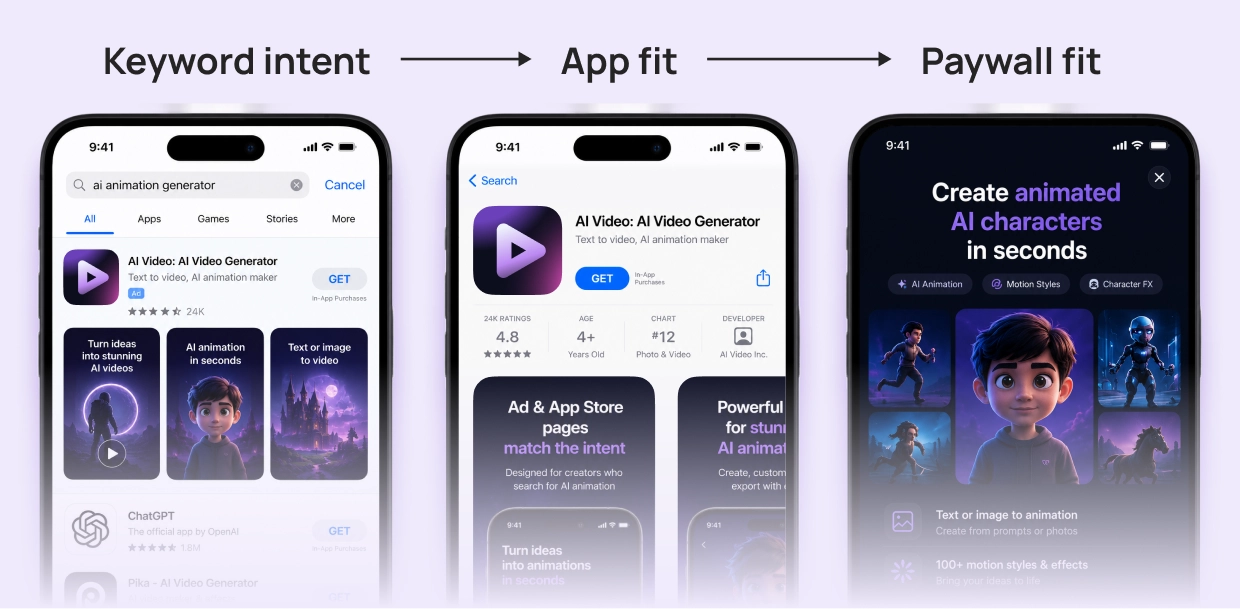
Two matched 93-day windows:
| **** | Before | With Adapty |
| Net revenue | indexed 100 | indexed 318, up 218% |
| ROAS | 64.8% | 126% |
| Paid subscribers | baseline | up 278% |
| Cost per subscriber | baseline | down 57% |
| Breakeven | never, past day 366 | day 61 |
| Active markets | 3 geo groups | 57 countries |
Spend scaled 63% while revenue tripled.
Better flows raised revenue per tap, revenue per tap raised the CPC ceiling, and the higher ceiling is what made markets affordable that had not been before.
In the AI Video cohorts, the gap between periods grew as cohorts aged, with the biggest improvement at day 28 and beyond.
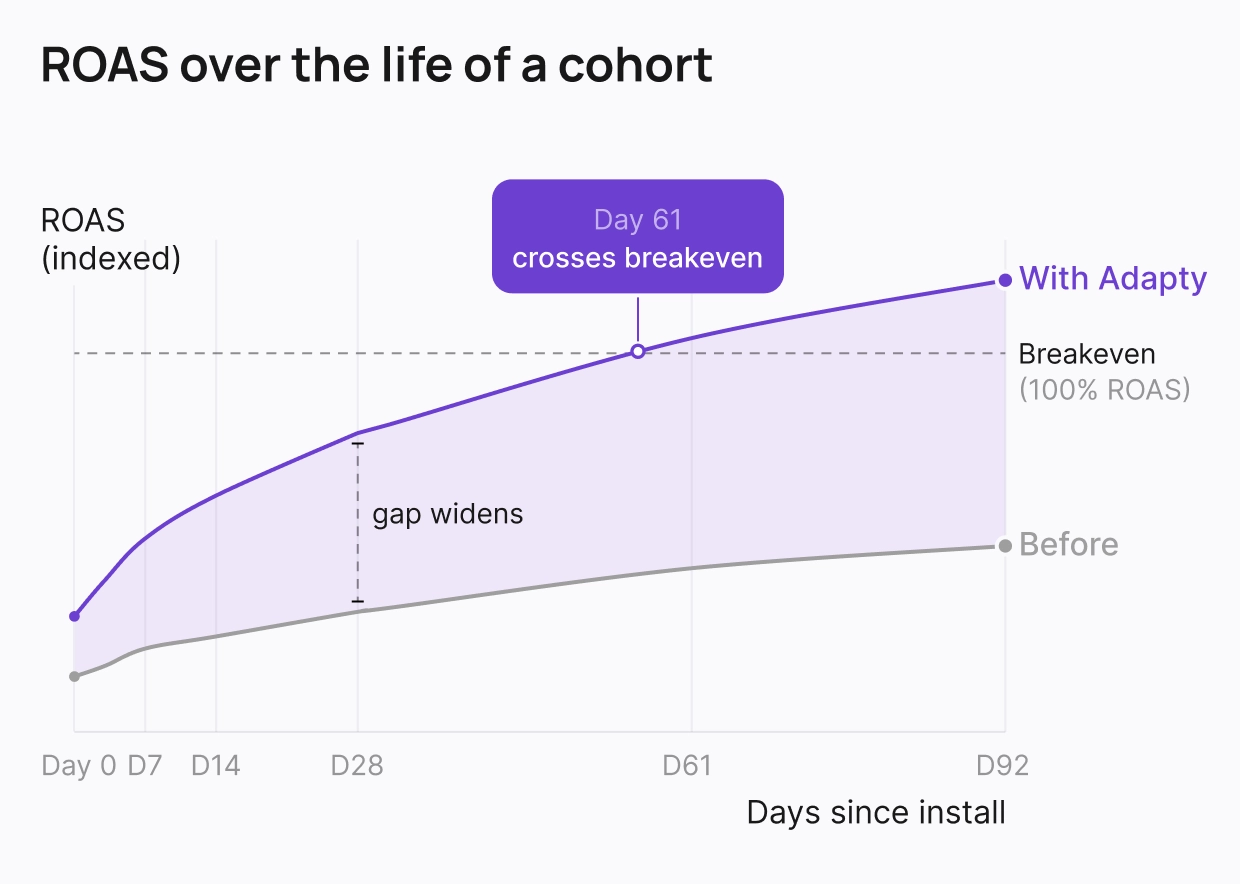
Caption: Most of our internal data agrees that the ROAS gap widens, and it is the finding most teams miss because their reporting window closes first. Source: AI video case study
Our aggregate data shows the same shape: the ROAS gap is still widening at day 92, and reading the result at day 14 underreports it by 14 points.
If you judge this experiment at two weeks, you will conclude it barely worked.
Start creating ad-matched onboardings and paywalls in Flow & Paywall Builder, no app release required.
How to build ads-to-flows matches in Adapty’s Flow & Paywall Builder
You can do this all from your Adapty dashboard.
1. Get the attribution into Adapty
If you already have it, skip to step two. If not:
- Connect Apple Ads so the keyword behind each install reaches the profile.
- For social, connect Meta Ads or TikTok for Business through Adapty Attribution, or pass data from your MMP if you run AppsFlyer, Adjust, Branch, or Singular.
2. Turn ad entities into segments
In Adapty Ads Manager, open the Keywords tab, tick every keyword in a cluster, and choose Actions > Create segment from keywords.
Selecting five keywords gives you one segment covering all five, which is what you want for a cluster.
A cluster is a set of queries that mean the same thing to the user. AI Video's animation bucket groups "ai animation," "photo to animation," "animate my photo," and "cartoon video maker." One intent: make a still picture move. They can all have the same flow, because the same first screen answers all four. “AI avatar” however, goes in a different cluster.
If you want to build paywalls for sources from Meta or TikTok ads, connect the network through Adapty Attribution, or pass data from your MMP.
In Profiles & Segments, create a segment and pick the Attribution filter that matches how you want to split:
- Channel for a whole network
- Campaign or Ad set for a specific angle
- Creative for a specific hook
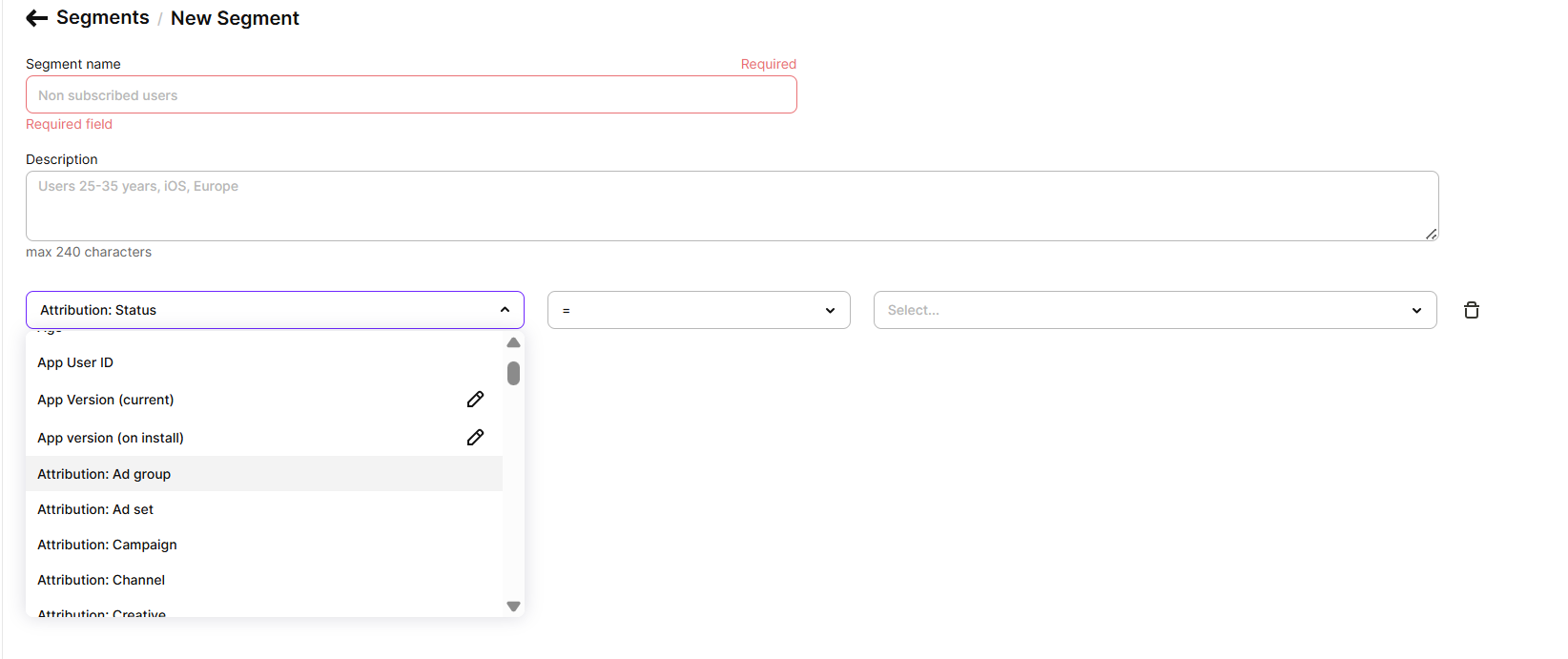
Open one of your own profiles first and look at what those fields actually contain, because the values follow your account's naming and your attribution setup. Then build the filter to match.
The same logic applies to Meta and TikTok, with the promise standing in for the keyword. For example, you run three TikTok ad sets: hook-before-after, hook-10sec-transform, and hook-founder-story. The first two show the same thing, a face turning into a studio portrait in a few seconds, so they share a flow that opens on that exact frame. The founder story sells credibility instead of transformation, so it gets the flow with the reviews and the longer explanation.
The number of personalized flows depends only on how many distinct intents or signals you’re buying. Two clusters, two flows.
Three different Meta Ads targets, three possible flows. Twelve keywords with one intent between them? Still one flow.
3. Build one flow per cluster
Duplicate your best flow in Flow & Paywall Builder and change what the source justifies: the hero on screen one, the questions, the order of value props, the plan on top.
Screens render natively and publish from the dashboard.
Four variants is not four code paths, and fixing a headline on one of them is not a release. That difference is what decides whether a personalization project ships or sits in the backlog.
4. Attach the audiences to one placement
Add each segment as an audience on the placement that owns your first session, with your default flow last for All users.
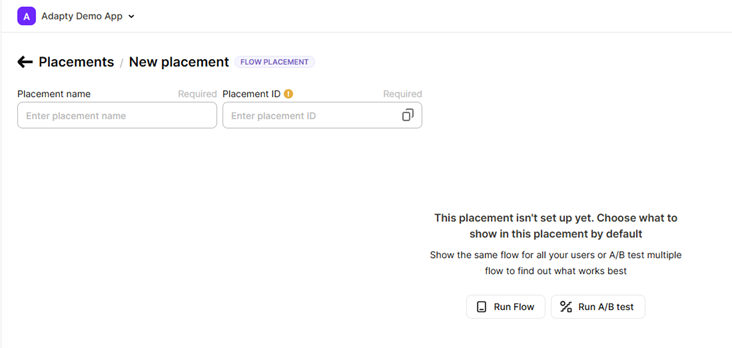
A profile can match several audiences, and Adapty serves the highest-priority match, so the narrowest segment goes on top and the default catches everyone else.
Stack order is a configuration decision.
ℹ️One thing to hand your engineer. Apple Ads attribution arrives a moment after the SDK activates, so a flow requested too early falls back to the default audience and quietly bypasses your segments. The first-launch recipe covers iOS, React Native, and Capacitor. It affects the first launch only, and doesn't apply to country or locale splits.
5. Test one cluster at a time, and measure to day 90
Run each cluster flow against the default as an A/B test.
You need enough installs per cluster per week for the test to say anything, so start with your largest cluster.
Then read cohort ROAS out past day 60, because the gap between a matched flow and a default one keeps widening long after your dashboard's default window closes.
Ad-matched paywalls best practices
In order in which it’s best to apply them:
- Start with your biggest source, not your most interesting one. A cluster with a small number of weekly installs might never reach significance.
- Match the promise. Echoing the keyword string back at the user reads like a mail merge. Show the outcome behind it.
- Carry the match all the way to the paywall. Onboarding that names the goal, followed by a paywall selling something else, does more damage than no personalization at all.
- Keep pricing constant while you test copy. Change one layer at a time or you will not know what moved.
- Reuse the ad's own assets. The frame that earned the tap is the best candidate for screen one.
- Name ad groups and campaigns for the intent they carry. Sloppy naming makes segments you cannot trust.
- Give attribution a deadline. A user waiting on a spinner converts worse than a user seeing your default flow.
- Re-check clusters when you re-check keywords. Search terms drift, and a cluster built in March can be half broad-match noise by August.
When personalizing by source is not worth it
One keyword dominates. If 80% of installs come from your brand name, you have one intent. Build the default flow properly instead.
Clusters too thin to test. Under roughly 200 installs per cluster per week, you can build the flow but you cannot learn whether it works.
Attribution you do not trust. Broad match keywords that pull unrelated queries, MMP data landing hours late, or campaign names nobody maintains all produce segments that route users to the wrong flow.
Mostly organic traffic. Ad-source personalization scales with paid spend. If paid is 10% of installs, put the effort into onboarding questions, which work on everyone.
A default flow that is already broken. Wrong placement, wrong trial, six plans on the paywall. Personalization multiplies a working funnel and does nothing for a broken one.
The promise you cannot keep. Selling a headshot flow into an app that does headshots badly gets you a trial and a refund.
Build it once, then let the source pick the flow
You are already paying for intent. Apple Ads sells it to you by the keyword, and TikTok and Meta sell you a promise you made in the creative. The flow either continues that or resets it.
Flow & Paywall Builder lets you build the onboarding and the paywall as one object, point each ad source at its own version, and ship changes without an app release. Start with your largest keyword cluster, keep the default flow as the control, and read the result at day 90.
See the numbers behind the Apple Ads case in Does paywall personalization work for Apple Ads, or open Flow & Paywall Builder and split your first source.