Does paywall personalization work for Apple Ads? Real data from 1M+ ad groups

TL;DR:
- Tailored paywalls lift install-to-trial conversion by 41% and trial-to-paid by 24% — compounding into 75% more paying users from the same install volume.
- The ROAS gap between tailored and default paywalls reaches 82% by day 92, and keeps widening.
- Apple Ads is the canonical channel for paywall personalization because the literal search keyword carries through to install. Meta and TikTok give you audience signals, not search intent.
- It compounds with Custom Product Pages, which lift installs 23% on the same spend.
- It doesn't always work. Apps with one dominant keyword, thin install volume per cluster, or strong existing paywalls see smaller lifts.
A user searches "privacy VPN" on the App Store, taps your ad, installs your app, and opens it.
After a brief onboarding, the paywall appears, leading with fastest streaming speeds in 60 countries. The user closes the paywall. They didn’t search for a fast VPN.
They use the free tier for a day, never come back, and your $1.50 tap turns into a non-subscriber.You paid for the install, but the paywall lost the subscription.
That's the problem Apple Ads’ paywall personalization is supposed to solve.
To test whether that works, we dug through 1M+ ad groups from 8000+ apps running campaigns through Adapty. The report confirmed it.
Why does Apple Ads work for paywall personalization?
Apple Ads is the only major paid channel that exposes the literal search query behind every install.
Apple's AdServices framework passes the campaign, ad group, keyword, and creative ID through to the install event.
That means an app can know exactly what the user typed before they tapped and use that information to choose which paywall to show.
This is why paywall personalization specifically works for Apple Ads.
The mechanism that makes personalization possible on the web (matching the page to the query) has always been harder on mobile.
The channel between the ad and the install was opaque.
With Apple Ads, a user searching "AI animation" can land on a paywall built around motion and character generation; a user searching "AI photo editor" can land on a paywall built around image editing.
The app’s the same but the first impression is completely different.
How big is the paywall personalization lift, by funnel stage?
We measured the effect at two separate funnel stages. Both lift and the lift compounds.
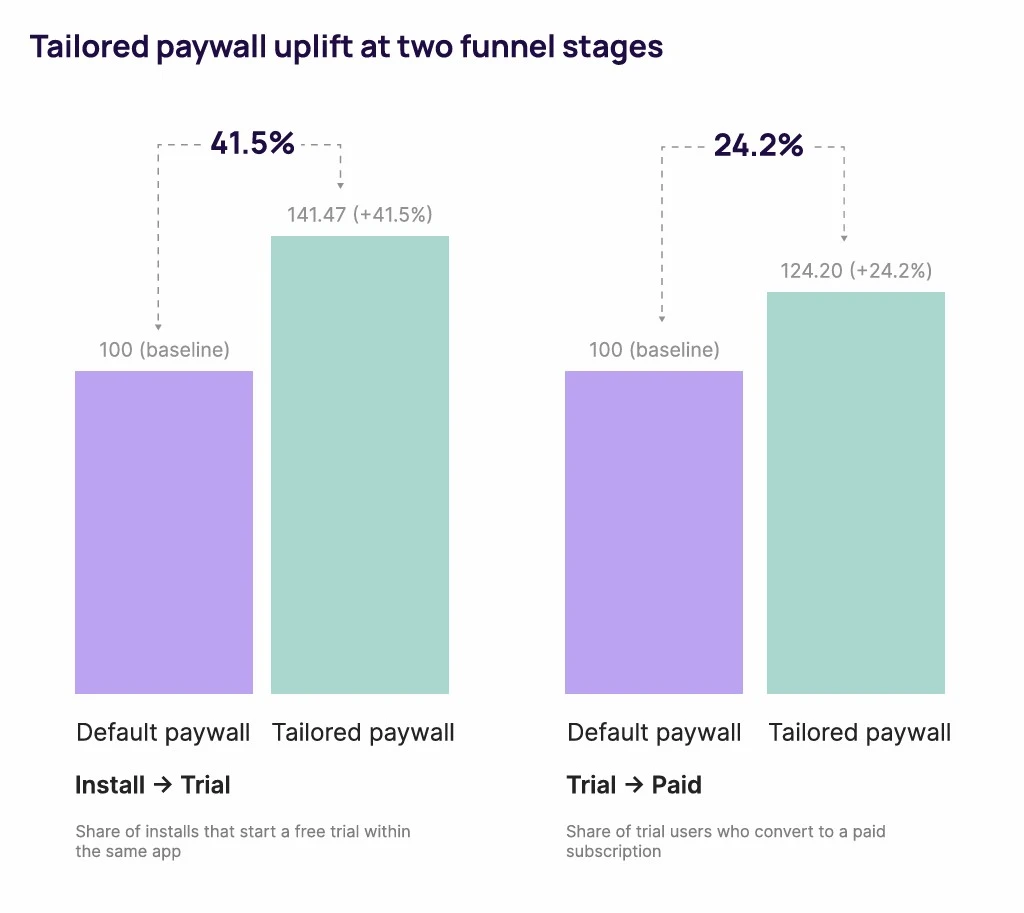
The install-to-trial stage: A +41% uplift
The first lift happens at the moment the user opens the app after install.
A tailored paywall confirms what the search promised. A user who tapped on "AI animation" sees a paywall about motion and character generation.
Their first 30 seconds in the app feel like a continuation of the search. The friction disappears, and trials go up.
The trial-to-paid stage: A +24% uplift
The second lift happens later, when the trial ends, and the user decides whether to subscribe.
Intent-matched users are higher-fit users. They came in for a specific reason, and the app delivered that reason.
They've already spent the trial period using the feature they searched for, which makes the paid commitment easier. Less buyer's remorse, more renewal.
The compounding effect
Each lift is moderate on its own. Together they compound.
At the report's baselines, 100 installs that produce 1 paying user on a default paywall produce 1.76 paying users on a tailored one, a 75% lift in paying subscribers from the same install volume.
Same ad spend, same keywords, same bids. The only thing that changes is which paywall the user sees after install.
What does the day-92 ROAS curve look like?
Most paywall personalization conversations stop at day 7 or day 30.
The Adapty report tracks the comparison out to day 92, and the finding is the novel single data point.
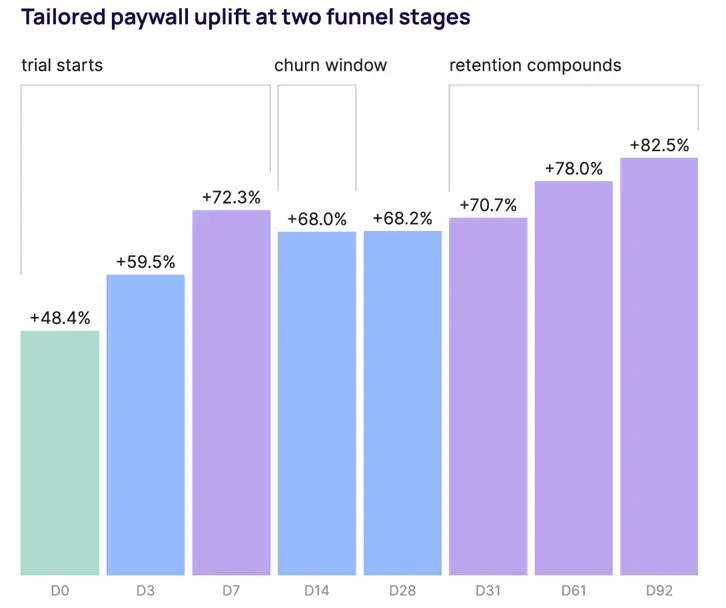
The ROAS gap between tailored and default paywalls opens at +48% on day zero, climbs to +72% by day 7, and reaches +82% by day 92. Still climbing.
The lift doesn't just hold over time. It keeps growing.
The mechanism makes sense once you look at what each lift represents:
- Day 0 reflects conversion at the moment of install.
- Day 92 reflects retention plus conversion. Intent-matched users convert more often and stay subscribed longer because the app delivered what they searched for.
- The compounding gap is the cumulative result.
⚠️The measurement trap: Teams measuring paywall test results at day 14 are reading the curve at its flattest point (+68%) and underreporting their actual lift by 14 percentage points. The full picture only shows up past day 60. Adapty Analytics tracks cohort ROAS to day 90+ by paywall variant automatically, which is how this finding was measured in the first place. For the deeper take on why measurement window matters, see Cohort revenue vs revenue analytics for Apple Ads.
When does paywall personalization underperform?
Five conditions where the lift is smaller than the report's averages, or where the work isn't worth doing at all.
- Apps with one dominant keyword. If 80% of installs come from one branded query, you have one intent to match. Personalization needs intent diversity to be worth the operational cost. A branded "Notion" or "Headspace" search isn't an intent cluster.
- Thin install volume per intent cluster. A/B testing requires a statistical sample size. Less than ~200 installs per cluster per week, and you can't reliably tell whether a variant beats the default. The framework still applies; you just can't validate it.
- Strong existing paywalls. Apps already converting above their category's 75th percentile see smaller relative lifts. Personalization compounds with weakness as it has less to fix when the baseline is strong.
- Product-market fit issues. A tailored paywall can match the screen to the search intent, but if the app doesn't deliver what the paywall promised, trial-to-paid collapses anyway. Personalization can sharpen a good product. It can't save a bad one.
- Bait-and-switch risk. The biggest pitfall. Building a paywall that promises feature X, then opening the app to onboarding that leads with feature Y. The mismatch creates trust damage at the worst possible moment, and trial-to-paid drops below the default-paywall baseline.
The broader CRO principle applies here: ad/page mismatch is a known conversion killer on the web, and the same logic applies on mobile.
Nielsen Norman Group has decades of research on this. Users decide whether a page matches their search within the first few seconds, and a mismatch drives bounce.
How do you set up paywall personalization for Apple Ads?
The next five decisions are the actual workflow.
Each one has a corresponding capability in Adapty, but they apply regardless of which platform you use to run them:
- Cluster keywords by intent."Privacy VPN," "free VPN," and "fast VPN" are different intents even though they're all VPN keywords. Don't cluster by which keywords spend the most, but by what the user is trying to accomplish. Three to five clusters are the Pareto point for most apps.
- Build one paywall per cluster. Operational overhead beats perfection. A paywall per intent cluster captures 80% of the lift with 20% of the maintenance burden. A paywall per keyword captures the last 20% of the lift at 5x the operational cost.
- Match the first screen to the search intent. Most paywall conversion happens in the first three seconds. Match the first headline, first feature highlighted, and first social proof to the cluster's specific desire. Don't bury the relevant value behind a generic hero.
- A/B test against the default before rolling out. The report's data is averages. Your app's specific lift may be higher or lower. Test each cluster's variant against the default paywall before committing to it across your whole Apple Ads spend.
- Track to day 92, not day 7. The lift compounds. Short measurement windows underreport the result.
ℹ️AI Video, an AI video generation app, ran this playbook. They mapped Apple Ads keywords to three to five intent clusters, each with its own paywall. Net revenue grew 218% while ad spend scaled 63%. Paid subscribers grew 3.8× at less than half the acquisition cost. The channel went from never breaking even to profitable in 61 days. Read the full case study here.
Adapty was built to collapse this:
- Apple Ads Manager runs your campaigns and exposes the keyword behind every install.
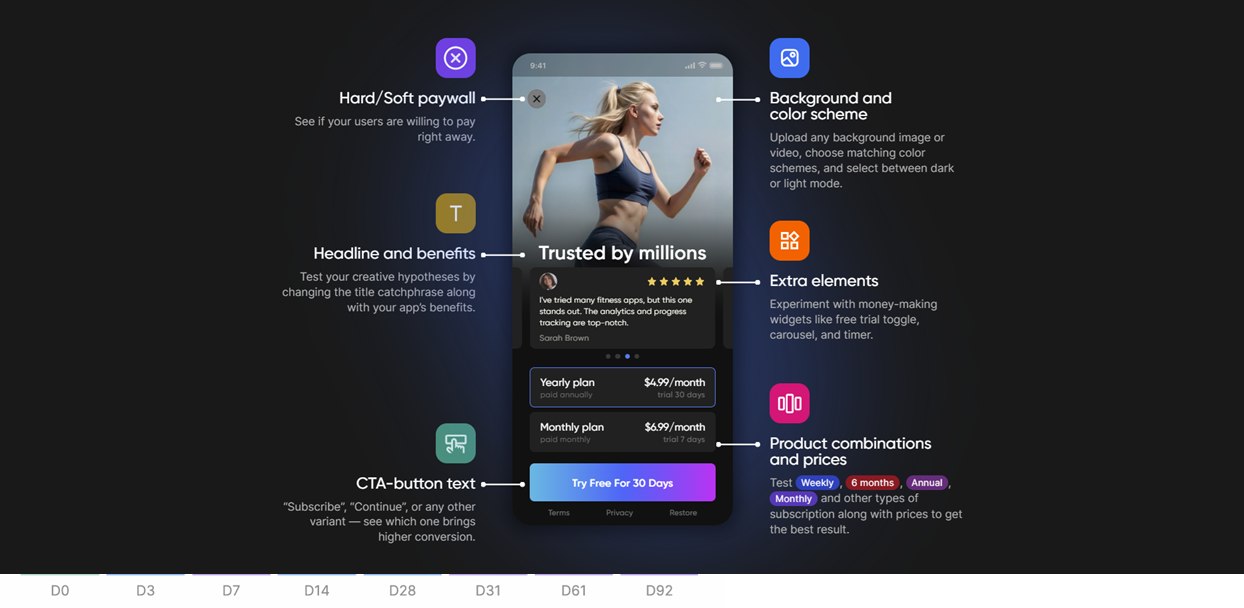
- Paywall Builder builds the variants you'd otherwise need engineering for.
- Adapty's A/B testing engine validates which variant wins.
- Adapty Analytics measures cohort ROAS out to day 90 and more, which is how the day-92 finding in this article was measured in the first place.
If you've read this far and the principle makes sense, Adapty is what unblocks your workflow.
What this means for your Apple Ads strategy
The principle behind paywall personalization isn't new.
What's new is that Apple Ads has finally made it actionable for mobile. The keyword behind every install is traceable, and the paywall a user sees can be matched to what they came looking for.
The data says the lift is real, and it compounds.
If you're running Apple Ads with a single default paywall, the easiest place to start is matching it to your top three keyword clusters.
Try Adapty for free: Apple Ads Manager, Paywall Builder, and the analytics that connect them live in one place.