How to build flows and paywalls with your own AI coding agent


TL;DR:
- Describe the paywall you want to Claude or whatever AI tool you code in. It builds it in your app.
- Point it at a screenshot and it rebuilds that screen, matching the colors off the actual pixels. Point it at a Figma frame and it reads the frame.
- A quiz that routes people to different screens, a second version to test against the first. All from asking.
- Nothing goes live without you pressing the button, and you can change the price or the headline later without shipping an update
You can now build an entire onboarding and paywall in Adapty by simply asking. And without opening the builder.
All with Adapty's flow-generator skill.
You instruct your own AI coding tool to read Adapty’s flow config, rewrite it, check the results, and save as a draft. That's all.
Put simply, you prompt it what to build and it builds it directly into our Flow & paywall builder. You open the dashboard just to see how it turned out.
To demonstrate, let’s think of a random app. Say, a hydration tracker. We’ll input the following prompt:
Build me a paywall for a water tracking app. Two plans, annual preselected with a free trial. And make it feel like water.
Five minutes later, here’s what we found in our Adapty dashboard:

It doesn’t stop there, though. The same prompt box will build an entire onboarding, branch it on a quiz answer, repair your navigation, or place photographs from a folder on your laptop.
The benefits of building flows with your agent
Adapty already has an AI Editor inside the Flow Builder and it works within our guidelines.
This skill, on the other hand, runs your model in your terminal with your context.
Adapty becomes one more tool your agent knows how to operate, together with all your other playthings:
- Your design tool. Connect your AI tool to a design tool like Figma over MCP and the skill reads the frame itself. Exporting PNGs is a thing of the past.
- Your repo. Your product identifiers sit in your code and your brand colors sit in your theme file. An agent working in your project reads them instead of asking you for them.
- Your tooling. Claude Code, GitHub Copilot CLI, OpenAI Codex and Gemini CLI all load skills. Whichever one you have open is the one this runs in.
- Your other skills. flow-generator ships beside
paywall-breakdown,adapty-integrationandads-manager. They compose.
The consequence you will feel is scope. One prompt reaches the whole flow, and no internal guideline decides what you are allowed to ask for.
ℹ️When the skill designs a screen with no reference to follow, it runs the paywall-breakdown library over Adapty’s internal data and fixes what ranks highest before you see the result.
What you can build with the Adapty AI coding skill
Requests tend to fall into three shapes.
You're either starting something new, extending something that already exists, or making a second version of something that already works. Let’s walk through each.
Make something from nothing
There are multiple ways in, depending on what you're holding. A competitor's screen, a single sentence, or maybe a template you liked the shape of.
All three end in a brand new flow, so nothing you already have is at risk while you experiment.
Rebuild a paywall from a screenshot
If you ever wanted to build something close to a Duolingo paywall, or a competitor paywall, but didn’t have the time, or skill… Now you have both.
To test it out, we uploaded a Kitchen Stories app paywall and told it to try and make the closest possible version. The result:

A solid output for around 10 minutes of wait.
The skill sampled color off of pixels rather than naming them from memory:

What’s great is that it then builds, renders, then compares its render against your file element by element, and closes the differences it can reach.
For those it cannot, it says; In this case, the app's custom typeface, which the CLI cannot upload, and the illustration, which had no source file.
For the illustration it drew a stand-in and told us it had done so, rather than binding an invented image URL into the screen:

Not a bad sketch, Mr Agent. Not bad at all.
ℹ️It’s better to give a file path. Our paywall library is a good source of reference screens if you want to try this before you have a file of your own. You can also use MCPs of public onboarding libraries and just ask the agent to "replicate a Duoloingo paywall" for example. Or your favorite app. Or a competitor.
Build one from a sentence
No reference? No problem. You can prompt one or two sentences and the skill can pick the design and grade its own work before you see it.
It runs Adapty’s paywall-breakdown library over the screen it built and fixes what ranks highest, which gets you the patterns that convert in your category instead of a generic layout.
The prompt used:
A paywall for my fitness app. Two plans, annual preselected, free trial on the annual. Show me my products first and let me pick.
The output we got:

Your numbers stay yours. Ratings, review counts and discount percentages never get invented: the skill asks you, or it leaves the element out and says which one it chose.
ℹ️Why not vibe-code the paywall outside of Adapty instead? Because your agent writes the screen just as fast, then it lives in your build. When you vibe code, every headline change after that is a new version and another store review. Point the same prompt at Adapty and the screen updates on users who already installed the app. The longer argument.
Start from an entire flow from template and change it
You can also upload a template or a design that you’ve built in a design tool and simply describe what it should become.
The skill fetches the config that already works and patches it, which means the navigation, the plan-card mechanics and the theme structure all come pre-solved.
We’ve uploaded the entire flow:

Here's what we got:
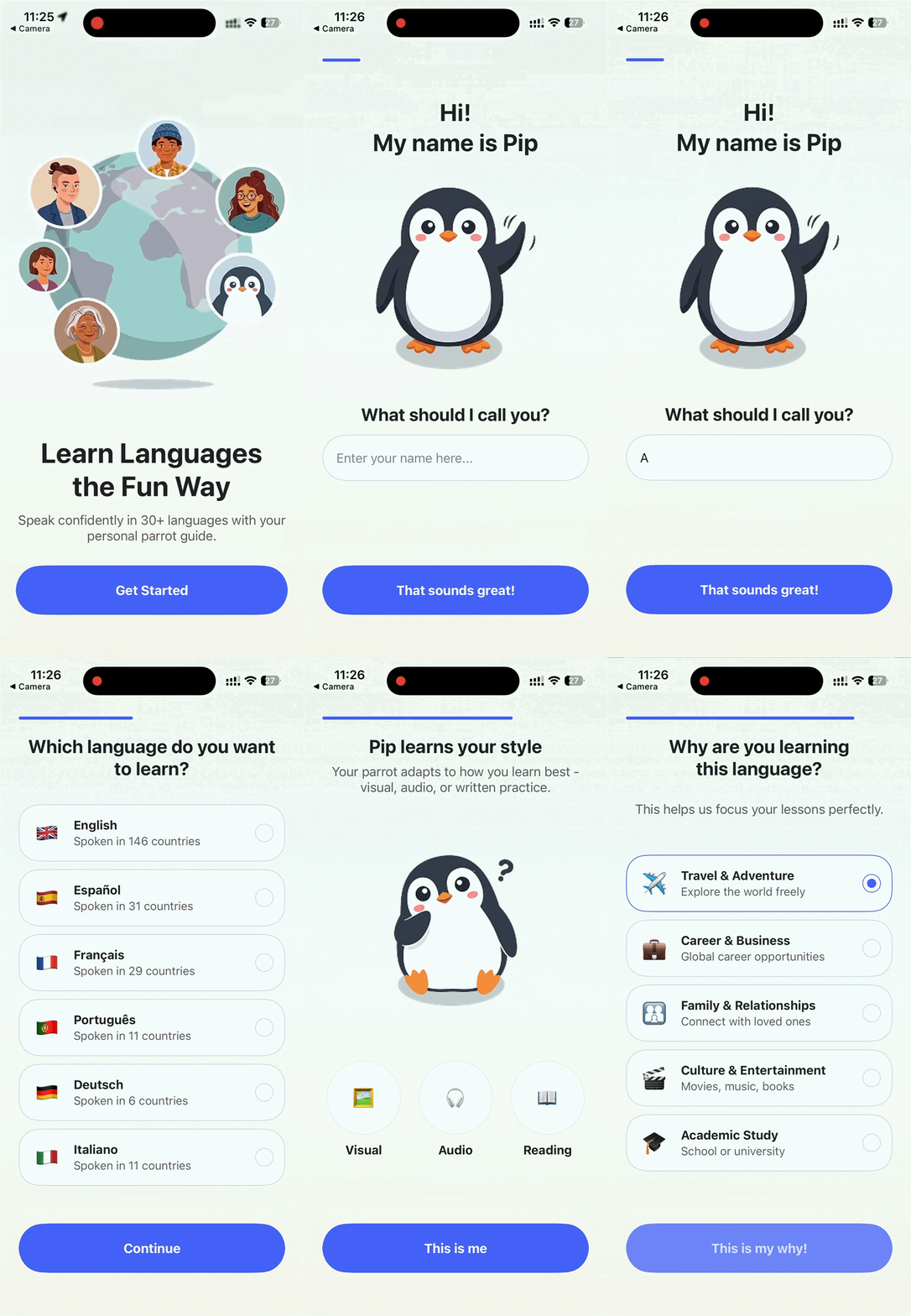
The biggest upside is that you’re editing a working document instead of authoring one.
It is also the gentler first run. A flow with content in it gets treated as something to protect: the skill backs it up before the first edit and waits for your yes before it writes.
Point the skill at a frame instead of a template and it reads the design directly: real color values, real spacing, real type scale. Nobody exports a PNG.
Take a flow further
Editing a flow you already have is the safer path and the more common one.
The skill fetches the real config, backs it up, and patches the copy it fetched. That's why dropping a screen into the middle of a flow doesn't strand the screens around it.
Build a quiz that branches
A quiz can help you tailor your paywall depending on each users’ goals and smoothen the decision. It also makes the first touch with an app feel like a personalized conversation.
But building tons of quiz screens and connecting the logic behind each can intimidate easily.
That’s why we tried this prompt on top of the fitness app paywall we built above:
Add a quiz screen before my paywall: "What's your main goal?" with three options, each routing to its own benefit screen, then on to the paywall.
The agent explains the logic and connects the dots so you don't have to:

Selectable groups, option IDs, and the conditional actions that send each answer somewhere different.
This is the personalization step that turns an onboarding into a qualified paywall visit.
The agent built three possible answers and three simple branches:

And if you pick one of the other two it takes you to different outcomes:

Add new screens to your existing flow
If you just drop a screen in the middle of the flow you can break the navigation around it.
But the skill repairs what broke and names any screen that’s left unreachable, which is a defect you’d otherwise meet in review.
Or, you just remembered you’d need a social proof screen before the paywall. You say:
Add a social proof screen between the quiz and the paywall, with a star rating and two testimonials. Ask me for the real numbers.
And voila:

Since we made up the app, we told the agent to make up some quotes, too. It did.
What we didn’t want to make up is the data you place as a value screen during onboarding..
So we found one about the benefits of exercise and prompted the agent to add it after social proof. Here’s a screen it added after 5 minutes:

It also builds the chart. Not a picture of a chart: a real image, uploaded to your media library and bound into the screen, with the source line sitting on the screen as text so it survives translation.
Iterate and test
A paywall is rarely finished.
These are the changes you make to something that already converts, where the whole point is to move one thing and leave everything else exactly where it was.
Create another paywall for a quick A/B test
Theme, fonts, locales and products carry over from the flow that already works, so your variant differs in one place.
That is the only condition under which the test result tells you anything.
If we wanted to test our fitness app, we can say:
Copy my "Main paywall" into a new flow and make the weekly plan the preselected one. Leave the original alone.
We got two almost identical screens, yet with a crucial difference.

A re-skin from a reference image
Imagine you can just make your screen “christmassy” before Christmas.
The skill samples the palette off your image and applies it across every screen, which beats restyling six screens by hand the week before a seasonal campaign.
Let’s take our Kitchen Stories Here’s a simple recoloring prompt pointing to a different color palette. Something that’s more in line with, say... Autumn.
Re-theme my paywall flow to match the colors in ./design/autumn.png. Copy and layout stay as they are.
Compare the two:

Or take it and make it feel like Christmas, too:

Pretty good for a stupid simple prompt and four minutes of wait.
Use your own image to build a flow or a paywall
The agent does a great job in fitting your images into paywalls and flows.
It uploads each file and binds the URL it gets back into the flow, so you skip the trip to the media library.
Name a file it cannot find and it asks you, instead of substituting one that looks close.
Now, have you ever thought about this: what if could just built a paywall for a fictional app about my dog?
So, yours truly uploaded three most recent images, picked the one where he has a piece of paper on his ear to be the hero image, and let AI do its thing. Did it?
You bet it did:

Yes, it would be a useless app. But the point is, you can build absolutely anything than comes to mind. And we mean anything.
ℹ️Runs take time. The skill re-renders after every change it makes, which is what keeps a broken config off your dashboard. A small edit finishes in a few minutes. A multi-screen flow with branching takes 10 to 40. Start it and go do something else.
Check your flow before you ship
A flow can clear every publish gate and still hurt you.
The Flow Builder's checks and flows config validate both ask whether the document is well formed. Neither asks whether a real user gets stuck, or reads something false.
The flow-audit skill asks that. It ships in the same plugin. Point it at a flow and it reads the config and your product catalog, then gives you a verdict instead of a list to interpret:
It catches dead text that looks like a working control, missing restore and terms links that fail App Store review, products bound to nothing, hardcoded prices where a variable belongs, and copy nobody finished.
It writes nothing. Hand the report to flow-generator, which owns the backup and your approval.
What the AI agent won’t do
Publishing stays yours, because the CLI has no publish command and the skill stops at a saved draft.
Overwriting a config you already have needs your explicit yes, and the request names the flow, its status and the backup file it took first.
If a teammate saved that flow while the skill was working, your write fails instead of erasing their afternoon.
How to install Adapty’s AI agent?
You need an AI coding tool that loads skills. Claude Code, GitHub Copilot CLI, OpenAI Codex and Gemini CLI all qualify.
You don't need to install the Adapty CLI yourself: the skill checks for it on the first run, installs or updates it if it has to, then opens your browser to log in and waits for you.
Claude Code
Then run /reload-plugins to activate it.
Any other tool
--all installs into every agent the skills CLI can find.
For this one on its own, use --skill flow-generator. Copilot CLI, Codex and Gemini each have a native route too, listed in the docs.
Then ask for it. /flow-generator in tools that map slash commands to skills, or "use the flow-generator skill" in the ones that don't.
One install gives you every skill in the plugin, so paywall-breakdown, adapty-integration and ads-manager arrive at the same time.
They compose with each other, which is how the fitness paywall above got graded before anyone saw it.
Install it, then say what you want in plain words.
Stop dragging boxes, start describing screens
The skill earns its install if your paywalls stall between the idea and the build. What it produces is an ordinary flow, so the paywall your agent wrote on Tuesday is one your marketer can edit next week, and the change reaches people who already installed the app.
You don't need the terminal to start. Build the flow in the editor, then hand it to your agent when you want ten variants of it.
Open the Flow & Paywall Builder