Email deliverability infrastructure for subscription apps


TL;DR:
- Good content doesn't fix bad infrastructure. If authentication, reputation, sending behavior, or consent handling breaks down, the email gets filtered, delayed, or buried before a recipient ever sees it.
- Email deliverability infrastructure is the four checks every inbox runs before placing your mail: authentication (are you who you claim to be), reputation (is your domain or IP flagged by inbox providers or blocklists), sending behavior (is your volume ramping up gradually instead of spiking on day one), and consent and compliance (does the recipient want this and can they leave easily).
- None of this is a one-time setup. Gmail, Yahoo, and Microsoft have all changed their bulk sender rules since 2024, and switching domains or email providers resets your warmup clock to zero.
- This piece names a specific tool for checking each part of the infrastructure.
If the email sequences are good, why is the open rate still 3%?
You wrote the welcome email, the trial-ending nudge, the win-back email that fires 30 days after churn. The segments are clean, the timing is tested, the content is sharp. We've covered how to build that part of the system. And the open rate still sits around 3%.
The instinct is to rewrite the subject line again. More often than not, the email never made it far enough to be judged by its subject line. Inboxes decide whether to show a message, bury it in a promotions tab, or drop it in spam before a human reads a single word, based on technical and behavioral signals unrelated to the email's content.
None of this throws an error. Nothing in your ESP dashboard tells you a send failed for reputation reasons. The campaign shows as delivered, the report looks normal, and the open rate is lower than it should be, with nothing in the data pointing back to infrastructure rather than content.
This piece is about that layer, the infrastructure underneath the content, the segmentation, and the send-time optimization that decides whether any of that work gets seen at all.
You don't write these records from scratch... Everything past this point gets judged relative to a sender who already got authentication right.
If SPF, DKIM, and DMARC sound familiar, they got a one-paragraph mention in our guide to email marketing for subscription apps. This is the deeper version: what each one does, where it lives, and what breaks when it's set up wrong.
How does an email reach an inbox in the first place?
Every domain has a public set of instructions attached to it, called DNS records. Think of DNS as the notarized paperwork behind a domain name. It doesn't carry the email itself, but it answers questions a receiving mail server asks before accepting anything: who's allowed to send as this domain, has this message been altered since it was sent, and what should happen if the answer to either is no.
Every inbox provider runs the same four checks, roughly in this order, before deciding what to do with your email.
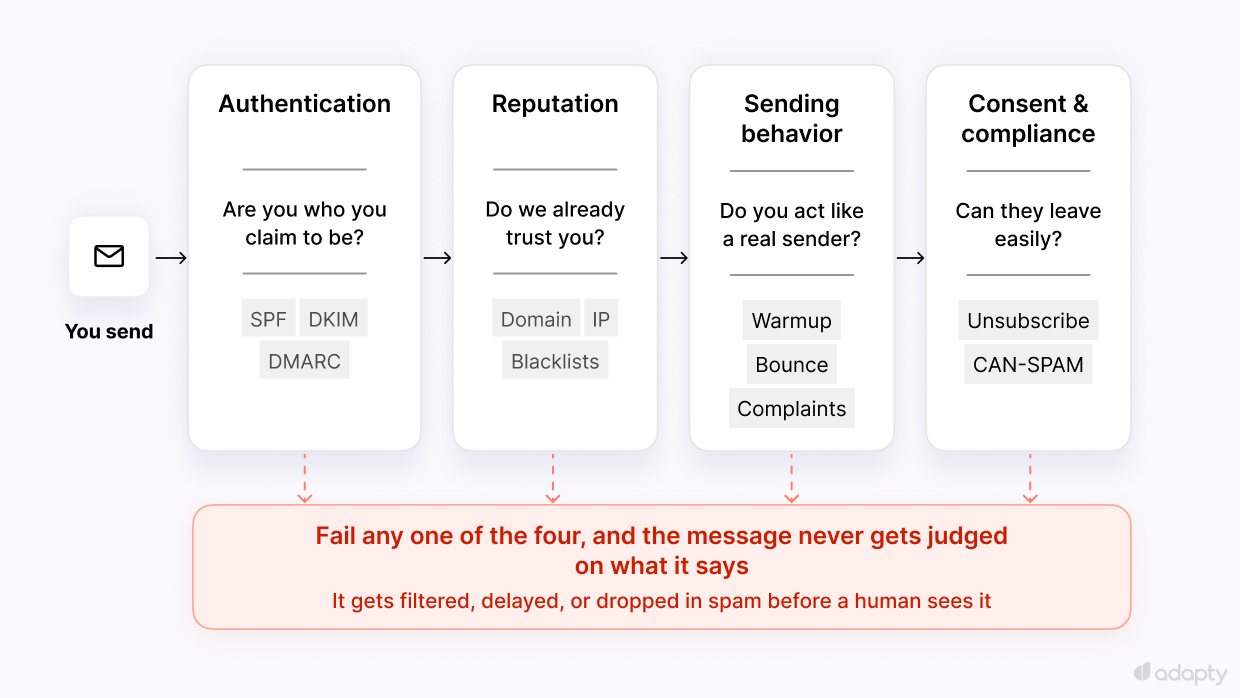
Authentication
Authentication is proof that you're the sender you claim to be, and it usually comes down to three pieces, buried in acronym soup before anyone explains what they mean in plain terms.
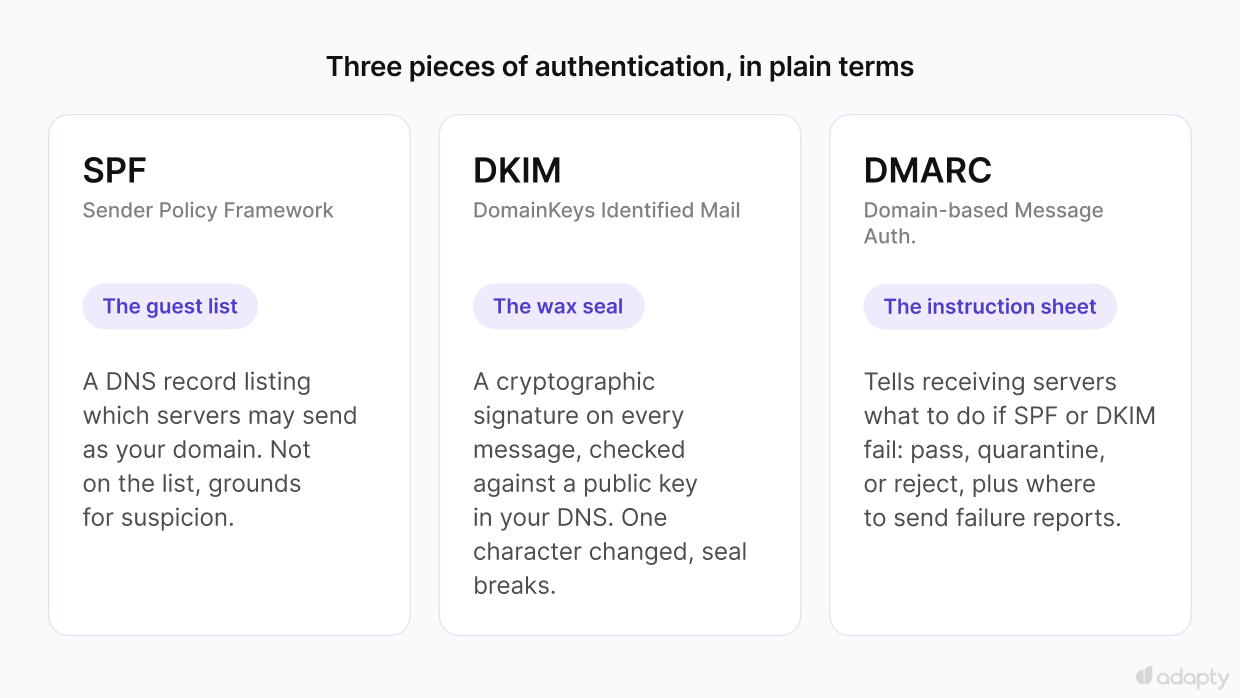
- SPF (Sender Policy Framework) is a guest list. It's a DNS record listing which mail servers are allowed to send email on behalf of your domain. A message claiming to be from yourapp.com that arrives from a server not on that list gives the receiving server grounds for suspicion.
- DKIM (DomainKeys Identified Mail) is a wax seal. Every message is signed with a cryptographic signature before it's sent, and the receiving server verifies that signature against a public key published in your DNS. If the message was altered in transit, even by one character, the signature won't match.
- DMARC (Domain-based Message Authentication, Reporting, and Conformance) is the instruction sheet posted next to the guest list. It tells receiving servers what to do when SPF or DKIM fails: let it through anyway, quarantine it, or reject it, and where to send reports about those failures so you can see what's happening.
⚠️ SPF also has a hard limit of 10 DNS lookups per check. Route mail through several services at once — an ESP, Google Workspace, a CRM — each contributing its own include statement, and that limit gets exceeded silently, producing an SPF failure that looks like a misconfiguration even when the record was written correctly.
DMARC also has a policy setting, and most guides skip straight to the strict option. Start at p=none, which only asks for reports without rejecting anything. Move to p=quarantine once those reports look clean, then p=reject.
None of these get typed in manually from a blank slate. Your email service provider generates the record values; your job is to paste them into your DNS host as TXT records and confirm they're live. Two free ways to check the work:
- mail-tester.com sends a test email through your setup and scores it, showing exactly which of the three checks passed or failed.
- MXToolbox performs a direct lookup on your domain and shows the raw SPF, DKIM, and DMARC records as they currently exist, which is useful when mail-tester flags a failure and you need to see why.
Reputation
Once identity is established, reputation is a separate question: what your track record looks like to the inboxes you're sending to.
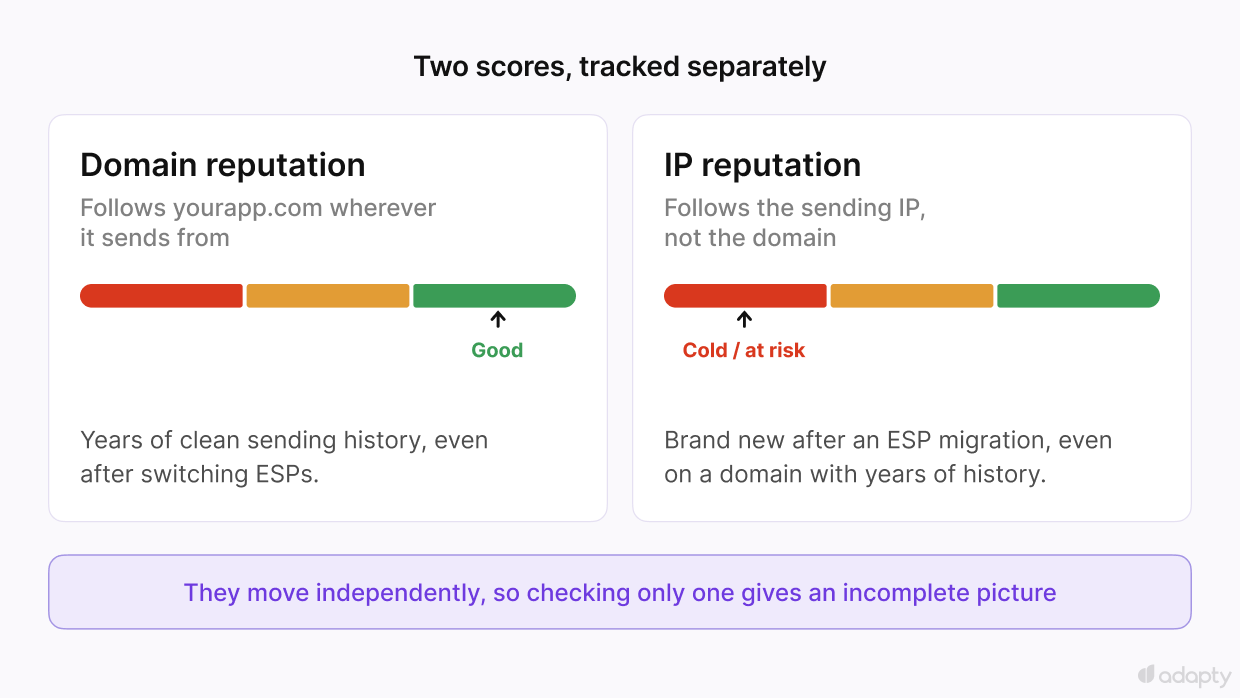
Reputation is tracked on two axes that move independently:
- Domain reputation follows your domain name wherever it sends from.
- IP reputation follows the sending IP address, regardless of which domain the message is sent from.
A strong domain reputation can still take a hit from a bad IP, and vice versa.
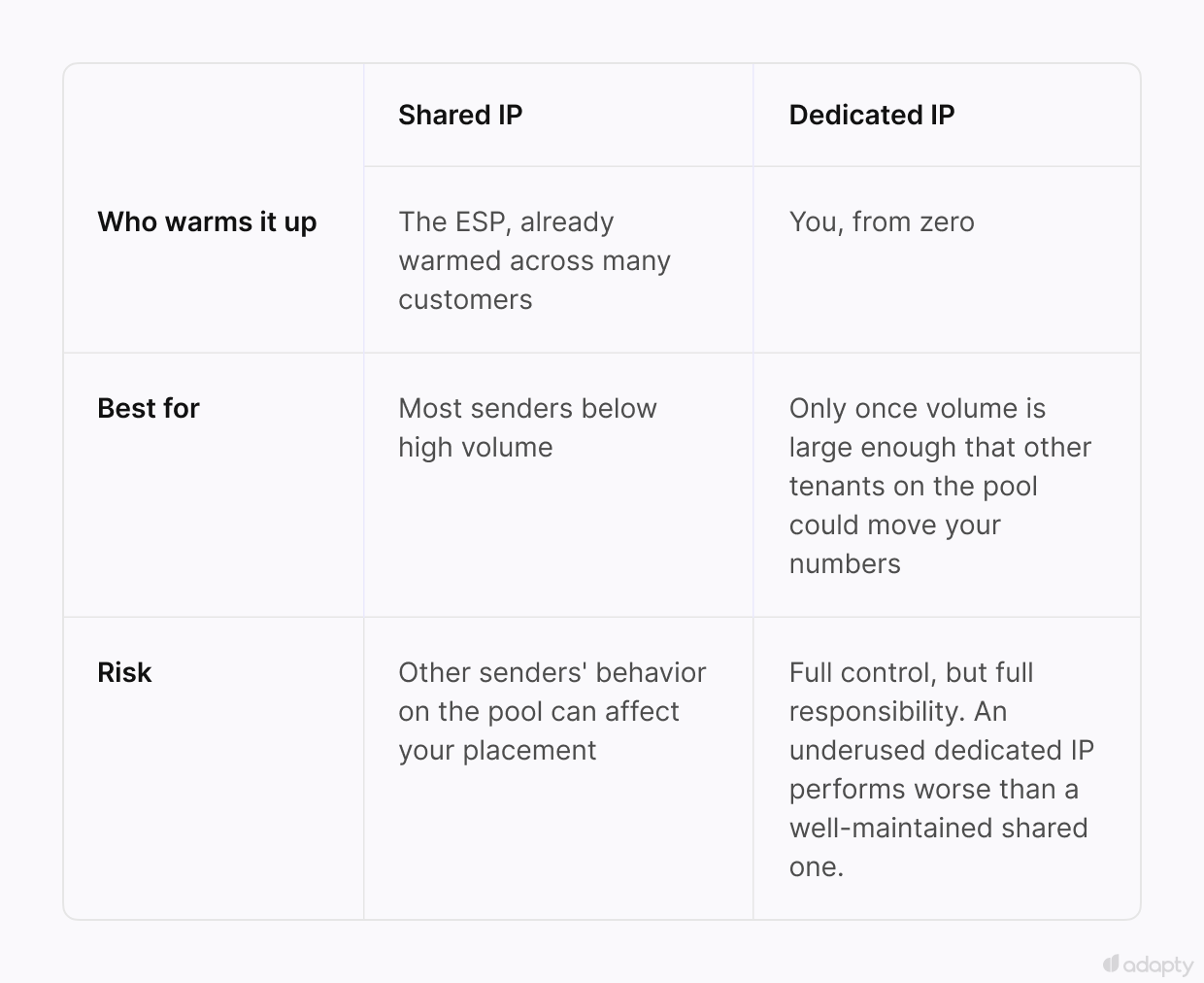
Most senders below a fairly high volume use a shared IP, one address pool an email service provider already warmed up and maintains across many customers. A dedicated IP is yours alone, full control but also full responsibility for warming it from zero. Below meaningful scale, shared is almost always the better call, and the math only flips once your volume is large enough that other tenants on the pool could move your numbers.
This is also why marketing emails are typically sent from a subdomain like mail.yourapp.com rather than the root domain. If a marketing campaign gets flagged, a subdomain absorbs the damage without dragging down transactional email, receipts, password resets, security alerts, sent from the root domain or a separate subdomain.
Blocklists are a third, separate thing from reputation scores. Spamhaus, Barracuda, and SpamCop maintain lists of IPs and domains flagged for spam-like behavior, and landing on one isn't the same as having generally poor reputation scores. A single bad campaign or one hit on a spam trap address can get you blocked while your broader reputation metrics still look fine. Check both separately:
- Google Postmaster Tools shows the domain and IP reputations as Gmail sees them, along with your spam rate.
- Microsoft SNDS (Smart Network Data Services) does the equivalent for Outlook, Hotmail, and Live addresses.
- Yahoo Sender Hub's Complaint Feedback Loop covers Yahoo and AOL addresses once you've verified a DKIM-signed domain, and it's more granular than the others, individual complaints rather than just an aggregate rate.
- MXToolbox's blocklist check runs your IP and domain against dozens of blocklists in one pass.
Sending behavior
Sending behavior refers to whether your volume and pace look like a real, established sender rather than a spam operation just getting started.
A brand-new domain or IP has no history. A sudden spike of thousands of messages from an address with zero track record raises exactly that suspicion, because there's no way yet for an inbox provider to tell a real ramp-up from a spam blast.
Warmup means gradually increasing volume over days or weeks so that a real track record accumulates before you're sending at full scale. Skip it, and even a properly authenticated, well-reputed sender gets throttled or filtered simply for showing up too fast.
A common ramp curve: near-100% day-over-day increases while volume is still small, tapering down toward something closer to 20% as the daily total grows, since the same percentage jump means a much bigger absolute spike once you're already sending in the thousands.
Inbox providers weigh what happens to messages already sent, opens, replies, spam rescues, as heavily as how many go out each day, and generating that on purpose means the sending domain also has to receive and read mail, not just send it. In practice, this is usually handled by pairing two separate pieces of infrastructure. A dedicated warmup service sends mail from your domain into a network of real seed inboxes across Gmail, Outlook, and Yahoo, then opens a portion of it, replies to some, and manually pulls anything that lands in spam back into the inbox and marks it important, simulating the pattern of a genuinely active mailbox instead of a one-way blast. That only works if the sending domain can receive mail in the first place, and most ESPs don't support that since they're built to send, not to host a mailbox. So teams running this setup pair it with a standards-based email host to stand up an actual inbox on the domain. Most warmup guides compress all of that into "send a little more each day," which is true and also barely half the story.
Without that kind of dual setup, there's still a real lever available to any team: which subscribers you warm up on first. Blasting a new domain or IP with your entire list, including subscribers who haven't opened anything in a year, teaches inbox providers that your mail isn't wanted. Starting instead with your most recently engaged segment, people who opened or clicked in the last 30 to 60 days, gives the new domain a run of genuine positive signals before it ever touches the colder part of your list. That segment is likely already built if the lifecycle sequences are in good shape; using it first is a matter of sequencing, not extra work.
Two numbers matter more than any other single metric here:
- A bounce rate above 2% already registers as a reputation signal with inbox providers, well before it becomes a list-hygiene headache. Above 5%, it's a real problem that gets you filtered aggressively. Waiting to hit either threshold is the wrong response. Remove hard bounces from your list the moment they happen, because by the time your rate crosses a threshold, the damage is already logged against your domain.
- A complaint rate above 0.3%, the same figure Gmail and Yahoo use in their own bulk sender requirements, risks throttling or blocking, and the safer target most senders aim for sits closer to 0.1%.
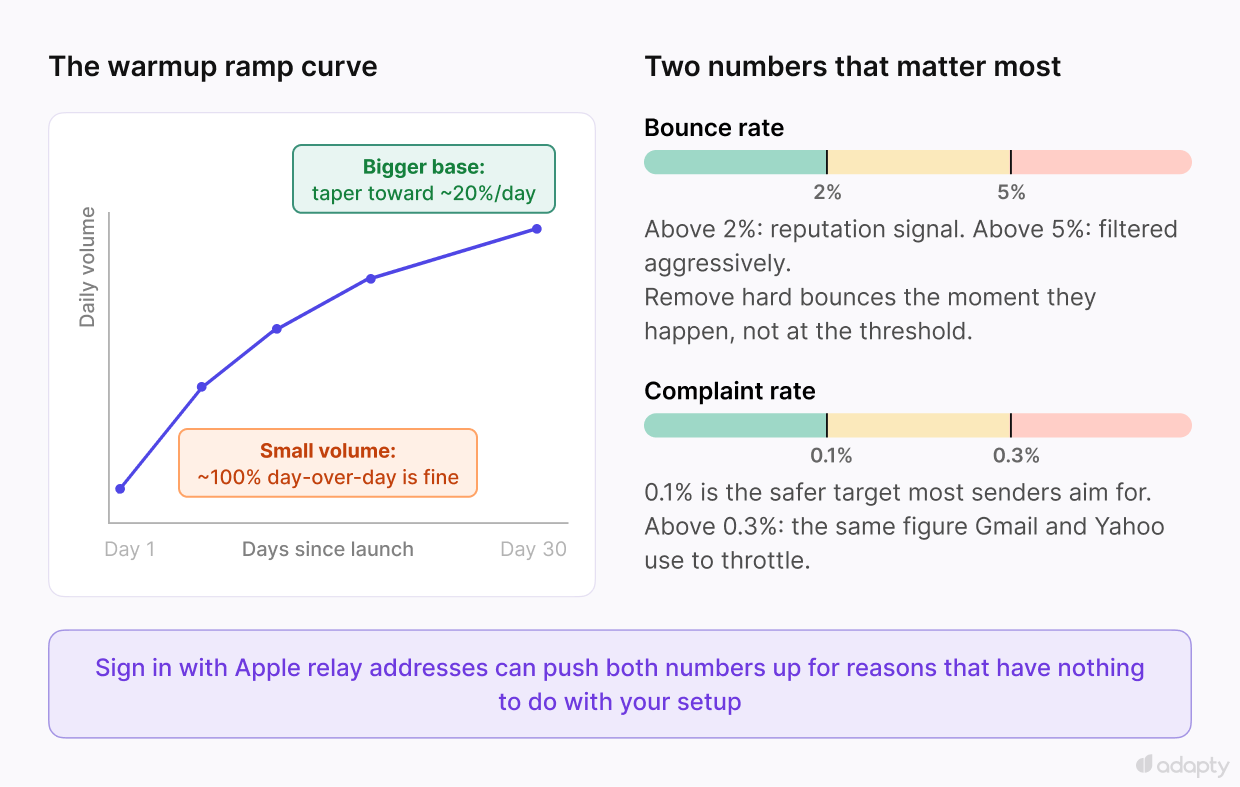
ℹ️🍎 Subscription apps run into one wrinkle a generic SaaS company doesn't. Users who sign in with Apple often receive an @privaterelay.appleid.com address instead of their real one, and those addresses tend to have higher bounce rates and lower engagement than a normal inbox for two reasons unrelated to your sending quality. First, if you haven't registered your sending domain in the Apple Developer Portal, Apple rejects that mail outright, a setup problem worth fixing immediately. Second, even with registration done correctly, Apple sometimes silently drops forwarding when a user turns it off, with no bounce message at all, which later shows up as dead engagement rather than a clean bounce. Don't let that bucket of addresses convince you your whole list has degraded when it's really a specific, known behavior tied to one sign-in method.
Warmup sequencing, bounce and complaint monitoring, and quirks like Apple's relay addresses make sending behavior the most demanding of the four checks here, and none of it runs on autopilot.
Consent and compliance
Consent and compliance is whether the recipient agreed to this and can leave easily, and inbox providers weigh it as heavily as anything else on this list.
When an unsubscribe link is missing, buried, or broken, recipients still want out. They reach for "report spam" to get there, and a spam complaint damages your reputation with the receiving inbox far more than an unsubscribe ever would. Unsubscribe removes one address from your list. A spam complaint tells the receiving server that your domain sent something a real person didn't want, which is exactly the signal every check in this piece exists to avoid.
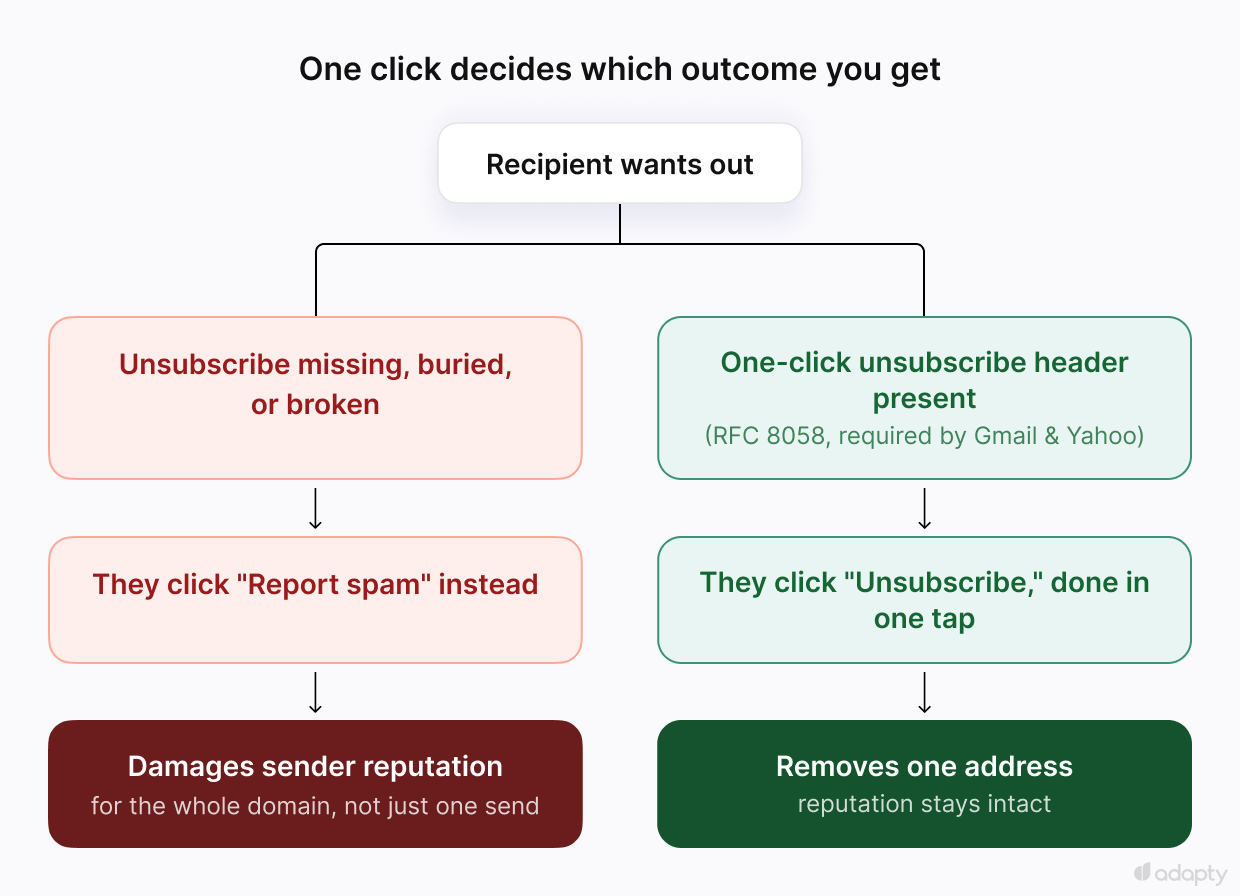
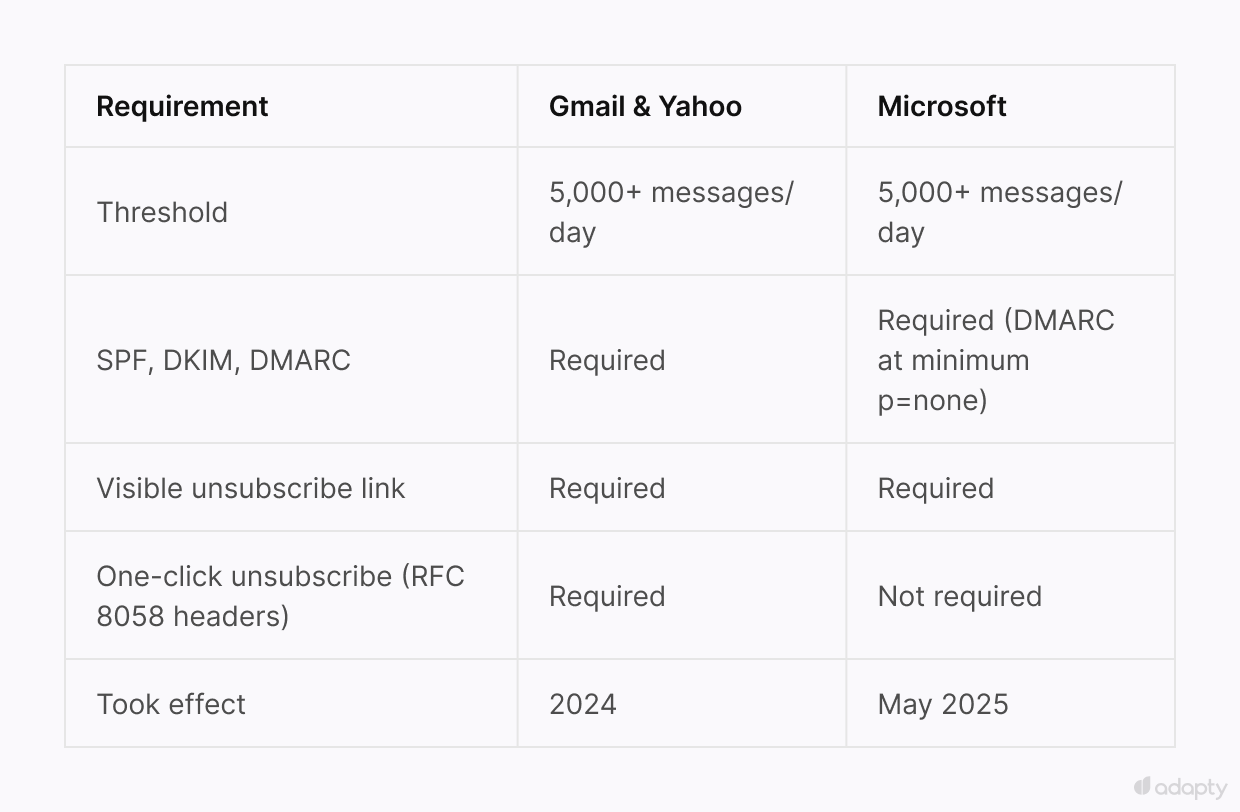
One-click unsubscribe, as defined in RFC 8058, has been required by Gmail and Yahoo since 2024 for anyone sending more than 5,000 messages per day. The requirement lives in a specific pair of headers, List-Unsubscribe and List-Unsubscribe-Post, that let the inbox display a one-click "Unsubscribe" option next to your sender name, without the recipient ever opening the message. Without those headers, full inbox placement at Gmail or Yahoo isn't available regardless of how clean the rest of your setup is.
Microsoft's own bulk sender rules, at the same 5,000-per-day threshold, took effect in May 2025 and cover the same authentication ground: SPF, DKIM, and a DMARC record at a minimum policy of p=none, plus a visible, functional unsubscribe link in the body of the email. What Microsoft hasn't required, at least so far, is the RFC 8058 header itself. Worth supporting anyway since Gmail and Yahoo credit it regardless of destination, even though the mandate doesn't cover Outlook, Hotmail, and Live.
The footer link still matters on its own terms. CAN-SPAM requires a real physical postal address in every commercial email: a current street address, a registered PO box, or a registered private mailbox. Skipping it creates a compliance gap independent of anything related to deliverability. One more thing: opt-in vs opt-out rules differ by country, so check where your users live before you expand into a new market. That's a separate consideration, and you'll need to obtain the appropriate consent from your users.
Does any of this stay fixed once you set it up?
No, and this is the part worth being honest about. Every check in this piece lives in a different free tool. Google Postmaster Tools only covers Gmail. Microsoft SNDS only covers Outlook and Hotmail. MXToolbox handles blocklists. Mail-tester gives a one-time snapshot the moment you run it. None of them talk to each other, and none of them alert you the instant something breaks. That gap is the real reason this needs continuous monitoring, well past whatever got configured during initial setup.
The requirements themselves keep moving too. Gmail and Yahoo's bulk sender rules took effect in 2024, Microsoft added its own version in 2025, and a domain or email provider switch resets your warmup clock back to zero regardless of how long you'd been sending cleanly before, since reputation is tracked as a rolling average rather than a score earned once and kept.
A common way this shows up in practice is a team migrating ESPs mid-quarter for pricing or feature reasons, keeping the same sending domain, and assuming reputation carries over because the domain didn't change. Reputation attached to the old provider's shared IP pool doesn't transfer, and the new IP starts cold even though the domain has years of history. Open rates drop for two to three weeks while the new setup re-earns trust, and that dip stays temporary only if volume gets throttled back down to a warmup pace on the new IP. Keep sending at the old volume anyway, and the dip stops being temporary: enough bounces and complaints on a cold IP in that window can burn the domain's reputation past the point where it comes back on its own.
Recovering from that is harder than it sounds, because most sending platforms don't make it easy to run two sending domains side by side. Adding a second domain usually means a full authentication setup and its own warmup curve, not a quick failover for a bad week. Once reputation is really gone rather than just dented, the practical fix is starting over: a new domain or subdomain, authenticated from zero, ramped up the same slow way a brand-new sender would, while the burned one recovers on its own or gets retired.
What does Adapty Mail handle?
Adapty Mail handles all four of these for you: authentication, reputation, sending behavior, and compliance. Your team doesn't have to set any of it up, watch it, or fix it when something breaks.
- Authentication is set up correctly from day one. Every link in every email points to your own domain, not a separate redirect domain, so nothing weakens the trust you just built.
- Reputation is tracked around the clock across Gmail, Yahoo, and Microsoft, the same three providers covered above. If something goes wrong, you find out before it costs you weeks of lower open rates, not after.
- Sending behavior: warmup happens automatically for every new domain and IP, no schedule for you to track. If one domain's reputation takes a hit, multi-domain sending lets you move volume to another domain that's already trusted, while the first one recovers, instead of starting over.
- Consent and compliance come built into every send: double opt-in, one-click unsubscribe, and the legal requirements covered earlier in this piece. None of it gets added later, after complaints start piling up.
Put together, your mail keeps landing in the inbox instead of getting stuck at any of the four checks in this piece, and nobody on your team has to become a deliverability expert to make that happen. Adapty Mail handles it end to end, so adding email marketing to your app doesn't mean building any of this yourself.
Skip the four checks. Adapty Mail handles them for you.