How to set up email marketing for a subscription app from scratch

TL;DR:
- The median subscription app earns 4.3% of revenue from email. The top 5% earn 13.2%. The difference is that most subscription apps don't send much at all.
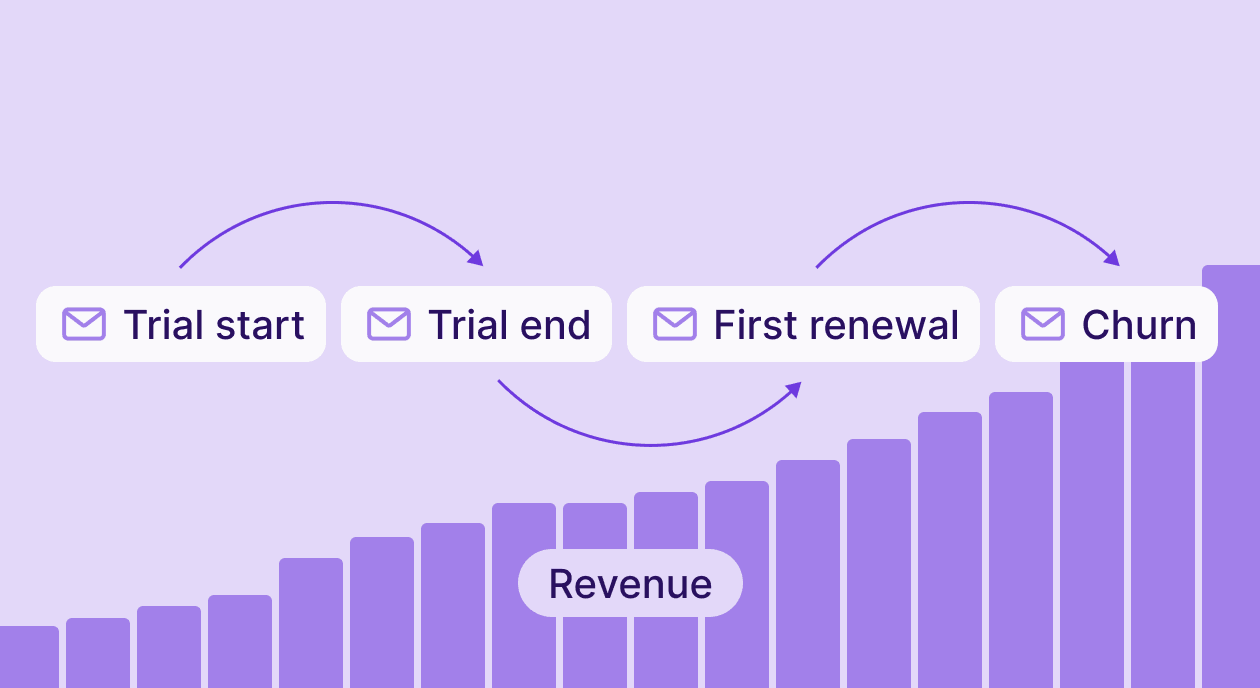
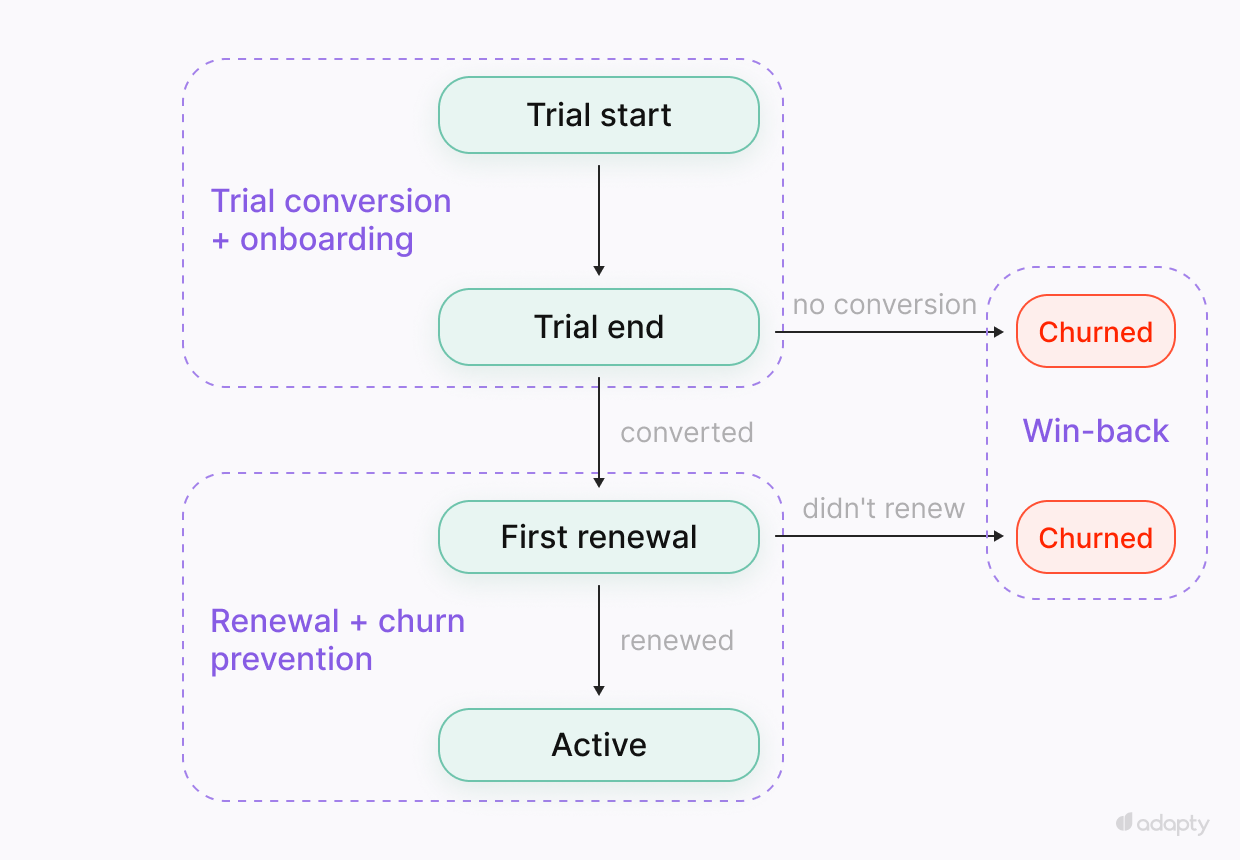
- Subscription email runs on four events: Trial start, trial end, renewal, and churn. Everything triggers off that graph.
- The App Store doesn't hand over user emails. You collect them at registration, and list quality is the first constraint you'll hit.
- Build in order: Trial conversion first, onboarding in parallel, then renewal and churn prevention, then win-back.
- Some users never start a trial at all. They installed, left their email, and stopped. That's a separate sequence with a 24-48 hour window.
Setting up email marketing for subscription apps starts here: A user signed up, started a trial, and didn't convert. Their trial expired yesterday. They never received an email. You have their address, the signup timestamp, and the trial dates. That's the data the sequences in this guide run on.
Doing email right requires more than an email service provider (ESP) and a welcome template. You need real expiry dates pulled from the subscription system, live data wiring subscription events to sends, and copy written for the category. Most apps have none of this. This guide covers how to build it, sequence by sequence.
Why does email outperform every other channel for subscription apps?
Push notifications get blocked. Ad retargeting loses signal as privacy restrictions tighten. In-app messages only reach users who are already active. Email reaches everyone who gives you their address, and no algorithm decides whether the message is worth showing.
The numbers follow from that. Lifecycle email for subscription apps hits open rates of 30-50%. Push notifications average 2-5%. The median app earns 4.3% of revenue from email. The top 5% earn 13.2%. That's the spread to play in.
What makes subscription email different from SaaS or e-commerce?
E-commerce has cart abandonment signals, browse history, and a product catalog to remarket against. B2B SaaS has website behavior, demo requests, and sales cycles. Subscription apps have none of these. The user downloads the app, starts a trial, and the whole experience plays out inside a walled garden that the App Store controls.
So three things make this category its own discipline.
Four events run everything
Subscription email runs on four events: Trial start, trial end, first renewal, and churn. Every trigger, segment, and sequence should be built around that graph. An ESP without direct access to those events guesses, and guesses produce mistimed sends.
The App Store gives you almost nothing
You know when someone downloaded and when they started a trial. What happened inside the app, which features they used and why they didn't convert, is invisible unless you've instrumented it.
Trial windows are short
Seven days is the most common trial length. Three days is the second most common. In that window, every email needs to land on the right day. An expiry email sent a day late loses the conversion.
How do you map your audience before building anything?
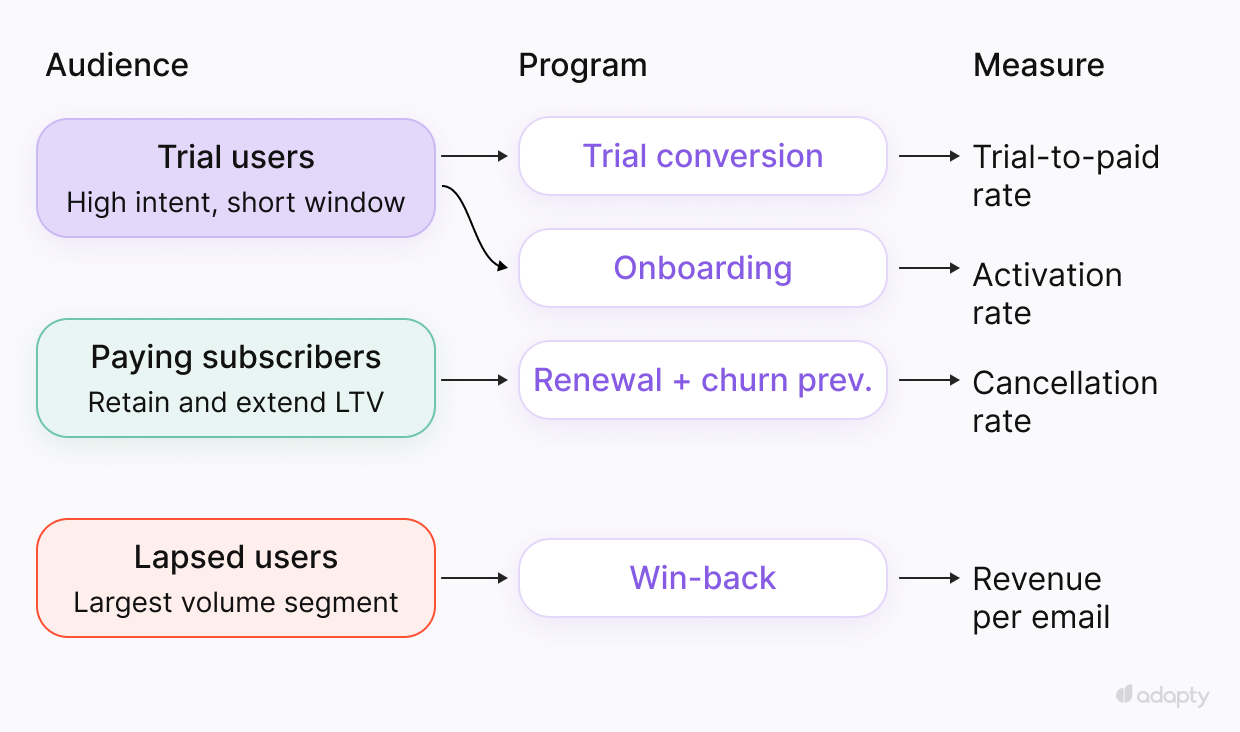
Three groups drive the entire email marketing.
- Trial users haven't committed yet. Their intent is high, and their window is short. Every email runs against a countdown.
- Paying subscribers are the retention audience: Stopping involuntary churn from failed payments, catching voluntary churn before the cancellation decision, and extending LTV by moving monthly subscribers to annual.
- Lapsed users downloaded and never converted, or churned after paying. These are the largest volume segments in most apps. The conversion rate on win-back is lower, but the segment is large enough that modest performance generates real revenue.
Start with trial users. They have the clearest ROI and the fastest feedback loop. The other two can wait until the trial conversion is running and measured.
What needs to be ready before the first send
First, you need subscription events firing in real time: Trial start, trial conversion, renewal, billing failure, and cancellation. Without them, every sequence in this guide is a batch send with the wrong timing.
Second, you need the email addresses themselves. The App Store doesn't hand over user emails. You collect them during registration inside the app. Sign in with Apple complicates this because it can return a relay address instead of a real one.
How do you segment subscription users for email?
Sending the same email across statuses is how a good copy ends up in the wrong inbox. A re-engagement email landing in an active subscriber's inbox looks confused. A conversion email to someone who already churned and resubscribed is noise. Segment first, then write.
| Segment | Signal | Message focus | Flow |
| Installed — never started trial | Registration event, no trial_started within 48h | Start the trial | Pre-trial activation |
| Trial — high engagement | Active usage, nearing expiry | Urgency | Trial conversion |
| Trial — low engagement | Little or no app usage | Activation first, then urgency | Onboarding → trial conversion |
| Active — healthy | Regular app opens, low churn risk | Upsell monthly to annual | Retention |
| Active — at risk | No opens 7+ days, disengagement signals | Re-engagement before cancellation decision | Churn prevention |
| Active — payment failed | DID_FAIL_TO_RENEW event | Recover billing, fast | Dunning (day 1, 3, 7) |
| Lapsed — never paid | Downloaded, trial expired, no conversion | Offer-led win-back | Win-back 30/60/90 |
| Lapsed — churned | Paid, then cancelled | Offer-led win-back | Win-back 30/60/90 |
How do you reach users who never started a trial?
Most lifecycle email advice starts at the trial. A portion of every app's user base never reaches it: They installed, gave you their email, and stopped. No trial started, no subscription event fired, nothing sent.
The window is short. Someone who installed three weeks ago and never started a trial is a different problem from someone who installed yesterday. The first 24-48 hours after registration are where this sequence has leverage.
These users already saw the app and passed on the free option. Offering the trial again won't change that. Lead with a purchase offer: A discount, a limited-time price, or an annual plan at a reduced rate. One CTA, straight to checkout.
The trigger is the absence of a trial_started event within 24–48 hours of registration. The ESP receives the registration event, sets a timer, and fires if trial_started never comes.
Send 5-6 emails in the first 48 hours. After that, drop to one per day. Beyond 72 hours, response rates fall fast enough that continuing to mail hurts deliverability more than it recovers revenue. Suppress the cohort at that point.
What to measure: conversion to paid among users who received the sequence compared to those who didn't.
How do you convert free users and recover cancelled trials?
Each scenario needs a different trigger and different copy.
Free users who haven't paid yet. The user left their email and started using the free features. The welcome email is personalized to what they've already done in the app. It surfaces the one feature that moves users from free to paid in the category. One clear path to using it.
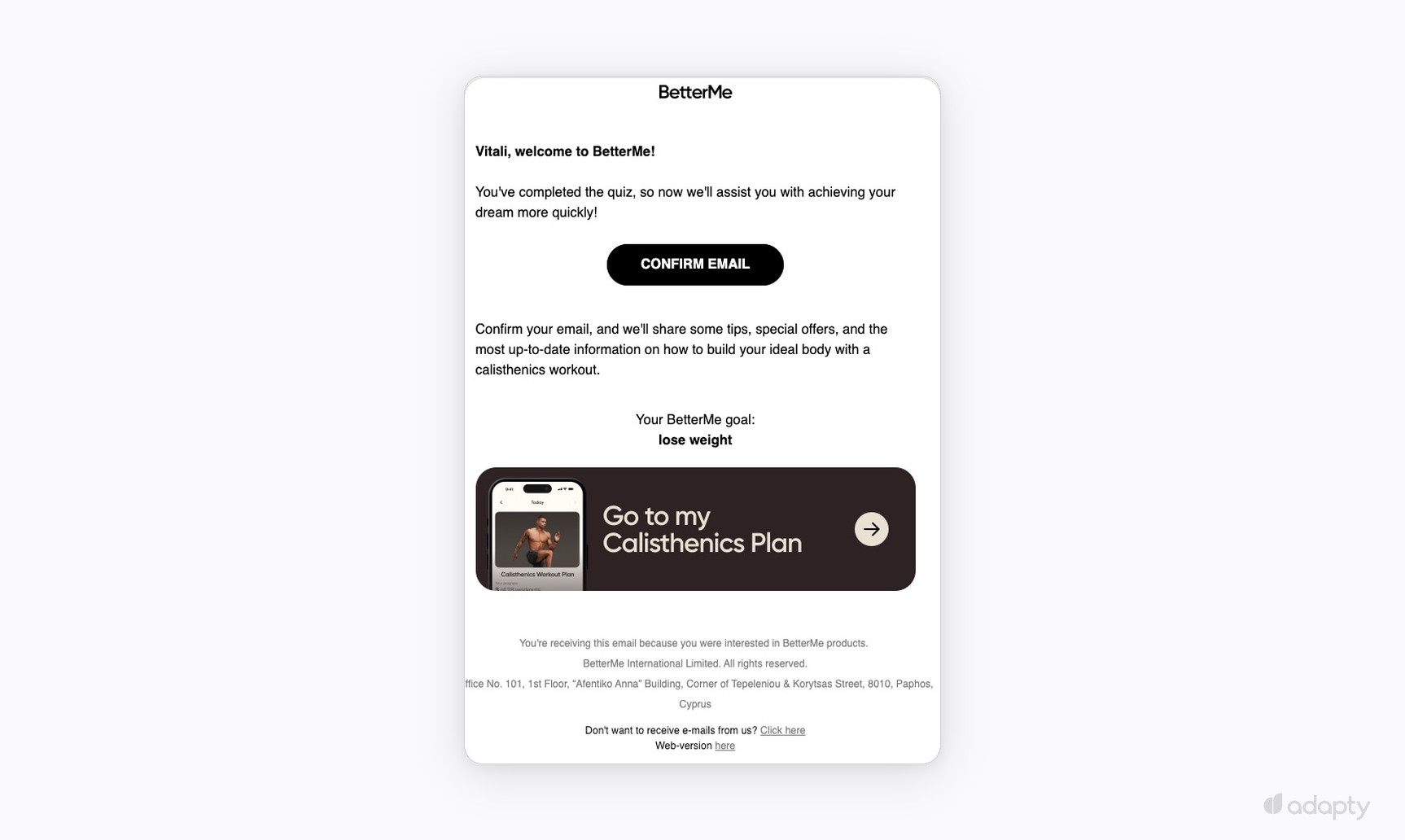
BetterMe does this in one screen: The quiz result ("lose weight") drives straight to a personalized workout plan. The user asked for a plan, the email delivers it, and the only action is to go use it. The welcome confirms what the user already chose, then points them at the one thing that makes the product valuable for them specifically.
Users who cancelled their trial. Cancellation is an active decision. A reminder about the trial ending won't change it. Lead with an offer: A discount, a reduced annual rate, or access to something they haven't tried. One paragraph, one CTA, straight to checkout.
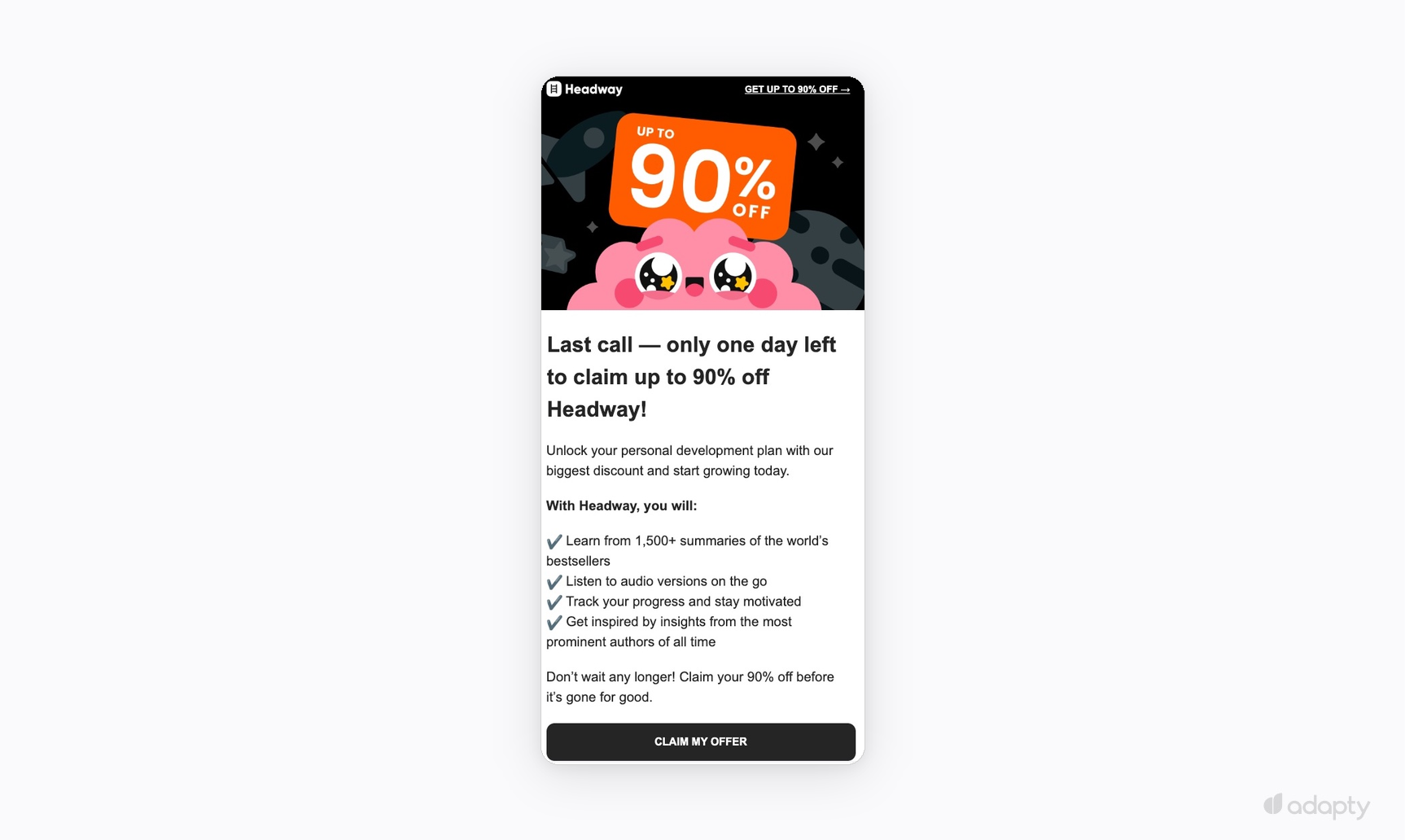
Headway leads with urgency and one CTA — the right structure. The feature list below loses the thread. By day six, the user knows what the app does. The offer is what needs the space.
Users whose payment failed at trial end. The user intended to convert, billing failed. The trigger is a payment failure event at the trial-to-paid transition. One email on day 1, another on day 3 if still unpaid. Neutral tone, one CTA to update billing.
What to measure: conversion to paid from free users; recovery rate on cancelled trials; payment recovery rate at trial end.
What do you need before sending anything?
Three things need to be in place before any sequence in this guide works correctly.
- Subscription events in real time. At a minimum: Trial start, trial conversion, renewal, billing failure, and cancellation. Without those events firing into the sending system, every sequence becomes a batch sent with the wrong timing. A trial expiry email sent from a daily export is an approximation. An approximation arrives on the wrong day.
- The email addresses themselves. The App Store doesn't hand over user emails. You collect them during registration inside the app. Sign in with Apple complicates this because it can return a relay address instead of a real one, which affects deliverability and list quality. Audit the list before building sequences around it.
- Sending infrastructure. The domain needs to be configured, DNS records in place (DKIM, SPF, DMARC), and the domain warmed up. A correctly triggered email sent from an unwarmed domain goes to spam regardless of the copy.
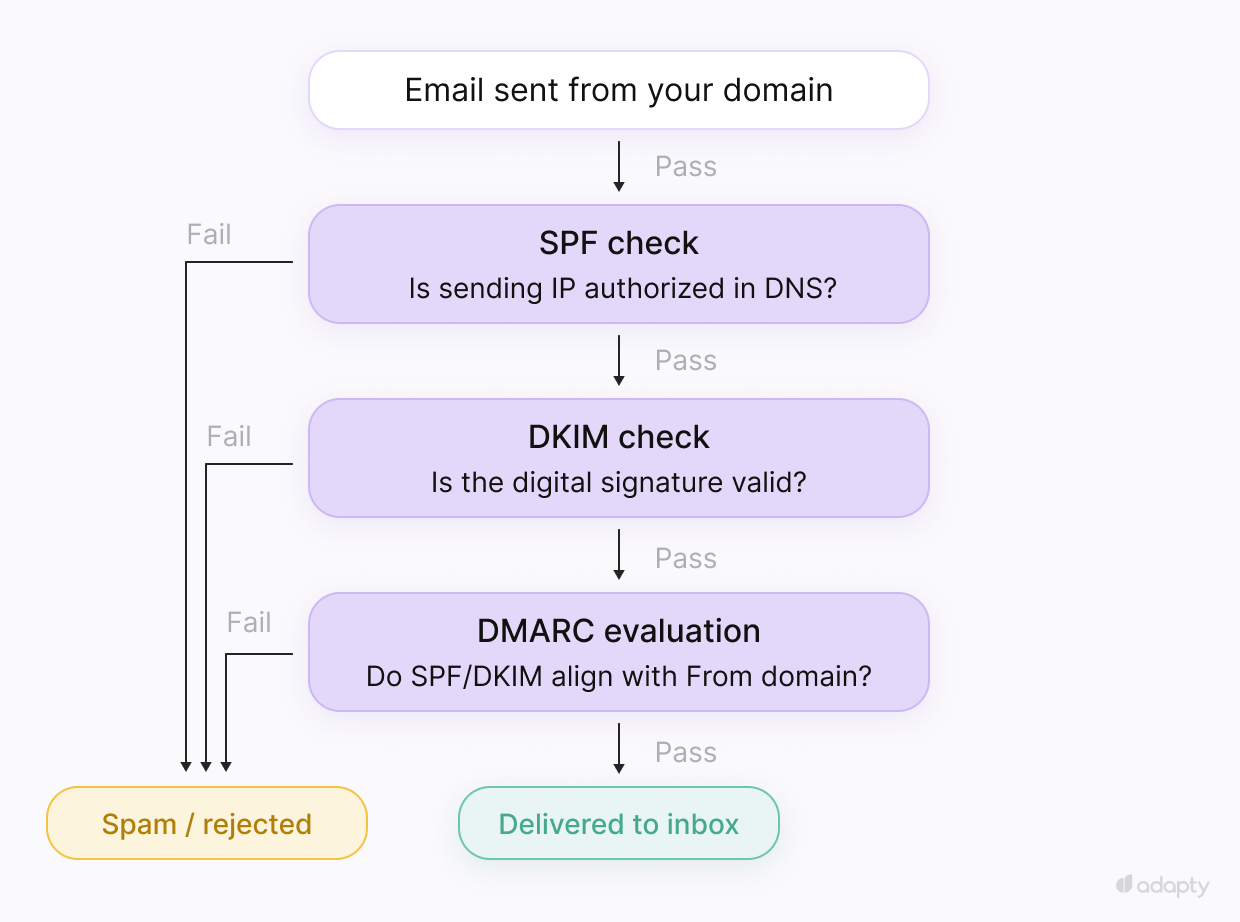
What to measure: Trial-to-paid conversion rate from email-attributed sessions. Open rate tells you the subject line worked. The conversion rate tells you the sequence works.
How do you build the onboarding sequence?
Onboarding runs in parallel with trial conversion. Trial conversion emails push toward payment. Onboarding emails push toward the moment where the app becomes valuable. Without it, the conversion sequence is pushing against a wall.
The sequence is built around the activation event, the specific in-app action that predicts conversion. For a meditation app, it's completing a first session. For a budgeting app, it's connecting a bank account. For a language app, it's finishing the first lesson. Most apps don't pipe that data into the ESP, so the sequence runs the same for everyone. The emails push toward the activation event rather than branching on it. For apps that do have the instrumentation, branching on whether the user hit it by day 3 makes the sequence more precise.
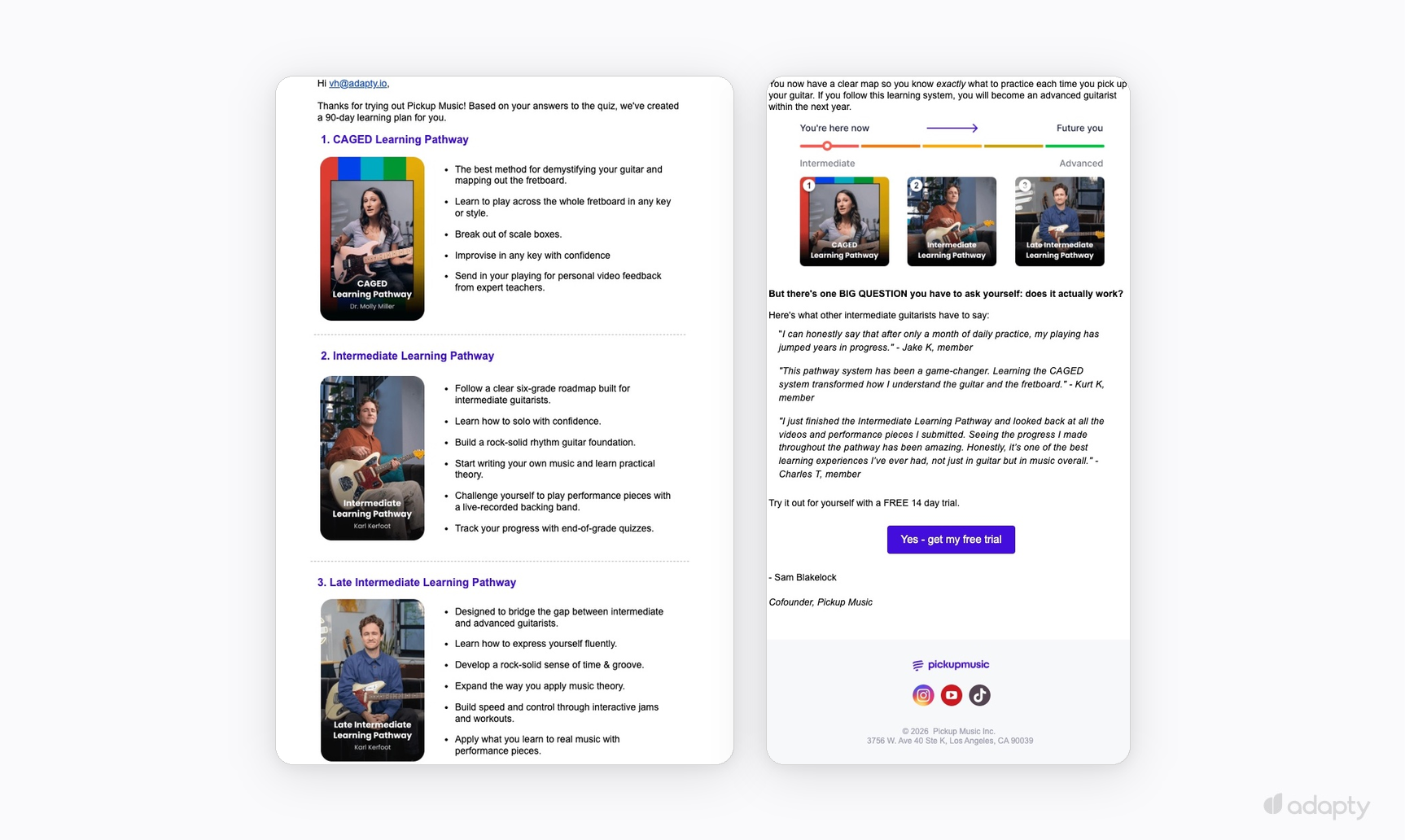
Sequence logic branches on whether the user hits the activation event. If they don't hit it by day 3, it escalates with more direct prompts. That branch requires in-app event tracking piped into the ESP as a trigger condition.
What to measure: Activation rate among users who received the sequence compared to those who received only conversion emails. The delta is what onboarding emails contribute.
How do you reduce involuntary and voluntary churn?
Churn prevention covers two problems. Each needs different triggers and different copy, and conflating them produces sequences that fire at the wrong time.
Involuntary churn comes from failed payments. The user intended to stay, but billing failed. The recovery rate depends on timing more than anything else.
| Trigger | Tone | Goal | |
| Day 1 | DID_FAIL_TO_RENEW fires | Neutral | Let them know, make updating the card easy |
| Day 3 | Still unpaid | Direct | Remind them access is at risk |
| Day 7 | Final notice | Urgent | Last chance before access is cut |
Voluntary churn happens when users make the decision before the cancellation flow opens. Prevention emails need to fire on disengagement signals: No app opens in 7 days, no engagement with the last three emails.
Renewal reminders work on a different timing, Send renewal reminders 30 days before the annual renewal date. They reduce cancellations and open an upsell window: Monthly subscribers who've been on the product long enough to renew are the right audience for an annual upgrade offer.
What to measure: Recovery rate on failed payments across the dunning sequence, and cancellation rate among users who received prevention emails compared to those who didn't.
When should you run win-back campaigns?
Build win-back last. Trial conversion, onboarding, and churn prevention shrink the lapsed segment over time. Starting win-back before those are running means mailing a larger pool with worse odds.
People who downloaded, tried the app, and have already left know what it does. Sending a reminder wastes the send. Lead with an offer: A discounted plan, an extended trial, or a feature they hadn't tried.
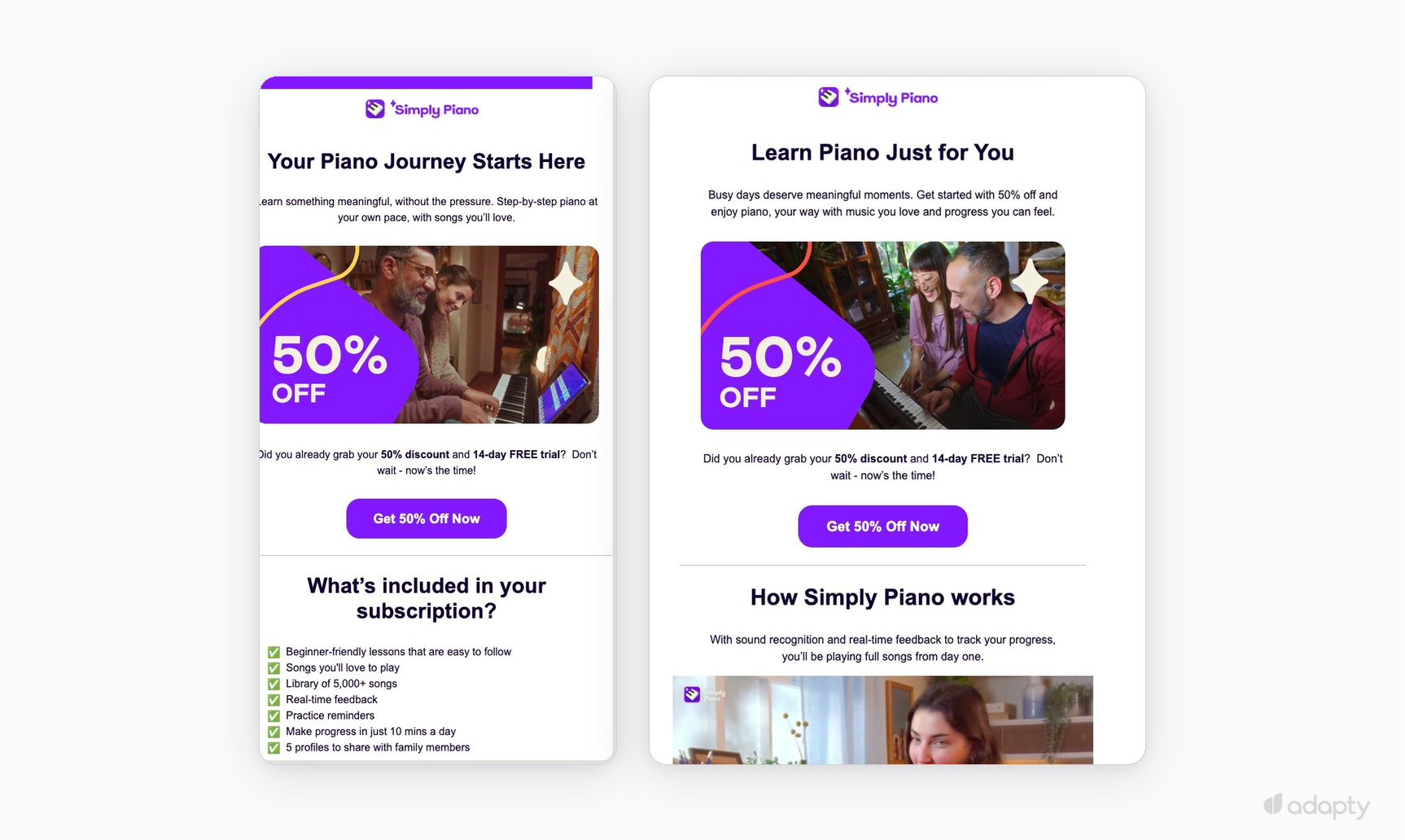
Every offer needs to connect to a checkout page that attributes the purchase back to the specific email that drove it.
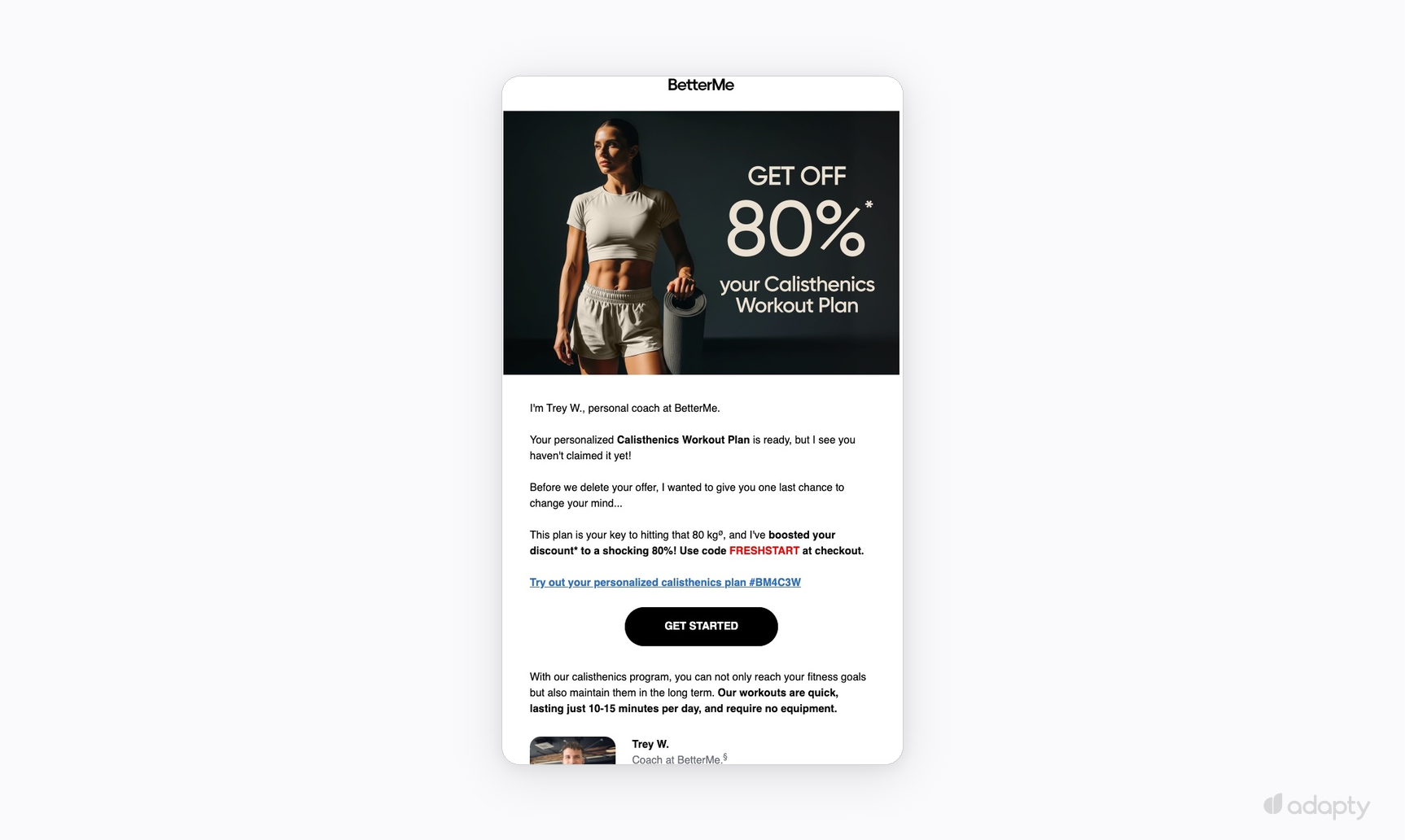
The sequence runs at 30, 60, and 90 days after lapse. Response rates drop sharply after 90 days. Mailing past that window hurts deliverability without recovering meaningful revenue. Suppress that cohort.
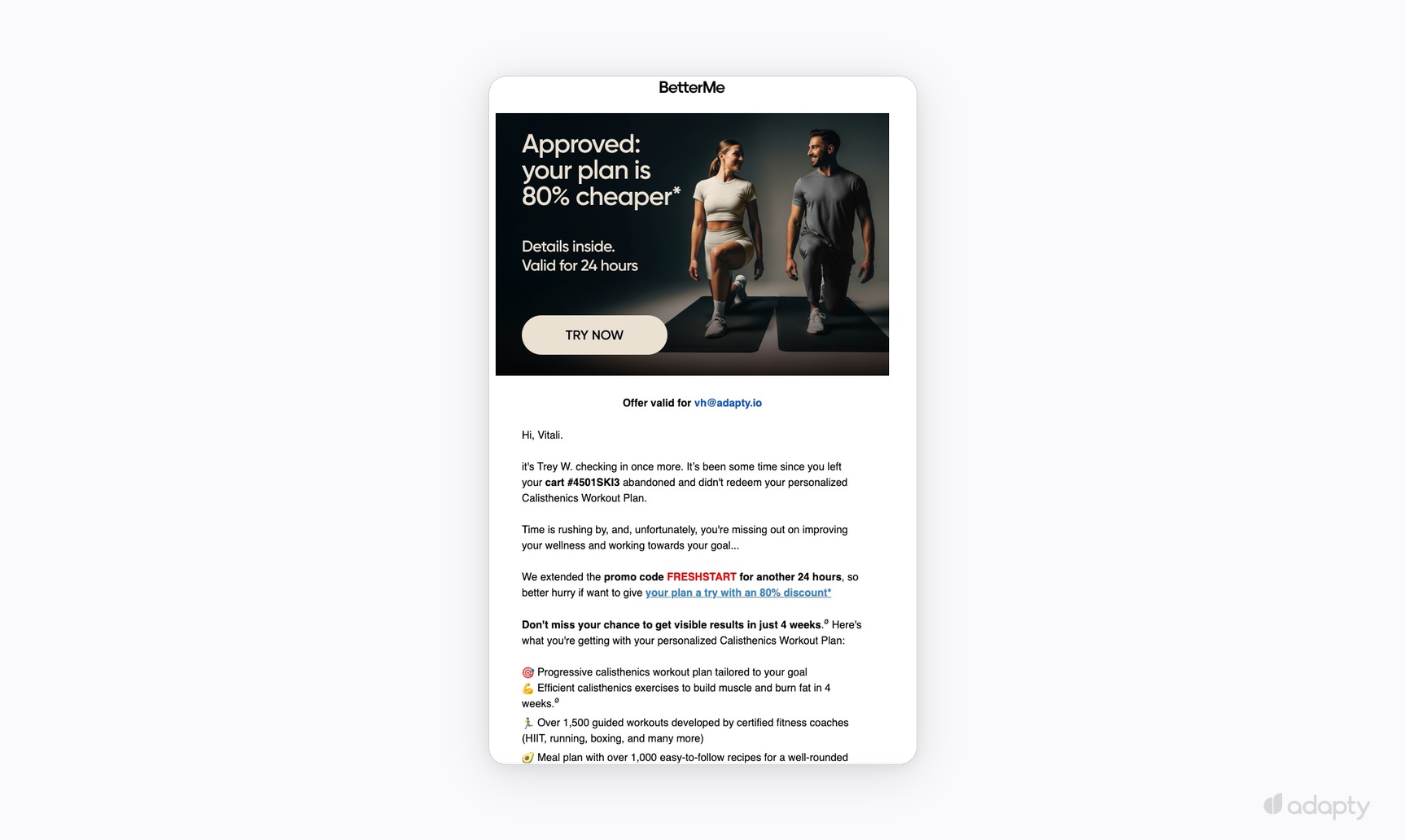
Win-back is where compliance matters most. CAN-SPAM and GDPR require a working unsubscribe mechanism. And users who haven't received anything in months without clear opt-out paths is a deliverability risk. Set this up before the first win-back send goes out.
What to measure: Revenue per email sent across the 30, 60, and 90-day windows. This shows where the returns are and when to stop mailing a cohort. Conversion rate alone doesn't tell you that.
How do you run this without a dedicated team?
Paste your App Store link. Two minutes later, nine email drafts in the app's brand voice are ready to review.
That's what Adapty Mail does. It writes the copy, generates the images, and renders correctly in Gmail, Apple Mail, and Outlook. The sequences run on the subscription data already in Adapty with no integration work before the first send. Every email links to a web paywall, so every purchase traces back to the exact email that drove it.
At $50K MRR, moving from 4.3% to 13% email revenue adds $4,350 a month. At $200K MRR, that gap is $17,400. The only question is how long the lifecycle email has been sitting on the roadmap.