5 emails every subscription app should send and when

TL;DR:
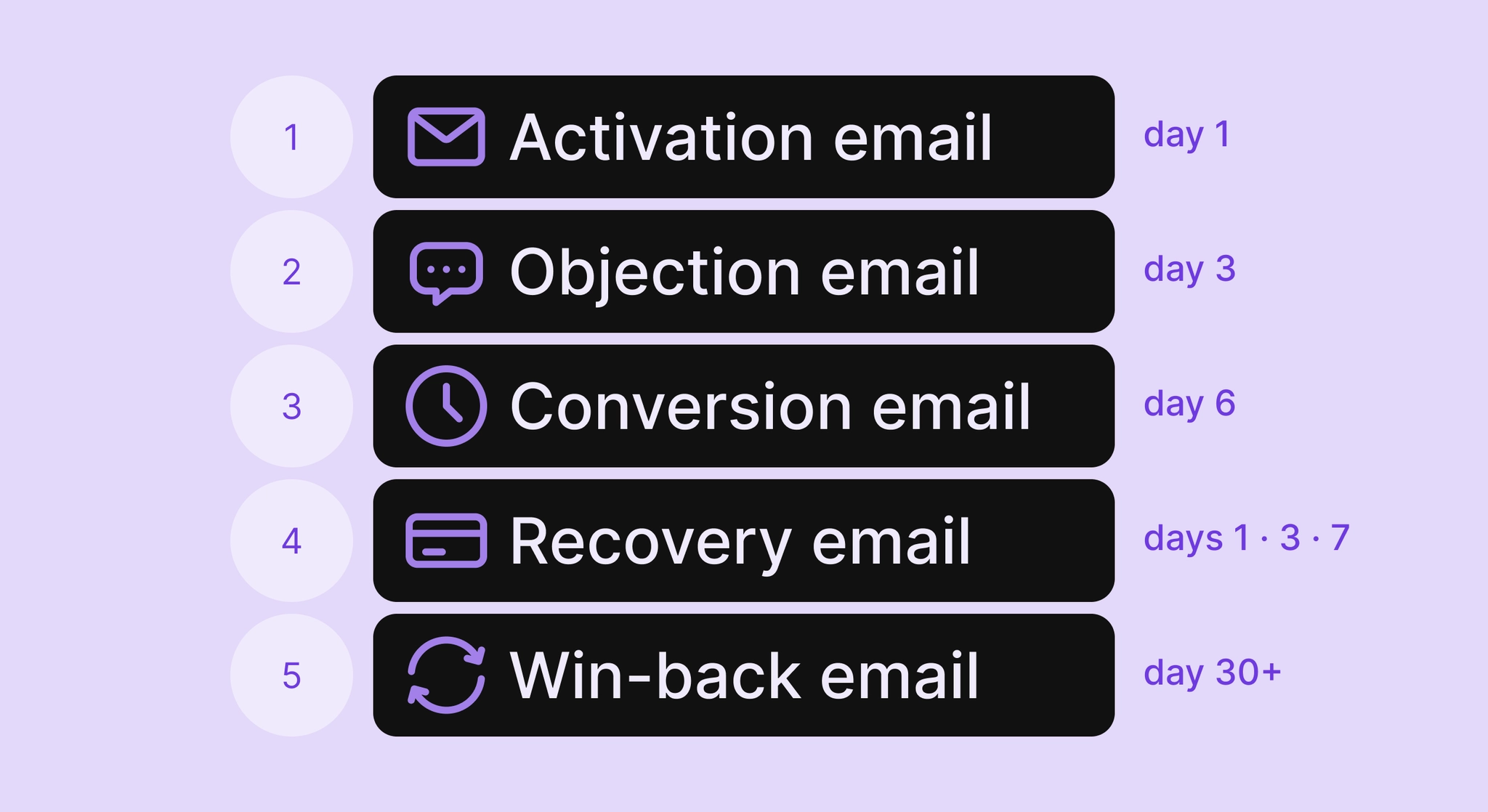
- Five sequences map to the moments where subscription revenue is at risk: activation, objection, save, recovery, win-back.
- All five fire on subscription events, timed to what the user did or didn't do.
- Adapty data across 5B sends: The top 5% of apps earn 13.2% of revenue from email. The median is 4.3%. Most apps haven't built the sequences.
- Start with activation and save. Add dunning before win-back.
Adapty's analysis of 5 billion subscription app emails shows the top 5% of apps earn 13.2% of revenue from email. The median is 4.3%. Most apps at 4.3% have the same problem: No lifecycle sequences running, just a confirmation email at registration.
Five subscription app email sequences map to the moments where revenue is at risk: trial start, cancellation, billing failure, lapse. Each fires on a specific event. Timing is as important as copy. An expiry email that arrives after the trial ended loses the conversion. A dunning email sent a week late loses the payment.
What follows covers all five: the trigger, the timing, and what each email needs to say.
How does lifecycle email work for subscription apps?
Lifecycle sequences fire on events. Someone registers and never opens the app. A payment fails. A trial lapses. Each of those moments has a corresponding send.
SaaS teams have weeks of website behavior and feature adoption to work with. E-commerce teams browse history and cart data. Subscription apps have a shorter window: a trial, a billing cycle, and a cancellation decision that's often made before the user opens the cancellation flow.
A dunning email that fires a week after billing failed doesn't recover the payment. An expiry email that arrives after the trial ended doesn't convert anyone. The sequences in this article are built around that constraint.
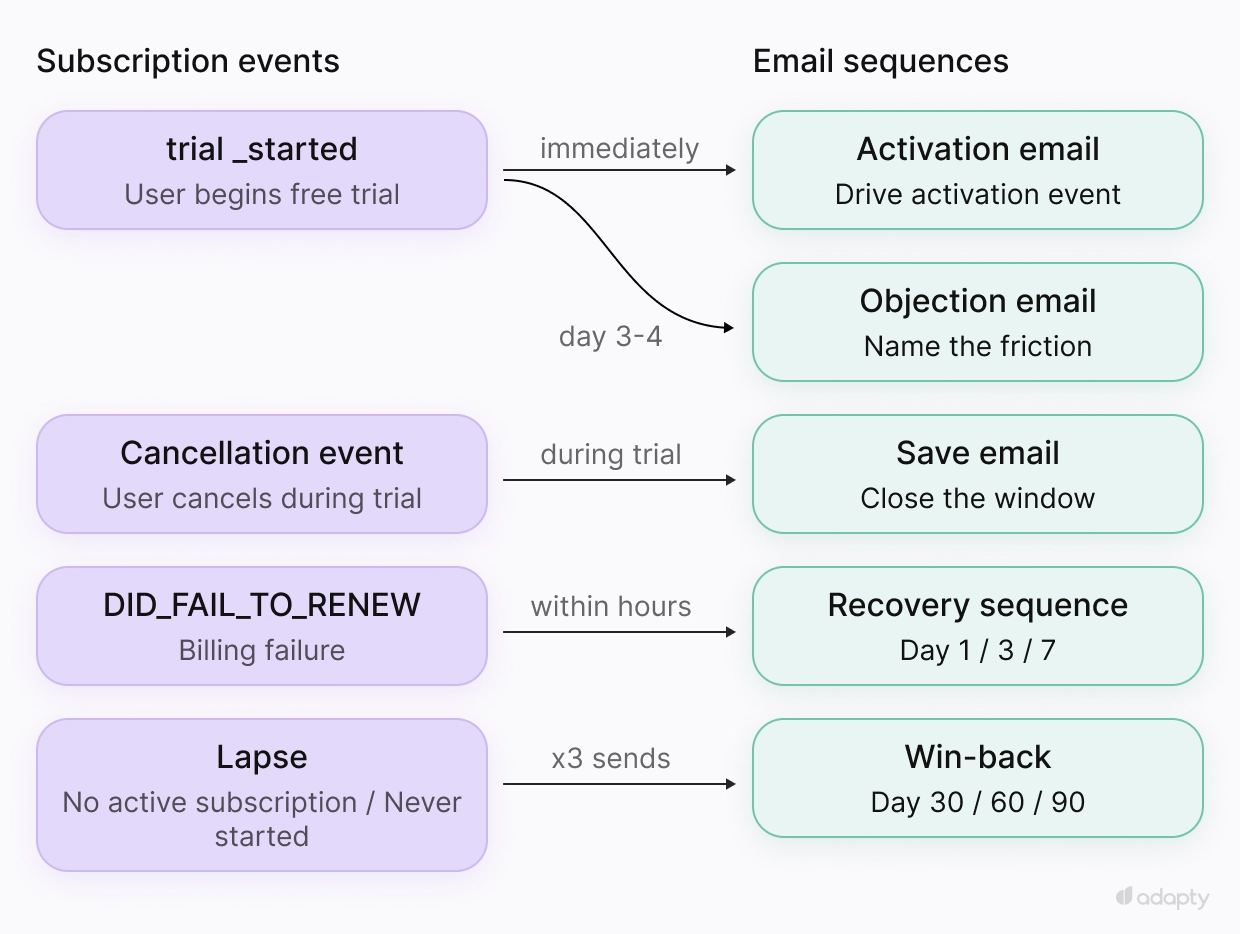
Email 1: What does the activation email need to do?
Every category has one in-app action that predicts conversion: The moment a user gets real value from the product for the first time. The welcome email exists to get them there.
For trial apps, the trigger is trial_started. Send immediately. Name the feature that drives that first moment and point directly to it.
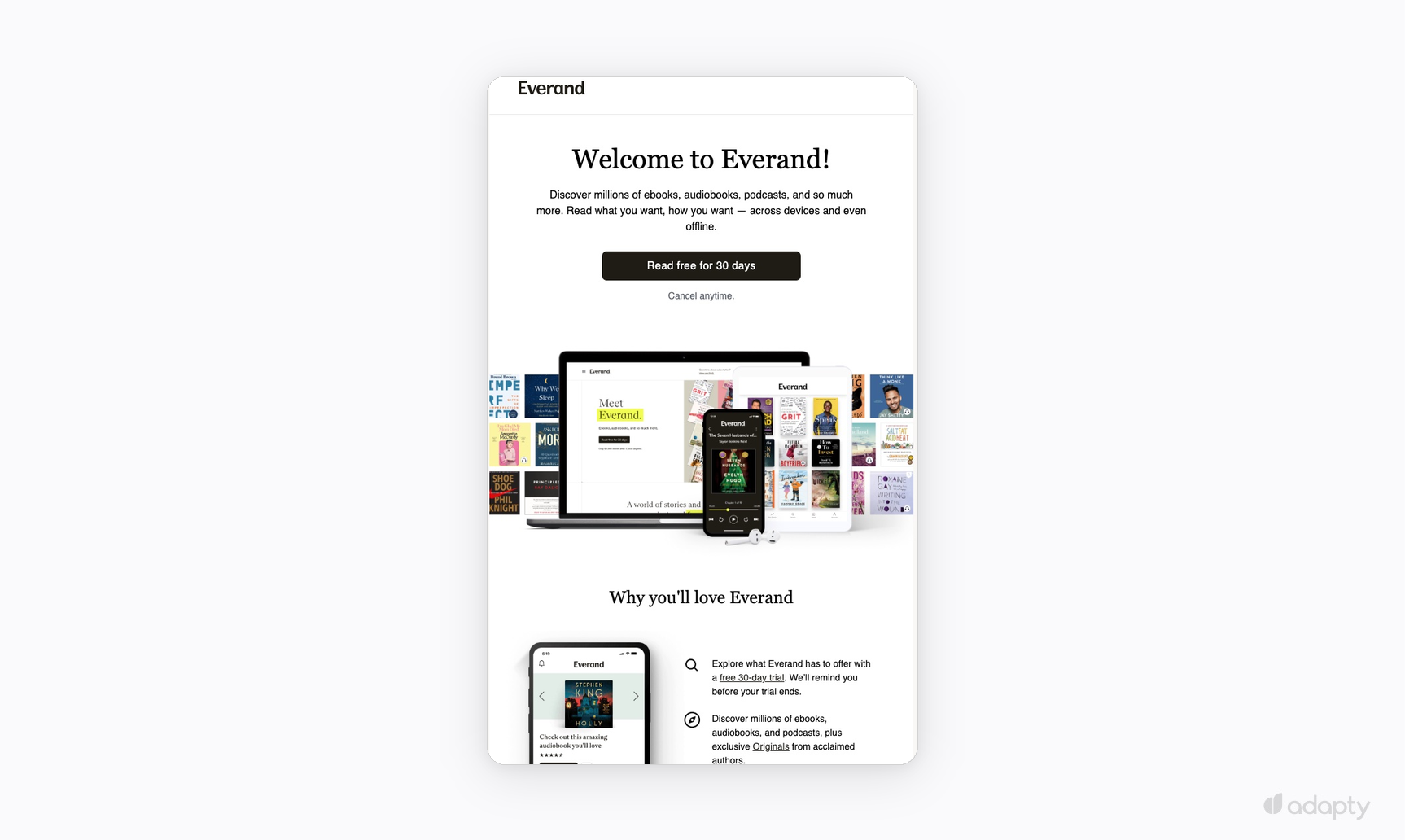
Everand gets the structure right. Subject: "Welcome to Everand," plain confirmation. One CTA immediately below the headline, "Read free for 30 days," with "Cancel anytime" beneath it. Someone ready to subscribe clicks without hunting for the button. The product hero shows the library, so the value is clear before the copy describes it.
Further down, "Why you'll love Everand" breaks it. By the time someone reads this email, they've signed up. Selling the product at this point works against the sequence.
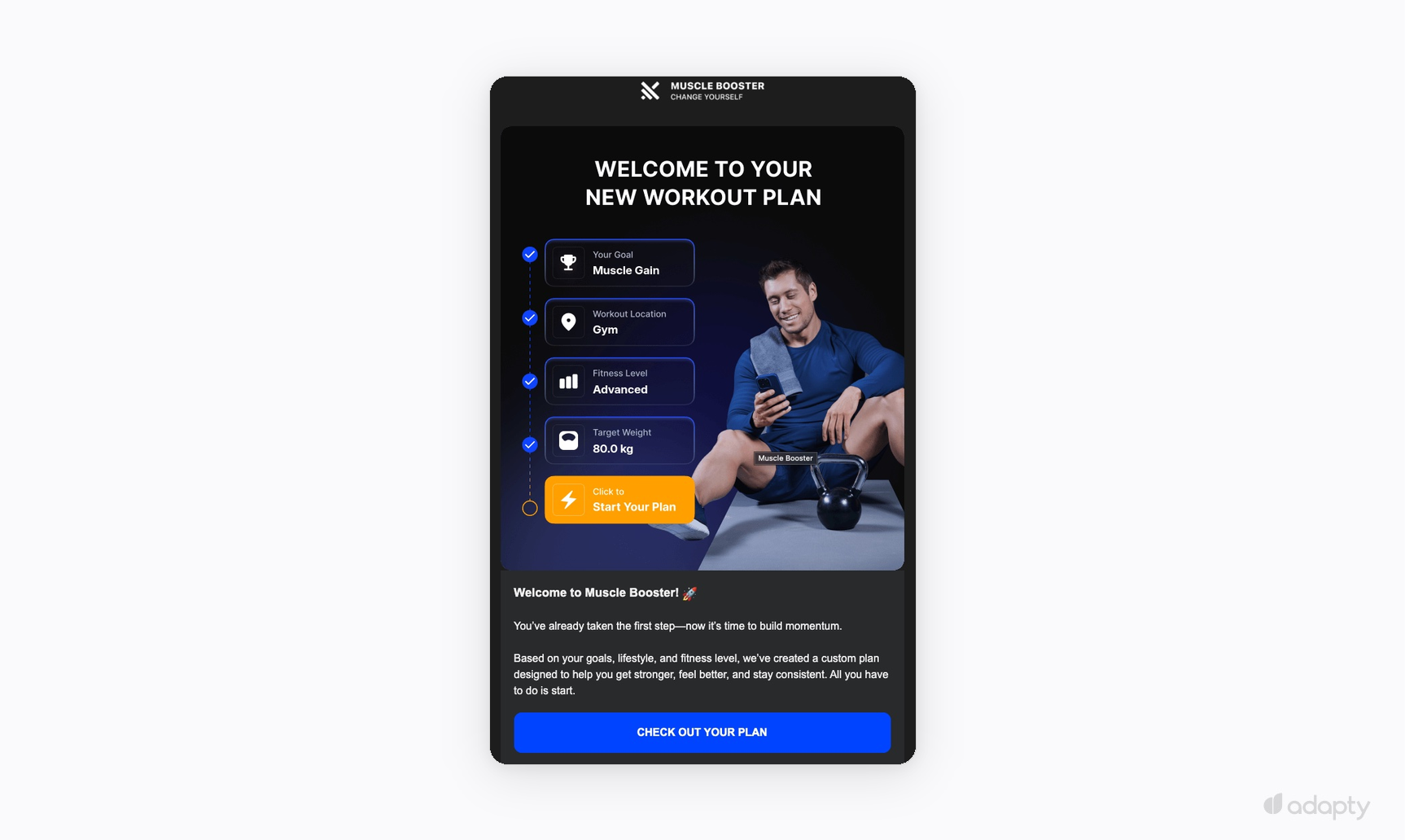
Four parameters from the onboarding quiz fill the hero: goal, workout location, fitness level, target weight. Seeing them confirms the plan is real before reading a line of copy. The CTA reads "Start Your Plan." Two paragraphs in the body, both pointing toward the same moment: Starting the first workout.
Runna takes it further. The headline is "Tick off workout 1," a task framed as an instruction. Three steps walk through recording the first run. The CTA reads "Record your first run." From opening the email to starting takes one click.
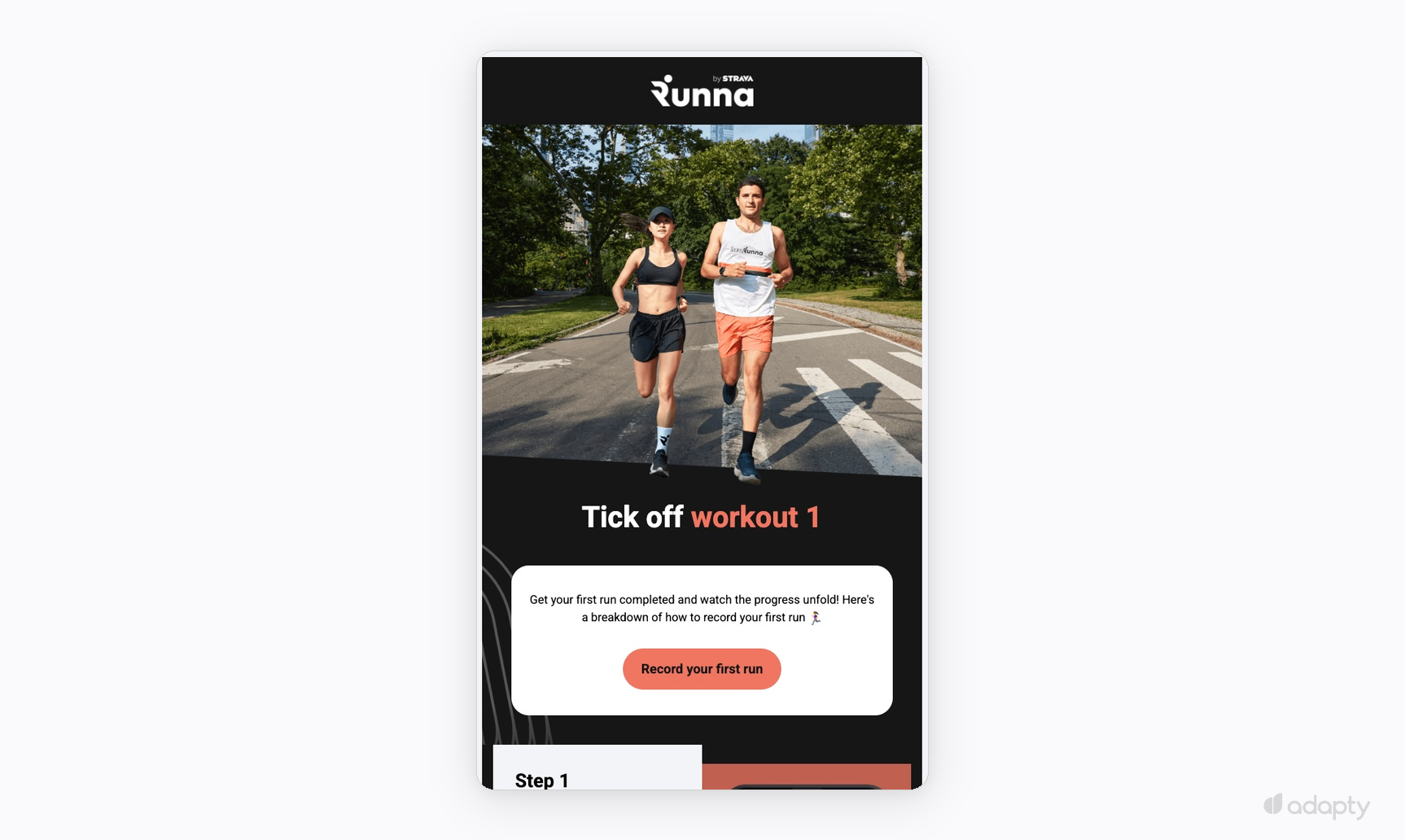
All three handle the same problem differently. Everand removes friction at the CTA. Muscle Booster and Runna make the first action impossible to miss, through quiz data and step-by-step instructions. Welcome emails that miss this show the product, list features, and ask users to explore.
For freemium apps, the trigger is registration. Send immediately. There's no trial countdown, so the welcome email's job is orientation: Show users what the free tier includes, what's locked, and why the locked features matter. Knowing the ceiling early gives users a reason to upgrade before they hit it unexpectedly.
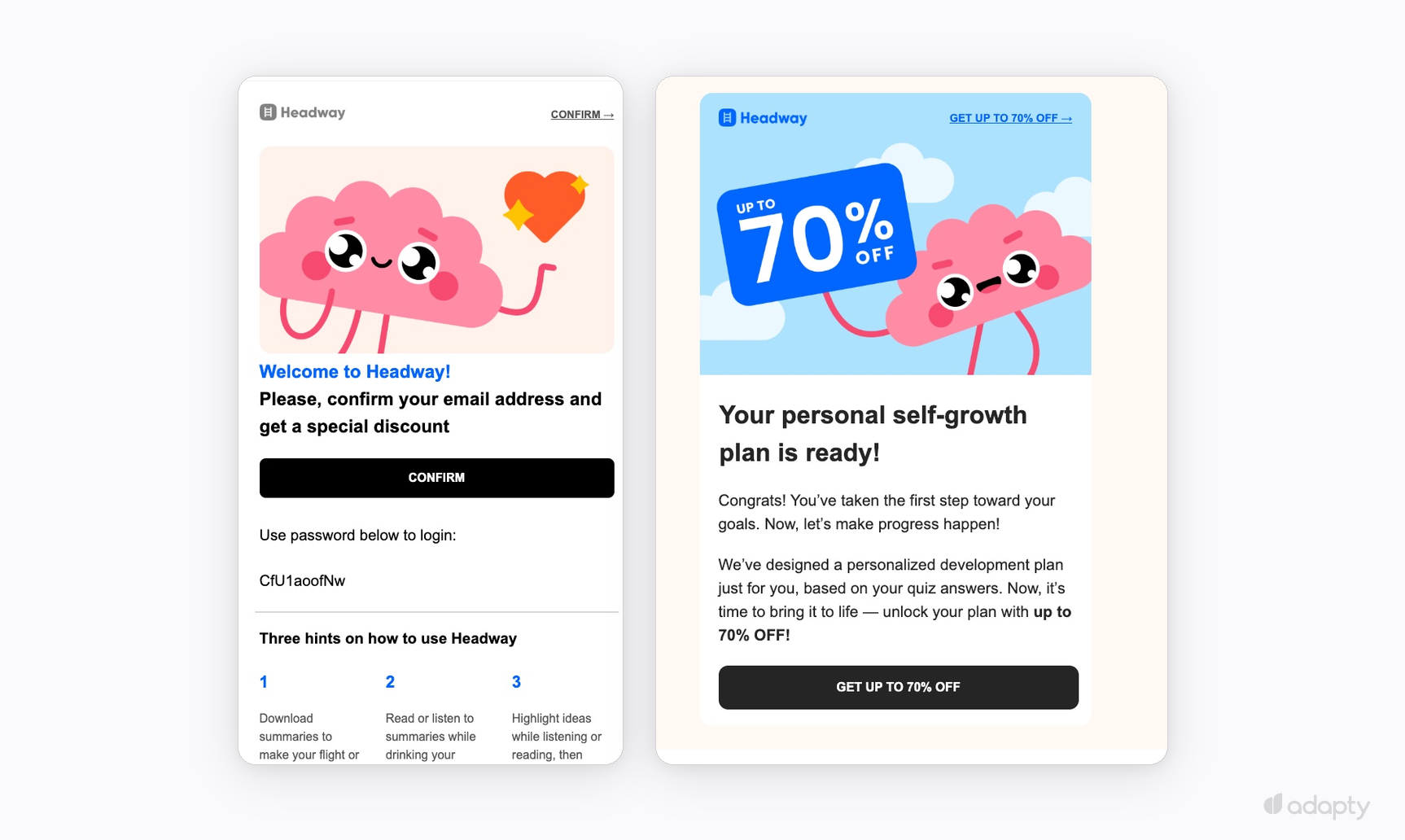
Headway's opening sequence shows this working and breaking at the same time. The first email confirms the account and walks through three onboarding hints: How to download summaries, listen while commuting, highlight while reading. The second arrives immediately after with "Your personal self-growth plan is ready" and a 70% off offer. The user hasn't opened the app yet. A conversion ask at this point undermines the sequence.
Keep orientation and conversion in separate sends. The conversion push belongs after the activation event. If the user hasn't hit it, that's the trigger for a different email.
Email 2: How do you write the objection email?
By day three, users who haven't taken action have a reason. In fitness apps the first session felt too hard. In language apps, progress felt slow. Write the email around that reason before the user articulates it themselves.
For trial apps, the trigger fires on day 3 after trial_started, or earlier if the activation event hasn't happened. Name the objection, explain why it happens, show the fix. Users who hit the activation event get a deeper feature. Users who didn't need an escalation. That branch requires in-app events wired into the ESP as a trigger condition.
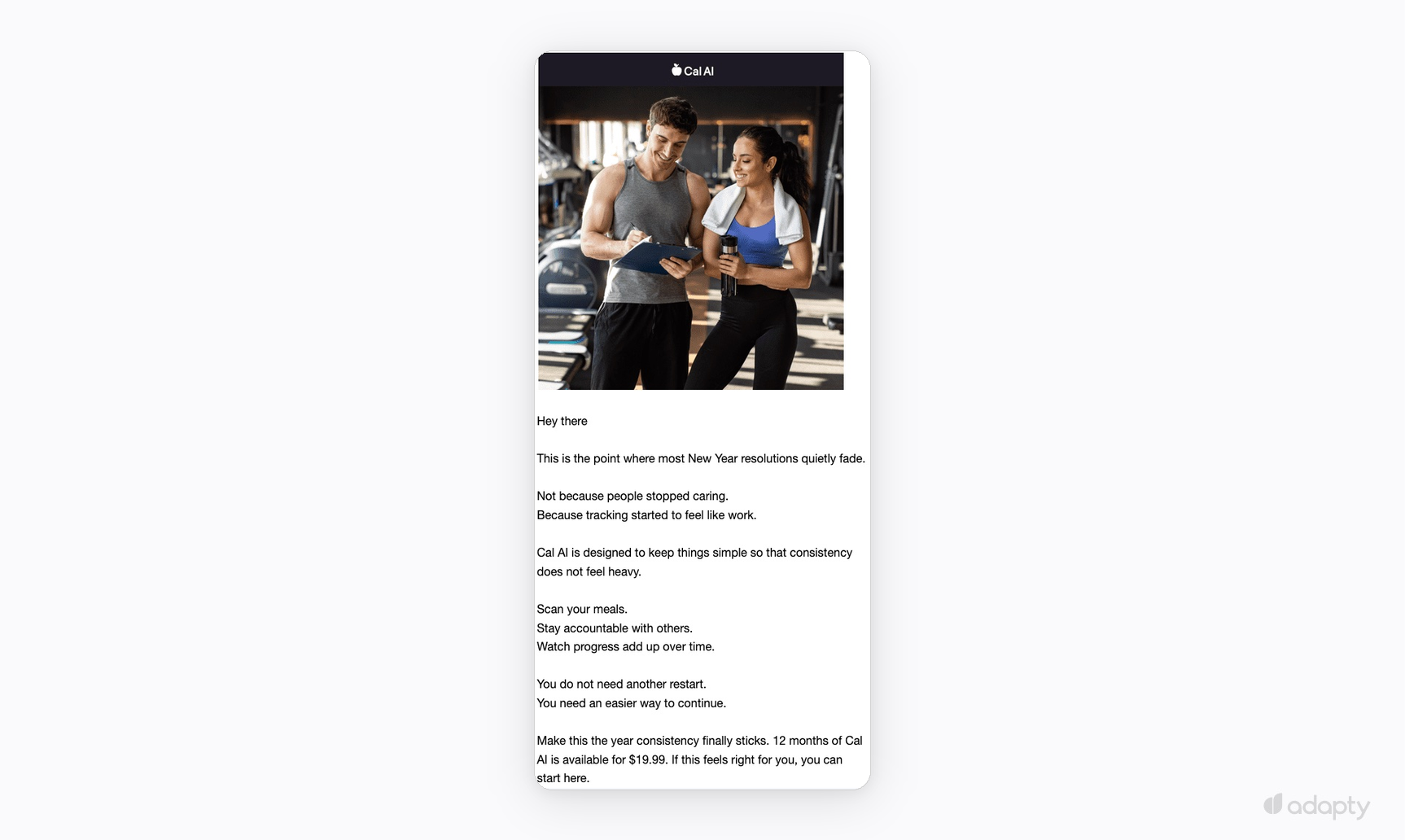
Cal AI names the objection in the first two lines: "This is the point where most New Year resolutions quietly fade, because tracking started to feel like work." Two sentences: subject and cause. One paragraph in the body explains why the product removes that barrier.
The last paragraph breaks it: "12 months of Cal AI is available for $19.99." Friction removal and conversion belong in separate sends. Putting a price in the same email as the objection handling means the user sees the ask before the barrier is gone.
Nordletics goes deeper. The subject line uses the user's own quiz goal: "If you truly want to reach 80 kg." The copy names the real objection: "Most people never reach their goal. Not because they don't want it, but because they never really start." Where Cal AI points to a habit, Nordletics points to the psychology behind it. Then the same mistake: 80% off in the closing line.

Name the objection, explain why it happens, and point to the fix. Send before the conversion ask.
For freemium apps, send when the user hits a feature gate. A fixed day-three email misses the point. The right trigger is behavioural. The user tried to do something they can't do on the free tier. At that moment, their intent is high. Put the feature name in the subject line. Two sentences in the body cover what happened and how to unlock it. One CTA. The user was mid-action when the gate fired, so the email skips the product explanation and removes the block.
Email 3: What makes the save email work?
When a trial ends without cancellation, billing kicks in. This email is for users who cancelled during the trial, or for apps where subscribing requires a deliberate action.
The trigger is a cancellation event during the trial window. Segment before sending: Users already converting don't need it, and mailing them erodes trust.
Write the subject line around what they lose when the trial ends. One paragraph, one CTA. That's the whole email.
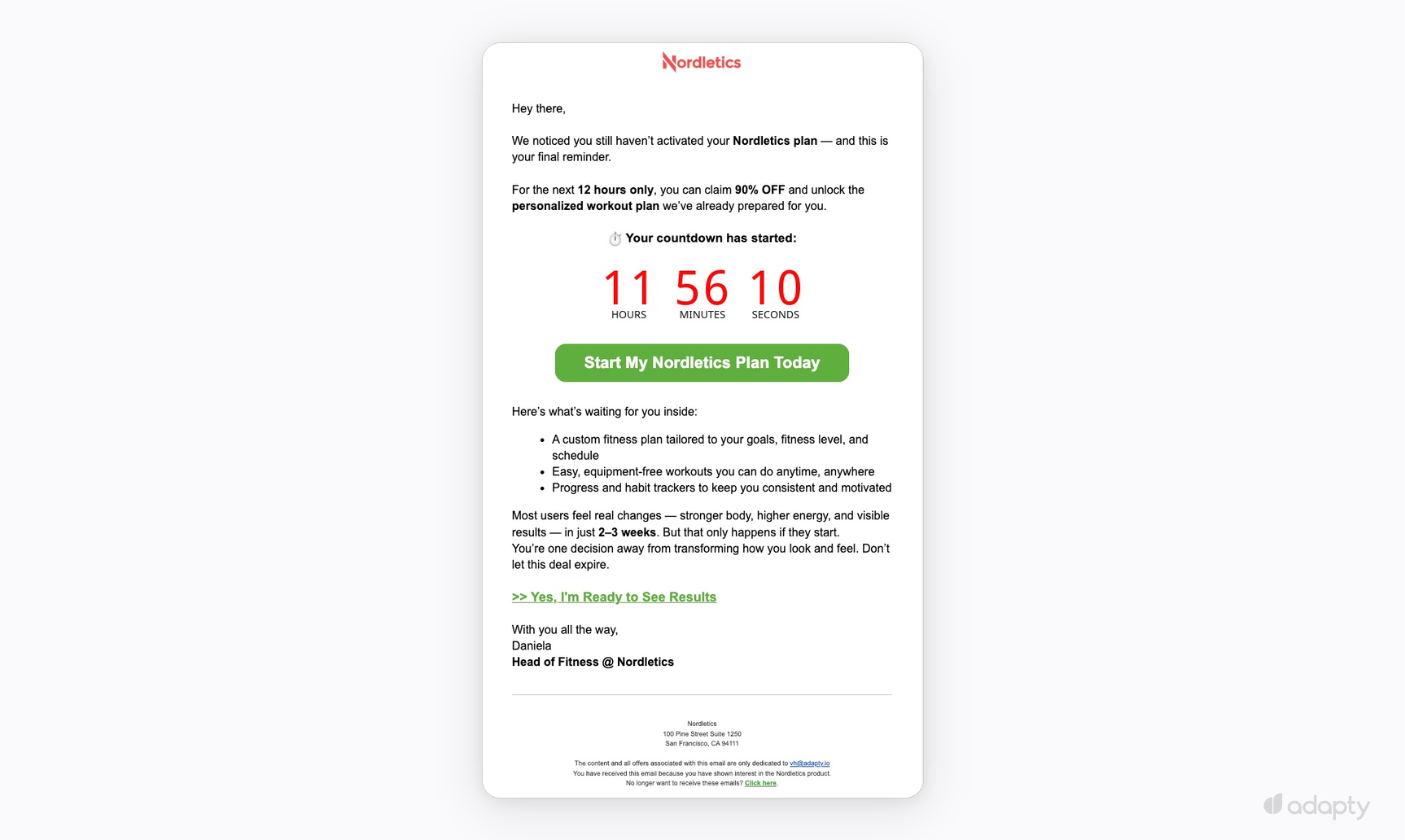
Nordletics gets the mechanics right, even though they anchor urgency to an offer. "We noticed you still haven't activated your Nordletics plan. This is your final reminder." The opening tells the reader where this sits in the sequence. The countdown timer reads 11 hours, 56 minutes, 10 seconds, with the CTA directly below.
The feature list below the fold breaks it. By the final reminder, users know the product. A list there undercuts the urgency the timer built.
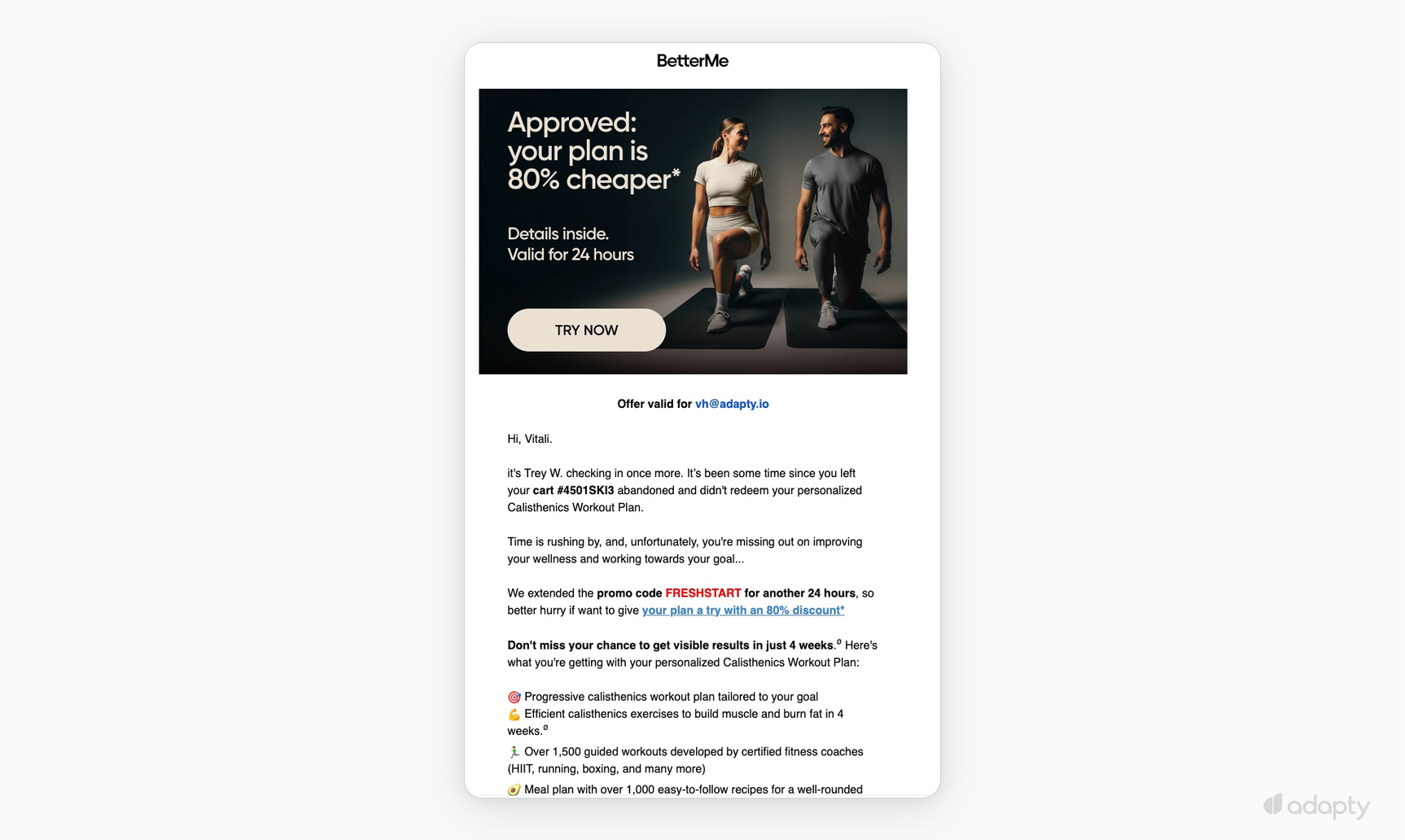
BetterMe leads with the deadline in the hero image: "Approved: Your plan is 80% cheaper. Valid for 24 hours." Before reading the body, the reader sees the clock. The header reads "Offer valid for \[email]," putting personalization at the top. The cart ID gives the feel of a system notification. "We extended the promo code FRESHSTART for another 24 hours" signals this is the last send in the sequence.
Both emails share the same structure: A deadline above the fold, personalisation visible before the copy, and one CTA. Nordletics and BetterMe anchor urgency to an offer. A save email anchors it to access, which is what the subscription was for.
For annual subscribers, send 30 days before the renewal date. Someone paying for a year knows the product, so urgency framing doesn't fit. Summarize what they used, what's new, and give one clear path to renew. Thirty days out is the right window to pitch monthly subscribers on annual as well: They've used the product long enough to commit, and the next charge hasn't arrived.
Email 4: How does the recovery email get the payment back?
Billing failures are worth chasing. The payment failed; the user didn't cancel. Most apps send nothing, so customers lose access and assume it was deliberate. Three emails change that.
Trigger: DID_FAIL_TO_RENEW event (Apple) or equivalent billing failure event (Google, Stripe)
| Day | Tone | Goal |
| Day 1 | Neutral | Let them know, make updating the card easy |
| Day 3 | Direct | Access is at risk |
| Day 7 | Urgent | Last chance before access is cut |
- Send day one as a neutral notification: Subject "Your payment didn't go through," one sentence, one link. The user meant to stay.
- Day three names what's at stake: "Your access is at risk." One CTA.
- Day seven is the last send: "Your access gets cut today." After day seven, stop.
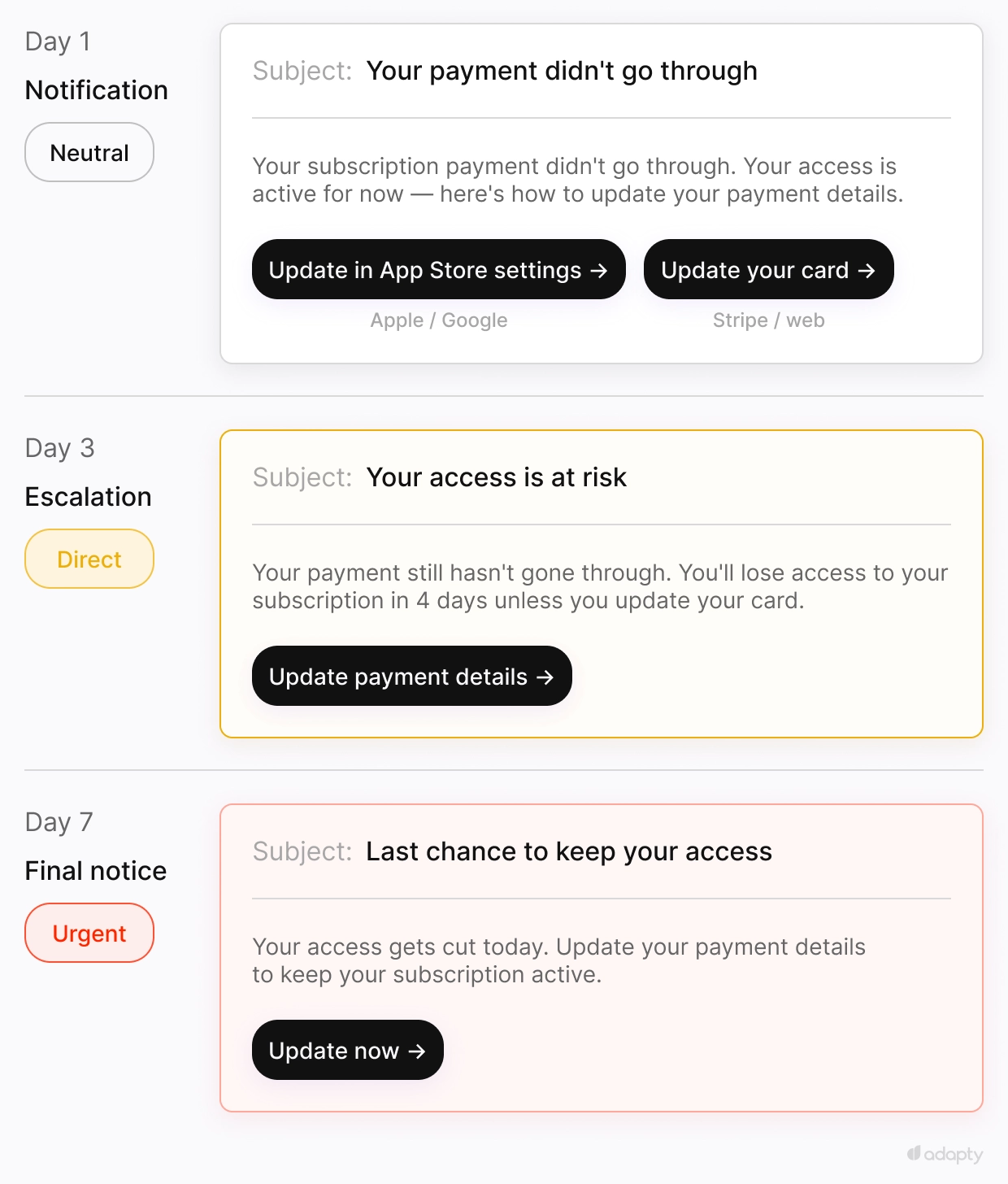
Apple and Google require updating the card through App Store or Play Store settings, with no direct link to a payment form. Stripe and web billing let you send one. That extra step accounts for much of the recovery rate difference between platforms. Write the CTA accordingly: "Update in App Store settings" for Apple, "Update your card" for Stripe.
Build dunning before win-back. The user was paying. Getting them back takes one click.
Email 5: The win-back email — when should you mail lapsed users, and with what?
In most subscription apps, lapsed users outnumber active subscribers. They tried the product and left. Send them a specific reason to come back.
Send at 30, 60, and 90 days after lapse, then suppress. Connect each email to a checkout page with profile-level attribution. Standard web tracking loses the purchase connection at the App Store handoff.
Registered but never started:
Some users give you their email at registration and never open the app. Send a free trial offer with one CTA. They have no prior objection and no billing history. In most apps this is the largest lapsed segment. Conversion rates are lower than for lapsed trial users, but the volume makes it worth sending.
Lapsed trial (never paid):
They tried the product and left before converting. Lead with an offer that removes the price barrier: a discounted first month, an extended trial, or a feature they hadn't reached. Personalising their onboarding goal works better than a generic discount.
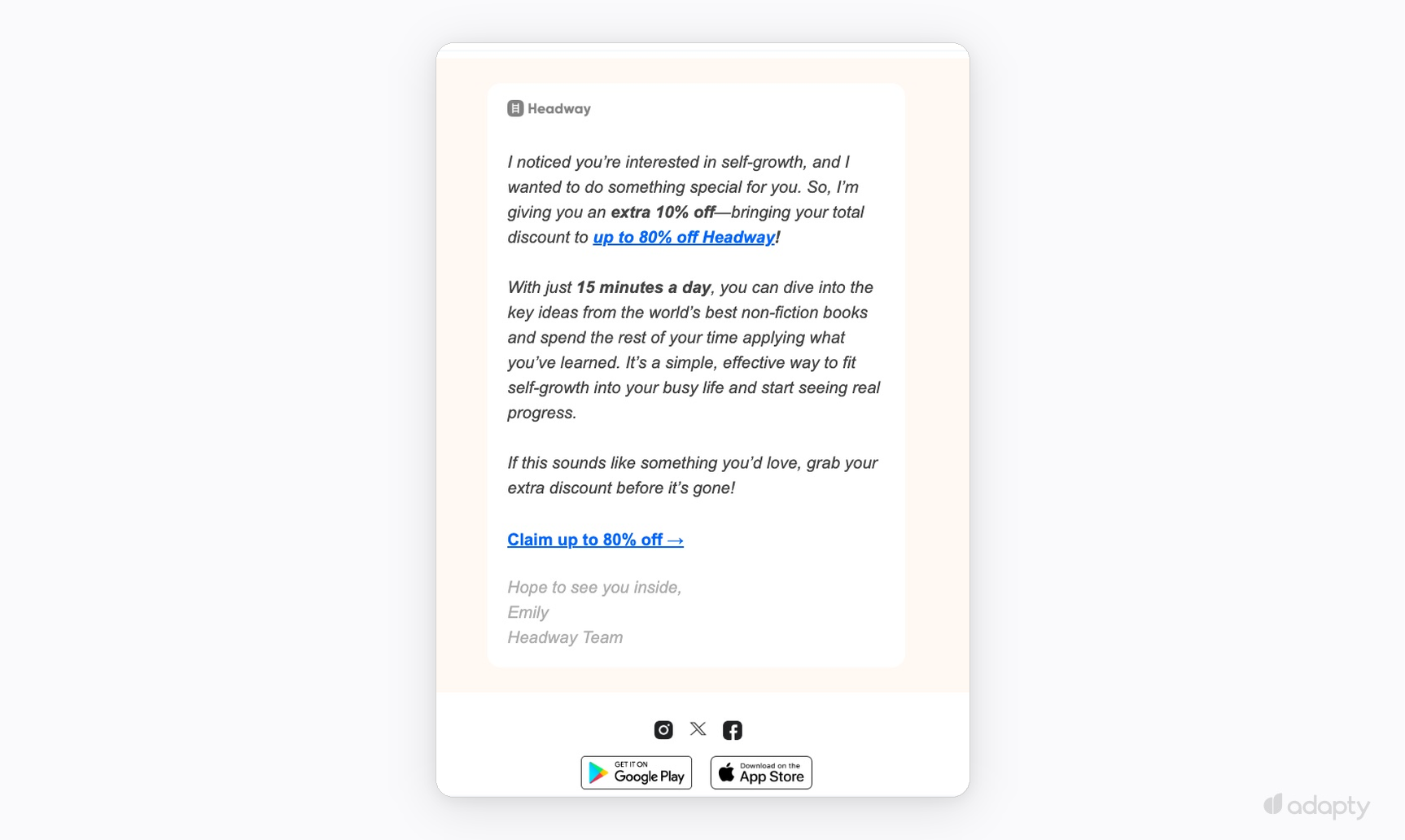
Headway's win-back email from Emily shows this in practice. Subject: "I noticed you're interested in self-growth." Emily builds on a previous send: "I'm giving you an extra 10% off, bringing your total discount to up to 80% off Headway." That line tells subscribers this is the final send. Emily keeps the body short, one value reminder and one CTA.
Lapsed paying user (paid, then cancelled):
They knew the product well enough to pay, then decided it wasn't delivering. Lead with what changed since they left. A new feature, an update to something they used. Add the offer after.
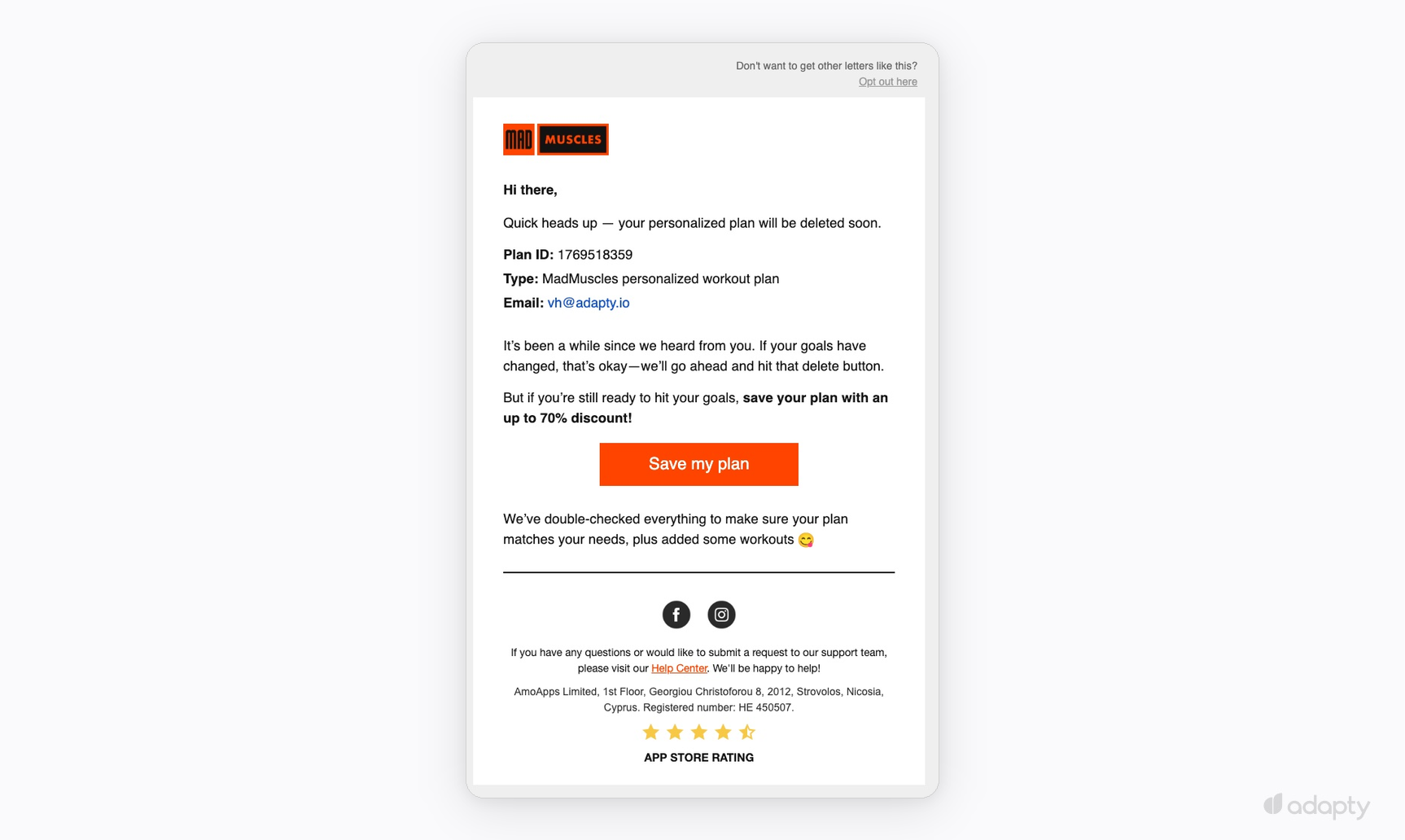
MadMuscles opens with the user's own data: Plan ID, plan type, email address. "Your personalized plan will be deleted soon." Something already built feels worth protecting. "If your goals have changed, that's okay, we'll go ahead and hit that delete button" takes the pressure off while keeping the stakes visible. The CTA reads "Save my plan."
Worth noting: The plan stays in the system. Data loss as urgency is a dark pattern. Personalised data and a specific CTA reach the same outcome.
Past 90 days, the sends stop paying off. Suppress that cohort. CAN-SPAM and GDPR require a working unsubscribe on every send. Mailing people who haven't heard from you in months, with no clear opt-out, damages sender reputation before it produces revenue.
| Sequence | Trigger | Timing | One job | Measure |
| First email | trial_started / registration / first purchase | Immediately | Drive the activation event | Activation rate |
| Mid-period check-in | Day 3 (trial) / feature gate hit (freemium) | Day 3-4 or behavioral | Name the objection before it forms | Open rate, activation rate delta |
| Conversion email | expires_date − 24h (trial) / renewal − 30 days (annual) | 24h before expiry or 30 days before renewal | Close the conversion window | Trial-to-paid conversion rate |
| Dunning | DID_FAIL_TO_RENEW | Day 1 / 3 / 7 | Remove the barrier between intent to stay and an updated card | Payment recovery rate |
| Win-back | Lapse | Day 30 / 60 / 90, then suppress | Lead with an offer — they already know the product | Revenue per email sent |
What's the right order to build these subscription app email sequences?
- Build the activation email and the save email first. Within two weeks you'll have enough trial volume to read the results.
- Run the objection email in parallel. Both need to be live at the same time. One pushes toward the activation event. The other clears what's blocking conversion.
- Dunning comes third. The user was paying. Getting them back takes one click. Each day without it running is revenue you're not recovering.
- Win-back comes last. Build trial conversion and churn prevention first. They reduce the lapsed pool. Starting win-back before those are live means mailing a larger group at lower conversion rates.
How do you run all five without a dedicated team?
Most teams skip the infrastructure. Before the first send goes out, someone has to wire subscription events into the ESP, configure domain authentication, and build attribution to connect purchases back to specific sends. Skip any of that and sequences run on guessed timing with no way to measure what's working.
Adapty Mail runs on the subscription data already in Adapty. Paste an App Store link and a full sequence is ready in under two minutes: copy, brand-matched images, production HTML. Each email connects to a web paywall with profile-level attribution, so purchases trace back to the send that drove them. Adapty handles the event wiring, domain setup, and attribution so the first send goes out without that setup work.
At $50K MRR, moving from 4.3% to 13% email revenue adds $4,350 a month. At $200K MRR, $17,400. Sign up for Adapty and get custom user attributes, full email sequences, and revenue attribution down to the specific email.