How to collect emails in your mobile app without killing conversion

TL;DR:
- At $100K MRR, skipping email collection costs $84,000 a year in recoverable revenue.
- One fear keeps you from starting: The ask will hurt conversion. Placed correctly, it doesn't.
- Apps like Zeely, Cal AI, and Flo collect emails at 40%+ opt-in rates with no measurable paywall impact.
- Four patterns explain how they do it: pick the one that fits how your app delivers value.
- The patterns, the screens that make them work, and a seven-step plan to ship your first sequence are all here.
The top 5% of subscription apps that collect emails in their mobile app generate 13.2% of their revenue from email. The median sits at 4.3%. At $100K MRR, that gap costs you $84,000 a year.
Most of that gap comes down to one decision that keeps getting deferred: Where to put the email ask without breaking conversion. The fear is real: Add a screen to onboarding and watch trial numbers move. So the decision waits for a sprint with time to measure it properly. That sprint never comes.
Open Adapty and look at what that costs.
- Never purchased: Users who downloaded and never converted.
- Renewal cancelled: Subscribers who decided to stop.
- Billing issue: Users who tried to pay and couldn't.
- Expired: Trials and subscriptions that lapsed.
Each segment has a playbook: Win-back, payment recovery, re-engagement. All of it requires an email address.
Zeely, Cal AI, Flo, and Hallow solved this without touching paywall conversion. Their opt-in rates sit at 40%+. What follows is how they did it.
How do apps lose money on email?
Three reasons email stays off the table.
- You never built a collection at all. The onboarding goes straight through without an email field or registration step. Every user who churns is gone permanently. The Never purchased segment alone is usually bigger than your entire paying base. Every person in it is out of reach.
- You collect emails but can't act on them. The address gets saved somewhere, but you never built the ESP integration. Sequences sit unconfigured. Your Billing issue segment churns silently every month. One email recovers most of it. You don't send it.
- You know exactly what to do and don't have time to do it. Email is on the roadmap. Has been for two quarters. Building it takes a developer and a marketer at minimum. For a two-person team shipping product, that's a sprint that never gets scheduled.
Start with a collection. The other two playbooks depend on it.
What are the best ways to collect emails without hurting conversion?
Any extra step in onboarding costs installs: That's the assumption. An email screen shown at the wrong moment hurts conversion. At the right moment, opt-in rates hit 40%+. The apps that get there ask after the user has already built something worth protecting: The result they want to retrieve.
Pattern 1: Quiz-gated, before the paywall
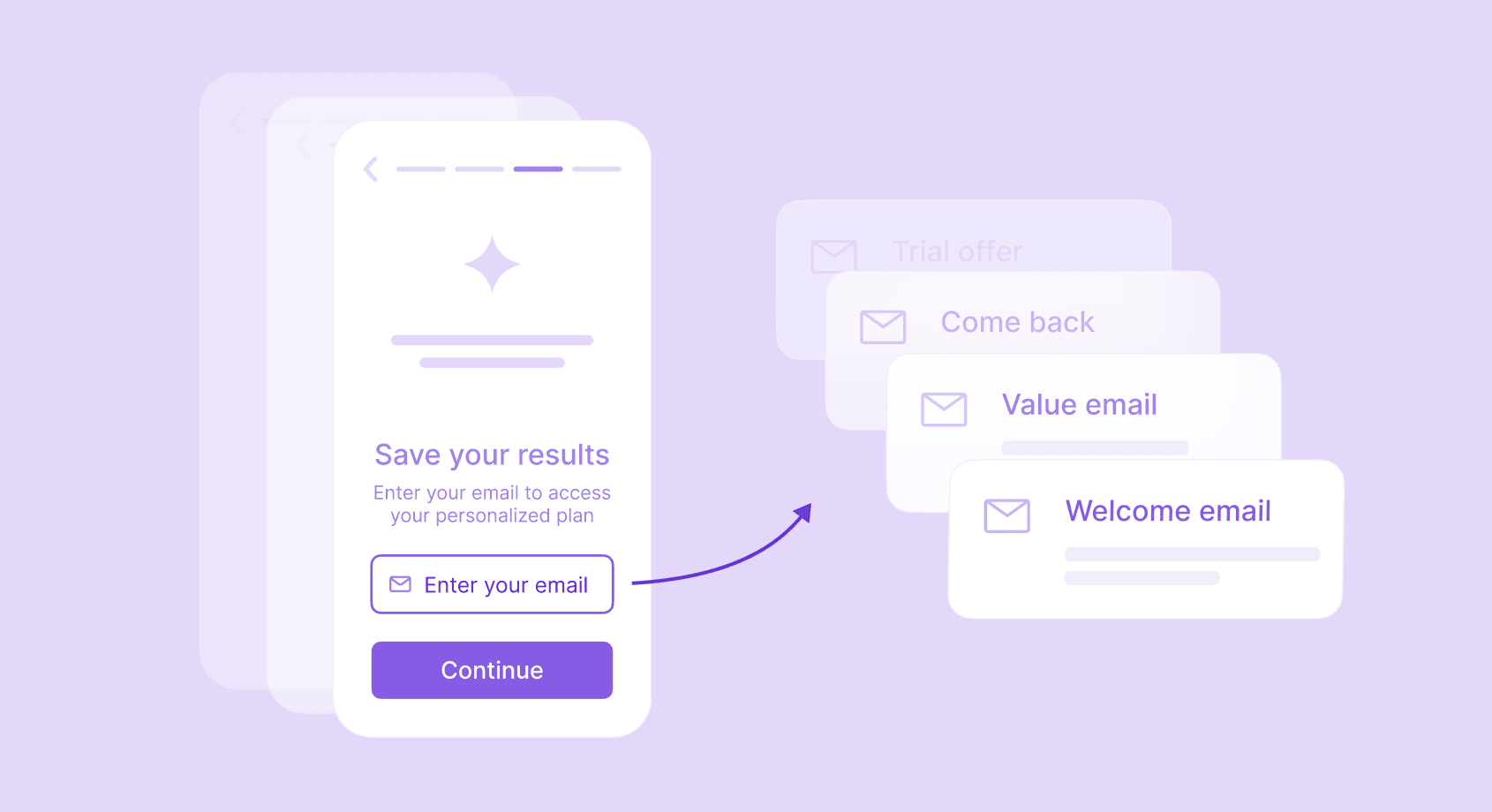
The most common pattern among high-performing subscription apps, and the one with the highest opt-in rates. The structure: A personalization quiz, a results screen that reflects the user's inputs as a specific outcome, and then an email field before the paywall.
Conversion holds here because the user arrives at the email screen having already spent 3 to 5 minutes answering questions about their goals. Leaving means losing that time. The email field is the last step before they retrieve what they came for.
Zeely builds the email ask over seven screens before it ever appears.
The first four are entirely about the user's business: Current sales volume, monthly goal, target timeline, weekly hours available for marketing. Four screens of questions about a real problem, with real numbers. By screen four, the user has invested three minutes in something that matters to them.
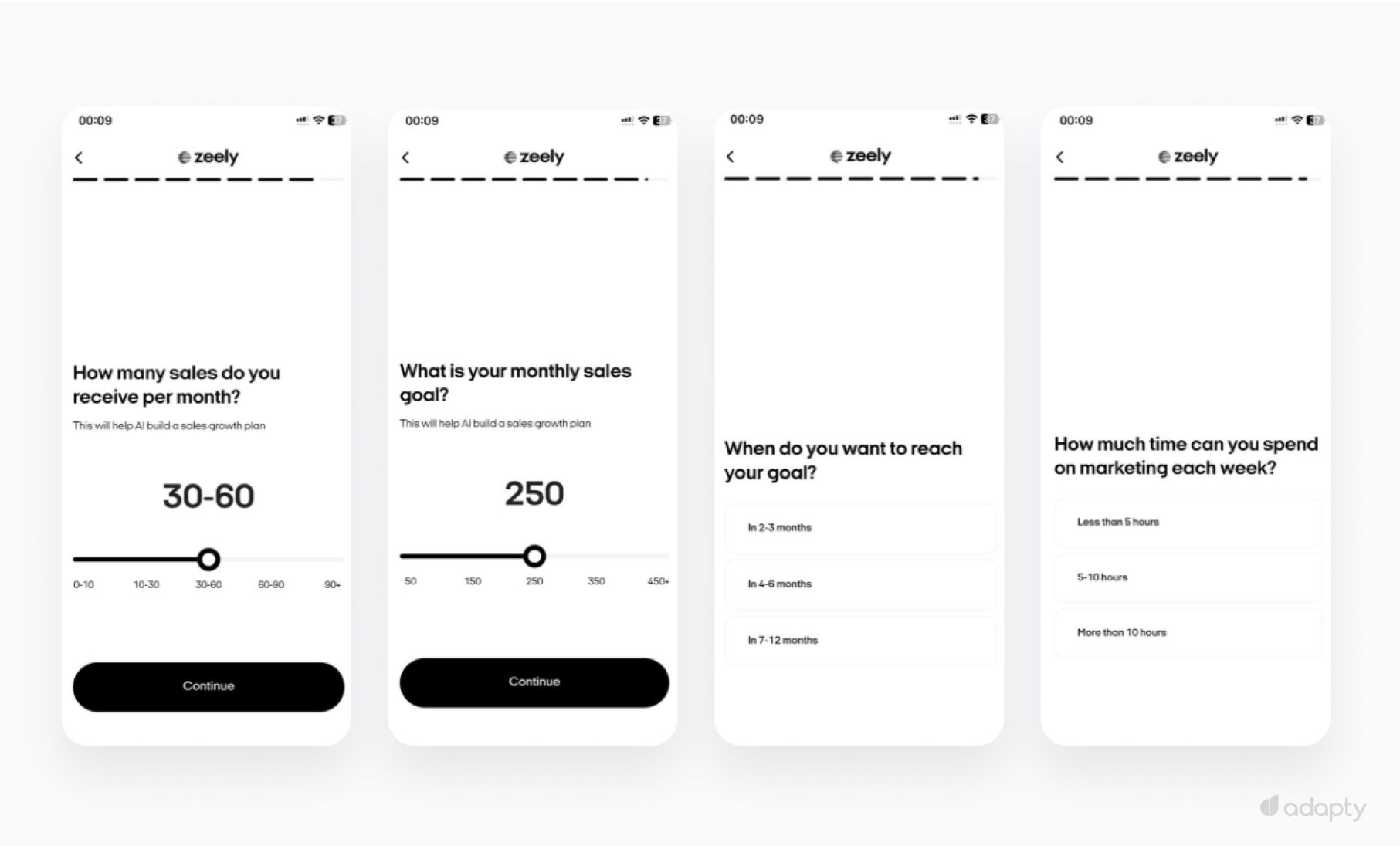
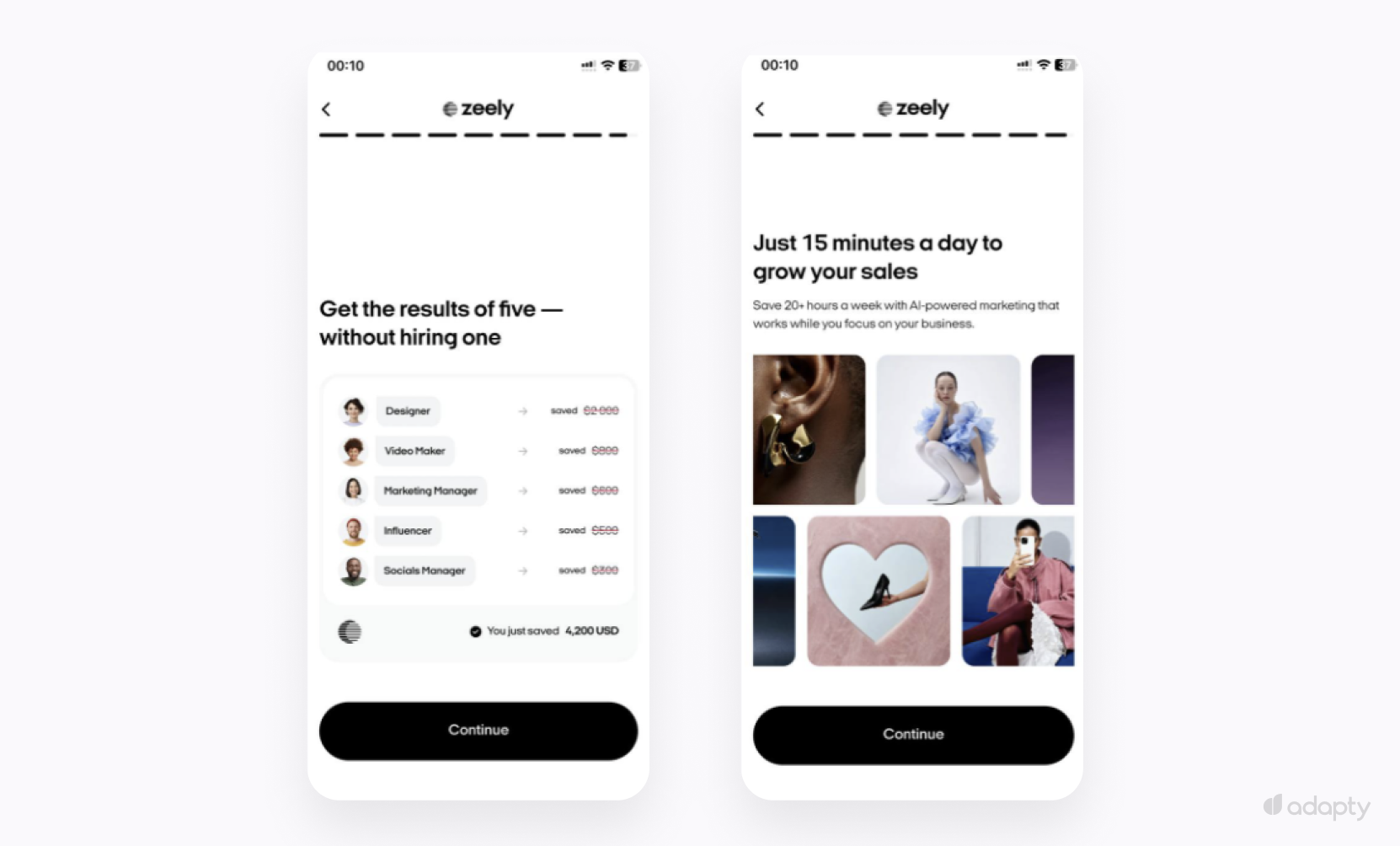
Then Zeely flips the flow. Instead of another question, the next two screens show what those numbers are worth. The key design decision: Zeely shows money saved and crossed-out salaries for roles the user is replacing with the product. The user sees their own situation priced out. A personal financial calculation built from their answers.
The email screen that follows uses "Growth Strategy" deliberately: Something the user built and now needs to retrieve. The copy frames the email as the last action before access.
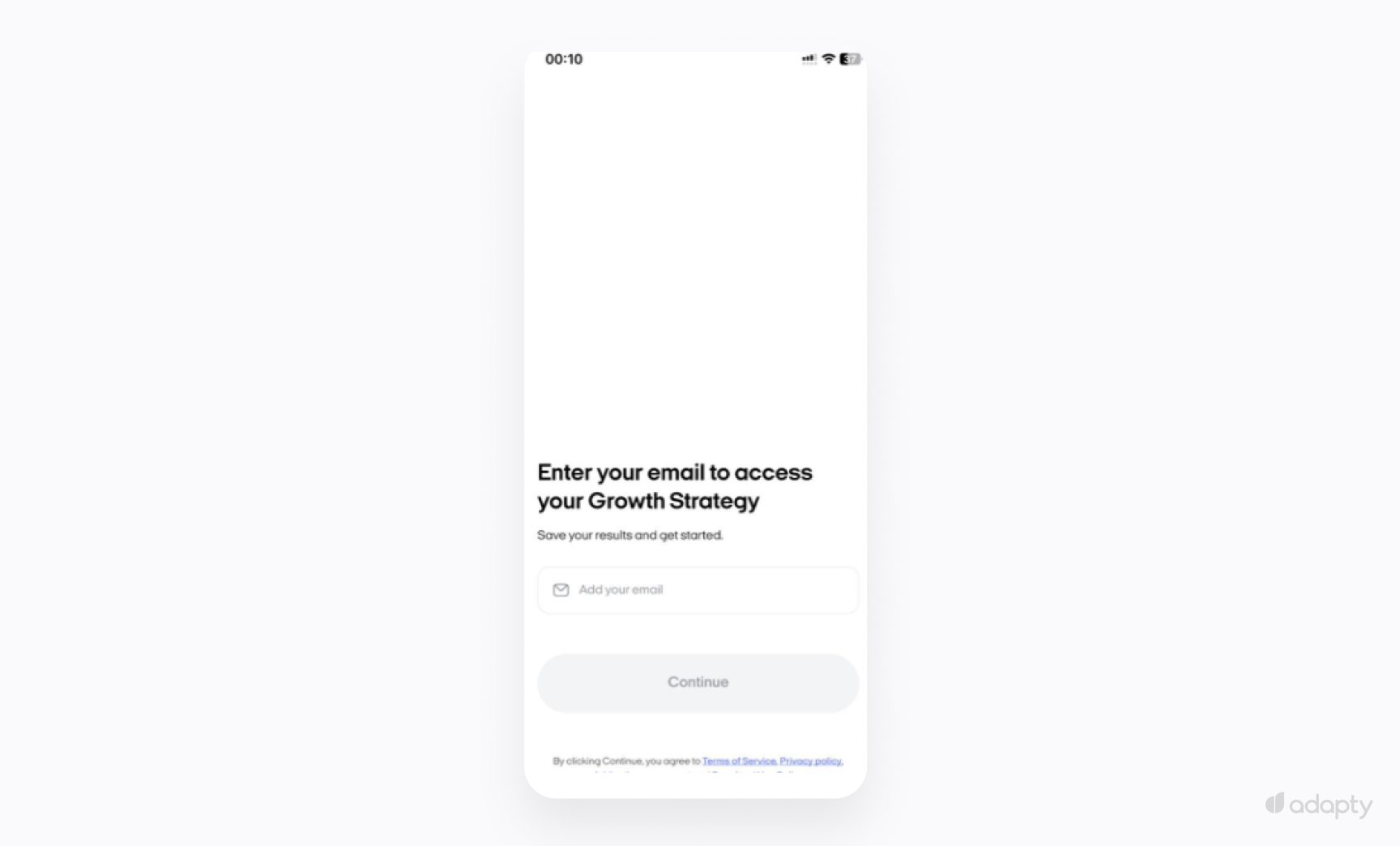
The user retrieves a plan they spent seven screens building. The email field is the last step before access.
Cal AI takes the same mechanics into fitness and adds one layer Zeely skips: The loading screen.
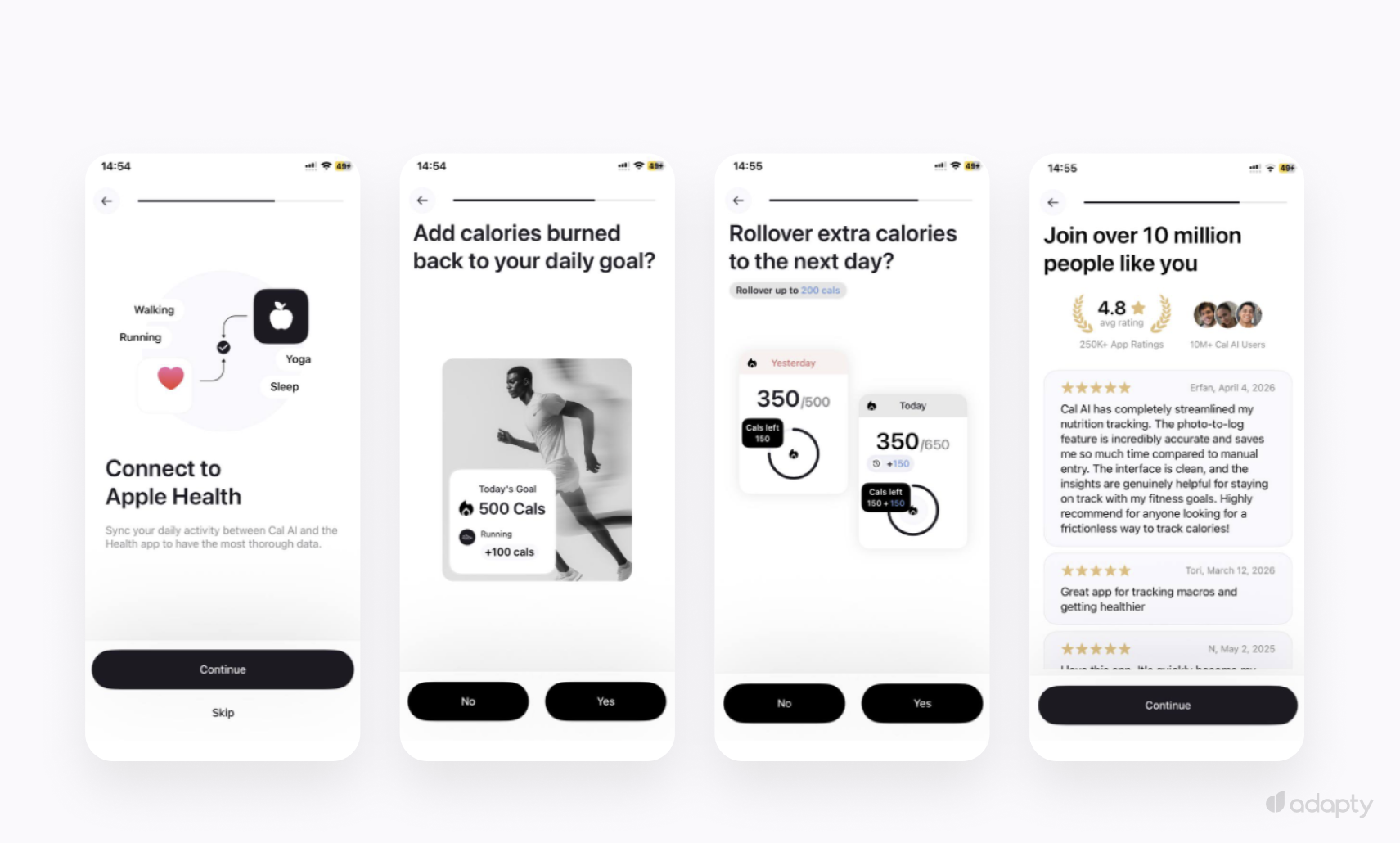
The quiz collects starting weight, goal weight, activity level, and target date. Cal AI then adds two more screens before the email: Apple Health integration and calorie rollover settings. Each screen asks the user to configure something personal. By the time they finish, they've made real decisions about how the app will work for them specifically.
Then the loading screen: a progress bar with a checklist of metrics being calculated. Six seconds of apparent calculation. The loading screen signals that the output requires effort to produce. Waiting makes the result feel earned.
The result screen shows the user's own numbers with a specific date attached. The date matters. A goal without a deadline feels abstract. "Gain 10 lbs" is a wish. "Gain 10 lbs by August 6" is a plan. The date makes the result feel real enough to protect.
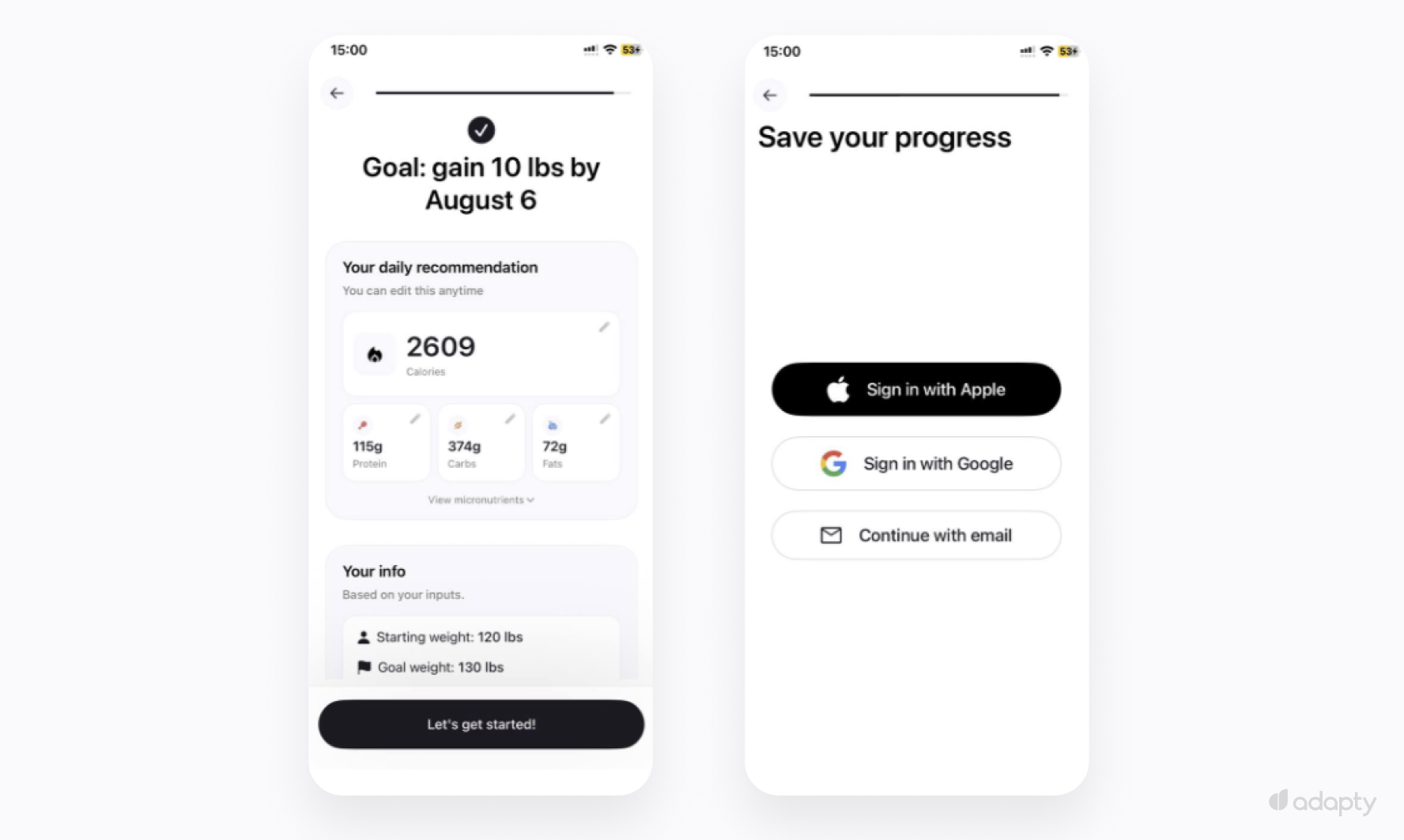
"Save your progress" works for the same reason Zeely's "Growth Strategy" works: Both frame the email as preservation. The user arrives at the screen in retrieval mode, already committed to finishing.
The email ask converts because the user is looking at a plan built from their own inputs. Closing the app means losing it. The psychological mechanism matches Zeely: Time invested plus a result worth retrieving, assembled differently.
Cal AI also removes pricing from the entire flow. Your users reach the email screen with zero information about what comes next. That removes all resistance to the ask. The trade-off is real: The list fills with users who have no purchase intent, and your sequences carry the full weight of converting them. Worth knowing before you copy the pattern.
Foodvisor asks for email midway through the quiz.
Motivation peaks early in onboarding, before quiz fatigue sets in. A user who's answered three questions is still engaged and committed to the process. By the end of a long quiz, some users have mentally checked out. Foodvisor asks before that happens.
The quiz covers goal setting, lifestyle, upcoming events, dietary restrictions, and time available per day. Each question tells the user that the program is being built around them specifically.
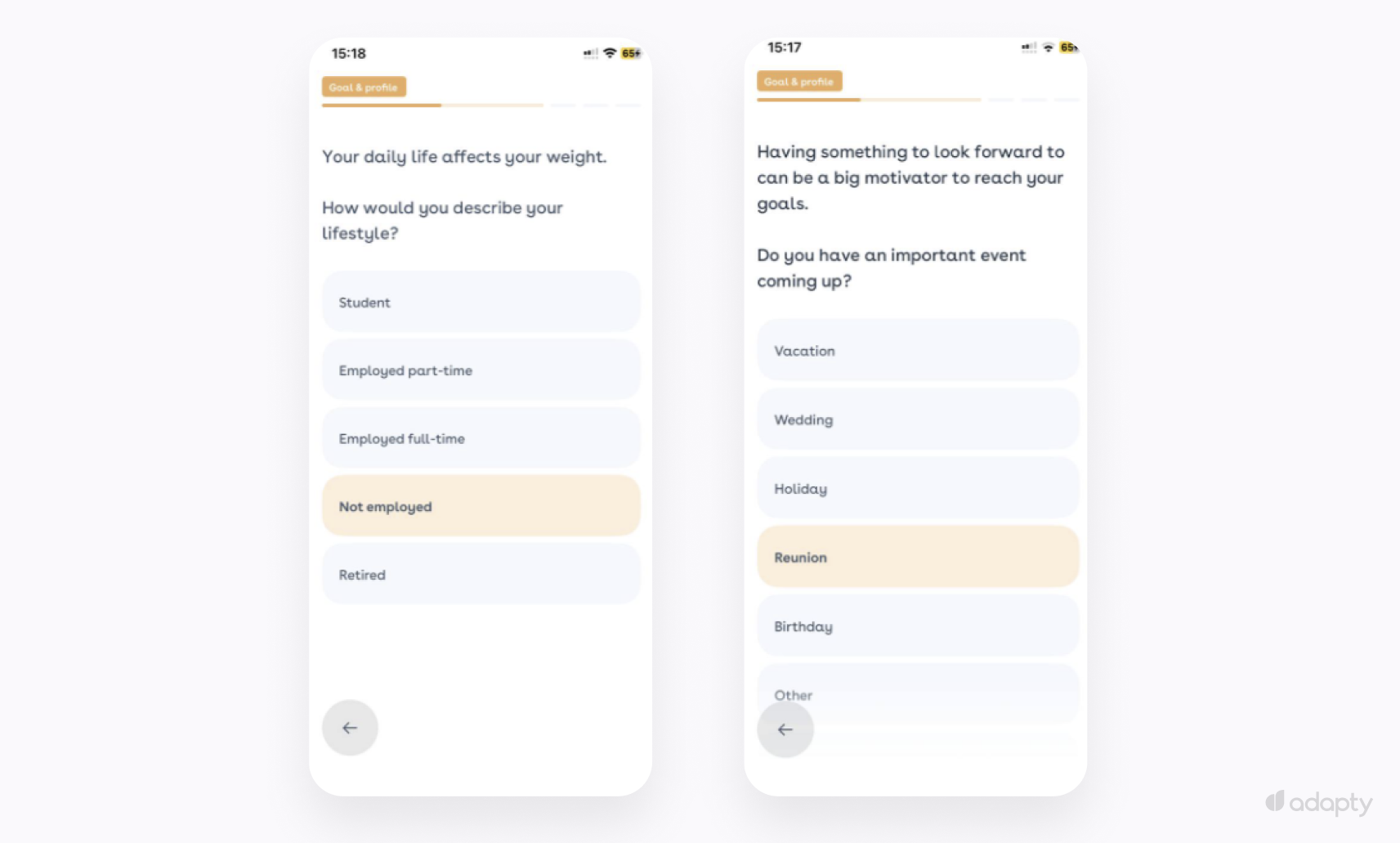
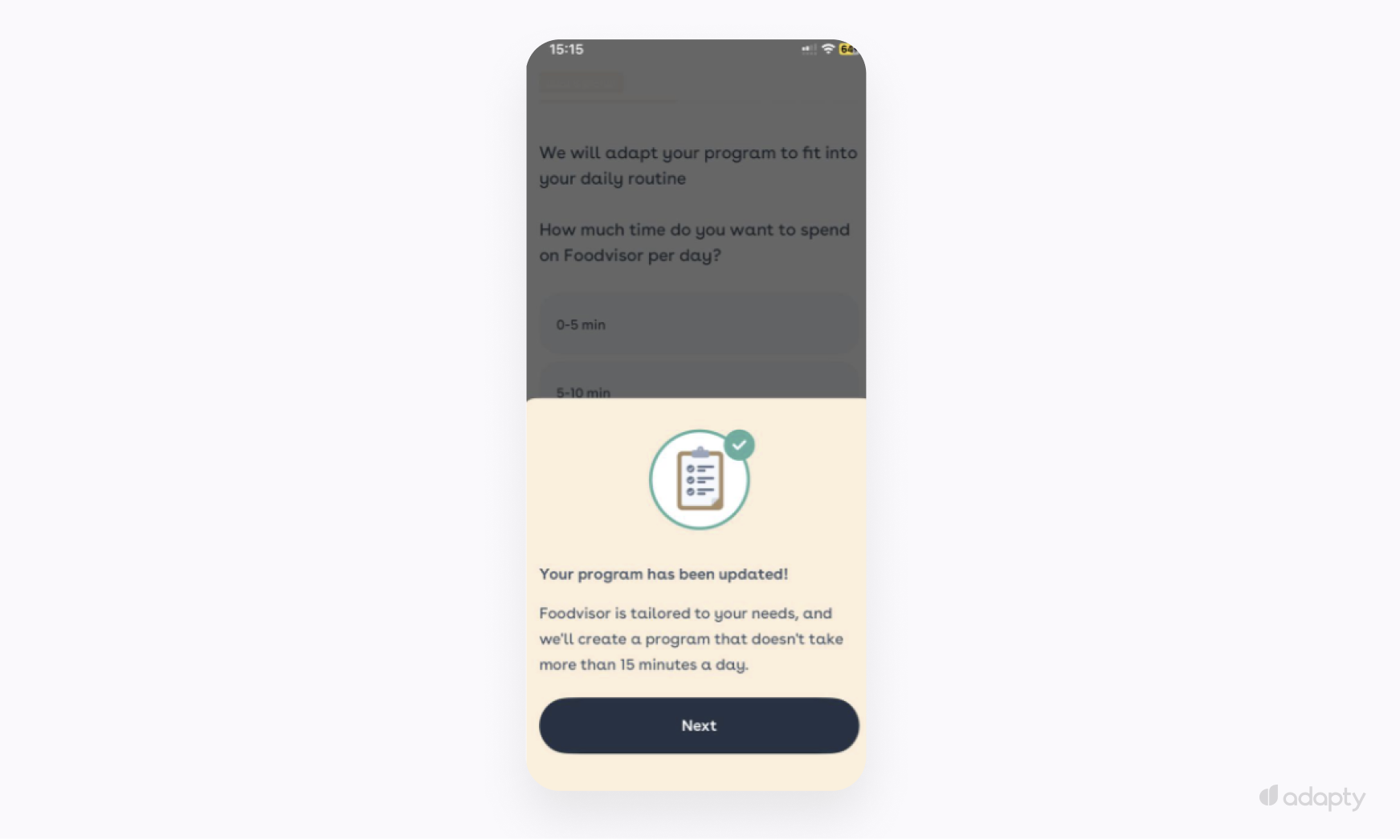
After the time-per-day question, Foodvisor shows a confirmation screen: "Your program has been updated! Foodvisor is tailored to your needs, and we'll create a program that doesn't take more than 15 minutes a day." The user sees a personalized result already waiting for them. Walking away means losing it.
If your users track diet, weight, or health conditions, the email ask carries extra friction. They're protective about health data. Ask for an email with no context and a significant portion drops off — the ask reads as a data grab.
Foodvisor puts a full privacy screen immediately before the email field. Three commitments: The app uses data only for nutritional advice, keeps it between the user and the app, and shares it with nobody else. The screen ends with an explicit opt-in checkbox.
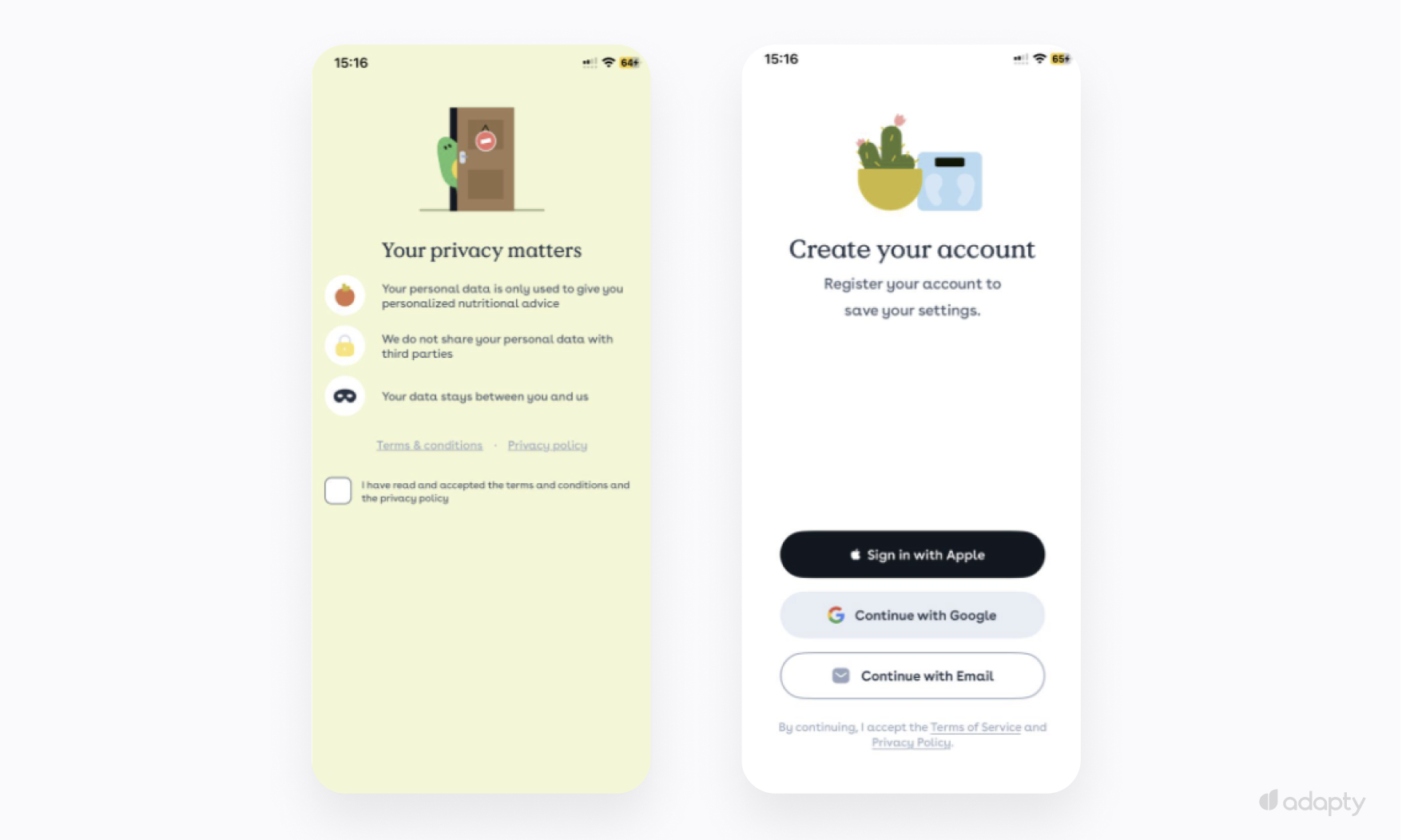
The privacy screen is a conversion tool: It neutralises data anxiety at the exact moment the email ask would otherwise lose the user. At the email field, they've already agreed to share.
Users convert here because they're still mid-process. Foodvisor gave them a goal-based program. The email is how they protect it while they finish.
Pattern 2: In-app, after value delivery
Registration as a prerequisite is the default. Flo made a different call: Treat it as a reward.
Flo collects deeply personal data during onboarding: Cycle tracking, fertility goals, pregnancy status. For users making decisions about their health and body, a registration wall at that moment reads as a demand for commitment before they've decided whether to trust the app. That friction causes drop-off.
Flo skips registration during onboarding entirely.
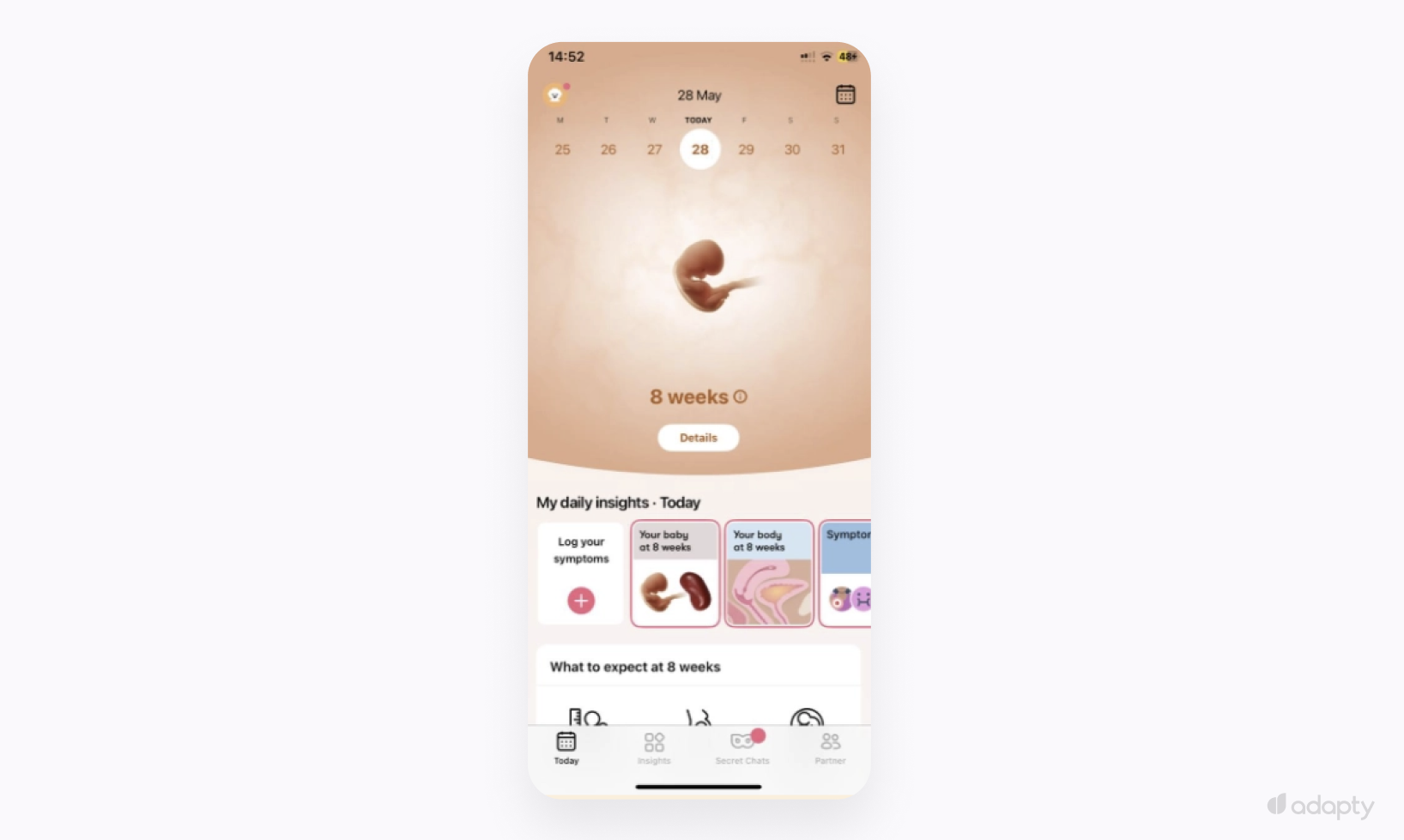
The app opens to a full product view: Week 8 of pregnancy, daily insights, symptom logging, no account required. The user gets the product immediately, starts logging, and comes back the next day.
Registration surfaces later, in Settings, as a quiet banner: "Register to save your data, or log in to access your account."
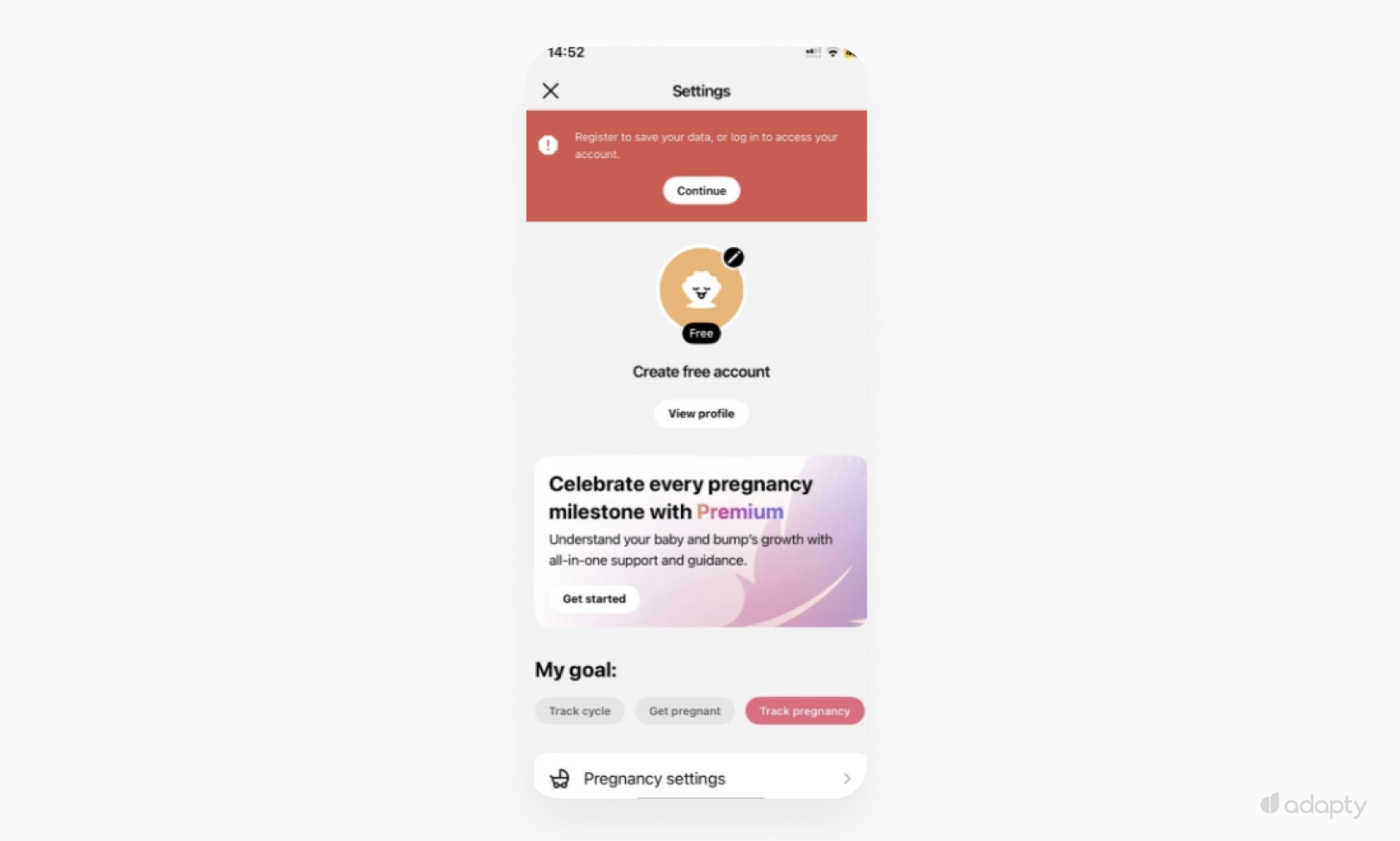
Timing drives the conversion. By the time the user sees the banner, they've already logged symptoms and built weeks of personal health data. The registration ask lands when losing the app carries real cost, and opt-in rates run higher for it.
"Register to save your data" frames the email as preservation. The user is protecting what they built, not creating an account.
Use this pattern if your app delivers real value before requiring a login and your audience decides on trust. Push the ask earlier, and you lose users who are still evaluating.
Pattern 3: At the beginning, with clear utility
Most apps that ask for registration early show a generic "Create an account" screen with no context about what registration gives the user. The user sees a demand with no obvious benefit and drops off.
Hallow, a Catholic prayer app, asks for registration early. Every ask is tied to a specific feature the user has just encountered and clearly wants.
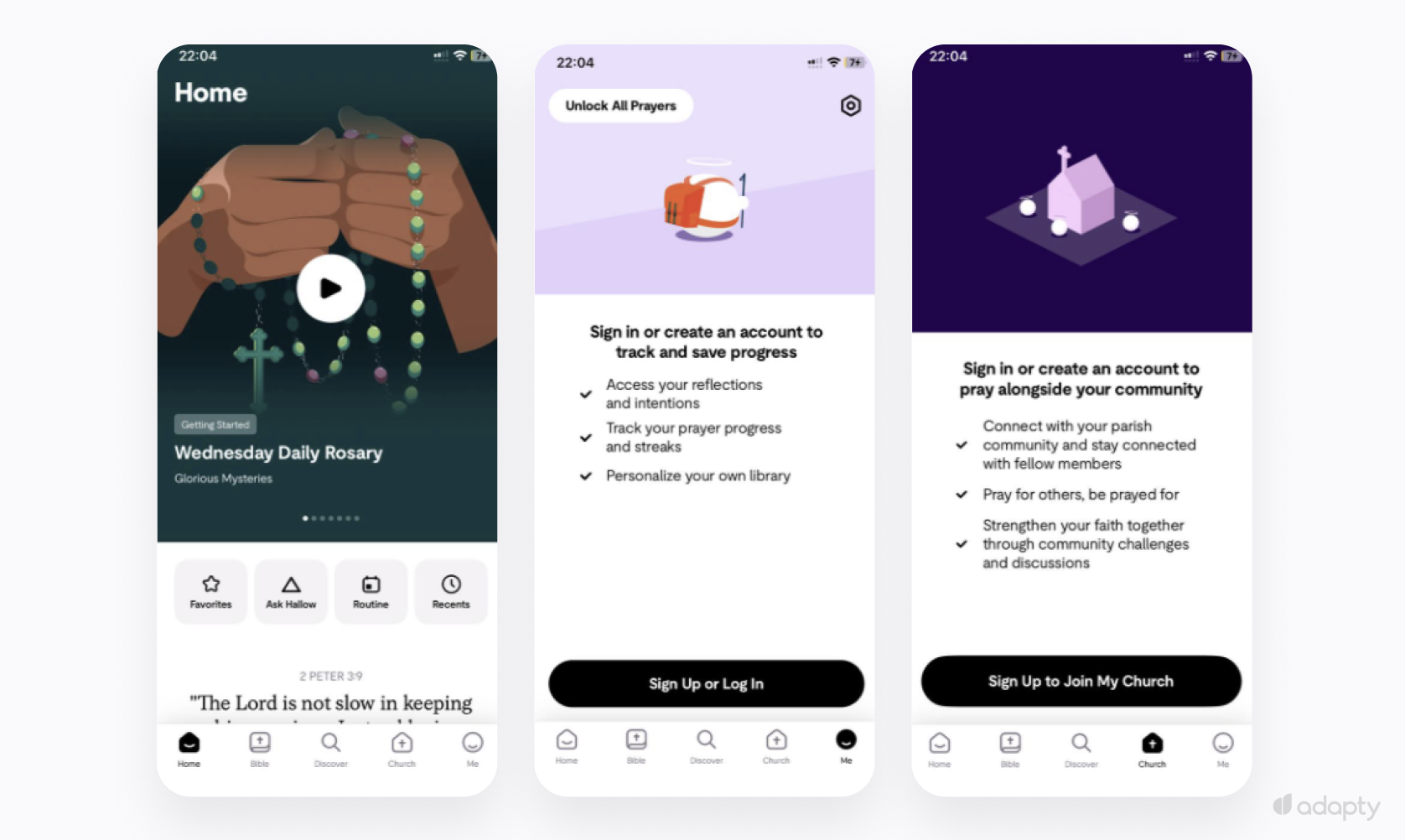
On the "Me" tab, the user sees progress tracking, streaks, and personal reflections. The registration prompt says: "Sign in or create an account to track and save progress. Access your reflections and intentions." The user sees exactly the value on offer.
On the "Church" tab, the context shifts entirely. The user sees community features: Praying with others, joining their parish. The registration prompt changes to match: "Sign in or create an account to pray alongside your community.”
Two tabs, two different reasons to register. Each prompt is written for the feature it unlocks: The user sees exactly what registration gives them.
Hallow makes the value obvious from the first screen. The user arrives knowing why they're there. Registration reads as the next logical step.
Use this pattern if your product's value is immediately obvious and registration unlocks features the user can already see. Specific prompts tied to real features convert. A generic "Create an account" screen at the top of onboarding loses people before they've seen anything worth staying for.
One more condition: This pattern works for users who already trust you before they open the app. Web-to-app migrations and established brands both fit. For a new app without an existing relationship, asking early is a harder sell.
Pattern 4: After the paywall
This is the rarest pattern and the hardest to execute. Apps that run it well build the cleanest email list of the four.
Duolingo lets users start learning with no account required. The app opens and the first lesson starts. Zero friction on entry.
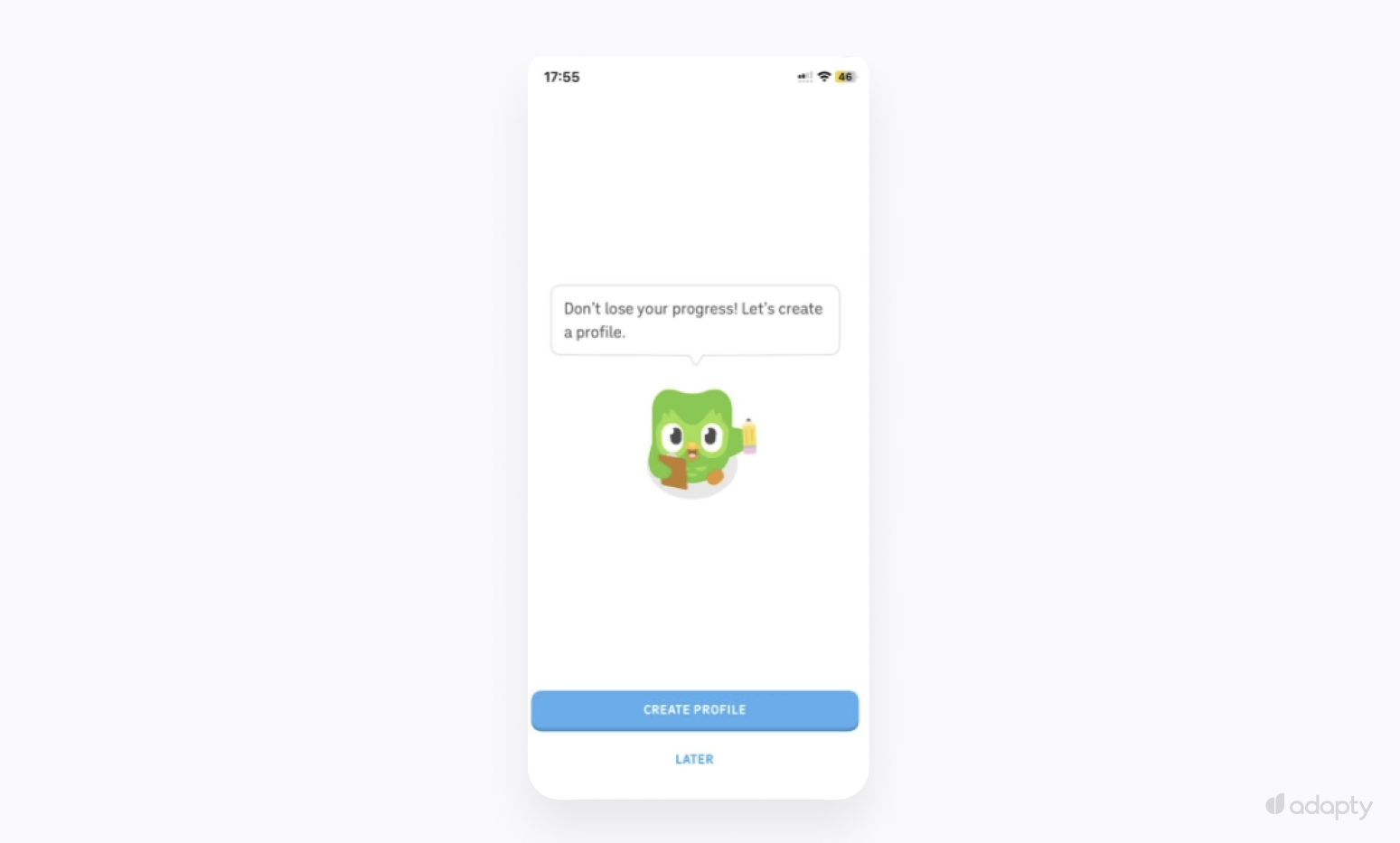
Registration surfaces gradually, tied to specific moments: a streak counter after a few sessions, leaderboards that unlock, progress saves that become visible. Each feature gives the user something worth protecting, and leaving starts to feel costly.
When Duolingo asks for an email, the user has a 7-day streak, a leaderboard position, and a learning history built over days of actual use. The email ask converts because abandoning the app now means losing something real.
You're trading speed for quality. A quiz-gated flow captures emails in the first three minutes. Duolingo's pattern takes days or weeks. Most users who leave after session one don't come back. Without that return, you lose the window to collect.
Use this pattern if your app delivers its core value before login and your retention brings users back on their own. Miss either condition and Pattern 1 is the more practical starting point.
What should happen on the screens before your email gate?
Your users arrive at the email field having already built something they'd pay a real cost to keep. The quiz result, the streak, the health log, the prayer progress. Leaving means losing all of it.
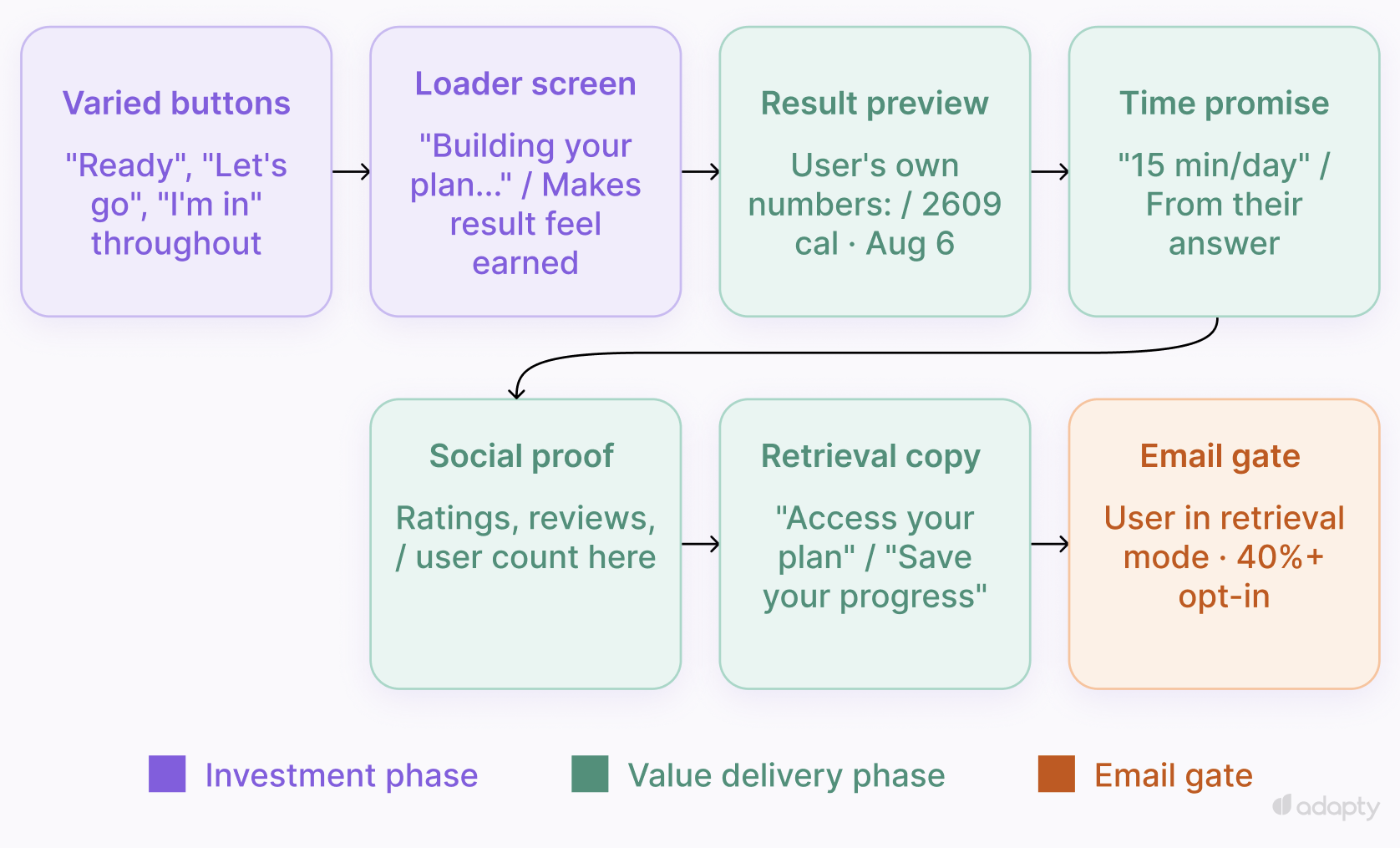
Six elements, in the order they appear in the flow:
- Varied button labels throughout the quiz. Every screen with "Continue" conditions the user into passive form-filling mode. "Ready", "Let's go", "I'm in", "Next step": Each label signals a distinct action. A user who's been making active choices throughout the quiz arrives at the email field in a different state.
- Personalization loader after the last question. The screen shows a few seconds of apparent calculation: " Building your plan... Applying your profile...", indicating to the user that the output took effort. The result feels earned. Cal AI put the loading screen there to change how the result lands, and it moves opt-in rates.
- Result preview with specific numbers. Show the actual metrics the user entered: Calories, savings, a date, a target. "2609 calories, 115g protein, August 6" converts better than "your personalized plan" because the numbers belong to the user.
- Time promise tied to their constraint. The user told you how much time they have. Show it back to them: "15 minutes a day", "results in 8 weeks". Zeely asks about weekly hours available, then shows "Just 15 minutes a day to grow your sales." It lands because it came from their answer.
- Social proof immediately before the email gate. App Store ratings, user counts, recent reviews with dates. Users skip social proof at the start of onboarding before they're invested. At the end, right before the ask, they want confirmation they made the right choice.
- Email copy that frames retrieval. "Access your Growth Strategy", "Save your progress", "Get your plan". The user finishes something. The framing moves their attention from "should I give this" to "how do I finish what I started."
Pick one question in your onboarding that captures what the user wants to achieve. On the screen before the email field, show that goal back as a specific outcome: A number, a date, a result. The user gives their email to protect what they just saw.
How do you start collecting emails?
Step 1: Pick one placement
Pick the highest-leverage moment and build that first.
If you have a quiz or personalization flow: Put the email field after the results preview, before the paywall. The user has invested time and seen their output. Opt-in rates here hit 40%+.
If you have a standard onboarding with a paywall: Ask after the first meaningful value delivery — the first completed session, the first result the user would want to keep. If your onboarding goes straight to a paywall with no value moment, add one. A single screen showing a personalized result or plan is enough to anchor the email ask.
Three placements consistently hurt conversion:
- First screen of onboarding. The user is still evaluating the app. iOS data shows opt-in rates drop below 30% when any permission fires that early.
- Same screen as the paywall. One user, two decisions at once. The weaker ask loses.
- Immediately after a declined purchase. The user's guard is up. An email ask here reads as desperation.
Step 2: Build the warm-up for that placement
Put the six elements on the screens before the email gate: Personalization loader, result preview, time promise, social proof, varied button labels, retrieval copy.
No quiz? Build one screen that shows the user what they set up or achieved in their first session. A productivity app can show tasks created, a language app words learned. Use a real number that belongs to the user.
Step 3: Name what the user receives
By app category
- Fitness: "See your plan" / "Save your workout program"
- Nutrition: "Get your meal plan" / "Save your daily targets"
- Productivity: "Save your setup" / "Access your workspace"
- Education: "Access your curriculum" / "Save your progress"
- Finance:"See your results" / "Save your analysis"
Step 4: Resolve consent before you build
EU users require an explicit opt-in: An unchecked checkbox with clear language stating what the user agrees to. Apply this to all users regardless of location. Collecting slightly fewer emails is cheaper than a compliance incident. US-only audience? CAN-SPAM requires a working unsubscribe in every email, nothing more at collection time.
Build consent into the design from the start. Adding it post-launch is a bigger job than it looks.
Step 5: Connect to an ESP
One input field, one API call, one checkbox: two days to build. On form submit, send the email address and user ID to your ESP via API. Most major ESPs have straightforward REST APIs that take an afternoon to integrate. If you're on Adapty, Adapty Mail skips the integration. The subscription data is already there.
Step 6: Set up your first sequence before you have a list
Configure the first flow now, with triggers ready. The first email goes out to the first user who registers.
Start with the segment you want to close first:
| Segment | Flow | First email | Goal |
| Never purchased | Onboarding sequence, 3-5 emails | Within 1 hour of registration | First purchase |
| Renewal cancelled | Win-back | Within 48 hours of cancellation | Re-subscription |
| Billing issue | Payment recovery | Immediately on billing failure | Recover lost payment |
| Expired | Re-engagement sequence | Within 24 hours of expiry | Return to paid |
Start with Never purchased. It's the largest segment and the highest-leverage starting point. Apps running all four see a 7% MRR lift on average, based on Adapty data.
Step 7: Measure two numbers
Opt-in rate: The percentage of users who see the email field and submit. Below 40% means the warm-up or the copy needs work.
Email-to-paid conversion rate: The percentage of email subscribers who eventually convert to paying. Low conversion with a healthy opt-in rate points to the sequences. Start with timing. Most apps send too late.
How do you collect emails if you don't have time to build it from scratch?
Six weeks is the realistic build time for email collection when a two-person team is shipping other things in parallel. Three blockers make it that long.
- The build. Warm-up screens, consent handling, ESP integration, sequence logic: each piece depends on the previous one. Everyone waits on someone else. It rarely ships in one sprint.
- The data. Most ESPs have no picture of a user's subscription state: Trial, cancelled, billing issue. You pipe that data in manually, map it to segments, and keep it in sync. A second integration on top of the first, and it breaks every time something changes in your subscription logic.
- The attribution. Standard web tracking loses the conversion at the App Store handoff. A user clicks your email, downloads the app, pays. Your analytics show zero revenue from that email. You're running sequences blind.
If your app already runs on Adapty, Adapty Mail solves two of these three before you write a line of code.
Your SDK already passes subscription events to Adapty in real time: Trial starts, billing failures, cancellations, expirations. Adapty Mail reads that directly and maps the segments automatically. Setup takes one evening because the data infrastructure is already there.
Add DNS records to your sending domain, paste your App Store link, and click Generate. The AI produces a full email sequence based on your app's brand and category: Copy, images, HTML. Each subscription event triggers the right sequence automatically. The first send goes out around day 14, after domain warm-up.
Each email contains a checkout link with the user's profile ID. You see the exact email that drove each purchase: The attribution point where standard tracking goes dark.
Pricing is 20% of incremental revenue. You pay only on the revenue Adapty Mail generates. Most teams ship their first sequence within a week of signing up.