Apple Ads keyword automation: when to automate


TL;DR:
- Use Apple Ads keyword automation for repeatable actions. Give each action a clear limit and enough data.
- Automate spend protection when the data backs it. Do the same for search term moves and small bid changes.
- Check position, volume, and payback first.
- People should judge conversion, relevance, and business context. A bid is a ceiling, not a price.
- Rules should support the strategy, not replace it.
When Apple Ads keyword automation makes sense
Apple Ads keyword automation is useful for tasks that happen often. Each task needs a clear limit and a safety check.
Key point: Apple Ads keyword automation should execute defined actions, while people should make decisions that require judgment.
| Automate | Keep manual |
| Pause clear non-converters | Judge keyword relevance |
| Reduce bids after weak performance | Review App Store page conversion |
| Nudge bids on keywords with stable results | Decide why conversion changed |
| Move discovery candidates into testing | Choose campaign structure |
| Add exact-match negatives | Review markets and localization |
| Re-enable keywords after data matures | Set profitability targets |
Start with spend protection. A keyword rule can pause a keyword at a set spend limit with no conversions. Still, check installs, trials, CPA, ROAS, or cohort data. A rule based on one metric is easy to set up. It is also easy to misuse.
Next, automate actions for proven winners. A rule can raise a bid by a small amount when ROAS beats a payback target. It can do the same when CPA stays below a target. Cap the new bid and each change. Apple’s bid guide explains how to set and adjust this control. A bid does not promise an auction result.
Rules make work consistent. They do not add insight. Before you turn one on, define its condition, action, and safety check. The team must be able to explain why the action fits. If it cannot, keep the action manual.
Bid management: when a rule should set bids
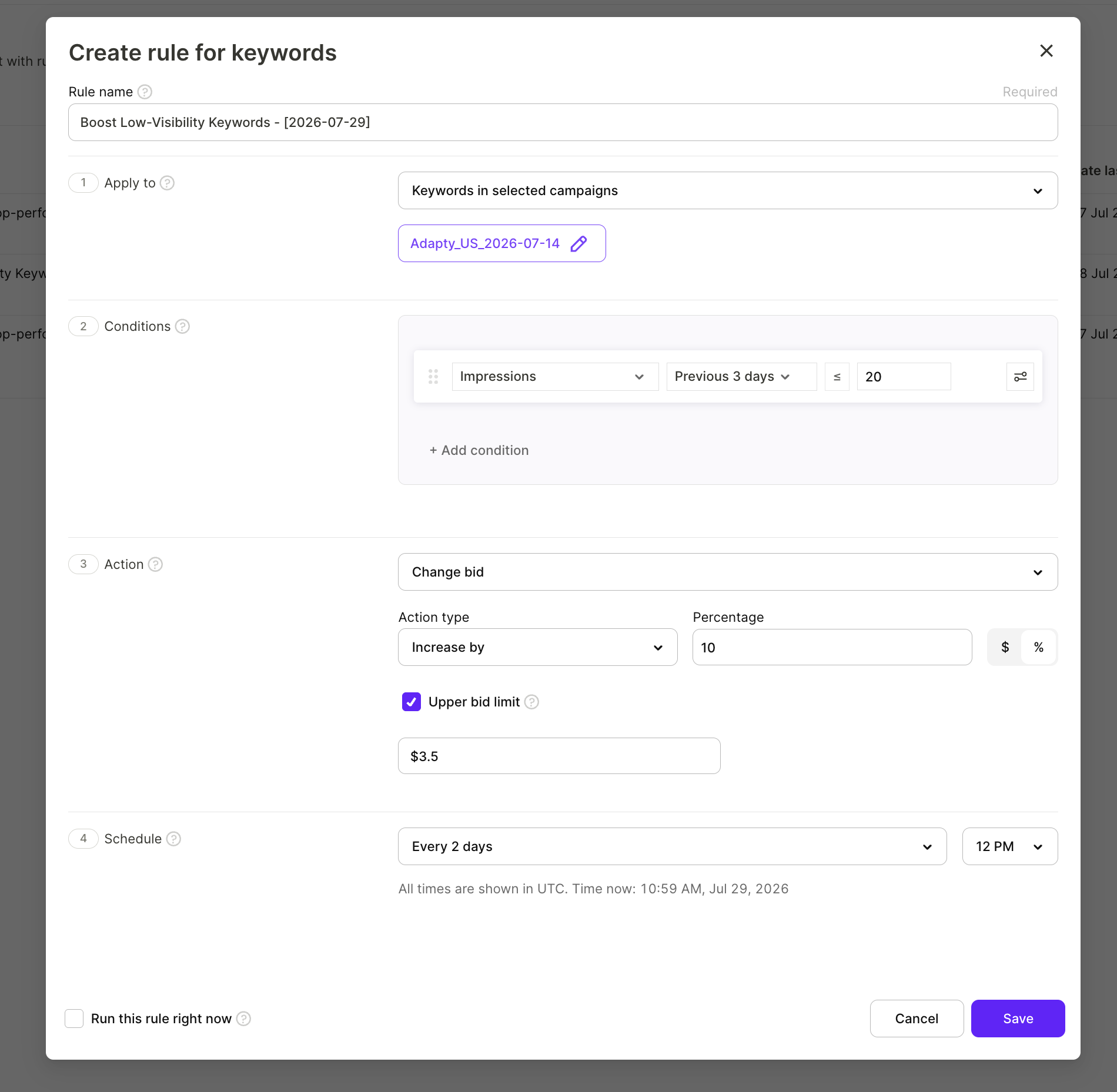
Bid management should use a rule only when the reason is clear. Check position, volume, and payback before any bid change.
Key point: A bid rule should apply a decision supported by position, volume, and payback rather than create that decision.
Use these facts before changing a bid:
- Position: Decide whether the keyword reaches the placement needed.
- Volume: Decide whether useful reach remains available and whether the keyword has enough signal.
- Payback: Decide whether additional cost supports the business goal.
Position and volume show if more reach is available. Payback shows if that reach is worth the cost. When the facts support a change, add these safety checks:
- Restrict the rule to a narrow campaign or ad-group scope.
- Set a clear performance threshold.
- Give the rule one bid action.
- Limit the adjustment.
- Add a final bid cap.
- Schedule reviews of the rule’s executions.
Safety checks reduce risk. They do not prove that the choice is sound. Keep bid management manual when a rule lacks the facts for a sound change.
Volume matters because a little activity can make a weak keyword look better or worse. Ask if one conversion could reverse the rule’s result. If so, the signal is too weak for a bid rule. Begin with proven keywords. Review the first runs. Expand only while the rule stays sound.
Higher bids do not fix weak relevance or a poor product page. TTR and conversion shape the value of each impression. A bid is only one cost lever.
Search term automations and discovery campaigns
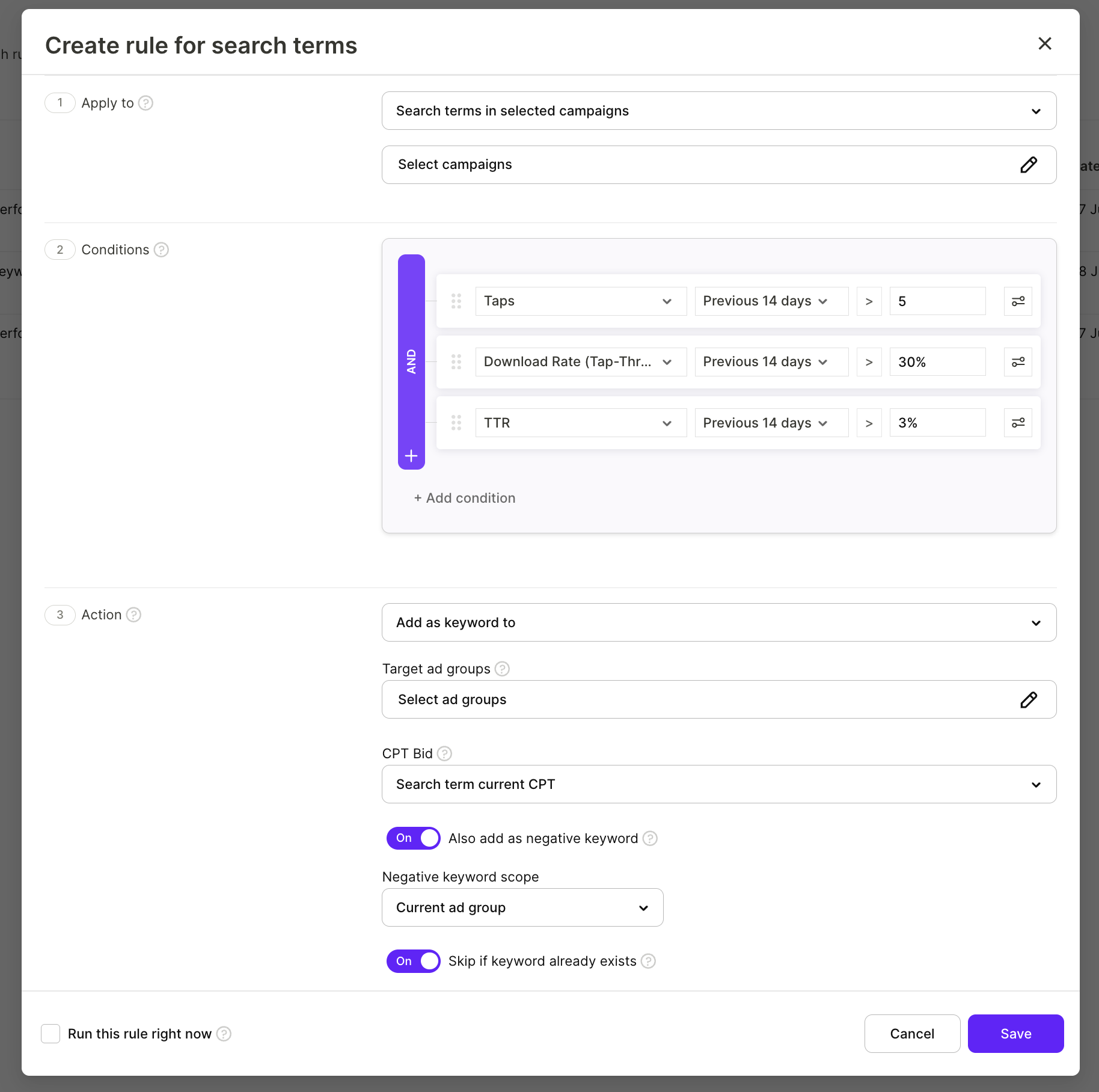
Search term automations move useful queries out of a discovery campaign. They put each query into a controlled exact-match test.
Key point: A discovery campaign should generate candidates, while exact match should test each promoted term on its own evidence.
A discovery campaign finds possible keywords before a planned test. Search Match is an Apple Ads targeting option. It can surface useful user queries. Keep it in its own discovery campaign. This keeps its traffic apart from planned keyword activity. Search term rules can move useful candidates without treating them as proven.
Use this workflow:
- Let the discovery campaign collect search-term data.
- Apply performance conditions that match the goal.
- Move a qualifying term into a probing campaign as exact match.
- Add the term as an exact-match negative at the discovery source.
- Let the new exact-match keyword collect its own data.
- Consider bid rules only after the keyword has meaningful signal.
A probing campaign is a controlled test for promoted keywords. A term that works in discovery has earned an exact-match test. It has not earned a scale-up. Results can change in a new campaign with its own target and bid.
Source negation keeps discovery traffic clean. It can also reduce duplicate spend across campaign areas. Apple’s match type guide explains how broad and exact match differ. That difference supports this split between discovery and testing.
Search term automations should move candidates through a controlled process. They should not turn every good query into a permanent winner.
Manual decisions and keyword-rule configuration
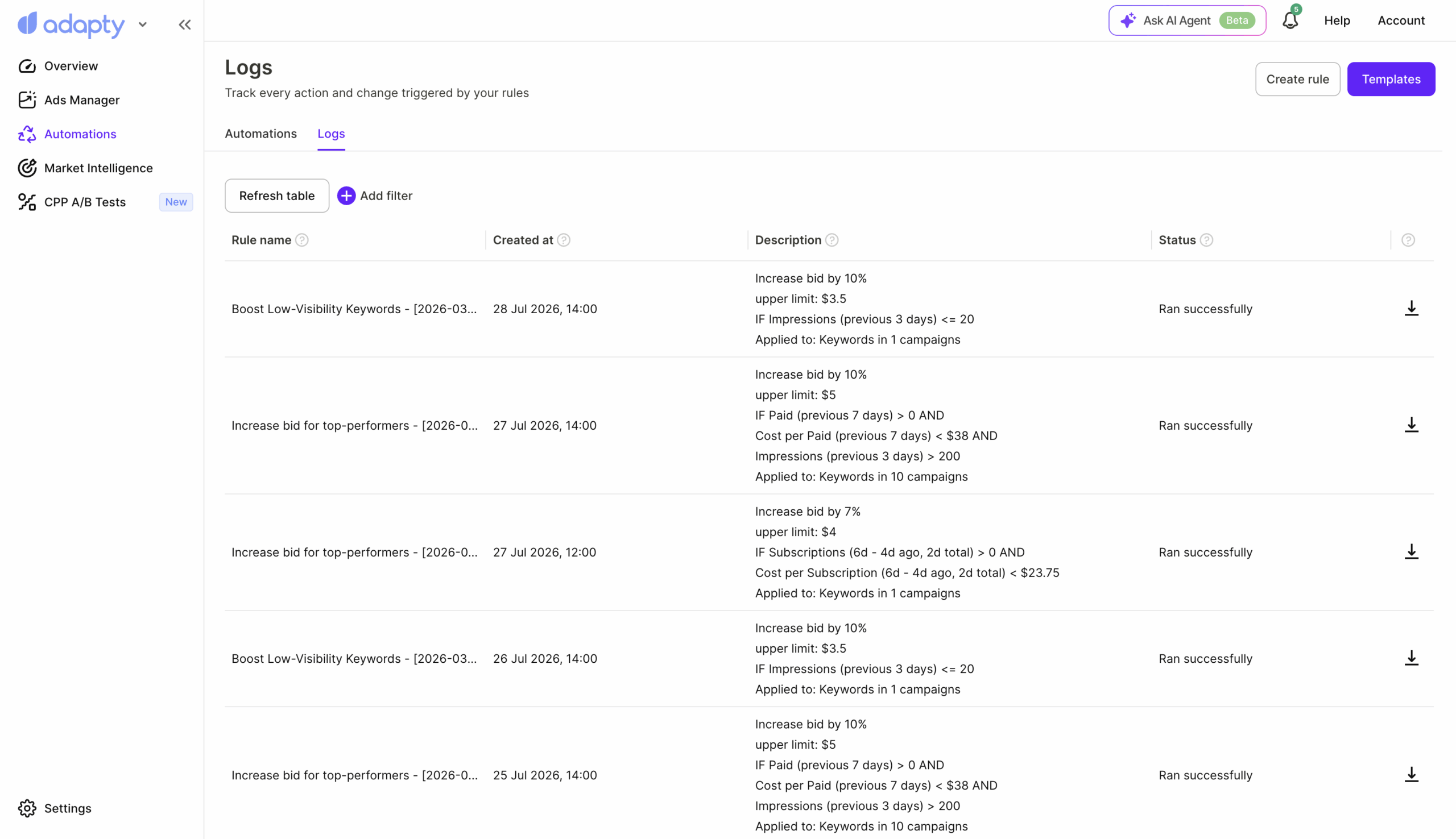
Manual review should explain performance. A keyword rule should take one narrow action that the team can review.
Key point: Rules can act on performance signals, but they cannot reliably explain why keyword performance changed.
Keep these decisions manual:
- Whether a keyword matches user intent
- Whether the product page supports that intent
- Whether a market needs localization
- Whether a performance change is temporary
- Whether a keyword belongs in discovery, testing, or scaling
- Whether a target still matches the business goal
A rule can flag a change in CPA. It cannot tell you the cause. Relevance, the App Store page, market mix, and limited data may all play a part. A bad target creates fast, steady mistakes.
Upfront: I work at Adapty, so this is not a neutral take. Adapty Ads Manager supports rules for keywords and search terms. The rules can use full-funnel metrics.
To configure a bounded bid-increase rule:
- Open Automations, select Create rule, then choose Keywords.
- Give the rule one clear name and purpose.
- Under Apply to, select a small set of campaigns or ad groups.
- Add a condition such as ROAS above a payback target.
- Set the time range, comparison operator, and threshold.
- Add a volume condition when needed.
- Choose Change bid, then Increase by.
- Set an absolute or relative increase and an upper bid limit.
- Set the frequency and run time.
- Save the rule.
See Adapty’s guides to keyword rules and campaign rules for setup details. After a set run, review Automations and Logs. Check the affected-item export too. For keyword rules, the CSV shows each affected keyword and its old and new bid.
A successful status means the rule ran. It does not mean the choice was good. Review the first runs and avoid rules that overlap. Treat hands-off “AI bidding” as a bounded test, not a default.