iOS 27.2 App Store ads lost the blue background


TL;DR:
- On our release devices, iOS 27.2 App Store ads no longer sit on a blue background, as of the October 26, 2026 release.
- Search results ads carry only the small "Ad" label, on iPhone and iPad, in light and dark mode.
- Apple has published no announcement, and we cannot yet say that every user sees it.
What changed for iOS 27.2 App Store ads
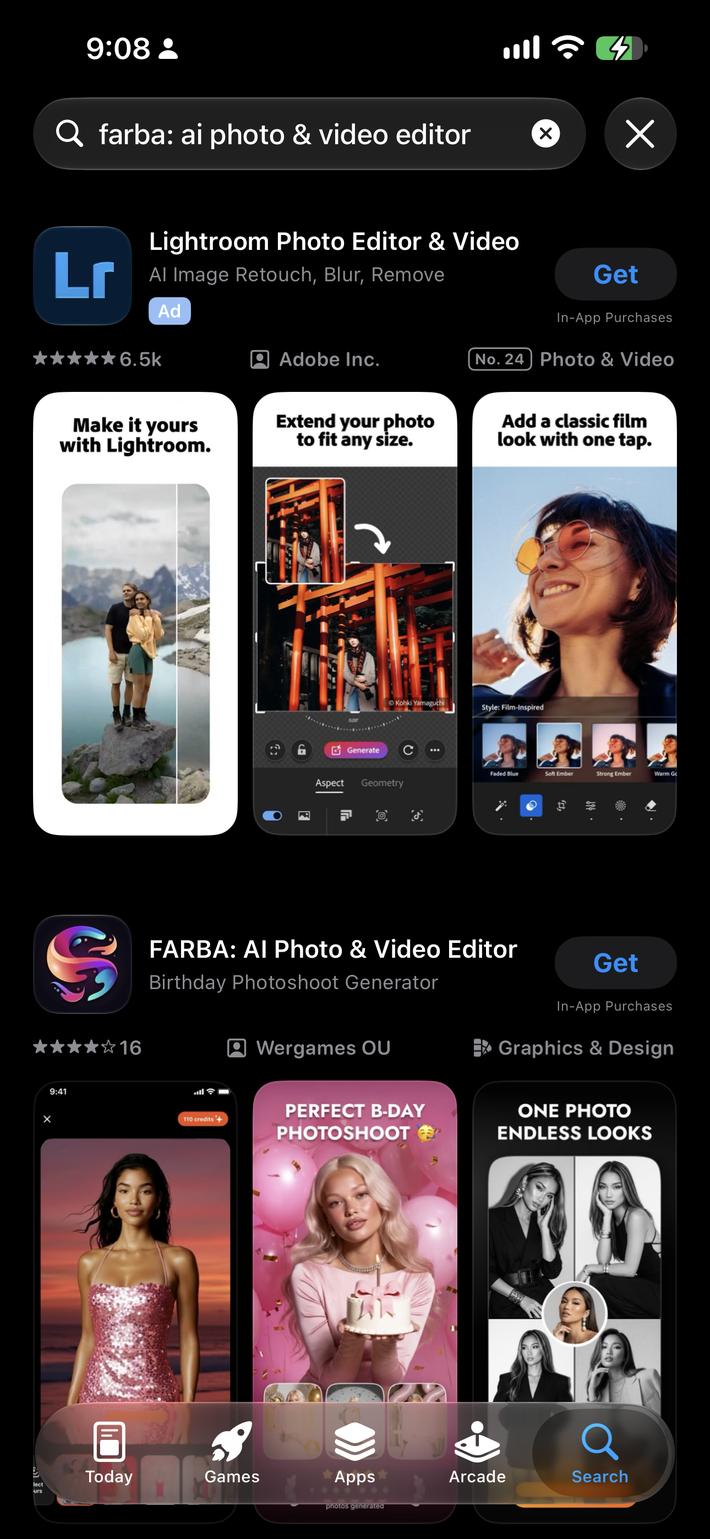

On our devices, App Store ads changed in one way: the blue tint behind Apple Ads search results ads is gone. Before, an ad sat on a light blue card. Now it looks like a normal search result, marked only by a small "Ad" label.
We checked our own release devices on October 27, 2026, one day after the release. The design matches what we saw in the beta in September.
Where we saw it:
- iPhone: light mode and dark mode, in App Store search results.
- iPad: light mode and dark mode. Ads sit inside the same two-column grid as organic results, so they read as one more card.
- Lower slots: additional ads further down the results also carry only the label.
- Search tab: the ad in the Suggested list carries the same small label and no background.
Apple still puts an ad disclosure on every ad, according to its ad placement documentation. Pricing is still cost-per-tap. What changed is how much the App Store ad label stands out.
These are our own devices. We have not checked every country, storefront, or user.
Key point: On our iOS 27.2 release devices, App Store search results ads look like organic results apart from a small "Ad" label, on iPhone and iPad, in both themes.
From beta test to release: what is confirmed
The path from beta test to release ran alongside a separate change.
More ad slots. In December 2025, Apple Ads announced additional ads further down App Store search results, citing that nearly 65% of downloads happen right after a search. The extra slots started in March 2026 in the UK and Japan and then reached all Apple Ads markets.
The no-background look. In January 2026, some iOS 26.3 beta users saw search results ads without the blue tint, as 9to5Mac reported. It did not ship then.
At the time, Michael Tsai collected developer comments saying ads became harder to tell apart from organic results.
We reported the same design in the iOS 27.2 beta in September 2026 and wrote that it might not ship. This time it shipped.
| Claim | Status |
| iOS 27.2 released October 26, 2026 | Confirmed |
| No blue background on our iPhone and iPad release builds | Confirmed, first-party |
| Light mode and dark mode both affected | Confirmed on our devices |
| Every country and storefront sees it | Unknown |
| Tied to the iOS version | Likely, not proven |
| Apple announcement | None found as of October 29, 2026 |
Key point: The release date is confirmed, the scope is not. Apple has not announced the design.
What will move in your Apple Ads data
If the design moves anything, your Apple Ads data is where you will see it. We have no first-party numbers on it yet, so what follows is reasoning, not measurement.
TTR first. Search results ad TTR is the metric to watch. An ad that looks organic may get more taps. For reference points, see our Apple Ads benchmarks.
CPT may follow. Actual CPT depends on bids, relevance and competing bids. If taps shift across the whole auction, what advertisers can afford per tap may shift too, and prices with it. Treat that as a hypothesis and check your own account.
The shape matters more than the direction. If the design follows adoption of the new iOS version, any shift would be gradual: users update over weeks, so charts would show drift, not a step. A switch on Apple's side could look different.
That is the trap. A slow TTR drift looks like the result of your own bid and creative changes. Read it that way, and you optimize against a shift you do not control. For separating real shifts from noise, see our guide to analyzing and optimizing Apple Ads.
Organic App Store search installs may move too. The ad now blends into the result list, so taps on the first organic result may change. Nothing suggests the design changes organic ranking rules.
Key point: If the design changes tapping and follows iOS adoption, TTR may drift rather than jump. Date the change before you credit or blame your own bids.
Brand keywords: check them today
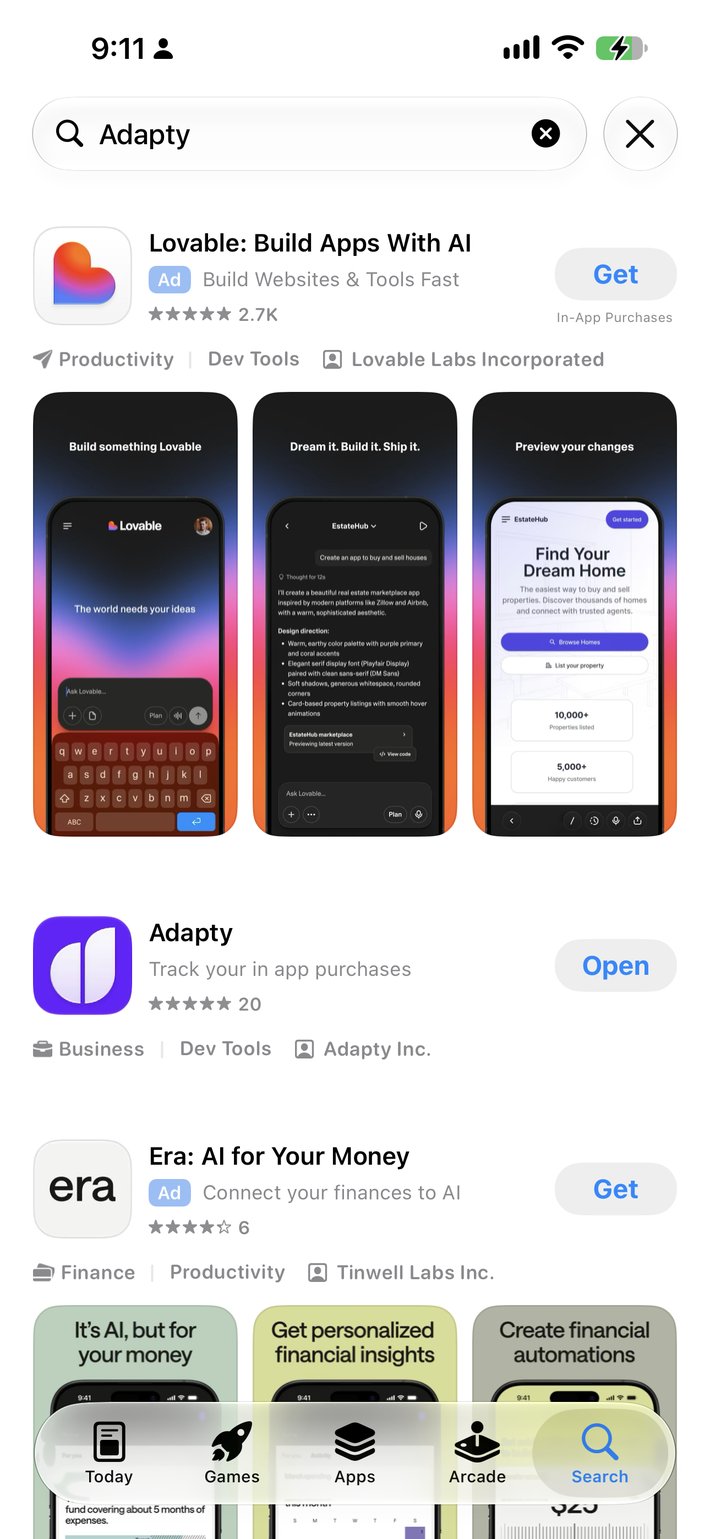
Brand keywords deserve a check today, not next quarter.
A competitor bidding on your brand query used to sit in a blue box above your listing. Now that competitor looks like the first organic result, with only a small label to tell you apart. Our own brand query is an example: on our device, another app's ad sits above our own listing.
Our position has not changed: we treat Apple Ads and organic App Store search as separate sources. A top organic rank does not protect the volume: some users will still pick your listing, but some will tap the ad above it.
The new design makes that ad look more like a result, so it may take a larger share. Judge brand keyword defense by incremental installs and revenue against its cost.
Check your brand queries several times, in your main markets. One clean result on your device does not prove that nobody bids, because ads are not shown on every search. For the basics, see our Apple Ads guide.
If you do find a competitor there, a small exact-match brand campaign is the usual answer. Keep it separate from generic campaigns, so its TTR does not mix with the rest of your data.
Key point: A competitor on your brand query now looks like your own organic listing. Check your brand terms before you decide.
What to do this week
Start this week with the date, because everything else depends on reading before and after.
- Annotate October 26, 2026 in every report and dashboard you use. Do this first.
- Export search results data for the last few weeks: TTR, CPT, and installs per keyword. That is your baseline.
- Search your brand terms on a device with the new iOS version, in your main markets. Note who shows up above you.
- Start or review brand defense based on what you see. For the setup, see our Apple Ads best practices.
- Keep bid changes small and logged for the next few weeks. Big moves now make the design effect unreadable.
- Re-check in two weeks, and look at the shape of the curve, not just the level.
If you track revenue per keyword, compare that too. A higher TTR is only good news if the extra taps turn into subscribers.
The annotation and your existing keyword reports are enough for monitoring. Treat any before-and-after change as an observation, not proof of the design effect.
Key point: Annotate the release date, export a baseline, check your brand terms, and keep bid changes small while the effect settles.