Apple's Retention Messaging API: the cancellation screen you can now write on


TL;DR:
Apple's Retention Messaging API lets you put a message on the Confirm Cancellation screen in iOS Settings in an attempt to keep your subscriber onboard.
Four formats are available: text, text with an image, a switch-plan suggestion, and a promotional offer. Apple calls your server in real time to decide which one a given subscriber sees.
Apple shows nothing at all for any product and locale without a configured default message. Your coverage decides how many cancelling subscribers you can reach, before offer strategy matters.
Adapty runs the sub-second endpoint Apple requires, translates one message into every locale, previews the real cancellation sheet, and reports the retention rate.
A subscriber opens Settings, scrolls to Subscriptions, finds your app, and taps Cancel Subscription. The next thing on the screen is a confirmation button. Nothing else.
We found that average monthly subscriber retention is 14.2% by day 380 and whatever you spend on acquiring the rest walks away through that one screen you have no power on.
However, Apple's Retention Messaging API now gives you the ability to change that screen.
But it also comes with a server requirement that most teams will not want to build, and a coverage rule that decides whether your message ever appears at all. Retention Messaging in Adapty handles both.
👉 Apple's Retention Messaging API is still in beta. Access is granted per app. Request your API URL from Adapty support, submit it in Apple's access request form, and wait for Apple to approve your app before messages can go live.
What is Apple's Retention Messaging API?
A server-to-server service that lets you make one last pitch to a subscriber who is on their way to cancel.
Push notifications and win-back emails reach your subscribers after they are gone. Apple hands you this screen while they are still deciding.
The sequence
- A subscriber opens the subscription details page for your app, in Settings or on the App Store.
- Apple calls your server with the subscription details and the subscriber's locale.
- Your server picks one of your preapproved messages and returns it.
- The subscriber taps Cancel Subscription, and Apple shows a Confirm Cancellation screen carrying your message.
- The subscriber can now cancel, but also keep subscription or take the offer.
This whole exchange runs in the time it takes the screen to load and the subscriber sees none of it.
Also, two things catch teams out:
- Apple calls when the subscriber opens the page, not when they tap Cancel, so your server gets hit far more often than anyone cancels.
- Every message has been uploaded and reviewed by Apple in advance, so your server chooses between prepared options rather than composing anything live. Apple waits for that choice before moving on without you.
Retention messages appear on iOS 15.1 and later, iPadOS 15.1 and later, visionOS 1 and later, and macOS 14 and later. Subscribers on older versions go straight to confirmation.
Adapty's docs cover the full flow, from connecting to Apple in sandbox to authoring and localizing your first message.
What can you put on the Confirm Cancellation screen?
Apple supports multiple message types.
Take a subscriber cancelling a $9.99 monthly plan, and they collapse into three decisions:
#1: Text and/or image: remind users what they are giving up
A text message, with optional bullet points and an image, restating what the subscription covers.
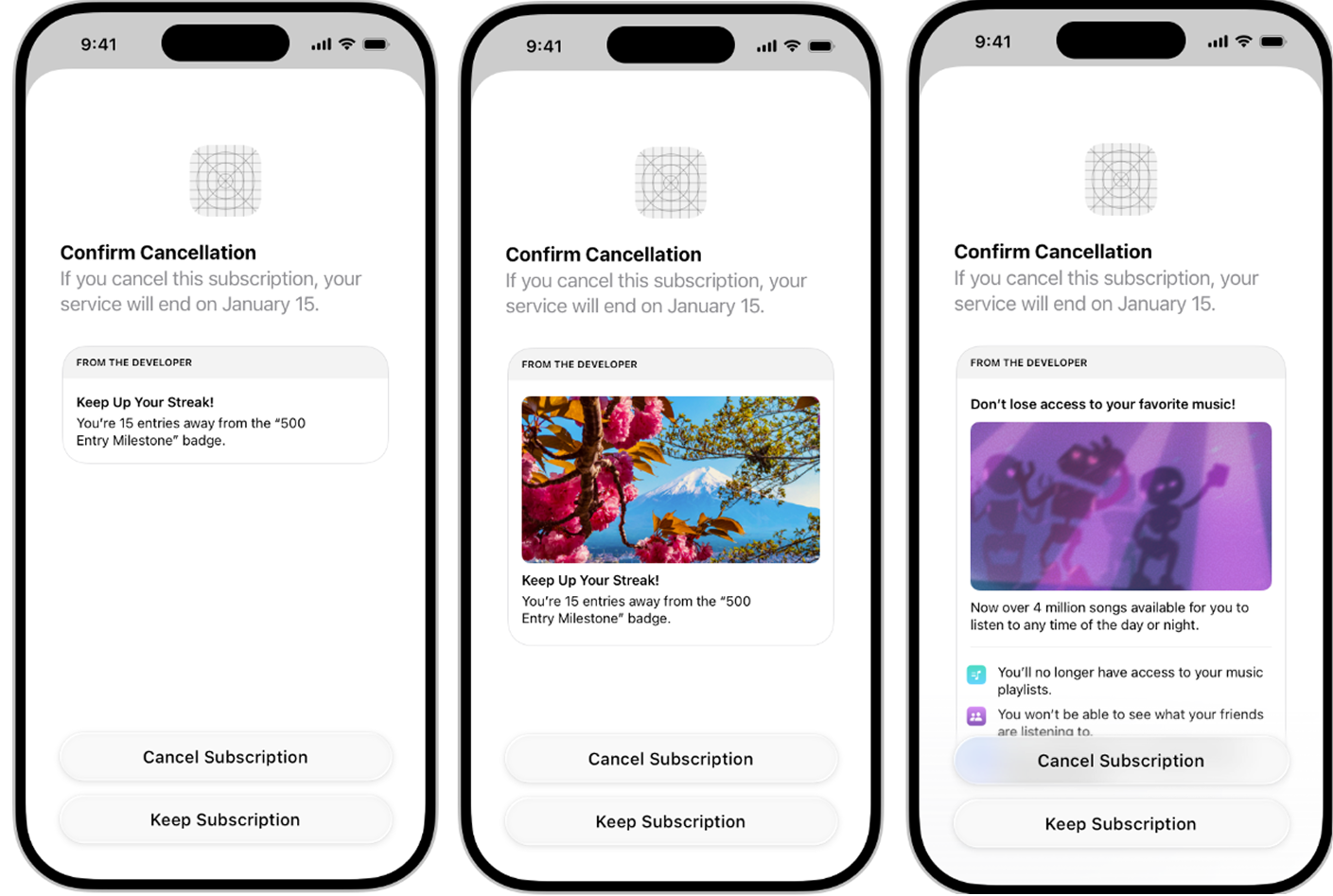
This little window
- Breaks the flow and interrupts the decision making process.
- Reminds the user of what they’re paying for.
- Reminds the user what he’s losing, triggering loss aversion.
For a subscriber that simply forgot what the subscription brings, this can be enough. It also costs you nothing when it falls while also reducing your churn rate and saving you money.
#2: Offer a discount
A promotional offer continues the same subscription at a reduced rate, say $7.99 instead of $9.99.
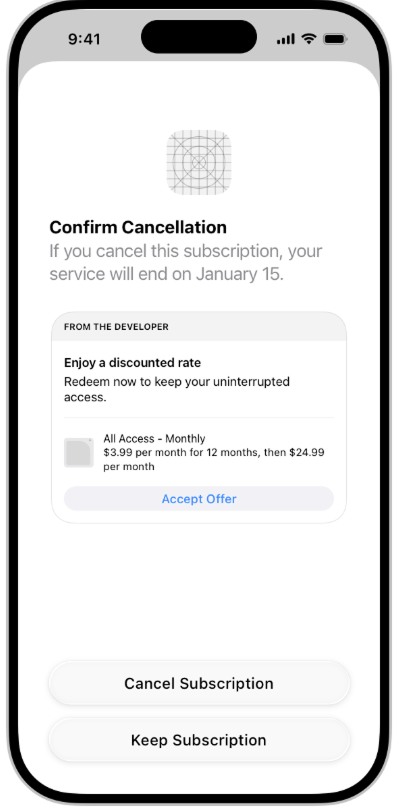
The subscriber taps once and stays.
Yes, you’ve traded margin for a retained relationship, but you have done it for someone who was already leaving.
#3: Offer a switch to a different plan
A switch-plan message suggests another subscription in your catalog.
A monthly subscriber at $9.99 who balks at the recurring charge may take an annual plan with a lower effective monthly rate.
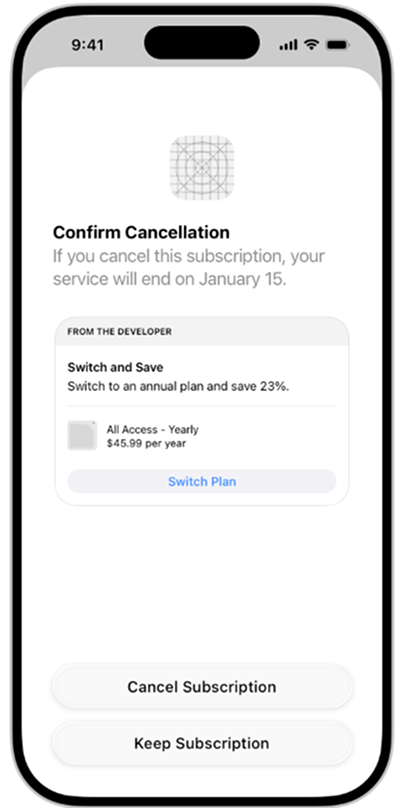
This allows you to keep the customer and extend the lifetime value of your subscriber without discounting the tier you sold.
💡Text and text-with-image can run as default messages on their own. Offers and plan switches need the real-time flow, which means an endpoint that answers Apple in time.
Which retention message should each product get?
Adapty targets by product rather than by user cohort, which fits how cancellation works.
The plan someone is cancelling already tells you a lot about why.
| Product being cancelled | Message to configure | Reasoning |
| Monthly | Switch-plan to annual | The objection is the recurring charge. A longer commitment at a lower effective rate answers it without cutting your monthly price. |
| Annual | Promotional offer at the same tier | No meaningful downgrade exists below annual, so price is the only lever you have |
| Weekly | Switch-plan to monthly or annual | Weekly plans churn hardest and fastest. Moving the subscriber to a longer cycle beats losing them. |
| Any product, first pass | Text or text with image | Establishes a baseline before you give anything away. |
Our advice? Start with text everywhere.
It costs no margin, and it tells you how many of your cancelling subscribers a reminder alone can hold.
Reaching for a discount first is the expensive mistake.
Every subscriber who would have tapped Keep Subscription after reading two sentences, and instead receives $2 off, is margin you handed away for nothing.
Because messages are set per product, a promotional offer reaches everyone cancelling that product. You cannot hold it back from the people who were going to stay anyway.
Running text first tells you how big that group is before you start paying them, and then you add offers to the products where text underperforms.
Cheaper still is reducing early churn, so fewer subscribers reach that screen at all.
How do you set up retention messaging without building a sub-second endpoint?
Apple publishes the endpoints and leaves the orchestration to you.
Working through it directly means you have to do five jobs.
Answer Apple's call in time
Your server has to accept Apple's real-time call, identify the subscriber and product, choose a message, sign any promotional offer, and respond inside Apple's window.
It has to do that reliably, at all hours, for a request pattern you do not control.
Adapty runs that endpoint. You point Apple at us during setup, and the response comes back under Apple's time limit.
Nobody on your side writes backend code.
Configure a default for every product and locale
Apple requires a default message for every product in every locale.
The default is what Apple shows when a real-time call fails for any reason. That’s what shows whenever the clever path breaks, which makes it a product decision you should write carefully.
Apple displays no retention message at all for any product and locale pair without a configured default. Not a fallback, nothing.
The subscriber sees the bare confirmation screen and leaves.
Sell five products across twelve locales and you owe Apple sixty configured defaults before your coverage is complete.
If you configure English and ship, the screen will reach a fraction of the subscribers they meant to.
Get every message through Apple review
Apple supports ** 85 locales. ** Done by hand, one message for one product becomes 85 pieces of copy to write, upload and track through Apple review.
Multiply that by your catalog and the job stops being realistic, which is why most teams will ship English and stop.
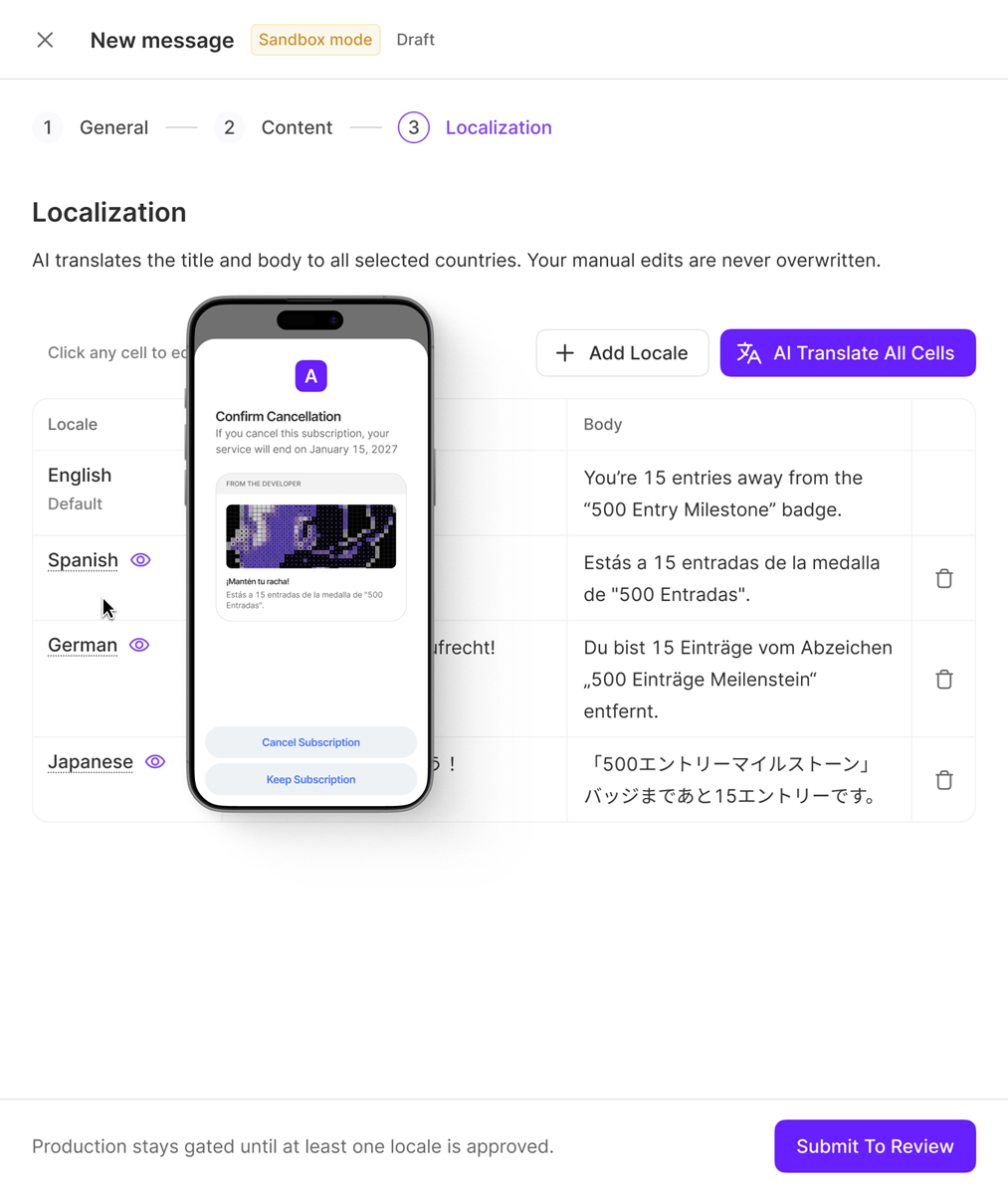
Adapty's AI localization translates the message you wrote once into all 85 locales and submits the set to Apple for review.
Two clicks, and that product is covered everywhere you sell it.
Stay inside Apple's limits
Apple enforces limits on message length, bullet points and image specifications, and rejects content it judges misleading or inaccurate.
Adapty validates against those limits as you write, so problems surface before submission rather than after a review cycle.
Adapty also renders your message on Apple's real cancellation sheet, so you see what the subscriber sees before anything goes to review.
You cannot open that screen yourself without an active subscription and a genuine cancellation attempt, so the alternative is submitting copy blind and learning how it wraps once Apple approves it.
Pass the performance test and go live
Apple requires a performance test against your sandbox endpoint before production messages go live.
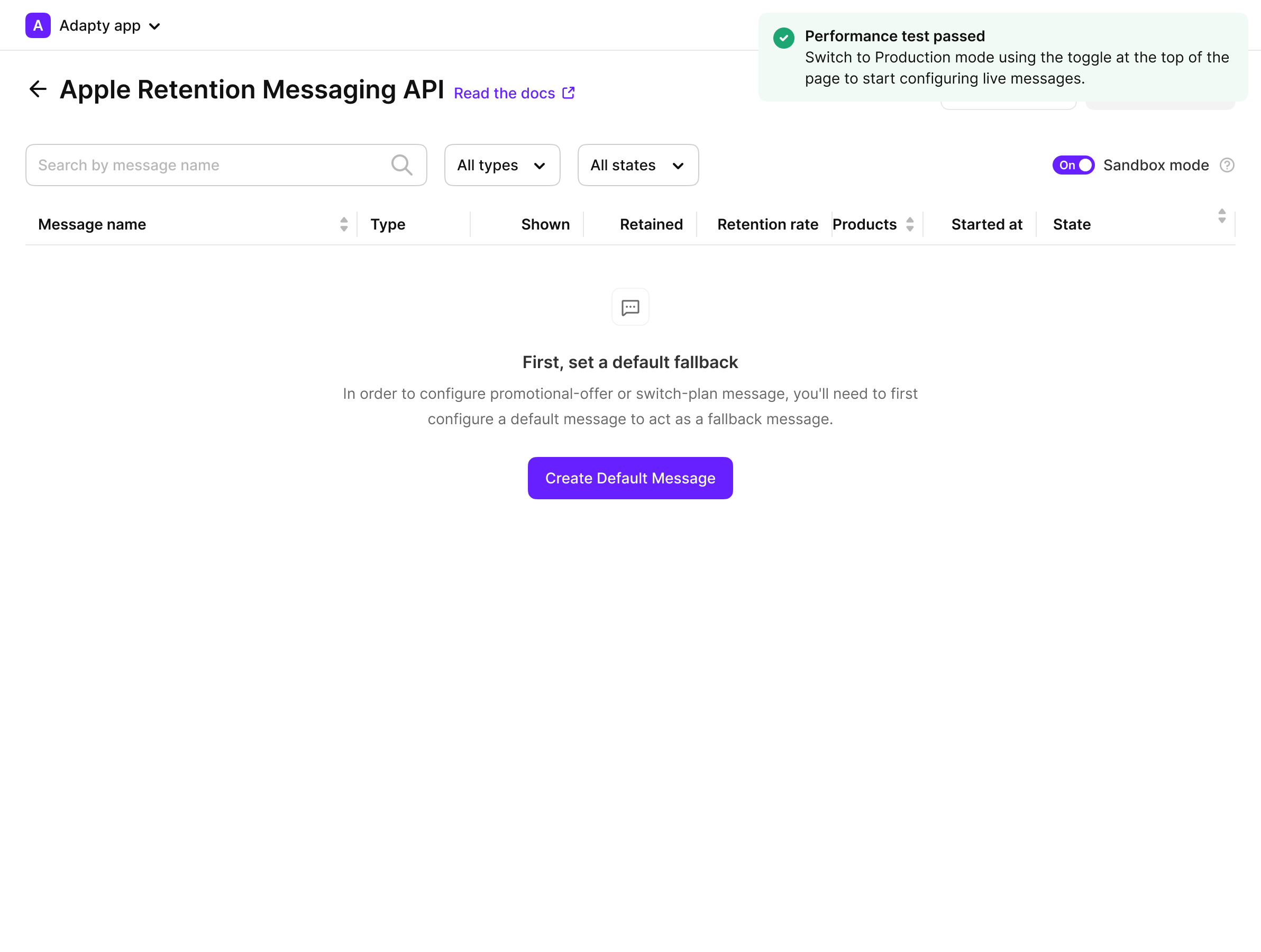
Adapty runs it on an active sandbox or TestFlight transaction, and you can author messages while it completes.
Retention messaging catches subscribers at cancellation. Refund Saver catches them at the refund request, the other Apple-controlled surface where revenue leaves without touching your app. Teams running one without the other are covering half the exit.
How do you know a message retained anyone?
Adapty reports three numbers against every message you publish:
Shown, Retained, and Retention rate. Retention rate is Retained divided by Shown.
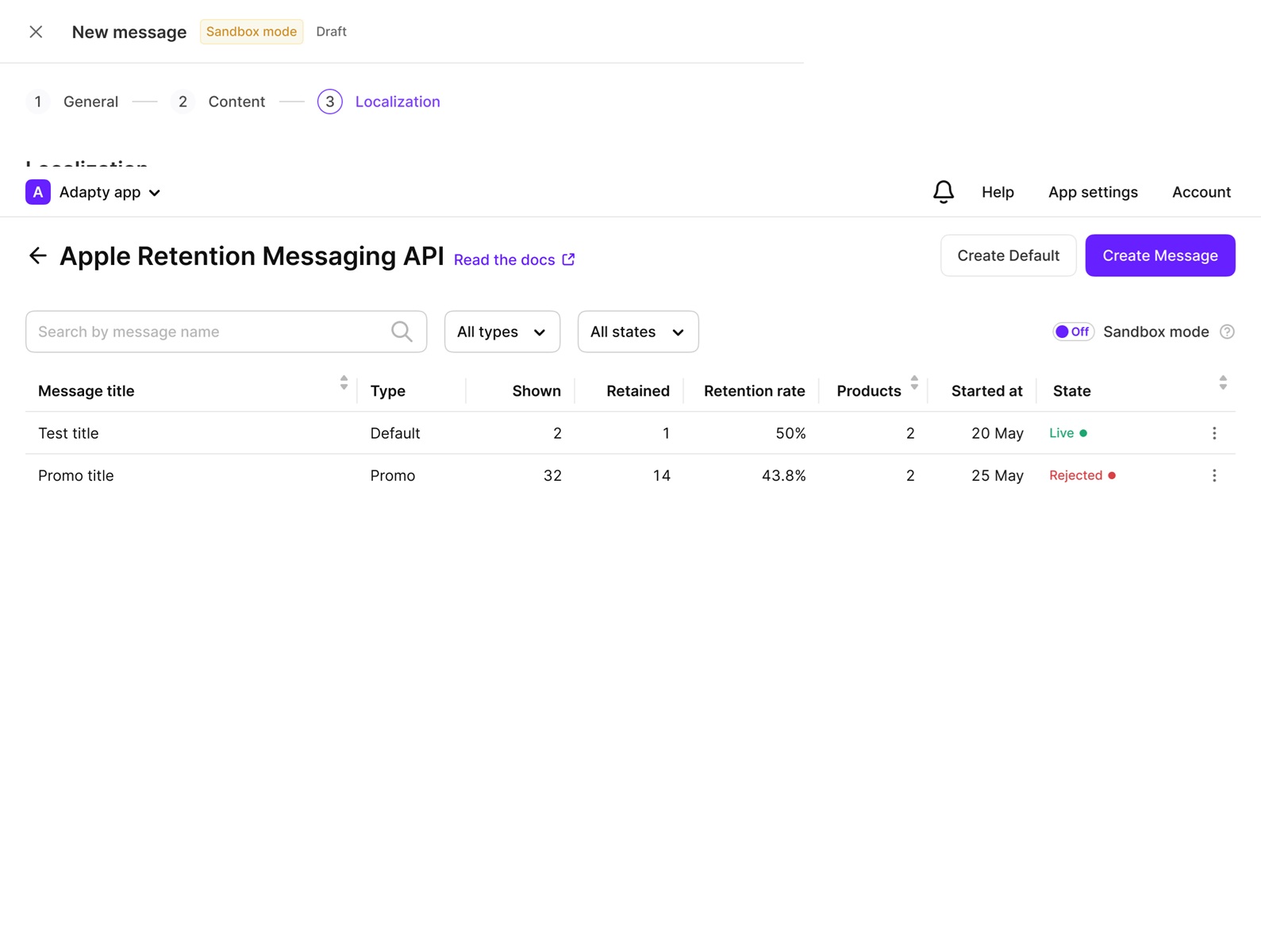
Read the retention rate as an operating metric. It tells you how many subscribers who saw a message kept their subscription.
It does not isolate how many kept it because of the message, since some share of them would have backed out of the cancellation anyway.
Without a holdout you cannot separate the two, and any vendor quoting you a causal lift on this surface is overselling.
That is still enough for the decision you face. You are comparing one message against another on the same products and keeping what works.
💡Treat retention rate the way you treat any funnel metric with a soft denominator: worth acting on, not evidence for a board slide. The same discipline applies to how you read churn rates generally.
Own the screen you haven’t owned before
Apple opened the last screen before a subscriber walks away.
What you write on it matters less than whether it shows up at all, and that comes down to coverage: every product, every locale, a message approved and waiting, behind a server that answers Apple in time.
Adapty takes care of:
- The endpoint. We run the sub-second server Apple requires. Nobody on your team writes backend code.
- Instant localization. Write once, and AI localization ships it to all 85 of Apple's locales and submits the set for review.
- Approval. Inline validation against Apple's limits, plus a preview of the real cancellation sheet before you submit.
- Results. Shown, Retained and Retention rate for every message you publish.
All of it is included in Pro at no extra charge. The only job left on your side is writing the message.
Set up your first retention message with Adapty. Author, translate and ship it from one dashboard.