Native paywall rendering: How it works and why we chose it

TL;DR:
- WebView and native paywalls both work. The right call depends on what you're willing to trade.
- Go native if first-paint speed matters or your users come from accessibility-sensitive segments. Native paywalls paint once, with no JavaScript and CSS to download first and no fonts arriving mid-render. You also inherit OS-level accessibility for free.
- Go with WebView if you need the same paywall to render on the web alongside iOS and Android, and your team is comfortable with the slower load times and multi-pass paint behavior.
- Doesn't matter much if your paywall is a single-focused screen shown to high-intent users. Pick whichever ships faster.
The first decision in building a paywall platform is what renders the screen.
We chose native rendering for Adapty in 2022. Every paywall built in Flow & Paywall Builder, our visual editor, renders as real SwiftUI components on iOS and Jetpack Compose components on Android. The same primitive system maps to native runtimes on React Native, Flutter, KMP, Capacitor, Expo, and Unity. There's no browser engine in the render path and no WebView between the SDK and the screen.
This article covers why we made that call and what it cost us to make it work. WebView paywalls are a legitimate alternative, and we'll be honest about where they win. Most of the piece is about native rendering itself: How it handles latency, accessibility, and platform fidelity. We'll also cover the supporting infrastructure (CDN delivery, offline fallbacks) that lets our customers ship paywall changes without an app release.
What happens between a tap and a paywall render?
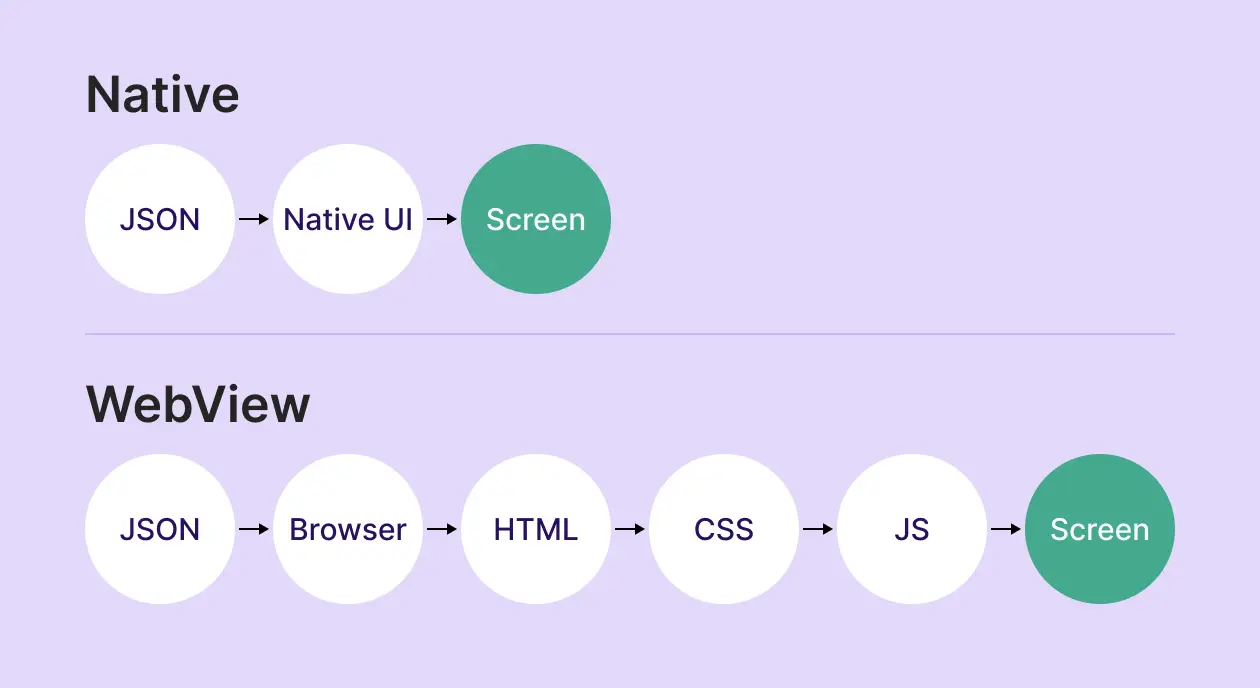
When Adapty fires a paywall, the SDK either has a config payload waiting in memory or fetches one from a CDN edge. The payload is JSON describing a screen as a tree of primitives. The SDK maps each primitive to a SwiftUI component on iOS or a Jetpack Compose component on Android, mounts the view hierarchy into the existing window scene, and paints the first frame. The render pipeline downstream of SwiftUI and Compose is the one your home screen uses.
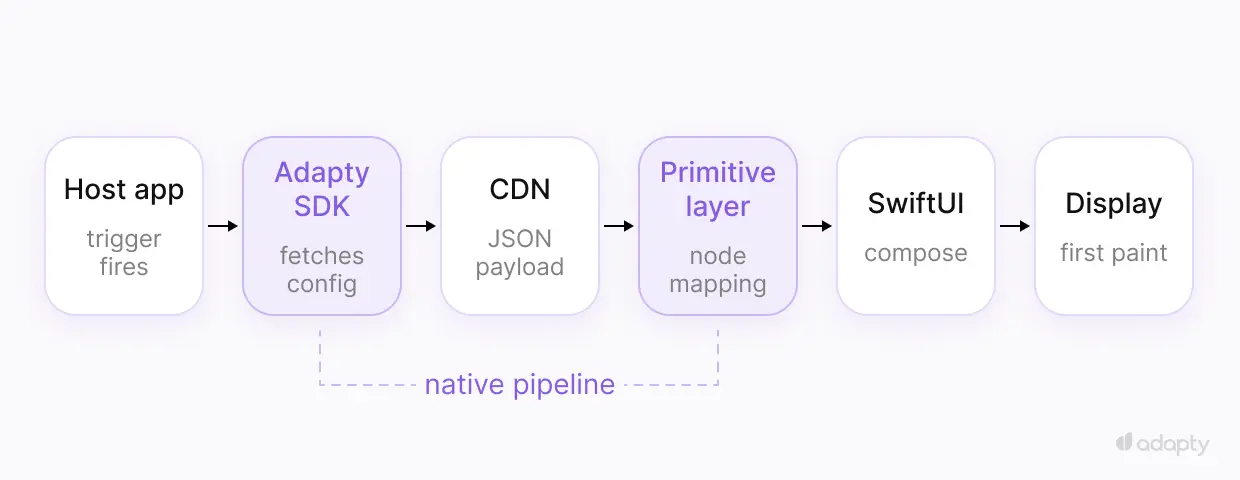
The runtime cost of this approach lives in the SDK install, paid once. After that, every paywall trigger renders against an existing UI framework that's already loaded.
A WebView paywall takes a different path. The SDK instantiates a WKWebView on iOS or a WebView on Android. The framework loads the HTML payload, and WebKit or Chromium parses it, runs layout, executes the JavaScript, and paints. Published benchmarks put WKWebView cold instantiation at roughly 50ms or more on iOS, and WebView creation at 200ms or higher on Android, before the HTML starts parsing. Parse and layout add more, scaling with payload size.
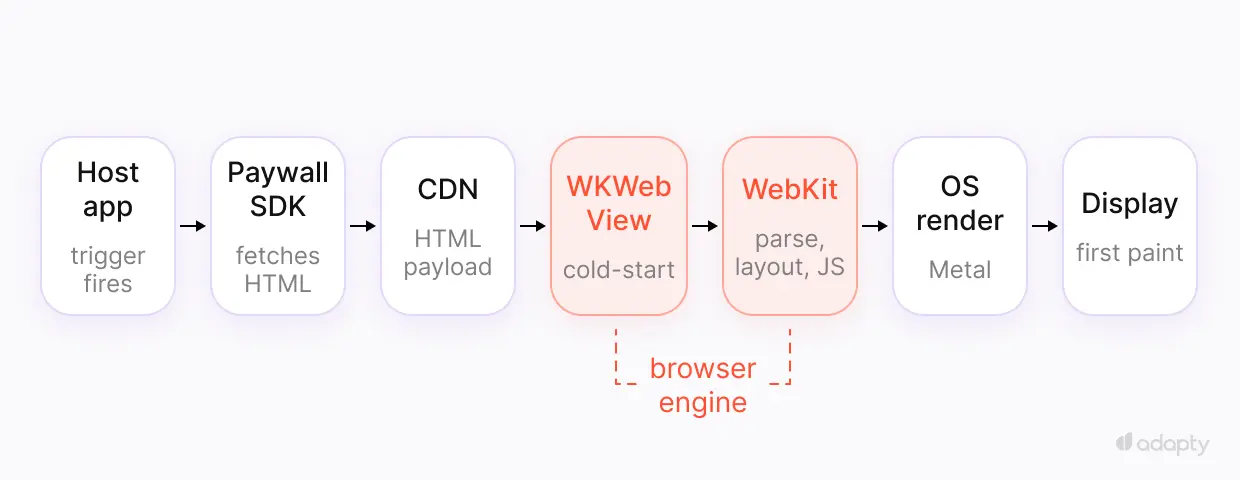
The paint also arrives in stages. The browser downloads and parses the JavaScript and CSS, runs the first visible-area render, then downloads web fonts separately and repaints once they arrive. A WebView paywall can repaint two or three times before it settles. The user can watch text restyle and layout shift in the moment they're deciding whether to pay.
Pre-warming a WebView mitigates the cold-start. So does keeping a hidden one in memory, or placing the paywall deep enough in a mandatory onboarding flow that the WebView is already warm by the time it fires. All three work. All three add complexity or constraints to the host app. Native rendering avoids the cold-start without any of them.
Why fast paywall rendering matters more than your dashboard shows?
Paywalls are the screens closest to revenue. Every millisecond between trigger and first paint is a millisecond the user can spend doing something else, like getting a notification, switching apps, or locking the phone. Native rendering closes that gap: The paywall paints in one pass with no JavaScript and CSS to download first.
Adapty paywalls hit first paint inside the OS frame budget once the SDK has the config. Config delivery runs on a global CDN with points of presence in 330+ cities, so a device fetches its paywall config from a nearby edge rather than a distant origin.
The cost of slow rendering doesn't show up in most paywall dashboards. A/A tests measure conversion among users who saw both variants, but the latency-driven drop-off lives upstream of the measurement. To catch it, you'd have to instrument the gap between trigger fired and first paint visible, then compare drop-off rates in that window across rendering paths. Few teams do, because the data is hard to gather and the answer rarely flatters whichever path the team has already picked.
A single paywall shown once survives a few hundred milliseconds of cold start. The bigger gain from native rendering happens at the very first paint: the paywall appears in one pass, with no assets to download and no repaints as fonts arrive. The earlier the paywall fires in a session, the more that matters.
For Flow & Paywall Builder sequences (onboarding, paywall, post-purchase), this matters most at the entry point. The user hasn't committed to the flow yet, and a slow first screen is where you lose them.
What does "accessibility by default" mean?
Native rendering inherits the OS accessibility tree. Dynamic Type on iOS reads the user's system text size and scales the UI. VoiceOver and TalkBack navigate the same component hierarchy that the rest of the app exposes. Switch Control, Voice Control, and reduced-motion settings all work because the components are the same ones the OS already knows how to handle. Adapty paywalls inherit all of this from SwiftUI and Compose without us writing accessibility code per primitive.
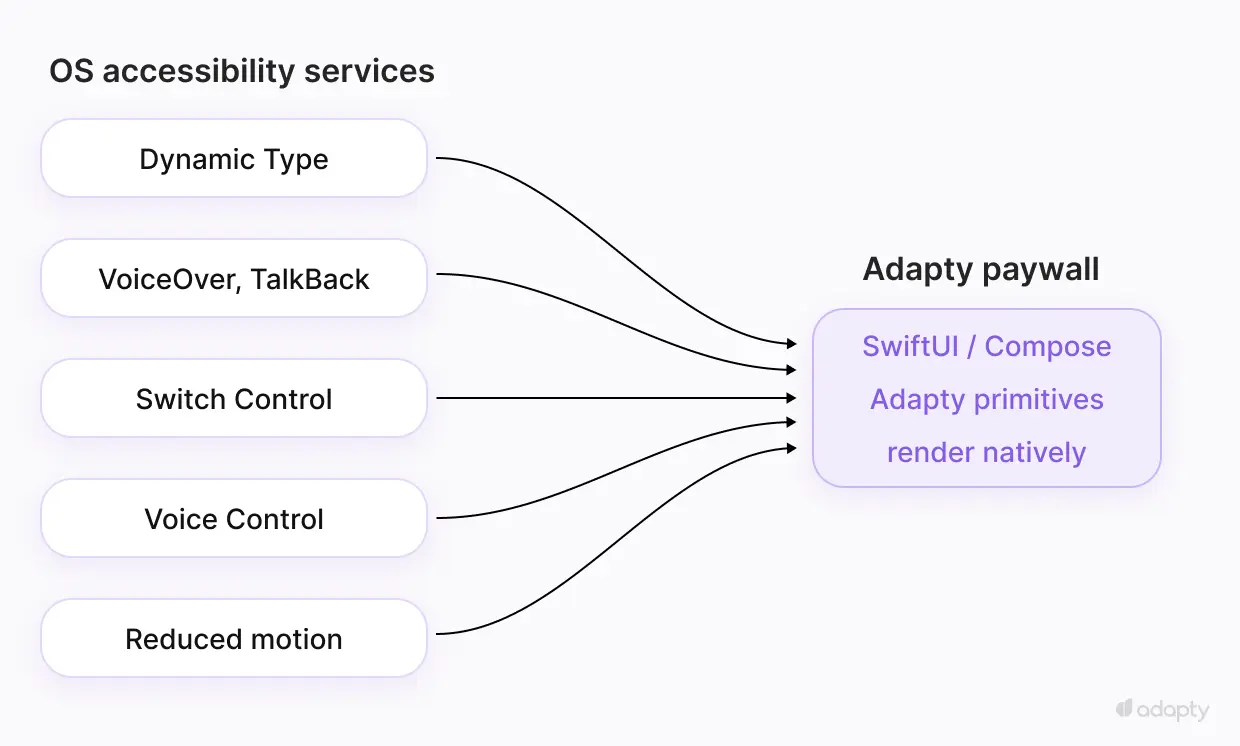
When Apple ships a new accessibility feature in iOS 27, it appears in Adapty paywalls as soon as customers update to a supported SDK version. Android works the same way. The OS owns the accessibility surface, so every OS-level improvement reaches our paywalls without a Flow & Paywall Builder release.
WebView takes a longer path. WKWebView and Android WebView expose accessibility nodes, and HTML with proper ARIA labels lets VoiceOver and TalkBack read the screen. But features like Dynamic Type require custom JavaScript that listens for the system setting and rewrites CSS at runtime. Public defenses of the WebView approach acknowledge this: support is technically possible, but doesn't come for free.
For paywalls, accessibility is upstream of conversion. If your paywall is the screen where a user decides to pay you, the system reader and the system text size are part of whether they finish the decision.
The "server-driven UI is HTML anyway" argument
The strongest case for WebView paywalls goes like this: Server-driven UI is just HTML. Whether you send JSON that maps to native components or HTML that renders directly, both approaches transmit a description of an interface over a network call.
The argument is partly right. Both approaches do send a description over the wire. What's different is what reads the description on the other side.
JSON describing native primitives gets handed to SwiftUI or Compose, and the OS renders it through the same pipeline your home screen uses. Accessibility tree, gesture system, animation framework — all inherited from the platform.
HTML describing a webpage gets handed to WebKit or Blink. A browser engine renders inside your app, with its own render pipeline, its own accessibility tree exposed through a bridge, and its own gesture system that follows browser conventions.
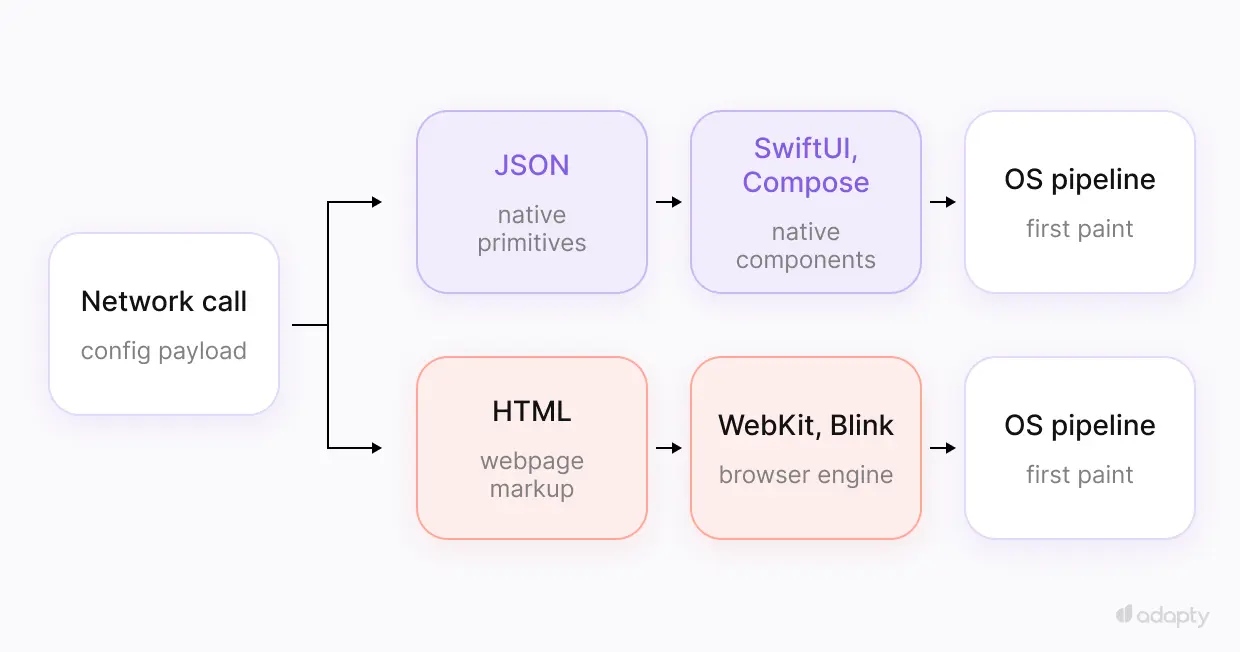
The network call is the same. Everything downstream is where the trade-offs sit.
What WebView gets right
A piece about native rendering loses credibility if it pretends the alternative has no upside. WebView wins in one place; we took it seriously when we designed Flow & Paywall Builder: render parity across platforms.
One HTML payload renders consistently on iOS, Android, React Native, Flutter, and the web. Getting the same parity across native runtimes requires engineering work, because every platform has its own default font weights, padding, and component behavior. Translation between platforms drifts unless somebody maintains it. For a small cross-platform team without native engineers, WebView's single render engine is useful.
The second is backwards compatibility. HTML and CSS are forgiving. Browser engines have rendered old markup alongside new features for decades. A paywall built on a 2021 WebView design will probably still render today without intervention. Native rendering ties paywall features to SDK versions, so adopting a new primitive sometimes means a customer SDK update. For most teams that ship app updates regularly, this is a minor cost rather than a recurring problem.
We absorbed the parity cost internally. The cross-platform team solves it once, so customers don't have to.
How we built Flow & Paywall Builder to make native rendering practical
Picking native rendering was the choice. Making it work for thousands of apps shipping paywalls through Flow & Paywall Builder is the engineering.
The primitive system
Every component in Flow & Paywall Builder (buttons, products, surveys, carousels, and conditional containers) is defined once in a spec that isn't tied to any platform. Each runtime we support has its own implementation of that spec: SwiftUI on iOS, Compose on Android, and per-runtime mappings for React Native, Flutter, KMP, Capacitor, Expo, and Unity. Our customers describe a paywall once and get native output on every platform their app ships to. When iOS shipped Liquid Glass, our iOS implementation adopted it. The Android Compose mapping picked up Material 3 Expressive the same way. You don't need to write platform-specific code for either.
Cold-start budget
First paint on a native paywall is bounded by the view hierarchy mount and layout pass. There's no JavaScript bundle to download and no fonts to fetch before the screen appears, because the components are compiled into the app and the fonts are the system's. For multi-screen flows, subsequent screens render incrementally against the existing hierarchy.
CDN config delivery
One real advantage of WebView is shipping paywall changes without an app release. We wanted native to match that. Flow configs are delivered through a CDN spanning 330+ cities worldwide. You can ship paywall changes from the dashboard to every device on the next trigger, with no app release.
Offline fallbacks
If the device is offline or the config fetch fails, the SDK falls back to a cached version of the flow, so users see a paywall. Cache freshness is configurable per flow.
Two-way SDK bridge
Native rendering lives in the host app's process, which makes data exchange between app and paywall a function call rather than a postMessage. The Adapty SDK passes data into the flow (user name, subscription status, custom attributes) and takes data back after completion (survey responses, input fields, computed values from scripts). With a WebView bridge, the same exchange goes through postMessage and a serialization layer.
Conditional logic and scripts
Flow & Paywall Builder supports conditional rendering and lightweight scripts at the primitive level. Show a screen only if the user is in cohort X. Compute a localized price from base currency. Route to a different paywall based on attribution source. The scripts run inside the SDK, which keeps them out of a browser-hosted JavaScript runtime.
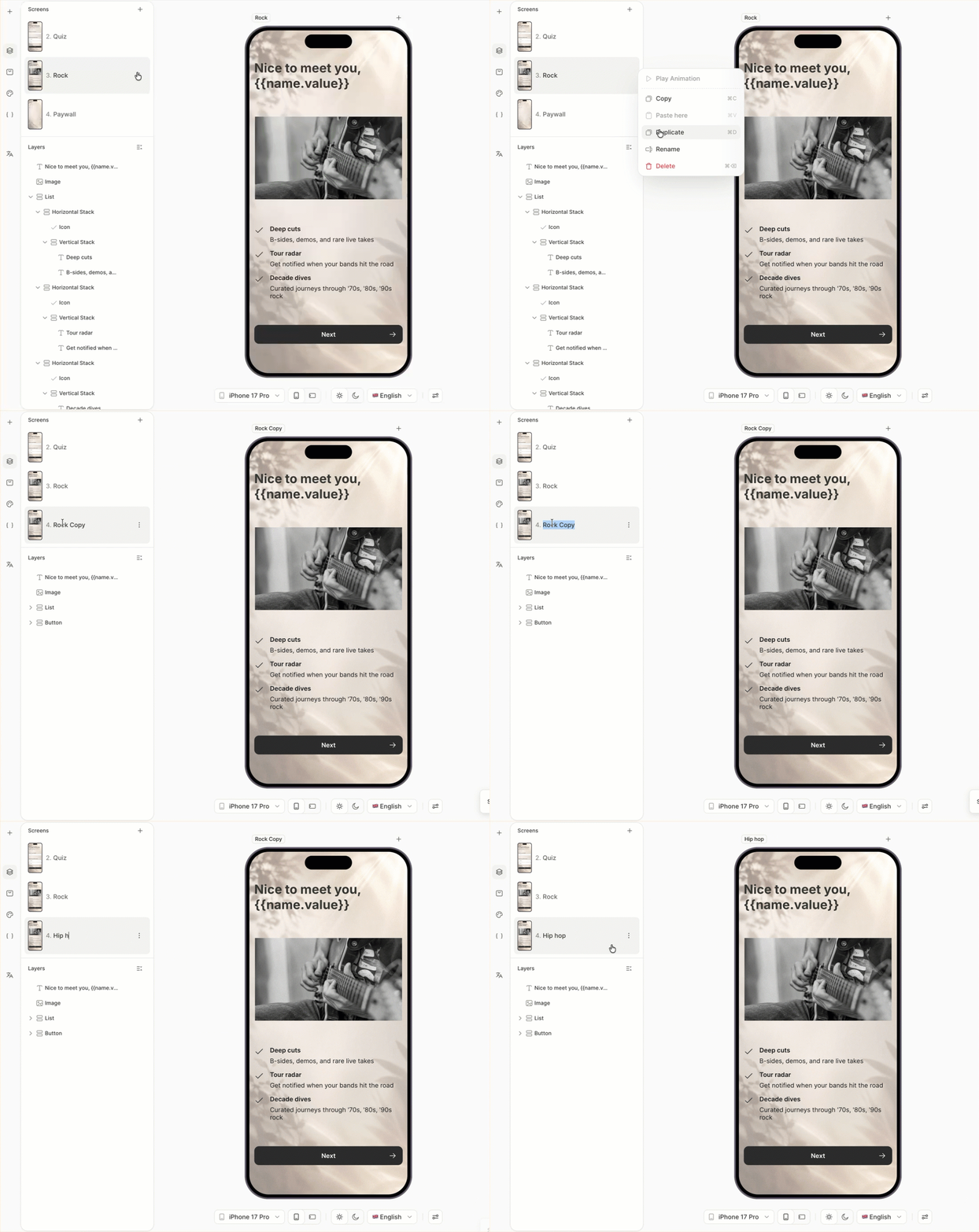
Product specifics are on the Flow & Paywall Builder page. If you want to go deeper on how it fits your stack (rendering, SDK integration, multi-platform setup, flow-level experiments), book a technical call with our team.
When this decision doesn't matter
Plenty of paywalls are simple. One screen, one CTA, minimal motion, shown to a user who already decided to pay. For that paywall, the rendering architecture is a rounding error. Pick whichever your team ships faster.
The decision matters more when the paywall is the front door to a longer flow, when your users come from accessibility-sensitive segments, or when premium feel is part of the product. In those cases, the framework above is how we'd reason through it.