
Handle onboarding events in Kotlin Multiplatform SDK
Onboardings are deprecated starting with Adapty SDK v4. Build flows instead: unlike onboardings, which run inside a WebView, flows render natively on the device — smoother animations, a consistent native look and feel, faster load times, and no WebView runtime dependency.
Before you start, ensure that:
- You have installed Adapty Kotlin Multiplatform SDK 3.15.0 or later.
- You have created an onboarding.
- You have added the onboarding to a placement.
Onboardings configured with the builder generate events your app can respond to. Learn how to respond to these events below.
Set up the onboarding event observer
To handle onboarding events, you need to implement the AdaptyUIOnboardingsEventsObserver interface and set it up with AdaptyUI.setOnboardingsEventsObserver(). This should be done early in your app’s lifecycle, typically in your main activity or app initialization.
import com.adapty.kmp.AdaptyUI
import com.adapty.kmp.AdaptyUIOnboardingsEventsObserver

// In your app initialization
AdaptyUI.setOnboardingsEventsObserver(MyAdaptyUIOnboardingsEventsObserver())
Custom actions
In the builder, you can add a custom action to a button and assign it an ID. Then, you can use this ID in your code and handle it as a custom action.
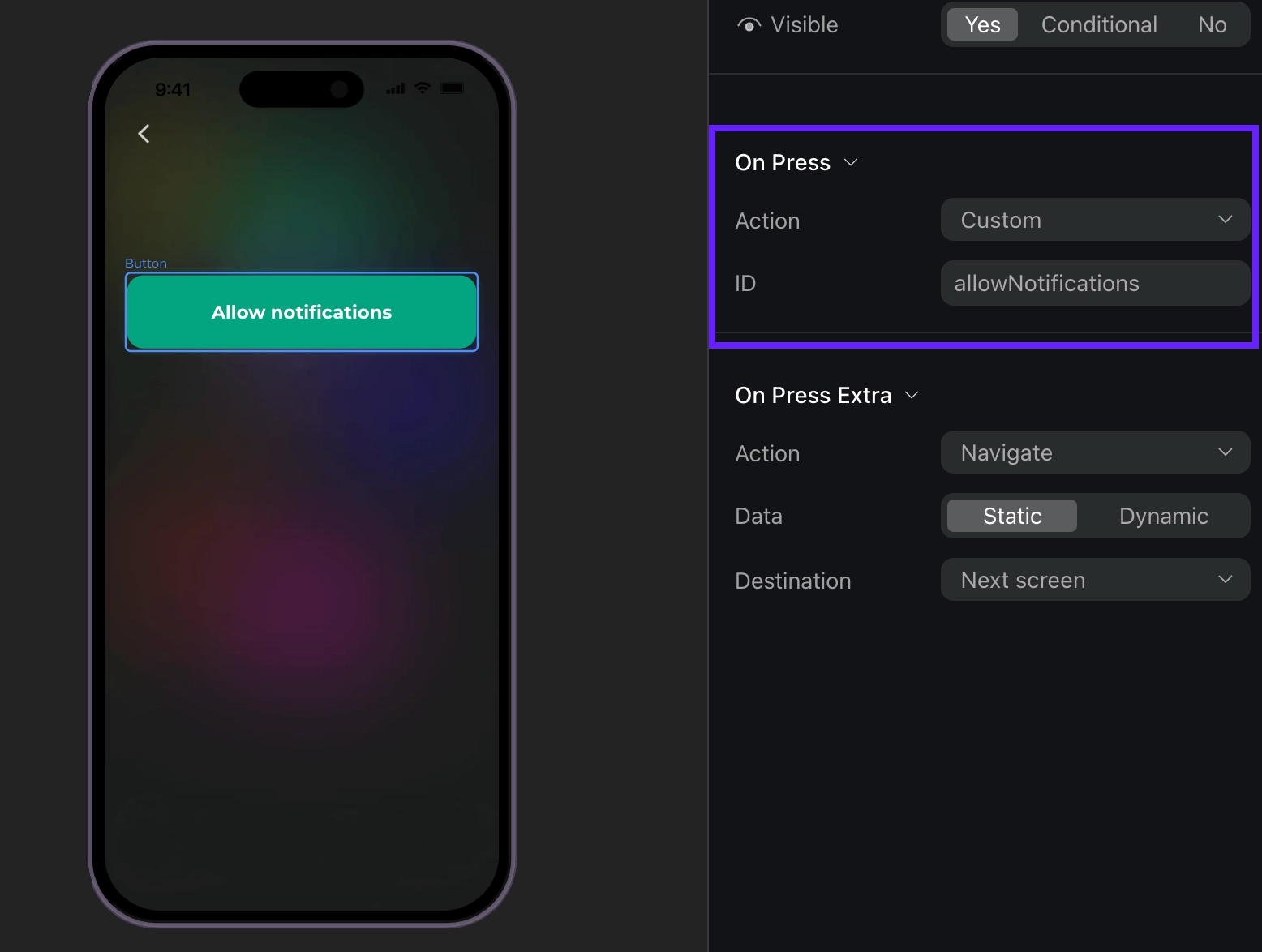
For example, if a user taps a custom button, like Login or Allow notifications, the delegate method onCustomAction will be triggered with the action ID from the builder. You can create your own IDs, like “allowNotifications”.
import com.adapty.kmp.Adapty
import com.adapty.kmp.AdaptyUI
import com.adapty.kmp.AdaptyUIOnboardingsEventsObserver
import com.adapty.kmp.models.AdaptyUIOnboardingView
import com.adapty.kmp.models.AdaptyUIOnboardingMeta

class MyAdaptyUIOnboardingsEventsObserver : AdaptyUIOnboardingsEventsObserver {
    override fun onboardingViewOnCustomAction(
        view: AdaptyUIOnboardingView,
        meta: AdaptyUIOnboardingMeta,
        actionId: String
    ) {
        when (actionId) {
            "openPaywall" -> {
                // Display paywall from onboarding
                // You would typically fetch and present a new paywall here
                mainUiScope.launch {
                    // Example: Get the flow by placement ID
                    // Adapty.getFlow("your_placement_id").onSuccess { flow ->
                    //     AdaptyUI.createFlowView(flow).onSuccess { view ->
                    //         view.present()
                    //     }
                    // }
                }
            }
            "allowNotifications" -> {
                // Handle notification permissions
            }
            else -> {
                // Handle other custom actions
            }
        }
    }
}

// Set up the observer
AdaptyUI.setOnboardingsEventsObserver(MyAdaptyUIOnboardingsEventsObserver())
Event example (Click to expand)
{
    "actionId": "allowNotifications",
    "meta": {
    "onboardingId": "onboarding_123",
    "screenClientId": "profile_screen",
    "screenIndex": 0,
    "screensTotal": 3
}
}
Closing onboarding
Onboarding is considered closed when a user taps a button with the Close action assigned. You need to manage what happens when a user closes the onboarding. For example:
You need to manage what happens when a user closes the onboarding. For instance, you need to stop displaying the onboarding itself.
If you are using createNativeOnboardingView, view.isStandaloneView is false — the default implementation does not call view.dismiss(). Remove the view from your layout and call dispose() on it in this callback instead.
import com.adapty.kmp.AdaptyUI
import com.adapty.kmp.AdaptyUIOnboardingsEventsObserver
import com.adapty.kmp.models.AdaptyUIOnboardingView
import com.adapty.kmp.models.AdaptyUIOnboardingMeta

class MyAdaptyUIOnboardingsEventsObserver : AdaptyUIOnboardingsEventsObserver {
    override fun onboardingViewOnCloseAction(
        view: AdaptyUIOnboardingView,
        meta: AdaptyUIOnboardingMeta,
        actionId: String
    ) {
        // Dismiss the onboarding screen
        mainUiScope.launch {
            view.dismiss()
        }

        // Additional cleanup or navigation logic can be added here
        // For example, navigate back or show main app content
    }
}

// Set up the observer
AdaptyUI.setOnboardingsEventsObserver(MyAdaptyUIOnboardingsEventsObserver())
Event example (Click to expand)
{
    "action_id": "close_button",
    "meta": {
    "onboarding_id": "onboarding_123",
    "screen_cid": "final_screen",
    "screen_index": 3,
    "total_screens": 4
}
}
Opening a paywall
Handle this event to open a paywall if you want to open it inside the onboarding. If you want to open a paywall after it is closed, there is a more straightforward way to do it – handle onboardingViewOnCloseAction and open a paywall without relying on the event data.
The most seamless way to work with paywalls in onboardings is to make the action ID equal to a paywall placement ID. This way, you can use the placement ID to get and open the paywall right away:
import com.adapty.kmp.Adapty
import com.adapty.kmp.AdaptyUI
import com.adapty.kmp.AdaptyUIOnboardingsEventsObserver
import com.adapty.kmp.models.AdaptyUIOnboardingView
import com.adapty.kmp.models.AdaptyUIOnboardingMeta

class MyAdaptyUIOnboardingsEventsObserver : AdaptyUIOnboardingsEventsObserver {
    override fun onboardingViewOnPaywallAction(
        view: AdaptyUIOnboardingView,
        meta: AdaptyUIOnboardingMeta,
        actionId: String
    ) {
        // Get the flow using the placement ID from the action
        mainUiScope.launch {
            Adapty.getFlow(placementId = actionId)
                .onSuccess { flow ->
                    AdaptyUI.createFlowView(flow)
                        .onSuccess { view ->
                            view.present()
                        }
                        .onError { error ->
                            // handle the error
                        }
                }
                .onError { error ->
                    // handle the error
                }
        }
    }
}

// Set up the observer
AdaptyUI.setOnboardingsEventsObserver(MyAdaptyUIOnboardingsEventsObserver())
Event example (Click to expand)
{
    "action_id": "premium_offer_1",
    "meta": {
    "onboarding_id": "onboarding_123",
    "screen_cid": "pricing_screen",
    "screen_index": 2,
    "total_screens": 4
}
}
Finishing loading onboarding
When an onboarding finishes loading, this method will be invoked:
import com.adapty.kmp.AdaptyUI
import com.adapty.kmp.AdaptyUIOnboardingsEventsObserver
import com.adapty.kmp.models.AdaptyUIOnboardingView
import com.adapty.kmp.models.AdaptyUIOnboardingMeta

class MyAdaptyUIOnboardingsEventsObserver : AdaptyUIOnboardingsEventsObserver {
    override fun onboardingViewDidFinishLoading(
        view: AdaptyUIOnboardingView,
        meta: AdaptyUIOnboardingMeta
    ) {
        // Handle loading completion
        // You can add any initialization logic here
    }
}

// Set up the observer
AdaptyUI.setOnboardingsEventsObserver(MyAdaptyUIOnboardingsEventsObserver())
Event example (Click to expand)
{
    "meta": {
    "onboarding_id": "onboarding_123",
    "screen_cid": "welcome_screen",
    "screen_index": 0,
    "total_screens": 4
}
}
Navigation events
The onboardingViewOnAnalyticsEvent method is called when various analytics events occur during the onboarding flow.
The event object can be one of the following types:
| Type | Description |
|---|---|
AdaptyOnboardingsAnalyticsEventOnboardingStarted | When the onboarding has been loaded |
AdaptyOnboardingsAnalyticsEventScreenPresented | When any screen is shown |
AdaptyOnboardingsAnalyticsEventScreenCompleted | When a screen is completed. Includes optional elementId (identifier of the completed element) and optional reply (response from the user). Triggered when users perform any action to exit the screen. |
AdaptyOnboardingsAnalyticsEventSecondScreenPresented | When the second screen is shown |
AdaptyOnboardingsAnalyticsEventUserEmailCollected | Triggered when the user’s email is collected via the input field |
AdaptyOnboardingsAnalyticsEventOnboardingCompleted | Triggered when a user reaches a screen with the final ID. If you need this event, assign the final ID to the last screen. |
AdaptyOnboardingsAnalyticsEventUnknown | For any unrecognized event type. Includes name (the name of the unknown event) and meta (additional metadata) |
Each event includes meta information containing:
| Field | Description |
|---|---|
onboardingId | Unique identifier of the onboarding flow |
screenClientId | Identifier of the current screen |
screenIndex | Current screen’s position in the flow |
screensTotal | Total number of screens in the flow |
Here’s an example of how you can use analytics events for tracking:
import com.adapty.kmp.AdaptyUI
import com.adapty.kmp.AdaptyUIOnboardingsEventsObserver
import com.adapty.kmp.models.AdaptyOnboardingsAnalyticsEvent
import com.adapty.kmp.models.AdaptyOnboardingsAnalyticsEventOnboardingCompleted
import com.adapty.kmp.models.AdaptyOnboardingsAnalyticsEventOnboardingStarted
import com.adapty.kmp.models.AdaptyOnboardingsAnalyticsEventScreenCompleted
import com.adapty.kmp.models.AdaptyOnboardingsAnalyticsEventScreenPresented
import com.adapty.kmp.models.AdaptyOnboardingsAnalyticsEventUnknown
import com.adapty.kmp.models.AdaptyUIOnboardingView
import com.adapty.kmp.models.AdaptyUIOnboardingMeta

class MyAdaptyUIOnboardingsEventsObserver : AdaptyUIOnboardingsEventsObserver {
    override fun onboardingViewOnAnalyticsEvent(
        view: AdaptyUIOnboardingView,
        meta: AdaptyUIOnboardingMeta,
        event: AdaptyOnboardingsAnalyticsEvent
    ) {
        when (event) {
            is AdaptyOnboardingsAnalyticsEventOnboardingStarted -> {
                // Track onboarding start
                trackEvent("onboarding_started", event.meta)
            }
            is AdaptyOnboardingsAnalyticsEventScreenPresented -> {
                // Track screen presentation
                trackEvent("screen_presented", event.meta)
            }
            is AdaptyOnboardingsAnalyticsEventScreenCompleted -> {
                // Track screen completion with user response
                trackEvent("screen_completed", event.meta, event.elementId, event.reply)
            }
            is AdaptyOnboardingsAnalyticsEventOnboardingCompleted -> {
                // Track successful onboarding completion
                trackEvent("onboarding_completed", event.meta)
            }
            is AdaptyOnboardingsAnalyticsEventUnknown -> {
                // Handle unknown events
                trackEvent(event.name, event.meta)
            }
            // Handle other cases as needed
        }
    }

    private fun trackEvent(eventName: String, meta: AdaptyUIOnboardingMeta, elementId: String? = null, reply: String? = null) {
        // Implement your analytics tracking here
        // For example, send to your analytics service
    }
}

// Set up the observer
AdaptyUI.setOnboardingsEventsObserver(MyAdaptyUIOnboardingsEventsObserver())
Event examples (Click to expand)
// OnboardingStarted
{
    "meta": {
    "onboardingId": "onboarding_123",
    "screenClientId": "welcome_screen",
    "screenIndex": 0,
    "screensTotal": 4
}
}

// ScreenPresented
{
    "meta": {
    "onboardingId": "onboarding_123",
    "screenClientId": "interests_screen",
    "screenIndex": 2,
    "screensTotal": 4
}
}

// ScreenCompleted
{
    "meta": {
    "onboardingId": "onboarding_123",
    "screenClientId": "profile_screen",
    "screenIndex": 1,
    "screensTotal": 4
},
    "elementId": "profile_form",
    "reply": "success"
}

// SecondScreenPresented
{
    "meta": {
    "onboardingId": "onboarding_123",
    "screenClientId": "profile_screen",
    "screenIndex": 1,
    "screensTotal": 4
}
}

// UserEmailCollected
{
    "meta": {
    "onboardingId": "onboarding_123",
    "screenClientId": "profile_screen",
    "screenIndex": 1,
    "screensTotal": 4
}
}

// OnboardingCompleted
{
    "meta": {
    "onboardingId": "onboarding_123",
    "screenClientId": "final_screen",
    "screenIndex": 3,
    "screensTotal": 4
}
}