TL;DR
Apple’s new second ad placement inside Search Results goes global on March 17. Apps running active in-app events physically remove that slot from the page for users who’ve ever installed them — turning a retention feature into an ASO defense tool. This article explains the mechanic, who it works for, and how to run events continuously enough to keep the protection alive.
Introduction
Your branded keyword rankings are solid. Your ASO score is healthy. Then a competitor with a bigger Apple Ads budget starts appearing at position 3 — right inside the organic results your team spent months building.
That’s the new reality of App Store Search starting March 17, when Apple’s additional ad placements go live globally. The first rollout hit the UK in early March, Japan follows on March 10, and the rest of Apple Ads markets get it by the end of the month.
Most teams are focused on the paid side of this shift — adjusting bids, restructuring campaigns, reviewing CPT benchmarks. That’s the right instinct. But there’s a parallel lever that’s entirely free, already available, and directly suppresses the second ad slot for a significant portion of your search traffic.
In-app events.
Here’s how the mechanic works, who it actually protects, and what you need to do before the global rollout hits.
Why does Apple’s second ad placement change the rules of ASO?
For years, the App Store Search Results page had a stable structure: one sponsored result at the top, organic results below. The implicit contract was clear — rank well organically, own the page below position 1. ASO teams built strategies around that floor.
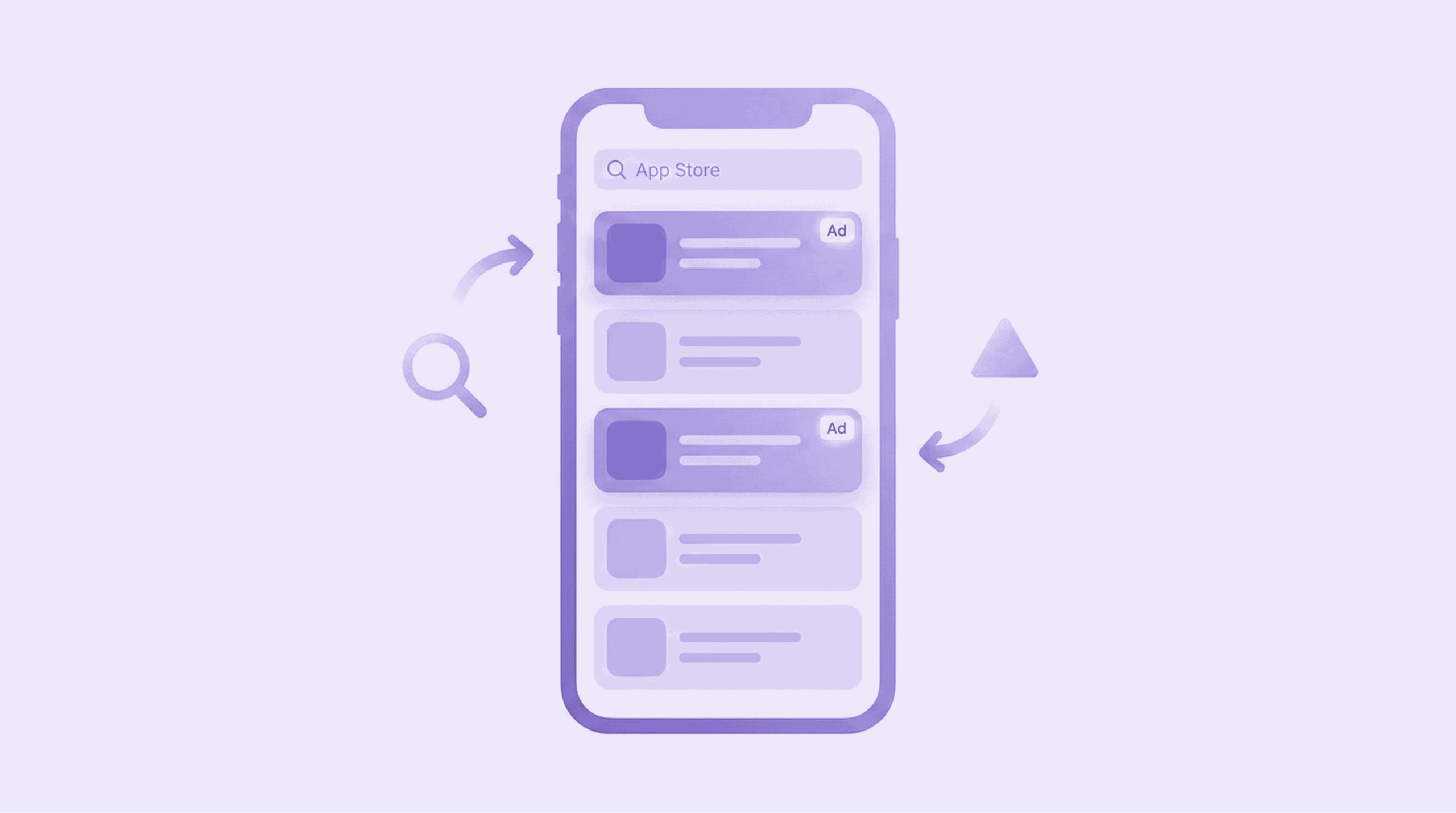
The new placement breaks that contract. A second ad now lives inside the organic list, not just above it. Based on early live observations in the UK, the sponsored result can appear as low as position 3. That position used to belong entirely to organic. It was the highest-value real estate for apps with strong ASO — the first result a user sees after consciously scrolling past the top ad.
The ad format itself hasn’t changed. The “Ad” label is still there. But position influences behavior more than labels do. A competitor at position 3 with a polished custom product page will capture clicks from users who were actively scanning for the best option, not just the first one. These are your highest-intent searchers — the ones most likely to install, start a trial, and convert to a subscription.
The structural implication for ASO: organic ranking alone no longer guarantees clean visibility on the most valuable queries. High ASO scores still matter — they determine your organic position relative to other organic results. But paid results can now intercept users at positions that ranking optimizations cannot protect.
That makes the question of how to defend specific audience segments, not just rankings, more urgent than it’s ever been.
How do in-app events physically block the second ad slot?
The mechanic is specific and worth understanding precisely, because it only works under certain conditions.
When a user searches and Apple identifies them as someone who has previously installed your app, the system shows your listing in an expanded format. Instead of the standard compact, the listing displays a full-width in-app event card — a tall banner-style row with a hero image or video, event headline, short description, and a distinct CTA badge.
That expanded card is significantly taller than a standard listing. Tall enough that there is no room for a second paid placement on the same visible screen without pushing it entirely below the fold — which, functionally, eliminates it.
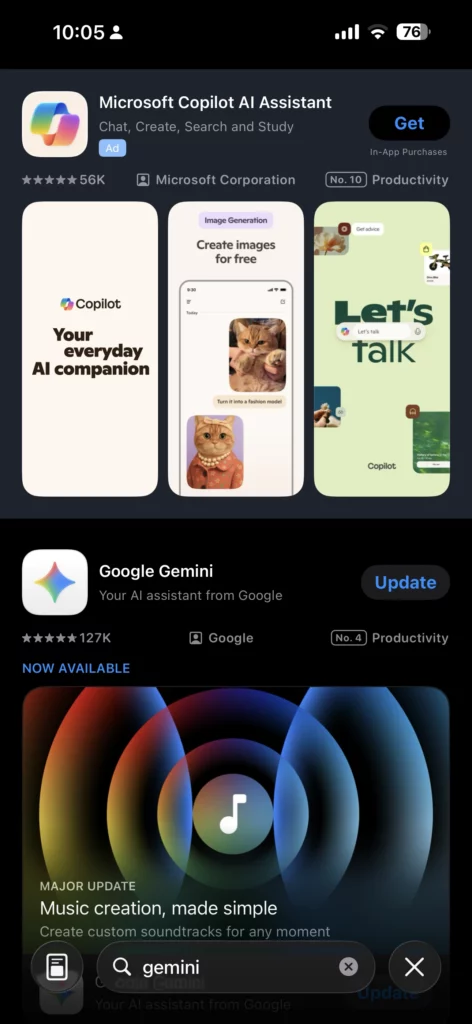
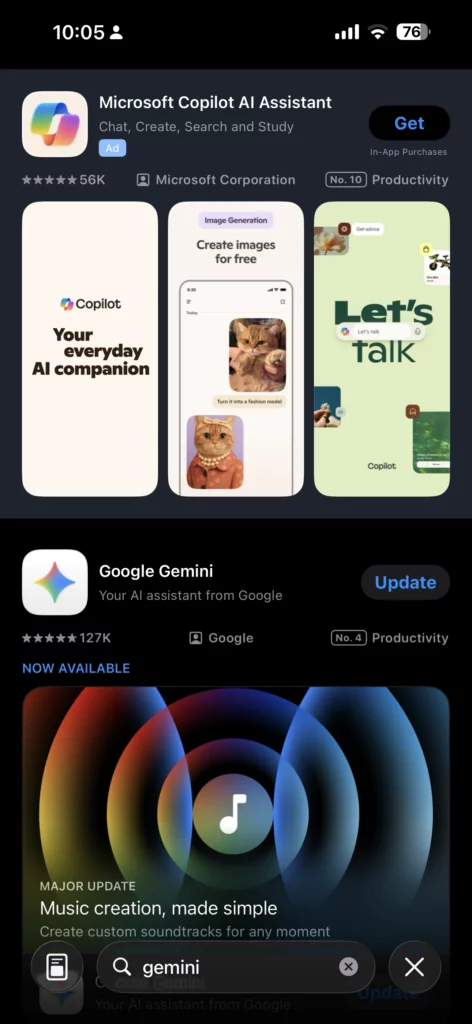
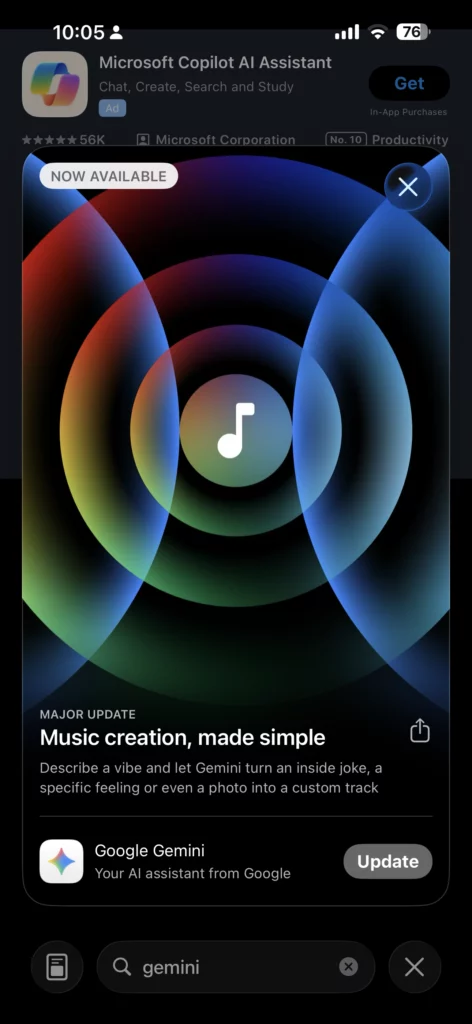
The clearest live demonstration of this: search “gemini” on a device where Google Gemini was previously installed. Microsoft Copilot’s ad appears at the top. Immediately below it: Gemini’s expanded event card for “Music creation, made simple.” No second ad slot anywhere on the page.
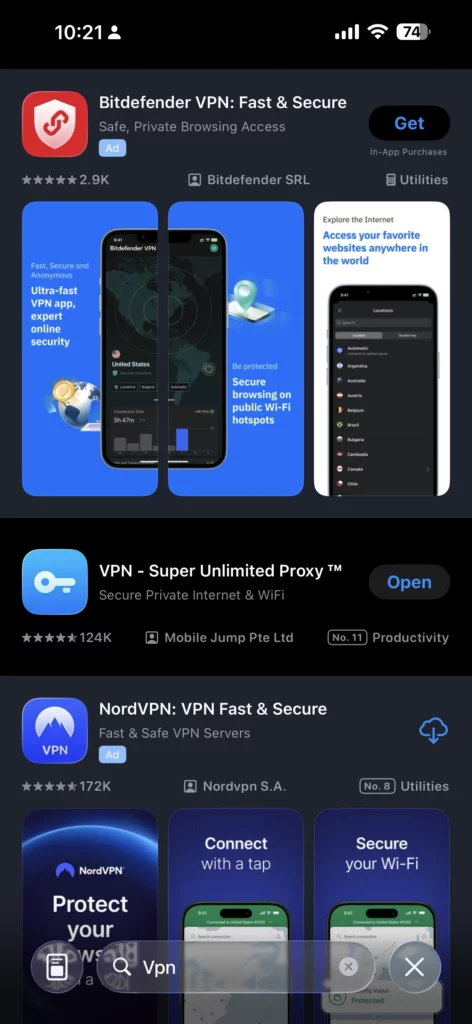
Now search “VPN” on the same device, without a prior install of VPN Super Unlimited Proxy. Bitdefender’s ad at the top, then VPN Super Unlimited Proxy’s standard compact listing, then NordVPN’s ad buying the second slot right below it. Unobstructed, because the organic result didn’t expand.
The event card doesn’t push the ad down. It eliminates the space the ad would have occupied. For that user, on that query, the competitor cannot buy placement next to your organic result regardless of their bid.
Who actually sees the in-app event card?
Apple’s official documentation draws a clean line: event cards replace screenshots in Search Results for users who have the app installed. New users see screenshots. Installed users see events.
The real behavior is broader, and it matters for how you calculate the protective value of running events.
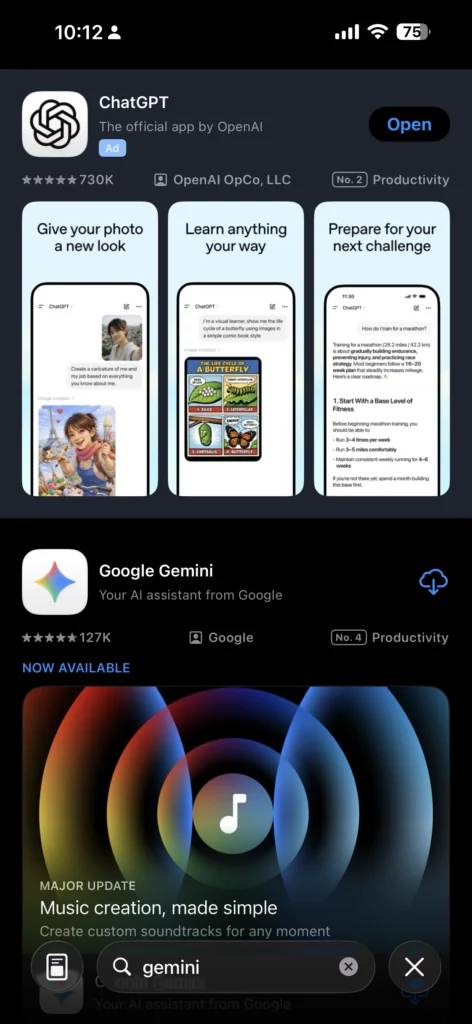
Three user states trigger the expanded event card in Search Results.
Current users — people with the app installed and actively using it. This is the clearest case and matches Apple’s documentation exactly.
Lapsed users — people with the app still installed but who haven’t opened it in weeks or months. The app is on the device, Apple sees the install, the event card shows. This is a meaningful segment for most apps: a significant share of installed base is dormant at any given time.
Former users who deleted the app — this is the segment Apple’s docs understate. Apple retains the association between a user’s Apple ID and apps they have previously downloaded, even after deletion. A user who installed your app eight months ago and deleted it last spring is still classified as a prior user. When they search your category today, they are likely to see your event card, not your screenshots.
The practical implication: the protective audience is larger than “current active users.” It includes everyone who has ever downloaded your app — including churned users who might not have thought about you in months. That’s your entire historical install base, not just your current MAU.
For new users with zero history with your app, screenshots still show. The event mechanic is exclusively for users Apple can identify as having some prior relationship with your product.
Why have in-app events been underused until now?
In-app events launched with a clear retention pitch: re-engage lapsed users, surface new features, drive seasonal spikes. The feature worked for its stated purpose, and teams that ran events consistently saw real lifts in reactivation rates.
Adoption stayed low anyway, for predictable reasons.
Production overhead is real. Each event requires a hero image or video, a localized title and short description across every supported language, accurate start and end dates, and App Store review — which can take several days. For teams already stretched across paid UA, ASO, and lifecycle, events routinely fell to the bottom of the queue.
The attribution problem made ROI hard to justify. Retention metrics are notoriously difficult to isolate. Did that reactivation come from the in-app event, a push notification, a remarketing campaign, or the user randomly opening the app? The ambiguity made events feel like a nice-to-have rather than a measurable channel.
The competitive protection angle didn’t exist until now. Before multiple ad placements arrived, there was no mechanism by which running or not running an event affected whether a competitor could appear near your organic result. The feature was purely offensive — engage users, drive opens — with no defensive dimension.
That changes on March 17. Now there is a direct, concrete, zero-cost benefit to running events: for your entire historical install base, you remove the surface where a competitor can buy positioning next to your organic result. That’s a defensive value that doesn’t require attribution modeling to justify — it either works or it doesn’t, and you can see the difference on a live device in two minutes.
How often do you need to publish in-app events to keep the protection active?
In-app events run for a maximum of 31 days. When an event expires and you haven’t replaced it, your listing reverts to standard screenshot display. The expanded card disappears. The second ad slot reappears.
This means the protection is only as continuous as your publishing cadence. A single event every quarter leaves your organic results exposed for roughly eleven weeks out of thirteen. A competitor who understands this mechanic can time their spend to your gaps.
The operational implication: treat in-app events like a content calendar, not a campaign. Plan a rolling schedule of events tied to your product roadmap — feature launches, seasonal hooks, content drops, challenge mechanics, milestone updates. Most apps with active development have more than enough material to sustain one event every two to four weeks. That cadence keeps the expanded card format active for your historical install base almost permanently.
Build production buffer into the schedule. Apple review for events typically takes two to five business days, but can run longer. Submit at least a week before your intended live date. Rejections reset your timeline, so build a quality checklist into your submission process — accurate start and end dates, assets that meet App Store guidelines, metadata that matches what the event actually delivers.
Teams that maintain a consistent event cadence gain something beyond protection: they turn their entire historical install base into an addressable re-engagement audience at no incremental cost. Every new event is a reason to come back, surfaced automatically in Search Results for every prior user who searches the category.
What makes an in-app event card convert returning users?
The format does significant work on its own. Where a standard listing shows three static screenshots in a row, the event card shows a full-width hero image or autoplay video with a headline, short description, and a CTA badge. It is closer in visual weight to a mini product page than a list row.
But the creative logic for returning users is fundamentally different from the logic for new user screenshots. Screenshots answer “what does this app do?” — a question returning users already know the answer to. Event cards need to answer “why should I open this right now?” That’s the relevant question for someone who installed your app, drifted away, and is now searching the category again.
The highest-performing event cards share specific characteristics.
Time-bound framing outperforms feature announcements. “New feature: X” generates less urgency than “Do Y before [date].” Returning users are already familiar with your core value proposition. They need a reason to act now, not a reminder of what the app does.
Specific beats general. “AI music creation” outperforms “major update.” The more precisely the event title matches a concrete outcome the user cares about, the higher the click-through rate.
Video outperforms static when you have production capacity. Apple surfaces autoplay previews in the expanded card. A three-to-five second loop showing the actual experience of a new feature will outperform the most polished static frame, because it answers “is this real?” faster than any copy can.
The CTA badge matters. Apple offers several event type badges — Challenge, Competition, Live Event, Major Update, New Season, Special Event, Premiere. Badges that imply scarcity or time pressure (Challenge, Competition, Live Event) consistently drive higher engagement than informational badges.
The event title and short description are the highest-leverage copywriting in your App Store presence for the returning user audience. Treat them with the same rigor you’d apply to paywall headline copy.
Why keyword intent and paywall alignment complete the picture
In-app events protect the top of the Search Results page for your existing audience. They don’t change what happens after the tap.
The full defensive and monetization value of this mechanic only compounds when the path from search intent to paywall is aligned. A returning user who taps your event card has a specific motivation — they saw “Music creation, made simple” and wanted that. If they land on a generic paywall that talks about your full feature set, you’ve captured the tap and discarded the intent.
The same applies to paid traffic from the new ad positions. Every additional placement Apple adds to the auction is another surface where you pay for specific intent and then lose it at the paywall.
Adapty connects keyword intent to subscription outcomes at the level of detail that makes this measurable. When a new placement goes live, a creative test changes performance, or an in-app event drives a spike in reactivations, you need to see what happened at the keyword and intent cluster level — trial start rate, trial-to-paid conversion, net revenue per tap — not just aggregate ROAS.
That visibility is what separates teams that know what to do from teams that react to moves they can’t explain.
Start before March 17
The global rollout of Apple’s new ad placements is March 17. In-app events are available right now.
The concrete steps: check whether you have an active in-app event running today. If you don’t, build and submit one this week — factor in review time. Build an event calendar through Q2 that maintains continuous coverage without gaps. And set up the pre/post measurement baseline so you can quantify the protection value once the new placements are live.
If you want to see how Adapty ties in-app event traffic, Apple Ads keyword intent, and paywall performance into a single view — explore Adapty Apple Ads Manager.