Flutter is an open-source UI framework developed by Google that allows developers to build natively compiled applications for mobile (iOS and Android), web, desktop, and embedded systems from a single codebase. First released in 2017, Flutter uses the Dart programming language and ships with a rich library of customizable widgets, a high-performance rendering engine, and a hot reload feature that lets developers see code changes instantly. Today it is one of the most widely adopted cross-platform frameworks, used in production by companies like Google Pay, BMW, Alibaba, eBay, and Nubank to deliver consistent, high-performance experiences across every major platform.
What is Flutter?
Flutter is Google’s free, open-source software development kit (SDK) for building visually rich, natively compiled applications across multiple platforms from a single shared codebase. It was first announced in 2015 under the codename “Sky” and reached its stable 1.0 release in December 2018. Since then it has evolved into a complete toolkit that targets six platforms — iOS, Android, web, Windows, macOS, and Linux — plus embedded devices such as smart TVs and in-car displays.
Unlike traditional cross-platform tools that rely on web views or a JavaScript bridge, Flutter draws every pixel of the user interface itself using its own rendering engine. The code you write in Dart is compiled directly to native ARM or Intel machine code (or to JavaScript and WebAssembly for the web), with no intermediate interpreter sitting between your app and the operating system. The result is performance close to that of a fully native app, while you maintain only one codebase.
Because it is a complete SDK rather than just a UI library, Flutter includes everything a team needs to build, test, and ship an application: a reactive framework, pre-built widgets that match Material Design and iOS Cupertino conventions, a command-line interface, debugging and profiling tools, and integrations with editors like VS Code and Android Studio. For more on what an SDK actually contains, see our glossary entry on SDK.
How Flutter works: architecture explained
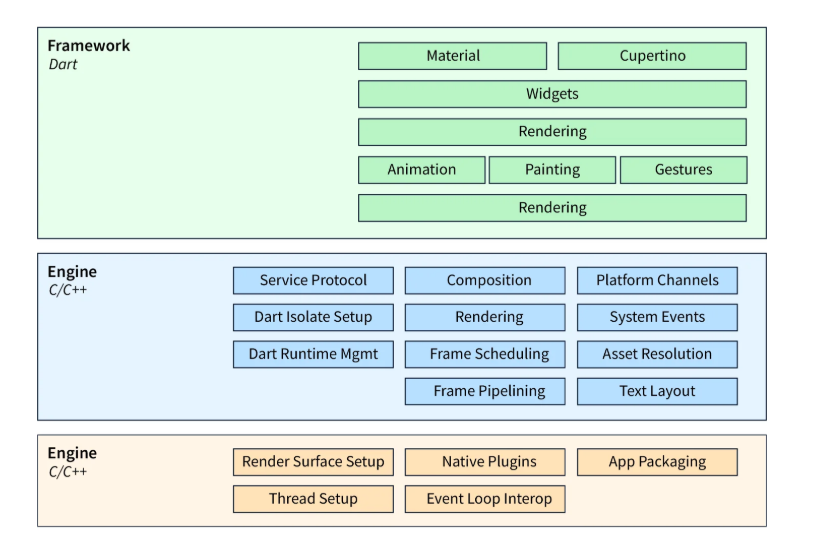
Flutter’s architecture is organized in three main layers that work together to translate your Dart code into a running app on any supported device. The key idea is separation of concerns: developers work almost exclusively at the top of the stack, while the lower layers handle rendering and platform integration without leaking complexity upward. This is what makes it possible to write a single Dart codebase that looks identical on an iPhone, a Pixel, a Windows laptop, and a web browser.
Framework layer (Dart)
At the top of the stack is the Flutter framework, written entirely in Dart. This is the part developers interact with day to day. It contains the widget library, layout system, animation primitives, gesture detection, and state management foundations. Every visible element on the screen — from a single button to a complex scrolling list — is a widget, and widgets are composed into trees to describe the interface declaratively. Because the framework is written in the same language developers use to write their app code, the entire stack above the engine can be inspected, debugged, and even overridden.
Engine layer (C++)
Below the framework sits the Flutter engine, written in C++ for performance. The engine is responsible for rasterization, animation, text layout, accessibility support, and the Dart runtime. Historically Flutter used Google’s Skia graphics library; more recent versions ship with a newer engine called Impeller, which improves rendering smoothness on iOS and Android API 29 and above. The engine is what enables Flutter apps to run at 60 or even 120 frames per second on modern devices, and it is the reason animations feel fluid rather than stuttery.
Embedder layer (platform-specific)
The embedder is the bridge between Flutter and the underlying operating system. It is written in the native language of each target platform — Objective-C/Swift for iOS and macOS, Java/Kotlin for Android, C++ for Windows and Linux, and JavaScript for the web. The embedder is responsible for launching the app, managing the surface where the engine draws, forwarding input events, and exposing platform services such as the camera, GPS, file system, and push notifications through platform channels. This layered design is also what allows Google to add new platforms to Flutter without changing the framework or engine — only a new embedder is required.
Key features of Flutter
Several technical decisions set Flutter apart from other cross-platform frameworks. Many tools promise “write once, run anywhere,” but the way Flutter delivers on that promise — by owning the rendering pipeline rather than delegating to native components — has significant implications for performance, design fidelity, and developer experience.
The most distinctive feature is the widget system. In Flutter, everything is a widget: text, padding, layout, animation, even the app itself. Widgets are immutable descriptions of part of the user interface, and they compose into trees that Flutter rebuilds efficiently whenever the underlying state changes. This composition-based model avoids the deeply nested view hierarchies that often cause performance problems in traditional Android development, and it gives designers and developers fine-grained control over every pixel on the screen.
Equally important is hot reload, often cited as the feature developers miss most when they go back to native development. Hot reload uses Dart’s just-in-time compiler to inject code changes into a running app in under a second, without losing the current navigation or input state. A developer can adjust a color, tweak a layout, or change business logic and see the result almost immediately, which dramatically shortens the feedback loop during UI work and bug fixing.
The table below summarizes the features that developers and product teams most often cite as differentiators.
| Feature | What it means |
|---|---|
| Single codebase | One Dart codebase compiles to iOS, Android, web, desktop, and embedded targets |
| Hot reload | Code changes appear in the running app in under a second, without losing state |
| Widget-based UI | Everything from layout to animation is a composable, customizable widget |
| Native compilation | Dart compiles ahead-of-time to native ARM, Intel, or JavaScript and WebAssembly |
| Impeller rendering engine | Modern graphics pipeline that reduces jank and supports smooth high-FPS animations |
| Rich widget library | Material Design and Cupertino widgets give apps a native look on each platform |
| Pub.dev ecosystem | Tens of thousands of community and official packages for almost any feature |
| Backed by Google | Active development roadmap, strong documentation, and a large global community |
Taken together, these features explain why Flutter is increasingly chosen for apps where design quality and time to market matter equally. The widget system gives designers freedom to build distinctive interfaces without fighting the framework; hot reload removes hours of waiting from a typical day of UI work; and native compilation removes the performance penalty that earlier cross-platform tools were rightly criticized for.
Advantages of using Flutter
Flutter is most often chosen when teams want to ship the same product on multiple platforms without doubling their engineering investment. The benefits fall into two categories: development-time advantages that engineers feel directly, and business-level advantages that show up in budgets, release schedules, and product metrics.
On the development side, hot reload, a unified codebase, and strong tooling combine to make day-to-day work faster and more pleasant. Developers can prototype a feature in hours instead of days, and design changes that would require separate iOS and Android implementations can be made in one place. The widget system also makes it easier to enforce a consistent design system across the app, which reduces visual bugs and shortens code review cycles.
On the business side, the practical impact is measurable. Multiple studies and case reports indicate that teams typically save 20 to 40 percent compared with maintaining two native codebases, depending on the app’s complexity and how much it relies on platform-exclusive features. Just as important, time to market shrinks: instead of staffing parallel iOS and Android teams and synchronizing their releases, a single Flutter team can launch both versions together. For startups and product teams under pressure to validate ideas quickly, this often outweighs every other consideration.
The table below summarizes the main advantages teams cite when explaining why they chose Flutter.
| Advantage | Why it matters |
|---|---|
| Faster time to market | One team ships iOS and Android together, often launching weeks or months sooner |
| Lower development cost | Teams typically report 20 to 40 percent savings vs maintaining two native codebases |
| Consistent UI across platforms | Flutter renders its own pixels, so the design looks identical on every device |
| Near-native performance | Ahead-of-time compilation and the Impeller engine deliver smooth animations |
| Hot reload productivity | Developers iterate on UI in real time, speeding up debugging and design reviews |
| Strong tooling and IDE support | First-class plugins for VS Code and Android Studio, plus a complete CLI and DevTools suite |
| Add-to-app support | Flutter modules can be embedded into existing iOS or Android codebases incrementally |
Add-to-app deserves special mention because it removes one of the biggest barriers to adoption. Teams that already maintain a native iOS or Android codebase do not have to rewrite everything to start benefiting from Flutter. Instead, individual screens or feature modules can be implemented in Flutter and embedded into the existing app, then gradually expanded as the team builds confidence in the framework. Several large enterprises, including banks and e-commerce platforms, have used this approach to migrate to Flutter over months or years rather than in a single risky rewrite.
Limitations of Flutter
Flutter is not a fit for every project. Understanding its trade-offs helps teams decide whether it is the right choice for a particular product, and where they may need to plan additional native work alongside the Flutter codebase.
The most commonly cited limitation is app size. Because Flutter bundles its own rendering engine and framework runtime inside every release build, a “hello world” Flutter app is several megabytes larger than its native equivalent. In practice this is rarely a deal-breaker — most production apps already exceed this baseline by an order of magnitude — but for apps targeting users on low-end devices or with limited storage, the extra footprint is worth measuring early.
The second is the Dart programming language. Dart is well-designed, easy to learn for anyone familiar with Java, C#, or modern JavaScript, and excellent for building user interfaces. But it is not as widely used as the languages it competes with, which can complicate hiring and means there are fewer Stack Overflow answers and third-party tutorials than for, say, JavaScript or Kotlin. Most teams find that the learning curve is short, but the hiring market for senior Flutter engineers is still maturing, especially outside major tech hubs.
The third area to watch is platform integration. Flutter handles the most common platform features through its official plugins and the pub.dev ecosystem, but the very newest iOS and Android APIs sometimes take weeks or months to be wrapped for Flutter, and a small number of highly specialized features may still require platform-specific code. The same applies to niche use cases such as advanced background processing, deep hardware integration, or specific enterprise SDKs.
| Limitation | Practical impact |
|---|---|
| Larger app size | Bundled engine and framework add several MB to the final binary vs a fully native app |
| Dart learning curve | Dart is less widely known than JavaScript, Kotlin, or Swift |
| Limited niche libraries | Some highly specialized native SDKs still require platform-specific bridging code |
| Delayed access to new OS features | Brand-new iOS or Android APIs may take weeks or months to be wrapped for Flutter |
| Web SEO challenges | Flutter Web is best for interactive apps, not for content sites that depend on SEO |
| Hiring market is still maturing | Senior Flutter engineers can be harder to find than experienced native developers |
None of these limitations are unique to Flutter — every cross-platform tool involves trade-offs against fully native development — but they are worth weighing against the benefits before committing. For most consumer apps, the trade-offs lean clearly in Flutter’s favor; for apps that depend on cutting-edge platform features or deep hardware access, a native or hybrid approach may serve better.
Flutter vs other approaches
Most teams considering Flutter compare it to React Native, Kotlin Multiplatform, and traditional fully native development. Each option represents a different philosophy about how to build a cross-platform app, and the right choice depends on what the team values most.
React Native, backed by Meta, takes a different approach to UI: instead of drawing its own pixels, it maps React components to the underlying platform’s native UI primitives. This means each platform looks slightly different by default, which is sometimes desirable and sometimes a headache. React Native’s biggest advantage is that it uses JavaScript or TypeScript, which most web developers already know, making it easier to share talent and code between web and mobile teams. Flutter’s biggest advantage in this comparison is design consistency and rendering performance.
Kotlin Multiplatform takes yet another path. Instead of sharing the UI layer, it focuses on sharing business logic, leaving UI implementation native on each platform. This is well-suited for teams that already have strong native iOS and Android skills and want to reduce duplication in shared code (networking, data models, business rules) without giving up native UI control. Flutter, by contrast, shares the UI as well, which is faster but means the team commits to the Flutter rendering model.
Fully native development remains the gold standard for performance, deep platform integration, and access to brand-new OS features on day one. It also costs the most, because every feature must be built twice. Flutter is best understood as a way to get 80 to 95 percent of the native experience for roughly 50 to 60 percent of the engineering cost.
| Criterion | Flutter | React Native | Native |
|---|---|---|---|
| Language | Dart | JavaScript or TypeScript | Swift or Kotlin |
| UI rendering | Own engine, draws every pixel | Maps to native components | Native components |
| Performance | Near-native | Near-native with new architecture | Best in class |
| Platforms covered | iOS, Android, web, desktop, embedded | iOS, Android, web, desktop | One platform per codebase |
| UI consistency across platforms | Identical by default | Slight platform differences | Designed per platform |
| Code shared between platforms | Up to 95 percent | Up to 90 percent | Zero |
| Backed by | Meta | Apple and Google |
One last consideration is the long-term direction of each framework. Flutter has expanded steadily from mobile into web, desktop, and embedded systems over the past several years, and Google has migrated some of its own products (most visibly Google Pay) to it. React Native, after rebuilding its core architecture, has closed much of the historical performance gap with Flutter. For deeper comparisons that go feature by feature, see our detailed guides on Flutter vs React Native and Flutter vs Kotlin.
Companies and apps built with Flutter
Adoption of Flutter has grown well beyond startups and prototypes. Many global brands now ship production apps with millions or even tens of millions of users on the framework, and the list spans nearly every industry — banking, e-commerce, automotive, media, productivity, and wellness. Looking at how these companies use Flutter is one of the best ways to understand what the framework is genuinely capable of in production.
The strongest signal comes from Google itself. Google Pay, one of the company’s most widely used consumer products, was rebuilt on Flutter to unify its iOS and Android codebases. The team reported that after migration, building new features took roughly 1.2 times the engineering effort instead of doubling for two platforms — and the unified codebase made it dramatically easier to maintain. Similar stories come from BMW, which uses Flutter for its My BMW app across more than 40 markets, and from Alibaba, whose Xianyu secondhand marketplace serves tens of millions of monthly users in China on a Flutter codebase.
Equally telling is adoption by financial services, where regulatory and reliability standards are high. Nubank, the largest digital bank in Latin America with more than 80 million customers, has standardized on Flutter for new product work. Credit Agricole and ING have shipped Flutter banking apps in Europe. These case studies are important because they show that Flutter has passed the bar for industries that historically defaulted to native development.
| Company | Industry | Use of Flutter |
|---|---|---|
| Google Pay | Fintech | Unified iOS and Android experience after a major rewrite |
| BMW | Automotive | My BMW app and in-car interfaces for drivers |
| Alibaba (Xianyu) | E-commerce | Marketplace used by tens of millions of users in China |
| eBay Motors | E-commerce | Vertical-specific marketplace shipped from a single codebase |
| Nubank | Banking | Largest digital bank in Latin America, serving 80M+ customers |
| ByteDance | Media and tools | Used in CapCut and internal business tools |
| Toyota | Automotive | Selected Flutter as the platform for next-generation in-vehicle infotainment |
| Reflectly | Wellness | Two-engineer team built a cross-platform journaling app for millions of users |
What these examples have in common is that Flutter let the team move faster without sacrificing quality. Whether it was Google Pay needing to unify codebases that had drifted apart, BMW pushing a consistent brand experience to every car owner, or Reflectly’s two-person team punching far above its weight, the framework’s value showed up in delivery speed and design polish. The growing list of enterprise references is one reason analysts now describe Flutter as a mature, mainstream choice rather than an experimental one.
When to choose Flutter
Flutter shines in a few well-defined scenarios. It is a strong choice when a single product needs to look and behave consistently on iOS and Android, when speed of delivery is a priority, or when an MVP needs to validate an idea on multiple platforms at once. It also suits subscription apps, e-commerce experiences, fintech products, and content-driven apps where a polished and customized UI matters more than deep integration with a specific platform.
It is a weaker fit for apps that depend heavily on platform-exclusive features (such as advanced ARKit experiences, complex Apple Watch complications, or low-level audio and Bluetooth processing) or for SEO-critical web properties. In those cases, native development or a hybrid approach may serve you better. You can find a broader comparison in our overview of mobile app development frameworks.
Flutter and in-app purchases
Because Flutter targets both iOS and Android from one codebase, monetization through subscriptions and in-app purchases needs to work with two completely different billing systems: Apple’s StoreKit and Google’s Play Billing Library. Teams have two main options.
The first is the official in_app_purchase plugin maintained by the Flutter team. It gives you direct access to both store APIs but leaves receipt validation, subscription state tracking, refund handling, and analytics for you to build and host. The second is a managed solution like the Adapty Flutter SDK, which wraps both stores behind a single API and handles server-side validation, paywall configuration, A/B testing, and revenue analytics out of the box. For a full walkthrough of both paths with code samples, see our Flutter in-app purchases tutorial.
FAQ
in_app_purchase plugin or through managed solutions such as Adapty, which provide server-side receipt validation, paywall configuration, A/B testing, and revenue analytics.