

App Tracking Transparency (ATT) is Apple’s privacy framework, introduced with iOS 14.5 in April 2021, that requires every iOS, iPadOS, and tvOS app to obtain a user’s explicit permission before tracking their activity across other companies’ apps and websites. When an app calls the ATT API, the system displays a standardized prompt with two choices: “Allow” or “Ask App Not to Track.” Without consent, the app cannot access the device’s Identifier for Advertisers (IDFA), fundamentally reshaping how mobile marketers measure ad campaigns, attribute installs, and personalize user experiences on Apple devices.
How App Tracking Transparency works
ATT is built around a single piece of UI: a system-rendered permission dialog that an app must trigger before it can read the device’s IDFA or otherwise track the user across third-party properties. The prompt is delivered through Apple’s AppTrackingTransparency framework, and its wording is fixed by Apple — developers can only customize a short purpose string that appears beneath the system text.
According to Apple, “tracking” specifically means linking user or device data collected from your app with data collected from other companies’ apps, websites, or offline sources for advertising or advertising measurement. Sharing data with a data broker also qualifies as tracking, regardless of whether your app reads identifiers like the IDFA.
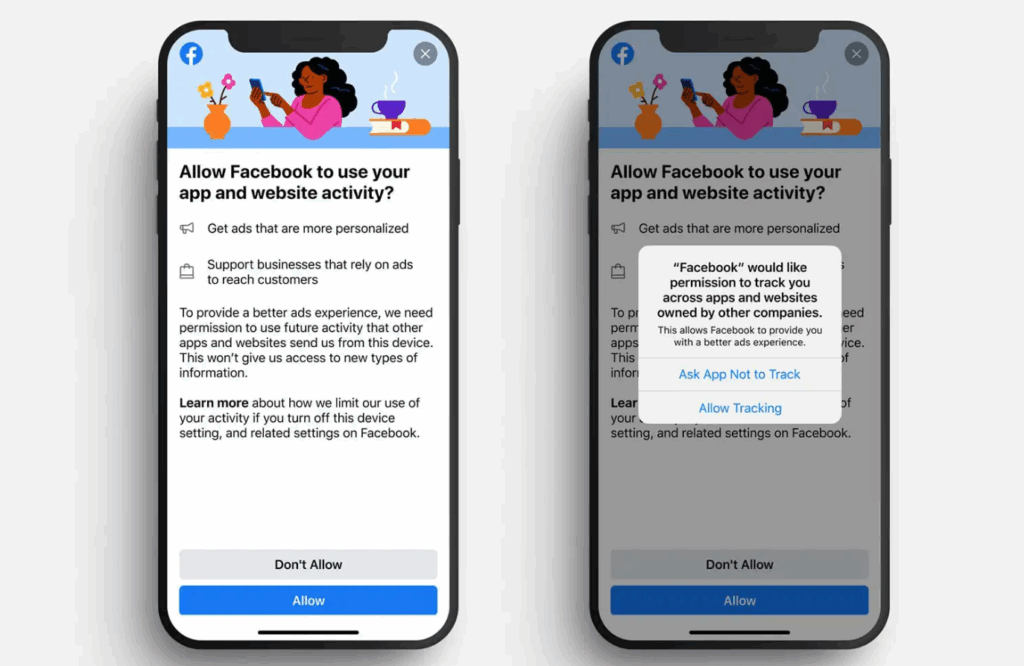
The ATT prompt
Every ATT prompt has three components:
- A fixed system question: “Allow [App Name] to track your activity across other companies’ apps and websites?”
- A short, developer-supplied purpose string explaining why tracking is requested.
- Two buttons: “Ask App Not to Track” and “Allow.”
The user is opted out by default until they tap “Allow.” Apps can show a custom pre-prompt screen beforehand to educate users on the value of opting in, but the system prompt itself cannot be modified, skipped, or replaced.
Authorization states
The ATT framework returns one of four authorization statuses, each of which determines what your app can and cannot do.
| Status | Meaning | IDFA returned |
|---|---|---|
| Not determined | Prompt has not yet been shown | All zeros |
| Authorized | User tapped “Allow” | Real IDFA |
| Denied | User tapped “Ask App Not to Track” or disabled tracking globally | All zeros |
| Restricted | Tracking is blocked at the device level (e.g., child accounts, MDM) | All zeros |
Why Apple introduced ATT
ATT is the operational core of Apple’s broader privacy strategy. Before iOS 14.5, every iPhone shipped with the IDFA available to apps by default, and users had to dig into Settings to enable “Limit Ad Tracking” if they wanted to stop personalized advertising. Roughly 70% of users never did, which gave ad networks, attribution providers, and developers nearly unrestricted ability to build cross-app behavioral profiles.
Apple flipped that default. ATT moved the iOS ecosystem from opt-out to opt-in tracking and tied access to the IDFA — the linchpin of cross-app attribution — to a single tap on a system dialog. Combined with App Store privacy nutrition labels and SKAdNetwork, ATT was Apple’s mechanism for forcing the entire mobile advertising stack to either earn user consent or operate on aggregated, anonymized data.
ATT and the IDFA: what changed
The Identifier for Advertisers (IDFA) is the unique, per-device ID iOS exposes to apps for advertising and attribution. Before ATT, it was always available; after ATT, it’s only returned to apps that obtain explicit consent. Apps that don’t get consent receive a string of zeros instead of a real ID.
| Aspect | Before ATT (pre-iOS 14.5) | After ATT (iOS 14.5+) |
|---|---|---|
| Default tracking state | Opted in | Opted out |
| IDFA access | Available unless user enabled LAT | Available only with user permission |
| User-level attribution | Default | Only for opted-in users |
| Consent UX | Settings toggle (LAT) | Per-app system prompt |
| Aggregated alternative | Not widely used | SKAdNetwork / AdAttributionKit |
Impact on advertisers and subscription apps
ATT compressed the amount of deterministic, user-level data available to advertisers on iOS, with knock-on effects across user acquisition, attribution, and lifetime-value modeling. For subscription apps in particular — where the unit economics depend on tracking trial-to-paid conversion and renewals over months — the loss of granular IDFA-based attribution forced a wholesale rethink of how marketing performance is measured.
Attribution challenges
Two consent layers compound the problem. To stitch a paid install back to an ad impression, both the publishing app (where the ad ran) and the destination app (the advertiser) need to obtain ATT consent — a “dual opt-in” that drops effective IDFA-based attribution well below the headline opt-in rate. Without it, MMPs cannot deterministically link an install to its source, and probabilistic methods carry meaningful margins of error.
SKAdNetwork and AdAttributionKit
Apple’s privacy-preserving alternative is SKAdNetwork (SKAN), since complemented and partially superseded by AdAttributionKit. Both frameworks deliver attribution at the campaign level rather than the user level: ad networks learn that a campaign produced installs, but not which user installed. Postbacks are delayed, conversion values are quantized, and aggregation thresholds limit how granular reporting can get. For a fuller picture of how this plays out on iOS, see Adapty’s deep dive on iOS 14, IDFA, and attribution.
How to implement ATT in an iOS app
Implementing ATT is a two-step process: declare the tracking purpose in your app’s Info.plist, then call the ATT API at an appropriate moment in your user flow.
Add the privacy description
Add the NSUserTrackingUsageDescription key to your Info.plist with a one- or two-sentence string explaining why your app wants to track. This string appears below the system prompt, and Apple rejects apps that ship vague, generic, or misleading text.
Request authorization
Call ATTrackingManager.requestTrackingAuthorization(completionHandler:) from the main thread when your app is in the foreground. The system shows the prompt only on the first call per app install — subsequent calls return the cached status without re-prompting. Always check the returned status before reading ASIdentifierManager.advertisingIdentifier; if the status is anything other than .authorized, the IDFA will be all zeros.
Best practices for the ATT prompt
Wording is fixed, but timing and context aren’t. Three placement strategies dominate, each with a different tradeoff between audience reach and consent quality.
| Funnel stage | Trigger | Audience reach | Typical opt-in rate |
|---|---|---|---|
| Early funnel | First app launch or first session | Largest | Lower |
| Mid funnel | After onboarding or first value moment | Medium | Medium to high |
| Late funnel | Account creation or first purchase | Smallest | Highest |
The most consistent levers are: showing a pre-prompt that explains a concrete benefit (“personalized recommendations” or “free, ad-supported content”), waiting until users have experienced value before asking, and being honest about what data is shared. Pre-prompts must not visually mimic the system dialog — Apple’s review team rejects apps that try to confuse users into tapping “Allow,” and forbids offering incentives in exchange for opt-in.
ATT opt-in rates: current benchmarks
Opt-in rates have trended upward as users become more familiar with privacy prompts and developers refine their pre-prompt and onboarding flows. Adjust’s Q2 2025 data places the global average around 35%, while AppsFlyer’s earlier benchmarks reported figures closer to 50% in some cohorts. Variance by country and vertical is significant — gaming and entertainment tend to underperform, while utilities and finance often see higher consent.
| Metric | Approximate value |
|---|---|
| Global ATT opt-in | ~35% |
| Reported high-end | ~50% |
| Effective IDFA attribution rate (after dual opt-in) | Significantly lower |
| Restricted devices (cannot be prompted) | ~14% of iOS users |
ATT vs Android privacy frameworks
Google has taken a different path with Android. The Google Advertising ID (GAID) — Android’s IDFA equivalent — has historically been accessible by default, but Android 12 introduced an opt-out toggle, and Google’s Privacy Sandbox aims to phase out cross-app identifiers in favor of on-device, aggregated signals. The user-level identifier IDFV (Identifier for Vendors), which is shared across apps from the same publisher, remains available on iOS without ATT consent and continues to be useful for first-party measurement.
| Aspect | iOS (ATT) | Android (GAID + Privacy Sandbox) |
|---|---|---|
| Consent model | Opt-in, per app | Opt-out, system-wide |
| Default tracking | Disabled until permission granted | Enabled until user resets ID |
| Aggregated framework | SKAdNetwork / AdAttributionKit | Privacy Sandbox APIs |
| Identifier when denied | Zeroed IDFA | Zeroed GAID |