App Store Optimization (ASO) is the process of improving a mobile app’s visibility and conversion rate within app stores such as the Apple App Store and Google Play. By optimizing metadata (titles, descriptions, keywords), creative assets (icons, screenshots, videos), and performance signals (ratings, reviews, download velocity), ASO aims to increase organic app downloads, reduce user acquisition costs, and drive sustainable growth. Often called “SEO for mobile apps,” ASO is the single most important organic growth lever available to app publishers today.
Why app store optimization matters
With over 5 million apps available across the Apple App Store and Google Play combined, standing out is a serious challenge. According to Apple, roughly 65% of app downloads come directly from store searches, which means that most users discover new apps by typing a query into the app store search bar rather than following an ad or external link. If your app does not appear in those search results, you are missing the majority of your potential audience.
ASO matters because it directly influences two critical outcomes: discoverability (whether users can find your app) and persuasion (whether users who find your app choose to download it). A well-optimized listing not only ranks higher for relevant search terms but also converts a larger share of visitors into actual installs. This compounding effect makes ASO the foundation for nearly every other growth strategy, including paid user acquisition, because even paid campaigns ultimately send users to your app store page.

Key benefits of ASO
| Benefit | Description |
|---|---|
| Higher organic visibility | Your app ranks higher in store search results, leading to more impressions and downloads without ad spend |
| Lower acquisition costs | Organic installs reduce dependency on paid campaigns, decreasing overall cost per install (CPI) |
| Better conversion rates | Optimized visuals, descriptions, and social proof turn more page visitors into users |
| Higher-quality users | Users who find your app through relevant search terms are more likely to engage and retain |
| Global reach | Localized metadata and visuals help you expand into international markets |
| Increased revenue | More relevant downloads lead to higher lifetime value and stronger subscription or in-app purchase revenue |
How app store optimization works
ASO operates on two parallel tracks: keyword optimization (making sure your app is found) and conversion rate optimization (making sure users who find it actually download it). Both tracks involve ongoing research, implementation, testing, and iteration.
Keyword optimization
Keyword optimization means selecting the most relevant and high-traffic search terms, then placing them strategically throughout your app’s metadata. This includes the app title, subtitle (iOS) or short description (Google Play), keyword field (iOS only), and full description. The goal is to signal to the store’s search algorithm that your app is a strong match for the queries users type in. Effective keyword research involves analyzing search volume, competitor rankings, and relevance to your app’s core functionality. Specialized ASO tools such as AppTweak, App Radar, and Sensor Tower help identify the best keyword opportunities.
Conversion rate optimization
Once a user lands on your app’s store page, conversion rate optimization (CRO) determines whether they tap “Get” or “Install.” This involves optimizing creative elements such as the app icon, screenshots, preview video, and description copy. According to App Store conversion rate data, the average conversion rate in the US App Store sits around 25%, while Google Play shows roughly 27%. A/B testing different creative variations is the most reliable way to improve these numbers over time.
On-metadata vs. off-metadata ASO factors
ASO professionals typically divide ranking factors into two groups: on-metadata factors (elements you directly control inside the app store listing) and off-metadata factors (signals that influence rankings but are not directly editable in the listing).
| Factor type | Apple App Store | Google Play |
|---|---|---|
| On-metadata factors | ||
| App name / title | Up to 30 characters, indexed | Up to 30 characters, indexed |
| Subtitle / short description | Up to 30 characters, indexed | Up to 80 characters, indexed |
| Keyword field | 100 characters, indexed (hidden from users) | Not available |
| Long description | Up to 4,000 characters, not indexed | Up to 4,000 characters, indexed |
| App icon | Influences tap-through rate | Influences tap-through rate |
| Screenshots and video | Up to 10 screenshots + 3 preview videos | Up to 8 screenshots + 1 promo video |
| Off-metadata factors | ||
| Ratings and reviews | Affect rankings and conversion rate | Affect rankings and conversion rate |
| Download volume and velocity | Influences top chart and search rankings | Influences top chart and search rankings |
| Update frequency | Signals active maintenance to the store | Signals active maintenance to the store |
| Retention and engagement | Positive signal for recommendations | Positive signal for search and recommendations |
| Backlinks (web presence) | Indirect influence | Indexed and used as a ranking signal |
ASO differences between Apple App Store and Google Play
While the core principles of ASO apply to both stores, the technical details differ significantly. Understanding these differences is essential for optimizing effectively on each platform.
The most important distinction is in how each store indexes keywords. On the Apple App Store, the dedicated keyword field (100 characters, hidden from users) is the primary place for keyword targeting, while the long description is not indexed for search at all. On Google Play, there is no separate keyword field — instead, the algorithm indexes the full description, meaning keyword placement within the 4,000-character description matters. Google Play also considers backlinks and web authority as ranking factors, which the Apple App Store does not. For a deeper comparison, see ASO vs SEO.
Another key difference is A/B testing support. Google Play offers a built-in Store Listing Experiments tool within the Google Play Console, letting developers test different icons, screenshots, descriptions, and feature graphics. Apple provides its own Product Page Optimization tool in App Store Connect, though it arrived later and has some limitations on the number of concurrent tests.
Core app store optimization strategies
Title and subtitle optimization
The app title carries the most weight for keyword indexation on both platforms. A common best practice is to use a format like “BrandName – Brief Description” (for example, “Calm – Meditation and Sleep”). This approach combines brand recognition with a high-volume keyword. The subtitle (iOS) or short description (Google Play) provides additional keyword real estate and should reinforce the app’s primary value proposition.
Keyword research and selection
Effective ASO begins with thorough keyword research. The process involves identifying search terms that are relevant to your app, evaluating their search volume, and assessing how difficult it would be to rank for each one. Long-tail keywords (more specific, lower-competition phrases) are often easier to win early on and can deliver highly targeted traffic. Regularly monitoring keyword rankings and updating metadata is essential, since search trends and competitor activity shift constantly.
Visual asset optimization
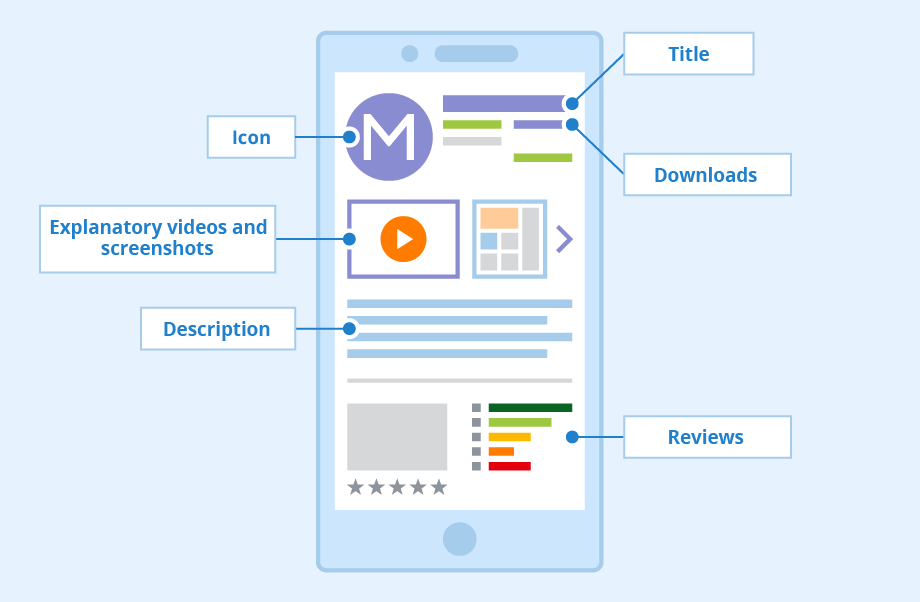
Your app icon is the first visual element users notice in search results. It should be simple, recognizable, and distinct from competitors. Screenshots tell the story of your app’s experience — lead with your strongest features in the first two or three images, as most users do not scroll further. Preview videos can boost conversion rates but should be short, engaging, and show real app functionality. For detailed guidance, check the app store screenshots optimization guide.
Ratings and reviews strategy
Ratings and reviews function both as a ranking factor and a conversion factor. Apps rated below 4.0 face significantly reduced visibility and user trust. Prompting users to rate your app at the right moment — after a positive experience, not during frustration — is critical. Responding to reviews, both positive and negative, demonstrates active engagement and can improve your rating over time. Learn more in the guide on how to improve app ratings and reviews.
Localization
Localization goes beyond simple translation. It means adapting your metadata, screenshots, and even your visual style to resonate with users in each target market. Localized listings can significantly increase download rates in international markets, as users are far more likely to install an app that feels tailored to their language and culture. Both the Apple App Store and Google Play support localized metadata for dozens of languages and regions.
ASO metrics and KPIs to track
Measuring the impact of your ASO efforts requires tracking the right metrics. Here are the most important ones:
| Metric | What it measures | Why it matters |
|---|---|---|
| Keyword rankings | Your app’s position for target search terms | Directly determines organic visibility |
| Impressions | Number of times your app appears in search results or browse | Shows the reach of your optimization efforts |
| Tap-through rate (TTR) | Percentage of impressions that result in a page view | Reflects the appeal of your icon, title, and rating in search results |
| Conversion rate (CR) | Percentage of page visitors who install the app | Measures the effectiveness of your store listing |
| Organic installs | Downloads not attributed to paid campaigns | The primary success metric for ASO |
| Ratings and reviews | Average star rating and volume of user feedback | Influences both rankings and conversion rates |
| Retention rate | Percentage of users still active after a set period | Signals app quality to store algorithms |
For a comprehensive guide to tracking these metrics, see how to measure mobile app performance: ASO metrics and KPIs.
Common ASO mistakes to avoid
Even experienced app marketers make ASO errors that undermine their results. Here are the most frequent pitfalls:
Keyword stuffing. Cramming irrelevant or excessive keywords into your title and metadata hurts readability and can trigger store review penalties. Focus on relevance and natural language.
Neglecting visual assets. Many developers invest heavily in keyword research but ignore screenshots and videos. Since creative elements drive conversion, this leaves significant performance on the table.
Setting and forgetting. ASO is not a one-time task. Search trends shift, competitors update their listings, and store algorithms evolve. Regular iteration — at minimum, monthly keyword reviews and quarterly creative refreshes — is necessary to maintain rankings.
Ignoring localization. Publishing your app in English only limits your addressable market. Even basic localization of metadata for your top international markets can yield meaningful download increases.
Using black-hat tactics. Incentivized reviews, fake downloads, and keyword manipulation violate store guidelines. Both Apple and Google have become increasingly aggressive at detecting and penalizing these practices, which can result in app suspension or removal.
ASO and paid user acquisition: working together
ASO and paid user acquisition are not competing strategies — they are complementary. Paid campaigns (Apple Search Ads, Google App Campaigns, social media ads) drive an initial spike in downloads that can boost your app’s organic ranking. At the same time, a well-optimized store listing improves the conversion rate of paid traffic, lowering your effective cost per install. This creates a virtuous cycle: paid campaigns boost organic signals, and stronger organic performance reduces the budget needed for paid campaigns. For more strategies on combining organic and paid approaches, see strategies to increase app downloads.
App store optimization checklist
| Step | Action | Frequency |
|---|---|---|
| 1 | Conduct keyword research and competitor analysis | Monthly |
| 2 | Optimize app title and subtitle with target keywords | With each update |
| 3 | Update the keyword field (iOS) or full description (Google Play) | Monthly |
| 4 | Design and test new screenshots and preview video | Quarterly |
| 5 | Run A/B tests on creative assets | Ongoing |
| 6 | Monitor and respond to user reviews | Weekly |
| 7 | Localize metadata for target markets | With each expansion |
| 8 | Track keyword rankings, impressions, and conversion rates | Weekly |