App size refers to the amount of storage space a mobile application occupies, measured at different stages of its lifecycle from download to active use. Understanding and managing app size is crucial for mobile developers because it directly impacts user acquisition, retention, and overall app performance. App size encompasses multiple dimensions including download size (compressed data transferred from app stores), install size (uncompressed data after installation), and storage size (total space used during active use including caches and user data).
The significance of app size extends beyond mere numbers. Research demonstrates that app size directly affects conversion rates and user behavior. For every 6MB increase in app size, installation conversion rates decrease by approximately 1%. This means larger apps face higher abandonment rates during download, particularly in emerging markets where users often have older devices with limited storage and slower internet connections. Given that emerging markets represent approximately 85% of the global population, optimizing app size becomes essential for reaching the broadest possible audience.
App size also has environmental implications. Mobile apps generate massive network traffic through updates and downloads. The collective impact of billions of app downloads and updates translates to significant power consumption and carbon emissions. Reducing app size by even 1MB can result in substantial decreases in annual carbon footprint, making optimization an environmental responsibility alongside a technical one.
What is app size?
App size is not a single static measurement but rather encompasses four distinct types of size measurements, each relevant at different stages of the app lifecycle and serving different purposes for developers, users, and platform providers.
Download size represents the compressed amount of data transferred over the internet when a user downloads an app from an app store. App stores compress applications to minimize bandwidth usage and reduce download times. This is the size users see in the App Store or Google Play Store listings and directly affects their decision to download, especially when using cellular data or facing storage constraints.
Install size measures the amount of disk space occupied immediately after installation on a device. Unlike download size, install size reflects uncompressed application data including all code, assets, and resources needed for the app to function. Install size is always larger than download size and is what users see in their device storage settings after installation.
Storage size accounts for the total space consumed by an app during active use, which includes the install size plus additional data such as caches, downloaded content, user-generated files, and temporary data. This size grows over time as users engage with the app and can significantly exceed the initial install size.
Update size refers to the data transferred when downloading app updates. Modern app stores use delta updates that only download changed components rather than the entire app, making update sizes potentially smaller than initial download sizes depending on how much of the app has been modified.
Each of these size measurements impacts users differently. Network-related impacts affect users during download and update processes, particularly those with limited bandwidth or data caps. Storage-related impacts influence users’ decisions about which apps to keep installed, especially on devices with constrained storage capacity.
Why is app size important?
App size significantly influences multiple critical aspects of app success, from user acquisition to environmental sustainability. Understanding these impacts helps developers prioritize size optimization efforts appropriately.
The most immediate impact of app size is on installation conversion rates. Data consistently shows that larger apps experience lower conversion rates from app store page views to successful installations. Users with limited storage space may be unable to install large apps without first deleting other content. Those on metered connections or in areas with slow internet may abandon downloads that take too long. The psychological barrier of seeing a large download size can deter users even when they technically have sufficient resources.
For users in emerging markets, app size considerations are particularly acute. Many individuals use older-generation smartphones with 16GB or less of storage, a portion of which is already claimed by the operating system. These users must carefully curate which apps remain on their devices, favoring smaller applications that provide value without consuming excessive space. Failing to optimize for these users means excluding a significant portion of the global market.
App size also affects engagement and retention metrics. Users frequently review their storage usage and uninstall large apps when space becomes scarce. Apps that grow substantially over time through cache accumulation or feature additions face higher uninstall rates. Conversely, apps that remain compact and manage their storage footprint effectively tend to enjoy better retention.
Performance implications of app size extend beyond installation. Larger apps typically take longer to launch, consume more memory during operation, and may exhibit slower performance on older devices with limited resources. These performance characteristics directly impact user satisfaction and app ratings.
From a business perspective, app size affects costs and sustainability. Larger apps consume more bandwidth for distribution and updates, resulting in higher infrastructure costs for companies serving millions of users. The environmental impact of these distributions, measured in power consumption and carbon emissions, represents both a corporate responsibility concern and increasingly a regulatory consideration.
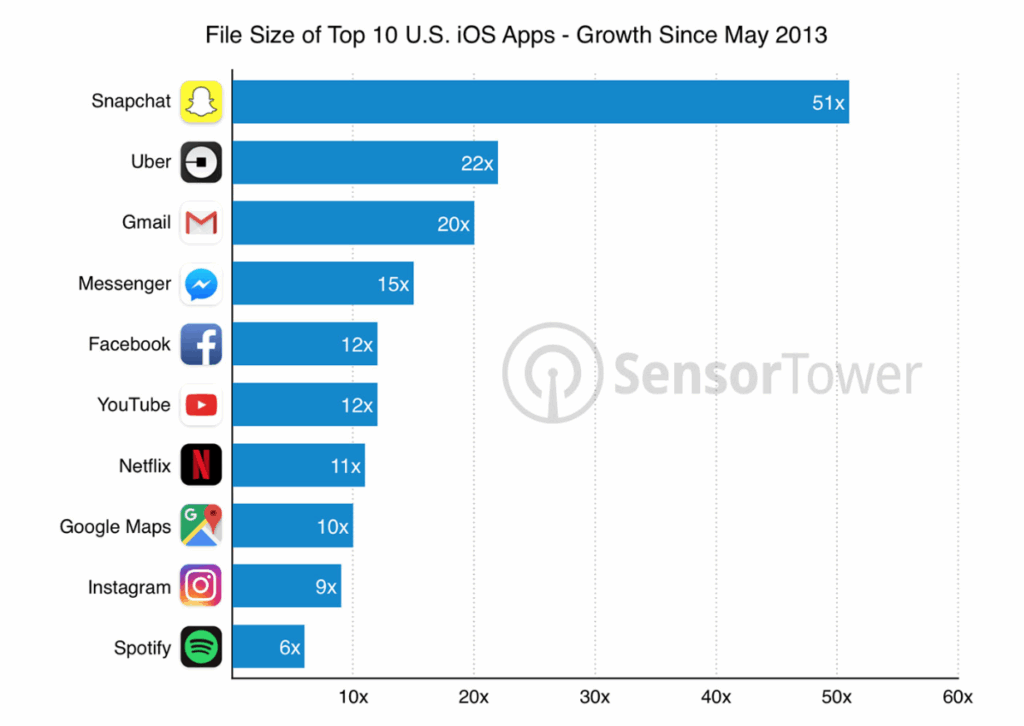
Android apps size
Android applications utilize specific packaging formats designed to optimize distribution and installation across diverse device configurations. Understanding these formats helps developers make informed decisions about how to build and distribute their apps.
.apk (Android Package)
The APK format has been the traditional Android application package since the platform’s inception. When developers build an APK using standard tools like Gradle, the default behavior creates a universal binary containing resources for all supported device types, screen densities, CPU architectures, and languages.
A universal APK ensures maximum compatibility and can be installed on any supported Android device, but this convenience comes at a significant size cost. For example, an app supporting both 32-bit and 64-bit processors, multiple screen densities, and numerous languages will include all these variations in a single file. A device using only ARM64 architecture, a specific screen density, and English language still downloads and stores resources for all other configurations.
Universal APKs serve important purposes in development and testing workflows. They can be shared via tools like Orbit or installed directly using ADB without concerning whether the recipient’s device matches specific configurations. However, for distribution through app stores, universal APKs are inefficient and unnecessarily large.
.aab (Android App Bundle)
The Android App Bundle format represents Google’s modern approach to app distribution. Introduced to address the inefficiencies of universal APKs, AABs allow developers to upload a single artifact containing all device configurations while enabling Google Play to generate optimized APKs tailored to each user’s specific device.
When a user downloads an app distributed via AAB, Google Play analyzes their device characteristics including CPU architecture, screen density, and language settings. The store then generates and delivers a custom APK containing only the resources relevant to that specific device. This results in substantially smaller download sizes compared to universal APKs.
From a developer’s perspective, AABs simplify the build and distribution process. Rather than generating multiple APK variants for different device configurations, developers build a single AAB and upload it to Google Play. The platform handles the complexity of creating device-specific builds, ensuring users receive optimized versions without additional developer effort.
All new apps submitted to Google Play must use the AAB format. This requirement ensures users benefit from smaller downloads and more efficient storage usage across the Android ecosystem.
Google Play maximum size limits
Google Play enforces specific size limits for different components of Android applications. These limits apply to compressed download sizes as calculated by Play Console upon upload. Understanding these constraints helps developers structure their apps appropriately and plan for content delivery strategies.
| Component | Maximum compressed download size |
|---|---|
| Base module | 200 MB |
| Individual feature modules | 200 MB per module |
| Individual asset packs | 1.5 GB per pack |
| Total of all modules and install-time asset packs | 4 GB |
| Total on-demand/fast-follow asset packs (standard developers) | 4 GB |
| Total on-demand/fast-follow asset packs (Level Up program members and Android XR titles) | 30 GB |
The total maximum compressed download size for standard apps is 8 GB. Games enrolled in Google Play’s Level Up program and Android XR titles can reach up to 34 GB total size through the use of additional on-demand asset packs.
Important considerations for these limits include:
- Apps exceeding 1 GB must target Android Lollipop (API level 21) or higher as the minimum SDK version
- The recommended maximum number of feature modules is 100 for apps targeting Android Oreo (API level 26) or higher, and 50 for lower SDK versions
- Each app bundle can contain a maximum of 100 asset packs
- Users downloading apps over 200 MB on mobile data connections receive a non-blocking dialog informing them of the large size
- Legacy APK distributions remain subject to the older 100 MB maximum APK size limit
Google strongly recommends keeping app sizes well below these maximum limits to optimize installation conversion rates and provide the best user experience.
iOS apps size
iOS applications employ distinct packaging formats for different stages of development and distribution. These formats serve specific purposes in the iOS ecosystem and understanding their characteristics is essential for effective app size management.
.app (iOS application bundle)
The .app format represents the actual iOS application bundle containing all the code, resources, and metadata needed to run the app. When developers test apps in the iOS Simulator or on development devices, they work with .app bundles.
App bundles can be built for specific architectures or as universal binaries containing code for multiple processor types. The size of an .app bundle provides limited insight into the final download size users will experience from the App Store, as the bundle hasn’t undergone the optimization and processing applied during app store submission.
Developers cannot directly install .app files to physical iOS devices outside of development workflows. This format primarily serves development and testing purposes rather than end-user distribution.
.ipa (iOS App Store Package)
IPA files are compressed archives (essentially ZIP files) containing the .app bundle plus additional resources required for various types of iOS app distribution. The IPA format serves multiple distribution channels including App Store releases, TestFlight builds, Ad Hoc distribution, and Enterprise deployment.
Beyond the application bundle itself, IPAs include security elements such as code signing information, provisioning profiles, and entitlements that verify the app’s authenticity and permissions. The App Store processes uploaded IPA files to create thinned variants optimized for different device types, extracting only the relevant resources for each configuration.
The size of an IPA file does not represent the download size users will experience. App Store processing splits universal IPAs into device-specific variants, removing unnecessary resources for each target device. A universal IPA might be 100 MB, but users with specific devices might download only 40-50 MB after App Store optimization.
Apple App Store maximum size limits
Apple enforces maximum size limits for iOS applications uploaded to the App Store. These limits ensure manageable distribution infrastructure and reasonable device storage expectations for users. The limits apply to uncompressed app size as measured after app thinning for specific device configurations.
| Component | Maximum Size |
|---|---|
| Total uncompressed app size | 4 GB |
| Cellular download limit (over-the-air) | 200 MB |
| Apple Watch apps | 75 MB |
| App Clips (after thinning) | Varies by iOS version |
| Mach-O executable file (total __TEXT sections) | 500 MB |
| Mach-O executable per architecture slice | 500 MB |
The 4 GB limit represents the total uncompressed size of an iOS application including all assets and executable code. This limit has remained constant since Apple increased it from 2 GB in 2015, marking the only size limit increase since the App Store’s 2008 launch.
For apps downloaded over cellular networks, Apple restricts downloads to 200 MB to prevent users from accidentally consuming large amounts of mobile data. This limit was increased from 150 MB in 2017 and from 100 MB prior to that. Apps exceeding 200 MB require Wi-Fi connectivity or download via computer sync. While this protects users from unexpected data charges, it can frustrate those with unlimited data plans as there is no option to override the restriction.
Apple Watch applications face stricter size constraints due to the watch’s limited storage capacity, with a maximum size of 75 MB. App Clips, which are lightweight app experiences designed for specific tasks, have size limits that vary based on the minimum iOS deployment target.
Developers can leverage On-Demand Resources and Background Assets to host larger content separately from the main app bundle. These assets are downloaded when needed rather than included in the initial installation, allowing apps to provide rich content while staying within size limits. On-Demand Resources can be up to 8 GB per asset pack after app thinning for apps targeting iOS 18 and later.
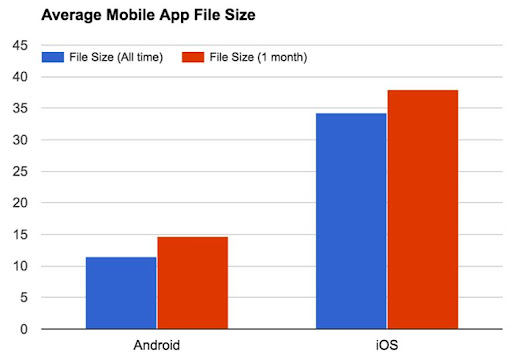
How to optimize app size?
Optimizing app size requires a systematic approach addressing multiple components that contribute to overall size. Effective optimization balances size reduction with functionality, performance, and code maintainability.
Static assets
Static assets including images, audio files, videos, fonts, and other resources frequently represent the largest component of app size. These assets come from both the app’s own resources and third-party libraries integrated into the project.
Begin optimization by auditing all assets included in your app. Use platform-specific tools to inspect build artifacts and identify large assets. For Android, tools like Android APK Analyzer and apktool allow detailed examination of APK contents. For iOS, renaming an IPA to .zip and extracting it enables inspection of resources, with the macOS utility assetutil providing detailed analysis of Assets.car files.
Image optimization offers substantial size reduction opportunities. Use appropriate image formats for different use cases: JPEG for photographs, PNG for images requiring transparency, and WebP for superior compression compared to both. Ensure images are correctly sized for their display context rather than scaling down oversized images at runtime. Remove unused images and duplicate assets that may have accumulated during development.
Vector graphics using SVG (Scalable Vector Graphics) format often provide significant size advantages over bitmap images, particularly for icons and simple graphics. Vector graphics scale to any size without quality loss and typically occupy less space than multiple resolution variants of bitmap images.
Audio and video compression requires careful balance between file size and quality. Modern codecs like AAC for audio and H.264 or H.265 for video provide excellent compression while maintaining acceptable quality. Remove high-quality assets intended only for development or testing from production builds.
Font optimization involves including only required character sets and font weights. If your app uses custom fonts, subset them to include only the glyphs needed for supported languages rather than entire Unicode ranges.
JavaScript bundles
For apps built with React Native, Flutter, or other frameworks using JavaScript or similar scripting languages, bundle size significantly impacts app size and performance. Modern JavaScript applications can accumulate substantial code through dependencies and features.
Use bundle analysis tools to understand what comprises your JavaScript bundle. Tools like Expo Atlas for React Native applications provide detailed visualization of bundle composition, revealing which libraries contribute most to bundle size. This analysis often uncovers unexpected large dependencies or libraries that remain included despite no longer being used.
Implement code splitting to divide your application into smaller chunks loaded on demand rather than including everything in the initial bundle. This reduces the amount of code loaded at app startup while maintaining access to all functionality when needed.
Tree shaking removes unused code during the build process. Ensure your build configuration enables tree shaking and that your code is structured to allow effective dead code elimination. ES6 modules facilitate better tree shaking compared to older CommonJS formats.
Minimize and compress JavaScript code for production builds. Modern build tools can strip comments, shorten variable names, and apply other size-reducing transformations that don’t affect functionality. Enable compression algorithms like gzip or Brotli for additional size reduction.
Review dependencies regularly and remove unused libraries. Each dependency adds to bundle size, and accumulated dependencies from abandoned features or experiments can substantially increase app size without providing value. Consider whether lighter-weight alternatives exist for heavyweight libraries.
Dynamic feature delivery
Both Android and iOS platforms provide mechanisms for delivering app content dynamically rather than bundling everything in the initial download. These features allow apps to provide rich functionality while maintaining minimal initial size.
Android App Bundles support dynamic feature modules that can be installed on demand after the initial app installation. Feature modules contain code and resources for specific functionality that not all users need. For example, a photo editing app might make advanced filters available as a dynamic feature module, downloaded only when users access that functionality.
Asset packs on Android provide another approach to dynamic content delivery. Asset packs can contain large resources like game levels, high-resolution textures, or video content. Three delivery modes support different use cases: install-time packs download alongside the app, fast-follow packs download automatically after installation, and on-demand packs download only when explicitly requested.
iOS On-Demand Resources enable similar functionality, allowing developers to host assets on the App Store and download them when needed. The system automatically manages these resources, downloading them when required and purging them when storage space becomes scarce. This ensures users always have access to essential resources while optional content consumes space only when actively used.
Background Assets on iOS allow hosting larger content managed separately from the main app bundle. This is particularly useful for apps requiring substantial media libraries or downloadable content packs while staying within initial size limits.
Implementing dynamic delivery requires careful planning around what content is essential for initial experience versus what can be deferred. Consider user bandwidth constraints and ensure the app functions gracefully when optional content is unavailable or downloading.