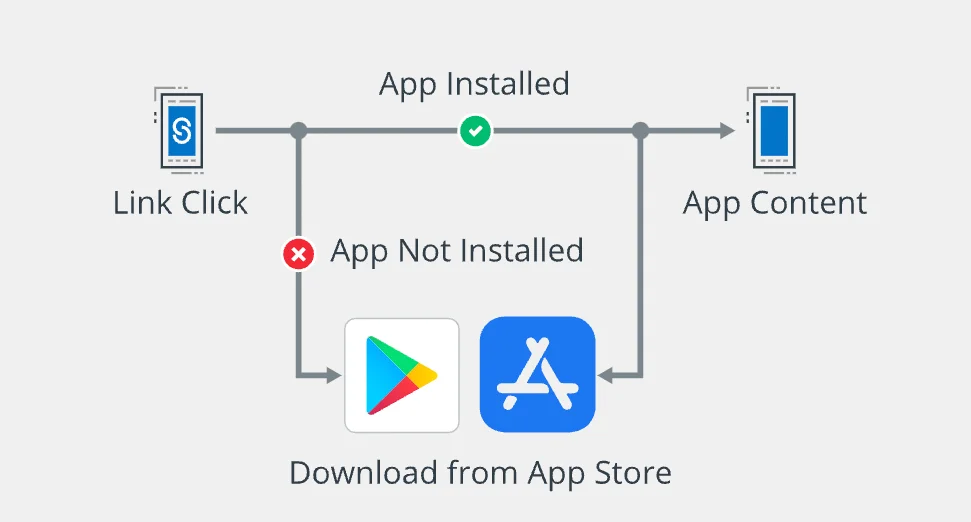
App Links are special URLs that take users directly to a specific screen or piece of content inside a mobile app, rather than opening a web page in a browser. When a user clicks an App Link and has the corresponding app installed, the app opens immediately and displays the relevant content. If the app is not installed, the user is redirected to a fallback web page or an app store listing. App Links streamline the mobile user experience by removing unnecessary steps between clicking a link and reaching the desired in-app destination.
What are App Links?
App Links is a broad term that refers to URL-based linking standards designed to connect web URLs with native mobile app content. The concept was introduced to solve a common problem: when users click a standard web link on their phone, it opens in a browser — even if they already have the relevant app installed and would prefer to use it.
App Links eliminate this friction by verifying a relationship between a website and a mobile app, so the operating system knows to open the app directly. The term “App Links” is most commonly associated with two specific implementations: Android App Links and Facebook App Links.
Android App Links
Android App Links are HTTP/HTTPS URLs that are verified to belong to a specific Android app. Available on Android 6.0 (API level 23) and higher, they allow an app to designate itself as the default handler for certain web URLs. When a user clicks a verified Android App Link, the app opens immediately — there is no disambiguation dialog asking the user to choose between a browser and the app.
To establish this verified relationship, the developer hosts a Digital Asset Links JSON file on their website domain and declares corresponding intent filters in the app’s manifest. This two-way verification ensures that only the legitimate domain owner can associate their URLs with their app, which adds a layer of security not available with standard deep links.
Facebook App Links
Facebook App Links are an open-source, cross-platform standard originally introduced by Facebook (now Meta). They use HTML meta tags embedded in a web page to define how content should be opened in a native app on iOS, Android, or Windows Phone. When a Facebook user clicks a shared link that includes App Links metadata, the Facebook app can route them directly into the relevant native app.
Unlike Android App Links, which are an Android-specific OS feature, Facebook App Links work across platforms and are primarily used within the Facebook ecosystem and other apps that support the App Links protocol.
Why do developers use Android App Links?
Developers adopt Android App Links for several practical reasons. First, they create a seamless transition from web content to the native app experience, which is typically faster, more feature-rich, and more engaging than a mobile website. Second, verified App Links skip the chooser dialog entirely, reducing friction and drop-off. Third, App Links use standard HTTPS URLs, making them shareable across any channel — email, social media, messaging apps, or even QR codes — without requiring special link formats.
From a business perspective, App Links help drive app engagement by keeping users within the native app environment where conversion rates tend to be higher. They also support better attribution, since user interactions happen inside the app and can be tracked more precisely than web-based journeys.
How do App Links work?
The mechanism behind App Links involves a handshake between a website and a mobile app. Here is how the process works for Android App Links:
1. The developer creates intent filters in the app’s AndroidManifest.xml file. These filters specify which URLs the app can handle.
2. The developer hosts a Digital Asset Links file (assetlinks.json) at https://yourdomain.com/.well-known/assetlinks.json. This file contains the app’s package name and SHA256 certificate fingerprint, proving that the domain owner authorizes the app to open its URLs.
3. Android verifies the association when the app is installed. The system checks the Digital Asset Links file against the app’s certificate to confirm the relationship.
4. When a user clicks a matching URL, Android opens the app directly and passes the URL data to the appropriate activity, which then displays the relevant content.
5. If the app is not installed, the URL opens in the user’s default browser, showing the corresponding web content.
Here is a video that explains Android App Links implementation in more detail:
| Step | Action | Where it happens |
|---|---|---|
| 1 | Add intent filters to AndroidManifest.xml | App code |
| 2 | Host Digital Asset Links JSON file | Website server |
| 3 | System verifies app-website association | Android OS |
| 4 | User clicks URL, app opens directly | User device |
| 5 | Fallback to browser if app is not installed | User device |
What are the benefits of App Links?
App Links offer several advantages for developers, marketers, and end users. Below are the key benefits.
Seamless user experience
App Links eliminate the extra step of choosing between a browser and an app. Users go directly to in-app content with a single tap, reducing friction and drop-off rates. This is particularly important for time-sensitive actions like completing a purchase, redeeming a promo code, or responding to a notification.
Higher conversion rates
By routing users into the native app — where interfaces are optimized for mobile interaction — App Links tend to produce higher conversion rates compared to mobile web experiences. Users who land inside the app are more likely to complete a desired action such as subscribing, making a purchase, or engaging with content.
Improved attribution and analytics
Because App Links drive users into the app environment, marketers can track the entire user journey with greater accuracy. This helps measure the effectiveness of campaigns across channels like email, social media, and paid ads, and supports better ROI analysis for user acquisition efforts.
Enhanced security
Android App Links require domain verification through Digital Asset Links. Only the verified domain owner can associate their URLs with their app, which prevents other apps from intercepting links or impersonating the legitimate app. This verification-based model is significantly more secure than traditional URI scheme deep links.
Better content sharing
Since App Links use standard HTTPS URLs, they work everywhere — in emails, text messages, social posts, and QR codes. Users can share these links naturally, and recipients will either open the app (if installed) or see the web version. There is no need for custom link formats or special handling.
| Benefit | Impact on developers | Impact on users |
|---|---|---|
| Seamless experience | Lower bounce rates | Instant access to in-app content |
| Higher conversions | Better monetization outcomes | Smoother purchase and signup flows |
| Improved attribution | More accurate campaign measurement | More relevant content through better targeting |
| Enhanced security | Protection against link hijacking | Safer browsing and app interactions |
| Better sharing | Standard URLs work across all channels | Links work regardless of app installation |
What are the other types of links?
App Links are one of several linking standards used in mobile development. Here is how they compare to other common link types:
| Link type | Platform | Format | Verification required | Fallback behavior |
|---|---|---|---|---|
| Android App Links | Android 6.0+ | HTTPS URLs | Yes (Digital Asset Links) | Opens in browser |
| iOS Universal Links | iOS 9+ | HTTPS URLs | Yes (apple-app-site-association) | Opens in Safari |
| Deep links (URI schemes) | Android and iOS | Custom schemes (e.g., myapp://) | No | Error if app not installed |
| Deferred deep links | Android and iOS | Varies | No | Redirects to app store, then opens content after install |
| Facebook App Links | Cross-platform | HTML meta tags | No | Opens web URL |
iOS Universal Links serve the same purpose as Android App Links but within Apple’s ecosystem. They use an apple-app-site-association (AASA) file instead of Digital Asset Links and work on iOS 9 and later. Deep links using custom URI schemes (like myapp://product/123) are the oldest form of mobile linking but lack verification and fail silently if the app is not installed. Deferred deep links address this by routing users through the app store first and then delivering the intended content after installation.
What is the difference between deep links and App Links?
While App Links are technically a type of deep link, there are important differences between traditional deep links (URI scheme-based) and Android App Links:
| Feature | Deep links (URI schemes) | Android App Links |
|---|---|---|
| URL format | Custom scheme (myapp://) | Standard HTTPS |
| Domain verification | Not required | Required (Digital Asset Links) |
| Disambiguation dialog | Shown (user chooses app) | Skipped (opens app directly) |
| Security | Any app can register a scheme | Only verified domain owner |
| Fallback when app is missing | Error or no action | Opens in web browser |
| Minimum Android version | All versions | Android 6.0 (API level 23) |
| Shareability | Limited (custom schemes may not work everywhere) | Works anywhere HTTPS links work |
In short, App Links are a more secure, reliable, and user-friendly evolution of traditional deep links. They solve the problems of link hijacking, missing app fallbacks, and the confusing disambiguation dialog. For a deeper understanding of deep linking strategies and their role in the mobile user journey, see our deep linking glossary entry.
How to implement App Links?
Implementing Android App Links involves both app-side and server-side configuration. Here is a step-by-step overview:
Step 1: Generate a SHA256 fingerprint. Create a SHA256 fingerprint of your app’s signing certificate. This is used to verify your app’s identity. You can generate it using the keytool command that comes with the Java Development Kit.
Step 2: Create intent filters. In your app’s AndroidManifest.xml, add intent filters to the activities that should handle specific URLs. Each intent filter should include the android:autoVerify="true" attribute, which tells the system to verify the app-website association at install time.
Step 3: Host the Digital Asset Links file. Create an assetlinks.json file containing your app’s package name and SHA256 fingerprint, and host it at https://yourdomain.com/.well-known/assetlinks.json. The file must be served over HTTPS and be accessible without redirects.
Step 4: Handle incoming links in your app. When a user clicks a verified App Link, Android sends the URL to the designated activity. Your app code should parse the URL and navigate the user to the appropriate content.
Step 5: Test your App Links. Use the App Links Assistant in Android Studio or test manually by clicking links from different channels (email, messaging apps, social media) to confirm they open your app correctly. The official Android developer documentation provides detailed instructions and troubleshooting guidance for each step.
| Implementation step | Tools needed | Key considerations |
|---|---|---|
| 1. Generate SHA256 fingerprint | Java keytool | Use your release signing key, not debug key |
| 2. Create intent filters | Android Studio | Include autoVerify=”true” attribute |
| 3. Host Digital Asset Links file | Web server | Must be HTTPS, no redirects, correct MIME type |
| 4. Handle incoming links | Android SDK | Parse URL path and parameters to route users |
| 5. Test App Links | App Links Assistant, adb | Test across multiple channels and devices |
Key takeaways
App Links bridge the gap between web content and native mobile apps by letting developers map HTTPS URLs directly to in-app screens. Android App Links use domain verification for security and skip the chooser dialog for a smoother user experience. Facebook App Links use HTML meta tags to enable cross-platform deep linking within the Facebook ecosystem.
For mobile developers and marketers, App Links are a practical tool for improving engagement, increasing conversions, and enabling precise campaign attribution. They are more secure and reliable than traditional URI scheme deep links, and they work naturally with standard web URLs that can be shared anywhere.
If you are building a subscription-based app and want to drive users directly to premium content or paywalls through targeted campaigns, App Links can play a key role in your mobile growth strategy.