The mobile app market is projected to exceed $630 billion in revenue by 2026, while the mobile application testing services market alone is expected to reach $7.7 billion. With over 5.5 billion people accessing the internet via mobile devices and users spending more than 4.2 trillion hours in apps annually, rigorous mobile testing is no longer optional — it is essential for survival in a fiercely competitive ecosystem.
Mobile testing tools help development and QA teams verify that their apps function seamlessly across thousands of device configurations, operating system versions, and network conditions. Whether you are building a native, hybrid, or web app, the right testing tool can dramatically reduce bugs, accelerate releases, and protect your brand reputation.
In this guide, we cover the best mobile app testing tools for 2026, compare their features side by side, and help you choose the right one for your project.
What is mobile application testing?
Mobile application testing is a critical process within the software development lifecycle that evaluates the functionality, performance, usability, security, and overall quality of mobile applications. The goal is to ensure that everything works as intended across different devices, operating systems, screen sizes, and network conditions before release.
Because mobile testing covers a broad range of concerns, it is useful to understand the main types of testing every QA team should be familiar with:
| Type of testing | Description |
|---|---|
| Functional testing | Verifies that individual features, UI elements, and user interactions work as intended |
| Performance testing | Measures responsiveness, speed, and stability under various load and network conditions |
| Security testing | Identifies vulnerabilities and ensures secure data handling to protect against threats |
| Usability testing | Evaluates user-friendliness, navigation, design, and accessibility compliance |
| Compatibility testing | Confirms consistent behavior across different devices, OS versions, browsers, and screen sizes |
| Interruption testing | Checks how the app handles incoming calls, texts, low battery, and other interruptions |
| Localization testing | Validates correct functioning across different languages, regions, and cultural settings |
| Regression testing | Ensures that new updates or features do not break existing functionality |
Key challenges of mobile testing
The mobile ecosystem presents unique challenges that make testing particularly complex:
Device fragmentation. With over 24,000 distinct Android devices in the market and multiple iOS and Android versions in circulation, ensuring consistent performance across all configurations is a significant hurdle. Foldable devices have added another dimension — foldable shipments grew more than 40% year-over-year in 2025, introducing new screen and layout behaviors.
OS version fragmentation. Android users remain spread across several OS versions and performance levels, while iOS adoption patterns vary significantly by region. Both platforms release major updates annually, requiring continuous compatibility testing.
Network variability. With the ongoing rollout of 5G (an estimated 1.9 billion 5G subscriptions expected by 2026), apps must perform reliably across a range of connectivity scenarios — from high-speed 5G to slower 3G connections in emerging markets.
Rapid release cycles. Mobile apps frequently follow agile development methodologies with short release windows. Nearly 85% of testing teams now leverage automated tools to keep pace with CI/CD pipeline demands.
Key trends shaping mobile testing in 2026
The mobile testing landscape is evolving rapidly. Here are the major trends shaping the industry this year:
| Trend | Impact on mobile testing |
|---|---|
| AI-powered test automation | Self-healing tests, AI-generated test scripts, and intelligent defect detection reduce maintenance and speed up test cycles |
| Codeless/low-code testing | Natural language and visual test creation make automation accessible to non-developers, enabling broader team participation |
| Real device cloud adoption | Cloud-based real device farms eliminate the need for physical device labs while providing broader coverage and parallel execution |
| 5G network testing | Tools must validate app performance at higher speeds and lower latency while ensuring backward compatibility with older networks |
| Shift-left testing in CI/CD | Testing moves earlier in the development pipeline, with continuous testing integrated directly into agile workflows |
| Accessibility testing | Compliance with WCAG and platform-specific accessibility standards is becoming a mandatory part of the testing process |
12 best mobile app testing tools in 2026
Here is a quick comparison of the leading tools before we dive into the details of each:
| Tool | Platforms | Best for | Pricing | Open source |
|---|---|---|---|---|
| Appium | Android, iOS, Web | Cross-platform automation | Free | Yes |
| BrowserStack | Android, iOS, Web | Cloud-based real device testing | From $249/mo | No |
| Katalon Studio | Android, iOS, Web, Desktop | Low-code all-in-one solution | Free tier; paid from $25/mo | No |
| Espresso | Android | Native Android UI testing | Free | Yes |
| XCUITest | iOS | Native iOS UI testing | Free | Yes |
| Kobiton | Android, iOS | Real device cloud + AI scriptless | From $75/mo | No |
| ACCELQ | Android, iOS, Web | Codeless AI-driven automation | Custom (free trial) | No |
| Maestro | Android, iOS | Fast UI flow testing | Free (open core) | Yes |
| testRigor | Android, iOS, Web | Plain English test creation | Custom pricing | No |
| LambdaTest | Android, iOS, Web | Scalable cloud testing + parallel execution | Free tier; paid plans available | No |
| Sauce Labs | Android, iOS, Web | Enterprise-level CI/CD integration | From $149/mo | No |
| TestComplete | Android, iOS, Web, Desktop | Object-recognition UI automation | From $6,095/year | No |
1. Appium
Appium remains the most widely used open-source framework for automating mobile tests across iOS, Android, and mobile web. It supports multiple programming languages — Java, Python, Ruby, C#, and JavaScript — and leverages the Selenium WebDriver protocol, making it easy for teams already familiar with Selenium to transition to mobile automation.
Appium 2.x, the current major version, introduced a driver/plugin architecture that makes the framework more modular and extensible. It works with native, hybrid, and mobile web applications without requiring modifications to the app source code.
Key features:
- Cross-platform automation for Android and iOS with a single API
- Supports native, hybrid, and mobile web apps
- Integrates with device farms and cloud testing platforms for parallel test execution
- Large ecosystem of plugins and community support
- Compatible with popular CI/CD tools like Jenkins, GitHub Actions, and GitLab CI
System requirements: Windows, macOS, or Linux; Node.js; JDK for Android testing; Xcode for iOS testing.
Best for: Teams that need flexible, language-agnostic cross-platform automation and already have Selenium experience.
2. BrowserStack App Automate
BrowserStack App Automate is a cloud-based platform that provides access to a vast farm of real Android and iOS devices. It supports automation through Appium, Espresso, and XCUITest, and offers real-time debugging with comprehensive logs, screenshots, and video recordings.
Key features:
- Testing on thousands of real devices in the cloud
- Native support for Appium, Espresso, and XCUITest
- Parallel execution to dramatically reduce test cycle times
- Detailed test logs, video recordings, and screenshots for debugging
- Integrates with Jenkins, GitHub, CircleCI, and more
Best for: Teams that need scalable real-device testing without maintaining a physical device lab.
3. Katalon Studio
Katalon Studio is an all-in-one, low-code automation platform built on top of Appium and Selenium. It covers mobile, web, API, and desktop testing within a single environment. Its record-and-playback functionality, built-in keywords, and visual object spy make it accessible to testers without deep coding expertise, while advanced scripting in Groovy/Java is available for experienced users.
Key features:
- Unified testing for mobile, web, API, and desktop
- Record and playback for easy test creation
- Built-in reporting and analytics dashboard
- Integration with Jira, Git, Jenkins, CircleCI, and cloud device platforms
- Dual-mode: scriptless for beginners, full scripting for advanced users
Best for: Agile teams looking for a single platform that spans multiple testing types and skill levels.
4. Espresso
Espresso is Google’s official test automation framework for native Android apps, tightly integrated with Android Studio. It excels at fast, reliable UI testing with minimal setup and is the go-to choice for Android-focused development teams.
Key features:
- Fast execution optimized for native Android apps
- Automatic synchronization with UI thread for stable tests
- Integrated directly into Android Studio IDE
- Works with Java and Kotlin
- Integrates with Firebase Test Lab for real-device cloud testing
Best for: Android development teams that want fast, reliable UI testing within the native Android toolchain.
5. XCUITest
XCUITest is Apple’s native testing framework for iOS and macOS applications, built directly into Xcode. It enables fast and seamless UI test execution for Swift and Objective-C applications.
Key features:
- Native integration with Xcode for streamlined iOS testing
- Fast test execution with direct access to iOS accessibility features
- Supports Swift and Objective-C
- Works with Apple’s device simulator and real devices
- Parallel testing support across multiple simulators
Best for: iOS-focused development teams that want tight integration with the Apple development ecosystem.
6. Kobiton
Kobiton is a mobile testing platform with strong real-device capabilities and AI-driven features. It stands out for its scriptless automation, which converts manual testing sessions into automated test cases, and its AI-powered Appium script generation.
Key features:
- AI-powered scriptless automation from manual testing sessions
- Real-device cloud testing with support for on-premise device labs
- Appium-compatible test execution
- Visual testing and performance monitoring
- Integration with Jenkins, GitHub, Jira, and CI/CD pipelines
- Supports native, web, and hybrid apps built with React Native, Flutter, and Xamarin
Best for: Teams that want AI-assisted test creation with real-device coverage and minimal scripting.
7. ACCELQ
ACCELQ is a cloud-based, codeless test automation platform powered by AI. It uses a natural language interface for test creation, making it accessible to business users and functional testers without programming experience. ACCELQ supports web, API, and mobile automation within a unified platform.
Key features:
- True codeless test creation using natural language
- AI-driven test design, execution, and maintenance
- Unified platform for mobile, web, and API testing
- In-sprint automation capabilities for agile workflows
- Integration with Jira, Jenkins, Git, and other DevOps tools
Best for: Enterprise teams that need codeless automation across multiple testing types without specialized developer resources.
8. Maestro
Maestro is a newer open-source mobile UI testing framework that has quickly gained popularity for its simplicity. Tests are defined in YAML files with a declarative syntax, and the framework includes built-in flakiness tolerance and automatic wait mechanisms that eliminate common sources of test instability.
Key features:
- Declarative YAML-based test definition
- Built-in flakiness tolerance and automatic wait handling
- Rapid iteration without compilation — tests are interpreted instantly
- Cross-platform support for Android and iOS
- AI-powered commands for enhanced automation
Best for: Development teams looking for a fast, simple, and modern alternative to Appium for UI flow testing.
9. testRigor
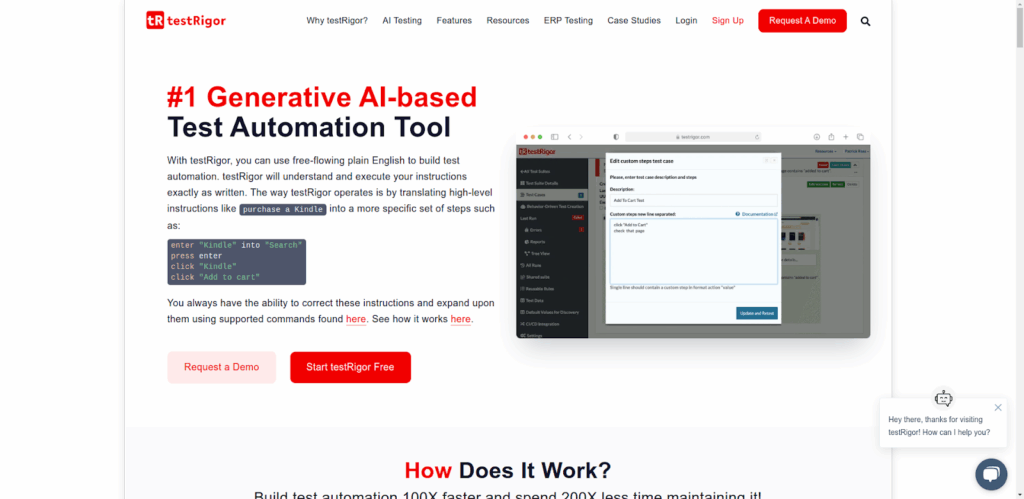
testRigor allows users to create and maintain tests using plain English commands, dramatically lowering the barrier to test automation. It supports web, mobile, and API testing, and integrates with existing CI/CD tools and test management platforms.
Key features:
- AI-driven test generation from plain English commands
- Supports web, mobile, and API testing
- Integration with CI/CD pipelines and test case management tools
- Self-healing tests that adapt to UI changes
- No programming knowledge required
Best for: Teams with limited technical resources that want to automate testing using natural language.
10. LambdaTest
LambdaTest is an AI-powered test orchestration platform that offers real device and emulator-based testing at scale. It supports Appium, Espresso, and XCUITest, and provides smart visual regression testing powered by AI.
Key features:
- Access to a wide range of real Android and iOS devices, plus emulators
- Parallel test execution for faster results
- AI-powered visual regression testing
- Supports Appium, Espresso, and XCUITest frameworks
- Integrates with Jenkins, CircleCI, GitHub, Jira, and Azure DevOps
Best for: Teams that need large-scale parallel testing across both real and virtual devices.
11. Sauce Labs
Sauce Labs is an enterprise-grade cloud testing platform that supports automated testing across real and virtual devices. It is designed for large-scale organizations with complex CI/CD pipelines and stringent security requirements.
Key features:
- Access to real and virtual Android/iOS devices
- Supports Appium, Espresso, and XCUITest
- Secure enterprise-grade cloud infrastructure
- Advanced debugging tools with logs, screenshots, and video
- Deep CI/CD toolchain integrations
Best for: Enterprise teams that need scalable, secure testing integrated deeply into their DevOps workflows.
12. TestComplete
TestComplete by SmartBear is a versatile UI automation tool known for its AI-powered object recognition engine and keyword-driven testing. It supports scripted and scriptless test authoring for mobile, web, and desktop applications, and integrates with BitBar for scalable cloud-based device testing.
Key features:
- AI-powered smart object recognition for dynamic UIs
- Scripted and scriptless test authoring options
- Supports JavaScript, Python, and VBScript
- Parallel test execution via BitBar cloud
- Integration with Jenkins, Jira, GitHub, and Azure DevOps
Best for: Organizations transitioning from manual to automated testing that need flexible authoring modes and strong object recognition.
How to choose the right mobile testing tool?
Choosing the best testing tool depends on your specific needs. Here are the key factors to consider:
Type of application
Consider whether your app is native, web-based, or hybrid. Some tools like Espresso and XCUITest are platform-specific and excel at native testing, while Appium and Katalon support all app types across platforms.
Cross-platform needs
If your app runs on both iOS and Android, choose a tool that supports both platforms with a single test suite. Appium, BrowserStack, LambdaTest, and Katalon all offer strong cross-platform support.
Team expertise and coding requirements
Evaluate your team’s technical skills. Tools like Appium and Espresso require programming knowledge, while ACCELQ, testRigor, and Maestro are designed for teams with limited coding experience. Katalon and TestComplete offer both modes.
CI/CD integration
Seamless integration with your CI/CD pipeline is essential for continuous testing. Most modern tools integrate with Jenkins, GitHub Actions, GitLab CI, and CircleCI. Make sure the tool you choose fits into your existing development workflow.
Real device vs. emulator testing
Emulators and simulators are useful for early-stage testing, but real device testing is critical for catching issues that only appear on physical hardware. Cloud-based device farms from BrowserStack, Kobiton, LambdaTest, and Sauce Labs provide real device access without the overhead of maintaining a physical lab.
Budget
Evaluate both upfront and long-term costs. Open-source tools like Appium, Espresso, XCUITest, and Maestro are free but may require more setup and maintenance effort. Commercial platforms offer convenience, support, and enterprise features at various price points.
| Your need | Recommended tools |
|---|---|
| Cross-platform (iOS + Android) | Appium, Katalon, BrowserStack, LambdaTest |
| Android-only | Espresso, Appium |
| iOS-only | XCUITest, Appium |
| No-code / codeless automation | ACCELQ, testRigor, Kobiton |
| Open-source / free | Appium, Espresso, XCUITest, Maestro |
| Enterprise-scale CI/CD | Sauce Labs, BrowserStack, TestComplete |
| Real device cloud testing | BrowserStack, Kobiton, LambdaTest, Sauce Labs |
| Fast UI flow testing | Maestro, Espresso, XCUITest |
Mobile testing tools: language and framework support
The programming language and framework compatibility of your testing tool matters for team adoption. Here is a detailed breakdown:
| Tool | Languages supported | CI/CD integrations |
|---|---|---|
| Appium | Java, Python, C#, Ruby, JavaScript | Jenkins, Git, Jira, GitHub Actions, Selenium Grid |
| BrowserStack | Framework-dependent (Appium, Espresso, XCUITest) | Jenkins, CircleCI, GitHub, Azure DevOps |
| Katalon Studio | Groovy, Java | Jenkins, Git, Jira, CircleCI, Sauce Labs |
| Espresso | Java, Kotlin | Gradle, Jenkins, Firebase Test Lab |
| XCUITest | Swift, Objective-C | Xcode Cloud, Jenkins, Fastlane |
| Kobiton | C#, Java, Ruby, NodeJS, PHP, Python | Jenkins, Azure DevOps, CircleCI, Travis CI |
| ACCELQ | Codeless (natural language) | Jenkins, Jira, Git, Azure DevOps |
| Maestro | YAML (declarative) | GitHub Actions, CI/CD via CLI |
| testRigor | Plain English (codeless) | Jenkins, GitHub, Jira, test management tools |
| LambdaTest | Framework-dependent (Appium, Espresso, XCUITest) | Jenkins, CircleCI, GitHub, Jira, Azure DevOps |
| Sauce Labs | Framework-dependent (Appium, Espresso, XCUITest) | Jenkins, GitHub, CircleCI, Azure DevOps |
| TestComplete | JavaScript, Python, VBScript | Jenkins, GitHub, Jira, Azure DevOps |
Conclusion
With the mobile app testing services market projected to grow from $7.7 billion in 2025 to over $17 billion by 2030, the demand for robust testing tools is only accelerating. The right tool depends on your platform requirements, team expertise, budget, and integration needs.
For open-source cross-platform automation, Appium remains the industry standard. For cloud-based real device testing, BrowserStack, LambdaTest, and Sauce Labs lead the way. If codeless automation is a priority, ACCELQ, testRigor, and Kobiton offer compelling AI-driven solutions. And for platform-native speed, Espresso and XCUITest are unmatched on Android and iOS respectively.
No matter which tool you choose, thorough mobile testing is the foundation for delivering a polished app experience that drives user retention and revenue growth. Before you launch, consider testing your paywall A/B tests and soft-launching your app to validate both functionality and monetization.