In 2026, Google App Campaigns (GAC) remains the cornerstone for mobile UA growth. With Google’s AI-driven automation and major platform updates throughout the year, these campaigns now offer more powerful ways to reach users across Search, Play Store, YouTube (including Shorts), Display, and Discover.
This comprehensive guide provides everything you need to set up, optimize, and scale your app campaigns effectively—incorporating all the latest features and best practices from 2026.
What’s new in 2026: Key updates you need to know
Before diving into the playbook, here are the critical updates that have reshaped Google App Campaigns this year:
Web to App Connect expansion
Web to App Connect has expanded significantly. You can now drive clicks directly to your app from YouTube Ads, Hotel Ads, and Demand Gen campaigns—in addition to Performance Max, Search, and Shopping campaigns. Brands using Web to App Connect on YouTube have reported 2x higher conversion rates.
Key benefit: Search and Shopping campaigns can now be credited with driving new app installs and in-app conversions for the first time.
iOS Web-to-App measurement
Google has expanded Web-to-App acquisition measurement for iOS, allowing advertisers to track when a user moves from a web campaign into an app install that ultimately leads to a valuable in-app action. This is particularly significant post-ATT, as it restores visibility that app advertisers lost years ago.
YouTube Shorts enhancements
YouTube has added interactive comments to eligible Shorts ads, creator links to brand websites, and expanded ad delivery to mobile web browsers. Co-branded partnership ads for App campaigns now enable Shorts creators to display app promotions with custom CTA panels.
AdAttributionKit (Replacing SKAN 5)
While SKAdNetwork 4.0 remains operational, Apple is transitioning to AdAttributionKit (AAK)—a new privacy-preserving framework that received major updates at WWDC 2025. AAK is designed to replace the anticipated SKAN 5.0.
Power Pack and AI Max
At Google Marketing Live 2025, Google introduced the Power Pack—replacing the Power Pair. This includes Performance Max, Demand Gen, and AI Max working together: Demand Gen creates awareness, AI Max engages users on Search, and Performance Max orchestrates full-funnel performance at scale.
Ads Advisor
Google’s new AI-powered Ads Advisor helps manage and improve campaigns through natural language interaction, troubleshooting policy issues, creating campaigns, and analyzing performance.
Why Google app campaigns remain a ‘Black Box’
Even in 2026, with nearly 10 years since their introduction, Google App Campaigns continue to frustrate marketers seeking clarity and control. Here’s why:
1. Algorithm-driven automation
GAC automates everything: ad creatives, audience targeting, bidding strategies, and placement decisions. You don’t choose keywords or placements manually. Google’s machine learning optimizes based on signals across Search, YouTube, Display Network, and Play Store.
2. Limited reporting granularity
Google restricts:
- Creative-level performance insights — no clear breakdowns by asset like in Meta
- Audience data — you can’t see exact user segments or interest groups
- Placement data — you can’t choose or see full lists of where ads appear
Google does allow you to see third-party app placement data based on impressions, but it’s still fairly limited.
3. Google’s incentive: Trust the AI
Google wants advertisers to trust machine learning rather than tweak manually. Their bet is that aggregated, high-signal user data is better leveraged by AI than by humans. GAC is designed to optimize outcomes, not explain them.
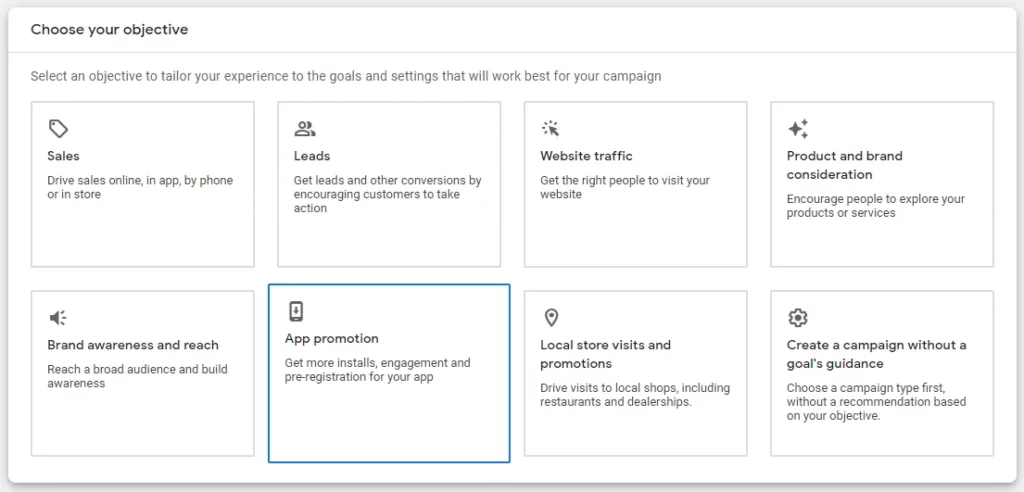
Campaign setup: Getting started right
Choose the right campaign type
Google offers three campaign types for mobile apps:
- App installs: Focus on acquiring new users
- App engagement: Re-engage current users (beneficial for inactive or lapsed users)
- Pre-registration (Android only): Build hype for upcoming app launches
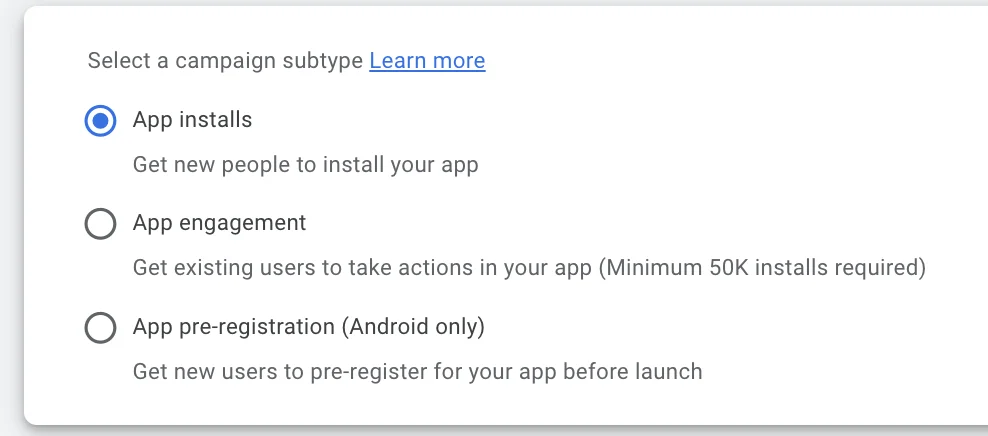
Align campaign types with business goals
- For growth: Start with App Install + “Users likely to perform in-app action”
- For monetization: Use App Installs optimized for in-app purchases
- For retention: Leverage App Engagement with deep links
Based on 11+ years of UA experience, install-only campaigns rarely bring quality traffic. Consider optimizing for in-app actions from the start if you have sufficient conversion volume.
Pre-launch checklist
Before launching your Google App Campaign, answer these critical questions:
| Question | Recommendation |
|---|---|
| What conversion event to optimize for? | Choose deep events (purchase, not install). Ensure 30-50+ daily volume. |
| Which bidding strategy? | tCPI for installs, tCPA for conversions, tROAS for revenue |
| Acceptable cost per event? | Base on CAC or payback window |
| Budget allocation? | 50× CPI for install campaigns; 10× CPA for action campaigns |
| Tracking setup? | Robust MMP or Firebase SDK with all events mapped and tested |
Conversion tracking: The foundation of success
Google App Campaigns use conversion data to train the algorithm. If your event data is missing, delayed, misfiring, or irrelevant, the system won’t know what a “good” user looks like—and you’ll waste budget attracting low-quality installs.
Core conversion tracking stack
| Layer | Tool | Purpose |
|---|---|---|
| SDK | Firebase or MMP (AppsFlyer, Adjust, Singular) | Track events inside the app |
| Ads Platform | Google Ads account | Ingest events and optimize |
Events you must track
There are three tiers of conversion events:
Tier 1 — Basic events
- first_open
- install
Use case: Only sufficient for tCPI bidding, not for quality users
Tier 2 — Mid-funnel events
- sign_up, onboarding_complete, tutorial_complete
- login, start_trial
Use case: Better signal for tCPA optimization — need 10-50+ per day
Tier 3 — High-value events (End funnel)
- purchase, subscribe, renewal
- add_to_cart, add_payment_info
- level_complete (for gaming)
- Custom: hero_user_achieved (e.g., completes 3 sessions & spends $10)
Use case: Ideal for tROAS bidding — requires sufficient volume
Why we recommend Firebase for GAC
- Audience signals and exclusions: Firebase is the only platform allowing you to create and sync audience segments directly with Google Ads for precise targeting signals.
- Priority beta access: Google prioritizes Firebase-linked apps for new features and beta programs.
- Real-time conversion syncing: Events sync directly and instantly, improving learning phases compared to delayed MMP postbacks.
- Ecosystem integration: Deep integration with Play Store, Google Analytics, and GA4.
Account and campaign structure
Structure your campaigns based on platform, optimization goal, and geo/language grouping.
Platform: Android vs iOS
Keep Android and iOS campaigns separate due to:
- Different user behavior and store ecosystems
- iOS requiring SKAdNetwork/AdAttributionKit support
- Separate event tracking schemas
Campaign naming examples:
- GAC – Android – Installs – US
- GAC – iOS – Purchases – UK
Optimization goal: Installs vs actions
| Goal | Campaign example |
|---|---|
| Install-focused | GAC – Android – Installs – Tier 1 |
| Purchase-focused | GAC – Android – Purchases – Tier 1 |
| Subscription-focused | GAC – iOS – Trial Start – US |
Avoid running different campaigns in the same geo optimizing for the same event—this causes cannibalization.
Ad Group (Asset Group) Level
Use one theme per ad group for clean creative testing:
- Creative concepts: utility vs lifestyle
- Language variants: for multi-lingual campaigns
- Promotion-specific assets: holiday offer vs evergreen
Ad group naming examples:
- AG – Value Prop – Track Expenses Fast
- AG – Promo – 30 Day Free Trial
- AG – Lifestyle – Gen Z Visuals
Creative assets: The complete specification guide
App Campaigns use your assets to generate ads across Google Search, Google Play, YouTube (including Shorts), Display Network, and Discover.
Text assets
- Short headline (max 30 characters) — up to 5
- Description lines (max 90 characters) — up to 5
- Callouts/Value props — clear, benefit-focused
Include different angles (features, emotion, social proof, urgency)
Image assets
| Format | Dimensions (px) | Priority |
|---|---|---|
| Square | 1200 × 1200 | MUST HAVE |
| Landscape | 1200 × 628 | Recommended |
| Portrait | 900 × 1600 | Recommended (for Shorts & Discover) |
Max file size: 150KB (PNG or JPG)
Avoid text-heavy images—keep visuals clean and mobile-optimized.
Video assets (Including YouTube Shorts)
| Orientation | Ratio | Best For |
|---|---|---|
| Portrait | 9:16 | YouTube Shorts, Discover |
| Landscape | 16:9 | Classic YouTube, GDN |
| Square | 1:1 | Versatile across placements |
YouTube Shorts specifications
- Recommended length: Under 60 seconds (matches user behavior)
- Maximum length: 3 minutes (only first 180 seconds play in Shorts feed)
- Sound: Always on—use sound-on assets
- CTA appearance: Shows 3 seconds into ad for App campaigns
- NEW – Comments: Now available on eligible Shorts ads (requires linked YouTube channel)
Video best practices: Use logo in first 3 seconds, avoid “click here”, show app UI early, create “social first” feel.
Bidding and budget guidelines
Recommended budget-to-bid ratios
| Campaign Type | Minimum daily budget | Optimal ratio |
|---|---|---|
| tCPI (Install) | 50× target CPI | 50× or higher |
| tCPA (Action) | 10× target CPA | 20× for best results |
| Initial tCPA bid | +20-30% above goal | Then taper down with volume |
CPI benchmarks by platform
| Platform/Category | Average CPI range |
|---|---|
| Google Ads (App Campaigns) | $1.50 – $4.50 |
| Competitive niches (Gaming, Finance, Tech) | $5.00 – $10.00+ |
| Lifestyle/Entertainment apps | $1.00 – $3.00 |
| Average CPA (in-app action) | $5.00 – $20.00 |
Scaling rules
- Wait for consistent CPAs across 5-7 days before scaling
- Scale budgets by no more than 20% every 48-72 hours
- Don’t change target CPI/CPA bids by more than 20% in 24 hours
- Wait until campaign generates 20-30+ targeted events per day before major changes
iOS Attribution in 2026: SKAN 4.0 and AdAttributionKit
iOS attribution has evolved significantly. Here’s what you need to know:
Current State: SKAdNetwork 4.0
SKAN 4.0 remains the primary attribution framework with these key features:
- Multiple postbacks: Up to 3 postbacks at different time intervals (0-48 hours, 3-7 days, 8-35 days)
- Conversion values: Fine-grained (0-63) and coarse-grained (low, medium, high)
- Source identifiers: Up to 4 digits (10,000 options vs previous 100)
- Web-to-app attribution: Available for Safari
AdAttributionKit (AAK)
Apple is transitioning to AdAttributionKit, which received major updates at WWDC 2025. AAK is designed to replace the anticipated SKAN 5.0 and will cover attribution for third-party stores and the Apple App Store.
ATT opt-in rates
Current opt-in rates for App Tracking Transparency are typically in the 15-30% range. SKAN/AAK handles attribution for users who don’t opt in.
Best practices for iOS campaigns
- Achieve 40-50+ SKAN installs per campaign ID daily to minimize NULL conversion values
- Map conversion values strategically to your most important events
- Use Google’s SKAN redistributed conversion values for more comprehensive reporting
- Prepare for AdAttributionKit transition
Troubleshooting: common problems and solutions
1. Campaign not spending budget
- Low bids: Increase bids by 20-30% or start higher than goal
- Insufficient budget: Ensure 50× CPI or 10× CPA minimum
- Limited creative assets: Add more diverse images and videos
- Narrow targeting: Expand location or language settings
2. High CPI in first days
- Conversion delay: Account for 24-48 hour delays in reporting
- Learning phase: Normal during first 1-2 weeks
- View-through conversions: Calculate adjusted CPI including VTCs
3. Performance fluctuations
- Use Explanations feature: Hover over blue values in data tables to see causes
- Check conversion tracking: Sudden drops in event pings affect optimization
- Review recent changes: Any setting changes can impact performance
- Competing campaigns: Check for cannibalization with similar targeting
4. Creative fatigue
- Refresh high-volume asset groups every 2-3 weeks
- Watch for “Low” performance labels in asset reporting
- Add new assets instead of removing “Good” or “Low” rated ones
- Rotate themes: utility vs emotion vs lifestyle
Pro tips: Lessons from 11+ years of UA experience
1. The algorithm is only as smart as your signals
Google’s automation is unmatched, but not magic. The difference between average and exceptional results comes down to the quality of your event tracking. Set up custom in-app events tied to user value, optimize toward deep funnel events, and ensure real-time, deduplicated conversion syncing.
2. Structure campaigns to learn, not just launch
Avoid dumping all assets and countries into a single campaign. Structure for clarity: separate Android vs iOS, separate by goal, group countries by language and monetization similarity, and limit to one theme per asset group.
3. Leverage audience signals from Firebase
You can’t target audiences directly in GAC, but you can influence them via audience signals. Create segments for high LTV users, 7-day retained users, and churned but monetized users. Upload these as signals to accelerate learning.
4. Don’t scale until you stabilize
Many marketers scale too fast—that’s when GAC breaks. Wait for consistent CPAs across 5-7 days, set proper budget-to-bid ratios, and scale gradually (no more than 20% every 48-72 hours).
5. Chase outcomes, not installs
Install volume is a vanity metric. Focus on ROAS over 7/14/30 days, retention and churn, and event velocity. If your post-install funnel is broken, no amount of traffic will fix it.
6. Embrace Web to App Connect
The 2026 expansion of Web to App Connect is a game-changer. Take advantage of unified conversions, the new combined overview card, and the ability to credit web campaigns for app installs—especially valuable for iOS.