Web paywalls on iOS, one year in: What the data says about app-to-web in 2026

TL;DR:
- A year after the Epic ruling, the App-to-web pitch ("save 15-30% Apple commission") turned out to be conditional. Three Adapty apps tested it. Three different verdicts.
- App 1 (standard 30% tier, post-onboarding placement): Web converted 26% fewer users, but ARPPU doubled. Net proceeds rose +53% per viewer. They redesigned the offer for the web instead of lift-and-shifting.
- App 2 (AI app): Same web paywall converted nearly 4x better in its best placement (post-onboarding) than its worst (mid-app contextual upsell). Placement matters more than design.
- App 3 (Small Business Program, 15% Apple tier): Web conversion improved by 55%, but proceeds decreased by 9% per viewer. Small Business math doesn't work the same way.
- Five best practices that hold across all three: design the offer for web; pick the right placement (post-onboarding wins, mid-app loses); know your commission tier first; Apple Pay as default or don't bother; track proceeds per viewer, not conversion rate.
- Compliance is non-negotiable. April 2026's Cal AI rejection ($50M ARR app, briefly pulled from the App Store for three specific violations) confirms Apple is still policing this space. Full checklist inside.
- The decision is conditional, not universal. Standard tier + redesigned offer + post-onboarding placement + Apple Pay default + meaningful US iOS traffic = test it. Miss any of those, and the cycles are better spent elsewhere.
A year ago this week, on April 30, 2025, Judge Yvonne Gonzalez Rogers ordered Apple to stop charging commission on purchases made through external links in US iOS apps. Within 24 hours, Apple updated its App Store Guidelines. Within 72 hours, Spotify, Patreon, and Proton shipped updated apps. The pitch sounded simple: add a button to your in-app paywall, route the user to your own checkout page, save Apple's 15% to 30% commission. Free margin.
A year later, almost none of that turned out to be that simple.
In December 2025, the Ninth Circuit modified the original ruling. Apple can charge a "reasonable" commission on external link purchases after all. The exact rate is still being negotiated. In April 2026, Apple briefly removed Cal AI from the App Store for web payment violations. Cal AI, a $50M ARR app recently acquired by MyFitnessPal, had its takedown send a clear signal that App Review is still policing how developers implement external payments. Operators who ran A/B tests over the year have reached a far more nuanced verdict than the May 2025 vendor copy suggested.
This guide is what we've learned from a year of watching customers ship app-to-web paywalls on Adapty. Three apps, three different outcomes. Five best practices that hold up across all of them. One compliance checklist informed by the most recent rejections. An honest decision framework for whether you should launch one yourself.
One thing worth saying upfront: App-to-web works only for US iOS users. The Epic ruling was a US court decision, and Apple's response is geographically scoped to the US App Store. If your US traffic is a small share of your iOS user base, the addressable opportunity is bounded by that share.
App-to-web vs web-to-app: which one are you building?
A category clarification before going further. Most "web paywall" content conflates two different products that have almost nothing in common operationally.
App-to-web paywalls (the focus of this guide) are an in-app button that opens a web checkout. The user is already in your iOS app. They tap a button on your paywall. The browser opens. They pay. They return to the app already subscribed. This is what the Epic ruling enabled, and it's available for US iOS apps right now.
Web-to-app funnels start on the web, usually from an ad. The user moves through a quiz onboarding, hits a paywall, and pays before installing the app. Then they download. This has been around for years, predates the Epic ruling, and works on any platform in any geography. Anyone building web-to-app funnels should look at FunnelFox.
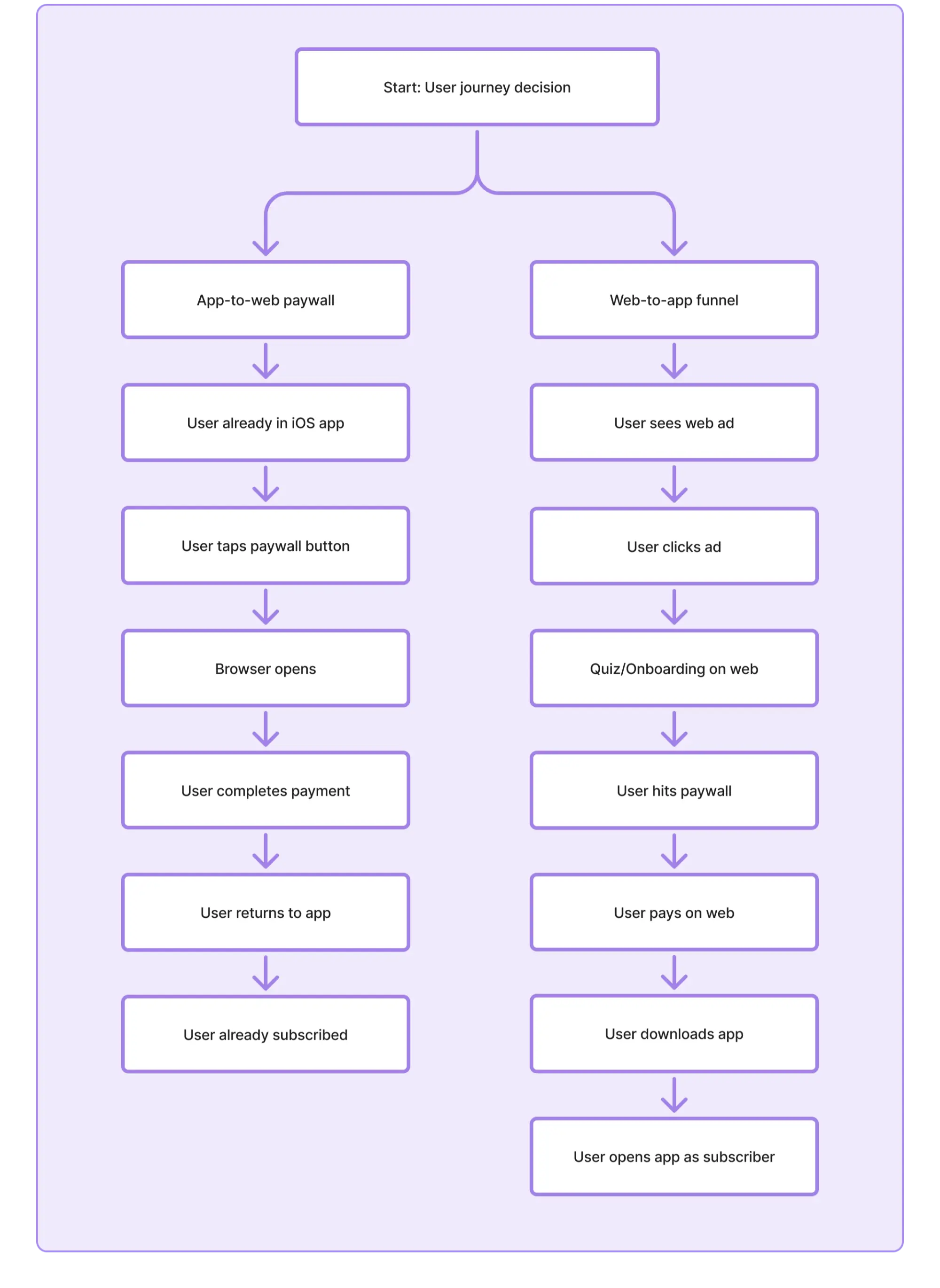
The rest of this guide is about app-to-web. The web-to-app playbook differs meaningfully on acquisition economics, attribution, and conversion patterns.
What the data shows: three apps and three results
The strongest argument against simple "best practices" content on this topic is that operators who've actually run these tests report wins, losses, and no-difference results in roughly equal measure. The same setup produces different outcomes for different apps. Here's what we've seen across three Adapty customers who ran clean A/B tests over the past year.
App 1: a US iOS subscription app on the standard 30% commission tier
Same audience, same placement (post-onboarding), overlapping time period. This is a directional read rather than a controlled 50/50 A/B test, but the sample on both sides is large enough to mean something.
| Metric | Native (IAP) | Web (app-to-web) | Difference |
| Conversion rate (purchase per view) | 4.95% | 3.69% | −26% |
| ARPPU | $23.76 | $47.59 | +100% |
| ARPU | $1.16 | $1.77 | +53% |
Purchase rate per view dropped 26% on the web. ARPPU roughly doubled. Net result: 53% more take-home revenue per paywall viewer.
The math behind the +53%: web saves about 25 percentage points in commission (Apple's 30% replaced by Stripe's ~5%), and the new web-only longer-cadence plans capture more revenue per buyer than the native weekly plan. Together, those two effects more than offset the 26% conversion drop. The conversion drop is real; the commission savings plus the cadence redesign are bigger.
The catch worth understanding: this team didn't lift-and-shift their native pricing onto Stripe. They built a different offer for the web. The native paywall used a weekly plan and a low-priced annual plan. The web variant introduced new plans at additional price points, with the weekly priced lower than native and the longer-cadence plans positioned as savings against it. The web won because the team treated it as a different product, not the same product on different rails.
App 2: an AI companion app testing five placements
App 2 deployed the same web paywall across five placements within the app. Same paywall design, same products, same payment provider. The only variable was where users encountered it in the funnel.
| Placement | Conversion rate | ARPU |
| Main placement (post-onboarding) | 3.38% | $2.55 |
| Last chance offer | 2.90% | $4.57 |
| Mid-funnel offer | 2.18% | $1.69 |
| Contextual upsell | 0.87% | $0.98 |
The same web paywall converted nearly 4 times better at its best placement than at its worst. The pattern is consistent. Web paywalls work as the primary decision point, where users are already evaluating whether to subscribe. They die as in-app contextual upsells deep in the app, where users are mid-task, and the browser context-switch breaks their attention.
App 3: a language-learning app on Apple's Small Business Program
App 3 ran a similar test to App 1: same audience, same placement, similar sample sizes. On the surface, the result looked like a clear win.
| Metric | Native (IAP) | Web (app-to-web) | Difference |
| Trial conversion rate | 5.80% | 6.04% | +4% |
| Conversion rate (purchase per view) | 2.54% | 3.93% | +55% |
| ARPPU | $65.99 | $52.83 | −20% |
| ARPU | $1.67 | $1.52 | −9% |
Purchase rate per view rose 55% on the web. Despite that, proceeds came in 9% lower per viewer, and the team walked back the experiment. IAP became the prominent CTA again, with web demoted to a quieter secondary link.
What happened? Two things. First, the team kept the native pricing structure on the web instead of redesigning it, and ARPPU dropped 20%. Second, and this is the under-discussed one, the app is on Apple's Small Business Program. Apple takes 15% from them, not 30%. The web paywall saved them about 10 net percentage points after Stripe fees, not 25. That margin wasn't enough to overcome the lower ARPPU.
Best practice 1: design for the moment, not the rail
The App 1 finding is the thesis of this entire guide. Treat a web paywall as a chance to sell a different product, not a different way to sell the same one.
The App Store enforces a specific paywall paradigm: one or two plans visible at a time, fight for one screen of attention, sticker shock built into the price tag. The web has none of those constraints.
You can scroll. You can show six plans. You can split price points across cadences. You can present pricing in the cadence that's most relevant to the user (monthly, quarterly, annual), as long as the actual billed amount is shown clearly alongside it. The flexibility is in how many cadences and price points you can offer, not in obscuring what the user is being charged.
Apps that lift their native paywall directly onto Stripe usually lose. The conversion gap between native and web in our tests has consistently shown native converting higher when the offer is held constant. App 1 saw a 26% drop with offer redesign; the impact varies depending on what else changes. Treat the context-switch as a real drag that has to be compensated for, even if the exact cost will differ for your app. Apps that treat the web as a redesign opportunity (different plans, different anchoring, longer-form layout, Apple Pay as the default) can come out ahead even when their conversion rate is lower.
What "redesigning for the web" looks like in practice:
A wider product mix. The App 1 web variant offered various plans alongside the annual option. Native paywalls hold to two or three plans because of screen space. Web paywalls don't have that constraint.
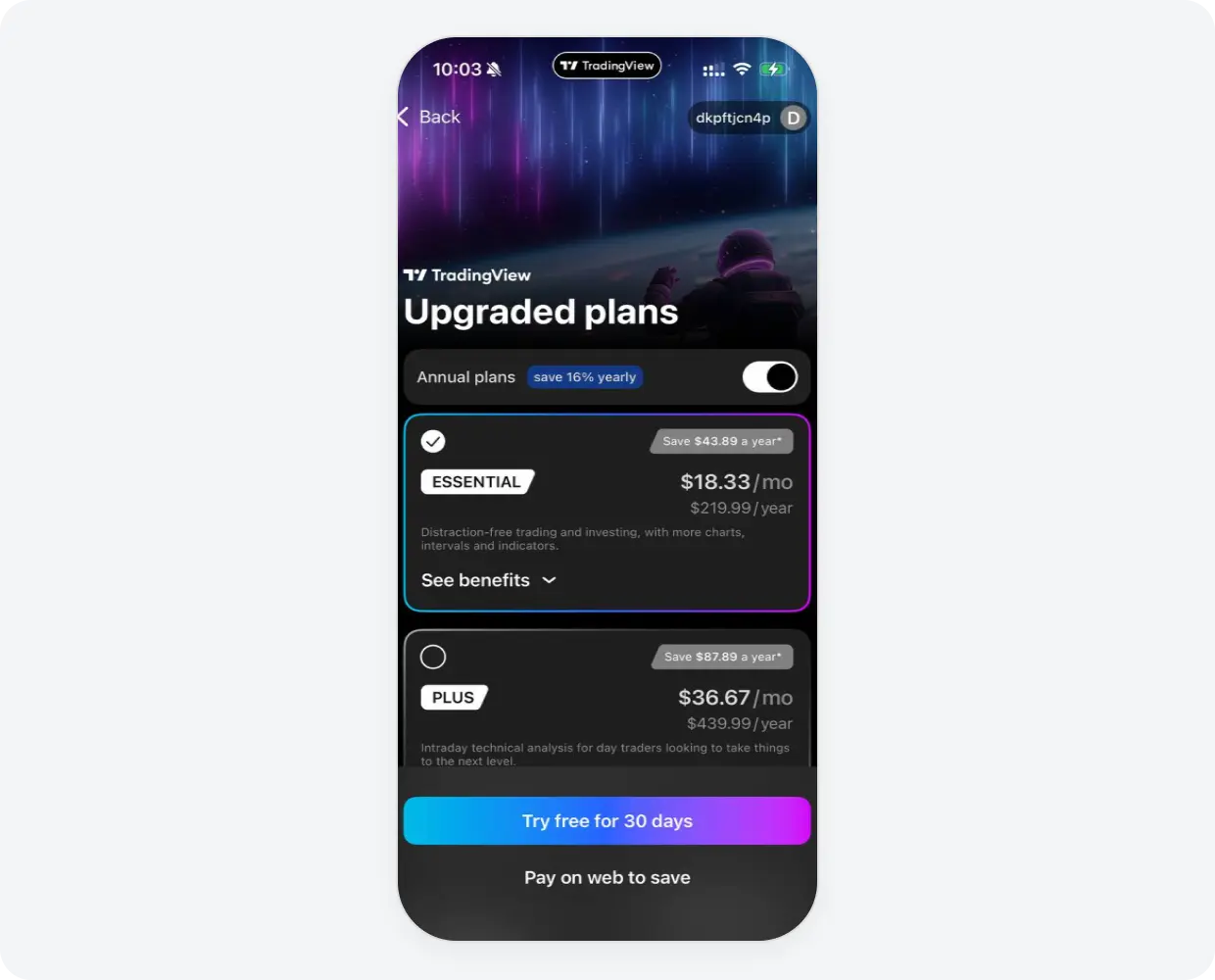
A web-native layout. Long-form scrolling layouts with feature lists, social proof, and FAQs perform well on the web. The same length on native creates fatigue. Treat the web paywall like a landing page, because it is one.
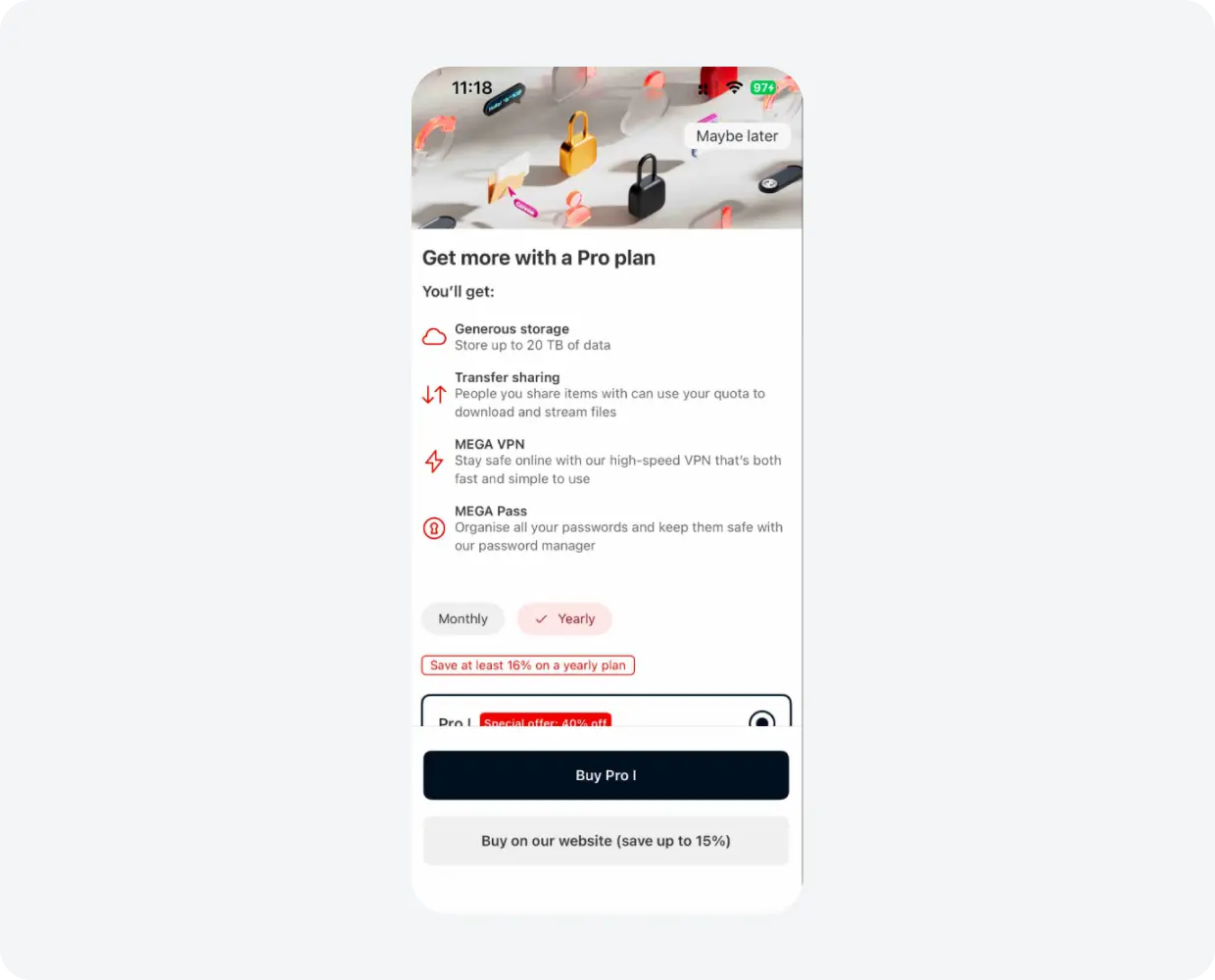
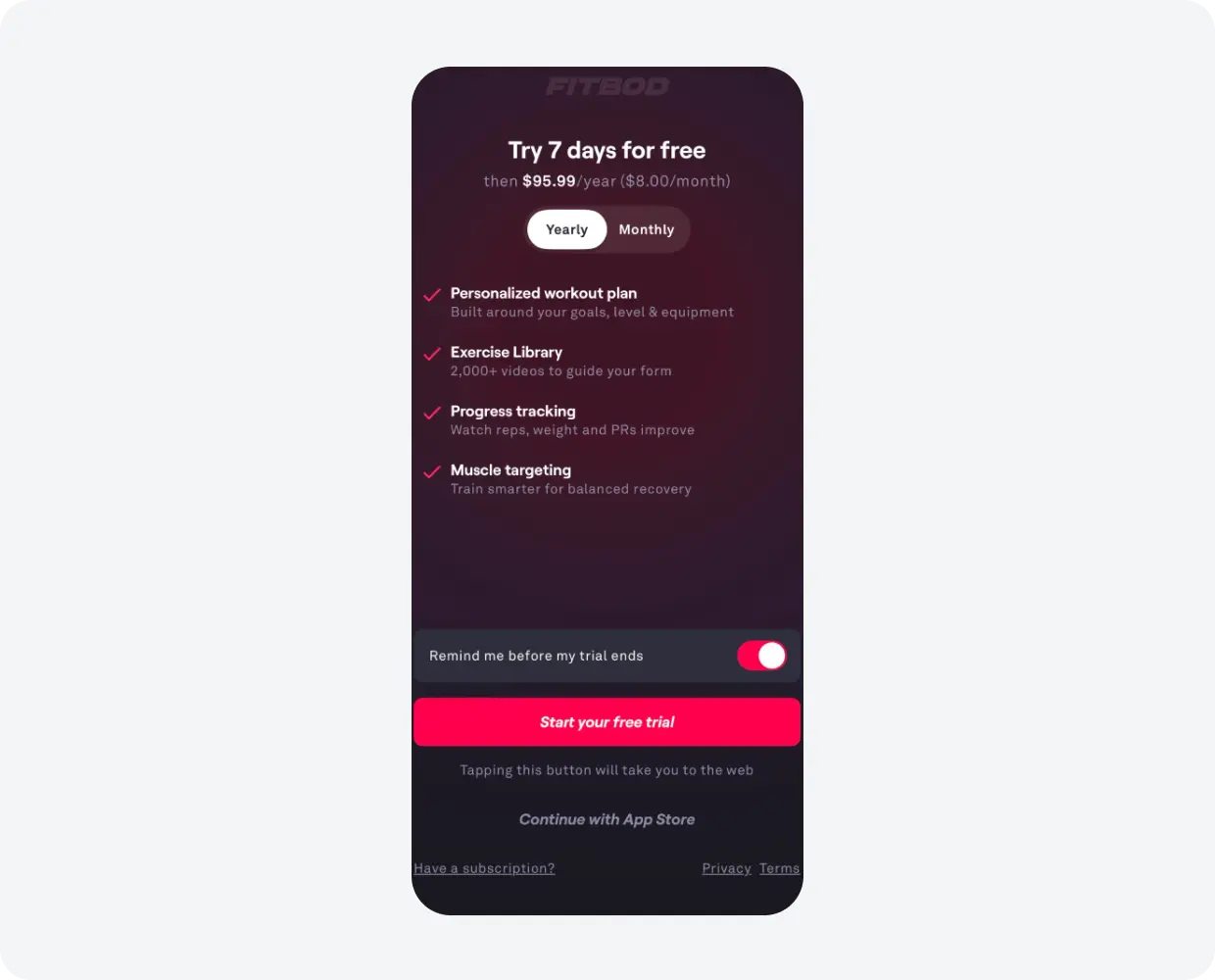
Clear redirect disclosure. Fitbod's pattern is the model. A button that says "Start your free trial" with the disclosure "Tapping this button will take you to the web" directly underneath, and a smaller "Continue with App Store" link below that. Honest, compliant, doesn't surprise the user.
Best practice 2: placement matters more than design
The App 2 data made this stark. The same web paywall, with no design changes, converted 6.4 times better in its best placement than in its worst. Apps that put a web payment button in a contextual upsell deep inside the app (a chat screen, a settings menu, a feature gate) usually see weak conversion. The browser context-switch is too expensive when the user wasn't planning to make a buying decision in that moment.
Where app-to-web works:
- The post-onboarding paywall. The user finished setting up, evaluated whether the app fits their needs, and is sitting on the buy decision. Friction tolerance is at its highest here. This is also where most of an app's revenue is made anyway, so optimizing it matters disproportionately.
- The intro reject offer. When a user dismisses the first paywall, the second-chance offer can route to the web effectively because the user has already engaged with the buy decision once. App 2 saw 2.90% conversion at this placement with the highest ARPU of all their placements ($4.57).
- A/B test variants on the main placement. App 2's A/B test at the main placement converted at 5.54%, better than the baseline main placement at 3.38%. The design of the web variant matters as much as the rail. Tested thoughtfully, the web at the main placement can outperform.
The general rule for any paywall is to put it where intent is high. The app-to-web-specific addition: The browser context-switch is an extra friction layer on top of paywall friction. So while a low-intent IAP placement might convert at 1% instead of 4%, the same low-intent placement on a web paywall converts at 0.87% (App 2's contextual upsell) instead of the 3-5% the same paywall achieves at higher-intent placements.
Best practice 3: Know your commission tier before doing the math
This is the under-discussed point that determines whether the math even works. The "save 30%" pitch from May 2025 only applies if you're paying Apple 30%. Many subscription apps aren't.
Apple's Small Business Program drops the commission from 30% to 15% for any developer earning under $1M in annual proceeds across all their apps combined. App 3 is on this program. So are most early-stage subscription apps, indie developers, and many growing apps that haven't crossed the $1M threshold yet.
The math changes meaningfully:
| Apple tier | Apple cut | Stripe cut | Net savings on the web | Worth the friction? |
| Standard tier (>$1M annual) | 30% | ~5% | ~25 percentage points | Likely yes |
| Small Business Program (\<$1M) | 15% | ~5% | ~10 percentage points | Probably no, unless ARPPU also rises |
A 25-point savings on the standard tier can absorb a 20% conversion drop and still come out ahead. A 10-point savings on Small Business cannot. The conversion drop has to be much smaller to make the economics work, which puts more pressure on the redesign quality, the placement, and the Apple Pay default.
There's a second factor compounding the tier math: brand trust. The bigger and more recognizable the app, the smaller the conversion gap on the web. Users who already trust Spotify or Netflix don't hesitate to enter a card on a Spotify or Netflix web page. Users who've never heard of your app, on a paywall they hit 90 seconds after install, do hesitate. Established consumer brands with strong brand recognition can absorb a bigger share of friction. Indie apps building first-time trust usually can't.
Best practice 4: Apple Pay as default, or don't bother
This is the lever that almost every operator who has tested app-to-web confirms in retrospect. Apple Pay is what makes the web checkout feel as frictionless as IAP. Manual card entry is what kills conversion.
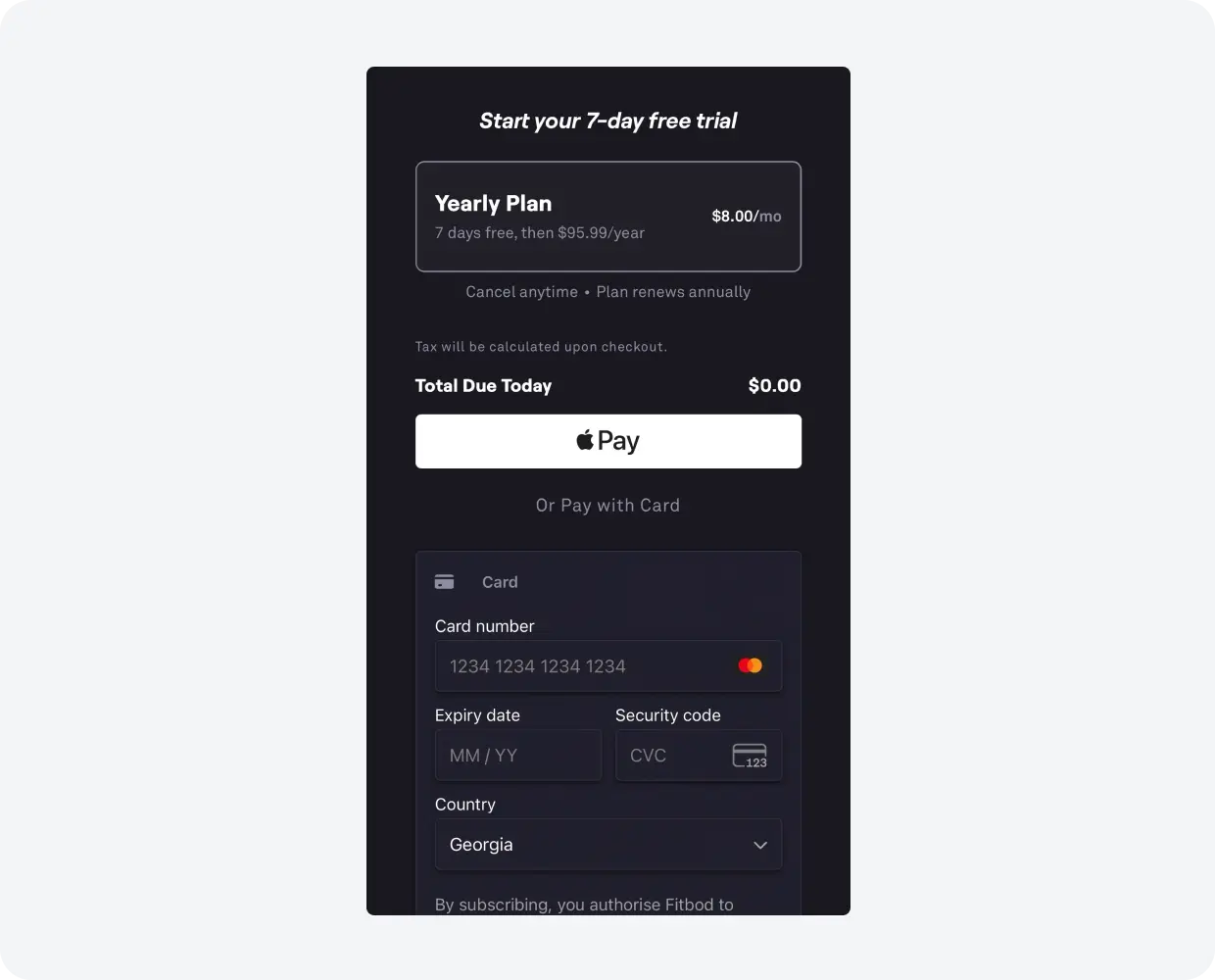
What the data says: In App 1's web variant, the products that converted well were paid through Apple Pay. The pattern repeats across operator reports. Most users who complete a web checkout do it through Apple Pay or Google Pay. Few will manually enter a credit card to start a free trial. The drop-off is severe.
Configuration recommendations:
- Set Apple Pay as the pre-selected payment method on your web checkout page. Card entry should be a fallback ("Or pay with card"), not the default.
- Use the in-app browser when possible, not the external Safari app. Adapty supports both via SDK 3.15 and later. Passing
WebPresentation.BrowserInAppkeeps the user inside your app context. Less attention loss, smoother return to the app after purchase. - For Apple Pay to work, your payment provider's domain needs to be verified. Stripe, Paddle, and Solidgate all have specific Apple Pay domain setup steps in their dashboards. Skip this, and Apple Pay won't render.
If you can only do one thing to improve app-to-web conversion, make Apple Pay the default. If you can't make Apple Pay the default, seriously consider whether app-to-web is worth launching at all.
Best practice 5: Track proceeds per viewer, not conversion rate
The App 1 and App 3 results make this point unmistakable. A web paywall can lose on conversion rate and still win on revenue. The reverse is also true.
What App 1 looked like at first glance: web converted 26% worse. Easy to call it a loss. Until you measure proceeds per viewer, where web came in 47% higher.
What App 3 looked like at first glance: web converted 55% better. Easy to call it a win. Until you measure proceeds per viewer, where web came in 9% lower.
Both apps would have made the wrong decision if they had used conversion rate as their primary success metric. The correct metric for app-to-web tests is ARPU (proceeds divided by unique viewers), because it captures both how many people convert and how much each one is worth net of fees.
End-to-end: what a complete app-to-web flow looks like
Zumba's iOS app shows what the patterns above look like in practice.
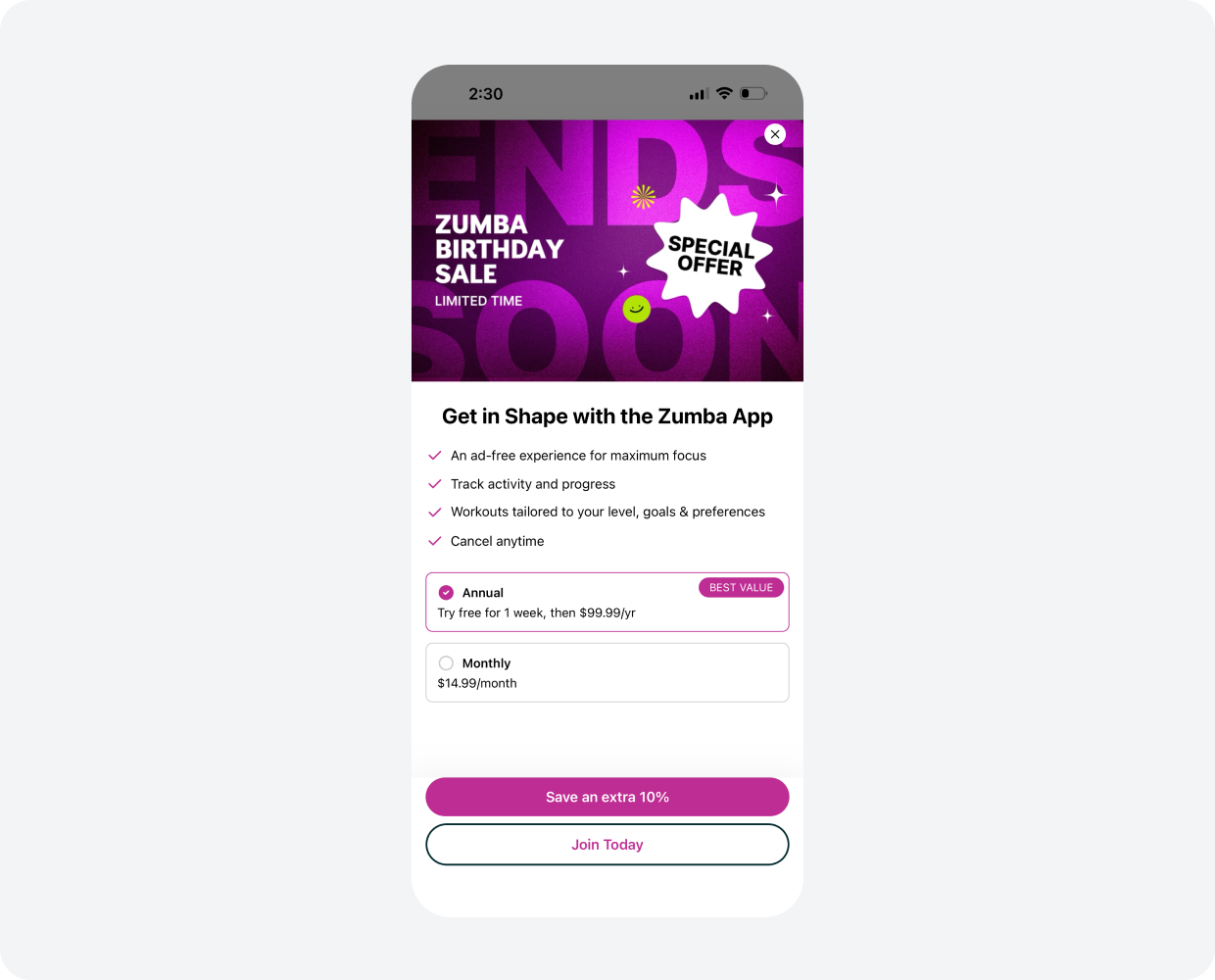
The in-app paywall stays compliant. Two plan options are visible (Annual with trial, Monthly without). The web entry point is the prominent "Save an extra 10%" CTA. The IAP fallback ("Join Today") sits directly below, available but visually quieter. Apple's review guidelines satisfied; the offer the user sees is the offer they get.
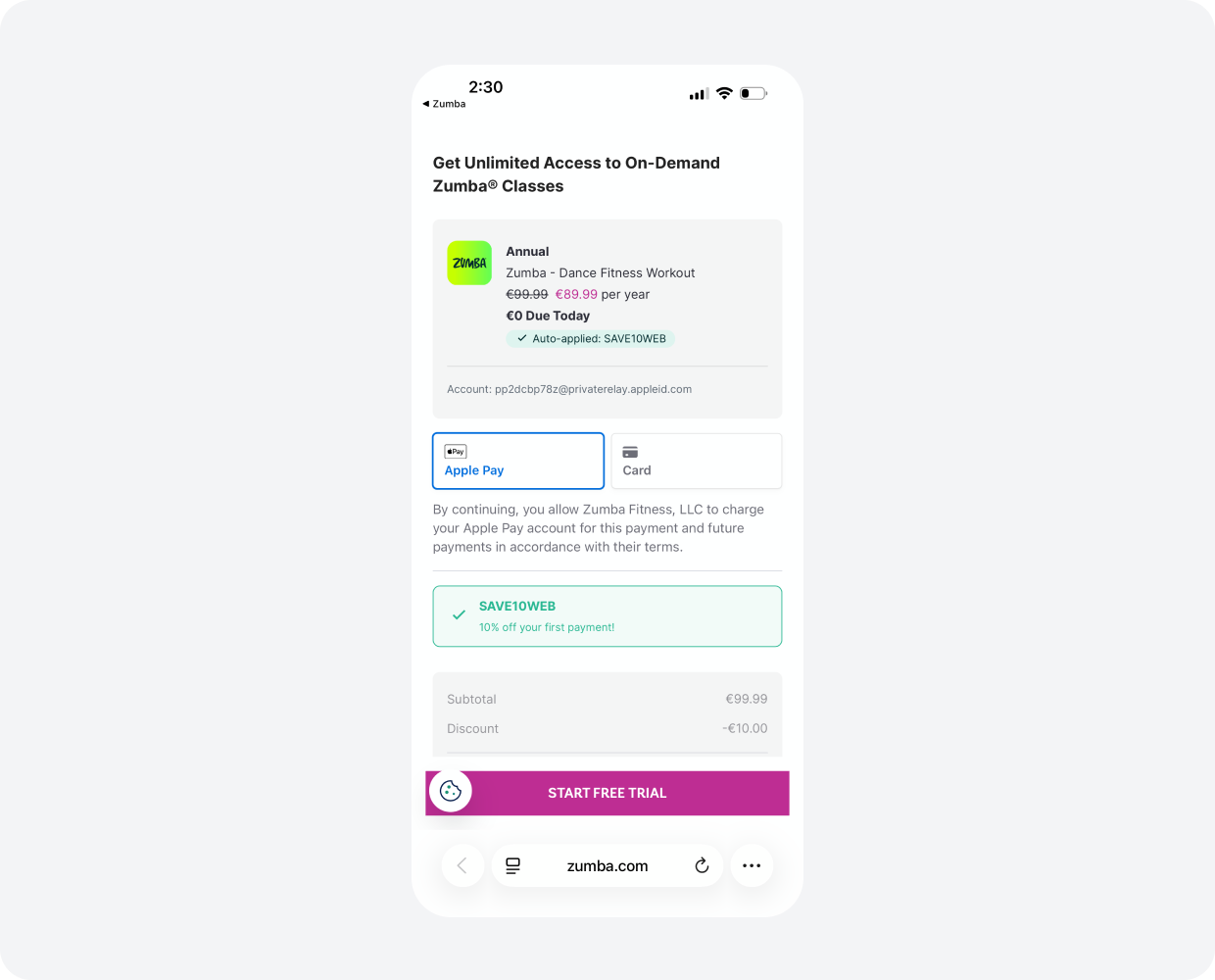
The web checkout opens with Apple Pay pre-selected and the discount already applied. €99.99 to €89.99 with no manual code entry. €0 due today (the trial). The user can complete the purchase in two taps from this screen.
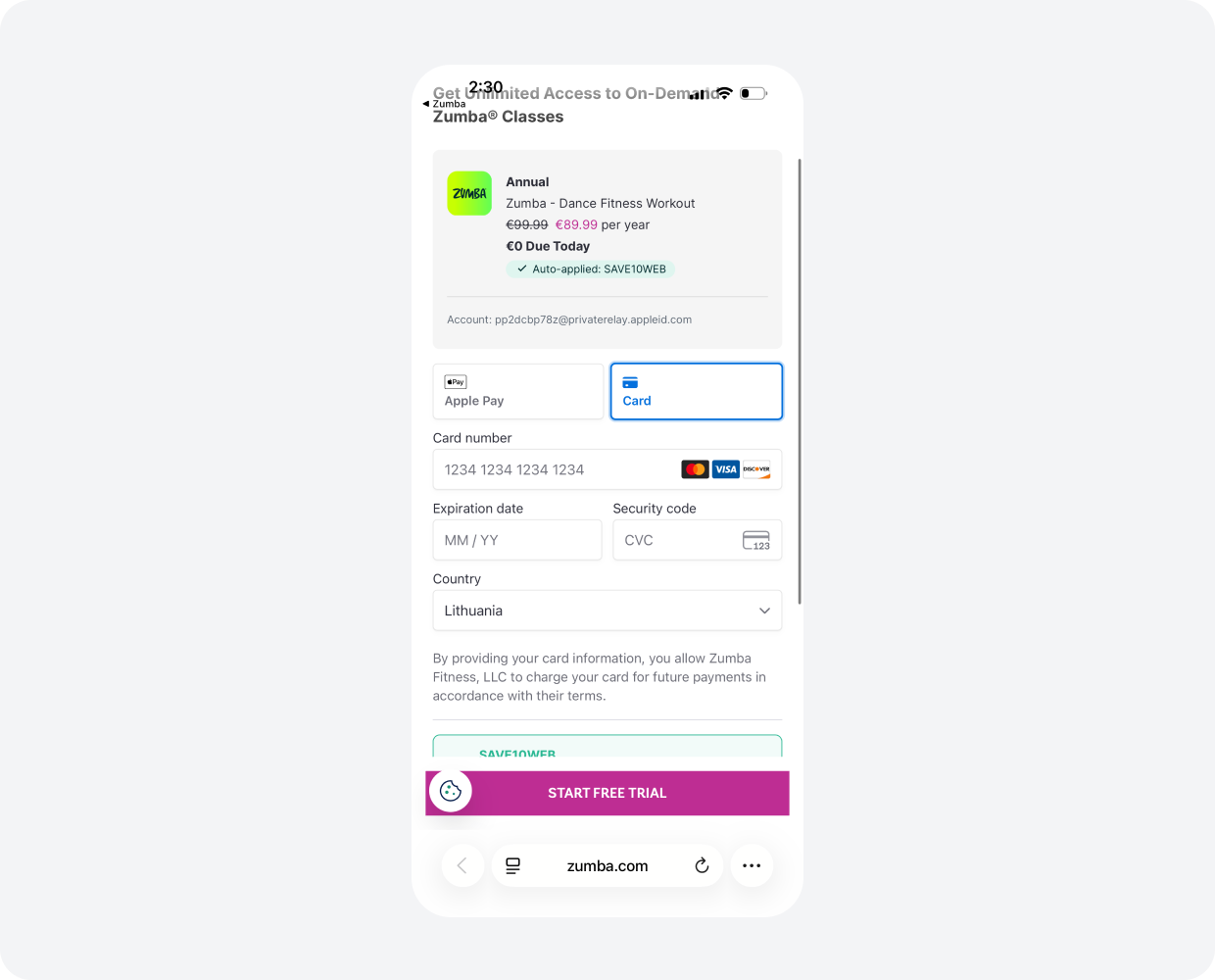
The card form is available for users without Apple Pay set up, but it's the secondary path. Same discount, same trial, same total. The auto-applied promo means the discount doesn't depend on the user remembering or finding a code.
What App Store review still requires: the Cal AI rules
In April 2026, Apple briefly removed Cal AI from the App Store. Cal AI is a calorie-counting app with $50M in annual recurring revenue, recently acquired by MyFitnessPal, currently sitting at #4 on the Health & Fitness charts. The reason for the removal: web payment violations.
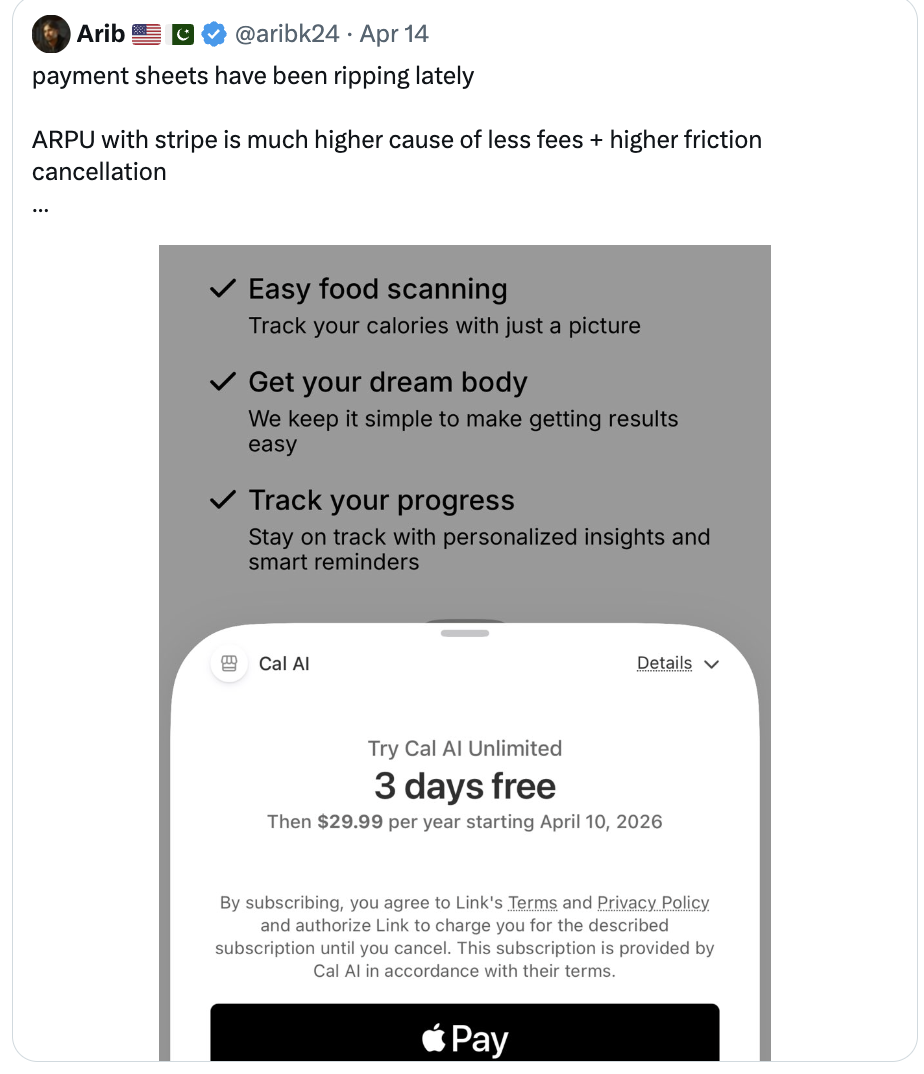
Cal AI was a high-profile example by design. Apple wanted to send a message a year after the Epic ruling: the freedom to use external payments doesn't mean the freedom to use them however you want. App Review is still active. The rules are still being enforced.
Apple cited three violations:
- Bypassed in-app purchase entirely. Cal AI used Stripe as the only payment option on its paywall, removing IAP from the user's choices. For non-reader apps, this violates Guideline 3.1.1, which requires that IAP be offered alongside any external payment link. The "reader" exception (books, music, video, audio streaming) doesn't apply to a calorie-counting app.
- Deceptive billing design. The paywall displayed the weekly-calculated price more prominently than the actual amount the user would be billed. A trial toggle obscured information about automatic renewal. Both violate Guideline 3.1.2c, which requires clear and unambiguous subscription terms.
- Manipulative tactics. When users declined the first subscription offer, the app showed a second, different subscription offer immediately afterward. Combined with negative user reviews calling the app deceptive, this triggered Developer Code of Conduct guideline 5.6.
After fixing the issues, Cal AI was reinstated. The message landed: Apple is still policing this space, and they'll make examples of large apps to discourage similar moves by others.
The compliance checklist that emerges from this:
| Requirement | What it means in practice |
| IAP must be offered alongside any external link (non-reader apps) | Both options must be visible. You can prioritize web visually, but IAP cannot be removed. |
| Display the actual billed amount as prominently as any "per-week" calculation | Showing "$1.99/week" without equally prominent "billed $103/year" is a violation. |
| Trial auto-renewal terms must be unambiguous | If you use a trial toggle, the auto-renewal information must remain visible regardless of toggle state. |
| Don't chain a second subscription offer immediately after a decline | Or do it carefully. The rule is intent. Apple is looking for patterns that feel manipulative. |
| Disclose the redirect | "Tapping this button will take you to the web," or similar. Fitbod's pattern works. |
| Handle refunds, chargebacks, and tax compliance yourself | Apple isn't doing it for you anymore. This is real operational overhead. |
| Monitor user reviews for "scam" or "deceptive" language | Apple does. So should you. |
The other regulatory note worth flagging: the December 2025 appeals ruling means Apple can now charge a "reasonable" commission on external link purchases. The exact rate is being negotiated. If you're building your business case on the May 2025 assumption that external payments are commission-free, update your model. The savings will be smaller than they were a year ago, even if no one yet knows the exact number.
How to launch app-to-web in Adapty
The setup itself is straightforward. The detailed walkthroughs are in our docs. Here's the path at a glance.
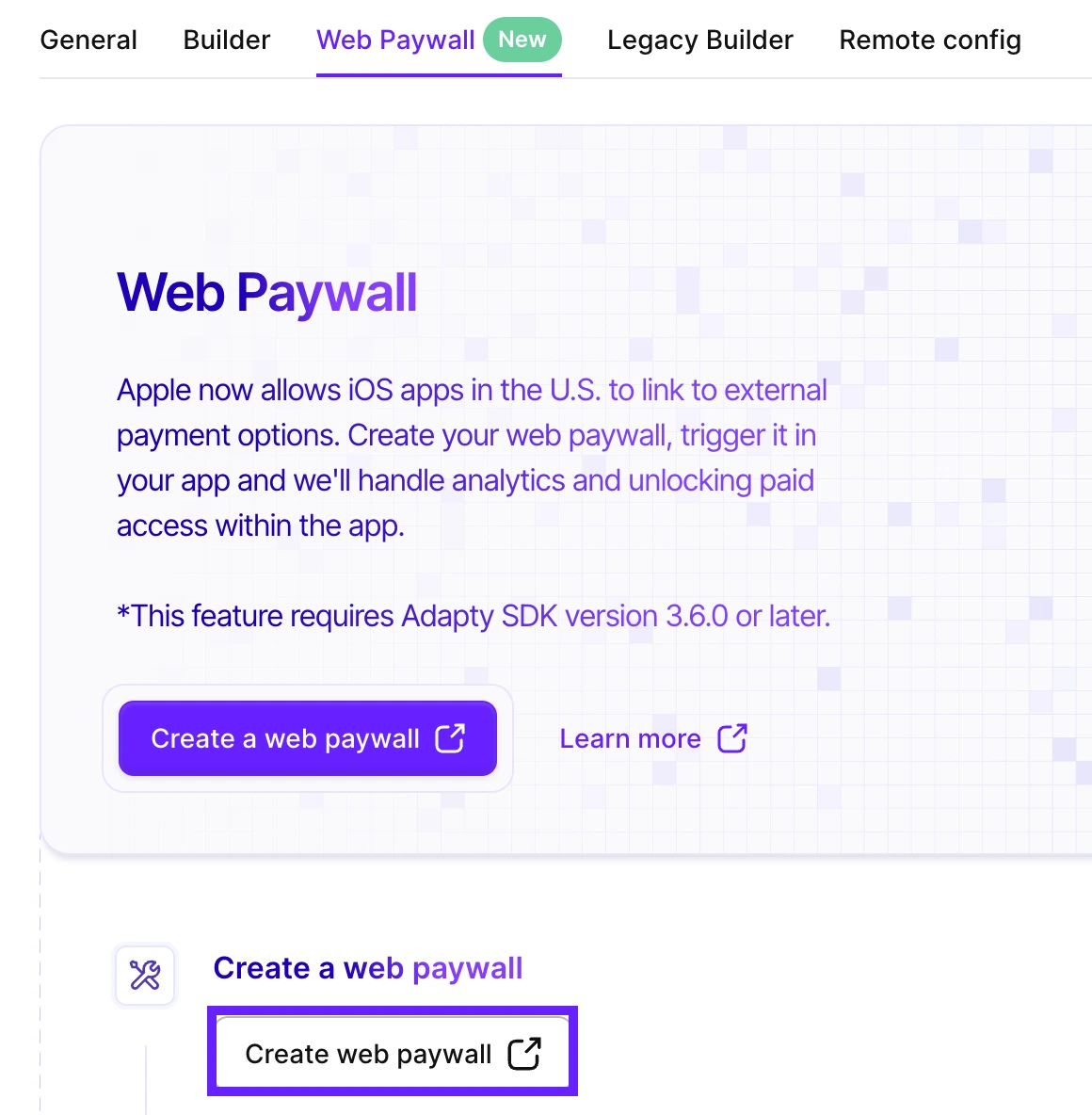
Step 1: Set up your web paywall in the dashboard.
Go to the Paywalls section, switch to the Web paywall tab, and create a new web paywall. You'll get a unique URL per paywall that handles the routing.
Step 2: Configure your payment provider and design.
Adapty supports Stripe, Paddle, Solidgate, and FunnelFox Billing. Set Apple Pay as your default payment method. Verify your domain with the payment provider so Apple Pay renders correctly. Full configuration steps are in the web paywall configuration docs.
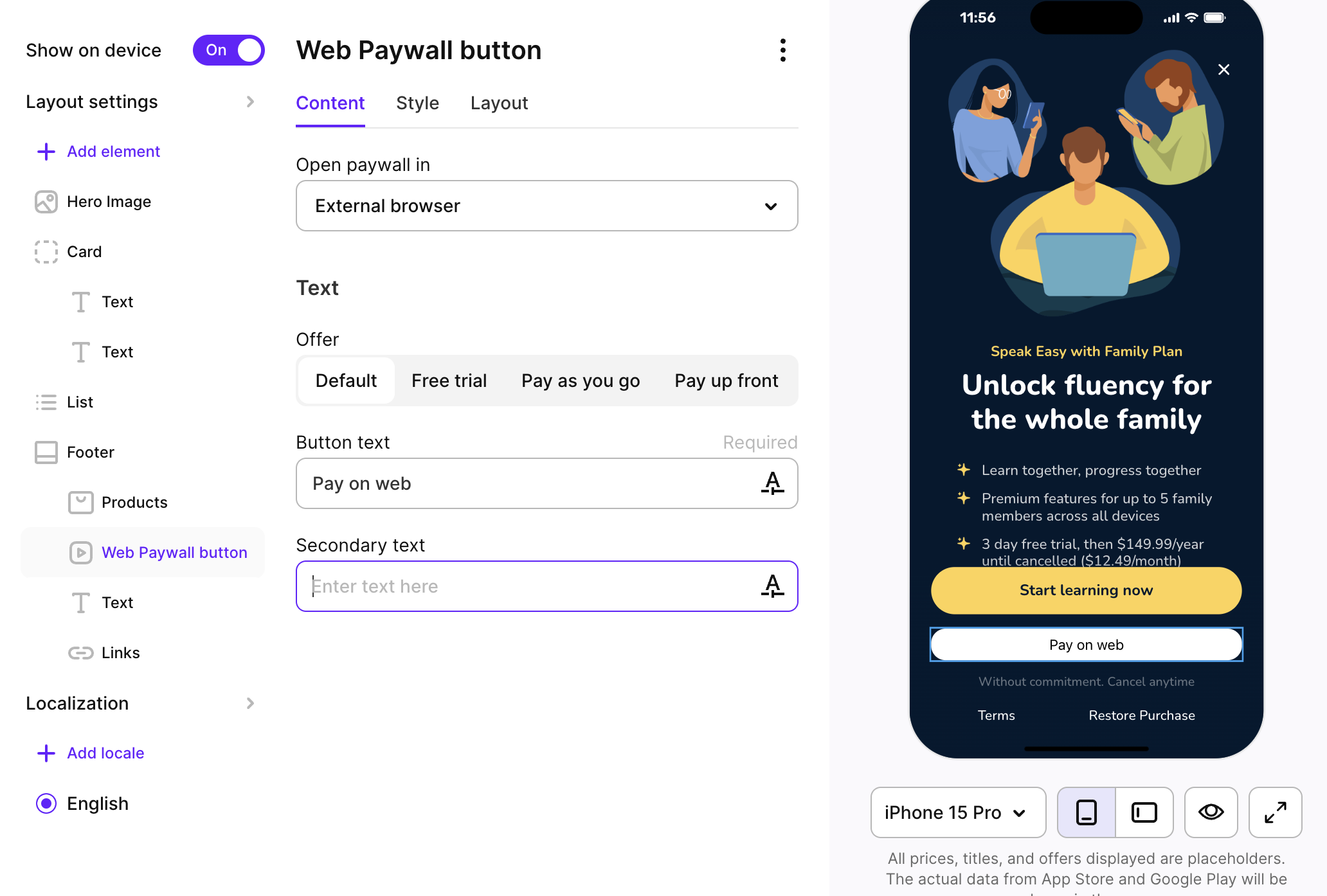
Step 3: Add the web paywall button to your in-app paywall.
If you're using Paywall Builder, add a Web paywall button element to your existing paywall. If you're working with a custom-built paywall, use the SDK method openWebPaywall. See the platform-specific guides for iOS, Android, React Native, and Flutter.
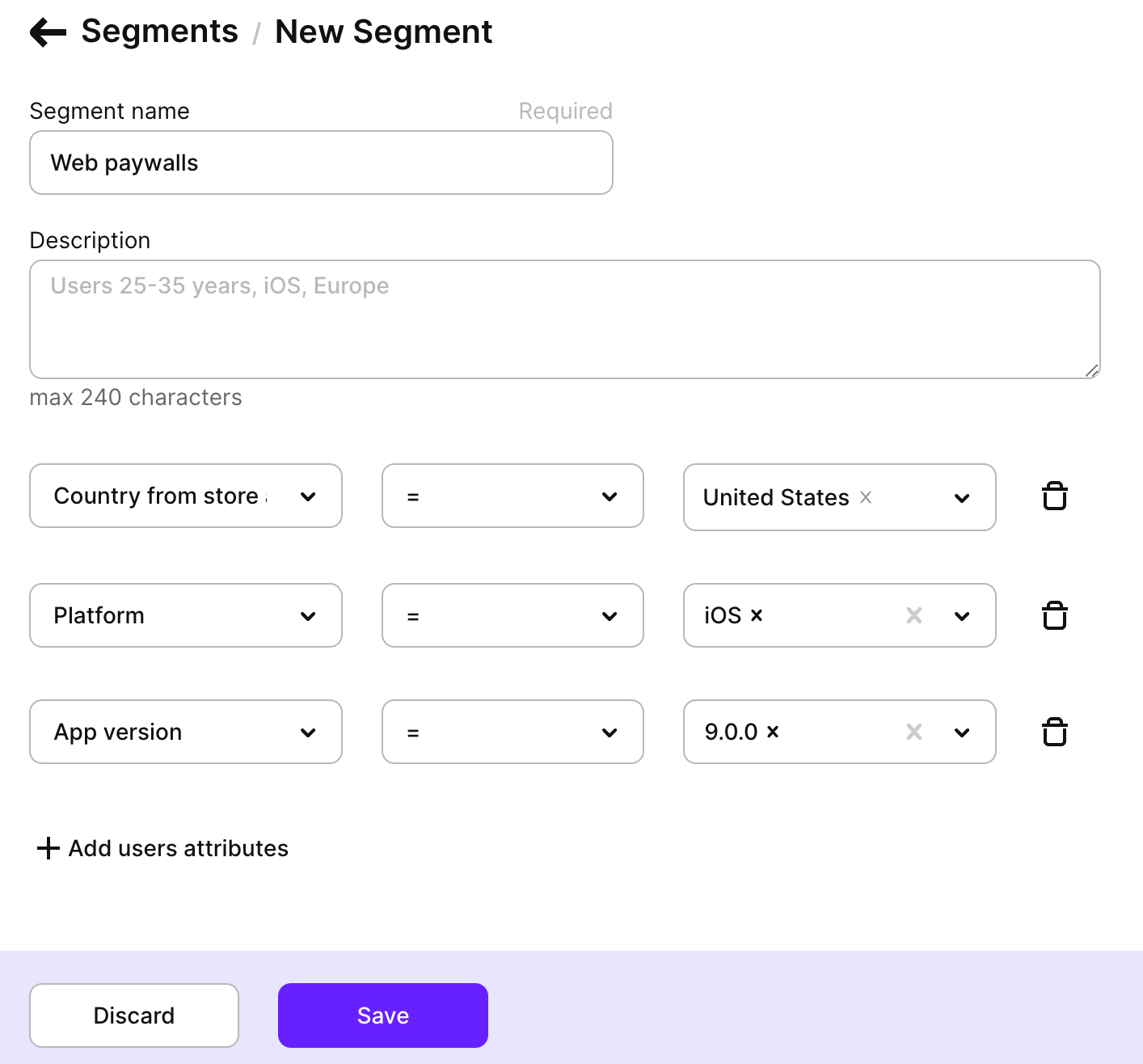
Step 4: Set up the right user segment.
App-to-web is currently approved for US iOS apps. Create a US-only audience for the web variant, with everyone else routed to your standard native paywall.
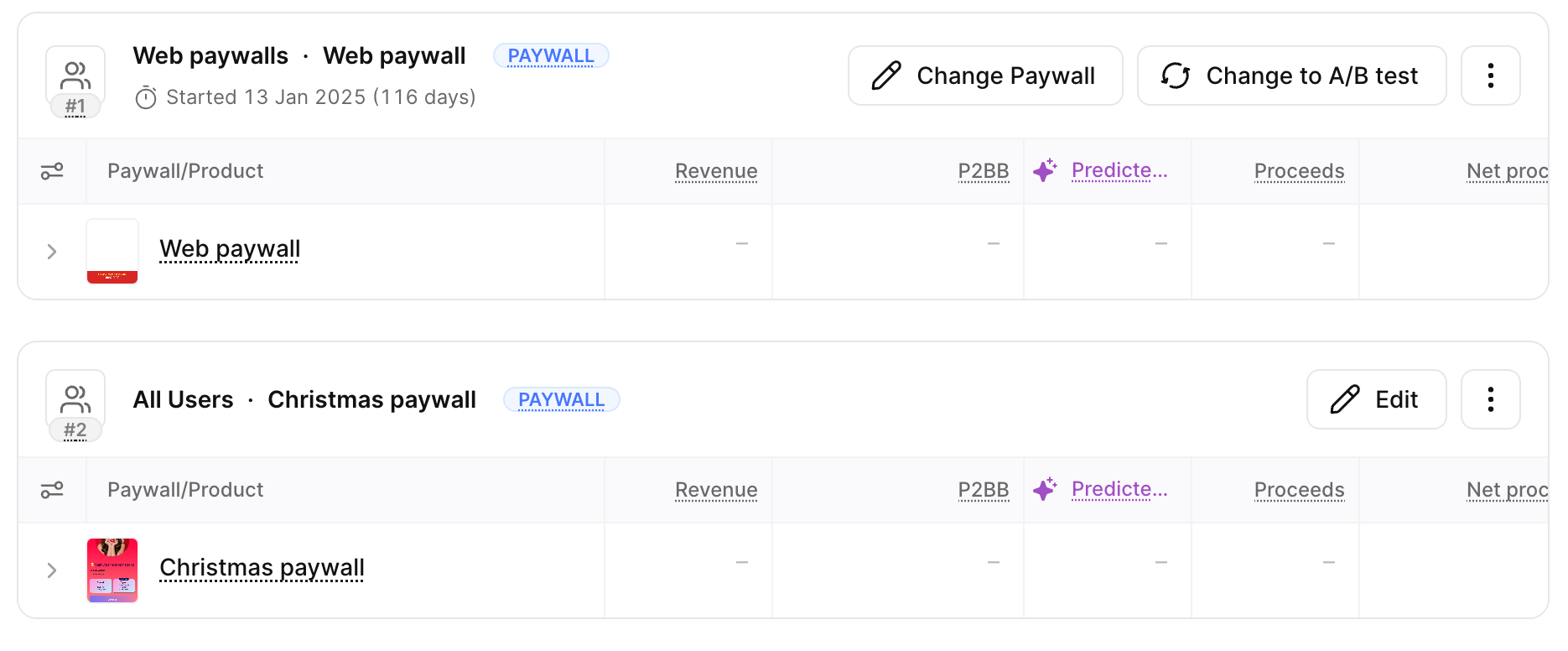
Step 5: Run a real A/B test.
Don't turn the web paywall on without control. Run it as a 50/50 split against your existing native variant for at least 4 weeks. Measure ARPU, refund rate, and 30-day retention. Decide based on the full picture, not first-week conversion numbers.
Step 6: Monitor for 60 to 90 days before scaling.
The first month tells you about checkout. The second and third months tell you about retention and refunds. Scale only after you've seen the full cohort behavior.
The bottom line
App-to-web is a strategic choice with conditions, not a free 30%. Apps on the standard commission tier with the appetite to redesign their offer for the web can win meaningfully. Apps on Small Business with limited dev capacity probably can't make the math work yet. The right question isn't "should I do this?" The right question is "Do I match the conditions where it works?"
If you're considering an app-to-web launch and want to talk through whether your app fits the pattern, book a call with our team. We've watched a year of these tests run on Adapty, and we can help you decide whether yours is worth running too.