In 2026, there are only two dominant forces in mobile: Android and iOS. With over 5 billion smartphones in active use globally—3.9 billion Android and 1.5-1.8 billion iOS—the choice between these platforms shapes how users interact with technology, how developers build apps, and how businesses reach their audiences.
In this guide, we talk about the key advantages and obstacles the development for each mobile operating system entails. Explore the pros and cons, uncover market trends, and determine the best fit for your app development journey. Don’t miss out—get the insights you need to succeed!
App development market trends
After over 15 years on the market, both iOS and Android are well-established. Let’s talk about the more recent insights:
iOS continues to dominate in terms of revenue, generating significantly higher app and in-app purchase earnings compared to Android. The App Store is projected to generate $138 billion in revenue globally in 2025, while Google Play brings in approximately $80 billion. Apple customers tend to spend more on apps—iOS users account for 68.6% of all consumer spending on mobile apps despite representing less than 30% of the global market. The revenue per install on iOS is $2.12, versus just $0.85 on Android.
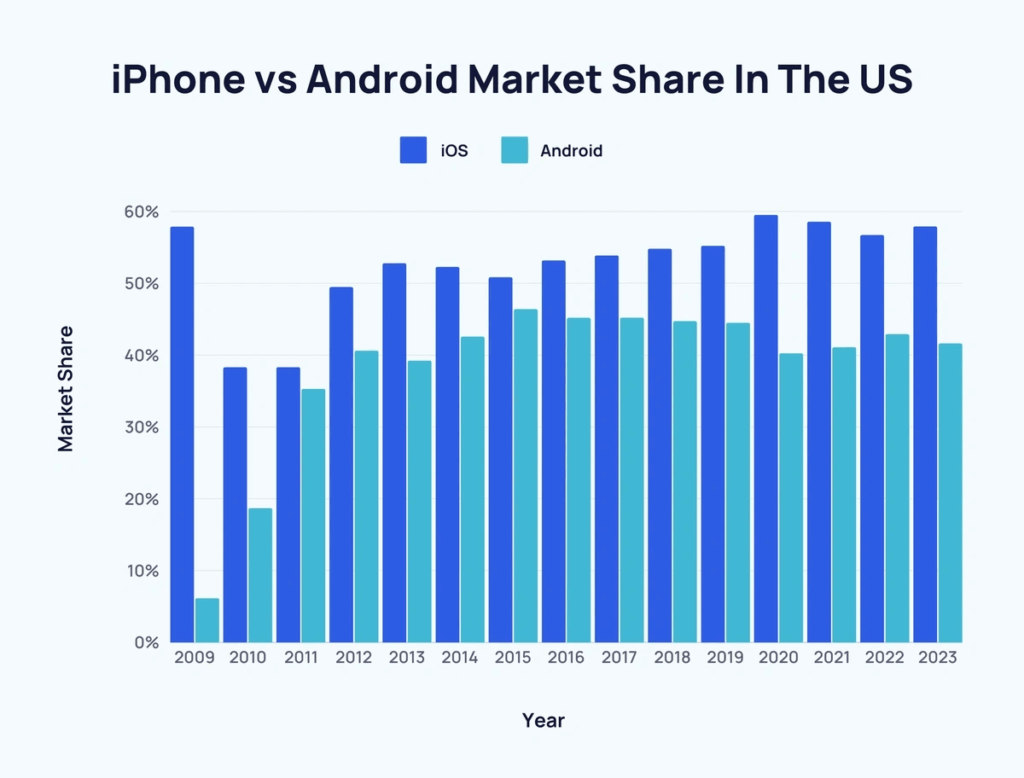
This is partially caused by the fact that iOS has a strong presence in affluent markets such as North America, Western Europe, and Japan. In the United States alone, iOS leads with approximately 58-59% market share, compared to Android’s 41-42%. Users in these regions generally have higher incomes and are more willing to spend on premium apps and in-app purchases.
AI has transformed app development for both platforms. GitHub Copilot is now officially available for Xcode with full support for code completions, Copilot Chat (generally available since March 2025), and Agent Mode for comprehensive codebase modifications. Developers can choose from multiple AI models including GPT-4.5, Gemini 2.5 Pro, and Claude 3.7 Sonnet. Xcode 16 also includes Apple’s native AI-based code prediction for Swift. On the Android side, Android Studio features built-in Gemini AI integration, making AI-assisted development the new standard on both platforms.
Android, on the other hand, holds a larger global market share—approximately 71-72% of the worldwide mobile OS market, with around 3.9 billion active devices. Android is particularly dominant in emerging markets such as Asia, Africa, and Latin America, where it often exceeds 85% market share. This broad reach provides a vast potential user base, making Android a preferred choice for those aiming for mass market penetration.
Android’s open-source nature allows for greater flexibility and customization, enabling developers to create unique app experiences for unique devices. There is now a significant market for foldable and dual-screen devices, which is projected to reach $31.3 billion in 2025 and grow with a CAGR of over 26% through 2035. These devices give more screen real estate for the app, but also require developers to implement dynamic screen ratio adaptation, fold state detection via device-specific APIs, and split-screen mode optimization.
iOS vs Android platform comparison
| Metric | iOS | Android |
|---|---|---|
| Global Market Share | 28-29% | 71-72% |
| US Market Share | 58-59% | 41-42% |
| Active Devices Worldwide | 1.5-1.8 billion | 3.9 billion |
| App Store Revenue (2025) | $138 billion | $80 billion |
| Revenue Per Install | $2.12 | $0.85 |
| Consumer App Spending Share | 68.6% | 31.4% |
| Developer Fee | $99/year | $25 one-time |
| Commission Rate | 15-30% | 15-30% |
| Average Device Lifespan | 5.5 years | 3.5 years |
| Day-1 App Retention Rate | 23.9% | 21.1% |
What’s the difference between Android and iOS development?
Now let’s compare what it’s like to develop for iOS and Android.
Learning curve
For iOS development, you’ll primarily work with Swift 6, Apple’s modern and user-friendly programming language that introduced improved concurrency handling, safer memory management, and better SwiftUI integration. Although Xcode can be overwhelming at first due to its extensive features, it offers excellent tools and debugging capabilities—and now includes native AI-based code prediction and full GitHub Copilot support. The consistency of the iOS ecosystem simplifies the testing process, and the abundance of learning resources makes it easier to get up to speed. However, you’ll need to familiarize yourself with Apple’s Human Interface Guidelines and navigate the stringent App Store review process.
On the other hand, Android development involves Kotlin 2.0, with enhanced performance and multiplatform support. Kotlin is the more concise and approachable option compared to Java. Android Studio, the official IDE, is powerful and includes built-in Gemini AI assistance, but managing dependencies and building processes with Gradle can be challenging. A significant challenge is dealing with device fragmentation due to the variety of Android devices, OS versions, and now foldable form factors.
Programming languages
Swift 6 is the language of choice for iOS development. Designed by Apple, Swift is known for its clean and modern syntax, making it relatively easy to learn, especially if you have experience with other programming languages. Swift emphasizes safety and performance, with features that prevent common coding errors and enhance efficiency. The 2025 version brought improved concurrency, safer memory management, and deeper SwiftUI integration. Apple’s extensive documentation, tutorials, and active developer community provide excellent support for newcomers.
Kotlin 2.0 is the preferred language for Android development, developed by JetBrains. Kotlin is designed to be concise and expressive, reducing boilerplate code by approximately 40% compared to Java and improving readability. It’s fully interoperable with Java, allowing you to leverage existing Java libraries and frameworks while enjoying Kotlin’s modern features like coroutines for efficient asynchronous programming. Kotlin Multiplatform (KMP) has matured significantly and is now a mainstream choice for sharing business logic between Android and iOS apps, allowing developers to reduce code duplication while maintaining native UI performance.
Development environment comparison
| Feature | iOS Xcode | Android Studio |
|---|---|---|
| Primary Language | Swift 6 | Kotlin 2.0 |
| UI Framework | SwiftUI | Jetpack Compose |
| AI Code Assistance | GitHub Copilot (official), Apple AI predictions | GitHub Copilot, Gemini AI |
| Cross-Platform Option | Swift (limited) | Kotlin Multiplatform (KMP) |
| Required Hardware | macOS only | Windows, macOS, Linux |
| App Review Time | 1-3 days | Hours to 1 day |
| Emulator/Simulator | iOS Simulator | Android Emulator + Firebase Test Lab |
Target audience
iOS users tend to be more affluent (given the iPhone prices, it comes as no surprise) and are often willing to spend more on apps and in-app purchases. They are typically found in regions like North America, Western Europe, and Japan—where iOS market share reaches 58-68%. iOS users also tend to upgrade their devices and operating systems more frequently, ensuring a more uniform user base with the latest software capabilities. The average iPhone lifespan has risen to 5.5 years in 2025, and iOS users spend an average of $140 annually on apps in the US.
Android users are more diverse and are mostly found in emerging markets like Asia, Africa, and Latin America, where Android often exceeds 85-95% market share. This diversity includes a broader range of device capabilities and operating system versions, presenting both opportunities and challenges. Android’s larger global market share means a potentially larger user base, but it also requires careful consideration of device fragmentation and varying user preferences. Android users spend approximately $69 annually on apps—about half of iOS users.
Key insight: iOS users spend more money in-app, and Android users bring more installs.
Development budget
iOS development generally requires a higher initial investment due to the need for Apple hardware (Macs for development and various iOS devices for testing). Additionally, the App Store has a $99 annual developer fee. However, the more uniform hardware and software environment can lead to lower testing and maintenance costs.
Android development can be more cost-effective initially, as it allows for development on a wider range of hardware, including Windows, macOS, and Linux systems. The Google Play developer fee is a one-time payment of $25, making it significantly cheaper than Apple’s annual fee. However, the diversity of Android devices means you might need a larger budget for testing across various models and OS versions. Ongoing maintenance costs can also be higher due to the need to support a wide range of devices and operating systems.
| Aspect | Apple App Store | Google Play Store |
|---|---|---|
| Developer fee | $99/year | $25 one-time |
| Standard commission | 30% | 30% |
| Small business rate | 15% (under $1M/year) | 15% (first $1M/year) |
| Subscription commission | 30% year 1, then 15% | 15% from day one |
| Enterprise program | $299/year | N/A |
Development environments & IDE
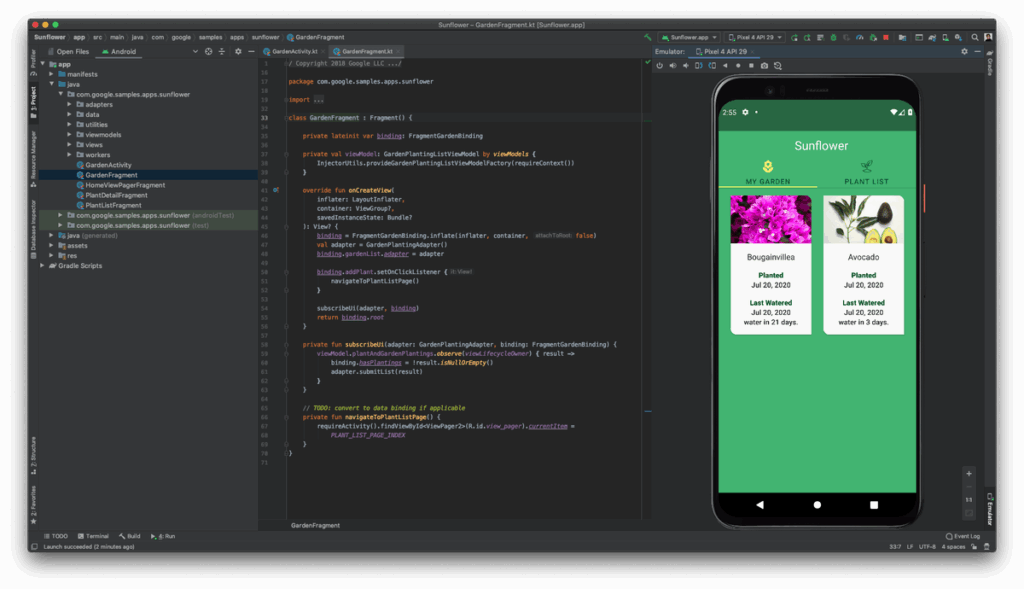
iOS development relies on Xcode, Apple’s official integrated development environment (IDE). Xcode is available only on macOS, so you’ll need an Apple computer to develop iOS apps. It offers a comprehensive suite of tools, including a code editor, debugger, and interface builder, all seamlessly integrated. Xcode’s Interface Builder simplifies UI design with drag-and-drop elements, and the simulator allows you to test apps on various iOS devices. In 2025, Xcode features native AI-powered code prediction for Swift, and GitHub Copilot for Xcode is now officially supported with code completions, Copilot Chat, Agent Mode, and support for multiple AI models including GPT-4.5, Gemini 2.5 Pro, and Claude 3.7 Sonnet.
Android uses Android Studio, the official IDE provided by Google. The app is available on Windows, macOS, and Linux, offering more flexibility in terms of hardware. Android Studio includes robust tools for code editing, debugging, and performance analysis, plus built-in Gemini AI integration for intelligent code assistance. It also features a rich layout editor that supports drag-and-drop UI design, similar to Xcode. However, Android development can be more complex due to the need to handle device fragmentation, foldable devices, and a variety of Android OS versions.
AI integration tools by platform
| Tool | iOS support | Android support | Purpose |
|---|---|---|---|
| Core ML | ✓ Native | ✗ | On-device ML inference |
| TensorFlow Lite | ✓ | ✓ Native | Cross-platform ML |
| ML Kit (Firebase) | ✓ | ✓ | Vision & NLP APIs |
| Apple Vision Framework | ✓ Native | ✗ | Computer vision |
| GitHub Copilot | ✓ Xcode extension | ✓ Android Studio | AI code completion |
| Apple Intelligence | ✓ Native | ✗ | On-device AI features |
| Gemini Nano | ✗ | ✓ Native | On-device generative AI |
System-specific design
iOS App design is legendary for its clarity and strictness:
- Apple’s Human Interface Guidelines (HIG) emphasizes clarity, deference, and depth. iOS apps are expected to have a clean, consistent, and minimalistic design. The focus is on content, with ample use of white space and a hierarchical structure that guides users through the app intuitively.
- iOS typically uses a tab bar for primary navigation at the bottom of the screen and a navigation bar at the top for contextual navigation. Gestures like swiping are heavily used for navigation and interaction.
- iOS apps often feature flat design elements with subtle gradients and shadows to create a sense of depth. Icons and buttons are generally simple and easily recognizable.
- Uniformity across different iOS apps is a key principle, helping users to easily adapt to new apps. This includes standard button placements, common gestures, and familiar UI components.
- SwiftUI has become the default framework for new iOS projects, offering declarative UI development with faster development cycles.
Android user interface has also become more uniform in recent years:
- Google’s Material Design 3 principles focus on creating a tangible, tactile user experience. This includes the use of bold colors, responsive animations, and depth effects like shadows and lighting to mimic real-world interactions.
- Android apps commonly use a navigation drawer for primary navigation and bottom navigation bars in more recent design trends. Android also utilizes floating action buttons (FABs) to highlight the primary action in an app.
- Android’s design language encourages the use of large, vibrant images, and dynamic color schemes. Components often have distinct, customizable appearances to create a unique brand identity.
- Jetpack Compose is now the standard for Android UI development, providing a modern declarative approach similar to SwiftUI.
- Android’s design guidelines provide more flexibility, allowing for greater customization and differentiation between apps—necessary to accommodate the diverse range of Android devices including foldables and dual-screen devices.
Developing for foldable devices
Foldable smartphones represent a growing segment projected to reach $31.3 billion by 2025 with a CAGR exceeding 26%. Developing for these devices presents unique challenges:
Key development considerations:
- Dynamic screen ratios: Traditional apps use 16:9 or 19:9 ratios, but foldables require adaptation to multiple aspect ratios based on fold state
- Fold state detection: Implement device-specific APIs to detect when users switch between folded and unfolded modes
- Split-screen optimization: Utilize drag-and-drop APIs and resizable activities for efficient split-screen functionality
- Continuity: Ensure app state persists when transitioning between screen modes
- Testing: Samsung’s Galaxy Z Fold displays are now rated for 500,000 folds, but thorough testing across both states remains essential
Book-style foldables control 62% of the market, while clamshell devices are growing at 33% CAGR. Tri-fold devices (like Huawei Mate XT) have also entered the market, adding further complexity.
Development complexity
App development for iOS is generally considered less complex due to the uniformity of Apple’s ecosystem. With fewer device variations and a consistent operating system, testing and optimization are more straightforward. Swift 6, the primary programming language, is modern and relatively easy to learn, and Xcode provides a comprehensive set of integrated tools with AI assistance. However, Apple’s stringent app review process and adherence to strict design guidelines can add some complexity to the development process.
Android developers must account for significant device fragmentation, which requires extensive testing and optimization. While Kotlin simplifies coding with its concise syntax, managing dependencies and building processes with Gradle can be challenging. The rise of foldable devices adds another layer of complexity—developers must now consider multiple screen configurations within a single device. Android Studio is powerful and includes AI assistance but can be overwhelming for beginners.
App testing
App testing on iOS is generally more streamlined due to the limited number of devices and operating system versions. The consistency of Apple’s hardware and software ecosystem simplifies the testing process. Xcode includes a built-in simulator that allows you to test apps across various iOS devices and screen sizes. Additionally, Apple’s TestFlight platform enables easy distribution of beta versions to up to 10,000 external testers, facilitating feedback and iterative improvements. App Store review times typically range from 1-3 days.
Android presents a more complex testing scenario: teams need to ensure their apps function correctly across a diverse ecosystem of devices, screen sizes, and OS versions—plus foldable configurations. Android Studio provides a robust emulator and integration with Firebase Test Lab for cloud-based testing on multiple device configurations. Managing this complexity can be challenging, and ensuring compatibility and performance across all target devices demands significant effort. Google Play reviews are faster, typically completing within hours to 1 day.
Return on investment
iOS apps often yield a higher return on investment due to the spending behavior of iOS users, who are typically more willing to pay for apps and in-app purchases. iOS users account for 68.6% of global consumer app spending despite representing under 30% of users. Subscription-based apps earn 87% more revenue on iOS compared to Android, and the App Store sees 40% lower app churn. While initial development costs may be higher, the potential for higher revenue can offset these expenses, making iOS development a financially attractive option.
Android’s larger global market share offers significant reach opportunities, especially in emerging markets. Development costs can be lower initially, with more flexible hardware options and a cheaper developer fee. However, the need to support a wide range of devices and OS versions can increase testing and maintenance costs. Success on Android often hinges on the ability to effectively manage the platform’s diversity and capitalize on its extensive reach. Ad-based monetization models often perform well on Android due to the higher user volume.
Revenue and monetization metrics
| Metric | iOS | Android |
|---|---|---|
| Subscription revenue share (of platform) | 73% | 27% |
| Gaming revenue | 25% higher than Android | — |
| Average annual user spending | ~$140 | ~$69 |
| In-app purchase revenue share | 68% | 32% |
| App churn rate | 40% lower than Android | — |
| Day-1 retention rate | 23.9% | 21.1% |
| App Store user trust | 82% | 65% |
Regional market leadership
| Region | Leading platform | Approximate market share |
|---|---|---|
| North America (USA) | iOS | 58-59% |
| Western Europe | iOS (varies by country) | 40-55% |
| Japan | iOS | 68-69% |
| China | Android | 70%+ |
| India | Android | 95%+ |
| Brazil | Android | 85%+ |
| Africa | Android | 85%+ |
| Southeast Asia | Android | 85%+ |
Pros and cons of iOS app development
Let’s compare the key aspects of programming for iOS devices.
Pros of iOS app development
- Higher revenue potential: iOS users tend to spend more on apps and in-app purchases compared to Android users—68.6% of global app spending comes from iOS. This can lead to higher revenues, especially for premium apps or those with significant in-app purchase options.
- Consistent ecosystem: Apple’s ecosystem is relatively uniform, with fewer device variations and a more consistent operating system update cycle. This reduces the complexity of testing and optimization, ensuring a smoother development process.
- Modern development tools: Swift 6 is designed to be easy to learn and use. Xcode offers comprehensive tools with native AI code prediction and official GitHub Copilot support. The tight integration within the Apple ecosystem further enhances the development experience.
- High quality standards: Apple’s strict app review guidelines ensure that apps on the App Store meet high standards for quality and performance.
- Simplified testing: The limited range of iOS devices simplifies the testing process. Apple provides robust tools including TestFlight for beta testing with up to 10,000 testers.
- Better retention: iOS shows 23.9% day-1 retention vs 21.1% for Android, with 40% lower app churn.
- Stronger security perception: 82% of users trust App Store apps, compared to 65% for Play Store.
Cons of iOS app development
- Higher initial costs: Apple hardware is costly yet necessary for development, and the annual developer fee for the App Store is $99/year compared to the one-time $25 fee for Google Play.
- Stringent review process: Apple’s app review process is famously rigorous and can take 1-3 days, sometimes longer for complex apps or first submissions.
- Limited customization: iOS development follows strict guidelines set by Apple, which can limit customization and creativity.
- Smaller global reach: While iOS has a strong presence in regions like North America and Western Europe, it has a smaller global market share (28-29%) compared to Android. This limits the potential user base, especially in emerging markets where Android dominates.
- Hardware dependency: Development for iOS requires an Apple computer, which can be a significant additional expense if you don’t already own one.
| Aspect | Pros | Cons |
|---|---|---|
| Money | Higher revenue potential (68.6% of app spending) | Higher initial costs ($99/year + Mac hardware) |
| Process | Consistent hardware/software simplifies testing | Stringent review process can delay releases |
| Simplicity | Modern tools with AI assistance | Limited flexibility due to strict guidelines |
| Platform | High-quality user experience due to standards | Smaller global market share (28-29%) |
| Tools | Efficient testing with Simulator and TestFlight | Requires Apple hardware |
Pros and cons of Android app development
Pros of Android app development
- Massive global reach: Android holds 71-72% of the global smartphone market share with 3.9 billion active devices, particularly in emerging markets like Asia, Africa, and Latin America. This broad reach provides a vast potential user base for app developers.
- Lower initial costs: Developing for Android can be more cost-effective initially. Android Studio is available on Windows, macOS, and Linux, providing flexibility in hardware choice. The one-time $25 Google Play developer fee is significantly lower than Apple’s annual fee.
- Greater flexibility: Android offers greater flexibility and customization options for developers. The platform’s open nature allows for more creative freedom in app design and functionality, enabling unique and innovative app experiences.
- Powerful development environment: Android Studio is a powerful tool that supports a range of features for coding, debugging, and performance analysis, with built-in Gemini AI integration. Kotlin 2.0 and Kotlin Multiplatform (KMP) further enhance the development experience.
- Multiple distribution channels: Besides the Google Play Store, Android apps can be distributed through various third-party app stores and direct APK installation, increasing the avenues for reaching users.
- Faster review process: Google Play reviews typically complete within hours to 1 day, much faster than Apple’s 1-3 day process.
- Subscription advantage: Google charges only 15% commission on subscriptions from day one, compared to Apple’s 30% in the first year.
Cons of Android app development
- Device fragmentation: Android devices are many, with varying screen sizes, hardware capabilities, OS versions, and now foldable configurations. This complicates the testing and optimization process significantly.
- Higher maintenance costs: Supporting a wide range of devices and OS versions often leads to higher ongoing maintenance costs. Developers need to regularly update apps to ensure compatibility with new devices and OS updates.
- Security concerns: The open nature of Android and the availability of third-party app stores and APK sideloading can increase security risks. Only 65% of users trust Play Store apps compared to 82% for App Store. Android accounted for approximately 98% of mobile malware cases.
- Lower per-user revenue: Android users are generally less likely to spend on apps and in-app purchases—averaging $69/year compared to iOS’s $140. Revenue per install is just $0.85 vs iOS’s $2.12.
- Complexity for beginners: Android Studio, while powerful, can be overwhelming for beginners. The complexity of managing dependencies with Gradle and dealing with the diverse Android ecosystem poses a steep learning curve.
| Aspect | Pros | Cons |
|---|---|---|
| Potential | Larger global market share (71-72%, 3.9B devices) | Monetization challenges with lower user spending |
| Costs | Lower initial costs ($25 one-time fee) | Higher ongoing maintenance costs |
| Open source | Greater flexibility and customization | Security concerns due to open nature |
| Development | Powerful tools with AI assistance (Gemini) | Device fragmentation complicates testing |
| Distribution | Multiple distribution options beyond Play Store | Apps more vulnerable to piracy via APK |
Android or iOS: Which platform to start with?
Choosing between Android and iOS as the platform to start your app development depends on various factors. Hopefully, after reading this guide, the answer to this question is easier.
If you choose to develop for iOS, you can benefit from higher revenue potential as iOS users account for 68.6% of global app spending. Swift 6 and Xcode with AI assistance provide a user-friendly and comprehensive development environment, making it easier for beginners to get started. However, you must invest in Apple hardware, and the stringent app review process requires adherence to strict guidelines, which can delay app releases.
If you choose to develop for Android, you will have access to a larger global market share (71-72%) with 3.9 billion active devices, and more affordable development setup. You can develop on any operating system, and Android Studio with Gemini AI provides powerful tools. The openness of the platform allows for greater customization and innovative app designs. However, the diversity of devices, OS versions, and foldable configurations complicates development and testing, leading to higher ongoing maintenance costs.
Conclusions
Know somebody too lazy to read this whole article? Share this screenshot.
Start with iOS, if:
- Your primary target audience is in North America, Western Europe, or Japan
- You aim to generate higher revenue through app sales and in-app purchases (iOS = 68.6% of global app spending)
- You prefer a more uniform development environment with less fragmentation
- You have or are willing to invest in Apple hardware
- Your potential users value higher app security and stricter privacy controls
- You’re building a subscription-based app (iOS generates 73% of subscription revenue)
Start with Android, if:
- You want to reach a larger and more diverse global audience (3.9 billion devices, 71-72% market share)
- You need a lower initial development cost ($25 one-time fee vs $99/year)
- You want flexibility in development hardware (Windows, macOS, Linux)
- You value the ability to customize and innovate with fewer restrictions
- You are prepared to handle device fragmentation and foldable device support
- You want to leverage Kotlin Multiplatform for code sharing with future iOS development
- Your monetization relies more on ads than direct purchases
Consider both platforms if:
- You want to maximize reach and revenue potential
- You have budget for cross-platform development or tools like Kotlin Multiplatform, Flutter, or React Native
- Your app serves a global audience with varied regional preferences
Ultimately, the decision should align with your target market, budget, and long-term business strategy. Many successful developers eventually create apps for both platforms to maximize their reach and revenue. And with Adapty, monetization success doesn’t depend on your platform choice!